

Xiaomi Robot Vacuum S20 FAQ
Overview
1. Q: What is the Xiaomi Robot Vacuum S20?A: The Xiaomi Robot Vacuum S20 is a smart integrated cleaning, sweeping and mopping robot. It can autonomously carry out sweeping and mopping tasks in your home, and when it completes the cleaning, it returns to the charging base to charge and stand by, which greatly helps you reduce the workload of floor cleaning.
2. Q: What are the features of the Xiaomi Robot Vacuum S20?
A: For your reference, here are the features of the Xiaomi Robot Vacuum S20:
1. 2600mAh large capacity battery, long battery life;
2. 2800Pa super suction power, Mi Home APP control option, stronger suction, cleaner sweeping.
3. Q: How to use the power-on button of the Xiaomi Robot Vacuum S20?
A: Power button:
1. Power on/off: Press and hold for 3 seconds to power on or off;
2. Cleaning: After turning on the robot, press to start cleaning.
Indicator Status:
1. Steady white: The main unit status is normal;
2. Blink in white: Recharging/firmware upgrade in progress;
3. Breath in white: Charging;
4. Blink in yellow: main unit Wi-Fi is offline;
5. Breath in yellow: main unit status is abnormal;
6. Light off: Shut down/sleep.
Note:
The main unit cannot be shut down while charging. Press any key to pause during cleaning, recharging, or partial cleaning.
4. Q: How to use the recharge button of the Xiaomi Robot Vacuum S20?
A: Recharge: Press the button to recharge.
Note:
Press any key to pause during cleaning, recharging, and partial cleaning.
5. Q: What is the meaning of the Wi-Fi indicator on the Xiaomi Robot Vacuum S20?
A: The indicator stays in blue for 2 seconds and then goes out: Wi-Fi is connected;
Flash in blue: Wi-Fi connection/firmware upgrade in progress;
Flash in yellow: Wi-Fi is waiting for connection.
Product introduction and use
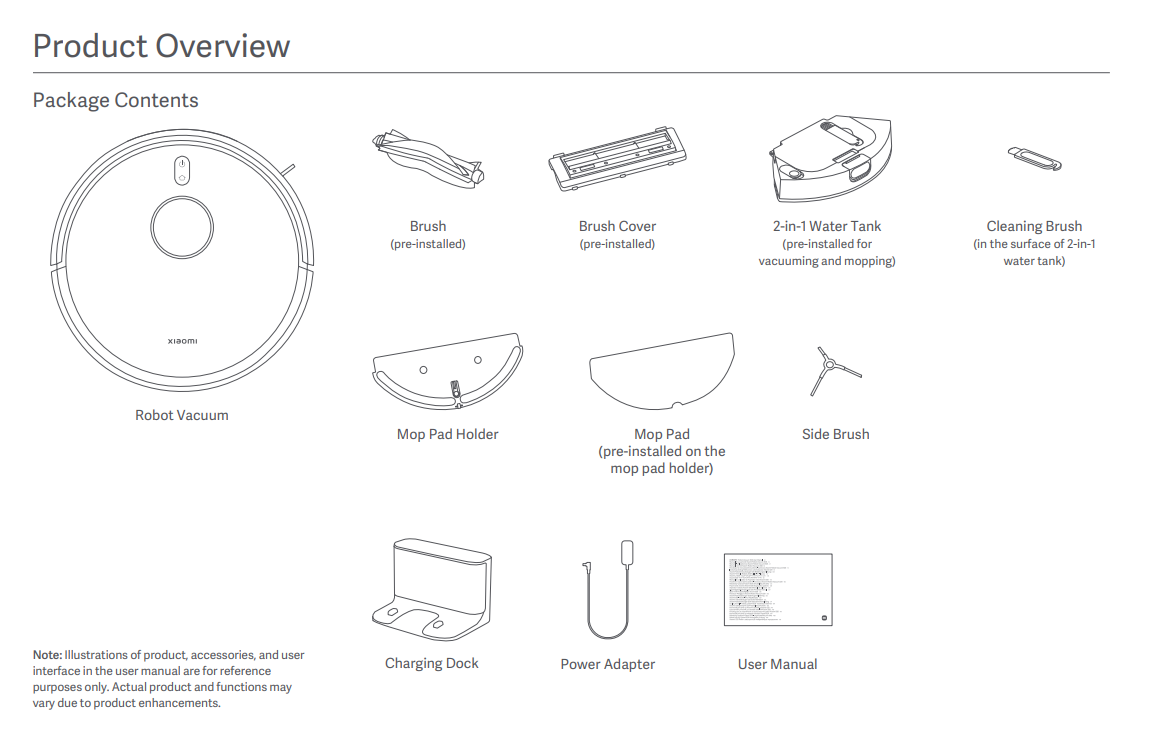
1. Q: What are the standard package contents of the Xiaomi Robot Vacuum S20?A: 2-in-1 water tank, filter (pre-installed on the 2-in-1 water tank), Brush(pre-installed), Brush cover(pre-installed), Mop pad holder, and mop (pre-installed on the mop holder) ), Side brush; other accessories include Charging Dock, Power Adapter, and User Manual.
Note:
After unpacking, it is recommended to check according to the instructions in the accessories list in the manual. If there is anything missing, please fully unfold the inner tray of the package to confirm whether it is missing, and contact customer service for consultation.
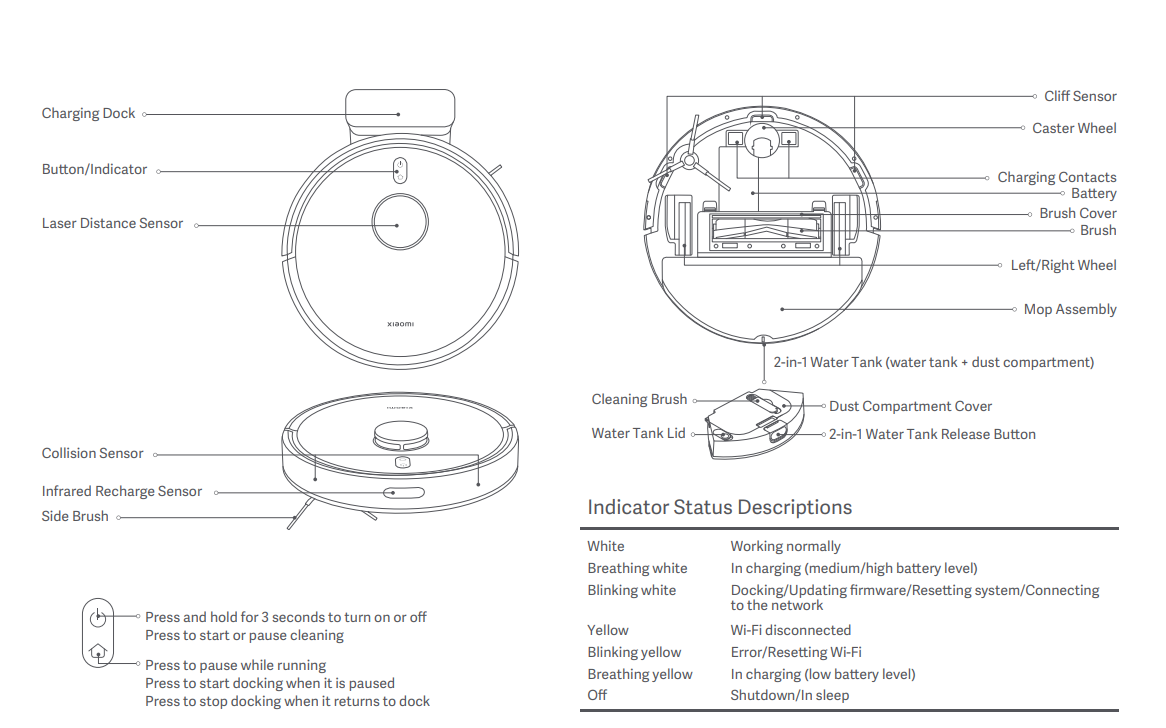
2. Q: What are the main functional components of the Xiaomi Robot Vacuum S20?
A: For your reference, here are the main functional components of the Xiaomi Robot Vacuum S20:
Charging Dock; Button/Indicator; Laser Distance Sensor; Collision Sensor; Infrared Recharge Sensor; Side Brush; Cliff Sensor; Caster Wheel; Charging Contacts; Battery; Brush Cover; Brush; Left/Right Wheel; Mop Assembly; 2-in-1 Water Tank (water tank + dust compartment); Cleaning Brush; Dust Compartment Cover; Water Tank Lid; 2-in-1 Water Tank Release Button.
Note:
Button usage:
Press and hold for 3 seconds to turn on or off;
Press to start or pause cleaning;
Press to pause while running;
Press to start docking when it is paused;
Press to stop docking when it returns to dock.
Indicator Status Descriptions:
White: Working normally;
Breath in white: In charging (medium/high battery level);
Blink in white: Docking/Updating firmware/Resetting system/Connecting to the network;
Yellow: Wi-Fi disconnected;
Blink in yellow: Error/Resetting Wi-Fi;
Breath in yellow: In charging (low battery level);
Off: Shutdown/In sleep.
3. Q: How to check the SN on the Xiaomi Robot Vacuum S20?
A: 1. You can see the SN information by looking at the label on the bottom of the main unit;
2. You can see the SN information by looking at the label on the back of the charging base.
4. Q: Can the Xiaomi Robot Vacuum S20 be used directly after unboxing?
A: Yes. It is recommended that after unpacking, first confirm whether there are any missing parts, and then turn on the Xiaomi Robot Vacuum S20 and connect to the Internet to learn how to use it.
Note:
For first-time use, please manually place the main unit on the charging base and align it with the charging spring piece. First, let the Xiaomi Robot Vacuum S20 be fully charged, and then start cleaning from the charging base. It takes about 3-4 hours to fully charge.
5. Q: What mode should choose when using the Xiaomi Robot Vacuum S20 for the first time?
A: Prioritize vacuuming mode. In scenes where there is a lot of dust and debris in the home, do not use the mopping function for the first time. Select the vacuuming mode to complete the global cleaning before filling the water tank with water. Install the mop assembly onto the 2-in-1 water tank and select the vacuuming and mopping mode.
6. Q: Why does the Xiaomi Robot Vacuum S20 need to wipe its appearance regularly?
A: The Xiaomi Robot Vacuum S20 is cleaning appliances that have cleaning functions such as sweeping, mopping, and collecting garbage. Regular dumping of garbage, cleaning mops and roller brushes can restore the cleaning ability of the sweeper.
The Xiaomi Robot Vacuum S20 is covered with various sensors. It needs to explore the surrounding environment, build a map and avoid obstacles. Therefore, when the equipment is dirty, please clean the surrounding dust with a wet rag that has been wrung out of water in time to remove the mixed foreign matter. Restore the obstacle avoidance and recognition capabilities of the sweeper.
Note:
Do not use chemicals such as detergents or sprays for cleaning.
7. Q: How to enter standby mode after completing the task of the Xiaomi Robot Vacuum S20?
A: After completing the task, it is recommended to return the Xiaomi Robot Vacuum S20 to the Charging Dock for charging and standby to ensure that the device battery has sufficient power. If the device is not on standby on the Charging Dock, you can manually press and hold the power button to shut down the device to avoid power consumption. (The device will automatically shut down when it is left on standby for a long time, which is normal).
8. Q: What should I do if the side brush of the Xiaomi Robot Vacuum S20 is entangled?
A: When the side brush is entangled with objects, please clean the side brush wrapping in time and check whether the side brush bristles are falling off or damaged. When cleaning again, you can first clean up the easily entangled items on the ground, such as wool, string, etc.
9. Q: What should I do if the Xiaomi Robot Vacuum S20 cannot be turned off on the Charging Dock?
A: The Xiaomi Robot Vacuum S20 will always be in a standby state when charging on the Charging Dock. If you need to shut down the device, you need to let the device leave the Charging Dock. Press and hold the power button for 3 seconds to shut down the device.
10. Q: What life scenes can the Xiaomi Robot Vacuum S20 be used?
A: The Xiaomi Robot Vacuum S20 is only used for floor cleaning in home environments. Do not use it outdoors, off the ground, in commercial or industrial environments. It may cause equipment failure, loss and other consequences.
11. Q: How to use the Do Not Disturb mode (DND mode) of the Xiaomi Robot Vacuum S20?
A: The Do Not Disturb mode (DND mode) is enabled by default at the factory, and the opening period is 11:00 PM-09:00 AM. You can use the mobile client to turn off DND mode or modify the DND mode period.
During the DND mode period, the main unit will not automatically continue scanning, or actively broadcast voice messages, and the indicator light will turn off.
12. Q: How to use the scheduled cleaning of the Xiaomi Robot Vacuum S20?
A: Scheduled cleaning time can be set in the Mi Home APP.
In the Mi Home APP, the main unit will automatically start cleaning at the designated time, and automatically return to the Charging Dock for charging after cleaning.
13. Q: How to save a complete map on the Xiaomi Robot Vacuum S20?
A: Press the power button to start cleaning on the main unit or tap [Vacuuming] mode on the Mi Home APP. The main unit starts from the Charging Dock and returns to the Charging Dock autonomously. A complete partition map will be generated, and a temporary map will be saved before the cleaning is completed. Automatically learn the home environment during the cleaning process and build a complete map. (When cleaning, please open the door of the cleaning area to ensure the integrity of the map.)
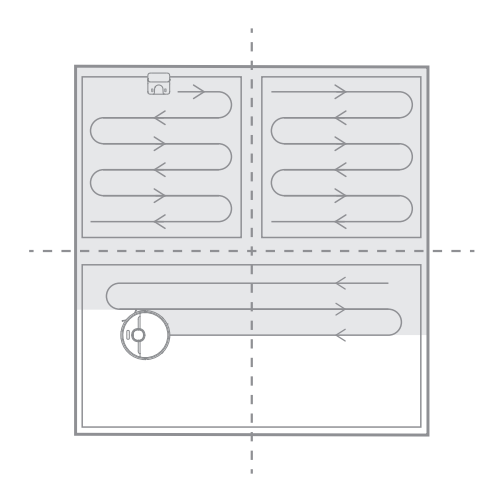
14. Q: How does the Xiaomi Robot Vacuum S20 clean the entire house?
A: After the first startup, the main unit will first extend the area according to 6*6m, and then clean it in a bow shape until all areas are covered.
After starting up, the main unit will clean according to the room, first sweeping along the edge, and then cleaning in the bow. The room will be cleaned sequentially, in an orderly and efficient manner with full coverage and no omissions. After the cleaning is completed, the main unit will automatically return to the Charging Dock.
15. Q: Can the Xiaomi Robot Vacuum S20 be charged all the time?
A: The Xiaomi Robot Vacuum S20 supports overcharge protection. It will automatically adjust to low current charging after the battery is full.
16. Q: Does the Xiaomi Robot Vacuum S20 have a motor overload protection function?
A: All motors on the Xiaomi Robot Vacuum S20 have overload protection, including the main brush motor, side brush motor, and main wheel motor. When foreign matter enters or is severely clogged, resulting in overload, the protection will automatically start.
17. Q: Does the Xiaomi Robot Vacuum S20 need to replace consumables regularly?
A: The Xiaomi Robot Vacuum S20 consumables include brush, side brush, brush cover, cleaning brush, filter, mop, etc., which need to be replaced regularly to ensure the normal function and cleaning ability of the device.
Parts Maintenance recommendations:
Brush: It is recommended to clean it every week and replace the brush every 6-12 months to ensure the cleaning effect;
Filter: It is recommended to clean it every week and replace the filter element every 3-6 months;
Side brush: It is recommended to clean it once a month and replace the side brush every 3-6 months to ensure the cleaning effect;
Mop: It is recommended to replace the mop every 3 months to ensure the cleaning effect.
18. Q: How to use the Charging Dock of the Xiaomi Robot Vacuum S20?
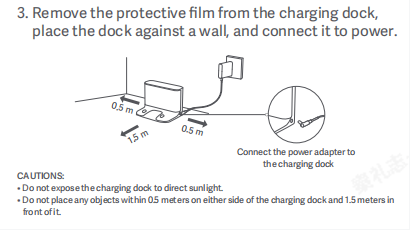
A: Place the Charging Dock against the wall on level ground, ensure there is more than 0.5m of space on both sides of the Charging Dock, and connect the plug to the power socket. To give you a better experience using the APP, please place the Charging Dock within Wi-Fi coverage
1. Install the Charging Dock in an open location with a good Wi-Fi signal;
2. Install the power cord to the Charging Dock and connect the power supply.
Please refer to the following steps and picture:
1. Remove the protective film from the Charging Dock;
2. Place the dock against a wall, and connect it to power;
3. Connect the power adapter to the Charging Dock.
Note:
1. Do not expose the charging dock to direct sunlight;
2. Do not place any objects within 0.5 meters on either side of the charging dock and 1.5 meters in front of it.
3. Before use, place the main unit on the Charging Dock, and the main unit will automatically turn on and charge;
4. After fully charged, the main unit indicator light stays on for 10 minutes and then goes off.
Note:
1. When charging the device for the first time, to protect the battery, please use it after fully charging it;
2. When the battery of the device is low, it may not be able to turn on. Please place the main unit on the Charging Dock to charge;
3. The device will automatically turn on after the main unit is connected to the Charging Dock, and it cannot be turned off during the charging process.
19. Q: How to charge the Xiaomi Robot Vacuum S20?
A: Press and hold the power button, wait for the power indicator to stay on, and then place the main unit on the Charging Dock to charge.
Note:
The device may not be able to turn on when the battery is low. Please place the main unit directly on the Charging Dock.
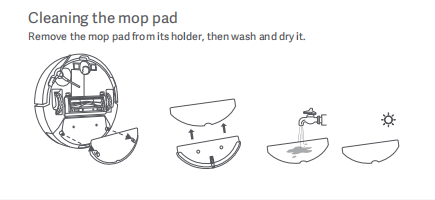
20. Q: How to clean the mop of the Xiaomi Robot Vacuum S20?
A: 1. Remove the mop holder from the Xiaomi Robot Vacuum S20;
2. Remove the mop pad from its holder;
3. Wash the mop;
4. Dry the mop.
21. Q: How to fill the water tank of the Xiaomi Robot Vacuum S20?
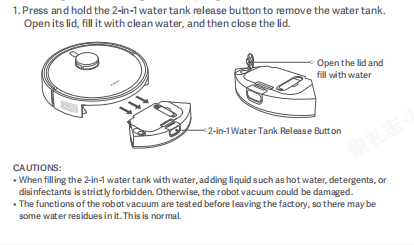
A: 1. Press and hold the 2-in-1 water tank release button to remove the water tank. ;
2. Open the cover of the water tank;
3. Fill the water tank with water until it is below the highest water level;
4. Fasten the water tank cap when finished.
Note:
1. Do not pour hot water into the clean water tank to avoid deformation of the water tank;
2. When the device is mopping the floor, set up a virtual wall or no-go zone around the carpeted area;
3. It is prohibited to use cleaning products such as detergents, disinfectants, and solid cleaning fluids to avoid corrosion and damage to the equipment;
4. The functions of the device are tested before leaving the factory, so there may be some water residues in it. This is normal.
22. Q: How to activate the cleaning function of the Xiaomi Robot Vacuum S20?
A: 1. Press the power button to start cleaning. Press any key to pause while cleaning.
2. When the main unit is in the Charging Dock, you can also easily start cleaning by pressing the Charging Dock button.
Note:
1. Please fully charge and let the main unit start from the Charging Dock before cleaning. Please do not move the Charging Dock randomly during cleaning.
2. If the battery of the device is too low, cleaning cannot be started. Please charge it first and then start cleaning.
23. Q: How to return the Xiaomi Robot Vacuum S20 to the Charging Dock for charging?
A: After cleaning, the main unit will automatically return to the Charging Dock for charging. In the paused state, press the recharge button to start charging. The power button flashes breathlessly when the main unit is charging.
Note:
If the main unit does not find the Charging Dock, it will automatically return to the cleaning starting point. Please manually put the main unit back into the Charging Dock for charging.
24. Q: How to maintain the brush and side brush of the Xiaomi Robot Vacuum S20?
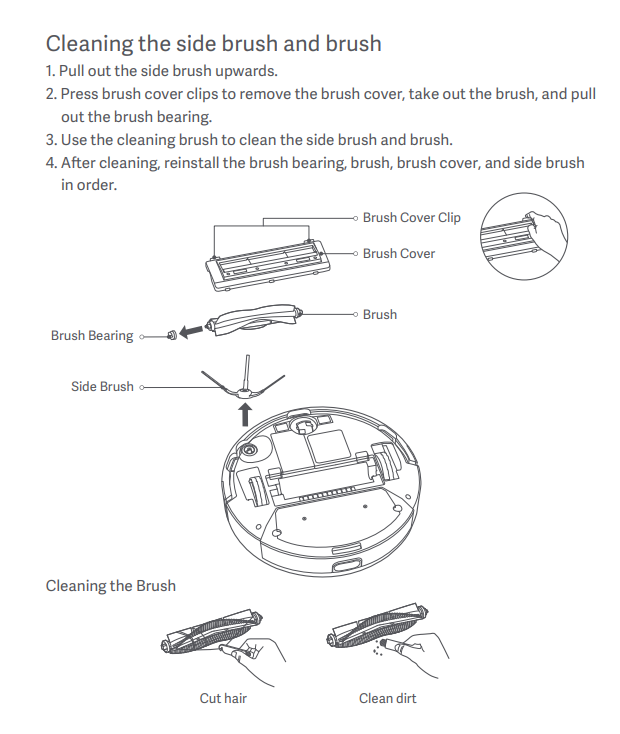
A: 1. Pull out the side brush upwards;
2. Press brush cover clips to remove the brush cover, take out the brush, and pull out the brush bearing;
3. Use the cleaning brush to clean the side brush and brush;
4. After cleaning, reinstall the brush bearing, brush, brush cover, and side brush in order.
Note:
It is recommended to replace the brush every 6-12 months to ensure the cleaning effect.
25. Q: How to maintain the dust box and filter of the Xiaomi Robot Vacuum S20?
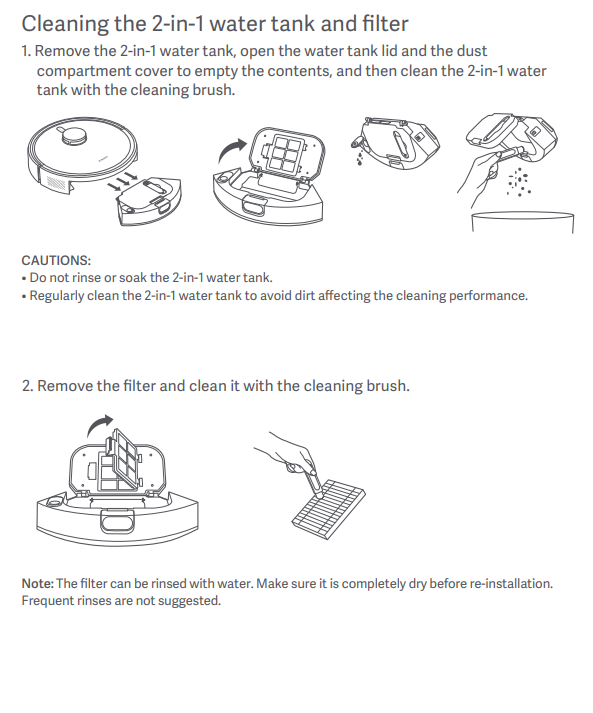
A: 1. Remove the 2-in-1 water tank, open the water tank lid and the dust compartment cover to empty the contents, and then clean the 2-in-1 water tank with the cleaning brush;
Note:
1. Do not rinse or soak the 2-in-1 water tank;
2. Regularly clean the 2-in-1 water tank to avoid dirt affecting the cleaning performance.
2. Remove the filter and clean it with the cleaning brush.
26. Q: Will the yellowing of the charging pole piece of the Xiaomi Robot Vacuum S20 affect its use?
A: The charging pole piece of the Xiaomi Robot Vacuum S20 is exposed in a complex environment. As the use time increases, normal phenomena such as oxidation and yellowing may occur to varying degrees. This will not affect the charging function, but it needs to be wiped regularly with a dry cloth.
Note:
1. It is recommended to clean the dust box thoroughly at least once a week. Please be sure to dry the dust box before use;
2. The filter can be rinsed with water. Make sure it is completely dry before re-installation. Frequent rinses are not suggested.
27. Q: How to maintain the battery of the Xiaomi Robot Vacuum S20?
A: The Xiaomi Robot Vacuum S20 has a group of built-in high-performance lithium-ion rechargeable batteries. To maintain battery performance, please keep the main unit charged during daily use.
Note:
If you have not used the device for a long time, please turn it off and store it. Charge the device at least once every three months to avoid battery damage due to over-discharge.
28. Q: Does the Xiaomi Robot Vacuum S20 support child lock?
A: Not support.
29. Q: Does the Xiaomi Robot Vacuum S20 support UV light?
A: Not support.
30. Q: Does the Xiaomi Robot Vacuum S20 support electrolyzed water?
A: Not support.
31. Q: How to reset the system of the Xiaomi Robot Vacuum S20?
A: Take out the dust box from the main unit, stand the main unit upright, or open the cover of the Xiaomi Robot Vacuum S20, and then you can reset the system.
Reset system:
Use a needle-shaped object to press and hold the reset button for 3 seconds. When you hear a beep, the main unit automatically restarts, and related settings such as scheduled cleaning and Wi-Fi are restored to the factory state.
32. Q: How to restore the system of the Xiaomi Robot Vacuum S20 to the system before the upgrade?
A: Take out the dust box from the main unit, stand the main unit upright, or open the cover of the Xiaomi Robot Vacuum S20, and then you can reset the system.
Restoration system:
Use a needle-shaped object to press and hold the reset button for 10 seconds. When you hear a beep, the main unit automatically restarts, scheduled cleaning and Wi-Fi and other related settings are restored to the factory state, and the system is restored to the previous firmware version.
33. Q: Does the Xiaomi Robot Vacuum S20 have a water shortage reminder and a dust box full reminder?
A: Not support.
34. Q: Can stickers be used on the Xiaomi Robot Vacuum S20?
A: It is recommended not to use stickers. When using stickers on the Xiaomi Robot Vacuum S20, it may cover the laser radar above the device and the obstacle avoidance sensor and infrared sensor in front of the collision plate, affecting the operation of the device.
35. Q: How to create a map with the Xiaomi Robot Vacuum S20?
A: 1. When using the Xiaomi Robot Vacuum S20 for the first time, follow the Mi Home APP prompts to choose quick mapping or global cleaning. After the cleaning is completed, the Mi Home APP will automatically save the map;
2. When using the Xiaomi Robot Vacuum S20 in a new environment (such as a different floor), create a new map in the [Mi Home] APP >> [Settings] >> [Map List] >> [Create Map]. Maps in different environments can be distinguished by different names.
Note:
1. The main unit is triggered from the Charging Dock. Please do not change the position of the Charging Dock while building the map;
2. The new map will be saved after the main unit automatically returns to the Charging Dock. Please do not interrupt or move the main unit during map building;
3. The presence of highly reflective objects in the environment, such as mirrors, windows, and shiny metal, will affect the mapping effect.
36. Q: Does the Xiaomi Robot Vacuum S20 support cleaning with water after it becomes dirty?
A: Not support.
If you flush the Xiaomi Robot Vacuum S20 directly with water, water will enter the device and damage the internal electronic components. It is recommended that after the device is dirty, remove the brush cover, brush, side brush, dust box, mop and other accessories and clean them separately. The main unit should be cleaned with a damp rag that is twisted until it does not drip.
37. Q: How good is the Xiaomi Robot Vacuum S20 in cleaning stubborn stains?
A: The mopping mode is used to imitate mopping the floor. For stubborn stains, it is recommended to add water to soften it in advance or switch to professional mopping mode.
38. Q: What small objects can the Xiaomi Robot Vacuum S20 recognize?
A: The Xiaomi Robot Vacuum S20 adopts 8-point TOF obstacle avoidance. Small objects higher than 3cm can be identified. If the objects are lower than 3cm, it is recommended to put away the items before mopping, such as weight scales and sockets.
39. Q: What should pay attention to when using the Xiaomi Robot Vacuum S20 for the first time?
A: 1. The Xiaomi Robot Vacuum S20 is equipped with a 2600mAh battery. The device has about 30% power before leaving the factory. It is recommended to use it after fully charging it for the first time unpacking;
2. Fill the 2-in-1 water tank with water;
3. Connect to the Mi Home APP and network, place the main unit in the Charging Dock, and then start mapping.
40. Q: When the Xiaomi Robot Vacuum S20 is cleaning, will it bypass the legs of tables and chairs?
A: The Xiaomi Robot Vacuum S20 adopts 8-point TOF obstacle avoidance. When it encounters the legs of tables and chairs, it will clean along the edges.
41. Q: How long does it take for the Xiaomi Robot Vacuum S20 to clean a room?
A: To ensure the cleaning power of the sweeper, the walking speed of the Xiaomi Robot Vacuum S20 is 0.3m/s. Cleaning time will fluctuate depending on the complexity of the home environment.
42. Q: Why can’t the Xiaomi Robot Vacuum S20 avoid scales or building blocks at home?
A: The Xiaomi Robot Vacuum S20 recognizes objects by mechanical collision plate + LDS laser navigation. Small objects higher than 3cm can be identified. If the object is lower than 3cm, it is recommended to put away the items before mopping the floor, such as weight scales and sockets.
43. Q: When unboxing the Xiaomi Robot Vacuum S20 for the first time, is it normal for water damage to the 2-in-1 water tank?
A: 1. The Xiaomi Robot Vacuum S20 must be checked randomly before leaving the factory. Clean water will be added to the 2-in-1 water tank for water tank testing;
2. Pour out the clean water after the 2-in-1 water tank test is completed. It is normal for water stains to remain in the water tank.
44. Q: Does the Xiaomi Robot Vacuum S20 support carpet recognition?
A: Not support.
45. Q: How many areas should the Xiaomi Robot Vacuum S20 mop the floor before cleaning the mop?
A: The Xiaomi Robot Vacuum S20 does not support automatic cleaning of the mop. The mop needs to be manually disassembled and cleaned. It is recommended to wash and dry it after each task is completed.
46. Q: Can the Xiaomi Robot Vacuum S20 add water to clean the mop during cleaning?
A: If the main unit needs to add water during the cleaning process, you can press any key to pause, take out the 2-in-1 water tank, put it back after completion, and press the start button to continue working. Mops need to be cleaned manually.
47. Q: Why does the Xiaomi Robot Vacuum S20 go back to charge midway and continue cleaning?
A: 1. The Xiaomi Robot Vacuum S20 is equipped with a 2600mAh battery with super battery life.
2. When the battery of the device is low during the mopping process, the main unit will return to the Charging Dock for charging. When the battery of the device reaches about 60%, it will go out of the Charging Dock and continue the unfinished task last time.
Note:
If the main unit is charging and you ask the Xiaomi Robot Vacuum S20 to execute other instructions or turn on Do Not Disturb mode(DND mode), the device will no longer continue cleaning.
Mi Home APP related
1. Q: How to connect the Xiaomi Robot Vacuum S20 to the Mi Home APP?A: This product has been connected to the Mi Home APP, can be controlled through the Mi Home APP, and is interconnected with other products.
To connect the Xiaomi Robot Vacuum S20 to the Mi Home APP, please refer to the following steps:
1. Scan the QR code, download, and install the Mi Home APP. If you have installed the Mi Home APP, you will directly enter the device connection page. Or you can search "Mi Home" in the App Store, download and install the Mi Home APP;
2. Open the [Mi Home] APP homepage, tap [+] in the upper right corner of the screen, and add the Xiaomi Robot Vacuum S20 according to the Mi Home APP prompts.
Note:
Due to the upgrade and update of the Mi Home APP, the actual operation may be slightly different from the above description. Please operate according to the current instructions in the Mi Home APP.
2. Q: How to reset Wi-Fi on the Xiaomi Robot Vacuum S20?
A: When the router cannot connect to the main unit due to modified configuration, forgotten password or other reasons, please open the top cover to reveal the Wi-Fi indicator, and press and hold the local cleaning button and the recharge button at the same time (7 seconds) until you hear the voice prompt. Wait for the Wi-Fi indicator to start flashing again to indicate a successful reset.
3. Q: How to upgrade the firmware of the Xiaomi Robot Vacuum S20?
A: You can use the Mi Home APP to upgrade the firmware of the main unit. Before upgrading, please ensure that the main unit is on the Charging Dock and the battery power of the Xiaomi Robot Vacuum S20 is greater than 15%. The buttons will flash during the firmware upgrade.
To upgrade the firmware of the Xiaomi Robot Vacuum S20 on the Mi Home APP, please refer to the following steps:
Open [Mi Home] APP >> tap [Settings] >> select [General Settings] >> select [Firmware Upgrade].
4. Q: How to let the Xiaomi Robot Vacuum S20 quickly build maps?
A: When the Xiaomi Robot Vacuum S20 is turned on for the first time, there is no map in the Mi Home APP.
To let the Xiaomi Robot Vacuum S20 quickly build maps, please refer to the following steps:
1. Place the main unit on the Charging Dock;
2. Open the [Mi Home] APP, find [Quick map creation] and tap [Quick map creation].
The main unit will only build maps but not clean. After the main unit automatically returns to the Charging Dock, the map construction is completed and the map is automatically saved.
Note:
During the mapping process, please do not move the Xiaomi Robot Vacuum S20, and keep it away from children and pets.
5. Q: How many maps can the Xiaomi Robot Vacuum S20 support?
A: Currently only 5 maps are supported.
6. Q: What is the Do Not Disturb feature (DND mode) of he Xiaomi Robot Vacuum S20?
A: During the Do Not Disturb (DND) period, the main unit will not respond to continued cleaning, scheduled cleaning, or active voice broadcast. DND mode is enabled by default at the factory, and the default period is from 11:00 PM to 9:00 AM. DND mode can be turned off through the Mi Home APP.
Note:
During the DND period, the indicator goes off after 1 minute of charging.
7. Q: What is the full cleaning function of he Xiaomi Robot Vacuum S20?
A: When the map is not saved in the Mi Home APP, if you choose full cleaning, the main unit will clean a 6m×6m square area by area.
After saving the map in the Mi Home APP, select full cleaning, and the main unit will automatically plan a path to clean room by room, and return to the Charging Dock after cleaning is completed.
8. Q: What is the edge cleaning function of the Xiaomi Robot Vacuum S20?
A: Select edge cleaning in the Mi Home APP. After the main unit automatically identifies the cleaning area, it will clean along the edge. After cleaning, the main unit will automatically return to the Charging Dock.
9. Q: What is the memory map function of the Xiaomi Robot Vacuum S20?
A: For the first cleaning, the Xiaomi Robot Vacuum S20 needs to start from the Charging Dock. After completing the cleaning, it will automatically return to the Charging Dock. Only after completing the complete cleaning can the map of your home be saved. If the cleaning process is terminated manually or moved back to the Charging Dock, the map will not be saved. After the map is drawn successfully, you can divide, merge areas, or customize room names in the Mi Home APP.
10. Q: What is the memory map function of the Xiaomi Robot Vacuum S20?
A: You can set up zoned cleaning in the Mi Home APP, and the main unit will clean according to the planned area.
Note:
During the cleaning process of the Xiaomi Robot Vacuum S20, the main unit may go out of the marked area. Please pay attention to clearing the ground obstacles around the marked area. The marking of this area does not play a role in safety isolation.
11. Q: What is the designated location-cleaning function of the Xiaomi Robot Vacuum S20?
A: Select the designated location-cleaning in the Mi Home APP, and then select the target point on the map. The main unit will automatically plan a route to the target point, with the target point as the center, and clean a 2m×2m square area.
12. Q: What is the sleep mode of the Xiaomi Robot Vacuum S20?
A: When the main unit is not charging and does not run or operate for more than 5 minutes, it will automatically enter sleep mode. If there is no reservation, it will automatically shut down if it sleeps for more than 6 hours. The main unit can be woken up by pressing buttons or Mi Home APP in the sleep state.
Note:
The main unit will not enter sleep mode when it is on the Charging Dock.
13. Q: What is the scheduled cleaning function of the Xiaomi Robot Vacuum S20?
A: You can set a scheduled cleaning time through the Mi Home APP. The main unit will automatically start cleaning at the specified time and automatically return to the Charging Dock when the cleaning is completed.
To set the scheduled cleaning function of the Xiaomi Robot Vacuum S20 on the Mi Home APP, please refer to the following steps:
Open the [Mi Home] APP >> tap [Settings] >> select [Schedule cleaning].
Note:
If the DND mode is turned on, scheduled cleaning will not be performed during the DND time period.
14. Q: What is the virtual wall/no-zone feature of the Xiaomi Robot Vacuum S20?
A: You can set up a virtual wall/no-zone through the Mi Home APP to prohibit the main unit from entering areas that do not need to be cleaned.
Note:
1. Before using this function, you need to save the map in the Mi Home APP;
2. Moving the main unit or significant changes in the home environment may cause the original map to become invalid and the virtual wall/no-zone to be lost.
3. Virtual wall: Add a virtual wall to make the device impossible to pass through.
Please refer to the following steps:
Open the [Mi Home] APP >> tap [Settings] >> select [Virtual wall/no-zone].
Added: On the screen of [Virtual wall/no-zone] >> tap [Settings] >> tap [Virtual wall/no-zone] >> move the virtual wall line/restricted area to the appropriate area (you can enlarge or reduce the length of the virtual wall/no-zone) >> tap [√] to save.
Delete: On the screen of [Virtual wall/no-zone] >> tap [Settings] >> select the virtual wall/no-zone to be deleted >> tap [X] to delete >> tap [√] to save.
Clean no-zone: Add cleaning no-zone, and the device will not enter this area when cleaning;
Mopping no-zone: Add a mopping no-zone, the device will not enter this area when mopping the floor.
15. Q: What kind of cleaning mode does the Xiaomi Robot Vacuum S20 use?
A: There are the standard mopping mode and the professional mopping mode. You can choose from [More Settings] >> [Sweep and Mop Settings] >> select sweeping and mopping mode.
The standard mopping mode mops the floor more energy-saving, while the professional mopping mode mops the floor more precisely.
16. Q: How to perform regional editing on the Xiaomi Robot Vacuum S20?
A: Merge: In the [Mi Home] APP >> tap [Settings] in the upper right corner >> tap [Map management] >> tap [Area Editing] >> select two adjacent areas >> select [Merge].
Split: In the [Mi Home] APP >> tap [Settings] in the upper right corner >> tap [Map management] >> tap [Area Editing] >> select an area to be divided (When dividing, please pay attention to the two endpoints of the dividing point and need to be on the boundary of the area to be divided) >> tap [√] after confirm >> rename the area.
17. Q: How to reset the map of the Xiaomi Robot Vacuum S20?
A: In the [Mi Home] APP >> tap [Settings] in the upper right corner >> tap [Map Management] >> tap [Reset Map] >> tap [OK], the map will be reset and disappear, and the map needs to be rebuilt.
Note:
After resetting the map, scheduled cleanings associated with the map will be deleted simultaneously.
18. Q: How to use the custom mode of the Xiaomi Robot Vacuum S20?
A: Before using the custom mode, you need to save the map. After the map is saved, room partitions will be automatically formed. Then select custom mode on the main interface of the Mi Home APP.
In the custom mode, select a room and set the cleaning times, modes, times, etc. for different rooms.
19. Q: How many cleaning reservations does the Xiaomi Robot Vacuum S20 support?
A: Scheduled cleaning supports up to 10 tasks. When setting up scheduled cleaning, it is recommended that the interval be more than 2 hours to ensure that the last cleaning can be successfully completed; if the interval is too close, the last cleaning may be terminated.
20. Q: How to rename the map of Xiaomi Robot Vacuum S20?
A: In the [Mi Home] APP >> tap [More Settings] in the upper right corner >> tap [Map List] >> select the map that needs to be renamed and rename it.
FAQs
1. Q: What should I do if the Xiaomi Robot Vacuum S20 cannot connect to the Internet?A: 1. Confirm whether the Wi-Fi password entered when connecting is correct. The Wi-Fi user name cannot contain Chinese characters or the password setting contains special characters such as @$%. If so, please reset it to English or an account with numbers or letters. and password before trying again;
2. Check whether the external network connection of the router is normal. You can try to open the web page through a mobile phone or a computer connected to Wi-Fi to see if it is smooth;
3. Confirm whether the distance between the router and the device is too far (more than 5 meters or there is a partition in between). You can try to move the device within 1 to 2 meters away from the router and try to reconnect;
4. Try to connect to the mobile phone WiFi hotspot;
5. Check whether too many smart devices are connected to the router, causing the network to slow down or the router to become unresponsive. You can restart the router and try again;
6. Currently, it does not support the company's EAP802.1x certified network, 5G signal network or public Wi-Fi network that requires web page authentication. such as CMCC. You need to switch the network again and try to connect;
7. After the network is turned off, if the device is not connected to the Internet for more than 1 hour, the Wi-Fi module will turn off the network connection function, and the Wi-Fi indicator light will flash. The connection can be restored only after restarting the device;
8. Check whether the mobile phone has restricted the permissions of the App, such as networking, positioning, etc. Please allow the permissions and try again;
9. Connection failure may also be related to the mobile phone model. You can try to use other different mobile phone models to try to connect.
2. Q: What should I do if the Xiaomi Robot Vacuum S20 is charging abnormally?
A: Please check whether the Charging Dock and the charging pad of the main unit are stained with dust. Abnormal charging will occur when dust is stained. Please wipe it before use.
3. Q: What should I do if the Xiaomi Robot Vacuum S20 does not come out of water?
A: 1. Confirm that water is added to the water tank to the lowest water level;
2. Confirm that the water tank identification is normal;
3. The power supply electrode piece of the water tank is not dirty and has good contact;
4. Confirm that the fault is not eliminated after restarting. If there is any damage, please contact after-sales service.
4. Q: What precautions should be taken before cleaning with the Xiaomi Robot Vacuum S20?
A: Please try to make the main unit fully charged before starting cleaning from the Charging Dock.
Before cleaning, please tidy up your home furniture environment and put away fragile items and debris on the floor of your home in advance.
5. Q: Will the cleaning efficiency of the Xiaomi Robot Vacuum S20 be reduced in complex environments?
A: To ensure cleaning coverage, the main unit will clean all corners. In complex environments, turning and edge movements will be increased, and the cleaning efficiency may be reduced.
6. Q: Why does the Xiaomi Robot Vacuum S20 sound louder when cleaning?
A:1. It is necessary to confirm whether the roller brush is entangled with foreign objects and makes abnormal noises. The roller brush needs to be cleaned in time, otherwise, it will cause damage to the roller brush;
2. To ensure the cleaning effect, the main unit adopts a fan with greater suction power, which has a stronger dust collection effect and a relatively louder sound. When the device is cleaning, you can use the quieter setting to work.
7. Q: Why does the Xiaomi Robot Vacuum S20 make strange noises when cleaning?
A: When the main unit is working on smooth tile floors and wooden floors, there may be a slight sound when the bottom scraper rubs against the floor.
When the main unit passes through the joints between the tiles and the floor, it will contact and clean the joints, which may produce a slight "click" sound.
The above sounds do not affect the normal use of the machine.
8. Q: What should I do if the Xiaomi Robot Vacuum S20 gets stuck while cleaning?
A: When the main unit is cleaning, slippers, plastic bags and other debris at home may get stuck. After solving the stuck problem, try to place the main unit in a nearby cleaned area and continue cleaning.
Please try to clear away the debris in your home before cleaning to avoid the main unit getting stuck during cleaning.
9. Q: What should I do if the Xiaomi Robot Vacuum S20 gets stuck on the surface of the fuselage when cleaning?
A: When the main unit is cleaning, when it encounters the bottom of furniture that is close to the height of the main unit, the upper surface of the main unit may get stuck. Please set up a virtual wall to prevent the main unit from entering again.
10. Q: How to deal with the entanglement of the side brush and the brush of the Xiaomi Robot Vacuum S20 when cleaning?
A: When the main unit is cleaning, the side brushes and roller brushes may entangle the power cords, charging cables, etc. at home. After solving the entanglement problem, try to place the main unit in a nearby cleaned area and continue cleaning.
Please try to clear away the debris in your home before cleaning to avoid the main unit from getting entangled during cleaning.
11. Q: What is the reason why the Xiaomi Robot Vacuum S20 failed to reposition?
A: If the main unit is moved to an area that has not been cleaned before, the relocation will fail. Please try to ensure that it is moved to an area that has been cleaned before.
Someone was standing next to the main unit while it was relocating. Please try not to stand next to the main unit.
12. Q: What is the reason why the Xiaomi Robot Vacuum S20 does not slow down and collide with obstacles when it encounters obstacles?
A: The main unit is equipped with LDS laser sensor and edge sensor, which can detect obstacles and slow down in advance. However, for some darker, smaller table and chair legs and some shorter obstacles, collision may not be detected, which is normal.
13. Q: Why does the Xiaomi Robot Vacuum S20 collide with the wall when cleaning along the edge?
A: The main unit is equipped with a wall-side sensor. When cleaning along the edge, it will keep a certain distance from the wall, which is normal.
14. Q: What should I do if the Xiaomi Robot Vacuum S20 cannot be turned on?
A: The battery of the device is low. Please charge it on the Charging Dock before using it. If the ambient temperature is too low (below 0℃) or too high (above 40℃), please use it in an environment of 0-40℃.
15. Q: What should I do if the Xiaomi Robot Vacuum S20 cannot be charged?
A: The Charging Dock is not powered on. Please confirm whether both ends of the power cord of the charging base are plugged in. If the contact is poor, please clean the charging base shrapnel and the main unit charging contact piece.
16. Q: Why does the Xiaomi Robot Vacuum S20 consume so much power when cleaning?
A: After the main unit is charged and left for a long time, the power may drop rapidly a few minutes before cleaning starts. This is normal. After a few minutes, the power consumption will return to normal.
When using powerful cleaning mode, the power of the main unit will be consumed faster.
17. Q: What may be the reason why the Xiaomi Robot Vacuum S20 fails to recharge?
A: 1. There are too many obstacles near the Charging Dock. Please place the Charging Dock in an open area and ensure that there are no obstacles within 0.5 meters on both sides of the charging base and 1.5 meters in front of the charging base;
2. The main unit did not start from the Charging Dock before cleaning, and the Charging Dock was not found during the cleaning process. Please try to make the main unit start from the charging base to clean;
3. The main unit was moved during the cleaning process. When cleaning was continued, the relocation of the main unit failed and a new task was started.
18. Q: Why does the the Xiaomi Robot Vacuum S20 repeatedly dock when charging?
A: Please check whether the Charging Dock and the charging pad of the main unit are stained with dust. When dust is stained, repeated docking may occur. Please wipe it before use.
19. Q: What should I do if the Xiaomi Robot Vacuum S20 cannot remove stubborn stains when mopping the floor?
A: Some stubborn stains cannot be removed when mopping the floor, and manual cleaning is required.
20. Q: What should I do if the floor of the Xiaomi Robot Vacuum S20 becomes dirtier as it is mopped?
A: If the floor is too dirty, please clean the mop regularly when mopping the floor.
21. Q: How long does it take to dry the mop of the Xiaomi Robot Vacuum S20?
A: There is no mop drying function.
22. Q: What should I do if the map of the Xiaomi Robot Vacuum S20 is skewed and overlaid?
A: 1. Confirm that the map has been saved successfully (the regional page has partition icons and the regional functions can be used normally;
2. Turn off the power switch, restart the machine, and then manually place the machine to charge and try to restore the map. Restore failed, change the location of the charging base and re-create the map.
Recommendations:
1. Place the charging base correctly against the wall (make sure to leave 0.5m left and right of the charging base and no obstacles 1.5m in front);
2. During the working process of the sweeping robot, do not move it at will or provide human help to the sweeping robot;
3. If the home environment has strong direct light, mirror reflection, etc., it will lead to chaotic construction;
Note:
Direct exposure to strong light: It is recommended to draw the curtains or change the time to take pictures.
Specular reflection: It is recommended to cover the bottom 15 cm
4. You can reset it in the map function, and the map will be rebuilt during the next cleaning process;
5. Regularly check whether there is dirt on the side of the navigation scanning component and wipe it with a clean rag or paper towel.
23. Q: What should I do if the Xiaomi Robot Vacuum S20 moves backwards?
1. Please check whether the driving wheel is wrapped with foreign matter;
2. Confirm whether the LDS of the machine rotates normally. Please try to light the lid of the radar sensor and check whether the rebound is normal;
3. Please check whether there are any foreign objects or hair on the rotating part of the LDS, causing the rotation to be sluggish or stalled. If so, please try to remove it;
4. Please confirm whether there are uneven or warped stickers or large objects on the surface of the machine on the strike plate and the machine;
5. Please try to tap the collision plate to confirm that it is in a state where it can rebound;
6. Please try to restart the main unit and try again.
24. Q: What should I do if the Xiaomi Robot Vacuum S20 reports a collision abnormality?
1. Please try to tap the impact plate to confirm that the impact plate is in a state where it can rebound;
2. Please try to restart the main unit and try again.
25. Q: What should I do if the Xiaomi Robot Vacuum S20 reports a side brush abnormality?
A: 1. Please try to remove the side brush and confirm whether there are foreign objects or hair entangled in the side brush and its components;
2. Please try to restart the main unit and try again.
26. Q: Does the Xiaomi Robot Vacuum S20 machine support multi-person connection?
A: Not support.
But the device can be shared with others. You can share in [Mi Home] APP >> [Settings] >> [General Settings] >> [Device Sharing], and the shared person can perform basic machine operations and settings on the device(start, pause, end cleaning, adjust suction and water volume).
27. Q: Why is the Xiaomi Robot Vacuum S20 machine offline?
A: 1. The Wi-Fi signal is not good. Please make sure that the main unit is within a good Wi-Fi signal coverage area;
2. The Wi-Fi connection is abnormal. Reset the Wi-Fi and download the latest Mi Home APP and try to connect again;
3. Please confirm whether the main unit is powered on. When it is powered off, it is offline.
28. Q: Why does the Xiaomi Robot Vacuum S20 consume so much power when mopping the floor?
A: 1. It is recommended to do the following steps when receiving the machine for the first time. The Xiaomi Robot Vacuum S20 is equipped with a 2600mAh battery. It is recommended to use it after unpacking it for the first time;
2. Check whether the professional mopping mode is turned on during the cleaning process. If this mode is turned on, the machine will mop the floor in a Y-shaped path, which will provide better mopping effect and consume faster power. It is recommended to choose different mopping modes according to the cleaning conditions of the floor.
29. Q: Why is the Xiaomi Robot Vacuum S20 noisy when mopping the floor?
A: Check whether the mopping board is installed in place. It is normal to make some noise when changing the mopping mode.
Does it help?
Yes
No