

Redmi Watch 3 FAQ
Product Overview and Hardware Related
1.Q: What are the features of Redmi Watch 3?
A:1.The 1.75" AMOLED display has a screen-to-body ratio of 70%, allowing you to view everything at a glance from message notifications to workout data. The 600 nits peak display brightness allows for easy reading, even in strong sunlight.
2.Redmi Watch 3 comes in with 2 in-box options: black and ivory and more strap colors. The strap has an innovative position memory loop on the strap. After you select a hole for the first wearing, it will be remembered and you can wear the watch more easily in the future.
3.The app offers more than 200 custom watch faces, covering themes like sports, minimalist, technology and machinery. There are also a number of always-on watch faces, which give you all the info you need without having to raise your hand.
4.Continuing the lightweight design philosophy of the Redmi Watch series, the watch body weighs only 37g and is more comfortable to wear on the wrist. The metallic middle frame helps you stand out at the wave of your hand.
2.Q: What is the difference between Redmi Watch 3 and traditional watches?
A: Redmi Watch 3 is a fashionable smartwatch to help work, travel, and sport a healthy life. It supports Bluetooth calling and has upgraded in processor, system, and running health functions. It can intelligently monitor personal heart rate, sleep, blood oxygen saturation and other data, and all-round health tracking to escort healthy life. And with 120 workout modes,120 workout modes, message notification and other functions. The watch has rich dials and can be matched with different color of straps, suitable for sports, leisure, business and other scenarios.
3.Q: What is the material of the screen and middle bezel of Redmi Watch 3?
A: Redmi Watch 3 has a 1.75-inch AMOLED square display with a resolution of 390x450 and a pixel density of 341 PPI for a more detailed display; the middle frame is made of NCVM technology, which shows a metallic texture and luster.
4.Q: What is the material of the Redmi Watch 3 strap?
A: The watch strap is made of TPU (black) or silicone (white).
5.Q: How can I change the Redmi Watch 3 band?
A: The Redmi Watch 3 TPU/silicone strap supports quick release, the replacement method is as follows:
Remove the strap: To remove the strap, press the quick release button and pull the strap outward with the other hand to remove the strap.

Install the strap: align the recessed part of the strap with the main body of the watch, and when you hear a "click", the strap is successfully installed. Before wearing, please pull the strap to make sure it is firmly fastened to the watch body.
6.Q: What is the wrist circumference of the Redmi Watch 3 strap?
A: The width of the Redmi Watch 3 TPU/silicone strap is 19mm, and it can fit wrist circumference between 135mm and 200mm.
7.Q: Can Redmi Watch 3 be paired with other Xiaomi watch straps?
A: No.
8.Q: What is the waterproof rating of Redmi Watch 3?
A:The water resistance rating of 5ATM (equivalent to a depth of 50 metres underwater) means it can be worn in swimming pools, during sandbar swimming, and other shallow water activities. It is not suitable for wearing in hot showers, saunas, or whilst diving. Make sure to avoid the direct impact of high-speed water flow during water sports. The water-resistance function is not permanent and may decline over time. *50 metre waterproofing satisfies ISO22810: 2010 standards. It has passed the TÜV SÜD Certification and Testing (China) Co., Ltd. Water resistance rating report number: 68.189.22.0112.02.
9.Q: What comes standard with the Redmi Watch 3? What colors are available?
A:Watch/Magnetic charging cable/User Manual (including warranty notice). Black(TPU strap)、Ivory(Silicone strap).
*Redmi Watch 3 comes with a black/white strap, straps of other colours must be purchased separately. Color options may vary depending on location
10.Q: How is the battery life of Redmi Watch 3? How long does it take to fully charge?
A: When Redmi Watch 3 is fully charged for less than 2 hours, the battery life is up to 12 days in typical usage mode, 7 days in Heavy usage mode, and 4 days in Always-on mode (AOD) in Heavy usage mode.
The test conditions are as follows:
11.Q: What is the battery capacity of Redmi Watch 3? How to charge it?
A: The Redmi Watch 3 has a battery capacity of 289mAh and comes standard with a special magnetic charging cable.
Charging method is as follows:
1. Align the charging cable with the metal contact on the back of the watch, and the charging cable will automatically attach to the watch;
2. Connect the other end of the charging cradle to the USB-A charger (please match the adapter with an output voltage of 5V and with CCC logo);
Notes:
1、If the watch cannot be turned on after a long time, it needs to be pre-charged for a period of time before the charging icon is displayed when it is used again.
2、Please tear off the protective film on the back of the watch before using the charging cable, and make sure there are no other foreign objects to use normally.
12.Q: Does Redmi Watch 3 support connecting to a heart rate band?
A: No.
13.Q: What positioning system does Redmi Watch 3 use?
A: Redmi Watch 3 supports single-frequency GNSS and five major satellite positioning systems: BeiDou, GPS, GLONASS, GALILEO, and QZSS.
14.Q: How to wear my Redmi Watch 3 properly?
A: Wear the watch about one finger from your wrist bone and adjust the wrist strap loosely to ensure that the heart rate sensor is collecting data properly. Do not wear the watch too loose or too tight, as this may affect the heart rate test.
15.Q: Will Redmi Watch 3 be allergic to wear?
A: Redmi Watch 3 is made of professional, healthy and environmentally friendly materials, which have been tested for allergic reactions by professional organizations. Some areas that often come into contact with skin, such as the strap, bottom bracket, buttons, etc., have passed strict allergy-prone harmful substance testing and meet the limits set by national standards. Due to individual differences, there may be a small number of people who may have uncomfortable reactions to specific materials. If you feel skin discomfort when wearing, please stop wearing and consult a doctor.
It is recommended to follow the following guidelines in wearing the watch: when exercising, do not wear the watch too loose or too tight to ensure that the watch does not slide up and down on the wrist; for daily use, relax the strap slightly to ensure a comfortable experience of skin ventilation. After wearing the watch continuously for a long time, take it off and let your wrist rest for about half an hour. Wash and wipe the sweat on your arm and strap after exercise, and dry it before wearing.
16.Q: Does the Redmi Watch 3 have the same monitoring effect when worn by left or right hand?
A: The watch can be worn on the left hand or right hand, it does not affect the normal sampling of sports and health data, the data monitoring effect is the same, you can choose to wear it according to your own habits.
Note: The watch does not have the function to choose left hand or right hand.
17.Q: Can I wear the watch for swimming or bathing?
A: The TPU and silicone strap can be worn in swimming pools and shallow pools, but not in saunas, diving, or hot baths.
Note: It is recommended not to use the watch in an environment where the temperature changes a lot. In addition, the watch should not be exposed to soap, shower gel and some organic solvents, which may cause discoloration and other abnormalities in the appearance of the watch over time.
18.Q: How far away will the Redmi Watch 3 be from my phone when the Bluetooth is automatically disconnected?
A: The Bluetooth connection status between Redmi Watch 3 and cell phone is affected by the surrounding environment, in general, when there is a normal cover, the Bluetooth will be automatically disconnected when the watch and cell phone are 5-8 meters away; when the watch and cell phone are 50 meters away in an open area or a long corridor, the Bluetooth will be automatically disconnected; if the watch and cell phone are 3-5 meters away from each other (the watch and cell phone are facing each other), the Bluetooth will be automatically disconnected. automatically disconnect. The specific performance is subject to actual use.
19.Q: How to clean my Redmi Watch 3?
A: Wipe off sweat stains after exercise and wipe the watch with a soft cloth regularly to clean the dirt in the crevices.
Note:
1.Please do not rinse directly into the microphone or air vent of the watch. The two holes on both sides of the watch are the microphone and the air vent:
2.Please avoid contacting the watch with substances that may cause dirt or damage, such as dust, sand, oil and smoke, hand soap, soapy water, cosmetics, salt water, pool water, perfume, insect repellent, detergent, sunscreen, adhesive, hair dye or other acidic or alkaline substance solvents, etc.
20.Q: How to adjust the brightness of the screen on Redmi Watch 3?
A: Due to hardware limitations, the watch brightness does not support automatic adjustment, only manual settings to adjust the brightness.
Manual adjustment: Watch-Settings-Brightness, custom brightness adjustment.
21. Q: Does Redmi Watch 3 support Bluetooth disconnection reminder function?
A: When you are disconnected when using functions that depend on phone connection, such as taking photos, finding your phone, weather, OTA updates, etc., a disconnection reminder will be displayed. In addition, the status bar icon will show the disconnection status after disconnection.
22.Q: Does Redmi Watch 3 support Raise to answer calling?
A: No, it does not. The watch supports Bluetooth calls, so you can answer directly from the watch. To answer/reject a call, you need to click the corresponding button on the watch screen.
Key Questions
1.Q: Why can't I find watch displays?
A: The watch comes with a variety of pre-installed watch displays, including various color schemes and replaceable modules. If you want to adjust them, please long press the main watch displays interface or go to the watch displays editing page through "Settings->watch displays replacement", you can slide up and down in the "Style" page to switch between In the "Style" page, you can swipe up and down to switch between different color schemes, or swipe right to select the data items displayed in the component module from the list in the "Data" page.
2.Q: Redmi Watch 3 charging cable can't be charged?
A:For charging, please make sure to remove the protective film from the watch case and charger, and use the original wireless charging dock and 5V-2A and above adapter, or regular brand adapter with CCC certification to charge the watch, and check if there are any foreign objects between the watch and the charging dock.
3.Q: Why does the watch cut off during charging and repeatedly light up the screen and display the charging icon?
A:Please update the watch to the latest firmware version, if there is still a problem, please replace the adapter with another model or specification and try again.
4.Q: Why does the watch stop charging?
A:Please check if there are any metal foreign objects between the watch and the charging base and the surrounding area, or if there is any problem of poor contact between the charging base and the adapter.
5.Q: Why can't I charge the watch with USB extender/adapter/hub?
A:Some USB ports or aging USB extenders have insufficient power supply. It is recommended to use 5V-2A or above adapters or regular brand adapters with CCC certification to charge the watch, and please make sure the watch is updated to the latest version of firmware.
6.Q: Why does the touch screen of Redmi Watch 3 not work?
A:The touch screen will occasionally appear without touch after the watch is turned on the double-tap bright screen setting. The next firmware update is expected to solve the problem.
Temporary solution: Press and hold the watch power-on button for 15s to force restart, then immediately turn off the double-tap brightness setting (Watch-Settings-Brightness-Double-tap, click the off switch), the touch function can be used normally. This problem will be solved by software update later, you can turn on the double-tap screen again to experience this function.
7.Q: Why there are 2 Bluetooth names in the Bluetooth list after Redmi Watch 3 pair?
A:The watch supports Bluetooth call, after connected, the Bluetooth list of 2 Bluetooth names, one is BT connection, one is BLE connection.
APP usage related
1.Q: Does the Redmi Watch 3 support iOS/Android?
A: Yes, Redmi Watch 3 requires the Mi Fitness App, which can be searched and downloaded from the Android and iOS Play stores for device pair use.
Note: Mi Fitness App can be downloaded by scanning the QR code on the watch standby screen.
2.Q: Why can't the watch be found after I downloaded and installed the "Mi/Xiaomi Wear" app?
A: "Mi/Xiaomi Wear" is an old version of the app, which does not support the Redmi Watch 3, so you need to scan the code on the watch standby screen to download the Mi Fitness App, or download the "Mi Fitness" app from the Play store and install it. Download the "Mi Fitness" App from Play store and install it, then try to pair it.
3.Q: How to pair my Redmi Watch 3 with my phone?
A: Redmi Watch 3 needs to pair with Mi Fitness App. after pairing, you need to lock the app in the background to avoid being shut down by the system and disconnected from the phone, which will affect the normal use of the watch.
The way of pair is as follows:
1. Press and hold the power button to turn on the watch. Scan the QR code on the watch screen with your phone or search for "Mi Fitness" in the mobile application market to download and install the Mi Fitness App.
2. Open the Mi Fitness App and follow the instructions in the pop-up box to open the permissions related to the app. Click "Add Device", click Auto Scan Device or Redmi Watch 3, if you use Andriod device to connect to the watch, when the Bluetooth name of the watch appears, click Pairing, when the phone displays the same security code as the watch screen, click Pairing. When the phone displays the same security code as the watch screen, click "Pair" to complete the pairing connection with the watch.
3. If you use iOS device to connect to the watch, after selecting pair/sweep the QR code of the device, you will be prompted to go to the Bluetooth list to connect the device, select Redmi Watch 3 and the dual-end pairing interface will pop up, click on pairing, then return to the App to add the device through the pairing list.
Note:1. During the pairing process, please make sure your phone's Bluetooth is on to ensure the watch is properly connected to your phone.
2、If the security code has popped up on the watch, but the pop-up window to confirm the pairing is not shown on the phone, please look for the pairing request in the notification bar of the phone.
3、If you can't find the watch in the process of adding devices or can't connect the watch during use, please try to long press the power button of the watch for 3 seconds, select restore factory in the system operation interface, and then add the watch again.
4.Q: How to unpair Redmi Watch 3?
A: Open the Mi Fitness App and click "Unpair" on the "Device" page:
Open the Mi Fitness App and click "Unpair" on the "Devices" page.
After the watch is restored to factory settings, it will be automatically unpaired from the phone.
After unpairing, the watch will be restored to factory settings and all data (except for the open bus card/gate card) will be cleared.
5.Q: Can Mi Fitness App pair multiple devices?
A: You can pair more than one watch on the Mi Fitness App. Generally, you can pair 5-10 watches under the same account, but only one can be enabled when you use it.
6.Q: How can I switch to other watches on the Mi Fitness App?
A: Open the Mi Fitness App, go to Devices -> All Devices in the upper left corner, and select the watch you want to switch.
7.Q: How to upgrade the system firmware on Redmi Watch 3?
A: The watch will push subsequent upgrade packages for feature updates through the Mi Fitness App.
1. Go to Mi Fitness App->Profile->Click to check for updates;
2. If you find a new version to update, click Download Upgrade Package;
3、After the upgrade package is downloaded, it will be automatically pushed to the watch. After the upgrade package is received, the watch will be automatically upgraded and restarted.
Note: The watch needs to have more than 20% power when upgrading, the watch needs to be connected to the phone during the upgrading process, try to keep the watch near the phone.
8.Q: What kind of account does the Mi Fitness App support?
A: Mi Fitness App currently only supports Xiaomi account to login.
9.Q: How do I set up Redmi Watch 3 app notification alerts?
A: If you want to receive notifications from apps, such as phone calls and text messages, you need to turn on the app notifications in the Mi Fitness App.
How to open: Mi Fitness App-Device-App notifications-Choose which apps can send notifications
(phone calls, text messages, etc.).
Note: If you turn on notifications in the Mi Fitness App, you need to turn on the notification permission on your cell phone at the same time, so that the messages received by your cell phone can be synchronized to your watch.
10.Q: How can I keep my Redmi Watch 3 connected to the Mi Fitness App?
A: If you want to maintain a more stable connection, you can turn on the background keep alive/self-launch/off power limit permissions on the app permissions page, or lock the app in the app background, all of which can improve the app background keep alive ability.
11.Q: Does Redmi Watch 3 support cell phone alarm synchronization function?
A: Currently, this function is only supported when the phone is connected to MIUI system (the version of system clock APP must be greater than 12.8.1.1), and the watch needs to be connected to APP, when the phone alarm rings, the watch will ring synchronously. If you don't want to use the phone alarm synchronization function, you can turn off the function in the alarm settings in the app.
12.Q: How to pair Redmi Watch 3 after replacing my phone?
A: If you change your Redmi Watch 3 cell phone, you can click "Add device" in the new cell phone app, and then click "Connect to new cell phone" in the watch settings - system operation.
Note: If you don't change your account, your personal data will not be lost. If you change your account to a new Xiaomi account, your watch will be restored to factory and your unsynchronized data will be cleared.
13.Q: Why can't the Redmi Watch 3 watch time be synchronized with my phone?
A: If the Redmi Watch 3 cannot synchronize with your phone, you need to verify whether the app you are using is the latest version of Mi Fitness or not.
System settings related
1. Q: How does Redmi Watch 3 start up , shut down , and reboot ?
A: The bottom button on the right side of Redmi Watch 3 is the power button.
Start up : In the shutdown state, press and hold the power button to start up and enter the home page of the watch.
shut down :
1. In the Start up state, press and hold the power button and the watch will enter the page of Reboot , shutdown , connection to a new phone, and Factory reset settings, and select shutdown .
2. In the Start up state, watch : Settings — System — shut down .
Note: If the current device has a password and is not unlocked, the Factory reset option will be hidden.
Reboot :
1. In the Start up state, long press the power button and the watch will enter the Reboot , shutdown , Factory reset page, select Reboot .
2. In the Start up state, press and hold the power button for more than 12 seconds, and the watch will be forced to reboot .
3. In the Start up state, watch : Settings — System — Reboot .
2.Q:What are the general operations of Redmi Watch 3? What is the function of the button?
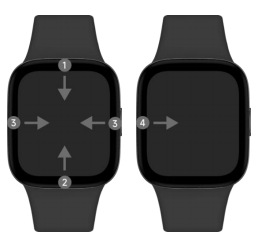
A: The screen operation is as follows:
1. Swipe down on the Watch face homepage: open App notifications .
2. Swipe on the home page of Watch face : open the control panel.
3. Swipe left and right on the Watch face home page: switch component cards.
4. Swipe right from the left edge on other pages: return to the previous level.

B: Key functions are as follows:
1. power/function keys:
1) Short press - enter the application list / return to watch displays home
2) Long press 3S - Start up , enter the option of shut down / Reboot / connect new mobile phone / Factory reset
3) Long press for more than 12s—force Reboot
4) Triple-click (3 consecutive presses within 2 seconds)—call emergency contacts
3. Q: How to customize widgets on Redmi Watch 3?
A: Redmi Watch 3 supports the widget function. On the main page of the watch, swipe left and right to view different widget cards.
Setting method: Mi Fitness App -> Profile -> Widgets -> Press and hold the right side of the card and drag up and down to adjust the order , click the component card to enter, click the widget that needs to be customized, and select the data item you want to display below, The widgets on this card can be customized.
4.Q: How to customize the shortcut key function on Redmi Watch 3?
A:No.
5. Q: How to replace and delete the Watch face of Redmi Watch 3 ?
A: Redmi Watch 3 supports replacing the Watch face , the replacement method is as follows:
1. To replace the watch , slide on the home page of the watch to enter the control panel->settings->select Watch face replacement, or press and hold the main Watch face interface for 2 seconds to enter the Watch face selection page, slide left and right to switch and select Watch face , some presets Watch face can enter and long press to enter the "Edit" interface to switch between different color schemes and component functions. The Watch face that comes with the system and the Watch face that has been downloaded and replaced before will be displayed on the Watch face selection page.
2. Replace in the Mi Fitness App . When the watch is connected to the mobile phone, open the Mi Fitness App , 1) select Watch face -> click the Watch face to be replaced -> click Use ; 2) select Watch face -> Watch face market ->Choose the Watch face you like ->Click Download and wait for the installation to complete.
Note: Due to the large memory usage of the Watch face , in order to ensure the running speed of the watch system, when the number of added Watch faces reaches 20, new Watch faces cannot be added .
Delete method:
Open Mi Fitness App , Device-- Online- Watch displays-click the watch display you want to delete-delete it
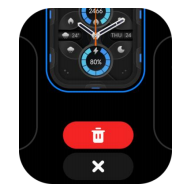
Notice: The preset Watch face cannot be deleted.
6. Q: Can Redmi Watch 3 customize the Watch face ?
A: Redmi Watch 3 supports customizing the Watch face , which needs to be realized through the album Watch face .
Setting method:
1. Open the Mi Fitness App , connect and synchronize the device correctly.
2. On the Mi Fitness App homepage, click the Watch face card to enter the Watch face management page.
3. Select the Watch face market, find and click the album Watch face -> download and install -> click to replace the background picture -> select the picture -> select the reserved picture location -> select the Watch face style , and then click OK.
4. The album Watch face supports adding multiple background images. When the screen is on, each time the screen is clicked, the background image can be switched.
7. Q: Does Redmi Watch 3 support AOD ?
A: AOD is supported . After turning it on, the watch will enter AOD after the screen is off .
AOD , you can wake up the screen by raising your wrist or clicking a button to exit AOD .
Setting method: Watch- Settings-Brightness-Lock screen
Note: 1) After selecting Auto to turn on AOD , it will automatically turn off AOD to improve battery life if it detects leaving the wrist or falling asleep.
2) After turning on AOD , the battery life of the watch will be shortened, please turn it on according to actual needs.
8. Q: Does the Watch face shift after the Redmi Watch 3 turns off the screen ?
A: The screen of the Watch is off, and the screen of the Watch is offset. This phenomenon is an anti-burn-in mechanism. It is a product software design and is a normal phenomenon.
9. Q: How to set up Redmi Watch 3 Do not disturb ?
A: After Do not disturb is turned on , there will be no reminders for incoming calls and application notifications; however, system reminders, such as low battery and alarm clocks, will still be reminded. When you enable Do not disturb synchronization on the APP , and the device and the mobile phone remain connected, the Do not disturb status of the device will be synchronized with the Do not disturb status of the mobile phone in both directions, that is, if Do not disturb is enabled on one end , the other end will also be synchronized Turn on Do not disturb . ( Note: Do not disturb synchronization function only supports Android 11.0 and above Android phones)
Setting method:
1. Swipe up on the home page of the watch to enter the control panel, click the Do not disturb icon to turn it on/off, and when you choose to turn it on, a shortcut time list will pop up, and you can select the required Do not disturb time in the list;
2. Voice command "Turn on/off Do not disturb ".
3. Watch Settings -> Do not disturb -> on/off .
4. Watch Settings -> Do not disturb -> Timing Do not disturb -> Click to open / close -> set the start / end time , the watch is within the set time period Custom Do not disturb .
10. Q: Does Redmi Watch 3 support APP notifications?
A: Yes, the watch and the mobile phone remain connected. After opening the application notification on the Mi Fitness App , you can view the App notifications on the mobile phone on the watch .
Note: By default, when the watch receives Message alerts , it only vibrates but does not automatically turn on the screen. When viewing messages, you can raise to wake or turn on the screen manually. Mi Fitness App -> App notifications -> Receive notifications on your wearable device , turn on the switch to turn on the screen automatically when receiving messages.
11. Q: How to view/delete App notifications on Redmi Watch 3 ?
A:
1. View messages: You can swipe down on the home page of the Watch face , open the message center to view App notifications , or click the message icon in the application list to view them.
2. Delete App notifications : You can click the clear button at the top of the message list to clear all messages, or slide the message to the right and click "X" to delete
After clicking on a message to view its details, the message will no longer be displayed in the message list.
12. Q: Does Redmi Watch 3 support incoming call notification ?
A: Support.
When the watch is connected to the mobile phone, when there is an incoming call on the mobile phone, the watch will vibrate, ring to remind, and display the number or name of the caller. You can tap the red phone icon on the watch screen to reject the call; tap the green icon to answer the call (synchronized with the phone).
Note: The name of the caller ID is consistent with that on the mobile phone, and the caller number is displayed for unfamiliar calls.
Do not disturb is enabled and within the Do not disturb period, the Incoming call notification will not be received .
Need to keep Mi Fitness App running in the background.
13. Q: What are the ways to turn off/off the screen of Redmi Watch 3? How to set it up?
A:
1. By default, if there is no operation within 5 seconds, the screen will automatically turn off. You can modify the off-screen time in the watch's "Settings" - "Off-Screen Settings". Setting method: Watch - Settings --Brightness-Lock screen-Sleep , the time range is 5 seconds to 1 minute.
2. The watch supports covering the rest screen. After it is turned on, cover and touch the Watch face with the palm of your hand . When the area reaches 1/2, the Watch face will directly change from the bright screen to the rest screen. Setting method: Open Watch Settings- >Block Screen Settings-> Cover Always On -> On or Off.
3. Flip the wrist to hold the screen, and turn the wrist watch in the opposite direction to hold the screen.
14. Q: How to set Raise to wake on Redmi Watch 3 ?
A: Setting method: Click Band-Settings-Brightne ss -> Raise to wake -> Custom / Keep on /Off on the watch ; there will be an effective time period option for Custom , and you can set the effective time according to your needs.
Swipe up on the Watch face homepage of the watch , open the control panel, and click the Raise to wake icon to quickly switch the Raise to wake state.
15.Q: How to adjust the brightness of the screen on Redmi Watch 3?
A: The brightness of the watch does not support automatic adjustment, you can only set the brightness manually.
Manual adjustment: Click Watch-Settings-Brightness on the watch, you can manually make custom brightness adjustment.
16. Q: Can Redmi Watch 3 add the time of multiple countries?
A: The setting of dual time zones is not supported.
17. Q: What types of reminders are included in the Redmi Watch 3 notification reminder?
A: Standing reminder, low battery reminder, activity standard reminder, heart rate over limit reminder, low SpO₂ reminder, Message alerts , upgrade reminder, alarm clock reminder, incoming call notification , etc.
18. Q: What is the message reading mechanism of Redmi Watch 3?
A: The message in the message list can be previewed, and it will be regarded as a read message after clicking on the message; when returning to the message list, the read message will be cleared from the message list.
19. Q: How to set the standing reminder on Redmi Watch 3?
A: Opening method: Mi Fitness App -> Device -> Standing > open , and supports setting the Idle alerts time period, custom start time and end time, if you don't want to be disturbed during lunch break, you can turn on the lunch break do not disturb option and set lunch break.
20. Q: What is the reminder logic of Redmi Watch 3 standing reminder?
A: Send a standing reminder when all the following conditions are met:
1. Turn on the standing reminder in "Settings";
2. The 50th minute of the current hour
3. The user has not completed "Hourly Standing" in the current hour
4. In the first 50 minutes of this hour, the "not wearing state" time is < 5 minutes, and the "sleep state" time is < 5 minutes
5. The current time point is within the reminder time range set by the user (note that the do-not-disturb function during the lunch break needs to be enabled, the default is 12:00-14:00; the do-not-disturb function during sleep; the user has set Do not disturb, etc. )
21. Q: Does Redmi Watch 3 support off-wrist lock (off-wrist password) function?
A: Yes, after enabling this function, when the watch detects that it is not worn, it will activate the password lock screen to ensure information security. The password is a 6-digit combination of 0-9.
Opening method: Watch->Settings->Device Password->Open Password->Set Input Password .
22. Q: Does Redmi Watch 3 support Bluetooth to unlock the phone?
The function of unlocking the phone on the watch currently only supports Xiaomi phones, and the specific support is as follows:
1. Domestic version: development version & stable version of Xiaomi mobile phones without changes packaged and released after August 6, 2020 for Android Q and above;
2. Overseas version: development boards & stable versions of Xiaomi mobile phones with Android R and above that will be packaged and released without changes after June 7, 2021;
Opening method:
Step 1: Set a lock screen password
1. If you have already set a lock screen password, you do not need to (cannot) perform this step
2. If no lock screen password is set, you need to set any password, and return to the previous page after the setting is completed
Step 2: Set the device to unlock
1. Verify password
2. Complete device security verification
3. Setup complete
23.Q: Does Redmi Watch 3 support WiFi connection and how can I use it?
A: Redmi Watch 3 does not support WiFi connection.
24.Q: Does Redmi Watch 3 support Bluetooth headset connection and how to use it?
A: Redmi Watch 3 does not support Bluetooth headset connection.
25.Q:Does Redmi Watch 3 support switching app layout, how to set it?
A: Redmi Watch 3 supports custom app layout.
Setting method: Open the watch system settings -> application layout, select the application layout as list layout or grid layout.
26.Q: How to enable silent mode on Redmi Watch 3? What sounds are turned off when silent mode is turned on?
A: The arrangement is as follows.
1. The silent mode supports the following ways to open:
Method 1: Open Watch Settings -> Sound and Vibration -> Turn on the silent mode switch.
Method 2: Swipe up the main Watch face page of the watch to open the control panel, and light up the silent mode icon in the control panel.
Method 3: Open Watch Settings -> Sound Settings ->Volume, and manually adjust the ringtone volume to 0.
2. After the silent mode is turned on, Incoming call notifications , App notifications , system prompts, sports health reminders, etc. will no longer ring, and only vibration reminders will be performed. Alarms, timers still ring and vibrate.
27. Q: Does Redmi Watch 3 support custom ringtones?
A: Redmi Watch 3 does not support custom ringtones, all ringtones are system defaults.
28.Q:What is the drainage function of Redmi Watch 3?
A:The principle of the drainage function is to play the sound of a specific frequency, make the diaphragm vibrate, and use the vibration to shake out the water intruded into the speaker space, so as to protect the speaker from being eroded by water.
29.Q:How to check the MAC address, serial number and other information of Redmi Watch 3?
A: The arrangement is as follows.
1. Watch : Settings-About -Info
2. When the watch is connected to the mobile phone, go to Mi Fitness App -> Device -> About device .
30.Q:Does Redmi Watch 3 support power saving mode (long battery life mode)?
A: Support, the watch needs to be updated to the latest version of firmware.
31.Q:How to set the time of Redmi Watch 3?
A: After the watch is paired with the mobile phone via Bluetooth and the data is synchronized, the watch will automatically synchronize the time of the mobile phone system without manual settings. If the time of the mobile phone is modified, it will be modified synchronously after the watch is connected to the mobile phone.
32.Q:How to check the Bluetooth connection status on Redmi Watch 3?
A: Swipe on the home page of the watch to enter the shortcut control panel, and you can check the Bluetooth connection status. The icon is gray and off to indicate that it is not connected, and the icon is on to indicate that it is connected.
33.Q: Does Redmi Watch 3 support adjusting the vibration intensity?
A: Yes, you can select the appropriate intensity level in Settings->Sound and Vibration->Vibration Mode.
34.Q: Can others search my watch when it is not with me?
A: No, after the watch pair, the Bluetooth of the watch will not be searched by others.
35.Q: What data will be cleared after the watch is restored to factory?
A: All the data except NFC bus card will be cleared.
36.Q: Does Redmi Watch 3 support modifying other languages?
A: Redmi Watch 3 supports Simplified Chinese and English. You can select the language before pairing the device or synchronize the watch language by switching the system language of the connected phone.
37.Q: Why can't I remove the Do Not Disturb icon from my Redmi Watch 3 at night? How to use the sleep mode function on the Mi Fitness app?
A: Please check whether you have turned on the Do Not Disturb function or set the sleep mode in the Mi Fitness App and set the corresponding rest period.
38.Q: The Redmi Watch 3 watch does not recognize the right swipe to return?
A: Please slide right from the left edge of the screen to trigger the operation of returning to the previous level.
39.Q: When the phone is connected to the watch and Bluetooth headset at the same time, why is the Bluetooth headset not used as the default calling device when making calls?
A: When the phone is connected to both Bluetooth headset and watch device, in order to ensure that the call is answered by the device currently in use, the call audio will be played on the device that is operating the call, if you tap the answer button on the watch to answer the call, the audio will be played on the watch, if you expect it to be played on the Bluetooth headset, we suggest you try to select the connected headset device in the list of Bluetooth devices on the phone and enter the settings interface. Turn on the "auto-answer call" function (this function only supports MIUI system).
40. Q: How many words does Redmi Watch 3 support for message alert display?
A: Redmi Watch 3 supports 300 bytes in the message reminder interface, and the watch supports anti-duplication function, which means that after one end of the watch or phone is read, the other end will no longer show unread.
Some applications can be opened on the watch by clicking "open on phone", which can control the cell phone to open the application message interface.
Sports and health related
1. Q: How does Redmi Watch 3 measure and view heart rate?
A: Heart rate is the number of heartbeats per minute. Redmi Watch 3 uses photoplethysmography technology to detect heart rate and display the heart rate value. When continuous Heart rate monitoring is turned on, a continuous heart rate fluctuation curve can be drawn. The heart rate measurement frequency of Redmi Watch 3 is divided into Auto monitoring (measure heart rate for 25s every 10 minutes when quiet, measure heart rate for 25s every minute when active), monitor every minute, monitor every 10 minutes, monitor every 30 minutes, and when the interval is reached Measurements are taken automatically and a heart rate graph is drawn.
The way to check the heart rate is as follows:
1. The watch has enabled continuous heart rate monitoring, enter the application list to open the heart rate application, or swipe left and right on the main page of the watch to view the heart rate widget, you can view the real-time heart rate, and some Watch faces can also display heart rate and other data in real time .
2. The watch has closed the continuous heart rate monitoring, enter the application list to open the heart rate application, or swipe left and right on the main page of the watch, enter the heart rate application through the heart rate widget, and automatically perform real-time heart rate measurement. After the measurement is completed, you can choose to exit or re-measure.
Drag down on the heart rate function page to view the heart rate range, the average resting heart rate, the highest resting heart rate, and the lowest resting heart rate in the past 30 days. When detecting the heart rate, please ensure that the watch is facing upwards, and the Heart rate monitoring area is attached to the wrist. It is best to lightly press the surface of the watch to increase the fit with the wrist.
2. Q: What is the resting heart rate of Redmi Watch 3?
A: Resting heart rate, also known as resting heart rate, refers to the number of heartbeats per minute when you are awake, inactive and quiet.
The best time to measure your resting heart rate is in a resting state after you wake up naturally in the morning. The resting heart rate of adults is usually in the range of 50-100 beats/minute, and the resting heart rate of professional athletes is usually 40-60 beats/min. Since the automatic measurement of the watch may not be at the best time, it may cause the resting heart rate The value is temporarily not displayed or the test value deviates from the actual one.
3. Q: What is the heart rate zone of Redmi Watch 3?
A: The heart rate zone refers to the range or level of the current heart rate compared to the maximum heart rate. It reflects the load level of the heart. It is usually used to measure the intensity of a person's exercise. Exercising in a suitable heart rate zone can help you Enhance cardiorespiratory capacity and improve fitness levels.
1. The heart rate range refers to the range of heartbeats per minute, which is calculated based on the percentage of the maximum heart rate value.
2. The maximum heart rate value of the watch is automatically calculated, and it can also be set in the Mi Fitness App . The setting method is: Mi Fitness App -> Profile-My profile-Max heart rate - turn off Auto detect -> set Max heart rate value .
The heart rate zone has the following states:
4.Q:What factors will affect the heart rate test results of the watch?
A:1. Non-standard wearing methods, such as light leakage caused by incomplete fit, arm swing, and slight movement of the watch on the skin; wearing the watch too tightly, raising the arm and making a fist will affect blood circulation. Heart rate signal may be affected.
2. Wear the watch close to the joints.
3. There are many sweat stains on the watch.
Correct way to measure: Lay your arm flat, relax and keep still while keeping the watch close to your arm.
Due to the nature of the PPG chip, blood oxygen (red light) and heart rate (green light) cannot be turned on at the same time, i.e. blood oxygen and heart rate cannot be measured at the same time.
Note: When worn correctly, individual differences such as skin color, hair, tattoos, and scars may also affect heart rate monitoring (brown skin and black skin cannot be measured, and darker skin cannot be detected due to greater absorption of green light).
5. Q: What should I do if the current heart rate measured by Redmi Watch 3 is too high?
A: When the heart rate is too high, you should rest properly and not exercise too much; if the heart rate continues to be too high, it is recommended to consult medical staff in time according to your own situation.
6. Q: Will Redmi Watch 3 display heart rate when not wearing it?
A: When the watch is not worn, enter the heart rate application of the watch, the real-time heart rate will not be displayed, and you can view the historical heart rate and resting heart rate.
Note: 1. The watch face that supports the display of heart rate data , the heart rate display is 0 when not worn;
2. In some cases (for example, real-time Heart rate monitoring may be triggered during exercise ), due to the heart rate judgment mechanism, the watch may display the heart rate when placed on some dark surfaces.
7. Q: How does Redmi Watch 3 measure and view SpO₂ saturation?
A: Continuous SpO₂ saturation monitoring supports SpO₂ monitoring throughout the day. When it is turned off, only a single measurement data is displayed, and you can enter the SpO₂ saturation detection application, click to start measurement, and when the first value is measured, it will enter the calibration process for 10 seconds. The device supports 80%~100% SpO₂ detection, and the SpO₂ saturation is divided into 4 levels,95~100%、90%~94%、80%~89%、<80%.
The SpO₂ historical measurement value will be displayed in a columnar trend distribution, and you can also view it in the APP.
8. Q: Does Redmi Watch 3 support sleep monitoring ?
A: The watch supports full sleep monitoring , that is, monitoring of long sleep and sporadic naps throughout the day. Sleep monitoring will only show the distribution of sleep REM in the state of continuous heart rate monitoring. After wearing the watch normally at night and falling asleep, the watch can automatically recognize it through the built-in sensor.
How to view sleep data:
1. On the watch, slide left and right on the home page of the Watch face to the entrance of the sleep component, you can check the sleep time last night, and click to enter the application to view more information.
2. Click the " icon" in the application list to open sleep, and you can view the sleep data of the day.
3. After the watch is connected to the mobile phone to synchronize data, in the data section of the Mi Fitness App , click Sleep to view historical sleep data, including day, week, month, and year. You can also check the daily sleep time period, the proportion of deep sleep, light sleep, rapid eye movement, and awake sleep, as well as detailed sleep status at each time point.
Note: 1. There is a delay in generating the sleep report. If you turn on the sleep function immediately after waking up, there may be no sleep report.
2. The watch only retains the sleep data of last night. Please synchronize the data to Mi Fitness App in time to avoid data loss.
9. Q: How does Redmi Watch 3 use the breathing training function?
A: Breathing training can help regulate heart rate, improve stress, and play a relaxing and soothing role. Regular deep breathing is good for health.
Operation method:
1. Open the breathing training application "", and you can choose 1-5 minutes of duration and appropriate speed for breathing training according to your needs.
2. Please keep a steady stillness and take a deep breath following the breathing animation on the watch screen.
3. After breathing training, you can see the comparison of your heart rate before and after breathing training.
10. Q: Does Redmi Watch 3 support pressure monitoring?
A: Yes, after wearing the watch for 1 hour, the watch will judge according to the current heart rate state of the individual and other sensor parameters through an algorithm, display the current pressure value, and continuously monitor the pressure value changes throughout the day.
Stress: Stress here refers specifically to mental stress, excluding physical stress caused by high-intensity exercise. The principle of stress detection is to use heart rate variability to evaluate the current stress intensity, compare the current heart rate variability data with the heart rate variability when the individual is sleeping and relaxing, and combine personal body activity tracking to assist in judgment. During low-intensity physical activity, if the heart rate variability is significantly weakened, it means that you are currently under high-intensity mental stress.
View by:
1. After wearing the watch normally, open the pressure application to view the daily trend data of pressure. On the App side, you can view the stress level, proportion, and average stress in the past 30 days.
2. In the data section of the Mi Fitness App , you can view the daily, weekly, monthly, and annual pressure curves, maximum, minimum, and average pressure and other information, and do some decompression activities to relieve stress through the pressure data.
Note: 1. Pressure dependence and heart rate data analysis. When continuous heart rate monitoring is turned off, pressure data will not be displayed normally.
2. When strenuous exercise or frequent medium-to-high-intensity activities will have a certain impact on the accuracy of pressure data assessment.
3. The watch is not a medical device, and the test results and suggestions are for reference only.
Introduction of pressure value:
Notice:
1. The pressure monitoring function will be implemented after the subsequent watch system firmware upgrade.
2. Please ensure that you wear it correctly and turn on continuous heart rate monitoring.
3. When strenuous exercise or frequent medium-to-high-intensity activities will have a certain impact on the accuracy of pressure data assessment.
4. This device is not a medical device, and the test results and suggestions are for reference only.
11. Q: How to enable Redmi Watch 3 Workout modes ?
A: The arrangement is as follows.
1. You can enter the exercise list by clicking the exercise application or the shortcut button on the watch, then select the exercise you want to start, and click the exercise icon in the middle to start the exercise.
2. After the exercise starts, the exercise data will be displayed.
3. Swipe left on the exercise data page to enter the control page, and choose to pause/resume/end the current exercise; swipe right to enter the Music playback page to control the music playback status on the phone.
Note: If the amount of exercise is too small, the exercise data will not be saved.
12. Q: Does Redmi Watch 3 support maximum oxygen uptake (VO2max)?
A: Not supported.
13. Q: What are the Redmi Watch 3 Workout modes ?
The Workout modes of Redmi Watch 3 currently include outdoor running, indoor running, indoor cycling, outdoor cycling, walking, mountain climbing, cross-country, free training, hiking, triathlon, pool swimming, open water swimming, elliptical machine, Rowing machine, skipping rope, high-intensity interval training, yoga, basketball, tennis, etc. have a total of 121 Workout modes .
14. Q: What data can Redmi Watch 3 view during exercise?
Workout mode of Redmi Watch 3 presents the most critical sports data, taking outdoor running and outdoor cycling as examples:
1. When running outdoors, it can display time, heart rate, mileage, pace, calories, stride frequency, steps, average pace, current altitude, cumulative ascent and descent.
2. When riding outdoors, it can display time, heart rate, mileage, speed, average speed, heat, current altitude, cumulative ascent and descent.
Note: Different Workout modes have different data types displayed during exercise.
15. Q: How does Redmi Watch 3 set goals when exercising?
A: When the watch selects Workout modes , you can set the exercise goal: you can choose the exercise with the goal of distance, time, and calorie consumption according to your own needs, and you can set the target value of this exercise for the above three goals, and you can clear it by sliding down Target. Take outdoor running as an example:
1. Target time: The default is 10 minutes, and the adjustment unit is 5 minutes, which can be set according to your own situation.
2. Target distance: the default is 5 kilometers, and the adjustment unit is 0.1 kilometers, which can be set according to your own situation.
3. Target calorie: The default is 300 kcal, and the adjustment unit is 50 kcal, which can be set according to your own situation.
16. Q: How to view exercise records on Redmi Watch 3?
A: After the exercise is completed, the watch will generate a rich and vivid exercise report, including exercise date, time, distance, calories, steps, pace, speed, heart rate, pace curve, speed curve, heart rate curve in all exercise record data , heart rate ratio, stride frequency curve, stride length, etc.
View method:
1. View detailed exercise data in the "Exercise Record" application of the watch.
2. After the watch is connected to the mobile phone, click "Data" on the Mi Fitness App homepage, and on the "Today's Activity" page, click the calendar icon in the upper left corner to view the exercise records of any day. In addition to the exercise information of the watch , you can also view exercise trajectory and other information.
17. Q: How does Redmi Watch 3 check the number of steps, active calories, and effective standing of the day?
A: There are three ways to view, view methods:
1. Component card: Swipe left and right on the home page of the Watch face of the watch, and view the current calories, steps, and effective standing data on the corresponding widget.
2. Application list: Click the electric rotating crown on the watch to enter the application list, and click the "vitality indicator" application icon to view it.
3. Mi Fitness App : When the mobile phone is connected to the watch, open the Mi Fitness App and check the status page.
18. Q: Does Redmi Watch 3 support voice broadcast during exercise, how to turn off exercise broadcast?
A: Voice broadcast is supported. If you need to turn it off, just pull the media volume to the bottom in the volume settings.
19. Q: How to set female health reminders on Redmi Watch 3?
A: Open the APP, women's health module, turn on the Auto menstrual period prediction switch, and the watch will synchronize the menstrual period data of the mobile phone. And it will remind you that your menstrual period and ovulation day are coming at the reminder time you set.
20. Q: Does Redmi Watch 3 support energy?
A: Not supported.
21. Q: How to judge the effective standing of Redmi Watch 3?
A: Effective standing: If the number of steps per hour exceeds 200 or the duration of moderate-to-high-intensity activities exceeds 3 minutes, it is counted as an effective standing. Sitting for long periods of time can pose health risks to the body. We recommend completing 12 or more standing sessions per day.
22. Q: Does Redmi Watch 3 support exercise reminders?
A: Support. When the watch is in Workout modes , such as outdoor running and outdoor walking, it will remind you by vibration every 1 km.
23. Q: How long can the data on Redmi Watch 3 be stored independently?
A: 100 pieces of exercise data can be saved on the watch, and the resting heart rate is saved for 30 days; sleep only saves the data of the day. Please connect with your mobile phone and sync to Mi Fitness App in time . If the watch is reset, the previous exercise data on the watch will be cleared, and the data that has been synchronized to the Mi Fitness App will not be cleared.
Note: All sports will only be saved if they meet the minimum sports record standard, otherwise they will not be saved.
24. Q: How to delete exercise data on Redmi Watch 3?
A: After the exercise record is uploaded to the App, if you want to delete it, you can select a certain exercise report on the exercise record page, and select "Delete" in the upper right corner
25. Q: Can Redmi Watch 3 be set to automatically pause during exercise?
A: Yes, walking, running, cycling, rowing machine, elliptical machine, and rope skipping support automatic recognition of start/pause by default. If you need to turn it off, you can turn it off in the exercise settings.
Gadget Related
1.Q: How to check Weather in Redmi Watch 3?
A: The watch is connected to the cell phone state, view the way as follows:
1、Click the knob under the main screen, select Weather application in the application list, and view it. Slide up and down to get the local temperature, Weather condition, AQI pollution, air quality forecast, wind level, UV intensity, relative humidity, sunrise and sunset time, and Weather forecast for the coming week.
2. Slide the screen left and right on the watch displays home page to view the Weather widget, you can get the temperature and Weather condition information, click the widget to enter Weather app to view more information.
Note: To view real-time Weather on the watch, you need to keep the phone connected to the watch and Mi Fitness AppWeather sync function is on.
1、If the watch is not connected to the phone, the Weather will show the information that was synchronized when the phone was last connected.
2、If the "Weather" widget is hidden in the Mi Fitness App, you cannot view Weather on the watch through the widget.
3、The Weather information displayed on the watch is obtained from the service provider by the Mi Fitness App and then pushed. If the Weather service provider is different from the one used by the cell phone system, the results displayed may be slightly different.
4、You can add 5 cities manually in the App.
2.Q: Does Redmi Watch 3 support Find phone/Find watch function?
A: Redmi Watch 3 supports Find phone/watch function. If you can't find your phone/watch in Bluetooth connection, you can use the Find phone/watch function of the watch.
The operation of Find phone is as follows:
1. Go to Find phone application in the application list and click Start to find.
2. In the process of searching, click Stop to end the search state.
Note: If Bluetooth is not connected, the Find phone function is not available.
The operation of Find phone is as follows:
In Mi Fitness App, click Device -> Find device, the watch will trigger ringing and vibration.
During the search process, click Stop to end the search.
3.Q: Does Redmi Watch 3 support compass function?
A: Yes, open the compass in the application list, turn the watch according to the watch screen, and then you can use the compass to locate the location after the calibration is completed.
4.Q: Does Redmi Watch 3 support viewing altitude and air pressure?
A:No.
5.Q:How to turn off the alarm vibration and ringing on Redmi Watch 3?
A:
1. The watch alarm does not support turning off vibration, but it supports pressing the power button or shortcut key to delay 10 minutes before reminding when the alarm is alerted.
2. To turn off the alarm clock ringing, you can turn the alarm volume to 0 in Watch Settings -> Sound & Vibration -> Alarm Volume.
6.Q: How to use emergency contacts on Redmi Watch 3?
A: 1:
1. Turn on the emergency contact: In Mi Fitness App, click Device -> Emergency Contact Settings -> Turn on, the default emergency contact is "Alarm Phone - 911", you can modify the emergency contact information by yourself. After modification, click the confirmation button in the upper right corner to save. The prompt "set successfully" means it has been synchronized to the watch.
2. Call emergency contact: Make sure Xiaomi watch can make Bluetooth call normally. Press the power/shortcut button at the bottom right three times to call the emergency contact directly (you need to keep the device connected to the Bluetooth of your cell phone, set the emergency call and turn on the function switch).
7. Q: How to receive and make calls on Redmi Watch 3?
A: During the process of connecting the watch via Mi Fitness App, the watch is authorized to make Bluetooth audio connection. Make sure the phone and watch maintain Bluetooth connection (you can open the phone Bluetooth connection list and check if the watch device shows that audio and calls are supported).
1、Answering calls: When the phone calls, the watch will prompt the caller synchronously, and the watch can answer/reject the call by clicking the answer button or hang up button (synchronous operation of the phone); when using the phone to answer, you can select Xiaomi watch in the audio device, and you can also use the watch to make calls.
2. Make a call: click on the record in the call history of the watch, missed call reminder, both of which can initiate a call (mobile phone synchronization operation).
8.Q: Does the Redmi Watch 3 call function support using Bluetooth headset?
A: No. Bluetooth calls using the watch are only supported using the watch speaker.
9.Q: How does the Redmi Watch 3 take pictures?
A: Redmi Watch 3 supports controlling the phone to take photos. After the phone and watch are connected, open the phone's camera, open the "Photo" app on the watch, and click the control button on the watch photo app interface to control the phone to take photos.
Note: The watch interface does not show the content of taking photos.
11.Q: Can Redmi Watch 3 control my phone to play music?
A: The watch can control the cell phone to play music, using this function requires the cell phone and the watch to be connected.
How to use: Open the music player on the cell phone and start playing music, then the watch will enter the function list and select the music icon to enter the music control page, which can realize music start/pause, switch previous/next song and volume up/down function.
Note: Currently, it supports most of the music players on the market, but due to the difference in the openness of music players and App versions, it may affect the experience of the watch music control function to a certain extent.
Troubleshooting
1.Q: Why is the Redmi Watch 3 inaccurate in counting steps?
A: The principle of step counting: the watch has a built-in acceleration sensor, and the data detected by the acceleration sensor is then combined with algorithms and basic information about the human body, which is eventually converted into information such as the number of steps and consumption.
Factors that affect the number of steps recorded by the watch
1. The principle of measuring walking distance is based on the user's own height, gender and weight, which is then multiplied by the number of steps taken by the individual to arrive at an estimated value.
2, step length will vary from person to person, may be the same height, gender, weight of the person step length will be different, so the final calculated value will also have a large error.
3, the accuracy of the pedometer, that is, the number of steps taken, there are many uncertainties will have a lot to do with each person's behavior habits, such as the amplitude of arm waving walking habits and more human activity scenarios (such as walking, car, driving, bathing, etc.), arm movements are more complex (such as keyboard tapping, moving the mouse, lifting and pulling objects, etc.).
It is because of the above reasons that the final distance calculated by the watch is also an estimated value, and the watch cannot be used as a professional measurement tool to measure distance. We will continue to optimize the software algorithm so that we can calculate a more accurate data.
2.Q: Why is GNSS/GPS positioning slow?
A: GNSS/GPS startup is divided into cold start, warm start and hot start. Cold start generally occurs in the following cases:
1、When the watch GPS function is used for the first time.
2、Watch battery power exhaustion shutdown leads to the loss of satellite ephemeris information.
3、The displacement of the watch is more than 200km in the shutdown state.
In the cold start state, the watch GPS positioning system needs to download the satellite ephemeris information, therefore, its positioning time will be much longer than the warm start and hot start. Due to the influence of wearing style and arm on GPS antenna, when cold start (including the first positioning), it is recommended that users choose an open field and keep watch displays pointing to the sky when the watch is worn normally, so that the download of ephemeris and GPS cold start positioning can be completed within 60 to 90 seconds, and the specific positioning time is related to the weather and surrounding environment.
If the watch is not displaced too much after the last positioning and the interval between the last positioning and the last positioning is less than 2 hours, the watch GPS can achieve hot start. In an open field, with the watch worn normally and the watch displays pointing to the sky, positioning can be completed in about 5 seconds. The specific time is related to the weather and the surrounding environment.
If you encounter slow GPS positioning, you can reopen the APP and reconnect the watch to synchronize the data, which will also greatly improve the GPS positioning speed.
3.Q: Why is there no motion track or track lost after the movement?
A: 1, before the start of the campaign please check to confirm that in the campaign preparation interface, GNSS / GPS positioning success (i.e. GPS symbols become blue, and vibration tips) after the start of the campaign.
2、GPS is subject to many factors, the surrounding tall buildings, complex terrain, flyovers, tunnels and complex electrical signal environment, harsh climatic conditions such as sandstorms, rainstorms, etc., may cause GPS positioning failure and loss of motion trajectory, etc.
3, in order to ensure that the GPS track more accurate, it is recommended to open the campaign, and the campaign process to keep the phone and watch connected.
4.Q: Why does the motion trajectory drift?
A: GNSS/GPS drift refers to the gap between GPS positioning and the actual location, and the continuous trajectory with a certain interval between the actual route during the movement. There are many factors affecting the GPS, the surrounding tall buildings, complex terrain and complex electrical signal environment, harsh climatic conditions such as sandstorms, rainstorms, and other natural weather.
5.Q: Why no data after exercise?
A:
1、Please confirm whether the watch is kept on normally and whether the heart rate is normal.
2、After the movement is turned on, whether the movement time or distance reaches the minimum standard of movement record.
3、It is possible that the heart rate is not properly monitored because of improper wearing.
6.Q:How to do if Redmi Watch 3 cannot charge?
A: Please follow the following methods for troubleshooting or checking:
1、Use the regular standard adaptor for charging.
2、Check if there are any foreign objects inside the charging base.
3、Take the watch off the charging base and put it back again, plug and unplug the USB of the base again, and try to replace the socket.
4、Forced restart the watch, and then put it back on the base for charging.
5. If the above check is invalid, please apply for after-sales testing.
Note: Redmi Watch 3 does not support connecting to the Hub for charging, so it may not be able to charge. Choose a charging adapter of at least 5V/1A regular standard adaptor for charging.
7.Q: Why does Redmi Watch 3 show heart rate when worn on other objects?
A: The watch uses an optical sensor to collect signals to analyze a person's heart rate. Due to the limitation of the sensor working principle itself, if the watch is worn on other objects or when there is an obstruction in front of the heart rate sensor, the heart rate value may be measured if the heart rate sensor monitors the change of light signal, so when the algorithm is compatible with the former signal, it may misjudge the latter signal, resulting in the calculated heart rate value.
8.Q: How to do if the synchronization of phone and watch data fails?
A: Sort out the following:
1、Refresh the page in Mi Fitness App to reconnect.
2. Turn off the Bluetooth on your phone and reopen the Mi Fitness App to connect again.
3、Restart the watch, restart the phone and reinstall the Mi Fitness App.
10.Q: How can I turn on my Redmi Watch 3 after it has crashed, blacked out or failed to turn on?
A: Organize as follows:
1、Connect the device to the charging base, charging cable and keep charging for more than 10 minutes.
2、When the wearable device is still unable to turn on after charging, you can try to force reboot: long press the power button for more than 12 seconds to force reboot.
3, if the device still can not be turned on, you need to apply for after-sales testing.
11.Q: How to upgrade my Redmi Watch 3 system?
A:
1、If the App or the wearable device prompts upgrade failure, please try to restart the wearable device and upgrade again.
2、Place the watch on the charger and re-upgrade when the watch power is greater than 20%.
3、Reset the watch and try to upgrade again after re-pairing.
4、Try to change other cell phones to re-bind to try to upgrade.
5.If you can't turn on the phone after the upgrade failed, please contact after-sales service for processing.
12.Q: What should I do if the system OTA upgrade is stuck at 100%?
A:When the watch system OTA upgrade, pushing to 100% is stuck in the interface, please press the power button for 12 seconds and push again;
13.Q: What should I do if the Mi Fitness App fails to sync my watch?
A:
1. Please check whether the APP version and the firmware version of the watch are the latest, if they are not the latest, try to upgrade first.
2. Please check the network connection of your phone. If WiFi connection is disconnected, please try to reconnect; if WLAN connection is normal but still can't be synchronized, please use traffic.
3、Check the connection status of the watch and the phone, make sure the Bluetooth is connected normally, and try to refresh the APP several times.
4、Restart your phone Bluetooth and restart your phone watch.
14.Q: How to deal with the time error of Redmi Watch 3?
A: If the watch time is not the same as the phone time, you can connect the Mi Fitness App to refresh it.
15.Q: How to do if I failed to pair my Redmi Watch 3?
A:
1、Exit the app and turn off the Bluetooth switch, try to pair again.
2、If the Mi Fitness App can't search for the watch, you can put your watch close to your phone or go to a place where there are fewer Bluetooth devices and search again to add.
3、If the watch is still not searched, check whether there is watch information in the Bluetooth settings of your phone, clear the Bluetooth pairing information of your watch, and then enter the Mi Fitness App homepage to re-add the device, take Xiaomi phone as an example: Settings>Select watch>Cancel pair, and then re-add pair.
4. Restart the watch or phone, reset the watch to change the environment to try.
16.Q: How can I do if the Weather of Redmi Watch 3 is not updated?
A: Weather is usually updated once every 15 to 30 minutes. If you find that Weather is not updated for a long time, please check as follows:
1. Please open the Mi Fitness App and check if the watch is disconnected from your phone on the homepage.
2. In Mi Fitness App->Profile->Weather, please check whether Weather synchronization is enabled.
17.Q: What should I do if the Redmi Watch 3 fails to simulate a door card?
A:
1、If the phone or watch reads the card, it indicates that the card is not supported or may be encrypted, then the door card does not support simulation.
2. If you can read the card successfully, but the simulation fails, you can restart your phone and watch and add it again.
18.Q: What if the heart rate of Redmi Watch 3 is not measured correctly?
A: The inaccuracy of the heart rate signal can be affected by substandard wearing style, such as not wearing it tightly enough, wearing it at the wrist joint, or swinging the arm excessively violently.
19.Q: What if the Redmi Watch 3 app notifications don't alert me?
1. Check whether the connection status of the watch and the phone is normal, make sure the phone is paired and in Bluetooth connection.
2、Check whether the watch is in Do Not Disturb mode, turn off Do Not Disturb mode.
3、Check that Mi Fitness App has correctly opened the notification permission, if it is the latest system of Xiaomi phone, you need to open the permission: Settings-Privacy-Permission manager-Select Mi Fitness app, you can try to close it and reopen it.
4、Check that the current app information can be correctly displayed in the notification bar of the phone, if not, please turn on the notification management permission on this app phone, take the latest system of Xiaomi phone as an example: Settings-Notification and status bar-Notification management-Select the app set to allow notification.
5. Check that the Mi Fitness App has enabled the message notifications of this app, how to set it: Mi Fitness App-Device-App notifications-Choose which apps can send notifications
6、Restart and reset the watch, and re-pair.
How to open the notification permission on iOS:
1、Settings-Bluetooth-The exclamation mark behind the device - open the shared system notifications.
2、Settings-Notification-Display preview-change to always.
3、Settings-Notifications-WhatsApp (or other apps)-All switches on-Display preview to always.
Note:Chat messages will not be pushed to the watch when the phone is in the chatting interface.
20.Q: Why does the watch only vibrate but not light up the screen when there is a new message reminder?
A: By default, the watch only vibrates and does not light up the screen when it receives a message reminder, when viewing the message, you can raise your wrist to light up the screen or light up the screen manually. If you want the screen to light up when you receive a message reminder, you can turn on the switch of "Automatically light up when device receives a message" in Mi Fitness App->Profile->Message Notification.
21.Q: Why does the step count on the watch not match with the step count on the Mi Fitness App?
A: It may be caused by the disconnection between the watch and the app, and the step information is not synchronized in time.
22.Q: Why can I see equal stripes on the screen at certain angles?
A: Redmi Watch 3 uses AMOLED screen, there is a thin film in the polarizer stack, it will leave visual traces after it is laminated with the substrate, this is a normal phenomenon of AMOLED, please feel free to use it.
23.Q: What should I do if I can't connect my Redmi Watch 3 even though it has been successfully paired?
A:
1、First of all, make sure the watch is fully charged.
2. Check the connection status of Mi Fitness App, if it is disconnected, click the connect button to restore the connection.
3、End the process of Mi Fitness App, restart the Bluetooth of your phone, restart your phone or watch, and try to refresh the connection status in the APP.
4、Please try to restore the watch to factory, then click Connect in the APP home page, and when the same pairing code appears in the interface of the watch and APP, click Pair.
5、If it still can't be solved, please clear the Bluetooth pairing with the watch in the Bluetooth setting of the phone and restore the watch to factory settings, then re-pair process.
24.Q: Redmi Watch 3 has been paired successfully, what should I do if my pair account fails?
A: It is possible that the network connection of your phone is abnormal, please check the network connection of your phone.
25.Q: Why does the Weather of the watch and the Weather of the phone not match?
A: The Weather information displayed on the watch is obtained from the service provider by Mi Fitness App and then pushed. If it is different from the Weather service provider used by the cell phone system, the results displayed may be slightly different.
26.Q: Why is the watch not counting steps when I have started walking?
A: The watch updates the step count several times a minute, but not every second in real time.
27.Q: Why does the Redmi Watch 3 have a short standby time, fast power consumption and short battery life?
A: Upgrade the firmware version of the watch to the latest version according to the system update prompt in the Mi Fitness App before first use, or update the latest version in the "Device -> Device Update" section of the Mi Fitness App. Experience.
If the fault still exists after updating to the latest firmware version, please upload the log in Mi Fitness App and then send the description of the fault to the Technical Support Center - Wearable Group of the Service Department.
28.Q: How to solve no data of heart rate, blood oxygen, sleep and pressure?
A: Please make sure the heart rate light in the back case is blinking normally, if the heart rate light is normal, please try to adjust the tightness of the watch and measure again; if the heart rate light is not on, please try to restart the watch by pressing and holding the button for 12 seconds.
29.Q: Why does it take a long time to upgrade the watch system?
A: The watch upgrade is related to cell phone, network environment and package size, it is normal for some versions to take 30~40min to upgrade, please wait patiently.
30.Q: Why is the download and installation of some watch displays slow?
A: Some of the watch displays contain components or complex dynamic effects, so the file memory is larger, and the download and installation time is relatively longer than other watch displays.
31.Q: Why does the screen show abnormal display (black and white stripes, splash screen, false touch jumping, etc.)?
A: If your machine is still working, please follow the APP instructions and update to the latest version of the watch firmware as a priority. If abnormalities still occur after the update, please follow the after-sales instructions for after-sales repair or return.
32.Q: Why does the watch restart automatically?
A: If the watch can work, please follow the APP instructions and update to the latest version of the watch firmware as a priority. If abnormalities still occur after the update, please follow the after-sales instructions for after-sales treatment.
33.Q: Why is there a slight trace of grain on the back case when I tear off the protective film?
A:
Before using the product, please also know the following precautions: the protective film used on the mirror of the heart rate window and the protective film used on the bottom steel ring are environmentally friendly materials. Due to the nature of the material, the requirements for environmental temperature difference is relatively high, Xiaomi ensure that in the storage and production process, strict control of temperature and humidity. However, in transit, as well as turnover, may be due to temperature differences, resulting in the product mirror and steel ring location will exist a slight adhesive residue. If you have the above situation, you can go to Xiaomi offline stores, Xiaomi can help you to clean up. Or you can use a dust-free cloth to wipe. The product itself will not be affected.
34.Q: What should I do if the interface is stuck or not smooth?
A: Please update the firmware of the watch to the latest version as a priority. In addition, when using the watch, there may be some occasional lag in the interface due to data transmission under certain conditions (such as reading more information or the interface contains complex dynamic effects), but it does not affect the normal use.
35.Q: Why is the time on the watch and the phone not the same/different by 8 hours?
A: The "Mi Wear/Mi Wear Lite" App has been fully upgraded to "Mi Fitness" App, if you connect to the old "Mi Wear/Mi Wear Lite" App, you may encounter compatibility problems such as time synchronization errors. If you connect to the old "Mi Wear/Mi Wear Lite" App, you may encounter compatibility problems such as time synchronization errors, so it is recommended to download the latest Mi Fitness App pair from the Play store or scan the QR code in the manual.
36.Q: Why does the watch charge more slowly after a long period of non-use, and the battery shows 0% and remains unchanged?
A: If your watch device is not charged in time after low battery shutdown or not used for more than two months, the device battery may take longer time to activate the battery due to over discharge, please make sure the device charging connection is normal and wait patiently for a period of time until the charging animation is displayed.
1.Q: What are the features of Redmi Watch 3?
A:1.The 1.75" AMOLED display has a screen-to-body ratio of 70%, allowing you to view everything at a glance from message notifications to workout data. The 600 nits peak display brightness allows for easy reading, even in strong sunlight.
2.Redmi Watch 3 comes in with 2 in-box options: black and ivory and more strap colors. The strap has an innovative position memory loop on the strap. After you select a hole for the first wearing, it will be remembered and you can wear the watch more easily in the future.
3.The app offers more than 200 custom watch faces, covering themes like sports, minimalist, technology and machinery. There are also a number of always-on watch faces, which give you all the info you need without having to raise your hand.
4.Continuing the lightweight design philosophy of the Redmi Watch series, the watch body weighs only 37g and is more comfortable to wear on the wrist. The metallic middle frame helps you stand out at the wave of your hand.
2.Q: What is the difference between Redmi Watch 3 and traditional watches?
A: Redmi Watch 3 is a fashionable smartwatch to help work, travel, and sport a healthy life. It supports Bluetooth calling and has upgraded in processor, system, and running health functions. It can intelligently monitor personal heart rate, sleep, blood oxygen saturation and other data, and all-round health tracking to escort healthy life. And with 120 workout modes,120 workout modes, message notification and other functions. The watch has rich dials and can be matched with different color of straps, suitable for sports, leisure, business and other scenarios.
3.Q: What is the material of the screen and middle bezel of Redmi Watch 3?
A: Redmi Watch 3 has a 1.75-inch AMOLED square display with a resolution of 390x450 and a pixel density of 341 PPI for a more detailed display; the middle frame is made of NCVM technology, which shows a metallic texture and luster.
4.Q: What is the material of the Redmi Watch 3 strap?
A: The watch strap is made of TPU (black) or silicone (white).
5.Q: How can I change the Redmi Watch 3 band?
A: The Redmi Watch 3 TPU/silicone strap supports quick release, the replacement method is as follows:
Remove the strap: To remove the strap, press the quick release button and pull the strap outward with the other hand to remove the strap.
Install the strap: align the recessed part of the strap with the main body of the watch, and when you hear a "click", the strap is successfully installed. Before wearing, please pull the strap to make sure it is firmly fastened to the watch body.
6.Q: What is the wrist circumference of the Redmi Watch 3 strap?
A: The width of the Redmi Watch 3 TPU/silicone strap is 19mm, and it can fit wrist circumference between 135mm and 200mm.
7.Q: Can Redmi Watch 3 be paired with other Xiaomi watch straps?
A: No.
8.Q: What is the waterproof rating of Redmi Watch 3?
A:The water resistance rating of 5ATM (equivalent to a depth of 50 metres underwater) means it can be worn in swimming pools, during sandbar swimming, and other shallow water activities. It is not suitable for wearing in hot showers, saunas, or whilst diving. Make sure to avoid the direct impact of high-speed water flow during water sports. The water-resistance function is not permanent and may decline over time. *50 metre waterproofing satisfies ISO22810: 2010 standards. It has passed the TÜV SÜD Certification and Testing (China) Co., Ltd. Water resistance rating report number: 68.189.22.0112.02.
9.Q: What comes standard with the Redmi Watch 3? What colors are available?
A:Watch/Magnetic charging cable/User Manual (including warranty notice). Black(TPU strap)、Ivory(Silicone strap).
*Redmi Watch 3 comes with a black/white strap, straps of other colours must be purchased separately. Color options may vary depending on location
10.Q: How is the battery life of Redmi Watch 3? How long does it take to fully charge?
A: When Redmi Watch 3 is fully charged for less than 2 hours, the battery life is up to 12 days in typical usage mode, 7 days in Heavy usage mode, and 4 days in Always-on mode (AOD) in Heavy usage mode.
The test conditions are as follows:
| typical usage mode | Full charge, factory default settings, heart rate monitoring every 30 minutes, high-precision sleep monitoring turned on, all-day stress monitoring turned on. All other settings were factory settings. 50 notifications received daily, 2 alarms daily. Wrist raised to engage screen 200 times daily; Bluetooth voice call 30 minutes a week; 2 call notifications daily; blood oxygen measured manually twice daily; exercise 60 minutes a week (with satellite positioning on). | 12days |
| Heavy usage mode | Full charge, factory default settings, heart rate monitoring every 1 minute, high-precision sleep monitoring turned on, all-day stress monitoring turned on, blood oxygen measured manually twice daily; AOD mode turned off. Turn on 24-hour step counting; 100 notifications received daily, 3 alarms per day;Wrist raised to engage screen 400 times daily; 4 call notifications daily, and 30 minutes Bluetooth calls a week. Outdoor exercise (with satellite positioning on) exercise 90 minutes a week. | 7 days |
| Heavy usage mode(+AOD on) | The battery life is up to 4 days with the Heavy usage mode and AOD mode on. | 4 days |
A: The Redmi Watch 3 has a battery capacity of 289mAh and comes standard with a special magnetic charging cable.
Charging method is as follows:
1. Align the charging cable with the metal contact on the back of the watch, and the charging cable will automatically attach to the watch;
2. Connect the other end of the charging cradle to the USB-A charger (please match the adapter with an output voltage of 5V and with CCC logo);
Notes:
1、If the watch cannot be turned on after a long time, it needs to be pre-charged for a period of time before the charging icon is displayed when it is used again.
2、Please tear off the protective film on the back of the watch before using the charging cable, and make sure there are no other foreign objects to use normally.
12.Q: Does Redmi Watch 3 support connecting to a heart rate band?
A: No.
13.Q: What positioning system does Redmi Watch 3 use?
A: Redmi Watch 3 supports single-frequency GNSS and five major satellite positioning systems: BeiDou, GPS, GLONASS, GALILEO, and QZSS.
14.Q: How to wear my Redmi Watch 3 properly?
A: Wear the watch about one finger from your wrist bone and adjust the wrist strap loosely to ensure that the heart rate sensor is collecting data properly. Do not wear the watch too loose or too tight, as this may affect the heart rate test.
15.Q: Will Redmi Watch 3 be allergic to wear?
A: Redmi Watch 3 is made of professional, healthy and environmentally friendly materials, which have been tested for allergic reactions by professional organizations. Some areas that often come into contact with skin, such as the strap, bottom bracket, buttons, etc., have passed strict allergy-prone harmful substance testing and meet the limits set by national standards. Due to individual differences, there may be a small number of people who may have uncomfortable reactions to specific materials. If you feel skin discomfort when wearing, please stop wearing and consult a doctor.
It is recommended to follow the following guidelines in wearing the watch: when exercising, do not wear the watch too loose or too tight to ensure that the watch does not slide up and down on the wrist; for daily use, relax the strap slightly to ensure a comfortable experience of skin ventilation. After wearing the watch continuously for a long time, take it off and let your wrist rest for about half an hour. Wash and wipe the sweat on your arm and strap after exercise, and dry it before wearing.
16.Q: Does the Redmi Watch 3 have the same monitoring effect when worn by left or right hand?
A: The watch can be worn on the left hand or right hand, it does not affect the normal sampling of sports and health data, the data monitoring effect is the same, you can choose to wear it according to your own habits.
Note: The watch does not have the function to choose left hand or right hand.
17.Q: Can I wear the watch for swimming or bathing?
A: The TPU and silicone strap can be worn in swimming pools and shallow pools, but not in saunas, diving, or hot baths.
Note: It is recommended not to use the watch in an environment where the temperature changes a lot. In addition, the watch should not be exposed to soap, shower gel and some organic solvents, which may cause discoloration and other abnormalities in the appearance of the watch over time.
18.Q: How far away will the Redmi Watch 3 be from my phone when the Bluetooth is automatically disconnected?
A: The Bluetooth connection status between Redmi Watch 3 and cell phone is affected by the surrounding environment, in general, when there is a normal cover, the Bluetooth will be automatically disconnected when the watch and cell phone are 5-8 meters away; when the watch and cell phone are 50 meters away in an open area or a long corridor, the Bluetooth will be automatically disconnected; if the watch and cell phone are 3-5 meters away from each other (the watch and cell phone are facing each other), the Bluetooth will be automatically disconnected. automatically disconnect. The specific performance is subject to actual use.
19.Q: How to clean my Redmi Watch 3?
A: Wipe off sweat stains after exercise and wipe the watch with a soft cloth regularly to clean the dirt in the crevices.
Note:
1.Please do not rinse directly into the microphone or air vent of the watch. The two holes on both sides of the watch are the microphone and the air vent:
2.Please avoid contacting the watch with substances that may cause dirt or damage, such as dust, sand, oil and smoke, hand soap, soapy water, cosmetics, salt water, pool water, perfume, insect repellent, detergent, sunscreen, adhesive, hair dye or other acidic or alkaline substance solvents, etc.
20.Q: How to adjust the brightness of the screen on Redmi Watch 3?
A: Due to hardware limitations, the watch brightness does not support automatic adjustment, only manual settings to adjust the brightness.
Manual adjustment: Watch-Settings-Brightness, custom brightness adjustment.
21. Q: Does Redmi Watch 3 support Bluetooth disconnection reminder function?
A: When you are disconnected when using functions that depend on phone connection, such as taking photos, finding your phone, weather, OTA updates, etc., a disconnection reminder will be displayed. In addition, the status bar icon will show the disconnection status after disconnection.
22.Q: Does Redmi Watch 3 support Raise to answer calling?
A: No, it does not. The watch supports Bluetooth calls, so you can answer directly from the watch. To answer/reject a call, you need to click the corresponding button on the watch screen.
Key Questions
1.Q: Why can't I find watch displays?
A: The watch comes with a variety of pre-installed watch displays, including various color schemes and replaceable modules. If you want to adjust them, please long press the main watch displays interface or go to the watch displays editing page through "Settings->watch displays replacement", you can slide up and down in the "Style" page to switch between In the "Style" page, you can swipe up and down to switch between different color schemes, or swipe right to select the data items displayed in the component module from the list in the "Data" page.
2.Q: Redmi Watch 3 charging cable can't be charged?
A:For charging, please make sure to remove the protective film from the watch case and charger, and use the original wireless charging dock and 5V-2A and above adapter, or regular brand adapter with CCC certification to charge the watch, and check if there are any foreign objects between the watch and the charging dock.
3.Q: Why does the watch cut off during charging and repeatedly light up the screen and display the charging icon?
A:Please update the watch to the latest firmware version, if there is still a problem, please replace the adapter with another model or specification and try again.
4.Q: Why does the watch stop charging?
A:Please check if there are any metal foreign objects between the watch and the charging base and the surrounding area, or if there is any problem of poor contact between the charging base and the adapter.
5.Q: Why can't I charge the watch with USB extender/adapter/hub?
A:Some USB ports or aging USB extenders have insufficient power supply. It is recommended to use 5V-2A or above adapters or regular brand adapters with CCC certification to charge the watch, and please make sure the watch is updated to the latest version of firmware.
6.Q: Why does the touch screen of Redmi Watch 3 not work?
A:The touch screen will occasionally appear without touch after the watch is turned on the double-tap bright screen setting. The next firmware update is expected to solve the problem.
Temporary solution: Press and hold the watch power-on button for 15s to force restart, then immediately turn off the double-tap brightness setting (Watch-Settings-Brightness-Double-tap, click the off switch), the touch function can be used normally. This problem will be solved by software update later, you can turn on the double-tap screen again to experience this function.
7.Q: Why there are 2 Bluetooth names in the Bluetooth list after Redmi Watch 3 pair?
A:The watch supports Bluetooth call, after connected, the Bluetooth list of 2 Bluetooth names, one is BT connection, one is BLE connection.
APP usage related
1.Q: Does the Redmi Watch 3 support iOS/Android?
A: Yes, Redmi Watch 3 requires the Mi Fitness App, which can be searched and downloaded from the Android and iOS Play stores for device pair use.
Note: Mi Fitness App can be downloaded by scanning the QR code on the watch standby screen.
2.Q: Why can't the watch be found after I downloaded and installed the "Mi/Xiaomi Wear" app?
A: "Mi/Xiaomi Wear" is an old version of the app, which does not support the Redmi Watch 3, so you need to scan the code on the watch standby screen to download the Mi Fitness App, or download the "Mi Fitness" app from the Play store and install it. Download the "Mi Fitness" App from Play store and install it, then try to pair it.
3.Q: How to pair my Redmi Watch 3 with my phone?
A: Redmi Watch 3 needs to pair with Mi Fitness App. after pairing, you need to lock the app in the background to avoid being shut down by the system and disconnected from the phone, which will affect the normal use of the watch.
The way of pair is as follows:
1. Press and hold the power button to turn on the watch. Scan the QR code on the watch screen with your phone or search for "Mi Fitness" in the mobile application market to download and install the Mi Fitness App.
2. Open the Mi Fitness App and follow the instructions in the pop-up box to open the permissions related to the app. Click "Add Device", click Auto Scan Device or Redmi Watch 3, if you use Andriod device to connect to the watch, when the Bluetooth name of the watch appears, click Pairing, when the phone displays the same security code as the watch screen, click Pairing. When the phone displays the same security code as the watch screen, click "Pair" to complete the pairing connection with the watch.
3. If you use iOS device to connect to the watch, after selecting pair/sweep the QR code of the device, you will be prompted to go to the Bluetooth list to connect the device, select Redmi Watch 3 and the dual-end pairing interface will pop up, click on pairing, then return to the App to add the device through the pairing list.
Note:1. During the pairing process, please make sure your phone's Bluetooth is on to ensure the watch is properly connected to your phone.
2、If the security code has popped up on the watch, but the pop-up window to confirm the pairing is not shown on the phone, please look for the pairing request in the notification bar of the phone.
3、If you can't find the watch in the process of adding devices or can't connect the watch during use, please try to long press the power button of the watch for 3 seconds, select restore factory in the system operation interface, and then add the watch again.
4.Q: How to unpair Redmi Watch 3?
A: Open the Mi Fitness App and click "Unpair" on the "Device" page:
Open the Mi Fitness App and click "Unpair" on the "Devices" page.
After the watch is restored to factory settings, it will be automatically unpaired from the phone.
After unpairing, the watch will be restored to factory settings and all data (except for the open bus card/gate card) will be cleared.
5.Q: Can Mi Fitness App pair multiple devices?
A: You can pair more than one watch on the Mi Fitness App. Generally, you can pair 5-10 watches under the same account, but only one can be enabled when you use it.
6.Q: How can I switch to other watches on the Mi Fitness App?
A: Open the Mi Fitness App, go to Devices -> All Devices in the upper left corner, and select the watch you want to switch.
7.Q: How to upgrade the system firmware on Redmi Watch 3?
A: The watch will push subsequent upgrade packages for feature updates through the Mi Fitness App.
1. Go to Mi Fitness App->Profile->Click to check for updates;
2. If you find a new version to update, click Download Upgrade Package;
3、After the upgrade package is downloaded, it will be automatically pushed to the watch. After the upgrade package is received, the watch will be automatically upgraded and restarted.
Note: The watch needs to have more than 20% power when upgrading, the watch needs to be connected to the phone during the upgrading process, try to keep the watch near the phone.
8.Q: What kind of account does the Mi Fitness App support?
A: Mi Fitness App currently only supports Xiaomi account to login.
9.Q: How do I set up Redmi Watch 3 app notification alerts?
A: If you want to receive notifications from apps, such as phone calls and text messages, you need to turn on the app notifications in the Mi Fitness App.
How to open: Mi Fitness App-Device-App notifications-Choose which apps can send notifications
(phone calls, text messages, etc.).
Note: If you turn on notifications in the Mi Fitness App, you need to turn on the notification permission on your cell phone at the same time, so that the messages received by your cell phone can be synchronized to your watch.
10.Q: How can I keep my Redmi Watch 3 connected to the Mi Fitness App?
A: If you want to maintain a more stable connection, you can turn on the background keep alive/self-launch/off power limit permissions on the app permissions page, or lock the app in the app background, all of which can improve the app background keep alive ability.
11.Q: Does Redmi Watch 3 support cell phone alarm synchronization function?
A: Currently, this function is only supported when the phone is connected to MIUI system (the version of system clock APP must be greater than 12.8.1.1), and the watch needs to be connected to APP, when the phone alarm rings, the watch will ring synchronously. If you don't want to use the phone alarm synchronization function, you can turn off the function in the alarm settings in the app.
12.Q: How to pair Redmi Watch 3 after replacing my phone?
A: If you change your Redmi Watch 3 cell phone, you can click "Add device" in the new cell phone app, and then click "Connect to new cell phone" in the watch settings - system operation.
Note: If you don't change your account, your personal data will not be lost. If you change your account to a new Xiaomi account, your watch will be restored to factory and your unsynchronized data will be cleared.
13.Q: Why can't the Redmi Watch 3 watch time be synchronized with my phone?
A: If the Redmi Watch 3 cannot synchronize with your phone, you need to verify whether the app you are using is the latest version of Mi Fitness or not.
System settings related
1. Q: How does Redmi Watch 3 start up , shut down , and reboot ?
A: The bottom button on the right side of Redmi Watch 3 is the power button.
Start up : In the shutdown state, press and hold the power button to start up and enter the home page of the watch.
shut down :
1. In the Start up state, press and hold the power button and the watch will enter the page of Reboot , shutdown , connection to a new phone, and Factory reset settings, and select shutdown .
2. In the Start up state, watch : Settings — System — shut down .
Note: If the current device has a password and is not unlocked, the Factory reset option will be hidden.
Reboot :
1. In the Start up state, long press the power button and the watch will enter the Reboot , shutdown , Factory reset page, select Reboot .
2. In the Start up state, press and hold the power button for more than 12 seconds, and the watch will be forced to reboot .
3. In the Start up state, watch : Settings — System — Reboot .
2.Q:What are the general operations of Redmi Watch 3? What is the function of the button?
A: The screen operation is as follows:
1. Swipe down on the Watch face homepage: open App notifications .
2. Swipe on the home page of Watch face : open the control panel.
3. Swipe left and right on the Watch face home page: switch component cards.
4. Swipe right from the left edge on other pages: return to the previous level.
B: Key functions are as follows:
1. power/function keys:
1) Short press - enter the application list / return to watch displays home
2) Long press 3S - Start up , enter the option of shut down / Reboot / connect new mobile phone / Factory reset
3) Long press for more than 12s—force Reboot
4) Triple-click (3 consecutive presses within 2 seconds)—call emergency contacts
3. Q: How to customize widgets on Redmi Watch 3?
A: Redmi Watch 3 supports the widget function. On the main page of the watch, swipe left and right to view different widget cards.
Setting method: Mi Fitness App -> Profile -> Widgets -> Press and hold the right side of the card and drag up and down to adjust the order , click the component card to enter, click the widget that needs to be customized, and select the data item you want to display below, The widgets on this card can be customized.
4.Q: How to customize the shortcut key function on Redmi Watch 3?
A:No.
5. Q: How to replace and delete the Watch face of Redmi Watch 3 ?
A: Redmi Watch 3 supports replacing the Watch face , the replacement method is as follows:
1. To replace the watch , slide on the home page of the watch to enter the control panel->settings->select Watch face replacement, or press and hold the main Watch face interface for 2 seconds to enter the Watch face selection page, slide left and right to switch and select Watch face , some presets Watch face can enter and long press to enter the "Edit" interface to switch between different color schemes and component functions. The Watch face that comes with the system and the Watch face that has been downloaded and replaced before will be displayed on the Watch face selection page.
2. Replace in the Mi Fitness App . When the watch is connected to the mobile phone, open the Mi Fitness App , 1) select Watch face -> click the Watch face to be replaced -> click Use ; 2) select Watch face -> Watch face market ->Choose the Watch face you like ->Click Download and wait for the installation to complete.
Note: Due to the large memory usage of the Watch face , in order to ensure the running speed of the watch system, when the number of added Watch faces reaches 20, new Watch faces cannot be added .
Delete method:
Open Mi Fitness App , Device-- Online- Watch displays-click the watch display you want to delete-delete it
Notice: The preset Watch face cannot be deleted.
6. Q: Can Redmi Watch 3 customize the Watch face ?
A: Redmi Watch 3 supports customizing the Watch face , which needs to be realized through the album Watch face .
Setting method:
1. Open the Mi Fitness App , connect and synchronize the device correctly.
2. On the Mi Fitness App homepage, click the Watch face card to enter the Watch face management page.
3. Select the Watch face market, find and click the album Watch face -> download and install -> click to replace the background picture -> select the picture -> select the reserved picture location -> select the Watch face style , and then click OK.
4. The album Watch face supports adding multiple background images. When the screen is on, each time the screen is clicked, the background image can be switched.
7. Q: Does Redmi Watch 3 support AOD ?
A: AOD is supported . After turning it on, the watch will enter AOD after the screen is off .
AOD , you can wake up the screen by raising your wrist or clicking a button to exit AOD .
Setting method: Watch- Settings-Brightness-Lock screen
Note: 1) After selecting Auto to turn on AOD , it will automatically turn off AOD to improve battery life if it detects leaving the wrist or falling asleep.
2) After turning on AOD , the battery life of the watch will be shortened, please turn it on according to actual needs.
8. Q: Does the Watch face shift after the Redmi Watch 3 turns off the screen ?
A: The screen of the Watch is off, and the screen of the Watch is offset. This phenomenon is an anti-burn-in mechanism. It is a product software design and is a normal phenomenon.
9. Q: How to set up Redmi Watch 3 Do not disturb ?
A: After Do not disturb is turned on , there will be no reminders for incoming calls and application notifications; however, system reminders, such as low battery and alarm clocks, will still be reminded. When you enable Do not disturb synchronization on the APP , and the device and the mobile phone remain connected, the Do not disturb status of the device will be synchronized with the Do not disturb status of the mobile phone in both directions, that is, if Do not disturb is enabled on one end , the other end will also be synchronized Turn on Do not disturb . ( Note: Do not disturb synchronization function only supports Android 11.0 and above Android phones)
Setting method:
1. Swipe up on the home page of the watch to enter the control panel, click the Do not disturb icon to turn it on/off, and when you choose to turn it on, a shortcut time list will pop up, and you can select the required Do not disturb time in the list;
2. Voice command "Turn on/off Do not disturb ".
3. Watch Settings -> Do not disturb -> on/off .
4. Watch Settings -> Do not disturb -> Timing Do not disturb -> Click to open / close -> set the start / end time , the watch is within the set time period Custom Do not disturb .
10. Q: Does Redmi Watch 3 support APP notifications?
A: Yes, the watch and the mobile phone remain connected. After opening the application notification on the Mi Fitness App , you can view the App notifications on the mobile phone on the watch .
Note: By default, when the watch receives Message alerts , it only vibrates but does not automatically turn on the screen. When viewing messages, you can raise to wake or turn on the screen manually. Mi Fitness App -> App notifications -> Receive notifications on your wearable device , turn on the switch to turn on the screen automatically when receiving messages.
11. Q: How to view/delete App notifications on Redmi Watch 3 ?
A:
1. View messages: You can swipe down on the home page of the Watch face , open the message center to view App notifications , or click the message icon in the application list to view them.
2. Delete App notifications : You can click the clear button at the top of the message list to clear all messages, or slide the message to the right and click "X" to delete
After clicking on a message to view its details, the message will no longer be displayed in the message list.
12. Q: Does Redmi Watch 3 support incoming call notification ?
A: Support.
When the watch is connected to the mobile phone, when there is an incoming call on the mobile phone, the watch will vibrate, ring to remind, and display the number or name of the caller. You can tap the red phone icon on the watch screen to reject the call; tap the green icon to answer the call (synchronized with the phone).
Note: The name of the caller ID is consistent with that on the mobile phone, and the caller number is displayed for unfamiliar calls.
Do not disturb is enabled and within the Do not disturb period, the Incoming call notification will not be received .
Need to keep Mi Fitness App running in the background.
13. Q: What are the ways to turn off/off the screen of Redmi Watch 3? How to set it up?
A:
1. By default, if there is no operation within 5 seconds, the screen will automatically turn off. You can modify the off-screen time in the watch's "Settings" - "Off-Screen Settings". Setting method: Watch - Settings --Brightness-Lock screen-Sleep , the time range is 5 seconds to 1 minute.
2. The watch supports covering the rest screen. After it is turned on, cover and touch the Watch face with the palm of your hand . When the area reaches 1/2, the Watch face will directly change from the bright screen to the rest screen. Setting method: Open Watch Settings- >Block Screen Settings-> Cover Always On -> On or Off.
3. Flip the wrist to hold the screen, and turn the wrist watch in the opposite direction to hold the screen.
14. Q: How to set Raise to wake on Redmi Watch 3 ?
A: Setting method: Click Band-Settings-Brightne ss -> Raise to wake -> Custom / Keep on /Off on the watch ; there will be an effective time period option for Custom , and you can set the effective time according to your needs.
Swipe up on the Watch face homepage of the watch , open the control panel, and click the Raise to wake icon to quickly switch the Raise to wake state.
15.Q: How to adjust the brightness of the screen on Redmi Watch 3?
A: The brightness of the watch does not support automatic adjustment, you can only set the brightness manually.
Manual adjustment: Click Watch-Settings-Brightness on the watch, you can manually make custom brightness adjustment.
16. Q: Can Redmi Watch 3 add the time of multiple countries?
A: The setting of dual time zones is not supported.
17. Q: What types of reminders are included in the Redmi Watch 3 notification reminder?
A: Standing reminder, low battery reminder, activity standard reminder, heart rate over limit reminder, low SpO₂ reminder, Message alerts , upgrade reminder, alarm clock reminder, incoming call notification , etc.
18. Q: What is the message reading mechanism of Redmi Watch 3?
A: The message in the message list can be previewed, and it will be regarded as a read message after clicking on the message; when returning to the message list, the read message will be cleared from the message list.
19. Q: How to set the standing reminder on Redmi Watch 3?
A: Opening method: Mi Fitness App -> Device -> Standing > open , and supports setting the Idle alerts time period, custom start time and end time, if you don't want to be disturbed during lunch break, you can turn on the lunch break do not disturb option and set lunch break.
20. Q: What is the reminder logic of Redmi Watch 3 standing reminder?
A: Send a standing reminder when all the following conditions are met:
1. Turn on the standing reminder in "Settings";
2. The 50th minute of the current hour
3. The user has not completed "Hourly Standing" in the current hour
4. In the first 50 minutes of this hour, the "not wearing state" time is < 5 minutes, and the "sleep state" time is < 5 minutes
5. The current time point is within the reminder time range set by the user (note that the do-not-disturb function during the lunch break needs to be enabled, the default is 12:00-14:00; the do-not-disturb function during sleep; the user has set Do not disturb, etc. )
21. Q: Does Redmi Watch 3 support off-wrist lock (off-wrist password) function?
A: Yes, after enabling this function, when the watch detects that it is not worn, it will activate the password lock screen to ensure information security. The password is a 6-digit combination of 0-9.
Opening method: Watch->Settings->Device Password->Open Password->Set Input Password .
22. Q: Does Redmi Watch 3 support Bluetooth to unlock the phone?
The function of unlocking the phone on the watch currently only supports Xiaomi phones, and the specific support is as follows:
1. Domestic version: development version & stable version of Xiaomi mobile phones without changes packaged and released after August 6, 2020 for Android Q and above;
2. Overseas version: development boards & stable versions of Xiaomi mobile phones with Android R and above that will be packaged and released without changes after June 7, 2021;
Opening method:
Step 1: Set a lock screen password
1. If you have already set a lock screen password, you do not need to (cannot) perform this step
2. If no lock screen password is set, you need to set any password, and return to the previous page after the setting is completed
Step 2: Set the device to unlock
1. Verify password
2. Complete device security verification
3. Setup complete
23.Q: Does Redmi Watch 3 support WiFi connection and how can I use it?
A: Redmi Watch 3 does not support WiFi connection.
24.Q: Does Redmi Watch 3 support Bluetooth headset connection and how to use it?
A: Redmi Watch 3 does not support Bluetooth headset connection.
25.Q:Does Redmi Watch 3 support switching app layout, how to set it?
A: Redmi Watch 3 supports custom app layout.
Setting method: Open the watch system settings -> application layout, select the application layout as list layout or grid layout.
26.Q: How to enable silent mode on Redmi Watch 3? What sounds are turned off when silent mode is turned on?
A: The arrangement is as follows.
1. The silent mode supports the following ways to open:
Method 1: Open Watch Settings -> Sound and Vibration -> Turn on the silent mode switch.
Method 2: Swipe up the main Watch face page of the watch to open the control panel, and light up the silent mode icon in the control panel.
Method 3: Open Watch Settings -> Sound Settings ->Volume, and manually adjust the ringtone volume to 0.
2. After the silent mode is turned on, Incoming call notifications , App notifications , system prompts, sports health reminders, etc. will no longer ring, and only vibration reminders will be performed. Alarms, timers still ring and vibrate.
27. Q: Does Redmi Watch 3 support custom ringtones?
A: Redmi Watch 3 does not support custom ringtones, all ringtones are system defaults.
28.Q:What is the drainage function of Redmi Watch 3?
A:The principle of the drainage function is to play the sound of a specific frequency, make the diaphragm vibrate, and use the vibration to shake out the water intruded into the speaker space, so as to protect the speaker from being eroded by water.
29.Q:How to check the MAC address, serial number and other information of Redmi Watch 3?
A: The arrangement is as follows.
1. Watch : Settings-About -Info
2. When the watch is connected to the mobile phone, go to Mi Fitness App -> Device -> About device .
30.Q:Does Redmi Watch 3 support power saving mode (long battery life mode)?
A: Support, the watch needs to be updated to the latest version of firmware.
31.Q:How to set the time of Redmi Watch 3?
A: After the watch is paired with the mobile phone via Bluetooth and the data is synchronized, the watch will automatically synchronize the time of the mobile phone system without manual settings. If the time of the mobile phone is modified, it will be modified synchronously after the watch is connected to the mobile phone.
32.Q:How to check the Bluetooth connection status on Redmi Watch 3?
A: Swipe on the home page of the watch to enter the shortcut control panel, and you can check the Bluetooth connection status. The icon is gray and off to indicate that it is not connected, and the icon is on to indicate that it is connected.
33.Q: Does Redmi Watch 3 support adjusting the vibration intensity?
A: Yes, you can select the appropriate intensity level in Settings->Sound and Vibration->Vibration Mode.
34.Q: Can others search my watch when it is not with me?
A: No, after the watch pair, the Bluetooth of the watch will not be searched by others.
35.Q: What data will be cleared after the watch is restored to factory?
A: All the data except NFC bus card will be cleared.
36.Q: Does Redmi Watch 3 support modifying other languages?
A: Redmi Watch 3 supports Simplified Chinese and English. You can select the language before pairing the device or synchronize the watch language by switching the system language of the connected phone.
37.Q: Why can't I remove the Do Not Disturb icon from my Redmi Watch 3 at night? How to use the sleep mode function on the Mi Fitness app?
A: Please check whether you have turned on the Do Not Disturb function or set the sleep mode in the Mi Fitness App and set the corresponding rest period.
38.Q: The Redmi Watch 3 watch does not recognize the right swipe to return?
A: Please slide right from the left edge of the screen to trigger the operation of returning to the previous level.
39.Q: When the phone is connected to the watch and Bluetooth headset at the same time, why is the Bluetooth headset not used as the default calling device when making calls?
A: When the phone is connected to both Bluetooth headset and watch device, in order to ensure that the call is answered by the device currently in use, the call audio will be played on the device that is operating the call, if you tap the answer button on the watch to answer the call, the audio will be played on the watch, if you expect it to be played on the Bluetooth headset, we suggest you try to select the connected headset device in the list of Bluetooth devices on the phone and enter the settings interface. Turn on the "auto-answer call" function (this function only supports MIUI system).
40. Q: How many words does Redmi Watch 3 support for message alert display?
A: Redmi Watch 3 supports 300 bytes in the message reminder interface, and the watch supports anti-duplication function, which means that after one end of the watch or phone is read, the other end will no longer show unread.
Some applications can be opened on the watch by clicking "open on phone", which can control the cell phone to open the application message interface.
Sports and health related
1. Q: How does Redmi Watch 3 measure and view heart rate?
A: Heart rate is the number of heartbeats per minute. Redmi Watch 3 uses photoplethysmography technology to detect heart rate and display the heart rate value. When continuous Heart rate monitoring is turned on, a continuous heart rate fluctuation curve can be drawn. The heart rate measurement frequency of Redmi Watch 3 is divided into Auto monitoring (measure heart rate for 25s every 10 minutes when quiet, measure heart rate for 25s every minute when active), monitor every minute, monitor every 10 minutes, monitor every 30 minutes, and when the interval is reached Measurements are taken automatically and a heart rate graph is drawn.
The way to check the heart rate is as follows:
1. The watch has enabled continuous heart rate monitoring, enter the application list to open the heart rate application, or swipe left and right on the main page of the watch to view the heart rate widget, you can view the real-time heart rate, and some Watch faces can also display heart rate and other data in real time .
2. The watch has closed the continuous heart rate monitoring, enter the application list to open the heart rate application, or swipe left and right on the main page of the watch, enter the heart rate application through the heart rate widget, and automatically perform real-time heart rate measurement. After the measurement is completed, you can choose to exit or re-measure.
Drag down on the heart rate function page to view the heart rate range, the average resting heart rate, the highest resting heart rate, and the lowest resting heart rate in the past 30 days. When detecting the heart rate, please ensure that the watch is facing upwards, and the Heart rate monitoring area is attached to the wrist. It is best to lightly press the surface of the watch to increase the fit with the wrist.
2. Q: What is the resting heart rate of Redmi Watch 3?
A: Resting heart rate, also known as resting heart rate, refers to the number of heartbeats per minute when you are awake, inactive and quiet.
The best time to measure your resting heart rate is in a resting state after you wake up naturally in the morning. The resting heart rate of adults is usually in the range of 50-100 beats/minute, and the resting heart rate of professional athletes is usually 40-60 beats/min. Since the automatic measurement of the watch may not be at the best time, it may cause the resting heart rate The value is temporarily not displayed or the test value deviates from the actual one.
3. Q: What is the heart rate zone of Redmi Watch 3?
A: The heart rate zone refers to the range or level of the current heart rate compared to the maximum heart rate. It reflects the load level of the heart. It is usually used to measure the intensity of a person's exercise. Exercising in a suitable heart rate zone can help you Enhance cardiorespiratory capacity and improve fitness levels.
1. The heart rate range refers to the range of heartbeats per minute, which is calculated based on the percentage of the maximum heart rate value.
2. The maximum heart rate value of the watch is automatically calculated, and it can also be set in the Mi Fitness App . The setting method is: Mi Fitness App -> Profile-My profile-Max heart rate - turn off Auto detect -> set Max heart rate value .
The heart rate zone has the following states:
| interval | illustrate |
| warm up | Used to develop physical fitness or warm up before exercise. Type of exercise: such as brisk walking. |
fat burning | It is used to improve basic physical fitness, which is beneficial to increase the rate of fat release and cardiovascular regulation. Type of exercise: such as jogging. |
aerobic | For endurance training, it is beneficial to improve aerobic fitness, increase lung capacity and control breathing rhythm. Type of exercise: such as easy running. |
anaerobic | It is used for speed improvement training, which is beneficial to improve physical fitness, and it is necessary to properly control the exercise time in this interval. Exercise type: Such as tempo running or interval training. |
limit | It is used for explosive strength exercises. At this time, lactic acid accumulates rapidly and the probability of injury is high. Exercise time in this interval needs to be strictly controlled. Type of exercise: such as extreme running. |
A:1. Non-standard wearing methods, such as light leakage caused by incomplete fit, arm swing, and slight movement of the watch on the skin; wearing the watch too tightly, raising the arm and making a fist will affect blood circulation. Heart rate signal may be affected.
2. Wear the watch close to the joints.
3. There are many sweat stains on the watch.
Correct way to measure: Lay your arm flat, relax and keep still while keeping the watch close to your arm.
Due to the nature of the PPG chip, blood oxygen (red light) and heart rate (green light) cannot be turned on at the same time, i.e. blood oxygen and heart rate cannot be measured at the same time.
Note: When worn correctly, individual differences such as skin color, hair, tattoos, and scars may also affect heart rate monitoring (brown skin and black skin cannot be measured, and darker skin cannot be detected due to greater absorption of green light).
5. Q: What should I do if the current heart rate measured by Redmi Watch 3 is too high?
A: When the heart rate is too high, you should rest properly and not exercise too much; if the heart rate continues to be too high, it is recommended to consult medical staff in time according to your own situation.
6. Q: Will Redmi Watch 3 display heart rate when not wearing it?
A: When the watch is not worn, enter the heart rate application of the watch, the real-time heart rate will not be displayed, and you can view the historical heart rate and resting heart rate.
Note: 1. The watch face that supports the display of heart rate data , the heart rate display is 0 when not worn;
2. In some cases (for example, real-time Heart rate monitoring may be triggered during exercise ), due to the heart rate judgment mechanism, the watch may display the heart rate when placed on some dark surfaces.
7. Q: How does Redmi Watch 3 measure and view SpO₂ saturation?
A: Continuous SpO₂ saturation monitoring supports SpO₂ monitoring throughout the day. When it is turned off, only a single measurement data is displayed, and you can enter the SpO₂ saturation detection application, click to start measurement, and when the first value is measured, it will enter the calibration process for 10 seconds. The device supports 80%~100% SpO₂ detection, and the SpO₂ saturation is divided into 4 levels,95~100%、90%~94%、80%~89%、<80%.
The SpO₂ historical measurement value will be displayed in a columnar trend distribution, and you can also view it in the APP.
8. Q: Does Redmi Watch 3 support sleep monitoring ?
A: The watch supports full sleep monitoring , that is, monitoring of long sleep and sporadic naps throughout the day. Sleep monitoring will only show the distribution of sleep REM in the state of continuous heart rate monitoring. After wearing the watch normally at night and falling asleep, the watch can automatically recognize it through the built-in sensor.
How to view sleep data:
1. On the watch, slide left and right on the home page of the Watch face to the entrance of the sleep component, you can check the sleep time last night, and click to enter the application to view more information.
2. Click the " icon" in the application list to open sleep, and you can view the sleep data of the day.
3. After the watch is connected to the mobile phone to synchronize data, in the data section of the Mi Fitness App , click Sleep to view historical sleep data, including day, week, month, and year. You can also check the daily sleep time period, the proportion of deep sleep, light sleep, rapid eye movement, and awake sleep, as well as detailed sleep status at each time point.
Note: 1. There is a delay in generating the sleep report. If you turn on the sleep function immediately after waking up, there may be no sleep report.
2. The watch only retains the sleep data of last night. Please synchronize the data to Mi Fitness App in time to avoid data loss.
9. Q: How does Redmi Watch 3 use the breathing training function?
A: Breathing training can help regulate heart rate, improve stress, and play a relaxing and soothing role. Regular deep breathing is good for health.
Operation method:
1. Open the breathing training application "", and you can choose 1-5 minutes of duration and appropriate speed for breathing training according to your needs.
2. Please keep a steady stillness and take a deep breath following the breathing animation on the watch screen.
3. After breathing training, you can see the comparison of your heart rate before and after breathing training.
10. Q: Does Redmi Watch 3 support pressure monitoring?
A: Yes, after wearing the watch for 1 hour, the watch will judge according to the current heart rate state of the individual and other sensor parameters through an algorithm, display the current pressure value, and continuously monitor the pressure value changes throughout the day.
Stress: Stress here refers specifically to mental stress, excluding physical stress caused by high-intensity exercise. The principle of stress detection is to use heart rate variability to evaluate the current stress intensity, compare the current heart rate variability data with the heart rate variability when the individual is sleeping and relaxing, and combine personal body activity tracking to assist in judgment. During low-intensity physical activity, if the heart rate variability is significantly weakened, it means that you are currently under high-intensity mental stress.
View by:
1. After wearing the watch normally, open the pressure application to view the daily trend data of pressure. On the App side, you can view the stress level, proportion, and average stress in the past 30 days.
2. In the data section of the Mi Fitness App , you can view the daily, weekly, monthly, and annual pressure curves, maximum, minimum, and average pressure and other information, and do some decompression activities to relieve stress through the pressure data.
Note: 1. Pressure dependence and heart rate data analysis. When continuous heart rate monitoring is turned off, pressure data will not be displayed normally.
2. When strenuous exercise or frequent medium-to-high-intensity activities will have a certain impact on the accuracy of pressure data assessment.
3. The watch is not a medical device, and the test results and suggestions are for reference only.
Introduction of pressure value:
| stress score | Pressure Level |
| 81~100 | severe |
| 51~80 | Moderate |
| 26~50 | mild |
| 1~25 | Relax |
1. The pressure monitoring function will be implemented after the subsequent watch system firmware upgrade.
2. Please ensure that you wear it correctly and turn on continuous heart rate monitoring.
3. When strenuous exercise or frequent medium-to-high-intensity activities will have a certain impact on the accuracy of pressure data assessment.
4. This device is not a medical device, and the test results and suggestions are for reference only.
11. Q: How to enable Redmi Watch 3 Workout modes ?
A: The arrangement is as follows.
1. You can enter the exercise list by clicking the exercise application or the shortcut button on the watch, then select the exercise you want to start, and click the exercise icon in the middle to start the exercise.
2. After the exercise starts, the exercise data will be displayed.
3. Swipe left on the exercise data page to enter the control page, and choose to pause/resume/end the current exercise; swipe right to enter the Music playback page to control the music playback status on the phone.
Note: If the amount of exercise is too small, the exercise data will not be saved.
12. Q: Does Redmi Watch 3 support maximum oxygen uptake (VO2max)?
A: Not supported.
13. Q: What are the Redmi Watch 3 Workout modes ?
The Workout modes of Redmi Watch 3 currently include outdoor running, indoor running, indoor cycling, outdoor cycling, walking, mountain climbing, cross-country, free training, hiking, triathlon, pool swimming, open water swimming, elliptical machine, Rowing machine, skipping rope, high-intensity interval training, yoga, basketball, tennis, etc. have a total of 121 Workout modes .
14. Q: What data can Redmi Watch 3 view during exercise?
Workout mode of Redmi Watch 3 presents the most critical sports data, taking outdoor running and outdoor cycling as examples:
1. When running outdoors, it can display time, heart rate, mileage, pace, calories, stride frequency, steps, average pace, current altitude, cumulative ascent and descent.
2. When riding outdoors, it can display time, heart rate, mileage, speed, average speed, heat, current altitude, cumulative ascent and descent.
Note: Different Workout modes have different data types displayed during exercise.
15. Q: How does Redmi Watch 3 set goals when exercising?
A: When the watch selects Workout modes , you can set the exercise goal: you can choose the exercise with the goal of distance, time, and calorie consumption according to your own needs, and you can set the target value of this exercise for the above three goals, and you can clear it by sliding down Target. Take outdoor running as an example:
1. Target time: The default is 10 minutes, and the adjustment unit is 5 minutes, which can be set according to your own situation.
2. Target distance: the default is 5 kilometers, and the adjustment unit is 0.1 kilometers, which can be set according to your own situation.
3. Target calorie: The default is 300 kcal, and the adjustment unit is 50 kcal, which can be set according to your own situation.
16. Q: How to view exercise records on Redmi Watch 3?
A: After the exercise is completed, the watch will generate a rich and vivid exercise report, including exercise date, time, distance, calories, steps, pace, speed, heart rate, pace curve, speed curve, heart rate curve in all exercise record data , heart rate ratio, stride frequency curve, stride length, etc.
View method:
1. View detailed exercise data in the "Exercise Record" application of the watch.
2. After the watch is connected to the mobile phone, click "Data" on the Mi Fitness App homepage, and on the "Today's Activity" page, click the calendar icon in the upper left corner to view the exercise records of any day. In addition to the exercise information of the watch , you can also view exercise trajectory and other information.
17. Q: How does Redmi Watch 3 check the number of steps, active calories, and effective standing of the day?
A: There are three ways to view, view methods:
1. Component card: Swipe left and right on the home page of the Watch face of the watch, and view the current calories, steps, and effective standing data on the corresponding widget.
2. Application list: Click the electric rotating crown on the watch to enter the application list, and click the "vitality indicator" application icon to view it.
3. Mi Fitness App : When the mobile phone is connected to the watch, open the Mi Fitness App and check the status page.
18. Q: Does Redmi Watch 3 support voice broadcast during exercise, how to turn off exercise broadcast?
A: Voice broadcast is supported. If you need to turn it off, just pull the media volume to the bottom in the volume settings.
19. Q: How to set female health reminders on Redmi Watch 3?
A: Open the APP, women's health module, turn on the Auto menstrual period prediction switch, and the watch will synchronize the menstrual period data of the mobile phone. And it will remind you that your menstrual period and ovulation day are coming at the reminder time you set.
20. Q: Does Redmi Watch 3 support energy?
A: Not supported.
21. Q: How to judge the effective standing of Redmi Watch 3?
A: Effective standing: If the number of steps per hour exceeds 200 or the duration of moderate-to-high-intensity activities exceeds 3 minutes, it is counted as an effective standing. Sitting for long periods of time can pose health risks to the body. We recommend completing 12 or more standing sessions per day.
22. Q: Does Redmi Watch 3 support exercise reminders?
A: Support. When the watch is in Workout modes , such as outdoor running and outdoor walking, it will remind you by vibration every 1 km.
23. Q: How long can the data on Redmi Watch 3 be stored independently?
A: 100 pieces of exercise data can be saved on the watch, and the resting heart rate is saved for 30 days; sleep only saves the data of the day. Please connect with your mobile phone and sync to Mi Fitness App in time . If the watch is reset, the previous exercise data on the watch will be cleared, and the data that has been synchronized to the Mi Fitness App will not be cleared.
Note: All sports will only be saved if they meet the minimum sports record standard, otherwise they will not be saved.
24. Q: How to delete exercise data on Redmi Watch 3?
A: After the exercise record is uploaded to the App, if you want to delete it, you can select a certain exercise report on the exercise record page, and select "Delete" in the upper right corner
25. Q: Can Redmi Watch 3 be set to automatically pause during exercise?
A: Yes, walking, running, cycling, rowing machine, elliptical machine, and rope skipping support automatic recognition of start/pause by default. If you need to turn it off, you can turn it off in the exercise settings.
Gadget Related
1.Q: How to check Weather in Redmi Watch 3?
A: The watch is connected to the cell phone state, view the way as follows:
1、Click the knob under the main screen, select Weather application in the application list, and view it. Slide up and down to get the local temperature, Weather condition, AQI pollution, air quality forecast, wind level, UV intensity, relative humidity, sunrise and sunset time, and Weather forecast for the coming week.
2. Slide the screen left and right on the watch displays home page to view the Weather widget, you can get the temperature and Weather condition information, click the widget to enter Weather app to view more information.
Note: To view real-time Weather on the watch, you need to keep the phone connected to the watch and Mi Fitness AppWeather sync function is on.
1、If the watch is not connected to the phone, the Weather will show the information that was synchronized when the phone was last connected.
2、If the "Weather" widget is hidden in the Mi Fitness App, you cannot view Weather on the watch through the widget.
3、The Weather information displayed on the watch is obtained from the service provider by the Mi Fitness App and then pushed. If the Weather service provider is different from the one used by the cell phone system, the results displayed may be slightly different.
4、You can add 5 cities manually in the App.
2.Q: Does Redmi Watch 3 support Find phone/Find watch function?
A: Redmi Watch 3 supports Find phone/watch function. If you can't find your phone/watch in Bluetooth connection, you can use the Find phone/watch function of the watch.
The operation of Find phone is as follows:
1. Go to Find phone application in the application list and click Start to find.
2. In the process of searching, click Stop to end the search state.
Note: If Bluetooth is not connected, the Find phone function is not available.
The operation of Find phone is as follows:
In Mi Fitness App, click Device -> Find device, the watch will trigger ringing and vibration.
During the search process, click Stop to end the search.
3.Q: Does Redmi Watch 3 support compass function?
A: Yes, open the compass in the application list, turn the watch according to the watch screen, and then you can use the compass to locate the location after the calibration is completed.
4.Q: Does Redmi Watch 3 support viewing altitude and air pressure?
A:No.
5.Q:How to turn off the alarm vibration and ringing on Redmi Watch 3?
A:
1. The watch alarm does not support turning off vibration, but it supports pressing the power button or shortcut key to delay 10 minutes before reminding when the alarm is alerted.
2. To turn off the alarm clock ringing, you can turn the alarm volume to 0 in Watch Settings -> Sound & Vibration -> Alarm Volume.
6.Q: How to use emergency contacts on Redmi Watch 3?
A: 1:
1. Turn on the emergency contact: In Mi Fitness App, click Device -> Emergency Contact Settings -> Turn on, the default emergency contact is "Alarm Phone - 911", you can modify the emergency contact information by yourself. After modification, click the confirmation button in the upper right corner to save. The prompt "set successfully" means it has been synchronized to the watch.
2. Call emergency contact: Make sure Xiaomi watch can make Bluetooth call normally. Press the power/shortcut button at the bottom right three times to call the emergency contact directly (you need to keep the device connected to the Bluetooth of your cell phone, set the emergency call and turn on the function switch).
7. Q: How to receive and make calls on Redmi Watch 3?
A: During the process of connecting the watch via Mi Fitness App, the watch is authorized to make Bluetooth audio connection. Make sure the phone and watch maintain Bluetooth connection (you can open the phone Bluetooth connection list and check if the watch device shows that audio and calls are supported).
1、Answering calls: When the phone calls, the watch will prompt the caller synchronously, and the watch can answer/reject the call by clicking the answer button or hang up button (synchronous operation of the phone); when using the phone to answer, you can select Xiaomi watch in the audio device, and you can also use the watch to make calls.
2. Make a call: click on the record in the call history of the watch, missed call reminder, both of which can initiate a call (mobile phone synchronization operation).
8.Q: Does the Redmi Watch 3 call function support using Bluetooth headset?
A: No. Bluetooth calls using the watch are only supported using the watch speaker.
9.Q: How does the Redmi Watch 3 take pictures?
A: Redmi Watch 3 supports controlling the phone to take photos. After the phone and watch are connected, open the phone's camera, open the "Photo" app on the watch, and click the control button on the watch photo app interface to control the phone to take photos.
Note: The watch interface does not show the content of taking photos.
11.Q: Can Redmi Watch 3 control my phone to play music?
A: The watch can control the cell phone to play music, using this function requires the cell phone and the watch to be connected.
How to use: Open the music player on the cell phone and start playing music, then the watch will enter the function list and select the music icon to enter the music control page, which can realize music start/pause, switch previous/next song and volume up/down function.
Note: Currently, it supports most of the music players on the market, but due to the difference in the openness of music players and App versions, it may affect the experience of the watch music control function to a certain extent.
Troubleshooting
1.Q: Why is the Redmi Watch 3 inaccurate in counting steps?
A: The principle of step counting: the watch has a built-in acceleration sensor, and the data detected by the acceleration sensor is then combined with algorithms and basic information about the human body, which is eventually converted into information such as the number of steps and consumption.
Factors that affect the number of steps recorded by the watch
1. The principle of measuring walking distance is based on the user's own height, gender and weight, which is then multiplied by the number of steps taken by the individual to arrive at an estimated value.
2, step length will vary from person to person, may be the same height, gender, weight of the person step length will be different, so the final calculated value will also have a large error.
3, the accuracy of the pedometer, that is, the number of steps taken, there are many uncertainties will have a lot to do with each person's behavior habits, such as the amplitude of arm waving walking habits and more human activity scenarios (such as walking, car, driving, bathing, etc.), arm movements are more complex (such as keyboard tapping, moving the mouse, lifting and pulling objects, etc.).
It is because of the above reasons that the final distance calculated by the watch is also an estimated value, and the watch cannot be used as a professional measurement tool to measure distance. We will continue to optimize the software algorithm so that we can calculate a more accurate data.
2.Q: Why is GNSS/GPS positioning slow?
A: GNSS/GPS startup is divided into cold start, warm start and hot start. Cold start generally occurs in the following cases:
1、When the watch GPS function is used for the first time.
2、Watch battery power exhaustion shutdown leads to the loss of satellite ephemeris information.
3、The displacement of the watch is more than 200km in the shutdown state.
In the cold start state, the watch GPS positioning system needs to download the satellite ephemeris information, therefore, its positioning time will be much longer than the warm start and hot start. Due to the influence of wearing style and arm on GPS antenna, when cold start (including the first positioning), it is recommended that users choose an open field and keep watch displays pointing to the sky when the watch is worn normally, so that the download of ephemeris and GPS cold start positioning can be completed within 60 to 90 seconds, and the specific positioning time is related to the weather and surrounding environment.
If the watch is not displaced too much after the last positioning and the interval between the last positioning and the last positioning is less than 2 hours, the watch GPS can achieve hot start. In an open field, with the watch worn normally and the watch displays pointing to the sky, positioning can be completed in about 5 seconds. The specific time is related to the weather and the surrounding environment.
If you encounter slow GPS positioning, you can reopen the APP and reconnect the watch to synchronize the data, which will also greatly improve the GPS positioning speed.
3.Q: Why is there no motion track or track lost after the movement?
A: 1, before the start of the campaign please check to confirm that in the campaign preparation interface, GNSS / GPS positioning success (i.e. GPS symbols become blue, and vibration tips) after the start of the campaign.
2、GPS is subject to many factors, the surrounding tall buildings, complex terrain, flyovers, tunnels and complex electrical signal environment, harsh climatic conditions such as sandstorms, rainstorms, etc., may cause GPS positioning failure and loss of motion trajectory, etc.
3, in order to ensure that the GPS track more accurate, it is recommended to open the campaign, and the campaign process to keep the phone and watch connected.
4.Q: Why does the motion trajectory drift?
A: GNSS/GPS drift refers to the gap between GPS positioning and the actual location, and the continuous trajectory with a certain interval between the actual route during the movement. There are many factors affecting the GPS, the surrounding tall buildings, complex terrain and complex electrical signal environment, harsh climatic conditions such as sandstorms, rainstorms, and other natural weather.
5.Q: Why no data after exercise?
A:
1、Please confirm whether the watch is kept on normally and whether the heart rate is normal.
2、After the movement is turned on, whether the movement time or distance reaches the minimum standard of movement record.
3、It is possible that the heart rate is not properly monitored because of improper wearing.
6.Q:How to do if Redmi Watch 3 cannot charge?
A: Please follow the following methods for troubleshooting or checking:
1、Use the regular standard adaptor for charging.
2、Check if there are any foreign objects inside the charging base.
3、Take the watch off the charging base and put it back again, plug and unplug the USB of the base again, and try to replace the socket.
4、Forced restart the watch, and then put it back on the base for charging.
5. If the above check is invalid, please apply for after-sales testing.
Note: Redmi Watch 3 does not support connecting to the Hub for charging, so it may not be able to charge. Choose a charging adapter of at least 5V/1A regular standard adaptor for charging.
7.Q: Why does Redmi Watch 3 show heart rate when worn on other objects?
A: The watch uses an optical sensor to collect signals to analyze a person's heart rate. Due to the limitation of the sensor working principle itself, if the watch is worn on other objects or when there is an obstruction in front of the heart rate sensor, the heart rate value may be measured if the heart rate sensor monitors the change of light signal, so when the algorithm is compatible with the former signal, it may misjudge the latter signal, resulting in the calculated heart rate value.
8.Q: How to do if the synchronization of phone and watch data fails?
A: Sort out the following:
1、Refresh the page in Mi Fitness App to reconnect.
2. Turn off the Bluetooth on your phone and reopen the Mi Fitness App to connect again.
3、Restart the watch, restart the phone and reinstall the Mi Fitness App.
10.Q: How can I turn on my Redmi Watch 3 after it has crashed, blacked out or failed to turn on?
A: Organize as follows:
1、Connect the device to the charging base, charging cable and keep charging for more than 10 minutes.
2、When the wearable device is still unable to turn on after charging, you can try to force reboot: long press the power button for more than 12 seconds to force reboot.
3, if the device still can not be turned on, you need to apply for after-sales testing.
11.Q: How to upgrade my Redmi Watch 3 system?
A:
1、If the App or the wearable device prompts upgrade failure, please try to restart the wearable device and upgrade again.
2、Place the watch on the charger and re-upgrade when the watch power is greater than 20%.
3、Reset the watch and try to upgrade again after re-pairing.
4、Try to change other cell phones to re-bind to try to upgrade.
5.If you can't turn on the phone after the upgrade failed, please contact after-sales service for processing.
12.Q: What should I do if the system OTA upgrade is stuck at 100%?
A:When the watch system OTA upgrade, pushing to 100% is stuck in the interface, please press the power button for 12 seconds and push again;
13.Q: What should I do if the Mi Fitness App fails to sync my watch?
A:
1. Please check whether the APP version and the firmware version of the watch are the latest, if they are not the latest, try to upgrade first.
2. Please check the network connection of your phone. If WiFi connection is disconnected, please try to reconnect; if WLAN connection is normal but still can't be synchronized, please use traffic.
3、Check the connection status of the watch and the phone, make sure the Bluetooth is connected normally, and try to refresh the APP several times.
4、Restart your phone Bluetooth and restart your phone watch.
14.Q: How to deal with the time error of Redmi Watch 3?
A: If the watch time is not the same as the phone time, you can connect the Mi Fitness App to refresh it.
15.Q: How to do if I failed to pair my Redmi Watch 3?
A:
1、Exit the app and turn off the Bluetooth switch, try to pair again.
2、If the Mi Fitness App can't search for the watch, you can put your watch close to your phone or go to a place where there are fewer Bluetooth devices and search again to add.
3、If the watch is still not searched, check whether there is watch information in the Bluetooth settings of your phone, clear the Bluetooth pairing information of your watch, and then enter the Mi Fitness App homepage to re-add the device, take Xiaomi phone as an example: Settings>Select watch>Cancel pair, and then re-add pair.
4. Restart the watch or phone, reset the watch to change the environment to try.
16.Q: How can I do if the Weather of Redmi Watch 3 is not updated?
A: Weather is usually updated once every 15 to 30 minutes. If you find that Weather is not updated for a long time, please check as follows:
1. Please open the Mi Fitness App and check if the watch is disconnected from your phone on the homepage.
2. In Mi Fitness App->Profile->Weather, please check whether Weather synchronization is enabled.
17.Q: What should I do if the Redmi Watch 3 fails to simulate a door card?
A:
1、If the phone or watch reads the card, it indicates that the card is not supported or may be encrypted, then the door card does not support simulation.
2. If you can read the card successfully, but the simulation fails, you can restart your phone and watch and add it again.
18.Q: What if the heart rate of Redmi Watch 3 is not measured correctly?
A: The inaccuracy of the heart rate signal can be affected by substandard wearing style, such as not wearing it tightly enough, wearing it at the wrist joint, or swinging the arm excessively violently.
19.Q: What if the Redmi Watch 3 app notifications don't alert me?
1. Check whether the connection status of the watch and the phone is normal, make sure the phone is paired and in Bluetooth connection.
2、Check whether the watch is in Do Not Disturb mode, turn off Do Not Disturb mode.
3、Check that Mi Fitness App has correctly opened the notification permission, if it is the latest system of Xiaomi phone, you need to open the permission: Settings-Privacy-Permission manager-Select Mi Fitness app, you can try to close it and reopen it.
4、Check that the current app information can be correctly displayed in the notification bar of the phone, if not, please turn on the notification management permission on this app phone, take the latest system of Xiaomi phone as an example: Settings-Notification and status bar-Notification management-Select the app set to allow notification.
5. Check that the Mi Fitness App has enabled the message notifications of this app, how to set it: Mi Fitness App-Device-App notifications-Choose which apps can send notifications
6、Restart and reset the watch, and re-pair.
How to open the notification permission on iOS:
1、Settings-Bluetooth-The exclamation mark behind the device - open the shared system notifications.
2、Settings-Notification-Display preview-change to always.
3、Settings-Notifications-WhatsApp (or other apps)-All switches on-Display preview to always.
Note:Chat messages will not be pushed to the watch when the phone is in the chatting interface.
20.Q: Why does the watch only vibrate but not light up the screen when there is a new message reminder?
A: By default, the watch only vibrates and does not light up the screen when it receives a message reminder, when viewing the message, you can raise your wrist to light up the screen or light up the screen manually. If you want the screen to light up when you receive a message reminder, you can turn on the switch of "Automatically light up when device receives a message" in Mi Fitness App->Profile->Message Notification.
21.Q: Why does the step count on the watch not match with the step count on the Mi Fitness App?
A: It may be caused by the disconnection between the watch and the app, and the step information is not synchronized in time.
22.Q: Why can I see equal stripes on the screen at certain angles?
A: Redmi Watch 3 uses AMOLED screen, there is a thin film in the polarizer stack, it will leave visual traces after it is laminated with the substrate, this is a normal phenomenon of AMOLED, please feel free to use it.
23.Q: What should I do if I can't connect my Redmi Watch 3 even though it has been successfully paired?
A:
1、First of all, make sure the watch is fully charged.
2. Check the connection status of Mi Fitness App, if it is disconnected, click the connect button to restore the connection.
3、End the process of Mi Fitness App, restart the Bluetooth of your phone, restart your phone or watch, and try to refresh the connection status in the APP.
4、Please try to restore the watch to factory, then click Connect in the APP home page, and when the same pairing code appears in the interface of the watch and APP, click Pair.
5、If it still can't be solved, please clear the Bluetooth pairing with the watch in the Bluetooth setting of the phone and restore the watch to factory settings, then re-pair process.
24.Q: Redmi Watch 3 has been paired successfully, what should I do if my pair account fails?
A: It is possible that the network connection of your phone is abnormal, please check the network connection of your phone.
25.Q: Why does the Weather of the watch and the Weather of the phone not match?
A: The Weather information displayed on the watch is obtained from the service provider by Mi Fitness App and then pushed. If it is different from the Weather service provider used by the cell phone system, the results displayed may be slightly different.
26.Q: Why is the watch not counting steps when I have started walking?
A: The watch updates the step count several times a minute, but not every second in real time.
27.Q: Why does the Redmi Watch 3 have a short standby time, fast power consumption and short battery life?
A: Upgrade the firmware version of the watch to the latest version according to the system update prompt in the Mi Fitness App before first use, or update the latest version in the "Device -> Device Update" section of the Mi Fitness App. Experience.
If the fault still exists after updating to the latest firmware version, please upload the log in Mi Fitness App and then send the description of the fault to the Technical Support Center - Wearable Group of the Service Department.
28.Q: How to solve no data of heart rate, blood oxygen, sleep and pressure?
A: Please make sure the heart rate light in the back case is blinking normally, if the heart rate light is normal, please try to adjust the tightness of the watch and measure again; if the heart rate light is not on, please try to restart the watch by pressing and holding the button for 12 seconds.
29.Q: Why does it take a long time to upgrade the watch system?
A: The watch upgrade is related to cell phone, network environment and package size, it is normal for some versions to take 30~40min to upgrade, please wait patiently.
30.Q: Why is the download and installation of some watch displays slow?
A: Some of the watch displays contain components or complex dynamic effects, so the file memory is larger, and the download and installation time is relatively longer than other watch displays.
31.Q: Why does the screen show abnormal display (black and white stripes, splash screen, false touch jumping, etc.)?
A: If your machine is still working, please follow the APP instructions and update to the latest version of the watch firmware as a priority. If abnormalities still occur after the update, please follow the after-sales instructions for after-sales repair or return.
32.Q: Why does the watch restart automatically?
A: If the watch can work, please follow the APP instructions and update to the latest version of the watch firmware as a priority. If abnormalities still occur after the update, please follow the after-sales instructions for after-sales treatment.
33.Q: Why is there a slight trace of grain on the back case when I tear off the protective film?
A:
Before using the product, please also know the following precautions: the protective film used on the mirror of the heart rate window and the protective film used on the bottom steel ring are environmentally friendly materials. Due to the nature of the material, the requirements for environmental temperature difference is relatively high, Xiaomi ensure that in the storage and production process, strict control of temperature and humidity. However, in transit, as well as turnover, may be due to temperature differences, resulting in the product mirror and steel ring location will exist a slight adhesive residue. If you have the above situation, you can go to Xiaomi offline stores, Xiaomi can help you to clean up. Or you can use a dust-free cloth to wipe. The product itself will not be affected.
34.Q: What should I do if the interface is stuck or not smooth?
A: Please update the firmware of the watch to the latest version as a priority. In addition, when using the watch, there may be some occasional lag in the interface due to data transmission under certain conditions (such as reading more information or the interface contains complex dynamic effects), but it does not affect the normal use.
35.Q: Why is the time on the watch and the phone not the same/different by 8 hours?
A: The "Mi Wear/Mi Wear Lite" App has been fully upgraded to "Mi Fitness" App, if you connect to the old "Mi Wear/Mi Wear Lite" App, you may encounter compatibility problems such as time synchronization errors. If you connect to the old "Mi Wear/Mi Wear Lite" App, you may encounter compatibility problems such as time synchronization errors, so it is recommended to download the latest Mi Fitness App pair from the Play store or scan the QR code in the manual.
36.Q: Why does the watch charge more slowly after a long period of non-use, and the battery shows 0% and remains unchanged?
A: If your watch device is not charged in time after low battery shutdown or not used for more than two months, the device battery may take longer time to activate the battery due to over discharge, please make sure the device charging connection is normal and wait patiently for a period of time until the charging animation is displayed.
Does it help?
Yes
No