

Xiaomi Buds 4 Pro FAQ
Overview
1.Q: What are the features of Xiaomi Buds 4 Pro?
A:Supports Hi-Res Audio Wireless with Sony's LDAC
Up to 48dB ANC with transparency modes
Dimensional audio for lifelike listening
Up to 38 hours long listening time with case
Ultra noise reduction for clear calls
11mm dual-magnet super balance driver for a powerful HiFi audio experience
Up to 48dB deep noise cancellation
3 transparency modes
Noise cancellation for clear calls with VPU
IP54 dust and water-resistance
2. Q : What is the Bluetooth version of Xiaomi Buds 4 Pro ?
A: Xiaomi Buds 4 Pro Bluetooth is the latest version 5.3.
The Bluetooth SIG officially released the Bluetooth 5.3 specification on July 13, 2021. Compared with Bluetooth 5.2, Bluetooth 5.3 has the characteristics of lower delay and stronger anti-interference.
3. Q : How long is the battery life of Xiaomi Buds 4 Pro ?
A: The single battery life of the earphones can reach 9 hours, and it can reach 38 hours with the charging box.
noise cancellation off at 50% volume, and other functions by default, can play music for up to 9 hours. Test content: Fully discharge the earphone battery while playing music until one of the earphones stops playing.
The above is the laboratory test data, and the specific usage time may vary due to usage conditions, charging conditions and environmental factors.
Common problem
1.Q : How to wear Xiaomi Buds 4 Pro ?
A: Select and assemble ear caps of appropriate size, hold the handle of the earphones, gently insert them into the ear canal, and it is advisable to swing the head lightly without shaking the earphones.
Note: After wearing, you can check whether the currently selected earcaps can provide the best acoustic effect through the MIUI Bluetooth settings or the "Fitness Detection" function in the Xiaomi Earbuds app. (To distinguish between left and right ears, please refer to the L-left and R-right next to the charging contacts of the earphone).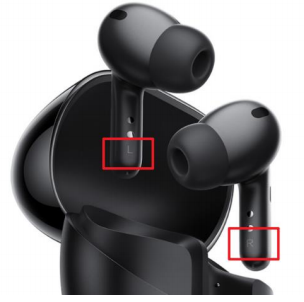
2.Q : What precautions should I take when using Xiaomi Buds 4 Pro for the first time?
A: When you use it for the first time, please be sure to remove the isolation film between the earphone and the charging box (the plastic film in the box as shown in the figure below), otherwise the displacement of the isolation film may affect the connection between the earphone and the contacts of the charging box, causing the earphone There is no normal power on/off when returning to the position, and then there are problems that the earphones cannot be paired and the Bluetooth cannot be found.
Note 1: The isolation film at the two red arrow positions in the charging compartment as shown in the figure is slightly lifted for easy removal.
Note 2: The protective film of the charging box is designed to protect the product from crushing during transportation. It is pasted manually in the factory, and the pasting effect is not stable, and there may be changes in viscosity after the protective film is normally pasted. Abnormalities such as the warping or deflection of the protective film will cause abnormal conduction between the charging contacts of the earphones and the charging box, resulting in a window that does not pop up when the cover is opened or communication failures.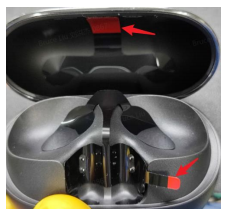
3.Q : How to charge Xiaomi Buds 4 Pro ? Does it support wireless charging ?
A: The earphones and the charging box are introduced as follows.
①Charge the headset: Put the headset into the charging box, and the headset will automatically enter the charging state.
②Charge the charging case: Use the Type-C charging cable to charge the charging case, or place the charging case with the indicator light facing up on a Qi-compatible wireless charger. (If you use a higher power charger, under normal circumstances the adapter will output the most suitable voltage/current according to the charging protocol according to the terminal support, please use a regular charger that meets 3C certification)
The wireless charging center is located about 7mm below the center of the back of the charging box. As shown in the figure, this center needs to be aligned with the center of the wireless charger for charging. The charging indicator lights up to indicate that the wireless charging is normally on.
4.Q : How to distinguish the charging status of Xiaomi Buds 4 Pro ? How to check battery level?
A: The charging box has only one LED light, which is located on the front of the charging box. The indicator light is solid orange when charging, and the indicator light is solid green when charging is complete.
1. Check the battery level of the headset:
① After the headset is connected to the mobile phone, you can check the power of the headset on the status bar of the mobile phone.
Note: The status bar of the mobile phone only shows the battery level of the earphone with the lower battery among the two earphones. Some mobile phones do not support checking the battery level of the headset.
②Put the left and right ears into the box, open the box cover, when the power of both ears is greater than 95%, it will display green for 8 seconds and then turn off, otherwise it will display orange for 8 seconds and then turn off. (Close the cover again, or short press the function key of the charging box, the same display logic)
2. Check the battery level of the charging box: take out the left and right earphones, open the box cover, when the battery level of the charging box is greater than 40%, it will display green for 8 seconds and then turn off, otherwise it will display orange and turn off after 8 seconds.
3. Use Xiaomi mobile phone to quickly check the power
① After successfully connecting the phone, put the earphones into the charging box, close the cover and approach the unlocked Xiaomi phone with Bluetooth enabled, open the cover of the charging box, a dialog box will pop up on the phone, and you can check the battery level of the earphones and the charging box.
② You can also check the battery level after binding the Xiaomi Earbuds app.
Note: To use the quick battery check function, the mobile phone system needs to be updated to the latest stable version. Currently only some Xiaomi phones support it.
Note: Open the charging box and the earphones will automatically turn on. When the earphones are put back into the charging box and the lid is closed, the earphones will automatically disconnect and enter a sleep state.
5.Q : How does Xiaomi Buds 4 Pro connect to mobile phones and other devices?
A: The connection steps are as follows.
1. Connect new device
①Put the earphones into the charging box. With the cover open, press and hold the function button for about 2 seconds. When the indicator light of the charging box flashes, the earphones are waiting to be connected.
②Turn on the Bluetooth of the device, search and connect to " Xiaomi Buds 4 Pro ".
Note: The first batch of a small number of products have an orange light that turns on for two seconds for the first time (the user may describe it as a red light). It is recommended to take the earphones out of the charging box—take off the insulating film—and then put them back into the charging box, that is, Can flash white light. (This situation only occurs when you turn on the device for the first time and press and hold for 2 seconds, and it will not occur again later)
2. Put the earphones into the charging box using the Xiaomi mobile phone quick connection, close the cover and approach the unlocked and Bluetooth-enabled Xiaomi mobile phone, open the charging box cover, and connect the earphones according to the phone interface prompts. ( Note: When the earphone is close to the mobile phone, the recommended distance is less than 30cm)
Note: To use the quick connection function, the mobile phone system needs to be updated to the latest stable version. Currently only some Xiaomi phones support this feature.
Dual-device connection The headset can be connected to two Bluetooth devices at the same time. After connecting the first device, when connecting the second device again, you need to put the headset into the charging box, press and hold the function button of the charging box for about 2 seconds, the charging box is white The light blinks and the second device is ready to be paired.
Supports Google Fast Pair. Simply open the cover, and you're paired. In one tap, the Xiaomi Buds 4 Pro enables quick, effortless Bluetooth pairing with your Android* devices. You can even check to see where you last placed it.
On all supported Android devices running Google Play services 11.7+ with compatibility back to Marshmallow (Android 6.0). Google Fast Pair will deactivate for 5 minutes if consecutvely canceled 3 times. If deactivated, please wait for 5 minutes to attempt pairing via Google Fast Pair.
Note 1: If there are other devices connected to the headset nearby, the headset may have already connected to the nearby device before the mobile phone pops up the pop-up window of finding the headset. At this time, the mobile phone will pop up a window prompting that this is not your headset, click the connect button After that, it will prompt you to press and hold the charging box button for 2 seconds, and the pairing connection will be automatically performed after operating the button; if you click the cancel button, the pop-up box will disappear and give up this pairing;
Note 2: To use the MIUI pop-up quick connection function, the mobile phone system needs to be updated to the latest version of MIUI (this function is not supported by all Xiaomi mobile phones, and some models of mobile phone systems updated to the latest version of MIUI do not support this function, as the mobile phone system updates , the supported mobile phone models will gradually increase, and whether it is supported depends on the actual situation).
6.Q : How to clear the pairing record between Xiaomi Buds 4 Pro and the device and reset the headset?
A: Take the Xiaomi mobile phone as an example, delete the Bluetooth record: Phone->Settings->Bluetooth-> Xiaomi Buds 4 Pro -> Unpair ;
Reset method : In the state of opening the cover, the two earphones are in the charging box, press and hold the bottom function button for 10 seconds, release the button until the orange light of the earphone indicator light flashes, the white light flashes, the earphones restore the factory settings and re-enter the pairing state. ( Note: Be sure to open the cover )
The reset process will clear the left and right earphones and the connection records between the earphones and the device. After the reset is complete, the headset will automatically power on and complete the binaural connection, and re-enter the pair.
Note: Due to the connection characteristics of the Bluetooth signal, there may be occasional intermittent disconnection or silence in places where 2.4GHz electromagnetic signal interference is dense.
7.Q : How to control Xiaomi Buds 4 Pro ?
A: The earphones are controlled by pressure sensing.
Note 1: The functions corresponding to the operation gestures can be modified through the Xiaomi Earbuds app ;
Note 2: In order to prevent possible hearing damage, please do not use this product at high volume for a long time.
Note 3: It is normal for the following 2 scenarios to have no pressure-sensitive prompt sound.
①When you press and hold multiple times in a short time to switch the noise cancellation mode, if the prompt sound of "the last switch noise cancellation " is playing, then the prompt sound (pressure-sensitive prompt sound) will not sound, only the sound of switching noise cancellation will sound Beeps (system beeps).
②During the operation of "double press to hang up" or "single press to answer", if the local ringtone is ringing, the pressure-sensitive prompt tone will no longer be played.
8.Q : Does Xiaomi Buds 4 Pro support binding App for control?
A: Currently only Android phones are supported to install the Xiaomi Earbuds app for control. If you are using an Apple mobile phone, you can use the default function by connecting the headset through the Bluetooth of the mobile phone. (Android 6.0 or above is required to install the Xiaomi Earbuds app , iOS system is not supported yet)
1. Before binding the App, please scan the manual QR code to download the App. (QR code as shown below)
1. There are 2 ways to connect to the App, which are organized as follows (1) and (2).
Note: Xiaomi phones and other Android phones support APP connection and use together. Please upgrade the phone system to Android6.0 or later. After successful connection, you can upgrade the firmware for the headset through the APP.
(1) Device quick connection
①Download and open the Xiaomi Earbuds app.
② Put the earphones into the charging box, close the cover and approach the unlocked mobile phone with the Bluetooth device function turned on, open the charging box cover, and connect the earphones according to the prompts on the phone interface.
(2) Device manual connection
①Turn on the bluetooth of the mobile phone, and keep the earphone in the white light flashing state. (Reset if the headset has been connected before)
②Download and open the Xiaomi Earbuds app , click the "+" in the upper right corner of the app, and follow the prompts on the phone interface to connect the earbuds.
As shown in the picture below (taking the black headset as an example), after clicking "+", it will prompt to open 2 permissions, and then it will automatically search for the device. After finding it, click the name of the black headset, and it will automatically connect. After the connection is successful, the device will be displayed automatically. Details page.
9.Q : Why is there no Hi-res golden standard logo on the package of the earphones I bought before?
A: Hello, add Hi-res on the package The golden standard logo is a normal product update, and the earphone products contained in different versions of the package are the same, please rest assured to buy and use.
Note: Although there is no such logo in the previous production , the function of the product itself is the same as that of the product on sale.
10.Q : What are the noise cancellation and transparency modes of Xiaomi Buds 4 Pro ?
A: When the headset is worn on both ears, by default, long press on either side of the headset will switch between " noise cancellation on" and " transparency mode ", and it is the noise cancellation or transparency mode that was used last time. It does not support setting the default mode. For example, if you have recently used 2-level noise cancellation mode and enhanced voice mode , you will switch between these 2 modes when you press and hold. (You can modify the gesture settings in the Xiaomi Earbuds app , and add the option to switch to "off")
Setting method: Xiaomi Earbuds app -> Xiaomi Buds 4 Pro -> Switch noise cancellation / transparency mode
1. Noise cancellation mode
①Turn on the "adaptive noise cancellation " option, then it supports 3 different gears such as Light , Balance and Deep. The earphones will intelligently recognize different noise environments and switch automatically.
Note: These 3 gears of noise cancellation are automatically selected by the system and do not support manual selection. Recommended applicable scenarios for 3 noise cancellations : Light noise cancellation (Bookshop/office), Balanced noise cancellation (Street/gym), Deep noise cancellation (Metro station/airport ).
② There is another 6-speed manual noise cancellation , which supports manual adjustment to the most comfortable gear for you, and you can manually click the 6 dots to switch.
Note: The 6-speed manual noise cancellation function needs to be manually switched on the Bluetooth settings page of the compatible model or the Android Xiaomi Earbuds app.
2. Transparency mode
Transparency mode allows users to enjoy music without missing the surrounding voices or ambient sounds that need attention.
Xiaomi Buds 4 Pro supports 3 kinds of transparency modes : regular transparency mode , enhanced voice mode , and ambient enhancement mode.
① regular transparency mode : The external sound is played through the earphone and transmitted to the ear clearly. This mode is the default.
② enhanced voice mode : On the basis of amplifying all external sounds, the human voice is enhanced, and it is clearly transmitted to the ear.
③ Ambient enhancement mode : Amplifies the ambient sound as a whole and transmits it to the ear clearly.
11.Q : Does Xiaomi Buds 4 Pro support wearing detection?
A: This headset supports wearing detection function, which can be enabled/disabled in the Xiaomi Earbuds app.
Function introduction: Take off the earphones, the sound will pause; put on the earphones, the sound will continue to play.
Setting method: Xiaomi Earbuds app -> Xiaomi Buds 4 Pro -> More -> Wearing Detection -> On/Off.
12.Q : Does Xiaomi Buds 4 Pro support Find my device ?
A: This headset supports Find my device.
Path: Xiaomi Earbuds app -> Xiaomi Buds 4 Pro -> Find my device , you can choose only the left/right/both earbuds, and the earbuds will make a default ring after clicking (not modifiable).
Note 1: The headset must be connected to the mobile phone near the mobile phone. If the headset is worn, ringing the headset may damage hearing.
Note 2: You can also go to the Bluetooth setting page of the compatible model->headphone anti-lost-> Find my device.
13.Q : Does Xiaomi Buds 4 Pro support anti-lost reminder?
A: This headset only turns on the anti-lost reminder on the Bluetooth setting page of the compatible model. After 3 minutes from the box, if the wearing status is not detected, the mobile phone will pop up an anti-lost reminder.
Setting method: Phone Settings -> Bluetooth -> Xiaomi Buds 4 Pro -> Headphones Anti-lost -> Turn on "Anti-lost Reminder" ,
14.Q : How to use the earplug fit detection of Xiaomi Buds 4 Pro ?
A: This headset supports the earplug fit detection function, which can detect which size earplug can provide a comfortable wearing experience and the best acoustic effect.
Opening method: Xiaomi Earbuds app -> Xiaomi Buds 4 Pro -> Earbuds fit test. During the test, you need to wear earphones, and the earphones will automatically play the music detection effect during the test.
15.Q : Does Xiaomi Buds 4 Pro support smart hands-free?
A: Xiaomi Buds 4 Pro supports smart hands-free function.
1. Smart no-pick function: In noise cancellation mode, when the wearer is detected to speak, the transparency mode will be automatically turned on to facilitate conversation, and it will resume after a period of time. (The specific recovery time can be selected at the time of setting)——Note: This is to use the force sensor control to detect the wearer's speech, that is, it is triggered when the user actively speaks, not the voice of others to trigger the transparency mode.
2. Setting method: Open the Xiaomi Earbuds app -> More -> Smart Hands-free , the default function is off, and you can choose the time for automatic recovery.
(Optional 5-second recovery, 10-second recovery, 15-second recovery, and no recovery.)
Note: You can also see the "Smart Hands-Free" option on the Bluetooth settings page of the compatible model.
16.Q : Does Xiaomi Buds 4 Pro support automatic answering of incoming calls?
A: Xiaomi Buds 4 Pro can only enable "automatically answer incoming calls" on the Bluetooth settings page of the compatible model.
Note: Unsuitable models do not support enabling this function.
17.Q : Does Xiaomi Buds 4 Pro support displaying in the notification bar?
A: Support. It can be turned on in the Xiaomi Earbuds app or on the Bluetooth settings page of the compatible model.
Setting method: Xiaomi Earbuds app -> Xiaomi Buds 4 Pro -> More -> Notification Bar Display -> On/Off.
18.Q : Does Xiaomi Buds 4 Pro support multi-device connection ?
A: This headset supports Dual-device connectivity. Support simultaneous connection to two Bluetooth devices. Answer incoming calls when watching videos on a tablet or laptop.
Setting method: Xiaomi Earbuds app -> Xiaomi Buds 4 Pro -> More -> Dual-device connectivity -> on/off.
Connection steps: first turn on the function in the Xiaomi Earbuds app , after connecting the first device, put the earbuds into the charging box, open the cover and press and hold the function button of the charging box for about 2 seconds, the white indicator light of the charging box will flash, and the second two devices to pair.
19.Q : Does Xiaomi Buds 4 Pro support smart scenes?
A: Not supported.
20.Q : Will Xiaomi Buds 4 Pro automatically shut down if it is not connected for a long time?
A: When the headset is out of the box, it will not automatically shut down if it is not connected for a long time.
Note: The earphones will only shut down after being fully charged when the earphones are in the earphone box and the cover is closed, and will wake up when the lid is opened, and will not automatically shut down in other cases.
21.Q : Is it possible to connect the left and right earphones to a mobile phone and other devices, and use them as two single-ear earphones?
A: Not supported.
22.Q : Does the headset support game mode / low latency mode?
A: Xiaomi Buds 4 Pro does not support game mode, you can turn on the "Low Latency" mode in the Bluetooth settings page of the compatible model.
Setting method: phone settings -> Bluetooth -> enter the function interface of Xiaomi Buds 4 Pro , you can see the options
23.Q : Does Xiaomi Buds 4 Pro support volume adjustment?
A: Support volume adjustment, which can be adjusted by configuring gestures and voice control. Both methods need to be set in the Xiaomi Earbuds app.
Gesture control setting method: Xiaomi Earbuds app -> Xiaomi Buds 4 Pro -> Gesture Settings , set the gestures of "press twice" and "press three times" respectively: for example, press the left earbud twice -> volume +, press three times on the left earbud ->Volume-.
Voice control setting method: Xiaomi Earbuds app -> Xiaomi Buds 4 Pro -> More , turn on the voice control function. After the setting is complete, you can control the volume through the command words "volume up" and "volume down" when wearing the headset and connecting to the phone.
24.Q : Will Xiaomi Buds 4 Pro broadcast the name of the contact when the phone calls ?
A: When a call comes in, Xiaomi Buds 4 Pro will only ring, and it does not support the name and phone number of the incoming call.
25.Q : The left earphone and the right earphone are lost / damaged respectively, can the remaining 2 earphones be used in combination?
A: For Xiaomi Buds 4 Pro , according to whether the firmware version is consistent, the arrangement is as follows.
①If the firmware versions of the two earphones are the same: you can put the left and right earphones into the charging box, press and hold the function key for 10 seconds when the cover is opened, and they can be used in combination after the reset is successful. (If the versions are inconsistent, there may be problems when using it.)
②If the firmware versions of the two earphones are inconsistent: they cannot be used in combination directly. You need to go to the service outlet to upgrade the firmware of the earphones through the built-in upgrade function of the SN reading and writing tool, and then write it into the SN before using it.
26.Q : Does Xiaomi Buds 4 Pro support Dual-device connectivity ?
A: Yes.
28.Q : How many microphones does Xiaomi Buds 4 Pro have and how do they work?
A: There are 3 microphones (unilateral) in the headset body, which are feed-forward microphone (FFMIC), feed-back microphone (FBMIC), and call microphone (TALKMIC). The 3 microphones are automatically controlled according to different business scenarios with the force sensor control Realize call radio.
29.Q : Which phones are compatible with the LHDC function of Xiaomi Buds 4 Pro ?
A: The LHDC of this headset needs to be matched with some compatible mobile phones before it can be turned on on the Bluetooth setting page.
The mobile phone models that support LHDC4.0+96kHz are as follows.
30.Q : How to use the LHDC function of Xiaomi Buds 4 Pro ?
A: The steps are as shown in the figure below. ( Note: LHDC and mobile phones need to be adapted before they can be used normally, please refer to the list of LHDC compatible models )
Setting method: mobile phone settings -> Bluetooth -> click the small arrow on the right of the connected headset -> select "audio quality" in the interface that appears
->LHDC->96.0kHz. (Up to 96kHz can be selected, and 48kHz/44.1kHz can also be selected, but the options for these 3 frequencies in the mobile phone are subject to the actual mobile phone adaptation)
Note: For models that are not compatible with LHDC (such as other mobile phones), if there are abnormal problems (such as stuttering) when connecting this headset, it may be due to compatibility (because there is no adaptation), it is recommended to switch the audio quality to AAC/SBC. Also try lowering the bluetooth audio sampling rate (e.g. switch from 96kHz to 48kHz).
31.Q : Which phones are compatible with the Xiaomi Buds 4 Pro Dimensional audio feature ?
A: There are two ways to implement the Dimensional audio feature supported by Xiaomi Buds 4 Pro.
1. The first is that the hardware of the headset itself supports the independent Dimensional audio feature function. There is no need to adapt the mobile phone system and third-party apps, just turn on the function on the Bluetooth settings page of the compatible model or in the Xiaomi Earbuds app.
2. The second type is dependent on the mobile phone system and third-party App.
Note: The supported models for the second case include Xiaomi 13 Pro, Xiaomi 13, Xiaomi 13 Lite, Xiaomi 12X, Mi 11i, Mi 11, Mi 11 Ultra. Other models are gradually being adapted.
Note: When the second condition is met, the Dimensional audio feature will use the mobile terminal calculation by default (the default option is "Mobile Dimensional audio feature "), which can bring you better sound quality; if you want to experience better adaptation compatibility, Please manually select "Headphone Dimensional audio feature " (turn on "Dual Device Connection" to connect with other Bluetooth devices).
32.Q : How to use the Xiaomi Buds 4 Pro Dimensional audio feature ?
A: Turn on the Dimensional audio feature , and you can experience the 3D immersion and sense of space in the supported audio and video.
Xiaomi Buds 4 Pro supports 2 ways to experience the Dimensional audio feature : phone Dimensional audio feature , headset Dimensional audio feature.
1. Dimensional audio feature of mobile phone
Dimensional audio feature " and "Head Tracking" in the Bluetooth settings page of the compatible model (as shown in the figure below), and then play the resource adapted to the Dimensional audio feature in the audio and video app that supports the Dimensional audio feature Turn on " Dimensional audio feature ".
Note: Before enabling the "Head Tracking" function on the Bluetooth settings page, you must first enable the " Dimensional audio feature " option, otherwise the "Head Tracking" option is not available.
2. Dimensional audio feature of headphones
How to use: Xiaomi Earbuds app -> Audio Settings -> Dimensional audio feature. (Or turn it on on the Bluetooth settings page of the compatible model)
Note 1: After turning on the " Dimensional audio feature ", you can also experience the sense of hearing of the Dimensional audio feature when connecting devices that support stereo Bluetooth audio output, such as TVs, game consoles, handhelds, etc.
you feel that the following speed of head tracking is slow after turning on the "mobile phone Dimensional audio feature ", it is recommended to use the "headphone Dimensional audio feature ", which can greatly reduce the transmission time and improve the followability. (The phone's Dimensional audio feature and speed are limited by Android.)
33.Q : Does the Xiaomi Buds 4 Pro headset firmware support automatic upgrade?
A: For Xiaomi Buds 4 Pro , you can turn on "Automatic Update" on the Bluetooth settings page of the compatible model.
The headset will upgrade silently after the option is turned on. The logic is: when the headset is connected to the mobile phone, the firmware package will be downloaded and synchronized to the headset. When the headset is put back into the charging box and the cover is closed, it will automatically upgrade. (If the headset is taken out halfway and the upgrade is interrupted, it will be upgraded again next time it is put back into the charging box. The interruption of the upgrade does not affect the normal use of the headset.)
34.Q : What are the colors of the indicators on Xiaomi Buds 4 Pro ?
A: The Xiaomi Buds 4 Pro product definition has 3 colors: green, orange, and white.
1. Reset
Open the case cover, press and hold the setting button of the charging case for 10 seconds until the status light flashes orange 3 times and then flashes white.
2. Pairing
① Open the case cover, press and hold the function key of the charging case for 2 seconds to enter the pair.
②When the earphone is in the pair , open the cover and it will flash white (2 flashes per second) until the pair is exited.
3. Fault status
The earphones are in the charging box, and the orange flashes alternately when the cover is opened. (At this time, please press and hold the function key for 10 seconds to reset it to solve the problem)
4. Charging box charging (wired/wireless charging)
One-sentence description: As long as the charging device (charging box, earphone) is less than or equal to 95%, it will display orange.
| Status | open cover | close cover |
| Both ears in the box | Box and dual headphones are greater than 95% of the power, display green, always on; otherwise, display orange, always on. | The status is the same as Open cover |
| Single ear in box | Box and in the box single headset are greater than 95% of the power level, display green, always on; otherwise, display orange, always on. | The status is the same as Open cover |
| Both ears are not in the box | The box is greater than 95% of the power, display green, always on; otherwise, display orange, always on. | The status is the same as Open cover |
5. Normal state (non-charging, non-pair, non-fault state)
| Status | Open cover | Close cover | Short press function key |
| Both ears in the box | Both ear power is greater than 95%, display green 8 seconds and then turn off; otherwise display orange 8 seconds and then turn off. | The status is the same as Open cover | The status is the same as Open cover |
| Single ear in box | If the power level of one ear is greater than 95%, the display will turn off after 8 seconds in green; otherwise, the display will turn off after 8 seconds in orange. | The status is the same as Open cover | The status is the same as Open cover |
| Both ears are not in the box | If the battery pack is more than 40%, the display will be green for 8 seconds and then turn off; otherwise, the display will be orange for 8 seconds and then turn off. | The status is the same as Open cover | The status is the same as Open cover |
| Push button | short press <0.5 seconds - battery pack to the headset charging status light. Short press time greater than 0.5 less than 2 seconds, the white light is long. ① If the button is released between 0.5 and 2 seconds, display the battery pack to the headset charging status light; ② Press more than 2 seconds, 2s ~ communication time, long light white light ② Press more than 2 seconds, 2s ~ communication time, long light white light, communication success, white light flashing. | Display the battery box to charge the headset, 8 seconds after turned off | / |
| First opening of the cover | Exit "factory mode", the earphones start to pair, and the white light keeps flashing. | Display the battery box to charge the headset, 8 seconds after turned off | The status is the same as Open cover |
35.Q : Why do I hear a " bang bang " sound when wearing Xiaomi Buds 4 Pro while walking ?
A: Hello, this phenomenon is a common problem with in-ear headphones. When the in-ear earphones are worn closely, the footsteps or body vibrations during walking will be transmitted to the eardrum, forming a "bang bang" sound. You can try to replace the ear caps with smaller ones.
36.Q : Why do I hear a short rustling sound when I put it on the ear?
A: Hello, when the headset is not worn, it will automatically enter the noise cancellation off state to save power consumption. Every time you wear it in the ear, the earphone will automatically detect the wearing status and turn on the corresponding noise cancellation mode. There will be a short and slight rustling sound during the status switching. This is a normal phenomenon caused by the status switching. It will disappear after the switching is completed and will not affect normal use.. When either earphone is taken out of the ear canal, there will be a corresponding state switch (the specific state is related to the earphone settings), and a similar phenomenon will occur when you wear it repeatedly. This kind of phenomenon is not a malfunction of the earphone, please rest assured to use it.
Troubleshooting
1.Q : When connecting to two devices, the Xiaomi Earbuds app prompts that the connection failed?
A: When connecting multiple devices, since the earbuds can only be connected and interacted with one Xiaomi Earbuds app , if the earbuds have been connected to a mobile phone, the connection cannot be made through the Xiaomi Earbuds app in another mobile phone, and a connection will be prompted fail. If you want to connect with two devices, it is recommended to search for the headset through the MIUI phone pop-up window or through the Bluetooth interface to connect.
2.Q : Why is the earphone pressure-sensitive control unresponsive?
A: Please refer to the following information for troubleshooting. (This entry is only applicable to products with pressure sensitivity control)
① Please follow the function introduction of the earphone instruction manual and press the correct position of the earphone "press prompt area";
② Please open the App bound to the headset to confirm whether the gesture settings have been modified;
③Please reset the headset and try again;
④If the above steps are not resolved, and there is no sound prompt when pressing, please apply for after-sales treatment.
3.Q : Why is it easy to freeze after turning on LHDC ?
A: It is usually caused by wireless interference. It may be that there are many peripheral electronic devices and the Bluetooth environment is poor.
①Due to the high-quality audio decoding of LHDC, the audio bit rate will be relatively high, while the bandwidth of Bluetooth is fixed, which leads to the inherent anti-interference ability of LHDC not as good as AAC, SBC and other formats.
②The bit rate of LHDC is relatively high (250Kbps-900Kbps), which transmits a lot of data and is more likely to be affected by the interference environment, causing the earphones to fail to receive all the data in time, resulting in stuttering.
4.Q : What should I do if I can’t find the LHDC option on the Bluetooth settings page of the compatible model?
A: This is because the relevant software version has not been updated. Please refer to the following steps to deal with it.
① Update the mobile phone system;
②Update the Bluetooth version.
5.Q : Turning on the Dimensional audio feature on the Bluetooth setting page of the MIUI system and the APP client at the same time , the sound quality becomes worse instead?
A: Please turn on one, and turn off the Bluetooth setting page of MIUI system or the Dimensional audio feature switch on the APP client to try again. It is recommended to use the Dimensional audio feature on the Bluetooth settings page of the MIUI system first.
6.Q : Why can't the headset turn on the transparency mode ?
Transparency mode can be turned on when wearing on one ear , but the headset needs to detect the wearing status, otherwise it will prompt "Please wear the headset".
If the transparency mode cannot be enabled , please refer to the following ideas to deal with it.
①The earphone may not be worn correctly, please adjust the position of the earphone in the ear canal.
②The earplugs may not fit your ears well enough, please replace them with suitable earplugs.
③Please put both ears into the box and reset the earphones, and then try to turn on the transparency mode.
7.Q : Why can't the earphones turn on noise cancellation ?
A: To turn on noise cancellation , you need to wear it on both ears. When noise cancellation is turned on and the earphones are taken off, it will automatically switch to the "off" option.
If noise cancellation cannot be enabled , please refer to the following ideas to deal with it.
①The earphone may not be worn correctly, please adjust the position of the earphone in the ear canal.
②Please keep wearing both ears, and then turn on noise cancellation.
③The earplugs may not fit your ears well enough, please replace them with suitable earplugs.
④Put both ears in the box and reset the earphones, and then try to wear them with noise cancellation turned on.
⑤If the above steps are not resolved, please upgrade the firmware, if the upgrade is still unresolved, please apply for after-sales processing.
8.Q : Is it normal that there is a slight step difference in some positions of the appearance of the earphone?
A: Hello, the design of the earphone and the charging box will fully consider the rationality of the structure, but some specific positions (such as the mold line, charging contacts, buttons, etc.) may see a slight step difference at a specific angle. There are strict quality inspection standards for the production of earphones, and the products shipped out of the factory have undergone strict quality inspections and meet the quality tolerance requirements. This situation will not affect the functions of the products, please feel free to use them.
9.Q : What should I do if the appearance of the earphones is corroded?
A: Hello, the earphone casing has been tested for reliability. If there is corrosion, it may be due to the special use environment or the abnormal spraying process of the casing. It is recommended to apply for after-sales treatment. If corrosion occurs during normal use, it can be treated in accordance with the warranty.
10.Q : What should I do if the paint on the edge of the charging box shaft is peeled off?
A: Hello, in this case, there will be slight wear and tear in normal use, which will not affect the function of the product, please rest assured to use it.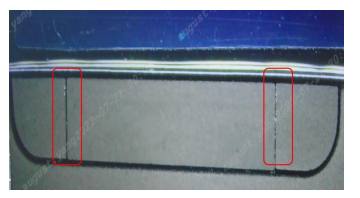
11.Q : What should I do if the earphone charging contacts are raised?
A: The contacts where the headset contacts the charging box are prominent, which may result in inability to communicate or charge.
If you encounter this problem with the product, please apply for after-sales processing.
12.Q : What should I do if the indicator light of the charging box keeps showing an orange light (the orange light is always on)?
A: If you encounter the problem that the orange light is always on , please check whether it is in the charging state. (Users may express the orange light as a constant red light)
1. If the charging box is in the charging state (wired charging or wireless charging): the orange light is displayed when the power is lower than 95%, which is normal.
2. If the orange light appears even when the charging box is not charging, please refer to the following steps to deal with it.
①Please reset the charging box first and then check if it is normal. Steps to reset the charging box : When the earphone box is closed, first press and hold the button at the bottom without letting go.
Then plug in the Type-C cable to charge the box, release the button after two seconds and remove the Type-C charging head.
②If the problem still persists, please do after-sales treatment (replace the charging box).
13.Q : What should I do if the indicator light keeps flashing orange after the charging case is opened?
A: When you open the charging box, if you see the orange light flashing, please refer to the following ideas to deal with it. (Users may describe it as flashing red light)
1. Please reset the headset first to see if it is normal. The reset steps are as follows:
①Open the earphone box and put the two earphones into the box, keep the box open;
②Press and hold the button at the bottom of the earphone box for 10 seconds and then release it. At this time, the indicator light should be flashing orange;
③Wait for the indicator light to change from orange to white and flash, which means the factory reset is successful (you can use your mobile phone to search and connect the earphones at this time).
2. Connect the Xiaomi Earbuds app and upgrade the earbuds firmware.
3. If it is still unresolved, please deal with it after the sale.
14.Q : What should I do if there is noise after the earphones turn on noise cancellation ?
A: After enabling noise cancellation , judge the exception by scene and handle it:
①If there are frequent noises in scenes such as slight shaking of the head or walking in the normal state, you can apply for after-sales treatment.
②If there is noise in scenes such as vigorous running and jumping or taking the subway, the noise cancellation earphones will encounter problems, not malfunctions.
15.Q : What should I do if I fail to upgrade the firmware of the headset using the Xiaomi Earbuds app ?
A: Please refer to the following ideas for troubleshooting.
① It may be that the download of the firmware package failed, please ensure that the network is unblocked, or replace the network, and then try to upgrade again;
②It may be that the connection between the mobile phone and the headset is unstable, please try again, or try again in a place with less interference from the wireless environment;
③The earbuds app does not support updating in the background or locked screen. Please ensure that the Xiaomi Earbuds app is running in the foreground and the screen is not turned off.
16.Q : When the Xiaomi mobile phone receives a call, the pressure-sensitive area is pressed twice continuously , but there is no pressure and no prompt sound. What is the reason?
A: When connected to a Xiaomi mobile phone, this is a normal design, the purpose is not to interrupt the ringtone of the incoming call.
17.Q : What should I do if the color of the earbuds is wrong after binding the Xiaomi Earbuds app ?
A: Please update the headset firmware on the Xiaomi Earbuds app interface, the latest version has solved this problem.
18.Q : What should I do if the Bluetooth of the mobile phone is connected to the headset, but the interface of the Xiaomi Earbuds app displays "Connecting"?
A: In this case, please close the Xiaomi Earbuds app (remove the app in the task management interface), and then reopen it.
19.Q : What should I do if I turn on the " Dimensional audio feature of mobile phone" on the Bluetooth setting page of the mobile phone, but it sounds ineffective?
A: Please note that what is mentioned here is that there is a problem with turning on the " Dimensional audio feature of the mobile phone ", not the " Dimensional audio feature of the headset ". If it is confirmed that it is a supported model, the system is up-to-date and the Dimensional audio feature resource is being played , but there is no feel of dimension , please temporarily switch the "Mobile phone Dimensional audio feature " to "Headphone Dimensional audio feature ", the research and development is analyzing and solving" The Dimensional audio feature of the mobile phone does not take effect.
Note: Only a small number of audio and video resources support the " Dimensional audio feature ". Please search for specific resources by yourself, and you can find them in common music apps.
20.Q : When wearing it, the setting interface shows that both ears are charging, and there is no prompt sound when wearing it, and there is no sound when playing music?
A: This situation is that the status of the headset out of the box has not been correctly judged. Occasionally, the latest version of the firmware has resolved it. Please update the headset firmware.
21.Q : During a mobile phone call, when both ears are out of the box, there is no sound in one ear?
A: Please refer to the following steps to deal with it.
①When talking on the phone, try to put both ears back into the charging box and then take it out to wear.
②Upgrade the headset firmware to solve the problem. (Binding Xiaomi Earbuds app to detect updates)
22.Q : I have connected the mobile phone before, opened the charging box, took out the single ear and closed the cover, and the pop-up window shows that the power of the earphone is 0% ?
A: Please upgrade the headset firmware. (Binding Xiaomi Earbuds app to detect updates)
23.Q : When I make a phone call, there is an asynchronous ringing in both ears, and it will return to normal after two or three times?
A: This situation has been optimized and resolved, please upgrade the headset firmware.
24.Q : You can switch noise cancellation in the Bluetooth settings , but the Xiaomi Earbuds app cannot, what should I do?
A: In this case, please upgrade the firmware of the earbuds and the version of the Xiaomi Earbuds app.
Note: It is recommended that you use the Bluetooth settings page first for a more complete experience.
25.Q : When connected to a computer to play music, the music does not pause when the earphones are taken off?
A: In this case, the wear detection command of some music listening software on the PC side does not take effect. It is recommended to try another music player, or give feedback to the software developer for optimization. (Your business headphones will also encounter this situation)
26.Q : When the earphone is connected to the notebook, and listening to music in the video conference or PC client, there is a continuous current hum?
A: This situation may be a computer system problem. It is recommended to feedback to the PC manufacturer for optimization.
Note: You can connect to a mobile phone or other computer to verify the problem.
27.Q : When the earphone switches to 96kHz sampling rate, it needs to be manually switched again when it is disconnected and reconnected. Is it normal?
A: This situation is normal at present.
Note: The 96kHz sampling rate is more likely to be disturbed by the external environment, and it is prone to stuttering. The current setting is 48kHz by default.
28. Q : Is it normal to see obvious gaps when the upper cover of the Xiaomi Buds 4 Pro charging case is lightly pushed?
A: Hello, I am very sorry for the inconvenience caused to you. The upper cover and the lower cover of the charging box are connected by a metal shaft. In order to ensure the smooth opening and closing of the cover, the stator and rotor of the shaft should be designed with a certain reasonable gap, so when the upper cover is pinched or rubbed hard, the upper cover will There is a slight shift in the range of the shaft clearance to create a gap, which is a common phenomenon for this type of product. The product has undergone strict appearance and function inspections before leaving the factory, please use it with confidence.
29.Q : Is it normal to hear a " creak " sound when rubbing the top cover of the Xiaomi Buds 4 Pro charging case ?
A: This product shakes the charging box and there is an abnormal sound, which is normal. We are very sorry for the inconvenience. For the convenience of taking and placing the earphones, the charging box adopts an open magnetic absorption "space capsule" shape, and multiple built-in magnets absorb and fix the earphones. When the charging box is shaken vigorously, the earphones in the box may shake slightly and be accompanied by a slight rattling sound due to the impact force, which is a common phenomenon for this type of product. The product has undergone strict appearance and function inspections before leaving the factory, please use it with confidence.
30.Q : Is it normal to hear the sound when shaking the charging case of Xiaomi Buds 4 Pro ?
A: Hello, I am very sorry for the inconvenience caused to you. In order to facilitate the taking and placing of the earphones, the charging box adopts an open magnetic absorption "space capsule" shape, and multiple built-in magnets absorb and fix the earphones. When the charging box is shaken vigorously, the earphones in the box may shake slightly and be accompanied by a slight rattling sound due to the impact force, which is a common phenomenon for this type of product. The product has undergone strict appearance and function inspections before leaving the factory, please use it with confidence.
31.Q : What should I do if the color of the Xiaomi Buds 4 Pro earphones displayed on the Xiaomi Share on the computer is different from the real one?
A: Hello, inaccurate color display is a known problem, and the engineering team is working hard to solve it, and will push the Xiaomi Share client to fix it as soon as possible. I'm really sorry for the inconvenience.
32.Q : What should I do if the Xiaomi Buds 4 Pro does not charge / turn on a single earphone ?
A: If one ear is not charging/not turning on, it may lead to the phenomenon that one ear cannot be connected and there is no sound in one ear.
If you encounter this problem, refer to the following steps to solve it.
1. Reset:
①Open the earphone box and put the two earphones into the box, keep the box open;
②Press and hold the function button at the bottom of the charging box for 10 seconds until the indicator light turns orange and then let go; (the orange light will flash after the long press for 10 seconds, which means the reset command is triggered)
③Wait for the indicator light to change from orange to white, then turn on the Bluetooth of the mobile phone to pair with the headset;
2. If the above operations still cannot solve the problem, it is recommended to deal with it after sale.
33.Q : What should I do if the pressure-sensitive control of Xiaomi Buds 4 Pro does not respond?
A:
① Check whether the pressure sensitive area is correct (the pressure sensitive position of the earphone is as shown in the red box in the figure below), press and hold the position with your index finger to see if it switches to noise cancellation / transparency, or pinch to see if there is a response.
②The headset is in the wearing state. It is normal for the removed earphones to perform pressure-sensitive movements and no response.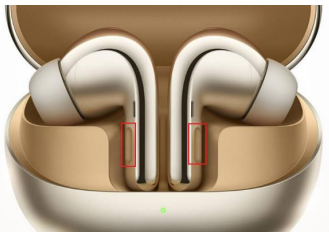
34.Q : Why do some devices feel poor in sound quality after connecting to headphones?
A: It may be a problem with audio and video resources , abnormal device decoding or software configuration (such as tuning/equalizer). Please refer to the following ideas for processing.
① Whether it is due to the equipment, please change another mobile phone to play music to check whether the sound quality is normal.
②Whether the equalizer is modified or not, turn off the equalizer that comes with the software.
③Turn off the phone " Dolby Atmos® " (search for " Dolby " at the top of the phone settings interface to find the option).
Some mobile phones have built-in Dolby Atmos® tuning function, which may have negative effects when superimposed with the headset function. (MIUI system is optimizing for this situation)
Does it help?