

Redmi Buds Essential FAQ
Overview
1. Q: What are the features of Redmi Buds Essential?
A:
1、 7.2mm dynamic driver professionally tuned by Xiaomi Acoustic Lab. With powerful and thumpy bass, crisp and clear highs, the beautiful tones of music dance in your ears.
2、AI algorithm for call noise reduction effectively filters out ambient noise and keeps your voice clear and undistorted.
3、 Bluetooth® 5.2. Delivering stable transmission, enhanced anti-interference ability
4、 Gaming mode. Reduced latency, audio-visual synchronisation.
5、 Extra-long battery life for up to 18 hours;Enjoy up to 5.5 hours of battery life on a single charge of both earbuds, and up to 18 hours with the charging case. Immerse yourself in a world of music.
6、 Quick pairing. Connecting immediately with earbuds after first pairing, enjoy the pleasure of music anytime.
2. Q : What is the Bluetooth version of Redmi Buds Essential ?
A: Redmi Buds Essential is the latest Bluetooth version 5.2. With the commercialization of the latest technical standards , more and more smartphones have begun to adopt the Bluetooth 5.2 standard . Bluetooth 5.2 headsets will maximize the technical advantages of 5.2 and bring consumers an excellent experience. The transmission rate is faster, more power-saving and more stable.
3. Q : How long is the battery life of Redmi Buds Essential ?
A: Extra-long battery life for up to 18 hours; Enjoy up to 5.5 hours of battery life on a single charge of both earbuds, and up to 18 hours with the charging case. Immerse yourself in a world of music.
The above is the laboratory test data, and the actual use time is related to the use intensity.
4. Q : Does the Redmi Buds Essential battery support replacement?
A: The battery does not support replacement.
Common problem
1. Q : How to wear Redmi Buds Essential ?
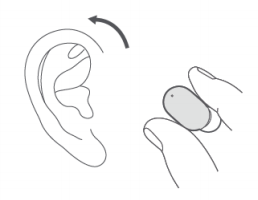
A: First select and assemble earmuffs of the right size, and then wear them as shown in the figure below:
Insert the ear caps obliquely downwards into the ear canal gently, and it is advisable to gently swing the head without shaking the earphones.
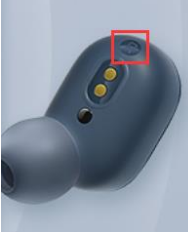
The earphones distinguish between left and right sound channels. The position shown in the figure below has "L" and "R", which represent the left and right sound channels respectively. Please wear them correctly.
2. Q : How to charge Redmi Buds Essential ?
A: The charging box is plugged into the charging cable and connected to the charger. The charging box itself will start charging. The earphones will start charging when the earphones are placed in the charging box. The earphones and the charging box can be charged at the same time or separately.
The charging indicator light is solid white when the charging box is not fully charged, and turns off when fully charged.
The earphone indicator light does not indicate the charging status of the earphone. When the earphone power is lower than 10%, the white light will double flash every 10 seconds for 500ms on and 500ms off).
Before starting to use, please tear off the isolation film at the charging contacts of the left and right earphones, and fully charge the charging box and earphones.
3. Q : How to turn on and off the Redmi Buds Essential ?
A: The method of turning on and off the earphone is as follows:
Power on: 1. The earphones are in the charging box, and the earphones will automatically turn on when the charging box is opened.
2. When the headset is outside the charging box and turned off, put it into the charging box, and the headset will automatically turn on.
Shutdown: 1. Put it into the charging box, close the cover, the headset will automatically disconnect and start charging, and it will automatically shut down after fully charged.
2. The headset enters the pairing state and is not in the charging box. If it is not connected to the device within 5 minutes, the headset will automatically shut down.
4. Q : How does Redmi Buds Essential connect to mobile phones and other devices?
A: Connection steps:
1. When connecting for the first time, after the charging box is opened, the white lights of the left and right earphones will flash slowly and enter the waiting connection state. If it is not the first connection, the earphones will automatically connect back to the last paired device after powering on; at this time, you can put the left and right earphones into the charging box, and press and hold the button of the charging box for 2 seconds to force it to enter the waiting connection state; or put the left and right earphones into the charging box In the box, press and hold the button of the charging box for 10 seconds, the white light of the charging box will flash quickly for 3 seconds and turn off, and the white light of the earphone will be on for 5 seconds to reset successfully. After the reset is complete, the headset will automatically enter the waiting connection state.
2. Open the device Bluetooth search and click " Redmi Buds Essential " to connect to the device. After the connection is completed, when the headset is turned on again, it can automatically connect back to the last paired device.
5. Q : How to clear the pairing record between Redmi Buds Essential and the device?
A: Put the left and right earphones into the charging box, press and hold the button of the charging box for 10 seconds, the white light of the charging box will flash quickly for 3 seconds and turn off, and the white light of the earphones will be on for 5 seconds to reset successfully. The reset process will clear the left and right earphones and the connection records between the earphones and the device. After the reset is complete, the earphones will automatically power on and complete the serial connection, and enter the state of waiting for connection.
6. Q : How to reset Redmi Buds Essential ?
A: Put the left and right earphones into the charging box, press and hold the button for 5 seconds to reset successfully. The reset process will clear the left and right earphones and the connection records between the earphones and the device. After the reset is complete, the earphones will automatically power on and complete the serial connection, and enter the state of waiting for connection.
7. Q : How do the left and right earphones of Redmi Buds Essential establish serial records?
A: Put the left and right earphones into the charging box, press and hold the button of the charging box for 10 seconds, the white light of the charging box will flash quickly for 3 seconds and turn off, and the white light of the earphones will be on for 5 seconds to reset successfully. The reset process will clear the left and right earphones and the connection records between the earphones and the device. After the reset is complete, the earphones will automatically power on and complete the serial connection, and enter the state of waiting for connection.
8. Q : How does Redmi Buds Essential answer / hang up calls, reject calls, play / pause music, and enable voice assistants?
A: The buttons prevent accidental touch. Tap or press and hold the button to control calls and music; press the button three times to wake up the voice assistant; every operation with your fingertip is precise and neat.
 Once tap left/right earbud: Answering incoming calls
Play/Pause
 Twice tap left/right earbud: Reject/End call
Next Song
 Press and hold left and right earbud for 1.5s: Enter/ Exit low-latency mode
 Triple tap left/right earbud: Activate voice assistant
9. Q : Does Redmi Buds Essential support connecting two mobile phones and other devices at the same time?
A: It does not support connecting two mobile phones and other devices at the same time.
10. Q : Does Redmi Buds Essential support the left and right earbuds to be connected to a mobile phone and other devices, and used as two single-ear earphones?
A: It is not supported to connect the left and right earphones to a mobile phone and other devices, and it is not supported to be used as two single-ear earphones.
11. Q : Will the Redmi Buds Essential automatically shut down if it is not connected for a long time?
A: If the headset is not connected for a long time and the headset is not operated, the headset will automatically shut down after 5 minutes.
12. Q : Does Redmi Buds Essential support game mode / low latency mode?
A: Redmi Buds Essential supports low latency mode.
Note: Only some models of mobile phones can turn on/off the "Low Latency" option in the Bluetooth settings on the mobile phone .
13. Q : Does Redmi Buds Essential support volume adjustment?
A: Redmi Buds Essential itself does not support volume adjustment, you need to adjust the volume on the device side.
14. Q : Can I use a power bank to charge Redmi Buds Essential ?
A : At present, most mobile power supplies have a current protection function. When the mobile power supply detects that the output current is too small, it will disconnect the charging. Since the battery capacity of Redmi Buds Essential is small, the current during charging is also small, which is generally lower than the current protection trigger value of the power bank, so it will trigger the current protection function of the mobile power supply. If the power bank supports low current mode, you can use low current mode to charge the headset.
15. Q : Will Redmi Buds Essential announce the name of the contact when the phone calls ?
A: When a call comes in, the Redmi Buds Essential will only ring, and it does not support the broadcast of the contact name and phone number of the call.
16. Q : Will the Redmi Buds Essential fall off easily when worn?
A: It is not easy to fall off. The design of Redmi Buds Essential follows ergonomics. The ear caps fit the external auditory canal and can be worn firmly on the ears. You can choose the appropriate size ear caps according to your personal needs.
17. Q : Does Redmi Buds Essential support connection with Mi Band or other Bluetooth bracelets?
A: The connection is not supported, because the headset and the Bluetooth bracelet belong to the receiving terminal equipment, so they cannot be connected.
18. Q : Two Redmi Buds Essential , the left earphone and the right earphone are lost / damaged respectively, can the remaining right earphone and left earphone be recombined?
A: It can be recombined and used. Put the remaining right earphone and left earphone into the charging box, press and hold the button of the charging box for 10 seconds, the white light of the charging box will flash quickly for 3 seconds and turn off, and the white light of the earphone will be on for 5 seconds to reset success. The reset process will clear the left and right earphones and the connection records between the earphones and the device. After the reset is complete, the earphones will automatically power on and complete the serial connection, and enter the state of waiting for connection.
19. Q : Does the mobile phone support displaying the battery level of Redmi Buds Essential ?
A: Method 1: Apple mobile phones and most Android mobile phones support displaying the power of the earphones. You can check the power of the earphones in the notification bar of the mobile phone, and the power of the main earphones is displayed;
Method 2: After the headset is connected to the mobile phone, you can check the power of the headset and charging box through the Mi Fitness APP .
20.Q : Is the connection of Redmi Buds Essential stable when talking, listening to songs or playing games?
A: The connection is stable. If there are multiple routers or Bluetooth devices around the Bluetooth headset, there will be different degrees of interference, and there may be stuttering and intermittent situations.
21. Q : Why is there a delay when using Redmi Buds Essential for voice, video, and games?
A: Redmi Buds Essential uses true wireless Bluetooth technology. The audio is transmitted from the mobile phone to the main/secondary earphones at the same time. There will be a certain delay in the audio transmission process, but it will not affect the music and calls, whether it is the sound details during the call, Or the rich emotions in music and movies, it can be realistically presented.
22.Q : How long is the sound delay when playing games on Redmi Buds Essential ?
A: Affected by the use environment, network, and mobile phone codec speed, there will be varying degrees of delay when the mobile phone transmits audio data to the headset.
23.Q : Why is the battery life of Redmi Buds Essential different from the left and right earbuds?
A: When using both ears, the one that comes out of the box first or the one that enters the ear first is the main earphone, and the left and right earphones take out the battery at the same time as the main earphone. Headphone/mobile phone connection, so the power consumption will be relatively higher than that of the headset, and the use time will be relatively short.
24.Q : What do the different states of the indicators on Redmi Buds Essential mean?
A: The white light is on for 1 second when the headset is turned on; the white light is on for 2 seconds when the headset is off; the white light flashes slowly when the headset is paired with the mobile phone; the white light flashes slowly when the headset is automatically connected; the white light flashes slowly when the automatic connection fails; Record and clear earphone series pairing records Touch the round button of the charging box and press and hold for 10 seconds until the white light of the charging box flashes quickly for 3 seconds and turns off; the indicator light does not light up during the charging process of the earphone (not the charging box).
25.Q : Does Redmi Buds Essential support third-party voice chat and voice input?
A: Both iOS and Android systems are supported.
26.Q : Are Redmi Buds Essential a two-channel headset?
A: It adopts Qualcomm QCC3040 Bluetooth chip and supports two-channel stereo.
27. Q : Why is the Redmi Buds Essential earphones still connected to the phone after putting them in the charging box?
A: When the charging box is out of power, the shutdown function cannot be activated when the earphones are put into the charging box. Therefore, when the charging box is out of power, putting the earphones into the charging box will still connect to the mobile phone. Please pay attention to the charging box. Charge in time.
28.Q : Why does the music not play automatically when I take off the Redmi Buds Essential and wear it again during music playback ?
A: If music is playing before taking off the earphones, the music will automatically pause when the earphones are taken off. If the headset is not in the box, put the headset back on
Automatically play music. If you take off the earphones and put them in the box, the music will not play automatically when you wear them again.
29.Q : Will there be adverse reactions when wearing Redmi Buds Essential ?
A: 1. The earphone adopts in-ear design, which may cause fatigue and a little pain when worn for a long time;
2. It is recommended to choose suitable earmuffs, which can increase the comfort of the ears and reduce the pain;
3. The volume of the earphones should not be too high. Using too high volume for a long time will make the hearing and ear canal nerves tired, and it is easy to make the ears feel tired.
Pain and soreness. It is recommended to lower the volume, take off the earphones after every 2 hours of wearing, and give the ears a relaxing or kneading massage.
30.Q : Why does the sound freeze when using Redmi Buds Essential in some environments (train stations, subway stations, substations, etc.) ?
A: 1. The strong interference environment affects the RF performance of the headset, causing the headset to freeze when listening to music. This problem exists in Bluetooth products;
2. When used in environments with low interference, such as offices, coffee shops, and homes, there will be no lagging problems.
31. Q : Redmi Buds Essential Can I upgrade again after the OTA upgrade fails?
A: 1. When there is a new version of the firmware, when you open the Mi Fitness APP, a window will pop up to prompt you to upgrade. The OTA upgrade must meet two conditions: both the earphone and the charging box must have more than 30% power; both ears must be placed in the charging box. Out of the box will cause the upgrade to fail, and calls and listening to music are not supported during the upgrade.
2. If the upgrade fails, the mobile phone is connected to the headset with Bluetooth, and the headset can be used normally;
3. If the upgrade fails, when you open the Mi Fitness APP again , a pop-up window will prompt to upgrade. At this time, you can click the upgrade button to upgrade again; if you cancel the upgrade, you will receive this reminder again when you enter the APP next time. You can also manually upgrade on the device details page.
4. After the upgrade fails, you can put the left and right earphones in the box and press the button of the charging box for 10s to reset, and then try to upgrade. After the upgrade is completed, you need not do any operation and wait for the earphones to automatically reconnect.
Note: Different batches of headphones may have different firmware version numbers, it is recommended to upgrade the firmware to the latest version.
32.Q : Why is the sound quality different when Redmi Buds Essential is used with some Android and Apple phones?
A: The encoding formats supported by the earphones are aptx, aptx Adaptive, and SBC. When the earphones are connected to an iOS phone, only the SBC audio encoding format is supported. When the earphones are connected to an Android phone, the audio encoding format is controlled by the mobile phone by default. The sound quality of different audio encoding formats Feelings are different.
33.Q : Why does the Redmi Buds Essential sometimes automatically adjust the volume when connected to the device?
A: 1. When the headset is connected to the MIUI device for the first time, the MIUI volume protection mechanism will cause the volume to be automatically adjusted;
2. iOS will automatically synchronize the volume when the headset is connected to the iOS device for the first time;
3. After connecting the device to adjust the volume, the volume will be synchronized with the last set volume when connecting again.
34.Q : Why does the music continue to play automatically when the Redmi Buds Essential is removed during music playback ?
A: When you take off the earphones to pause the music, please do not cover the wearing detection point (light sensing place). If it is blocked by an object, it will also trigger the playback
music.
35. Q : How many microphones are there in Redmi Buds Essential ? Is there a distinction between the primary and secondary microphones?
A: There are 2 microphones (single side) in the headphone body, there is no distinction between the main and the secondary, and the two microphones can work independently.
Note: If the user has not consulted, please do not take the initiative to mention it.
36.Q : Do the two microphones of Redmi Buds Essential work at the same time? How does it work? Which microphone works by default?
A: Only one microphone is working at the same time, and the default is the microphone where the touch surface is working.
Note: If the user has not consulted, please do not take the initiative to mention it.
37. Q : How to switch between the two microphones of Redmi Buds Essential ?
A: Switching method: When both ears have been connected to each other (playing a synchronized wearing prompt tone or synchronously flashing lights on both ears), put them into the charging box at the same time, press and hold the touch button on the right ear in the box for 10 seconds until the white lights on both ears If it stays on for 1s, it means the switching is successful.
Note: 1. If the user has not consulted, please do not take the initiative to mention it.
2. After resetting the headset, it will return to the original default microphone (the microphone where the touch surface is located)
38.Q : What is the difference between the two microphones of Redmi Buds Essential ? Which one is better? What will be the impact in use?
A: No matter which one of the two microphones on the headset works, the sound pickup effect is similar. In some wearing situations, the microphone on the non-touch surface may be blocked by the tragus, affecting the call effect. Please consider adjusting the wearing or switching the microphone.
Note: 1. If the user has not consulted, please do not take the initiative to mention it.
2. After resetting the headset, it will return to the original default microphone (the microphone where the touch surface is located)
39.Q : Under what circumstances will Redmi Buds Essential be disconnected or delayed?
A:
1. Affected by the use environment, network, and mobile phone codec speed, it may cause different degrees of delay when the mobile phone audio data is transmitted to the headset;
2. The headset adopts true wireless Bluetooth technology. There will be a certain delay in the process of audio transmission from the mobile phone to the main/secondary headset, but it will not affect the quality of music and calls, whether it is the sound details during the call or the music in the music. Rich in frequency bands, it can be truly presented.
3. If there are multiple routers or Bluetooth devices around the Bluetooth headset, there will be different degrees of interference, and there may be stuttering, intermittent, and disconnection.
4. The unobstructed effective connection distance between the headset and the mobile phone is 10 meters, and disconnection will occur after exceeding.
40.Q : Why are the Redmi Buds Essential ear caps different from before ?
Q: The earphones currently on sale have two kinds of ear caps, which are shipped randomly. Both of them have passed the relevant acoustic and functional tests of the factory, and will not affect the sound quality.
Note: The new-style ear caps are adjusted for users who are prone to earwax, and adopt an anti-scalar design, which can reduce the impact of earwax on the earphones.
Troubleshooting
1. Q : What should I do if the Redmi Buds Essential cannot be charged, cannot be turned on, and the indicator light does not light up?
A: Please follow the steps below to troubleshoot:
1. Check whether the charging box has power. If the charging box has no power, charge the charging box and then charge the earphones, and try to turn on the earphones after charging. If the earphones have not been used for a long time and the battery is insufficient, it will take a while for the indicator light to turn on. lights up;
2. Check whether the isolation film of the earphone charging contact has been removed, check whether the charging pin in the earphone charging contact/charging box is dirty, collapsed, damaged, remove the isolation film in time, clean the dirt, and ensure that the charging contact Good contact with the charging pin;
3. Try to reset the earphones. Reset method: Put the left and right earphones into the charging box, press and hold the button of the charging box for 10 seconds, the white light of the charging box will flash quickly for 3 seconds and turn off, and the white light of the earphones will be on for 5 seconds to reset successfully;
4. If the above operations are invalid, after-sales inspection.
2. Q : What should I do if the Bluetooth signal of the Redmi Buds Essential cannot be found ?
A: 1. Make sure whether the headset is in the waiting connection state. When it is in the waiting connection state, the white lights of the left and right earphones flash slowly. If the white lights of the non-left and right earphones flash slowly, the Bluetooth headset cannot be searched.
2. If the white lights of the left and right earphones flash slowly and still cannot be found, reset the earphones and try to search for pairing again.
3. Try to restart the mobile phone, replace the mobile phone, and search after changing the usage environment. If you still can’t find it, go to after-sales inspection.
3. Q : The device can search for Redmi Buds Essential , but what should I do if I can’t connect?
A : If the device can search for Redmi Buds Essential , but cannot connect, it may be that the Bluetooth data of the device is abnormal. Try to delete the previous connection record on the device, restart the device, and then try to pair and connect.
4. Q : When the device is connected to Redmi Buds Essential , there is always a PIN code or a pairing password error prompt, what should I do?
A : You can try to enter "0000", if it is still wrong, it may be that the Bluetooth data on the device is abnormal, try to delete the previous connection record on the device, restart the device, and then try to pair and connect.
5. Q : What should I do if the sound is intermittent or there are noises when using Redmi Buds Essential ?
A: Please follow the steps below to troubleshoot:
1. It may be because the battery of the mobile phone or the earphone is insufficient, please fully charge and then observe;
2. If the distance between the mobile phone and the earphones or between the two earphones is too far or there is an object blocking the signal (such as a wall), there may be intermittent or noise problems. Put the mobile phone and the earphones close together, and the two earphones close together. At the same time, avoid the signal from being blocked;
3. There may be signal interference in the use environment, you can try to compare whether there is such a phenomenon in other use environments;
4. Reset the headset, delete the connection record of the mobile phone, restart the mobile phone and then pair it for use. If there is still intermittent sound or noise, replace another mobile phone for testing. If the problem still exists, after-sales inspection.
6. Q : What should I do if the headset is silent when using Redmi Buds Essential to make calls or listen to music?
A: Please follow the steps below to troubleshoot:
1. Check whether the isolation film of the earphone is torn off. If the isolation film is not torn off, the earphone cannot complete the automatic pairing connection;
the Redmi Buds Essential in the connected device are turned on . If they are already turned on , please disconnect and reconnect;
3. Reset the headset, restart the phone, and then try to connect to see if there is sound. If there is still no sound, then connect to another phone to test. If it still cannot be solved, after-sales inspection.
7. Q : What should I do if the charging box of Redmi Buds Essential cannot be charged?
A : Please follow the steps below to troubleshoot:
1. Confirm whether the input voltage and current of the charger meet the requirements, if not, please replace it;
2. Replace the charging cable and charger and try to see if it can be charged. If it can be charged after replacement, it may be a problem with the charging cable or charger.
question;
3. Use the charging cable and charger to charge other devices, and verify whether the charging cable and charger are normal. If the charging is normal for other devices, please charge the charging box for half an hour and then observe. If it still cannot be charged, after-sales inspection.
8. Q : What should I do if the charging box of Redmi Buds Essential cannot charge the earbuds?
A : First, please make sure that the charging box is fully charged, and then check whether the contacts of the earphones and the charging pins in the charging box are dirty and in good contact (remove the isolation film for the first use). If the earphones have already lost power, just start charging The indicator light may not be on when charging, it is recommended to observe the indicator light after charging for half an hour, if it is still not on, you can charge it in another charging box if possible, if it still cannot be charged, after-sales inspection.
9. Q : Why does the notification bar not display the battery level or the battery level display is inaccurate after the Redmi Buds Essential is connected to the mobile phone?
A : Not all mobile phones support the function of displaying the power level in the notification bar of the mobile phone. If the mobile phone does not support this function, the power level cannot be displayed. The power displayed on the notification bar of the mobile phone cannot be 100% accurate. Please refer to the indicator light of the headset and the prompt tone of the headset.
10. Q : Why does the Redmi Buds Essential have sound when connected to a mobile phone, but there is no sound when listening to music?
A : Enter the mobile phone Bluetooth settings -> click on the paired Redmi Buds Essential -> open "Media Audio
"Audio" option, when this option is turned off, there will be no sound when listening to music or watching videos.
11. Q : Why is the actual battery life of Redmi Buds Essential shorter than the advertised time?
A : 1. It may be that the earphones are not fully charged. It is recommended to test the earphones after fully charging them.
2. The actual power usage is affected by many factors, such as: the brand and model of the mobile phone (including the frequency of Bluetooth search and data exchange), the volume setting, the distance of the connection, the strength of the signal, and whether the ambient temperature is too high. inferior. Therefore, the specific use time depends on the individual use method and intensity. If the actual battery life of the headset is much shorter than the advertised time, you can check the headset after sale.
12. Q : What should I do if the sound of the left and right earphones of Redmi Buds Essential is out of sync?
A: 1. Turn off the earphones and turn them on again (put the earphones back into the charging box, close the charging box and then open it to take it out), and test whether the sound of the left and right earphones is synchronized.
2. Reset the earphones, reconnect after resetting, and test whether the sound of the left and right earphones is synchronized.
13. Q : What should I do if the sound of Redmi Buds Essential is low?
A:
1. Connect the mobile phone to play music at the maximum volume, and check whether the sound in the left and right ears is too low;
2. If there is only a small sound problem when using some software, and there is no abnormality in other software or making calls, it is a software problem and has nothing to do with the headset. It is recommended to re-pair the headset or re-open and install the software to try;
3. Check the ear caps for dirt and foreign objects. If there are foreign objects, remove the earphones and remove the ear caps for cleaning;
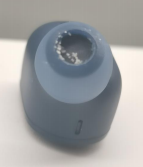
Cleaning method: Remove the earplug rubber cover, take a wet cotton swab (alcohol works well, and non-alcohol is also fine) to clean the visible foreign matter on the surface of the mesh until most of the foreign matter is invisible;
If the phone is reconnected to the maximum volume after cleaning, check to see if the sound returns to normal.
1. Q: What are the features of Redmi Buds Essential?
A:
1、 7.2mm dynamic driver professionally tuned by Xiaomi Acoustic Lab. With powerful and thumpy bass, crisp and clear highs, the beautiful tones of music dance in your ears.
2、AI algorithm for call noise reduction effectively filters out ambient noise and keeps your voice clear and undistorted.
3、 Bluetooth® 5.2. Delivering stable transmission, enhanced anti-interference ability
4、 Gaming mode. Reduced latency, audio-visual synchronisation.
5、 Extra-long battery life for up to 18 hours;Enjoy up to 5.5 hours of battery life on a single charge of both earbuds, and up to 18 hours with the charging case. Immerse yourself in a world of music.
6、 Quick pairing. Connecting immediately with earbuds after first pairing, enjoy the pleasure of music anytime.
2. Q : What is the Bluetooth version of Redmi Buds Essential ?
A: Redmi Buds Essential is the latest Bluetooth version 5.2. With the commercialization of the latest technical standards , more and more smartphones have begun to adopt the Bluetooth 5.2 standard . Bluetooth 5.2 headsets will maximize the technical advantages of 5.2 and bring consumers an excellent experience. The transmission rate is faster, more power-saving and more stable.
3. Q : How long is the battery life of Redmi Buds Essential ?
A: Extra-long battery life for up to 18 hours; Enjoy up to 5.5 hours of battery life on a single charge of both earbuds, and up to 18 hours with the charging case. Immerse yourself in a world of music.
The above is the laboratory test data, and the actual use time is related to the use intensity.
4. Q : Does the Redmi Buds Essential battery support replacement?
A: The battery does not support replacement.
Common problem
1. Q : How to wear Redmi Buds Essential ?
A: First select and assemble earmuffs of the right size, and then wear them as shown in the figure below:
Insert the ear caps obliquely downwards into the ear canal gently, and it is advisable to gently swing the head without shaking the earphones.
The earphones distinguish between left and right sound channels. The position shown in the figure below has "L" and "R", which represent the left and right sound channels respectively. Please wear them correctly.
2. Q : How to charge Redmi Buds Essential ?
A: The charging box is plugged into the charging cable and connected to the charger. The charging box itself will start charging. The earphones will start charging when the earphones are placed in the charging box. The earphones and the charging box can be charged at the same time or separately.
The charging indicator light is solid white when the charging box is not fully charged, and turns off when fully charged.
The earphone indicator light does not indicate the charging status of the earphone. When the earphone power is lower than 10%, the white light will double flash every 10 seconds for 500ms on and 500ms off).
Before starting to use, please tear off the isolation film at the charging contacts of the left and right earphones, and fully charge the charging box and earphones.
3. Q : How to turn on and off the Redmi Buds Essential ?
A: The method of turning on and off the earphone is as follows:
Power on: 1. The earphones are in the charging box, and the earphones will automatically turn on when the charging box is opened.
2. When the headset is outside the charging box and turned off, put it into the charging box, and the headset will automatically turn on.
Shutdown: 1. Put it into the charging box, close the cover, the headset will automatically disconnect and start charging, and it will automatically shut down after fully charged.
2. The headset enters the pairing state and is not in the charging box. If it is not connected to the device within 5 minutes, the headset will automatically shut down.
4. Q : How does Redmi Buds Essential connect to mobile phones and other devices?
A: Connection steps:
1. When connecting for the first time, after the charging box is opened, the white lights of the left and right earphones will flash slowly and enter the waiting connection state. If it is not the first connection, the earphones will automatically connect back to the last paired device after powering on; at this time, you can put the left and right earphones into the charging box, and press and hold the button of the charging box for 2 seconds to force it to enter the waiting connection state; or put the left and right earphones into the charging box In the box, press and hold the button of the charging box for 10 seconds, the white light of the charging box will flash quickly for 3 seconds and turn off, and the white light of the earphone will be on for 5 seconds to reset successfully. After the reset is complete, the headset will automatically enter the waiting connection state.
2. Open the device Bluetooth search and click " Redmi Buds Essential " to connect to the device. After the connection is completed, when the headset is turned on again, it can automatically connect back to the last paired device.
5. Q : How to clear the pairing record between Redmi Buds Essential and the device?
A: Put the left and right earphones into the charging box, press and hold the button of the charging box for 10 seconds, the white light of the charging box will flash quickly for 3 seconds and turn off, and the white light of the earphones will be on for 5 seconds to reset successfully. The reset process will clear the left and right earphones and the connection records between the earphones and the device. After the reset is complete, the earphones will automatically power on and complete the serial connection, and enter the state of waiting for connection.
6. Q : How to reset Redmi Buds Essential ?
A: Put the left and right earphones into the charging box, press and hold the button for 5 seconds to reset successfully. The reset process will clear the left and right earphones and the connection records between the earphones and the device. After the reset is complete, the earphones will automatically power on and complete the serial connection, and enter the state of waiting for connection.
7. Q : How do the left and right earphones of Redmi Buds Essential establish serial records?
A: Put the left and right earphones into the charging box, press and hold the button of the charging box for 10 seconds, the white light of the charging box will flash quickly for 3 seconds and turn off, and the white light of the earphones will be on for 5 seconds to reset successfully. The reset process will clear the left and right earphones and the connection records between the earphones and the device. After the reset is complete, the earphones will automatically power on and complete the serial connection, and enter the state of waiting for connection.
8. Q : How does Redmi Buds Essential answer / hang up calls, reject calls, play / pause music, and enable voice assistants?
A: The buttons prevent accidental touch. Tap or press and hold the button to control calls and music; press the button three times to wake up the voice assistant; every operation with your fingertip is precise and neat.
Once tap left/right earbud: Answering incoming callsPlay/Pause
Twice tap left/right earbud: Reject/End callNext Song
Press and hold left and right earbud for 1.5s: Enter/ Exit low-latency modeTriple tap left/right earbud: Activate voice assistant9. Q : Does Redmi Buds Essential support connecting two mobile phones and other devices at the same time?
A: It does not support connecting two mobile phones and other devices at the same time.
10. Q : Does Redmi Buds Essential support the left and right earbuds to be connected to a mobile phone and other devices, and used as two single-ear earphones?
A: It is not supported to connect the left and right earphones to a mobile phone and other devices, and it is not supported to be used as two single-ear earphones.
11. Q : Will the Redmi Buds Essential automatically shut down if it is not connected for a long time?
A: If the headset is not connected for a long time and the headset is not operated, the headset will automatically shut down after 5 minutes.
12. Q : Does Redmi Buds Essential support game mode / low latency mode?
A: Redmi Buds Essential supports low latency mode.
Note: Only some models of mobile phones can turn on/off the "Low Latency" option in the Bluetooth settings on the mobile phone .
13. Q : Does Redmi Buds Essential support volume adjustment?
A: Redmi Buds Essential itself does not support volume adjustment, you need to adjust the volume on the device side.
14. Q : Can I use a power bank to charge Redmi Buds Essential ?
A : At present, most mobile power supplies have a current protection function. When the mobile power supply detects that the output current is too small, it will disconnect the charging. Since the battery capacity of Redmi Buds Essential is small, the current during charging is also small, which is generally lower than the current protection trigger value of the power bank, so it will trigger the current protection function of the mobile power supply. If the power bank supports low current mode, you can use low current mode to charge the headset.
15. Q : Will Redmi Buds Essential announce the name of the contact when the phone calls ?
A: When a call comes in, the Redmi Buds Essential will only ring, and it does not support the broadcast of the contact name and phone number of the call.
16. Q : Will the Redmi Buds Essential fall off easily when worn?
A: It is not easy to fall off. The design of Redmi Buds Essential follows ergonomics. The ear caps fit the external auditory canal and can be worn firmly on the ears. You can choose the appropriate size ear caps according to your personal needs.
17. Q : Does Redmi Buds Essential support connection with Mi Band or other Bluetooth bracelets?
A: The connection is not supported, because the headset and the Bluetooth bracelet belong to the receiving terminal equipment, so they cannot be connected.
18. Q : Two Redmi Buds Essential , the left earphone and the right earphone are lost / damaged respectively, can the remaining right earphone and left earphone be recombined?
A: It can be recombined and used. Put the remaining right earphone and left earphone into the charging box, press and hold the button of the charging box for 10 seconds, the white light of the charging box will flash quickly for 3 seconds and turn off, and the white light of the earphone will be on for 5 seconds to reset success. The reset process will clear the left and right earphones and the connection records between the earphones and the device. After the reset is complete, the earphones will automatically power on and complete the serial connection, and enter the state of waiting for connection.
19. Q : Does the mobile phone support displaying the battery level of Redmi Buds Essential ?
A: Method 1: Apple mobile phones and most Android mobile phones support displaying the power of the earphones. You can check the power of the earphones in the notification bar of the mobile phone, and the power of the main earphones is displayed;
Method 2: After the headset is connected to the mobile phone, you can check the power of the headset and charging box through the Mi Fitness APP .
20.Q : Is the connection of Redmi Buds Essential stable when talking, listening to songs or playing games?
A: The connection is stable. If there are multiple routers or Bluetooth devices around the Bluetooth headset, there will be different degrees of interference, and there may be stuttering and intermittent situations.
21. Q : Why is there a delay when using Redmi Buds Essential for voice, video, and games?
A: Redmi Buds Essential uses true wireless Bluetooth technology. The audio is transmitted from the mobile phone to the main/secondary earphones at the same time. There will be a certain delay in the audio transmission process, but it will not affect the music and calls, whether it is the sound details during the call, Or the rich emotions in music and movies, it can be realistically presented.
22.Q : How long is the sound delay when playing games on Redmi Buds Essential ?
A: Affected by the use environment, network, and mobile phone codec speed, there will be varying degrees of delay when the mobile phone transmits audio data to the headset.
23.Q : Why is the battery life of Redmi Buds Essential different from the left and right earbuds?
A: When using both ears, the one that comes out of the box first or the one that enters the ear first is the main earphone, and the left and right earphones take out the battery at the same time as the main earphone. Headphone/mobile phone connection, so the power consumption will be relatively higher than that of the headset, and the use time will be relatively short.
24.Q : What do the different states of the indicators on Redmi Buds Essential mean?
A: The white light is on for 1 second when the headset is turned on; the white light is on for 2 seconds when the headset is off; the white light flashes slowly when the headset is paired with the mobile phone; the white light flashes slowly when the headset is automatically connected; the white light flashes slowly when the automatic connection fails; Record and clear earphone series pairing records Touch the round button of the charging box and press and hold for 10 seconds until the white light of the charging box flashes quickly for 3 seconds and turns off; the indicator light does not light up during the charging process of the earphone (not the charging box).
25.Q : Does Redmi Buds Essential support third-party voice chat and voice input?
A: Both iOS and Android systems are supported.
26.Q : Are Redmi Buds Essential a two-channel headset?
A: It adopts Qualcomm QCC3040 Bluetooth chip and supports two-channel stereo.
27. Q : Why is the Redmi Buds Essential earphones still connected to the phone after putting them in the charging box?
A: When the charging box is out of power, the shutdown function cannot be activated when the earphones are put into the charging box. Therefore, when the charging box is out of power, putting the earphones into the charging box will still connect to the mobile phone. Please pay attention to the charging box. Charge in time.
28.Q : Why does the music not play automatically when I take off the Redmi Buds Essential and wear it again during music playback ?
A: If music is playing before taking off the earphones, the music will automatically pause when the earphones are taken off. If the headset is not in the box, put the headset back on
Automatically play music. If you take off the earphones and put them in the box, the music will not play automatically when you wear them again.
29.Q : Will there be adverse reactions when wearing Redmi Buds Essential ?
A: 1. The earphone adopts in-ear design, which may cause fatigue and a little pain when worn for a long time;
2. It is recommended to choose suitable earmuffs, which can increase the comfort of the ears and reduce the pain;
3. The volume of the earphones should not be too high. Using too high volume for a long time will make the hearing and ear canal nerves tired, and it is easy to make the ears feel tired.
Pain and soreness. It is recommended to lower the volume, take off the earphones after every 2 hours of wearing, and give the ears a relaxing or kneading massage.
30.Q : Why does the sound freeze when using Redmi Buds Essential in some environments (train stations, subway stations, substations, etc.) ?
A: 1. The strong interference environment affects the RF performance of the headset, causing the headset to freeze when listening to music. This problem exists in Bluetooth products;
2. When used in environments with low interference, such as offices, coffee shops, and homes, there will be no lagging problems.
31. Q : Redmi Buds Essential Can I upgrade again after the OTA upgrade fails?
A: 1. When there is a new version of the firmware, when you open the Mi Fitness APP, a window will pop up to prompt you to upgrade. The OTA upgrade must meet two conditions: both the earphone and the charging box must have more than 30% power; both ears must be placed in the charging box. Out of the box will cause the upgrade to fail, and calls and listening to music are not supported during the upgrade.
2. If the upgrade fails, the mobile phone is connected to the headset with Bluetooth, and the headset can be used normally;
3. If the upgrade fails, when you open the Mi Fitness APP again , a pop-up window will prompt to upgrade. At this time, you can click the upgrade button to upgrade again; if you cancel the upgrade, you will receive this reminder again when you enter the APP next time. You can also manually upgrade on the device details page.
4. After the upgrade fails, you can put the left and right earphones in the box and press the button of the charging box for 10s to reset, and then try to upgrade. After the upgrade is completed, you need not do any operation and wait for the earphones to automatically reconnect.
Note: Different batches of headphones may have different firmware version numbers, it is recommended to upgrade the firmware to the latest version.
32.Q : Why is the sound quality different when Redmi Buds Essential is used with some Android and Apple phones?
A: The encoding formats supported by the earphones are aptx, aptx Adaptive, and SBC. When the earphones are connected to an iOS phone, only the SBC audio encoding format is supported. When the earphones are connected to an Android phone, the audio encoding format is controlled by the mobile phone by default. The sound quality of different audio encoding formats Feelings are different.
33.Q : Why does the Redmi Buds Essential sometimes automatically adjust the volume when connected to the device?
A: 1. When the headset is connected to the MIUI device for the first time, the MIUI volume protection mechanism will cause the volume to be automatically adjusted;
2. iOS will automatically synchronize the volume when the headset is connected to the iOS device for the first time;
3. After connecting the device to adjust the volume, the volume will be synchronized with the last set volume when connecting again.
34.Q : Why does the music continue to play automatically when the Redmi Buds Essential is removed during music playback ?
A: When you take off the earphones to pause the music, please do not cover the wearing detection point (light sensing place). If it is blocked by an object, it will also trigger the playback
music.
35. Q : How many microphones are there in Redmi Buds Essential ? Is there a distinction between the primary and secondary microphones?
A: There are 2 microphones (single side) in the headphone body, there is no distinction between the main and the secondary, and the two microphones can work independently.
Note: If the user has not consulted, please do not take the initiative to mention it.
36.Q : Do the two microphones of Redmi Buds Essential work at the same time? How does it work? Which microphone works by default?
A: Only one microphone is working at the same time, and the default is the microphone where the touch surface is working.
Note: If the user has not consulted, please do not take the initiative to mention it.
37. Q : How to switch between the two microphones of Redmi Buds Essential ?
A: Switching method: When both ears have been connected to each other (playing a synchronized wearing prompt tone or synchronously flashing lights on both ears), put them into the charging box at the same time, press and hold the touch button on the right ear in the box for 10 seconds until the white lights on both ears If it stays on for 1s, it means the switching is successful.
Note: 1. If the user has not consulted, please do not take the initiative to mention it.
2. After resetting the headset, it will return to the original default microphone (the microphone where the touch surface is located)
38.Q : What is the difference between the two microphones of Redmi Buds Essential ? Which one is better? What will be the impact in use?
A: No matter which one of the two microphones on the headset works, the sound pickup effect is similar. In some wearing situations, the microphone on the non-touch surface may be blocked by the tragus, affecting the call effect. Please consider adjusting the wearing or switching the microphone.
Note: 1. If the user has not consulted, please do not take the initiative to mention it.
2. After resetting the headset, it will return to the original default microphone (the microphone where the touch surface is located)
39.Q : Under what circumstances will Redmi Buds Essential be disconnected or delayed?
A:
1. Affected by the use environment, network, and mobile phone codec speed, it may cause different degrees of delay when the mobile phone audio data is transmitted to the headset;
2. The headset adopts true wireless Bluetooth technology. There will be a certain delay in the process of audio transmission from the mobile phone to the main/secondary headset, but it will not affect the quality of music and calls, whether it is the sound details during the call or the music in the music. Rich in frequency bands, it can be truly presented.
3. If there are multiple routers or Bluetooth devices around the Bluetooth headset, there will be different degrees of interference, and there may be stuttering, intermittent, and disconnection.
4. The unobstructed effective connection distance between the headset and the mobile phone is 10 meters, and disconnection will occur after exceeding.
40.Q : Why are the Redmi Buds Essential ear caps different from before ?
Q: The earphones currently on sale have two kinds of ear caps, which are shipped randomly. Both of them have passed the relevant acoustic and functional tests of the factory, and will not affect the sound quality.
Note: The new-style ear caps are adjusted for users who are prone to earwax, and adopt an anti-scalar design, which can reduce the impact of earwax on the earphones.
Troubleshooting
1. Q : What should I do if the Redmi Buds Essential cannot be charged, cannot be turned on, and the indicator light does not light up?
A: Please follow the steps below to troubleshoot:
1. Check whether the charging box has power. If the charging box has no power, charge the charging box and then charge the earphones, and try to turn on the earphones after charging. If the earphones have not been used for a long time and the battery is insufficient, it will take a while for the indicator light to turn on. lights up;
2. Check whether the isolation film of the earphone charging contact has been removed, check whether the charging pin in the earphone charging contact/charging box is dirty, collapsed, damaged, remove the isolation film in time, clean the dirt, and ensure that the charging contact Good contact with the charging pin;
3. Try to reset the earphones. Reset method: Put the left and right earphones into the charging box, press and hold the button of the charging box for 10 seconds, the white light of the charging box will flash quickly for 3 seconds and turn off, and the white light of the earphones will be on for 5 seconds to reset successfully;
4. If the above operations are invalid, after-sales inspection.
2. Q : What should I do if the Bluetooth signal of the Redmi Buds Essential cannot be found ?
A: 1. Make sure whether the headset is in the waiting connection state. When it is in the waiting connection state, the white lights of the left and right earphones flash slowly. If the white lights of the non-left and right earphones flash slowly, the Bluetooth headset cannot be searched.
2. If the white lights of the left and right earphones flash slowly and still cannot be found, reset the earphones and try to search for pairing again.
3. Try to restart the mobile phone, replace the mobile phone, and search after changing the usage environment. If you still can’t find it, go to after-sales inspection.
3. Q : The device can search for Redmi Buds Essential , but what should I do if I can’t connect?
A : If the device can search for Redmi Buds Essential , but cannot connect, it may be that the Bluetooth data of the device is abnormal. Try to delete the previous connection record on the device, restart the device, and then try to pair and connect.
4. Q : When the device is connected to Redmi Buds Essential , there is always a PIN code or a pairing password error prompt, what should I do?
A : You can try to enter "0000", if it is still wrong, it may be that the Bluetooth data on the device is abnormal, try to delete the previous connection record on the device, restart the device, and then try to pair and connect.
5. Q : What should I do if the sound is intermittent or there are noises when using Redmi Buds Essential ?
A: Please follow the steps below to troubleshoot:
1. It may be because the battery of the mobile phone or the earphone is insufficient, please fully charge and then observe;
2. If the distance between the mobile phone and the earphones or between the two earphones is too far or there is an object blocking the signal (such as a wall), there may be intermittent or noise problems. Put the mobile phone and the earphones close together, and the two earphones close together. At the same time, avoid the signal from being blocked;
3. There may be signal interference in the use environment, you can try to compare whether there is such a phenomenon in other use environments;
4. Reset the headset, delete the connection record of the mobile phone, restart the mobile phone and then pair it for use. If there is still intermittent sound or noise, replace another mobile phone for testing. If the problem still exists, after-sales inspection.
6. Q : What should I do if the headset is silent when using Redmi Buds Essential to make calls or listen to music?
A: Please follow the steps below to troubleshoot:
1. Check whether the isolation film of the earphone is torn off. If the isolation film is not torn off, the earphone cannot complete the automatic pairing connection;
the Redmi Buds Essential in the connected device are turned on . If they are already turned on , please disconnect and reconnect;
3. Reset the headset, restart the phone, and then try to connect to see if there is sound. If there is still no sound, then connect to another phone to test. If it still cannot be solved, after-sales inspection.
7. Q : What should I do if the charging box of Redmi Buds Essential cannot be charged?
A : Please follow the steps below to troubleshoot:
1. Confirm whether the input voltage and current of the charger meet the requirements, if not, please replace it;
2. Replace the charging cable and charger and try to see if it can be charged. If it can be charged after replacement, it may be a problem with the charging cable or charger.
question;
3. Use the charging cable and charger to charge other devices, and verify whether the charging cable and charger are normal. If the charging is normal for other devices, please charge the charging box for half an hour and then observe. If it still cannot be charged, after-sales inspection.
8. Q : What should I do if the charging box of Redmi Buds Essential cannot charge the earbuds?
A : First, please make sure that the charging box is fully charged, and then check whether the contacts of the earphones and the charging pins in the charging box are dirty and in good contact (remove the isolation film for the first use). If the earphones have already lost power, just start charging The indicator light may not be on when charging, it is recommended to observe the indicator light after charging for half an hour, if it is still not on, you can charge it in another charging box if possible, if it still cannot be charged, after-sales inspection.
9. Q : Why does the notification bar not display the battery level or the battery level display is inaccurate after the Redmi Buds Essential is connected to the mobile phone?
A : Not all mobile phones support the function of displaying the power level in the notification bar of the mobile phone. If the mobile phone does not support this function, the power level cannot be displayed. The power displayed on the notification bar of the mobile phone cannot be 100% accurate. Please refer to the indicator light of the headset and the prompt tone of the headset.
10. Q : Why does the Redmi Buds Essential have sound when connected to a mobile phone, but there is no sound when listening to music?
A : Enter the mobile phone Bluetooth settings -> click on the paired Redmi Buds Essential -> open "Media Audio
"Audio" option, when this option is turned off, there will be no sound when listening to music or watching videos.
11. Q : Why is the actual battery life of Redmi Buds Essential shorter than the advertised time?
A : 1. It may be that the earphones are not fully charged. It is recommended to test the earphones after fully charging them.
2. The actual power usage is affected by many factors, such as: the brand and model of the mobile phone (including the frequency of Bluetooth search and data exchange), the volume setting, the distance of the connection, the strength of the signal, and whether the ambient temperature is too high. inferior. Therefore, the specific use time depends on the individual use method and intensity. If the actual battery life of the headset is much shorter than the advertised time, you can check the headset after sale.
12. Q : What should I do if the sound of the left and right earphones of Redmi Buds Essential is out of sync?
A: 1. Turn off the earphones and turn them on again (put the earphones back into the charging box, close the charging box and then open it to take it out), and test whether the sound of the left and right earphones is synchronized.
2. Reset the earphones, reconnect after resetting, and test whether the sound of the left and right earphones is synchronized.
13. Q : What should I do if the sound of Redmi Buds Essential is low?
A:
1. Connect the mobile phone to play music at the maximum volume, and check whether the sound in the left and right ears is too low;
2. If there is only a small sound problem when using some software, and there is no abnormality in other software or making calls, it is a software problem and has nothing to do with the headset. It is recommended to re-pair the headset or re-open and install the software to try;
3. Check the ear caps for dirt and foreign objects. If there are foreign objects, remove the earphones and remove the ear caps for cleaning;
Cleaning method: Remove the earplug rubber cover, take a wet cotton swab (alcohol works well, and non-alcohol is also fine) to clean the visible foreign matter on the surface of the mesh until most of the foreign matter is invisible;
If the phone is reconnected to the maximum volume after cleaning, check to see if the sound returns to normal.
Does it help?
Yes
No