

Xiaomi Smart Laser Measure FAQ
Overview
1.Q: What are the features of Xiaomi Smart Laser Measure?
A:One-tap real-time measurement:Real time ranging to measure wherever you want
After a brief press to emit the laser, the length can be read in real time.
High precision measurement:The measure adoptes a precise and stable Class II laser.
Long-lasting battery life: 370mAh high-capacity lithium battery for measuring 3000 sets of data at full charge.
Type-C port for easy charging:Type-C charging port can share charger cable with other electronic devices like smartphone.
Expand the functions via the Mi Home/Xiaomi Home app : data synchronization/remarks, length/area/volume calculation, floor plan mapping, map sharing, and effect viewing.
2. Q : Is the laser of Xiaomi Smart Laser Measure harmful to people?
A: Xiaomi Smart Laser Measure adopts Class II laser . The maximum output of laser radiation is 1mW. It is strictly forbidden to irradiate the eyes and other parts of the body of oneself or others. It is strictly forbidden to irradiate the laser on the surface of highly reflective objects to avoid damage.
3. Q : What is the material of Xiaomi Smart Laser Measure ?
A: The main body is made of engineering plastics and industrial aluminum, and the surface is anodized, which is comfortable to the touch, high in strength, wear-resistant and drop-resistant.
4.Q : How about the battery life of Xiaomi Smart Laser Measure ?
A: The battery can measure about 3000 times continuously when fully charged.
5. Q : Does Xiaomi Smart Laser Measure support automatic shutdown?
A: The device will automatically shut down after 180s without any operation (Bluetooth and laser will also be turned off).
Use related
1.Q : How to turn on and off the Xiaomi Smart Laser Measure ?
A: For Xiaomi Smart Laser Measure, Long press 2 seconds to turn on/off , when the device is on, press and hold the front button for 3 seconds to turn off the device.
2.Q : How does Xiaomi Smart Laser Measure measure?
A:
1. After starting Xiaomi Smart Laser Measure , short press the button to continuously emit laser light to perform continuous measurement, and the screen will feed back the measurement data in real time.
2. Press the button again to stop emitting the laser, and the screen will display the final measurement value. When Xiaomi Smart Laser Measure is connected to the App, this data will be synchronously entered into the App measurement result list.
3. The benchmark of Xiaomi Smart Laser Measure refers to the origin of measurement. When using the front reference, the measuring range does not include the product length; when using the rear reference, the measuring range will include the product length, and the product length is 80mm.
4. After the device is connected to the APP via Bluetooth , all data can be synchronized to the APP; the disconnected device can store no more than 10 sets of data, and the data will be synchronized to the mobile APP after connecting to the APP.
3.Q : How to pair Xiaomi Smart Laser Measure with Mi Home App ?
A: Open the Mi Home App, add the "+" in the upper right corner, select Add Device or "Scan" to scan the QR code of the manual, then press and hold the power button for more than 7 seconds until the Bluetooth icon flashes on the screen, and the Mi Home App will automatically connect to the rangefinder , and then follow the prompts.
4. Q : How to charge Xiaomi Smart Laser Measure ?
A: The Xiaomi Smart Laser Measure box contains a USB Type-C data cable. When charging, it is connected to a 5V charger and charged through the rear USB Type-C interface. It will take about 100 minutes to fully charge the indicator after charging (this time refers to the time from when the power of the main unit is low to no longer able to operate to fully charged, and the charging time will fluctuate due to the influence of various environmental factors such as temperature).
5.Q : Can Xiaomi Smart Laser Measure be used during charging?
A: In order to protect the battery, motor and user safety, it is set to safe mode during charging and cannot be used.
6.Q : Does Xiaomi Smart Laser Measure need to be charged regularly?
A: It is recommended to leave the battery fully charged and charge the product once every 3 months.
7.Q : What is the charging and full status of Xiaomi Smart Laser Measure ?
A: The battery symbol flashes when charging, and the battery symbol is full and does not flash when fully charged. When the product button is pressed, it cannot be turned on or
The power indicator on the display flashes quickly, indicating that the battery is not enough, please charge it in time.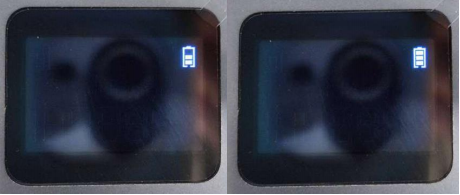
8.Q : How to switch measurement units in Xiaomi Smart Laser Measure ?
A: There are two measurement units, the default is "m" (meter). If you need to switch to "ft" (feet), after binding the Mi Home App , enter the product control page, click " ⋮ " in the upper right corner to enter the settings, and you can switch the measurement unit. (Please keep the product turned on when switching units, and the Bluetooth and APP are connected .
9.Q : How does Xiaomi Smart Laser Measure use the drawing measurement function?
A: The drawing measurement function can help users save the measurement data records graphically after measurement, and supports recording through pictures and graphics. After binding the Mi Home App, enter the rangefinder page, and click the drawing measurement interface to start drawing.
Picture: Click on the picture to choose to take pictures and album pictures, and then use the line drawing or frame function to draw; after drawing the picture, select the line (the line turns blue after selection, and the interface will prompt for data measurement or custom selection) , to customize and select existing data or click the rangefinder button to obtain real-time data for labeling.
Line drawing and picture frame: draw directly with line drawing and picture frame; select the line after drawing the picture (the line turns blue after selection, and the interface will prompt you to perform data measurement or custom selection), and make a custom selection Data or click the rangefinder button to obtain real-time data for labeling.
Undo: the undo button for drawing lines, the return key for not drawing well or drawing errors.
Share: After drawing the picture, you can click on the upper right corner to save the picture, or share it to others.
Drawing record, after the drawing measurement is completed, all the drawing pictures will be saved in the drawing record; you can click on the saved drawing picture to enter and then view and modify; you can click on the note to output the note; long press the empty space between the note and the drawing picture in the drawing record There will be a tick selection, and you can choose single item or multiple items to delete or share.
10.Q : How to delete, note and copy the measurement data of Xiaomi Smart Laser Measure ?
A: The measurement data is the saved data after the test, and you can click "Remarks" to modify the notes; long press the notes in the drawing record and the empty space in the drawing, and a check box will appear, and you can select a single item or multiple items to delete or copy.
11.Q : How does Xiaomi Smart Laser Measure use the App to remotely measure?
A: After the rangefinder is bound to the Mi Home App , click the " ⋮ " in the upper right corner to enter the settings; select virtual measurement, and the rangefinder will automatically turn on the laser to start the measurement. You can click the save button on the phone screen to save the measurement. The data result of a single measurement.
12.Q : How to use the calculator function of Xiaomi Smart Laser Measure ?
A: Bind Mi Home App , after measuring and saving the data, you can enter the calculator interface for calculation; (Note: Addition, subtraction, multiplication and division can only be used individually, and cannot be used in combination. After calculating the result, you can click √ in the upper right corner and the data will be displayed. saved)
AC zero function, wrong data selection during calculation, or need to recalculate; click the AC button to reset to zero and recalculate.
13.Q : How to use the function of looking at the effect of Xiaomi Smart Laser Measure ?
A: After binding the Mi Home App , click on the upper right corner to enter the setting interface, click to see the effect, and then click on the TV to enter the video wall to take pictures; after taking the photo, do not click Next, draw a dotted line frame directly, and align the dotted line with the surrounding TV wall Coincidentally, click next after drawing; click the TV wall height and TV wall width to draw the wireframe to select from the existing data, input data with the keyboard, or measure it with a rangefinder immediately. After confirming the length and width and clicking Next, the APP will simulate the scene and recommend the TV model of the recommended size. You can click Go to see and enter Youpin to check the TV model, price, etc. to choose the TV you like.
14.Q : How does Xiaomi Smart Laser Measure switch between the front reference and the rear reference?
A: Xiaomi Smart Laser Measure supports measurement based on the bottom of the fuselage (end measurement), and also supports measurement based on the launch window on the top of the fuselage (front reference). Two methods are supported.
The factory default datum is the end datum "  ", and the end of the product " " is used as the datum for distance measurement. If you need to use the front-end benchmark " ", quickly double-click the button to switch.
The datum plane is reset to the end datum “ ” after each power-on  .
.
15.Q : How does Xiaomi Smart Laser Measure clean the laser emitting and receiving lenses?
A: If the laser emitting and receiving lenses are obviously dirty, it may cause inaccurate distance measurement; it is recommended to use cotton cloth to clean them before using them.
Common problem
1.Q : Does Xiaomi Smart Laser Measure display horizontal lines? No value?
A: A horizontal line is displayed to indicate that it cannot be measured. If the measurement range is exceeded, the signal is too weak, the signal is too strong, or the rangefinder moves too fast, it will fail to measure. Please adjust the measurement position, confirm the measurement environment, move the product slowly or keep the device stable.
The laser range finder is generally used indoors, and it is recommended not to use the laser range finder outdoors. In harsh environments such as: too strong sunlight interferes with the laser, which will cause the laser red point to be unclear, and the measurement accuracy will drop significantly; the ambient temperature fluctuates too much, and the reflection effect of the reflective surface is weak; there are foreign objects in the objective lens or laser tube Obstruction; the measurement target is not clear, such as water surface, glass, mirror surface, laser jitter during measurement, etc.; when the battery power is insufficient, the measurement result will also have a large error.
| Please refer to the table below for general faults and troubleshooting methods encountered during use: | ||
| Information | Reason | Solution |
The battery symbol flashes | battery voltage is too low | please charge |
Unable to measure display | Laser reflection signal is too weak (e.g. black test surface) | Measure targets with strong reflectivity, or use with target reflectors |
| The laser reflection signal is too weak (such as a highly reflective test surface) | Measure targets with strong reflectivity, or use with target reflectors | |
| Out of measurement range | Please use within the range | |
| Measurement moves too fast | Please move the product slowly or keep the product steady | |
| Err01 | Insufficient power causes the laser to fail to emit | please charge |
| Err02 | Out of operating temperature range | Please use within the specified temperature range |
2.Q : Is it normal for the red dot to keep flashing during Xiaomi Smart Laser Measure measurement?
A: The device measures data in real time, and the data is constantly changing with the movement of the device , and the emitted infrared rays are constantly flashing.
The measurement data is normal.
3.Q : What should I do if the keys are stuck due to misalignment of the Xiaomi Smart Laser Measure aluminum case?
A: The aluminum shell of the fuselage adopts a sliding assembly design. When the rangefinder falls to the ground or hits a hard object, there may be a small probability of causing damage.
The aluminum shell is misaligned with the body, causing the keys to get stuck.
You can try to push the aluminum shell flat with your hands and reset it (the aluminum shell and the fuselage are pushed flat). If it is not flat by hand, you can put the protruding part on the
Press the flat button on the desktop and the button will return to normal.
4.Q : What should I do if the screen is blurred and there is no display during the use of Xiaomi Smart Laser Measure ?
A: This phenomenon is caused by static electricity interference during the use of the product (the probability is very small), you only need to restart the device
Normal use will not affect product performance/lifetime.

Does it help?