

Xiaomi Outdoor Camera AW300 FAQ
Product Introduction
1. Q: What are the features of the Xiaomi Outdoor Camera AW300?
A: 1. The Xiaomi Outdoor Camera AW300 has 3MP and 2K HD image quality;
2. The Xiaomi Outdoor Camera AW300 has IP66 protection and its working temperature is -30°C~60°C;
3. With full-duplex two-way calls, it supports real-time voice calls;
4. The Xiaomi Outdoor Camera AW300 supports Xiaomi Home Secure and Micro SD card storage up to 256G;
5. The Xiaomi Outdoor Camera AW300 has an external Wi-Fi network connection, providing a stronger signal;
6. The Xiaomi Outdoor Camera AW300 can provide 24 hours of continuous monitoring, 9 seconds of home monitoring video push, and 7 days of rolling cloud storage in the Xiaomi Home Secure (home monitoring function). The rated input is 12V⎓1A and the power cord is 3 meters long;
7. The Xiaomi Outdoor Camera AW300 supports human detection function;
8. The Xiaomi Outdoor Camera AW300 supports face recognition (Xiaomi Home Secure function);
9. The Xiaomi Outdoor Camera AW300 supports the electronic fence function, and you can delineate the electronic fence in the Mi Home/Xiaomi Home APP, which will trigger the alarm sound and light alarm when there is a human shape and the picture changes;
10. The Xiaomi Outdoor Camera AW300 supports customized voice recording to meet the use scenarios of individual merchants, such as welcome.
2. The Xiaomi Outdoor Camera AW300 has IP66 protection and its working temperature is -30°C~60°C;
3. With full-duplex two-way calls, it supports real-time voice calls;
4. The Xiaomi Outdoor Camera AW300 supports Xiaomi Home Secure and Micro SD card storage up to 256G;
5. The Xiaomi Outdoor Camera AW300 has an external Wi-Fi network connection, providing a stronger signal;
6. The Xiaomi Outdoor Camera AW300 can provide 24 hours of continuous monitoring, 9 seconds of home monitoring video push, and 7 days of rolling cloud storage in the Xiaomi Home Secure (home monitoring function). The rated input is 12V⎓1A and the power cord is 3 meters long;
7. The Xiaomi Outdoor Camera AW300 supports human detection function;
8. The Xiaomi Outdoor Camera AW300 supports face recognition (Xiaomi Home Secure function);
9. The Xiaomi Outdoor Camera AW300 supports the electronic fence function, and you can delineate the electronic fence in the Mi Home/Xiaomi Home APP, which will trigger the alarm sound and light alarm when there is a human shape and the picture changes;
10. The Xiaomi Outdoor Camera AW300 supports customized voice recording to meet the use scenarios of individual merchants, such as welcome.
2. Q: What are the package contents of the Xiaomi Outdoor Camera AW300?
A: Outdoor Camera × 1, Mounting Template Sticker × 1, Power Adapter (including a 3-meter power cord) × 1, Attention Sticker × 1, Wall Plug × 3, Screw × 3, Waterproof Tape × 1, User Manual × 1, Warranty Notice × 1.

3. Q: What is the appearance of the Xiaomi Outdoor Camera AW300?
A: The appearance of the Xiaomi Outdoor Camera AW300 is as follows:
It has a Spotlight, Indicator, Microphone, Speaker, Reset Button, and microSD Card Slot.
It has a Spotlight, Indicator, Microphone, Speaker, Reset Button, and microSD Card Slot.

4. Q: What is the power supply method of the Xiaomi Outdoor Camera AW300?
A: It needs to connect the input voltage of 110~240V power supply and use the 12V⎓1A power adapter. In order to ensure the normal use of the function, please be sure to use the original adapter.
5. Q: What are the steps of the Xiaomi Outdoor Camera AW300 wall mounting?
A: The installing steps are as follows:
1. Paste the mounting template sticker on a wall at a suitable position;
2. Drill holes on the wall that align with the holes on the mounting template sticker, with a diameter of about 6mm and a depth of about 35mm;
3. Install the wall plugs into the drilled holes;
4. Mount the base to the wall with screws;
5. Loosen the angle adjustment screw on the base to adjust the angle of the camera. After the camera is adjusted to the proper angle, re-tighten the angle adjustment screw;
(1). Rotate the adjustable rod (0°-360°adjustable);
(2) Adjust the position of the ball joint (0°-360° pan and 0°-90° tilt);
Note:
1. According to actual needs, the camera antenna angle can be adjusted to obtain a better signal;
2. When installing the camera, place the speaker downwards to avoid water accumulation in the sound cavity of the speaker after rainy weather, which will affect the sound effect;
3. To avoid water ingress, please tighten the protective cover of the microSD card slot with a screwdriver before use;
4. When connecting the power cord, be sure to wrap the power connector with waterproof tape to prevent water from entering the interface.
1. Paste the mounting template sticker on a wall at a suitable position;
2. Drill holes on the wall that align with the holes on the mounting template sticker, with a diameter of about 6mm and a depth of about 35mm;
3. Install the wall plugs into the drilled holes;
4. Mount the base to the wall with screws;
5. Loosen the angle adjustment screw on the base to adjust the angle of the camera. After the camera is adjusted to the proper angle, re-tighten the angle adjustment screw;
(1). Rotate the adjustable rod (0°-360°adjustable);
(2) Adjust the position of the ball joint (0°-360° pan and 0°-90° tilt);
Note:
1. According to actual needs, the camera antenna angle can be adjusted to obtain a better signal;
2. When installing the camera, place the speaker downwards to avoid water accumulation in the sound cavity of the speaker after rainy weather, which will affect the sound effect;
3. To avoid water ingress, please tighten the protective cover of the microSD card slot with a screwdriver before use;
4. When connecting the power cord, be sure to wrap the power connector with waterproof tape to prevent water from entering the interface.
6. Q: Does the Xiaomi Outdoor Camera AW300 support an extended power cord?
A: The device supports an additional 6-meter extension of the power cord and requires you to purchase it through a third-party channel.
The Xiaomi Outdoor Camera AW300 supports wire number 22, a cable length of up to 6 meters, and a 12V⎓1A DC power extension cable. Other specifications: socket length 10mm, interface diameter 4mm * 1.7mm, socket diameter 8mm. Please purchase regular manufacturer production materials, otherwise it will cause the device function to not be used normally. In addition, after installing the extension power cord, you also need to do waterproof work. Please be sure to use waterproof tape to wrap the power connector to prevent water from entering the interface.
The Xiaomi Outdoor Camera AW300 supports wire number 22, a cable length of up to 6 meters, and a 12V⎓1A DC power extension cable. Other specifications: socket length 10mm, interface diameter 4mm * 1.7mm, socket diameter 8mm. Please purchase regular manufacturer production materials, otherwise it will cause the device function to not be used normally. In addition, after installing the extension power cord, you also need to do waterproof work. Please be sure to use waterproof tape to wrap the power connector to prevent water from entering the interface.
7. Q: How to connect the Xiaomi Outdoor Camera AW300 to the Wi-Fi in the Mi Home/Xiaomi Home APP?
A: 1. This product can be connected to the Mi Home/Xiaomi Home APP, which can be controlled through the Mi Home/Xiaomi Home APP, and is interconnected with other products. Download and install the latest version of the Mi Home/Xiaomi Home APP;
2. Turn on the power and wait for the orange indicator to flash after the device is turned on (if the indicator status is abnormal, please press and hold the Reset Button for more than 10 seconds until the orange light flashes, there will be a prompt tone, and please wait for the connection);
3. Open the home interface of the Mi Home/Xiaomi Home APP, tap [+] >> [Scan] or [Add device] in the upper right corner of the interface, scan the QR code on the camera, and connect the camera according to the APP prompts. The camera is connected successfully, and the indicator will keep in blue.
Note:
1. This product only supports English or numbers and English numbers mixed names;
2. It only supports the Wi-Fi connection of 2.4GHz wireless network, and 5GHz wireless network is not supported;
3. Due to the upgrade and update of the Mi Home/Xiaomi Home APP, the actual operation can be slightly different from the above description, please follow the current instructions in the Mi Home/Xiaomi Home APP.
2. Turn on the power and wait for the orange indicator to flash after the device is turned on (if the indicator status is abnormal, please press and hold the Reset Button for more than 10 seconds until the orange light flashes, there will be a prompt tone, and please wait for the connection);
3. Open the home interface of the Mi Home/Xiaomi Home APP, tap [+] >> [Scan] or [Add device] in the upper right corner of the interface, scan the QR code on the camera, and connect the camera according to the APP prompts. The camera is connected successfully, and the indicator will keep in blue.
Note:
1. This product only supports English or numbers and English numbers mixed names;
2. It only supports the Wi-Fi connection of 2.4GHz wireless network, and 5GHz wireless network is not supported;
3. Due to the upgrade and update of the Mi Home/Xiaomi Home APP, the actual operation can be slightly different from the above description, please follow the current instructions in the Mi Home/Xiaomi Home APP.
8. Q: What are the meanings of the status indicators of the Xiaomi Outdoor Camera AW300?
A: The meanings of the indicators are as follows:
1. Awaiting connection: Blinking in orange;
2. Camera working normally: Keeping in blue;
3. Connecting: Blinking in blue;
4. Network connection error: Keeping in orange;
5. Connected successfully: Keeping in blue;
6. OTA updating: Blinking in blue.
1. Awaiting connection: Blinking in orange;
2. Camera working normally: Keeping in blue;
3. Connecting: Blinking in blue;
4. Network connection error: Keeping in orange;
5. Connected successfully: Keeping in blue;
6. OTA updating: Blinking in blue.
9. Q: How to install a Micro SD card on the Xiaomi Outdoor Camera AW300?
A: 1. Remove the protective cover with a screwdriver to expose the Micro SD card slot and Reset Button;
2. Insert the Micro SD card into the card slot, and please pay attention to the direction of inserting the Micro SD card;
3. After inserting the Micro SD card, please make sure to tighten the protective cover with screws before using it to prevent water ingress.
Note:
1. The PH00 or PH1 screwdrivers are recommended for opening or installing the SD card slot;
2. The SD card slot mounting screw specification is M1.7.
2. Insert the Micro SD card into the card slot, and please pay attention to the direction of inserting the Micro SD card;
3. After inserting the Micro SD card, please make sure to tighten the protective cover with screws before using it to prevent water ingress.
Note:
1. The PH00 or PH1 screwdrivers are recommended for opening or installing the SD card slot;
2. The SD card slot mounting screw specification is M1.7.
10. Q: What type of Micro SD card can be installed in the Xiaomi Outdoor Camera AW300?
A: It is recommended to use a high-speed Micro SD card with the Class10, U1, and U3 logo. This camera supports a minimum of 16GB and a maximum of 256GB. Above 32GB must be formatted in FAT32 format in the camera storage management to be used.
11. Q: How long can the video be stored in the Xiaomi Outdoor Camera AW300’s memory card in different capacities?
A: Memory card storage duration (stored video recorded in the highest definition supported by the camera):
Storage capacity | 2K HD |
16GB | About 36 hours |
32GB | About 3 days |
64GB | About 6 days |
128GB | About 14 days |
256GB | About 24 days |
12. Q: How to perform a factory reset of the Xiaomi Outdoor Camera AW300?
A: If you need to change the network or the Mi Home/Xiaomi Home APP account to which the camera is connected, press and hold the Reset Button for 10 seconds. The Reset Button is inside the bottom protective cover, and you need to use a screwdriver to remove the protective cover. You can restore the factory settings and a reset successful voice will prompt. Then follow the steps to reconnect to the APP.
A factory reset does not delete the contents of the SD memory card. If you change your account, you need to log in to the Mi Home/Xiaomi Home APP with the original account.
After unbinding, restore the factory settings, and then change the account binding.
A factory reset does not delete the contents of the SD memory card. If you change your account, you need to log in to the Mi Home/Xiaomi Home APP with the original account.
After unbinding, restore the factory settings, and then change the account binding.
13. Q: Does the Xiaomi Outdoor Camera AW300 support infrared night vision?
A: The Xiaomi Outdoor Camera AW300 automatically switches to night vision mode when it is dark according to the degree of change of surrounding light. The camera has 2 × 850nm night vision lights and 2 × LED warm lights for clear shooting in the dark. A clear shooting distance of 7 meters is recommended.
14. Q: Does the Xiaomi Outdoor Camera AW300 support NAS?
A: Not support.
15. Q: Where is the SN of the Xiaomi Outdoor Camera AW300?
A: At the barcode on the back of the device.
Package back:
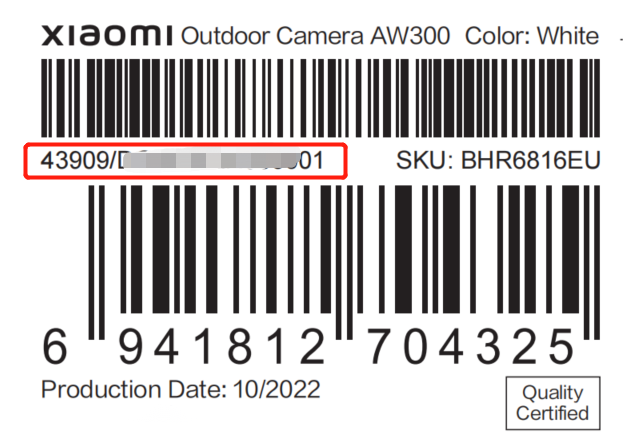
Package back:
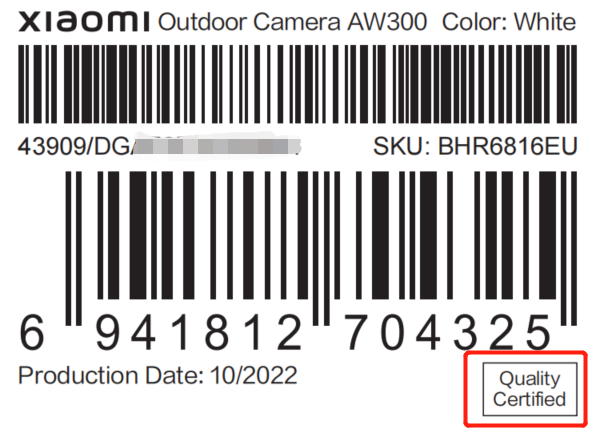
16. Q: How to check the conformity certificate of the Xiaomi Outdoor Camera AW300?
A: The printed certificate can be seen on the back of the camera packaging.
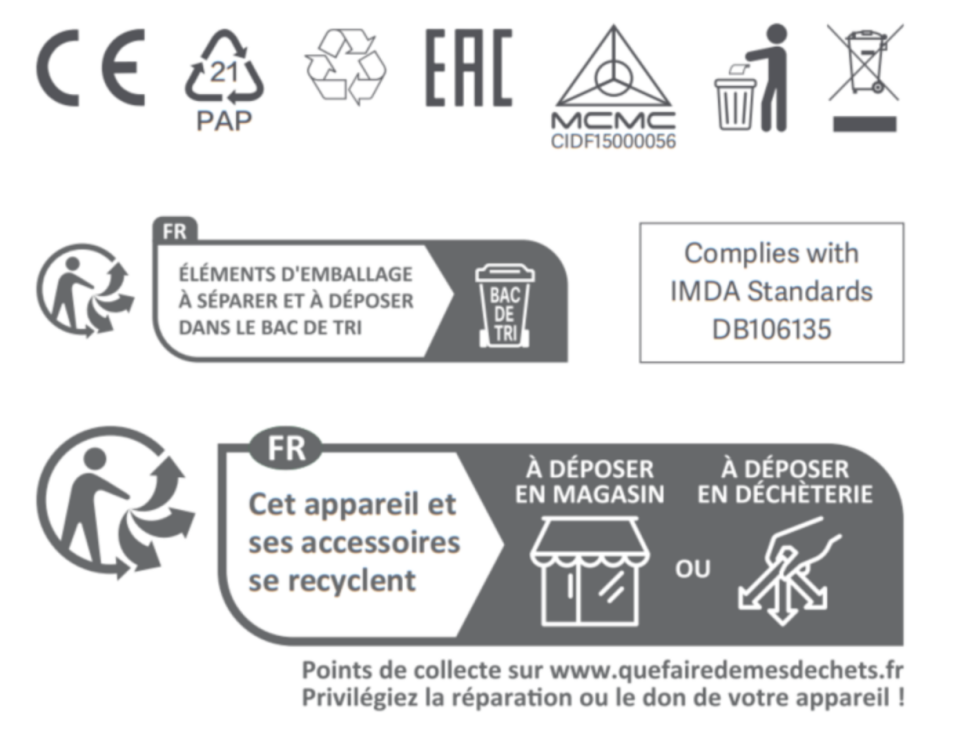
17. Q: What certifications does the Xiaomi Outdoor Camera AW300 have?
A: The certification is marked as follows:
18. Q: What are the lens parameters of the Xiaomi Outdoor Camera AW300?
A: 1. The Xiaomi Outdoor Camera AW300 adopts 2K (3 million) HD pixels with a resolution of up to 2304 × 1296. Ensure that the picture is true and clear;
2. Taking into account night vision and viewing range, it has an F2.0 aperture lens, which is cost-effective;
3. The Xiaomi Outdoor Camera AW300 supports 6X digital zoom (using two fingers to pinch real-time monitoring interface can enlarge the picture), with a lens focal length of 4mm.
2. Taking into account night vision and viewing range, it has an F2.0 aperture lens, which is cost-effective;
3. The Xiaomi Outdoor Camera AW300 supports 6X digital zoom (using two fingers to pinch real-time monitoring interface can enlarge the picture), with a lens focal length of 4mm.
19. Q: Does the Xiaomi Outdoor Camera AW300 support two-way voice calls?
A: The Xiaomi Outdoor Camera AW300 has a built-in microphone that enables two-way communication between the phone and the camera.
20. Q: Does the Xiaomi Outdoor Camera AW300 support the Bluetooth gateway function?
A: Not support.
21. Q: What things need to be paid attention to when using the Xiaomi Outdoor Camera AW300?
A: 1. The applicable working temperature of this product is -30°C ~ 60°C, so please do not use this product in an environment where the temperature is too high or too low;
2. This product is a precision electronic product, and it only supports IP66 dustproof and waterproof, so do not use this product for a long time in an environment that has excessive moisture, otherwise it will cause water ingress of this product. Environmental factors decrease waterproofing or accelerate aging and do not affect normal use;
3. The power adapter equipped with this product is not waterproof and can only be used indoors, so please avoid using it in an environment that is too humid, otherwise, it will cause water to enter the power adapter. The working temperature of the power adapter is -30°C ~ 45°C, so please do not use it in an environment where the temperature is too high or too low, and the environmental factors accelerate aging so as not to affect normal use;
4. In order to better use this product, avoid the front and side of the lens close to the glass, white walls, and other infrared reflective objects, so as not to create night vision with the phenomenon that the near view is too bright and the far view is too dark;
5. When choosing to use a Wi-Fi connection, please ensure that this product is installed within the range of the Wi-Fi signal and placed in a location with the best Wi-Fi signal. Try to install it away from microwave ovens, etc., where it can affect the signal;
6. Do not place the camera near a fire or other heat source;
7. When night vision is on or off, the camera switches IRCUT filters, which will make a slight tap sound, and it is normal;
8. There is a desiccant inside the device, and there will be a rustling sound when shaking the device, which is not a quality problem and is a normal phenomenon.
2. This product is a precision electronic product, and it only supports IP66 dustproof and waterproof, so do not use this product for a long time in an environment that has excessive moisture, otherwise it will cause water ingress of this product. Environmental factors decrease waterproofing or accelerate aging and do not affect normal use;
3. The power adapter equipped with this product is not waterproof and can only be used indoors, so please avoid using it in an environment that is too humid, otherwise, it will cause water to enter the power adapter. The working temperature of the power adapter is -30°C ~ 45°C, so please do not use it in an environment where the temperature is too high or too low, and the environmental factors accelerate aging so as not to affect normal use;
4. In order to better use this product, avoid the front and side of the lens close to the glass, white walls, and other infrared reflective objects, so as not to create night vision with the phenomenon that the near view is too bright and the far view is too dark;
5. When choosing to use a Wi-Fi connection, please ensure that this product is installed within the range of the Wi-Fi signal and placed in a location with the best Wi-Fi signal. Try to install it away from microwave ovens, etc., where it can affect the signal;
6. Do not place the camera near a fire or other heat source;
7. When night vision is on or off, the camera switches IRCUT filters, which will make a slight tap sound, and it is normal;
8. There is a desiccant inside the device, and there will be a rustling sound when shaking the device, which is not a quality problem and is a normal phenomenon.
22. Q: What are the places where the Xiaomi Outdoor Camera AW300 is suitable to be installed?
A: Villa, courtyard, terrace, garden, street in front of home, or home interior. (The original adapter power cord that comes with the package is 3 meters long.)
23. Q: Does the Xiaomi Outdoor Camera AW300 support being viewed at the same time?
A: When purchasing multiple cameras to work at the same time, you can view multi-sub-screen pictures through the Mi Home/Xiaomi Home APP on mobile phones, TVs, tablets, and other devices, and support 4-way picture viewing at the same time.
24. Q: What are the Xiaomi Outdoor Camera AW300 mounting screw holes?
A: The mounting screw holes are in three-hole positions, adjacent holes are spaced 4.8cm apart from center points, and three holes form an equilateral triangle.
25. Q: Is the Xiaomi Outdoor Camera AW300 waterproof?
A: The waterproof grade is IP66. Please face down the speaker when installing to avoid the speaker sound cavity accumulating water in rainy weather, which will affect the sound effect. After connecting the power cord, please wrap the power interface with waterproof tape to prevent water at the interface.
26. Q: What are the precautions for using the storage function of the Xiaomi Outdoor Camera AW300?
A: 1. If the MicroSD card is not installed, the Xiaomi Home Secure of the home surveillance is 7 days of rolling storage, and the shortest interval of about 9 seconds video is recorded for 7 days;
2. If you need to fully store the monitoring video (no change of the picture and no detection event), you need to pay for the Xiaomi Home Secure;
3. Separately purchased microSD cards can store surveillance video for 7 * 24 hours on a rolling basis, depending on the microSD card storage capacity;
4. The camera only supports the FAT32 type of MicroSD card. The MicroSD card of more than 32GB memory needs to be formatted to avoid affecting the use;
5. When the MicroSD card is full, the camera will automatically delete the oldest video and record it in a loop. To avoid file loss, back up your MicroSD card's files regularly.
2. If you need to fully store the monitoring video (no change of the picture and no detection event), you need to pay for the Xiaomi Home Secure;
3. Separately purchased microSD cards can store surveillance video for 7 * 24 hours on a rolling basis, depending on the microSD card storage capacity;
4. The camera only supports the FAT32 type of MicroSD card. The MicroSD card of more than 32GB memory needs to be formatted to avoid affecting the use;
5. When the MicroSD card is full, the camera will automatically delete the oldest video and record it in a loop. To avoid file loss, back up your MicroSD card's files regularly.
APP Related
1. Q: How to connect the Xiaomi Outdoor Camera AW300 to the Mi Home/Xiaomi Home APP?
A: 1. Connect the device to power, and you will hear a prompt: waiting to connect;
2. Open the Mi Home/Xiaomi Home APP >> tap the [+] at the top right of the interface >> tap [Scan] to scan the QR code on the camera to enter the device reset interface >> check if the orange status light is flashing. If the orange light is not flashing, press and hold the Reset Button (located inside the bottom cover of the device, use a screwdriver to remove the cover) for about 10 seconds until the orange light flashes;
3. Choose Wi-Fi (the device does not support 5GHz Wi-Fi, and please select 2.4GHz Wi-Fi);
4. Wait for the device to display "Connected successfully" and observe that the indicator turns into blue, indicating a successful connection. You can then choose a room and set the device name.
2. Open the Mi Home/Xiaomi Home APP >> tap the [+] at the top right of the interface >> tap [Scan] to scan the QR code on the camera to enter the device reset interface >> check if the orange status light is flashing. If the orange light is not flashing, press and hold the Reset Button (located inside the bottom cover of the device, use a screwdriver to remove the cover) for about 10 seconds until the orange light flashes;
3. Choose Wi-Fi (the device does not support 5GHz Wi-Fi, and please select 2.4GHz Wi-Fi);
4. Wait for the device to display "Connected successfully" and observe that the indicator turns into blue, indicating a successful connection. You can then choose a room and set the device name.
2. Q: What are the functions of the Xiaomi Outdoor Camera AW300 monitoring interface?
A: The control icons on the monitoring interface appear only when you tap on the live screen, otherwise, they remain hidden.
1. White light: When turned on, the device will keep the white light on for 30 seconds before automatically turning it off;
2. Mute/Unmute function: The default is muted. Tap the icon to unmute and turn on sound. Tap again to restore mute;
3. Video quality switch: Tap the [Auto] icon to switch between [360p smooth], [2K HD], and [Auto] (quality switches based on network environment);
4. Fullscreen icon: Tap to enter fullscreen mode on the monitoring interface.
1. White light: When turned on, the device will keep the white light on for 30 seconds before automatically turning it off;
2. Mute/Unmute function: The default is muted. Tap the icon to unmute and turn on sound. Tap again to restore mute;
3. Video quality switch: Tap the [Auto] icon to switch between [360p smooth], [2K HD], and [Auto] (quality switches based on network environment);
4. Fullscreen icon: Tap to enter fullscreen mode on the monitoring interface.
3. Q: How to check related settings on the Xiaomi Outdoor Camera AW300?
A: Enter the Xiaomi Outdoor Camera AW300, and tap [Surveillance] at the bottom to view the movement detection images. Tap [Playback] to view the continuous video for the whole day. Tap [Manage storage] to see segmented videos and delete videos from the storage card.
Other functions include:
1. Voice call: Tap the microphone icon in the camera's live screen to start a remote call via the Mi Home/Xiaomi Home APP;
2. Video download: Videos can be downloaded from [Manage storage] under the SD card section;
3. Xiaomi Home Secure: The Mi Home/Xiaomi Home APP provides 7 days of rolling video storage for free (indeed, it is the surveillance function and can record approx. 9 seconds per video). If more storage is needed, it must be purchased;
4. Device sharing: Go to the Mi Home/Xiaomi Home APP >> select the camera >> tap the [...] >> select [Share device] to share the device via the Xiaomi Account (the recipient must have the Mi Home/Xiaomi Home APP installed);
5. Alarm sound: Tap the bell icon to play a 30-second alarm sound. Tap again to stop;
6. Wi-Fi signal icon: Tap the Wi-Fi signal icon to check the Wi-Fi information of the device.
Other functions include:
1. Voice call: Tap the microphone icon in the camera's live screen to start a remote call via the Mi Home/Xiaomi Home APP;
2. Video download: Videos can be downloaded from [Manage storage] under the SD card section;
3. Xiaomi Home Secure: The Mi Home/Xiaomi Home APP provides 7 days of rolling video storage for free (indeed, it is the surveillance function and can record approx. 9 seconds per video). If more storage is needed, it must be purchased;
4. Device sharing: Go to the Mi Home/Xiaomi Home APP >> select the camera >> tap the [...] >> select [Share device] to share the device via the Xiaomi Account (the recipient must have the Mi Home/Xiaomi Home APP installed);
5. Alarm sound: Tap the bell icon to play a 30-second alarm sound. Tap again to stop;
6. Wi-Fi signal icon: Tap the Wi-Fi signal icon to check the Wi-Fi information of the device.
4. Q: How to set up home surveillance on the Xiaomi Outdoor Camera AW300?
A: Open the Mi Home/Xiaomi Home APP >> select the camera >> tap [...] >> select [Home monitoring]. Here you can adjust the [Home surveillance period], [Image change detection sensitivity], [Alarm interval], and [Detection push notifications].
Home surveillance period: Set for every day or customize specific days and times.
Alarm interval: Set intervals for motion alerts, such as 3 minutes, 5 minutes, 10 minutes, or 30 minutes.
Detection push notifications: The camera will push notifications only when you enable this feature. You can also customize the event notification types.
Image change detection sensitivity: Set to high, medium, or low (default is medium). Sensitivity settings correspond to distances: 7m (high), 5m (medium), 3m (low).
Home surveillance period: Set for every day or customize specific days and times.
Alarm interval: Set intervals for motion alerts, such as 3 minutes, 5 minutes, 10 minutes, or 30 minutes.
Detection push notifications: The camera will push notifications only when you enable this feature. You can also customize the event notification types.
Image change detection sensitivity: Set to high, medium, or low (default is medium). Sensitivity settings correspond to distances: 7m (high), 5m (medium), 3m (low).
5. Q: How to set up human detection on the Xiaomi Outdoor Camera AW300?
A: Set the sensitivity to high, corresponding to 7 meters for human detection. Or enable the [Push when movement detected] in the [Event notification type]. Face recognition is a paid feature and requires a purchase of the Xiaomi Home Secure.
6. Q: How to fix inaccurate face recognition of the Xiaomi Outdoor Camera AW300?
A: 1. The best face recognition distance is within 3.5 meters from the camera. Too far will affect accuracy. Face recognition performance can also drop under low light or in night vision conditions;
2. Go to the Mi Home/Xiaomi Home APP >> [Surveillance] >> select the detected video >> tap [Recognition errors report] to submit feedback. The face recognition will be optimized continuously.
2. Go to the Mi Home/Xiaomi Home APP >> [Surveillance] >> select the detected video >> tap [Recognition errors report] to submit feedback. The face recognition will be optimized continuously.
7. Q: How to update the firmware of the Xiaomi Outdoor Camera AW300?
A: In the Mi Home/Xiaomi Home APP >> select the camera >> tap the [...] >> tap [Firmware update] if an update is available.
8. Q: Does the Xiaomi Outdoor Camera AW300 support HomeKit?
A: No, it does not support HomeKit.
9. Q: What phone systems are supported by the Xiaomi Outdoor Camera AW300?
A: Android 8.0 or iOS 10 and above. Older versions are not supported.
10. Q: What settings are available for the Xiaomi Outdoor Camera AW300?
A: Includes status light (can be turned off), data usage warning (for mobile network), image settings, night vision settings, sound and light alert, electronic fence protection, and pop-up window.
11. Q: How to set up night vision on the Xiaomi Outdoor Camera AW300?
A: In the Mi Home/Xiaomi Home APP >> [Xiaomi Outdoor Camera AW300] >> tap [...] >> [Camera settings] >> [Night-vision settings].
Options include:
Infrared night vision: The camera uses infrared lights for high concealment, black-and-white images;
Smart full-color night vision Brightness 100%: When motion is detected, it automatically switches to full-color night vision. Otherwise, it remains in black-and-white.
Options include:
Infrared night vision: The camera uses infrared lights for high concealment, black-and-white images;
Smart full-color night vision Brightness 100%: When motion is detected, it automatically switches to full-color night vision. Otherwise, it remains in black-and-white.
12. Q: What are the sound and light alert settings on the Xiaomi Outdoor Camera AW300?
A: Enable the Home monitoring feature to use the sound and light alert.
Setting path: In the Mi Home/Xiaomi Home APP >> [Xiaomi Outdoor Camera AW300] >> tap [...] >> [Home monitoring] >> [Sound and light alert] >> choose the sound type, number of repetitions, and volume.
After enabling this feature, when the camera detects there is human movement, the camera will make a sound and light alert.
You can select effective time, notification sound settings, and alert indicator settings.
[Sound and light alert]: The option is disabled by default;
[Effective time]: It is the effective time period of the sound and light alert, which can be set by weeks. You can set the start and end time of 24 hours per day. It is set in daily and all day (24 hours) by default;
[Notification sound settings]: It includes [Select notification sound], [Notification sound playbacks], [Notification sound volume adjustment]. The default notification sound is an alert sound;
The [Notification sound playbacks] can be set as 1-10 times;
The [Notification sound volume adjustment] can be adjusted as 1-10 levels;
Tap [Play notification sound through the camera]: You can play the set sound;
Tap [Record voice]: You can record the custom sound, which supports up to 10s for each voice.
[Alert indicator settings]: It includes [Alert indicator switch], [Alert indicator mode], and [Alert indicator brightness adjustment]. By default, when you enable the sound and light alert, the light alert is also enabled with blinking and 100% brightness.
You can set the alert indicator mode to [Always on], [Blinking slowly], or [Blinking quickly]. Adjust brightness from 1 to 100 levels.
[Electronic fence triggered alert]: This switch is turned off by default. It will enter the electronic fence triggered settings interface when you enable it.
Setting path: In the Mi Home/Xiaomi Home APP >> [Xiaomi Outdoor Camera AW300] >> tap [...] >> [Home monitoring] >> [Sound and light alert] >> choose the sound type, number of repetitions, and volume.
After enabling this feature, when the camera detects there is human movement, the camera will make a sound and light alert.
You can select effective time, notification sound settings, and alert indicator settings.
[Sound and light alert]: The option is disabled by default;
[Effective time]: It is the effective time period of the sound and light alert, which can be set by weeks. You can set the start and end time of 24 hours per day. It is set in daily and all day (24 hours) by default;
[Notification sound settings]: It includes [Select notification sound], [Notification sound playbacks], [Notification sound volume adjustment]. The default notification sound is an alert sound;
The [Notification sound playbacks] can be set as 1-10 times;
The [Notification sound volume adjustment] can be adjusted as 1-10 levels;
Tap [Play notification sound through the camera]: You can play the set sound;
Tap [Record voice]: You can record the custom sound, which supports up to 10s for each voice.
[Alert indicator settings]: It includes [Alert indicator switch], [Alert indicator mode], and [Alert indicator brightness adjustment]. By default, when you enable the sound and light alert, the light alert is also enabled with blinking and 100% brightness.
You can set the alert indicator mode to [Always on], [Blinking slowly], or [Blinking quickly]. Adjust brightness from 1 to 100 levels.
[Electronic fence triggered alert]: This switch is turned off by default. It will enter the electronic fence triggered settings interface when you enable it.
13. Q: What are the electronic fence protection settings on the Xiaomi Outdoor Camera AW300?
A: Enable the Home monitoring feature to activate electronic fence protection.
Setting path: In the Mi Home/Xiaomi Home APP >> [Xiaomi Outdoor Camera AW300] >> tap [...] >> [Home monitoring] >> [Enable electronic fence protection].
After enabling this feature, when someone enters the fence, the camera will make an alert. You can customize the trigger conditions.
[Draw electronic fence]: The fence area is a rectangle, which you can adjust its position and size. The minimum size is a square with 10% of the width, and the maximum size is when the distance from the four corner points to the edges is 5% of the width.
[Trigger conditions]: Multi-options include [Person detected] and [Motion detected].
Setting path: In the Mi Home/Xiaomi Home APP >> [Xiaomi Outdoor Camera AW300] >> tap [...] >> [Home monitoring] >> [Enable electronic fence protection].
After enabling this feature, when someone enters the fence, the camera will make an alert. You can customize the trigger conditions.
[Draw electronic fence]: The fence area is a rectangle, which you can adjust its position and size. The minimum size is a square with 10% of the width, and the maximum size is when the distance from the four corner points to the edges is 5% of the width.
[Trigger conditions]: Multi-options include [Person detected] and [Motion detected].
14. Q: What image settings are available on the Xiaomi Outdoor Camera AW300?
A: In the Mi Home/Xiaomi Home APP >> [Xiaomi Outdoor Camera AW300] >> tap [...] >> [Image settings].
[Timestamp]: Turn it off to remove the time watermark. It is turned on by default.
[Image distortion correction]: It avoids distortion by reducing the image size. It is turned off by default.
[Wide Dynamic Range mode]: Default on to optimize lighting and contrast.
[Rotate image]: Flip vertically. The image is not flipped by default.
[Timestamp]: Turn it off to remove the time watermark. It is turned on by default.
[Image distortion correction]: It avoids distortion by reducing the image size. It is turned off by default.
[Wide Dynamic Range mode]: Default on to optimize lighting and contrast.
[Rotate image]: Flip vertically. The image is not flipped by default.
15. Q: How to set up the pop-up window for the Xiaomi Outdoor Camera AW300?
A: You can minimize the live image into a floating window after enabling the pop-up window in the Mi Home/Xiaomi Home APP. This feature is only available on Android phones.
16. Q: What AI features are available for the Xiaomi Outdoor Camera AW300?
A: In the Mi Home/Xiaomi Home APP >> [Xiaomi Outdoor Camera AW300] >> tap [...] >> [AI settings].
When the Xiaomi Home Secure is not purchased, you will be prompted to purchase the Xiaomi Home Secure to use the face recognition feature.
When the Xiaomi Home Secure is purchased, the [Face recognition] option is turned on by default. In the [Face management], you can mark or delete faces.
When the Xiaomi Home Secure is not purchased, you will be prompted to purchase the Xiaomi Home Secure to use the face recognition feature.
When the Xiaomi Home Secure is purchased, the [Face recognition] option is turned on by default. In the [Face management], you can mark or delete faces.
17. Q: What are the storage management settings for the Xiaomi Outdoor Camera AW300?
A: In the Mi Home/Xiaomi Home APP >> [Xiaomi Outdoor Camera AW300] >> tap [...] >> [Manage storage].
[SD card status]: View storage card status, including normal or abnormal. The whole capacity and remaining capacity of the card.
[Format SD card]: Format the memory card to a file format that can be recognized by the system (formatting the memory card will erase all videos stored on the device, so please ensure videos are saved elsewhere before proceeding with the formatting).
[Unmount SD card]: Safely disassociate the memory card from the camera through software.
[SD card status]: View storage card status, including normal or abnormal. The whole capacity and remaining capacity of the card.
[Format SD card]: Format the memory card to a file format that can be recognized by the system (formatting the memory card will erase all videos stored on the device, so please ensure videos are saved elsewhere before proceeding with the formatting).
[Unmount SD card]: Safely disassociate the memory card from the camera through software.
18. Q: How to review playbacks on the Xiaomi Outdoor Camera AW300?
A: There are three ways to view recorded playbacks:
1. Surveillance: View event-based playbacks (All events, Person detected, Motion detected, Electronic fence triggered, Triggered from smart scene). The event recording duration is 9 seconds by default for not purchasing the Xiaomi Home Secure, with complimentary 7-day storage for free. After this period, the videos will be overwritten on a rolling basis;
2. Playback: You can view all-day recordings and capture or record key moments during playback. Fast playback is also supported, with options for 4X and 16X speed. Features include pause/play, unmute, full-screen view, navigation to the previous/next day, and turn back/fast-forward. Tap [All playback videos] to access the storage management interface;
3. Storage management: You can view Xiaomi Home Secure, the album (to access downloaded local videos and screenshots), and daily recordings stored on the memory card. Recordings are divided into hourly segments, with the smallest segment being one minute. Recordings can be downloaded locally or deleted as needed.
1. Surveillance: View event-based playbacks (All events, Person detected, Motion detected, Electronic fence triggered, Triggered from smart scene). The event recording duration is 9 seconds by default for not purchasing the Xiaomi Home Secure, with complimentary 7-day storage for free. After this period, the videos will be overwritten on a rolling basis;
2. Playback: You can view all-day recordings and capture or record key moments during playback. Fast playback is also supported, with options for 4X and 16X speed. Features include pause/play, unmute, full-screen view, navigation to the previous/next day, and turn back/fast-forward. Tap [All playback videos] to access the storage management interface;
3. Storage management: You can view Xiaomi Home Secure, the album (to access downloaded local videos and screenshots), and daily recordings stored on the memory card. Recordings are divided into hourly segments, with the smallest segment being one minute. Recordings can be downloaded locally or deleted as needed.
19. Q: How to use the two-way voice call on the Xiaomi Outdoor Camera AW300?
A: In the Mi Home/Xiaomi Home APP >> select the camera >> tap the microphone icon on the live monitoring interface to start a two-way voice call. You can use voice modifiers like a middle-aged voice or clown voice, and tap the speaker icon to adjust the volume.
20. Q: How to set up a quick shortcut for the Xiaomi Outdoor Camera AW300?
A: In the Mi Home/Xiaomi Home APP >> select the camera >> tap [...] >> enable [Display on Mi Home/Xiaomi Home home page] to make the camera a shortcut on the home interface.
21. Q: What is the 4-screen display feature for the Xiaomi Outdoor Camera AW300?
A: If you have multiple cameras, you can view up to 4 live camera monitoring interfaces on a Xiaomi TV, which needs the TV support installing the Mi Home/Xiaomi Home APP.
22. Q: When does the white light on the Xiaomi Outdoor Camera AW300 turn on?
A: 1. After enabling [Smart full-color night vision Brightness 100%], the white light turns on automatically when motion is detected in low light;
2. Set [Alert indicator settings] in the [Sound and light alert]. The light turns on to alert when movement is detected. The alert indicator mode and alert indicator brightness can also be adjusted.
2. Set [Alert indicator settings] in the [Sound and light alert]. The light turns on to alert when movement is detected. The alert indicator mode and alert indicator brightness can also be adjusted.
23. Q: What smart scene automation can be created for the Xiaomi Outdoor Camera AW300?
A: Trigger commands include motion detected, person detected, and electronic fence triggered. Execute instructions like sound and light alert with adjustable duration (1-100 seconds).
Troubleshooting
1. Q: What to do if there is no sound or noise when viewing the monitoring interface of the Xiaomi Outdoor Camera AW300?
A: 1. The Mi Home/Xiaomi Home APP disables the live video volume by default. Tap the volume icon on the monitoring interface in the APP. If the volume is too low, increase the phone's volume;
2. Check if the camera's microphone hole is obstructed;
3. If there is noise in the live video, keep your phone away from the camera and avoid placing the camera near electronic devices such as refrigerators or microwaves.
2. Check if the camera's microphone hole is obstructed;
3. If there is noise in the live video, keep your phone away from the camera and avoid placing the camera near electronic devices such as refrigerators or microwaves.
2. Q: What to do if the video of the Xiaomi Outdoor Camera AW300 lags or the audio and video are out of sync?
A: 1. If the video lags or frequently shows a loading screen, switch the video quality to [Auto] or [360p smooth] mode;
2. If the audio and video are out of sync, check the network connection of the camera. If there is a significant delay, try exiting and re-entering the video.
2. If the audio and video are out of sync, check the network connection of the camera. If there is a significant delay, try exiting and re-entering the video.
3. Q: What to do if the QR code is damaged or unscannable, or if the pairing process of the Xiaomi Outdoor Camera AW300 is failed?
A: Pairing process:
1. Ensure the Xiaomi Outdoor Camera AW300 is powered on;
2. Use the manual pairing method with a verification code: Open the Mi Home/Xiaomi Home APP >> tap [+] in the upper right corner >> [Add device] >> search for the Xiaomi Outdoor Camera AW300 >> select [Device reset] >> [Next] >> enter Wi-Fi name and password;
3. Press and hold the Reset Button (located under the protective cover at the bottom of the camera, accessible using a screwdriver) for more than 10 seconds. Once the voice prompt says, "Waiting for connection," proceed to the next step;
4. Select [Add device manually], enter the 4-digit code announced by the camera, and wait for successful pairing.
If your phone fails to transfer to the device, restart the Wi-Fi router, ensure the Mi Home/Xiaomi Home APP is the latest version, and confirm the device is not unbound.
1. Ensure the Xiaomi Outdoor Camera AW300 is powered on;
2. Use the manual pairing method with a verification code: Open the Mi Home/Xiaomi Home APP >> tap [+] in the upper right corner >> [Add device] >> search for the Xiaomi Outdoor Camera AW300 >> select [Device reset] >> [Next] >> enter Wi-Fi name and password;
3. Press and hold the Reset Button (located under the protective cover at the bottom of the camera, accessible using a screwdriver) for more than 10 seconds. Once the voice prompt says, "Waiting for connection," proceed to the next step;
4. Select [Add device manually], enter the 4-digit code announced by the camera, and wait for successful pairing.
If your phone fails to transfer to the device, restart the Wi-Fi router, ensure the Mi Home/Xiaomi Home APP is the latest version, and confirm the device is not unbound.
4. Q: What to do if no sound is heard on the Xiaomi Outdoor Camera AW300 during a call?
A: 1. Check if the phone's volume is too low;
2. Verify that the Mi Home/Xiaomi Home APP has permission to access the phone's microphone. If not, enable it in the phone's settings.
2. Verify that the Mi Home/Xiaomi Home APP has permission to access the phone's microphone. If not, enable it in the phone's settings.
5. Q: What to do if the playbacks of the Xiaomi Outdoor Camera AW300 are inconsistent or choppy?
A: Check if the network is stable. The camera can experience issues if too many devices are connected to the same network or if multiple devices are streaming video simultaneously.
6. Q: What to do if there are issues with the memory card of the Xiaomi Outdoor Camera AW300?
A: 1. Use a high-quality memory card specifically designed for dashcams or cameras;
2. Confirm that a compatible memory card is installed. Cameras without a memory card cannot save recordings or view historical videos;
3. If the memory card is not recording or cannot automatically overwrite files, format the card via the Mi Home/Xiaomi Home settings;
4. If formatting is not possible via the APP, use a card reader to format the card on a computer. After formatting, power off the camera and reinstall the card.
Note:
Formatting will delete all files on the card.
2. Confirm that a compatible memory card is installed. Cameras without a memory card cannot save recordings or view historical videos;
3. If the memory card is not recording or cannot automatically overwrite files, format the card via the Mi Home/Xiaomi Home settings;
4. If formatting is not possible via the APP, use a card reader to format the card on a computer. After formatting, power off the camera and reinstall the card.
Note:
Formatting will delete all files on the card.
7. Q: What to do if the Mi Home/Xiaomi Home APP shows the device offline or fails to open the Xiaomi Outdoor Camera AW300?
A: 1. Device offline indicates the device is disconnected from the network or power. Check if the indicator keeps in blue. A flashing blue light indicates network disconnection. If the light is off, verify the power source;
2. Ensure the Wi-Fi network is operational. If the network stabilizes, the device will reconnect automatically;
3. When the APP does not prompt the device offline, however, entering the live video shows the camera failed to open, it indicates that the camera and the router's Wi-Fi were recently disconnected, and the reconnection process has not yet completed. If your phone is connected to the internet and the camera's indicator keeps in blue, try moving the camera closer to the router. The issue could be caused by environmental factors such as installation height, load-bearing walls, or reinforced doors obstructing the signal.
If a red "x" appears in the Wi-Fi signal in the top right corner of the monitoring interface, it means the signal is weak, which will cause the device to go offline or the camera to fail to open;
5. After resetting the device, try connecting it using a mobile hotspot or moving the camera indoors. Since outdoor cameras are placed outside the house, they will face interference from walls or other obstacles when trying to connect to an indoor router. If the camera works fine under these conditions, please improve your home network environment.
If problems persist, please apply for the after-sales service.
2. Ensure the Wi-Fi network is operational. If the network stabilizes, the device will reconnect automatically;
3. When the APP does not prompt the device offline, however, entering the live video shows the camera failed to open, it indicates that the camera and the router's Wi-Fi were recently disconnected, and the reconnection process has not yet completed. If your phone is connected to the internet and the camera's indicator keeps in blue, try moving the camera closer to the router. The issue could be caused by environmental factors such as installation height, load-bearing walls, or reinforced doors obstructing the signal.
If a red "x" appears in the Wi-Fi signal in the top right corner of the monitoring interface, it means the signal is weak, which will cause the device to go offline or the camera to fail to open;
5. After resetting the device, try connecting it using a mobile hotspot or moving the camera indoors. Since outdoor cameras are placed outside the house, they will face interference from walls or other obstacles when trying to connect to an indoor router. If the camera works fine under these conditions, please improve your home network environment.
If problems persist, please apply for the after-sales service.
8. Q: What to do if the blue indicator is flashing and the Xiaomi Outdoor Camera AW300 is unusable?
A: 1. A flashing blue light during pairing indicates that the camera cannot connect to the network or account. Check if the Wi-Fi account and passwords are correct and meet the camera's requirements;
2. If the Mi Home/Xiaomi Home APP was previously connected, however, the blue light is now flashing, check the network status and attempt reconnection.
2. If the Mi Home/Xiaomi Home APP was previously connected, however, the blue light is now flashing, check the network status and attempt reconnection.
9. Q: What to do if the Xiaomi Outdoor Camera AW300's security password is forgotten?
A: Delete the device from the Mi Home/Xiaomi Home APP, press and hold the Reset Button for more than 10 seconds, and re-add the camera to the APP.
10. Q: Why does echo occur during voice calls of the Xiaomi Outdoor Camera AW300?
A: Ensure the phone and camera are not in the same space. Keep the phone at least 10 meters away from the camera. Echoes are normal when devices are put close.
11. Q: What to do if the captured image is blurry or there is no image of the Xiaomi Outdoor Camera AW300?
A: 1. Ensure the camera lens is clean and dust-free;
2. Check if the lens is obstructed. If so, adjust the camera's position to remove the obstruction;
3. Avoid placing glass in front of the lens.
2. Check if the lens is obstructed. If so, adjust the camera's position to remove the obstruction;
3. Avoid placing glass in front of the lens.
12. Q: What to do if the indicator of the Xiaomi Outdoor Camera AW300 is off?
A: In the Mi Home/Xiaomi Home APP >> select the camera >> tap [...] >> [Camera settings] >> enable the status light.
13. Q: Why is there sound when viewing videos of the Xiaomi Outdoor Camera AW300 on a phone but not on a computer?
A: This is caused by incompatibility with the computer's video player. Try using a different player.
14. Q: What to do if recorded videos in the SD card of the Xiaomi Outdoor Camera AW300 are not continuous or are out of sync?
A: 1. Restart the device to check if the issue resolves;
2. Avoid hot-swapping the memory card. Always remove it when the camera is powered off. Frequent hot-swapping can degrade card performance;
3. Use a U3-type memory card for faster read speeds;
4. Replace the memory card if issues persist.
2. Avoid hot-swapping the memory card. Always remove it when the camera is powered off. Frequent hot-swapping can degrade card performance;
3. Use a U3-type memory card for faster read speeds;
4. Replace the memory card if issues persist.
15. Q: What to do if the Xiaomi Outdoor Camera AW300 cannot recognize the memory card?
A: 1. Restart the device;
2. Update the firmware version of the camera and the Mi Home/Xiaomi Home APP;
3. Clear the Mi Home/Xiaomi Home APP's data;
4. Replace the memory card.
Note:
Memory cards have a limited lifespan. Prolonged use of the same card will cause multiple write cycles, making it unusable. Please replace the memory card with a new one from a reputable brand.
2. Update the firmware version of the camera and the Mi Home/Xiaomi Home APP;
3. Clear the Mi Home/Xiaomi Home APP's data;
4. Replace the memory card.
Note:
Memory cards have a limited lifespan. Prolonged use of the same card will cause multiple write cycles, making it unusable. Please replace the memory card with a new one from a reputable brand.
16. Q: What to do if the Xiaomi Outdoor Camera AW300 frequently disconnects, cannot push notifications, and the monitoring interface cannot be viewed?
A: 1. Check the camera status and the video pushed by the Mi Home/Xiaomi Home APP to rule out issues such as the camera being lost or obstructed;
2. Verify stable power and network connections. Use the Wi-Fi signal icon in the APP for reference;
3. Ensure the camera and router are within effective communication range (approximately 15 meters without walls or obstructions);
4. Restart the device;
5. If the main account or shared account cannot open the monitoring interface, update the Mi Home/Xiaomi Home APP to version 7.10.701 or above.
2. Verify stable power and network connections. Use the Wi-Fi signal icon in the APP for reference;
3. Ensure the camera and router are within effective communication range (approximately 15 meters without walls or obstructions);
4. Restart the device;
5. If the main account or shared account cannot open the monitoring interface, update the Mi Home/Xiaomi Home APP to version 7.10.701 or above.
17. Q: Does the Xiaomi Outdoor Camera AW300 need to be unbound before switching Xiaomi Accounts?
A: Yes, you need to remove the device from the previous account before it can be bound to another account.
18. Q: Why does the night vision of the Xiaomi Outdoor Camera AW300 have unclear images, poor performance, glare, or a black screen?
A: The product is set by default to automatically switch between day and night vision modes based on the ambient light strength. The installation location of the device also affects the video capture quality. For example, if the device is installed in an area with sufficient lighting at night, the night vision mode will not activate (such as near lighting or reflective surfaces), or there will be a halo effect. Additionally, avoid obstructing the camera and ensure that the lens is not placed close to reflective surfaces such as glass or white walls, as this can cause bright areas in the foreground and dark or washed-out areas in the distance. When installing, make sure to keep the camera away from walls or other objects that can reflect infrared light, and it is recommended to install the device in an open space with no walls within 40cm in any direction.
19. Q: What does the Xiaomi Outdoor Camera AW300 exceeding maximum simultaneous connections mean?
A: This product can be shared with multiple Xiaomi Accounts, however, only two devices (e.g., a phone and a tablet) can view the live monitoring interface from the same camera at the same time.
20. Q: Can the double-sided tape be used instead of screws to mount the Xiaomi Outdoor Camera AW300?
A: No, the camera must be mounted using expansion screws. Using double-sided tape will cause the camera to fall.
Does it help?
Yes
No