

Xiaomi Smart Door Lock NFC Card FAQ
1. Q: Product introduction
A: Xiaomi Smart Door Lock NFC Card is a card that focuses on solving the fingerprint wear and tear of the elderly and the low fingerprint recognition rate of children. Matte material, smooth to the touch, exquisite and compact design, convenient and easy to carry.
Can be used with the following Xiaomi Smart Door Lock series products with NFC functions :
Xiaomi Smart Door Lock
Xiaomi Smart Door Lock 1S
Xiaomi Smart Door Lock Pro
Xiaomi Smart Door Lock (Push-Pull Version)
Xiaomi Automatic Smart Door Lock
Xiaomi Automatic Smart Door Lock Pro
Xiaomi Smart Door Lock X
The list is constantly being updated.
2. Q:Specification
A:
Product name: Xiaomi Smart Door Lock NFC Card
Weight: 4g (net weight)
Product dimensions: 45 x 25 x 4.2mm
Type: CPU Card
Material: plastic
Security grade: EAL 5+
Product model no.: MJZNMSNFC01LM
Operating frequency: 13.56MHz
Certification standard: Q/QLML027-2020
3. Q: What is the packing list of Xiaomi Smart Door Lock NFC Card ?
A: Xiaomi Smart Door Lock NFC Card x1
User manual x1
4. Q: How long is the warranty period of Xiaomi Smart Door Lock NFC Card ?
A: One year warranty
The real warranty period may vary depending on country/region .
5. Q: How to pair Xiaomi Smart Door Lock NFC Card ?
A: After opening the door lock plug-in through Mi Home App , enter the corresponding door lock device page, click User Management at the bottom of the page and select
User, click Add NFC card to enter the device list, select the smart door lock NFC card to be added in the device list, and then follow the page prompts to put the NFC card close to the NFC identification area of the door lock to add NFC card.
6. Q: How many locks can Xiaomi Smart Door Lock NFC Card be Paired with?
A. An NFC card can only be paired with one door lock. When the NFC card is re-added to the new door lock, the old door lock will no longer be opened with this NFC card (automatically invalidated)
7. Q: How to use Xiaomi Smart Door Lock NFC Card ?
A: When unlocking the NFC card, you need to touch the door lock panel. After waking up the door lock, place the NFC card in the NFC identification area of the door lock and stick the NFC card tightly to unlock the door.
8. Q: What is the optimal recognition distance and height range of the Xiaomi Smart Door Lock NFC Card ?
A: It is best to keep the recognition distance within 10mm from the card to the recognition area of the panel.
9. Q: Can Xiaomi Smart Door Lock NFC Card be linked?
A: Yes, you can set the linkage scene through Mi Home App . When any NFC card unlocks the door lock, control the indoor smart device path: Mi Home App - Scene - "+" sign in the upper right corner - select the door lock that needs to be linked - any NFC Card Unlock - select the smart device function that needs to be triggered
10. Q: Can Xiaomi Smart Door Lock NFC Card be hacked?
A: The Xiaomi Smart Door Lock NFC Card uses an EAL5+ security chip to protect the information in the card from being copied or cracked.
11. Q: Can the NFC card still be used after resetting the door lock?
A: After resetting, the NFC card information stored in the door lock will be reset at the same time. If you need to use the NFC card to open the door, you must reset the NFC
Cards are added into door locks.
12. Q: What is the security level of Xiaomi Smart Door Lock NFC Card ?
A: Financial grade security chipThe NFC card has a built-in EAL5+ financial grade security chip to ensure that your home door information can be stored safely.
*The finance grade certification refers to the "Security Certificate of UnionPay Card Chip Products", certificate no. PCN-A025
13. Q: What is the shell material of Xiaomi Smart Door Lock NFC Card ?
A: The NFC shell is mainly made of ABS+PC material
14. Q: Can Xiaomi Smart Door Lock NFC Card be hacked?
A: Financial grade security chipThe NFC card has a built-in EAL5+ financial grade security chip to ensure that your home door information can be stored safely.
15. Q: If there is a power outage, can the NFC card open the door if there is no network at home?
A: Yes, this product uses an independent power supply mode, even if the home power is cut off, it can work independently, and the main unlocking method of the product is
It can be used normally even when the network is disconnected, please use it with confidence.
16. Q: Occasionally, the recognition of the Xiaomi Smart Door Lock NFC Card fails?
A: When encountering occasional recognition failures:
① Make sure that the NFC card is close to the NFC identification area of the door lock and remains still during NFC identification
② When performing identification, the door lock panel needs to be kept awake (the number pad area is light)
17. Q: Why does the Xiaomi Smart Door Lock NFC Card fail to be recognized when it is directly placed in the NFC recognition area of the door lock when the door lock is not awakened?
A: Limited by the power consumption of the smart door lock, when the door lock is not awakened, in order to ensure the power consumption of the door lock, the NFC function is also in the same state.
Therefore, the NFC card function can be unlocked normally only after the Mi smart door lock is woken up.
18. Q: Can NFC card be used to open the door when the arm mode is turned on?
A: Yes, the arm mode can be unlocked by normal user unlock method.
19. Q: Can the Xiaomi Smart Door Lock NFC Card be used normally with a protective case on it?
A: yes
20.Q: Is the Xiaomi Smart Door Lock NFC Card waterproof, and can it be used normally after soaking in water?
A: Xiaomi Smart Door Lock NFC Card has a dustproof and waterproof rating of IP52, but it does not support soaking the NFC card in water
21. Q: The Xiaomi Smart Door Lock NFC Card is bound to a new door lock. Can the previously bound door lock be opened with this NFC card?
A: After the new door lock is bound, the previously bound door lock can no longer be unlocked using this NFC. When the new door lock is bound, the previously bound door lock will automatically become invalid.
22.Q: What are the applicable scenarios of Xiaomi Smart Door Lock NFC Card ?
A: It is suitable for scenarios where there is a need to use the door card to open the door, the fingerprints of the elderly/children are worn/underdeveloped, and the password cannot be remembered.
23.Q: How to bind Xiaomi Smart Door Lock NFC Card ?
A:
A: Xiaomi Smart Door Lock NFC Card is a card that focuses on solving the fingerprint wear and tear of the elderly and the low fingerprint recognition rate of children. Matte material, smooth to the touch, exquisite and compact design, convenient and easy to carry.
Can be used with the following Xiaomi Smart Door Lock series products with NFC functions :
Xiaomi Smart Door Lock
Xiaomi Smart Door Lock 1S
Xiaomi Smart Door Lock Pro
Xiaomi Smart Door Lock (Push-Pull Version)
Xiaomi Automatic Smart Door Lock
Xiaomi Automatic Smart Door Lock Pro
Xiaomi Smart Door Lock X
The list is constantly being updated.
2. Q:Specification
A:
Product name: Xiaomi Smart Door Lock NFC Card
Weight: 4g (net weight)
Product dimensions: 45 x 25 x 4.2mm
Type: CPU Card
Material: plastic
Security grade: EAL 5+
Product model no.: MJZNMSNFC01LM
Operating frequency: 13.56MHz
Certification standard: Q/QLML027-2020
3. Q: What is the packing list of Xiaomi Smart Door Lock NFC Card ?
A: Xiaomi Smart Door Lock NFC Card x1
User manual x1
4. Q: How long is the warranty period of Xiaomi Smart Door Lock NFC Card ?
A: One year warranty
The real warranty period may vary depending on country/region .
5. Q: How to pair Xiaomi Smart Door Lock NFC Card ?
A: After opening the door lock plug-in through Mi Home App , enter the corresponding door lock device page, click User Management at the bottom of the page and select
User, click Add NFC card to enter the device list, select the smart door lock NFC card to be added in the device list, and then follow the page prompts to put the NFC card close to the NFC identification area of the door lock to add NFC card.
6. Q: How many locks can Xiaomi Smart Door Lock NFC Card be Paired with?
A. An NFC card can only be paired with one door lock. When the NFC card is re-added to the new door lock, the old door lock will no longer be opened with this NFC card (automatically invalidated)
7. Q: How to use Xiaomi Smart Door Lock NFC Card ?
A: When unlocking the NFC card, you need to touch the door lock panel. After waking up the door lock, place the NFC card in the NFC identification area of the door lock and stick the NFC card tightly to unlock the door.
8. Q: What is the optimal recognition distance and height range of the Xiaomi Smart Door Lock NFC Card ?
A: It is best to keep the recognition distance within 10mm from the card to the recognition area of the panel.
9. Q: Can Xiaomi Smart Door Lock NFC Card be linked?
A: Yes, you can set the linkage scene through Mi Home App . When any NFC card unlocks the door lock, control the indoor smart device path: Mi Home App - Scene - "+" sign in the upper right corner - select the door lock that needs to be linked - any NFC Card Unlock - select the smart device function that needs to be triggered
10. Q: Can Xiaomi Smart Door Lock NFC Card be hacked?
A: The Xiaomi Smart Door Lock NFC Card uses an EAL5+ security chip to protect the information in the card from being copied or cracked.
11. Q: Can the NFC card still be used after resetting the door lock?
A: After resetting, the NFC card information stored in the door lock will be reset at the same time. If you need to use the NFC card to open the door, you must reset the NFC
Cards are added into door locks.
12. Q: What is the security level of Xiaomi Smart Door Lock NFC Card ?
A: Financial grade security chipThe NFC card has a built-in EAL5+ financial grade security chip to ensure that your home door information can be stored safely.
*The finance grade certification refers to the "Security Certificate of UnionPay Card Chip Products", certificate no. PCN-A025
13. Q: What is the shell material of Xiaomi Smart Door Lock NFC Card ?
A: The NFC shell is mainly made of ABS+PC material
14. Q: Can Xiaomi Smart Door Lock NFC Card be hacked?
A: Financial grade security chipThe NFC card has a built-in EAL5+ financial grade security chip to ensure that your home door information can be stored safely.
15. Q: If there is a power outage, can the NFC card open the door if there is no network at home?
A: Yes, this product uses an independent power supply mode, even if the home power is cut off, it can work independently, and the main unlocking method of the product is
It can be used normally even when the network is disconnected, please use it with confidence.
16. Q: Occasionally, the recognition of the Xiaomi Smart Door Lock NFC Card fails?
A: When encountering occasional recognition failures:
① Make sure that the NFC card is close to the NFC identification area of the door lock and remains still during NFC identification
② When performing identification, the door lock panel needs to be kept awake (the number pad area is light)
17. Q: Why does the Xiaomi Smart Door Lock NFC Card fail to be recognized when it is directly placed in the NFC recognition area of the door lock when the door lock is not awakened?
A: Limited by the power consumption of the smart door lock, when the door lock is not awakened, in order to ensure the power consumption of the door lock, the NFC function is also in the same state.
Therefore, the NFC card function can be unlocked normally only after the Mi smart door lock is woken up.
18. Q: Can NFC card be used to open the door when the arm mode is turned on?
A: Yes, the arm mode can be unlocked by normal user unlock method.
19. Q: Can the Xiaomi Smart Door Lock NFC Card be used normally with a protective case on it?
A: yes
20.Q: Is the Xiaomi Smart Door Lock NFC Card waterproof, and can it be used normally after soaking in water?
A: Xiaomi Smart Door Lock NFC Card has a dustproof and waterproof rating of IP52, but it does not support soaking the NFC card in water
21. Q: The Xiaomi Smart Door Lock NFC Card is bound to a new door lock. Can the previously bound door lock be opened with this NFC card?
A: After the new door lock is bound, the previously bound door lock can no longer be unlocked using this NFC. When the new door lock is bound, the previously bound door lock will automatically become invalid.
22.Q: What are the applicable scenarios of Xiaomi Smart Door Lock NFC Card ?
A: It is suitable for scenarios where there is a need to use the door card to open the door, the fingerprints of the elderly/children are worn/underdeveloped, and the password cannot be remembered.
23.Q: How to bind Xiaomi Smart Door Lock NFC Card ?
A:
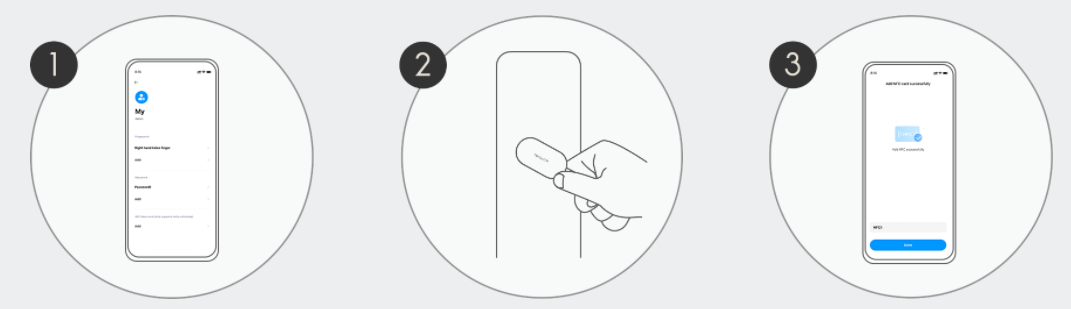
It only takes 3 simple steps to add and activate
1.Enter the door lock user management page to add the NFC device
2.Follow the app prompts to place the NFC card close to the identification area
3.Activate successfully and use it now!
1.Enter the door lock user management page to add the NFC device
2.Follow the app prompts to place the NFC card close to the identification area
3.Activate successfully and use it now!
Does it help?
Yes
No