

Redmi Smart Band 2 FAQ
Product Overview
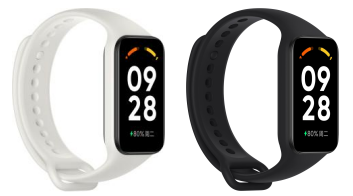
1. Q: What are the features of Redmi Smart Band 2 ?
A: 1. It adopts a 1.47-inch high-definition square screen with a resolution of 172*320. The display is clear, the touch and slide are sensitive and smooth, and the operation is smoother.
2. The appearance of the Band is simple and bright, with straps of different colors and personalized Bands , suitable for various scenarios.
3. It supports full-range motion data tracking of multiple mainstream sports modes, which is the best choice for entry-level sports enthusiasts.
4. All-round health tracking, supporting functions such as heart rate, blood oxygen, stress, sleep monitoring, etc., to help you gain a deeper understanding of your physical profile and escort a healthy life.
5. Ultra-long standby time, 210mAh battery capacity, under the premise of meeting daily exercise and health monitoring, ultra-long standby time of more than 14 days. If the low-intensity usage mode is used, that is, health functions such as continuous heart rate monitoring, blood oxygen, stress and sleep are turned off, it can stand by for 20 days.
2. Q: What is the difference between Redmi Smart Band 2 and traditional Band ?
A: Redmi Smart Band 2 is a comprehensive smart sports health band , which can intelligently monitor personal heart rate, sleep, stress, blood oxygen and other data. All-round health tracking escorts a healthy life, and it has 30+ mainstream sports modes , weather, music control, message notification and other functions. Band has rich displays , can be matched with straps of different colors , and is suitable for sports, leisure, business and other scenarios.
3. Q: What is the material of the screen and middle frame of Redmi Smart Band 2 ?
A: Redmi Smart Band 2 is equipped with a 1.47-inch high-definition square screen with a resolution of 172*320 and a pixel density of 247 PPI. The display screen is more delicate; the case is made of glass fiber reinforced nylon material, which has high strength and good corrosion resistance.
Note: Hard objects such as sand (quartz components) in life may also damage the Band screen.
4. Q: What is the material of the Redmi Smart Band 2 strap ?
A: The Redmi Smart Band 2 strap is made of TPU, with a smooth and comfortable surface, soft and elastic texture, anti-allergic, comfortable to wear and skin-friendly, and supports quick release.
5. Q: What is the waterproof level of Redmi Smart Band 2 ?
A: Redmi Smart Band 2 has a waterproof rating of 5 ATM can be worn in normal temperature showers, swimming pools and shoals, but it is not suitable for saunas, diving, or hot baths, and it is not recommended to use it in water environments where the temperature changes greatly.
Note: 50 m water resistance refers to the waterproof depth of the Band under standard conditions. This condition means that the Band has a certain resistance to water pressure in a static state. This resistance value is not obtained underwater, but Calculated by the anti-atmospheric pressure value, the 50 m water resistance indicates that the Band can withstand the pressure of 50 meters of water depth in a static state.
6. Q: What comes standard with Redmi Smart Band 2 ? What colors are there?
A: The regular version of Redmi Smart Band 2 comes standard with Band main body x 1, magnetic charging cable x 1, and product manual x 1. At present , the fitness tracker only has one color of black, and the strap has two colors of black and white.
7. Q: How to replace the Redmi Smart Band 2 strap ?
A: The Redmi Smart Band 2 strap supports detachment, the method is as follows:
Disassembling
Remove the band from your wrist, hold on to each end and pull on the wristband until you see a small gap between the fitness tracker and the wristband.
Use your finger to pop the fitness tracker out of its slot from the front side of the wristband.
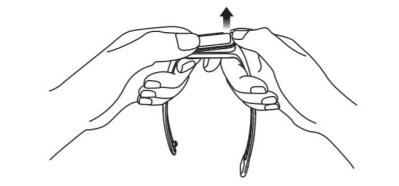
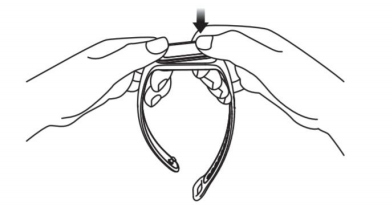
How to Install
1. Insert one end of the fitness tracker into the slot from the front of the wristband.
2. Press down on the other end with your thumb to push the fitness tracker completely into the slot.
APP usage related
1. Q: Which devices does Redmi Smart Band 2 support? What app do you use? Does it support iOS?
A: Redmi Smart Band 2 needs to be bound to Mi Fitness App , which can be searched and downloaded in the Play store.
Support system: Android 6.0 or iOS 12.0 and above.
2. Q: How to bind the Redmi Smart Band 2 to the mobile phone?
A:1. Scan the QR code to download and install the app. Add the Redmi Smart Band 2 to the app first before you start using it.

Compatible with: This product only supports certain Android or iOS systems. For detailed information, please check the product page on www.mi.com.
2. Log into your Xiaomi account in the app, and follow the instructions to connect and pair the band with your phone. Once the band vibrates and a pairing request is displayed on its touchscreen, tap to complete the pairing with your phone.
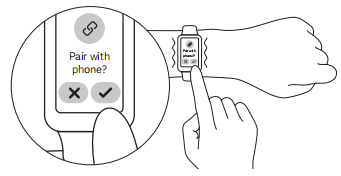
Note: Make sure the Bluetooth on your phone is enabled. Hold the phone and the band close to each other during pairing.
3. Q:How to unpair Redmi Smart Band 2?
A:1. Open the Mi Fitness App and click Unbind on the device page.
2. After the Band is restored to factory settings, it will be automatically unbound from the phone.
After unbinding, Band will restore factory settings and all data will be cleared.
4. Q: Can Mi Fitness App bind multiple Redmi Smart Band 2 ?
A: Multiple Bands can be bound to Mi Fitness App , but only one can be enabled.
5. Q: How does Mi Fitness App switch to other Bands ?
A: Mi Fitness App , enter the device, click to view all devices, select the Band you want to switch. Click Switch, and a pop-up window will pop up, then click OK.
6. Q: How to upgrade the system firmware of Redmi Smart Band 2 ?
A: Band will push subsequent upgrade packages through Mi Fitness App to update functions.
In Mi Fitness App >>Device>>Check for update
If there is a new version, click to download the upgrade package;
After the upgrade package is downloaded, it will be automatically pushed to the Band. After the upgrade package is received, the Band will be automatically upgraded and restarted.
Note:
The band power needs to exceed 20%;
During the upgrade process, the Band needs to remain connected to the mobile phone, and try to keep the Band near the mobile phone.
7. Q: What account does Mi Fitness App support to log in?
A: Mi Fitness App currently only supports Xiaomi account login.
8. Q: How to set up the notification reminder of the Redmi Smart Band 2 app?
A: If Redmi Smart Band 2 wants to receive mobile phone APP notifications, such as text messages and other reminders, you need to turn on the application's message notifications in the Mi Fitness App.
Open method: Mi Fitness App — Device-App notifications-Choose which apps can send notifications (such as SMS, etc.).
Note: To open notification messages in Mi Fitness App , you need to open the notification permission of the mobile phone at the same time.
9. Q: How to set up the redmi Smart Band 2 activity reminder?
A: Redmi Smart Band 2 can set daily calorie or step goals. After wearing the Band , it can monitor the calorie consumption, steps and standing activities of the day in real time. When the exercise reaches the target, the Band will have a vibration reminder, which cannot be turned off.
Setting method:
1. Open the Mi Fitness App on the mobile phone , log in to the Xiaomi account and bind the device;
2. After successfully connecting with the Band , find Calories / Steps on the [Health] homepage to set it up.
Functions and usage of the device
1. Q: How to turn on, shut down and restart Redmi Smart Band 2 ?
A: Power on: In the shutdown state, connect the power cord to power on
Shut down : In the power-on state, click Settings->System Operation-> shut down on the Band.
Reboot: In the power-on state, Band clicks Settings—System Operation—Reboot.
2. Q: How is the battery life of Redmi Smart Band 2 ? How long can it be fully charged?
A: It takes about 2 hours to fully charge the Redmi Smart Band 2. Up to 14 days of battery life under normal use
The test usage scenarios are as follows:
scenes to be used | Scenes | battery life |
typical use | After fully charged, use the factory default settings, use static Band , turn on heart rate detection for 30 minutes/time all day, turn off high-precision sleep monitoring, turn on Raise to wake , turn on message notification, and other factory default settings. | 14 days |
heavy use | After fully charged, use the factory default settings, use static Band , turn on 1 minute/time all-day heart rate detection, turn on high-precision sleep monitoring, turn on raising the wrist to brighten the screen, and turn on message notifications (others are factory default settings). | 6 days |
3. Q: What is the battery capacity of Redmi Smart Band 2 ? How to charge?
A: The battery capacity of the Redmi Smart Band 2 is 210mAh, and it is equipped with a special magnetic USB charging cable as standard, and the power cable is 50cm long.
The charging method is as follows:
1. Take out the charging cable, and make the charging contacts on the back of the Band fully fit with the metal contacts on the charging cable;
2. Connect the other end of the charging cable to a USB-A charger (output voltage 5V, output current ≥ 0.5A).
Band is lower than 15%, it will prompt to connect the charger to charge; during the charging process, there will be a charging prompt.
Note:
2. Before charging, please wipe off the charging contacts of the Band to avoid sweat or water residue.
4. Q: What are the routine operations of Redmi Smart Band 2 ?
A: When the band is successfully paired with your phone, it will start tracking and analyzing your daily activities and habits.
Tap the touchscreen to light it up.
View notifications: Swipe down from the top on the home screen.
Enter the function list: Swipe up from the bottom on the home screen.
Switch widget: Swipe left or right when on the home screen page.
Go back: Swipe from the left edge to the right on other pages.
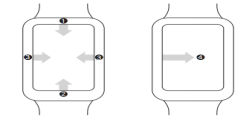
5. Q: How does Redmi Smart Band 2 measure and view heart rate?
A: Redmi Smart Band 2 uses photoplethysmography technology to detect heart rate and display the heart rate value. When continuous heart rate detection is turned on, a continuous heart rate chart can be drawn. Redmi Smart Band 2 enables smart monitoring by default, and can be set to 1 minute/10 minutes/30 minutes/smart monitoring.
The way to check the heart rate is as follows:
(1) Enter the Band application list and open the heart rate. At this time, the heart rate will enter the measurement state, and the heart rate data can be viewed. Some Bands can display heart rate and other data in real time.
(2) Drag down on the heart rate function page to view the heart rate chart. When measuring heart rate, resting heart rate, and detecting heart rate last time, please ensure that the Band is facing upwards, and the heart rate detection area fits on the wrist. It is best to tap the surface of the Band to increase Fit to the wrist.
6. Q: How does Redmi Smart Band 2 detect a single blood oxygen measurement?
A: Enter the Blood oxygen detection application, click to start measurement, and enter the calibration process when the first value appears in the measurement.
The blood oxygen history measurement value can be viewed in the APP.
7. Q: Does Redmi Smart Band 2 support sleep monitoring?
A: The sleep monitoring function is supported by default (the switch item is not provided). After wearing the Band to fall asleep, it can monitor the time of falling asleep, the time of waking up, and the duration. At the same time, the APP provides a high-precision monitoring and sleep breathing quality setting item, which can track the rapid eye movement distribution of sleep and the quality score of sleep breathing after it is turned on (turn it on in Mi Fitness App - Device - Sleep Settings)
Sleep data type: sleep data can be viewed on the app + including sleep duration, distribution of deep and light sleep, sleep quality evaluation, etc.
Sleep data viewing method: Open the sleep application in the application list to view the sleep data of the day.
8. Q: Does Redmi Smart Band 2 support nap monitoring/all-weather sleep monitoring?
A: Support.
Long sleep: sleep time ≥ 3 hours;
Sporadic naps: 15 minutes ≥ sleep duration < 3 hours;
Time periods that support detection of long sleep and sporadic naps: 24 hours a day.
9. Q: How to view weather information on Redmi Smart Band 2 ?
A: When the Band is connected to the mobile phone, the viewing method is as follows:
1. Select the weather application in the application list to view it. Swipe up and down to get the local temperature, weather, wind direction, wind level, relative humidity and other information as well as the weather forecast for the next five days.
2. Swipe the screen from left to right on the Band homepage to enter the weather direct card. Swipe up and down to get the local temperature, weather, wind direction, wind level, relative humidity and other information as well as the weather forecast for the next five days.
Note:
1. If the Band is not connected to the phone, the weather will display the information that was synchronized when it was connected to the phone last time.
2. If the "Weather" direct card is hidden in the Mi Fitness App , you cannot view the weather through the direct card on the Band.
3. The weather information displayed on the Band is obtained and pushed by Mi Fitness App from the service provider. If it is different from the weather service provider used by the mobile phone system, the displayed results may be slightly different.
10. Q: Does Redmi Smart Band 2 support pressure monitoring?
A: Not supported. Redmi Smart Band 2 only supports manual pressure measurement.
Stress: Stress here refers specifically to mental stress, excluding physical stress caused by high-intensity exercise. The principle of stress detection is to use heart rate variability to assess the current stress intensity.
View by:
1. Open the pressure application in the application list to view the last measured pressure value and pressure level
2. In the data section of the Mi Fitness App , you can view the daily, weekly, monthly, and annual pressure curves, maximum, minimum, and average pressure and other information, and do some decompression activities to relieve stress through the pressure data.
Note:
1) When strenuous exercise or frequent middle-to-high-intensity activities will have a certain impact on the accuracy of pressure data assessment.
2) Band is not a medical device, and the test results and recommendations are for reference only.
Introduction of pressure value:
stress score | Pressure Level |
81~100 | severe |
51~80 | Moderate |
26~50 | mild |
0~25 | Relax |
Note:
Strenuous exercise or frequent moderate to high intensity activities will have a certain impact on the accuracy of stress data assessment.
This device is not a medical device, and the test results and suggestions are for reference only.
11. Q: Does Redmi Smart Band 2 support energy monitoring?
A: Not supported.
12. Q: How to customize the card function of Redmi Smart Band 2 ?
A: Redmi Smart Band 2 supports shortcut card function. On the main page of Band , swipe left and right to switch application cards. Currently supported application card modes
blocks are: Band , vitality indicators, heart rate, blood oxygen, sleep, stress, women's health, exercise list, alarm clock, schedule, music control, weather
Setting method: Mi Fitness App - Device-System-Sort apps - Drag up and down on the right side of the application list to adjust the order, or click + or - to set the display to hidden.
Note: Bands cannot be hidden, and the order cannot be adjusted.
13. Q: How to replace and delete the Band of Redmi Smart Band 2 ?
A: Redmi Smart Band 2 supports band replacement , the replacement method is as follows:
1) To replace the Band, go to Band Settings -> Select Band Replacement, or long press the center of the Band on the home page of the screen to enter the Band selection page, slide up and down to switch and select the Band. Both the Band that comes with the system and the Band that has been downloaded and replaced before will be displayed on the Band selection page.
2) Replace in the Mi Fitness App. When the Band is connected to the mobile phone, open the Mi Fitness App - Device-- Online-Band displays-click the band display you want to -click to download and use, and wait for the installation to complete.
Note: Due to the limited memory, Redmi Smart Band 2 only supports downloading one additional Band from the App. When the number of added Bands is too large, new Bands cannot be added, and the installed Bands need to be deleted.
Delete method:
1) Open Mi Fitness App -> Device-- Online-Band displays-click the band display you want to delete-delete it ;
2) Delete on the device Band replacement interface ( Note: only one can be deleted).
14. Q: Can Redmi Smart Band 2 customize the Band background?
A: Redmi Smart Band 2 supports customizing the Band background, which needs to be realized through the album Band. Setting method: 1. Open the Mi Fitness APP, correctly connect and synchronize the device; 2. On the Mi Fitness App homepage, click the Band card to enter the Band management page; 3. Select the Band market, find the album Band and set it according to the process.
15. Q: How to enable the sports mode of Redmi Smart Band 2 ?
A: 1. You can enter the exercise page by clicking on the exercise application or the exercise direct card (need to be added on the APP side) through the Band , then select the exercise you want to start, and click GO to start the exercise.
2. After the exercise starts, the exercise data will be displayed;
3. During the exercise, click the power button to pause the exercise, and then choose to end or continue the exercise.
Note: If the exercise time or distance is too short, it will prompt "This exercise is too small to record data" when the exercise ends.
16. Q: Does Redmi Smart Band 2 support maximum oxygen uptake (VO2max)?
A: Not supported.
17. Q: Does Redmi Smart Band 2 support the function of finding phone/finding band ?
A: Redmi Smart Band 2 supports the function of finding the mobile phone, but the mobile phone does not support the function of finding the Band. When the mobile phone and the Band are connected via Bluetooth, if you cannot find the mobile phone, you can use the Find Mobile Phone function of the Band.
The operation method is as follows:
1. Click the Find Phone icon in the application list to enter the Find Phone page, click Start Search to enter the Find Phone interface
2. On the search phone page, click Stop Search to end the search state.
Note: If the Bluetooth is not connected, the Find Phone function prompt is unavailable.
18. Q: Does Redmi Smart Band 2 support compass function?
A: not supported
19. Q: What are the sports modes of Redmi Smart Band 2 ?
A: The sports modes of Redmi Smart Band 2 currently include outdoor running, indoor running, indoor cycling, outdoor cycling, walking, mountain climbing, cross-country, hiking, elliptical machine, rowing machine, rope skipping, high-intensity interval training, yoga, and free activities , Skateboarding, Snowboarding, Pilates, Stretching, Strength Training, Dance, Billiards, Badminton, Table Tennis, Outdoor Skating, Ice Hockey, Cricket, Rugby, Skis, Aerobics, Frisbee, Roller Skating
20. Q: Does Redmi Smart Band 2 support viewing altitude and air pressure?
A: Not supported.
21. Q: How to set the alarm clock on Redmi Smart Band 2 ?
A: Redmi Smart Band 2 supports the alarm clock function, the alarm clock reminds with vibration, and supports setting multiple alarm clocks and repeated alarm clocks.
Method 1: Enter the alarm clock application in the application list to create a new alarm clock. When setting the time, if you do not select a repeating date, it will be a single alarm clock; if you select a repeating date, it will be a repeating alarm clock.
Method 2: Click the alarm clock on the APP device page to add an alarm clock on the APP
22. Q: How to set up and use the Do Not Disturb mode of Redmi Smart Band 2 ?
A: After the Do Not Disturb mode is turned on, there will be no vibration reminders such as incoming calls and application notifications; however, system reminders, such as low battery and alarm clocks, will still vibrate to remind.
Setting method: Band setting - DND.
23. Q: Does Redmi Smart Band 2 support heart rate limit reminder?
A: Yes, after setting the heart rate overrun reminder on the Band , the device will continue to monitor the heart rate. If the heart rate is found to be continuously higher than the set value in a quiet state, it will be recorded as the heart rate is too high, and the Band will send out a heart rate overrun reminder;
Setting method: Mi Fitness App - Device->Health monitoring->Heart rate->Heart rate alert.
24. Q: Does Redmi Smart Band 2 support APP notifications?
A: Yes, the Band remains connected to the mobile phone. After opening the application notification on the Mi Fitness App , you can view the message notifications on the mobile phone on the Band. The message notifications are displayed in a list. Folding and replying are not supported.
View message notifications: Swipe down on the Band homepage to open the message panel, and you can view message notifications;
Delete message notification: Click the Clear button in the message panel to clear all messages.
Note: The message only displays text content, other formats cannot be displayed.
25. Q: Does Redmi Smart Band 2 support incoming call reminder?
A: Yes, when the Band is connected to the mobile phone, when there is an incoming call on the mobile phone, the Band will vibrate to remind and display the number or name of the caller.
Opening method: Device-- App notification. You can tap the red phone icon on the Band screen to reject the call; tap the ring to mute the phone to mute the phone (only supported by Android).
Note: 1. The name of the caller ID is consistent with that on the mobile phone, and the caller number is displayed for unfamiliar calls; the name stored in the address book is displayed for incoming calls from contacts in the mobile phone address book. (Need to obtain the mobile phone address book permission)
2. If the Do Not Disturb mode is turned on and it is within the Do Not Disturb period, you will not receive call reminders.
26. Q: What data can be viewed on the Redmi Smart Band 2 during exercise?
A: Each exercise mode of Redmi Smart Band 2 presents the most critical exercise data, taking outdoor running as an example:
When running outdoors, it can display data such as time, heart rate, mileage, pace, calories, stride frequency, and total steps;
*Different sports modes have different data types displayed during sports.
27. Q: What are the ways to turn off the screen of Redmi Smart Band 2 ? How to set it up?
A: 1. By default, if there is no operation within 5 seconds, the screen will automatically turn off. You can modify the off-screen time in Band 's "Settings" - "Display and Brightness".
2. Band supports covering and turning off the screen. After opening, cover and touch the Band with the palm of your hand. When the area reaches 80%, the Band will directly change from bright screen to off screen. Setting method: Open Band-Settings-Brightness-Lock screen -> Enable or closure.
3. Flip the wrist to turn off the screen, turn the wrist Band in the opposite direction to turn off the screen.
28. Q: How to set Raise to wake on Redmi Smart Band 2 ?
A: Setting method: Mi Fitness App -> Device -> Raise to wake -> All day on/timed on/off
29. Q: How to adjust the brightness of the band on Redmi Smart Band 2 ?
Settings-Brightness from the shortcut panel or the application list to manually adjust the brightness.
30. Q: Can Redmi Smart Band 2 add the time of multiple countries?
A: The setting of dual time zones is not supported.
31. Q: Does Redmi Smart Band 2 support phone function?
A: Redmi Smart Band 2 does not support the phone function, and cannot make calls on the Band. When the Band is connected to the mobile phone, when the mobile phone receives a call, it only supports checking the incoming call information and rejecting the call on the Band.
32. Q: What types of reminders does the Redmi Smart Band 2 reminder contain?
A: Stand reminder, low battery reminder, activity standard reminder, heart rate over limit reminder, message reminder, etc.
33. Q: What is the message reading mechanism of Redmi Smart Band 2 ?
A: The messages in the message list can be previewed, and the messages read on the mobile phone during the Bluetooth connection will no longer appear on the Band
34. Q: How to set the standing reminder for Redmi Smart Band 2 ?
A: After turning on the reminder, if there is no activity within an hour, the Band will vibrate to remind you to get up and exercise
Opening method: Mi Fitness app-Health monitoring-Standing-on/off> Set the time period. You can set the start time and end time, and if you don’t want to be disturbed during the lunch break, you can turn on the no reminder option for lunch break. The time period for no reminder during lunch break is 12:00-14:00.
35. Q: What is the reminder logic of the Redmi Smart Band 2 activity reminder (sedentary reminder)?
A: Organize as follows:
1. The user has not completed "Hourly Standing" in the current hour.
2. It is worn at 49'00"-49'59", and it is also worn when reminding.
3. This minute is "inactive" (active steps < 3).
4. In the first 50 minutes of this hour, the time of "not wearing state" is less than 5 minutes, and the time of "sleeping state" is less than 5 minutes.
5. The current time point is within the reminder time range set by the user.
36. Q: Does Redmi Smart Band 2 support off-wrist lock (off-wrist password) function?
A: Yes, after enabling this function, when the Band detects that it is not worn, it will activate the password lock screen to ensure information security. The password is a 6-digit combination of 0-9.
Opening method: Band -> Device-Security-PIN
37. Q: Does Redmi Smart Band 2 support Bluetooth to unlock the phone?
A: Band supports the function of unlocking the mobile phone, the function of Band unlocking the mobile phone, the current support status in the MIUI version of the Xiaomi mobile phone:
1. China version: Android Q and above, the development version & stable version of Xiaomi phones that are packaged and released without changes after August 6, 2020;
2. Overseas version: development boards & stable versions of Xiaomi mobile phones with Android R and above that will be packaged and released without changes after June 7, 2021;
When the mobile phone and the Band are connected via Bluetooth, the unlocking of the Band is a one -to-one binding between the Band and the mobile phone. Within a safe distance, the Band acts as an identity ID, which can replace the input of unlocking passwords or patterns, which greatly improves the operation efficiency while ensuring security. Convenience.
Setting method:
1. Mi Fitness App -> Device -> Unlock Phone -> Set a password to unlock the phone;
2. After the lock screen password is set, confirm the unlock on the Band , and the binding is successful. You can choose the unlocking distance (close, moderate, slightly far).
Unbinding: You need to turn off the Bluetooth device unlocking function in the phone system settings, taking Xiaomi phones as an example: Settings-Passwords&security-Unlock with Bluetooth device -> off.
Note: At present, the function of unlocking the phone needs to be used with Xiaomi phones with MIUI12 and above, so if the model and system do not match, the APP will not display the function entry of [Unlock Phone].
38. Q: What should I do if I forget the off-wrist password of Redmi Smart Band 2 ?
A: If you forget the wrist-off password, you can deal with it as follows: If you forget the password, open the APP and reset the password in the [Device Password] setting.
39. Q: Does Redmi Smart Band 2 support all-day blood oxygen detection?
A: Not supported. Only manual single blood oxygen measurement on the device side is supported.
40. Q: Why is there a big difference between the blood oxygen values measured twice in the same period of time?
A: Organize as follows:
1. The blood oxygen value is measured by an optical sensor. Emotional changes, small changes in breathing and wearing status, impact of standing movements, and changes in Band status may all affect the measurement results; the physical status, environment, and wearing position of the two measurements are inconsistent. It can also lead to different measurement results.
2. It is recommended to take multiple measurements and check the overall status of the blood oxygen value multiple times, so as to eliminate occasional inaccurate values and more accurately grasp the physical status.
common problem
1. Q: What is the resting heart rate of Redmi Smart Band 2 ?
A: Resting heart rate, also known as resting heart rate, refers to the number of heartbeats per minute when you are awake, inactive and quiet.
The best time to measure your resting heart rate is in a resting state after you wake up naturally in the morning. The resting heart rate of adults is usually in the range of 50-100 beats/min, and the resting heart rate of professional athletes is usually 40-60 beats/min. Since the Band automatic measurement may not be at the best time, it may cause resting heart rate The value is temporarily not displayed or the test value deviates from the actual one.
2. Q: What factors will affect the result of Band test heart rate?
A: 1. Non-standard wearing methods, such as light leakage caused by incomplete fit, arm swing, and slight movement of the Band on the skin; wearing the Band too tightly, raising the arm, and making a fist will affect blood circulation. Heart rate signal may be affected.
2. Wear the Band close to the joint;
3. There are many sweat stains on the Band.
The correct way to measure: put your arm flat, relax and keep it still while keeping the Band close to your arm.
Note: When worn correctly, individual differences such as skin color, hair, tattoos, and scars may also affect heart rate monitoring (due to dark skin's greater absorption of green light, monitoring may not be possible).
3. Q: What should I do if the current heart rate measured by Redmi Smart Band 2 is too high?
A: When the heart rate is too high, you should rest properly and not exercise too much; if the heart rate continues to be too high, it is recommended to consult medical staff in time according to your own situation.
4. Q: What is the suitable wrist size?
A: It is suitable for wrists with a circumference of 135mm~215mm.
5. Q: How to judge the effective standing of Redmi Smart Band 2 ?
A: Effective standing: The number of continuous steps in this hour reaches 20 steps/hour" or "The duration of medium-high intensity reaches 2 minutes"
Note: "Continuous steps" refers to accumulating from the time the actual steps are generated. If there is no increase within 60 seconds, it will be cleared and recalculated.
6. Q: What is the number of words and items for the Redmi Smart Band 2 support message reminder?
A: 1. If the content of the message notification exceeds 200 characters, an ellipsis will be displayed at the end. Please check the complete message notification on your mobile phone.
2. Band can receive up to 10 message notifications. If more than 10 messages are received, new received messages will overwrite previous messages.
7. Q: Does Redmi Smart Band 2 support the connection of heart rate belt?
A: The heart rate belt is not supported.
8. Q: What are the ways to turn on the screen of Redmi Smart Band 2 ?
A: 1. Click on the screen
Raise to wake is turned on , raise your wrist to light up the screen;
3. Charging bright screen
9. Q: Does Redmi Smart Band 2 support off-screen display (standby Band )?
A: Not supported.
10. Q: Can Redmi Smart Band 2 control the phone to play music?
A: The Band can control the mobile phone to play music. To use this function, the mobile phone and the Band need to be connected. The message notification is turned on in the APP, and the right to use the message notification is turned on.
How to use: Turn on the music player on the mobile phone , after starting to play music, Band enters the function list, select the music icon to enter the music control page, which can realize the music start/pause, switch to the previous/next song, volume increase/decrease functions.
Note: Most of the music players on the market are currently supported, but due to the differences in the openness of the music players and the app version, the experience of the Band music control function may be affected to a certain extent. (There may be certain compatibility issues with Band controlling Kuwo music player on the iOS )
11. Q: How to check the MAC address, serial number and other information of Redmi Smart Band 2 ?
A: 1. Band opens Settings -> About
2. When the Band is connected to the mobile phone, go to Mi Fitness App -> Device -> About
12. Q: What positioning system does Redmi Smart Band 2 use?
A: Band does not support independent positioning and needs to rely on APP assistance.
13. Q: How to set the time of Redmi Smart Band 2 ?
A: After the Band is paired with the mobile phone Bluetooth and the data is synchronized, the Band will automatically synchronize the time of the mobile phone system without manual settings. If the time of the mobile phone is modified, it will be modified synchronously after the Band is connected to the mobile phone.
14. Q: What is the correct way to wear the Redmi Smart Band 2 ?
A: Method: Wear the Band about one finger away from the wrist bone, and adjust the tightness of the wristband to ensure that the heart rate sensor can collect data normally. Do not wear it too tight or too loose, otherwise it will affect the accuracy of heart rate sampling.
15. Q: Will I be allergic to the Redmi Smart Band 2 ?
A: The Redmi Smart Band 2 is made of professional and healthy materials. Parts that often touch the skin, such as straps and bottom brackets, have passed strict allergy-prone and harmful substances testing, and meet the limit requirements stipulated in the national standard GB/T 26572. Due to individual differences, a small number of people may have an uncomfortable reaction to specific materials. If you feel skin discomfort when wearing it, stop wearing it and consult a doctor.
In terms of wearing, it is recommended to follow the following guidelines: when exercising, the wearing should not be too loose or too tight to ensure that the Band will not slide up and down on the wrist; in daily use, the strap can be slightly loosened to ensure a comfortable experience of skin ventilation. After long-term continuous wearing, you can take off the Band and let your wrist rest for about half an hour. After exercising, wash and wipe the sweat on the arms and strap , clean and dry before wearing.
16. Q: Is the monitoring effect of Redmi Smart Band 2 the same for left and right hands?
A: The Band can be worn on the left or right hand. It does not affect the normal sampling of sports health data. The data monitoring effect is consistent. You can choose to wear it according to your usage habits.
17. Q: Does Redmi Smart Band 2 support exercise reminder?
A: Band can remind you of each exercise in exercise mode
18. Q: How long can the data on Redmi Smart Band 2 be stored independently?
A: About 20 recent exercise data can be saved on the Band , and 20 is not a fixed number. If a single exercise takes too long, the number of 20 will be reduced. The heart rate data is kept for 15 days; the sleep page only displays the data of the current day. However, about 7 pieces of data will be saved, please connect to the mobile phone in time to synchronize to Mi Fitness App. If the Band is reset, the previous exercise data on the Band will be cleared, and the data that has been synchronized to the Mi Fitness App will not be cleared.
Note:
1. All sports will only be saved if they meet the minimum sports record standard, otherwise they will not be saved.
2. Indoor cycling, free training, etc. will save the data to the exercise record after the duration reaches 1 minute;
3. Outdoor running, indoor running, outdoor walking, outdoor cycling, mountaineering, cross-country, sports distance exceeding 100 meters are counted as valid data and saved to the sports record;
19. Q: Can Redmi Smart Band 2 be set to automatically pause during exercise?
A: Not supported.
20. Q: Does Redmi Smart Band 2 support automatic detection of exercise start?
A: Not supported.
21. Q: How to check the Bluetooth connection status of Redmi Smart Band 2 ?
A: When playing music, taking pictures remotely, etc., it will prompt Bluetooth connection.
22. Q: Can Redmi Smart Band 2 install apps independently?
A: Independent installation of applications is not supported.
23. Q: Does the vibration intensity of Redmi Smart Band 2 support adjustment?
A: Not supported.
24. Q: Will the Redmi Smart Band 2 display the heart rate when it is not worn?
A: When not wearing the Band , enter the Band heart rate application, the real-time heart rate will not be displayed, and you can view the historical heart rate and resting heart rate.
Note:
1. Support the Band displaying heart rate data , and the heart rate is displayed as - when not wearing it;
2. In some cases, due to the heart rate judgment mechanism, if the Band is placed on some light-colored surfaces, the heart rate may be displayed.
25. Q: If the Band is not with me, can others find my Band ?
A: No, after the Band is bound, the Bluetooth of the Band will not be searchable by others.
26. Q: If I change my mobile phone, how to re-bind the Band ?
A: 1. Restore the factory settings on the Band , and then use a new phone to re-bind.
2. When the Band is connected to the original mobile phone, unbind it in the Mi Fitness App , and use the new mobile phone to bind after unbinding.
27. Q: What reminder methods does Redmi Smart Band 2 support?
A: Band reminders have vibration and full screen bright screen reminders.
28. Q: Can I wear the Band for swimming or bathing?
A: It can be worn in the shower, pool swimming and shallow swimming, but not suitable for sauna and diving, or hot bath.
Note: It is not recommended to use it in an environment where the temperature changes greatly. In addition, the Band should not be in contact with soap, shower gel, and some organic solvents. After these liquid objects are stuck, the appearance of the Band may change color and other abnormalities after a long time.
29. Q: When is the distance between the Redmi Smart Band 2 and the mobile phone, the Bluetooth will be automatically disconnected?
A: The Bluetooth connection status between the Redmi Smart Band 2 and the mobile phone is affected by the surrounding environment. Generally, there are obstructions. When the distance between the Band and the mobile phone is 5-8 meters, the Bluetooth will be automatically disconnected; in an open area or a promenade, the Band and When the distance between the mobile phone and the mobile phone is 20 meters, the Bluetooth will be automatically disconnected; if there is one person separated from the body (the Band and the mobile phone are facing each other), and the distance between the Band and the mobile phone is 3-5 meters, the Bluetooth will be automatically disconnected. The actual performance shall prevail.
30. Q: What data will be cleared after the Band is restored to factory?
A: Erase all data on the device.
31. Q: How to clean Redmi Smart Band 2 ?
Band with a soft cloth , and clean the dirt in the crevices.
Note:
1. Do not wash directly against the microphone or air pressure hole of the Band.
2. Please avoid contacting the Band with substances that may cause dirt or damage, such as dust, sand, lampblack, hand sanitizer, soapy water, cosmetics, salt water, pool water, perfume, insect repellent, detergent, sunscreen, adhesives, hair dye or Other acidic and alkaline substances, solvents, etc.
32. Q: Why can't I use the remote camera function after restarting the Band ?
A: Android phone users may lose the HID pairing between the Band and the phone after restarting/resetting the Band to the factory. On the Mi Fitness App , go to Device > Camera Settings and set it to on to return to normal (only Android has this Entrance) IOS users can open the APP and click pairing in the Bluetooth pairing request.
33. Q: Why does the volume on the phone increase/decrease when the camera button is clicked on the Band ?
A: The principle of this function is to call the function of the volume key of the mobile phone. Before using it, it is necessary to ensure that the volume key of the current mobile phone has the function of taking pictures with the shutter.
34. Q: Why can't my Band control the phone to take pictures?
A: The remote camera function is currently a laboratory function, and some mobile phone models may have compatibility issues, and remote camera cannot be used.
Troubleshooting
1. Q: The step counting of Redmi Smart Band 2 is not accurate?
A: The principle of step counting: The Band has a built-in acceleration sensor. The data detected by the acceleration sensor is combined with the basic information of the algorithm and the human body, and finally converts this information into information such as step count and consumption.
Factors affecting the number of steps recorded by Band :
1. Band 's principle of measuring walking distance is to estimate the user's step length according to the height, gender and weight set by the user, and then multiply it by the number of steps taken by the individual to obtain an estimated value.
2. Because the step length varies from person to person, people with the same height, gender, and weight will also have different step lengths, so the final calculated value will also have a large error.
3. The accuracy of step counting, that is, the number of steps taken, also has many uncertain factors that will have a great relationship with everyone's behavior habits, such as the walking habit of waving arms, etc. (such as walking, riding, driving, bathing, etc.), and arm movements are more complicated (such as keyboard tapping, moving the mouse, lifting and pulling objects, etc.).
4. It is precisely because of the above reasons that the final calculated distance of Band is also an estimated value, and Band can not be used as a professional measurement tool to measure distance. Follow-up will continue to optimize the software algorithm to calculate a more accurate data.
2. Q: Why sometimes there is no movement track or the track is lost after exercise?
A: The device does not have GPS hardware, and relies on APP positioning to obtain track information. Please ensure that Mi Fitness App and Band are in Bluetooth connection during exercise, and keep Mi Fitness App running in the background or foreground
3. Q: Why does the motion track drift?
A: GPS drift means that there is a gap between the GPS positioning and the actual position, and there is a continuous track with a certain interval between the actual route and the actual route during the movement. There are many factors that affect GPS, such as tall buildings around, complex terrain and complex electrical signal environment, and harsh weather conditions such as sandstorms, rainstorms, and other severe natural weather.
4. Q: Why is there no motion data generated after exercising?
A: 1. Please confirm whether the Band is worn normally and whether the heart rate is normal;
2. After the exercise is started, whether the exercise time or distance meets the minimum standard of exercise records;
3. It may be caused by improper wearing and the heart rate is not monitored normally.
Band still display pace information when I stop exercising in exercise mode ?
A: The mileage and pace during exercise need time to be calculated and judged.
6. Q: What should I do if the Redmi Smart Band 2 cannot be charged?
A: Please troubleshoot or check according to the following methods:
1. There is no charging mark after plugging in the charger, check the adapter and Band charging interface for foreign matter blockage, mildew, corrosion, internal cable damage, etc.
2. If the Band has not been used for a long time, or the Band has not been charged in time after the low battery shutdown , the Band battery has been over-discharged, and it will take more time to activate the battery. It is recommended to wait patiently.
3. Please charge at room temperature (recommended 20~35 degrees). In order to ensure the safety of the battery, when the ambient temperature is too high or too low, the charging current of the battery will be much smaller than the normal temperature, resulting in longer charging time. Charge the Band at room temperature.
4. Please replace the charger and data cable that can be charged normally and try to see if it can be charged normally. If the charging is normal, the charger and data cable are faulty.
7. Q: Why does the Redmi Smart Band 2 display heart rate when worn on other objects?
A: Band collects signals through optical sensors to analyze the individual's heart rate. Due to the limitations of the working principle of the sensor itself, if the Band is worn on other objects, or there is an obstruction in front of the heart rate sensor, if the heart rate sensor detects changes in the light signal, it is possible to measure the heart rate value. Therefore, when the algorithm is compatible with the aforementioned signals, Misjudgment will occur to the latter signal, resulting in the calculation of the heart rate value.
8. Q: Why can Band only store a small amount of Band ?
A: Due to the large memory usage of the Band, in order to ensure the running speed of the Band system, the number of Bands will be limited to a certain extent.
9. Q: What should I do if the phone and Band data synchronization fails?
A: 1. Refresh the page on Mi Fitness App to reconnect;
2. Turn off the Bluetooth of the mobile phone and turn it on again, and turn on the Mi Fitness App connection again;
3. Restart the Band , restart the phone, and reinstall the Mi Fitness App to try.
10. Q: What should I do if the Redmi Smart Band 2 does not vibrate?
A: 1. First check whether the Band has enabled the Do Not Disturb mode, etc.;
2. If it is not turned on, you can restart the Band. After the restart is successful, set a few more Band alarm clocks. If the Band screen can normally display the alarm clock and alarm interface at the time, but the Band does not vibrate, you can apply for after-sales processing of the Band.
11. Q: What should I do if the Redmi Smart Band 2 freezes, black screen, or cannot be turned on?
A: 1. The general reason why the Band does not turn on is that it is out of power. The failure of the Band to charge may be due to the oxidation of the charging contacts. You can try to clean the charging contacts and see if it can be charged;
2. You can try to plug and unplug the Band body several times;
3. Secondly, please make sure that the USB interface (PC or other power supply equipment) is normally powered, and try to replace the Band USB charging cable. Or try changing the USB interface of the power supply device.
4. If the device still cannot be turned on, it is necessary to apply for after-sales testing.
12. Q: What should I do if the Redmi Smart Band 2 system upgrade fails?
A: 1. If the App or the wearable device prompts that the upgrade fails, please try to restart the wearable device and then upgrade again;
2. Put the Band on the charger, connect to WiFi, and re-upgrade when the Band power is greater than 20%;
3. Reset the Band , re-pair, and then try to upgrade;
4. Try to change another mobile phone to re-bind and try to upgrade;
3. If the device cannot be turned on after the upgrade fails, please contact the after-sales service for processing. ;
13. Q: Does the Redmi Smart Band 2 have a peculiar smell after unpacking?
A: When the Redmi Smart Band 2 is unpacked, there may be a slight odor. Plastic products and packaging materials usually have some plastic smell due to factors such as their own materials, and the product is stored in a sealed space for a period of time, and the smell accumulates. It may be relatively obvious when you open the box, usually after a period of time, the smell will disappear naturally, and it will not affect the human body and functional use.
14. Q: What should I do if Mi Fitness App fails to sync Band ?
A: 1. Please check whether the APP version of the mobile phone and the firmware version of the Band are the latest, if not, try to upgrade first;
2. Please check the network connection of the mobile phone. If the Wi-Fi connection of the mobile phone is disconnected, please try to reconnect; if the Wi-Fi connection is normal, but still cannot be synchronized, please use data.
3. Check the connection status between the Band and the mobile phone to ensure that the Bluetooth connection is normal, and try to refresh a few times in the APP;
4. You can restart the Bluetooth of the mobile phone, and restart the Band of the mobile phone to try;
15. Q: What should I do if the heart rate measurement of Redmi Smart Band 2 fails?
A: Turn off continuous heart rate detection, click the Band heart rate, and measure the heart rate once. When the Band is measuring, check whether the heart rate light at the bottom of the Band is on. If it is not on, you can unbind and rebind it or restart the Band. If it is invalid, you can apply for after-sales testing.
16. Q: How to deal with the time error of Redmi Smart Band 2 ?
A: If the Band time is inconsistent with the phone time, you can connect to Mi Fitness App to refresh.
17. Q: What should I do if the Redmi Smart Band 2Band cannot be bound?
A: 1. Exit the APP and turn off the Bluetooth switch, then turn on the binding again.
2. If the Band can not be found in the Mi Fitness App , you can place your Band close to the phone, or go to a place with fewer Bluetooth devices, and search and add it again;
Band information in the Bluetooth settings of the mobile phone , clear the Bluetooth pairing information of the Band , and then enter the Mi Fitness App homepage, and re-add the device. Take the Xiaomi mobile phone as an example: Settings>Select Band >Cancel pairing, Then re-add the binding;
4. Restart the Band or mobile phone, reset the Band and try to change the environment.
18. Q: What should I do if the weather of Redmi Smart Band 2 is not updated?
A: The weather is generally updated every 30 minutes, if it is found that the weather is not updated for a long time;
Please check as follows:
1. Please open the Mi Fitness App and check whether the Bluetooth connection between the Band and the mobile phone is disconnected on the home page ;
2. Please check whether weather synchronization is enabled in Mi Fitness App - My - Device More Settings.
19. Q: What should I do if the screen of Redmi Smart Band 2 cannot be turned on?
A: If the Band screen is off, Raise to wake or clicking the screen cannot turn on the screen, please try the following: It may be because the Band power is low, please connect the charging stand to check whether the power is sufficient.
20. Q: What should I do if the heart rate measurement of Redmi Smart Band 2 is inaccurate?
A: 1. Non-standard wearing methods will affect the measurement of heart rate signals, such as light leakage caused by incomplete fit, arm swing, and slight movement of the Band on the skin, etc. Wearing the Band too tightly, raising the arm and making a fist, etc. It will affect blood circulation and may also affect heart rate inaccuracy.
2. Check the wearing situation. When wearing the test, it needs to be a little tighter. Move the Band up, down, left, and right without sliding. Secondly, check the wearing position. It cannot be worn on the wrist joint. If the wrist joint moves too much, it will easily cause the bottom of the Band to not fit tightly with the skin.
21. Q: What should I do if the Redmi Smart Band 2Raise to wake is not sensitive?
A: The working principle of this function is to rely on the acceleration sensor in the Band.
1. It is recommended that you put the Band / Band face up, avoiding the wrist bone, and wear it tightly, and put it behind the wrist bone to ensure that the device will not slip.
2. When you raise your wrist, please tilt the Band / Band inward by 30-90 degrees, within 1 second, the screen will be on
3. When raising or turning your wrist, keep the screen as far as possible towards your face
22. Q: How to troubleshoot the Redmi Smart Band 2 app notification but no reminder?
A: 1. Check whether the connection status between the Band and the mobile phone is normal, and confirm that the mobile phone has been paired and is in the Bluetooth connection state;
2. Check whether the Do Not Disturb mode is turned on for the Band , and turn off the Do Not Disturb mode;
3. Check that Mi Fitness App has correctly opened the notification reading permission
4. Check that the current application information can be correctly displayed in the notification bar of the mobile phone. If it is not displayed, please enable the notification management permission on the mobile phone of this application. Take the latest system of Xiaomi mobile phone as an example: Settings - notification and status bar - notification management - select application settings To allow notification;
5. Check that the message notification of this app is turned on in Mi Fitness App , setting method: Mi Fitness App — Device-App notifications-Choose which apps can send notifications
6. Restart, reset Band , and re-bind.
How to enable the notification permission on the iOS:
1. Mobile phone settings - Bluetooth - exclamation mark behind the device - open sharing system notification;
2. Settings-Notification-Show Preview-Change to Always;
3. Settings-Notification-Application-All Switches On-Show Preview is changed to Always.
Note: When the mobile phone is in the chatting interface, chat messages will not be pushed to the Band.
Band only vibrate but not turn on the screen when there is a new message alert ?
A: This is a normal phenomenon. The Band system upgrade has optimized the message reminder strategy. Considering that there are many message notifications in normal use, the bright screen will be triggered frequently. On the one hand, it may have a certain impact on power consumption, and on the other hand, it is also an excessive disturbance. Therefore, the strategy of message notification and reminder is updated. When a message comes, it only vibrates and does not actively turn on the screen. The control right to view is in itself. When you want to view the message, you can just raise to wake or manually light up the screen. If you need to turn on the screen when you receive a message, you can turn it on in the Mi Fitness App. The setting method is: Mi Fitness App —Device—Message Notification—The screen will automatically turn on when the device receives a message.
24. Q: Why is the step count of Band inconsistent with the step count of Mi Fitness App ?
A: It may be that the connection between the Band and the APP is disconnected, and the step information is not synchronized in time. It can be synchronized after refreshing in the Mi Fitness App.
25. Q: What should I do if the Redmi Smart Band 2 has been bound successfully but cannot be connected?
A: 1. First, make sure that the Band is fully charged;
2. Check the connection status of Mi Fitness App , if it is disconnected, click to reconnect;
3. End the process of Mi Fitness App , restart the Bluetooth of the mobile phone, restart the mobile phone or Band , and try to refresh the connection in the APP;
4. Please try to restore the Band to the factory, then click Connect on the APP home page, and click pair when the same pairing code appears on the Band and APP interface.
5. If you still can't solve the problem, please clear the Bluetooth pairing with the Band in the Bluetooth settings of the mobile phone, restore the Band to factory settings, and then perform the binding process again.
26. Q: Redmi Smart Band 2 has been successfully paired, but what should I do if the account binding fails?
A: It may be that the network connection of the mobile phone is abnormal, please check the network connection of the mobile phone. If the Wi-Fi connection of the mobile phone is disconnected, please try to reconnect; if the Wi-Fi connection is normal, but still cannot be bound, please use data.
27. Q: What should I do if the screen of Redmi Smart Band 2 cannot slide?
A: 1. Check whether the power of the Band is too low; please connect the charging cable and try again
2. Click on the screen to see if it is in the long battery life mode, if so, please long press to exit the long battery life mode
28. Q: Why is the band 's weather inconsistent with the phone's weather?
A: The weather information displayed on the Band is obtained and pushed by Mi Fitness App from the service provider. If it is different from the weather service provider used by the mobile phone system, the displayed results may be slightly different.
Band not counting steps even though I started walking ?
A: The Band will update the step count multiple times per minute, but it does not update the step count in real time every second.
30. Q: Redmi Smart Band 2 has short standby time and fast power consumption?
A: Regarding the power consumption of the Band , it is related to personal daily use. For example, some special scenarios lead to an increase in the number of Raise to wake , frequent information reminders, heart rate detection and other functions that are open throughout the day, which will also lead to increased power consumption. At the same time, the amount of current required for Band 's heart rate detection will vary due to differences in individual physique, resulting in differences in power consumption. You can turn off some unnecessary functions, which can improve the battery life of the Band.
Through some simple settings, the battery life of the Band can be improved. For example, when you do not need to experience the following functions, it is recommended to turn off continuous heart rate measurement, notification management, Raise to wake switch and other functions in the device details page of Mi Fitness App.
31. Q: Raise to wake failure, heart rate failure, push Band failure, and frequent disconnection of Bluetooth? what to do?
A: When one of the above problems occurs, please try to restart or restore the factory settings to re-bind
32. Q: What should I do if the surface of the back cover is scratched or bruised?
A: Avoid direct friction with hard objects, and avoid contact with sharp objects, so as to avoid irreparable trauma on the surface.
33. Q: What should I do if the buckle is easy to fall off?
A: Avoid violently hitting the buckle with the strap.
34. Q: What should I do if the Band gets hot while charging?
A: The original charging cable must be used for charging, please charge at room temperature (recommended 20~35 degrees).
35. Q: The battery life of the Band does not meet the advertised standard?
A: The actual battery life of the watch is related to factors such as the configuration, operation, use environment and battery life of the watch, and may vary.
Please upgrade your watch to the latest version, and refer to the following methods to set up, which will help save power:
brightness of the watch/ band. In sufficient light conditions, the screen brightness of the watch/ Band can be appropriately reduced to save power.
1. Turn off Raise to wake. When you don't need to use Raise to wake , you can turn off this function to avoid frequent lighting of the watch screen and cause power consumption of the device.
2. Turn off unnecessary message push. When you check the message notifications pushed from the phone on the watch/ Band , it will also consume power. You can close some apps that do not need to push messages in the app. At the same time, you can also turn off the device to automatically turn on the screen when it receives a message in the app's permission to turn on notifications, so as to avoid frequent power consumption of the device by turning on the screen.
2. In the App, click to enter the device page and reduce the monitoring frequency of some health functions, which can effectively save power.
Select low frequency heart rate monitoring. The higher the frequency of heart rate monitoring, the more detailed the data, and the faster the power consumption of the device. In the heart rate setting, select low frequency heart rate monitoring to save power.
1. Close precision sleep monitoring. After turning on precision sleep monitoring , during your sleep, the watch/ band will increase the frequency to monitor your heart rate once per second, which will improve the accuracy of sleep data monitoring, but at the same time seriously reduce battery life. 2. After turning off precision sleep monitoring , the watch/ band will monitor your heart rate during sleep at the set heart rate monitoring frequency to save power.
36. Q: What should I do if the mobile phone scans the QR code and cannot download the APP?
1. Ensure that the mobile phone network communication is normal;
2. Try to scan the QR code with other apps;
3. Go to the app store to download;
37. Q: What should I do if the APP scans the Band QR code and cannot recognize it?
A: 1. Make sure to select the correct region;
2. Make sure the Band screen is clean and free from dirt;
3. Make sure that the phone camera focuses successfully;
38. Q: What should I do if the binding time between the mobile phone and the Band is too long?
A: 1. Re-switch the Bluetooth to connect again;
2. Restart the Band to connect again;
39. Q: How to synchronize data after binding?
A: 1. Automatic synchronization
In the case of Bluetooth connection, the APP will be synchronized once when switching from the background to the foreground (the switching page will not be synchronized).
2. Manual synchronization
2.1 When the APP is on the "Health" home page, the user can pull down to refresh the synchronized data;
2.2 You can click the sync button on the device page.
mobile phone and the Band cannot be connected
1. Ensure that the mobile phone network communication is normal, and turn on the Bluetooth switch of the mobile phone system;
2. Make sure to select the correct region;
3. Please try to switch on and off the Bluetooth of the mobile phone or restart the Band to connect again;
Bluetooth does not reconnect after disconnection
1. Ensure that the mobile phone network communication is normal, and the Bluetooth switch of the mobile phone system is turned on;
2. Please try to turn on and off the Bluetooth of the mobile phone or restart the Band to connect again;
the distance between the phone and the Band is within 20 meters.
40. Q: What should I do if the heart rate is inaccurate?
A: 1. Please wear the Band about one finger away from the wrist bone. Wearing it too loosely may affect the accuracy of heart rate monitoring data;
2. Please make sure that the heart rate light at the bottom of the Band is in direct contact with the skin and should not be covered by dirt;
3. Road bumps or arm disturbances will cause the wearable device to swing irregularly together, which will cause false detection by the wearable device sensor and cause a small amount of step accumulation;
41. Q: What should I do if the pedometer is not allowed to be worn?
A: 1. Please wear the Band about one finger away from the wrist bone. Wearing it too loose may affect the accuracy of the step counting data;
2. Road bumps or arm disturbances will cause the wearable device to swing irregularly together, which will cause false detection by the wearable device sensor and cause a small amount of step accumulation;
42. Q: What should I do if I am not allowed to sleep while wearing it?
A: 1. Algorithms for some small movements such as playing with mobile phones after waking up before going to bed may not be recognized accurately.
2. As a result, the time of falling asleep and waking up is inaccurate in some cases, and the algorithm is continuously optimized to improve the recognition accuracy;
43. Q: What should I do if the blood oxygen test shows slow or no value?
A: 1. Factors such as hair, tattoos, shaking, low temperature, incorrect wearing, etc. may affect the measurement results, and even cause the value to fail. Wear the device tightly to the distance of one finger from the wrist bone, and keep still during the whole measurement process, which can greatly improve the success rate of the value;
2. In order to ensure the accuracy of the measurement, please wear the watch correctly, keep your arm flat, keep the watch screen upward, and the watch fits comfortably with the skin of your wrist. Do not wear it on the wrist joints. Then start the Blood oxygen measurement on the watch/watch, measure Keep your arms still throughout;
3. Make sure the sensor on the back of the watch/ Band is clean, dry, and free from foreign objects;
4. In low temperature environments (such as high altitude, winter and other low temperature scenes), you can take off the watch/watch, rub the part where the watch is worn to activate blood circulation, and then wear the watch for measurement;
5. In order to make the measurement result more accurate, it is recommended that you wear it for 3-5 minutes before measuring the Blood oxygen.
44. Q: What should I do if the music playback control state is out of sync?
A: 1. The Band is always connected to the mobile phone, and the APP needs to keep running in the background;
2. For Android users, please confirm that the APP has enabled the notification read permission.
45. Q: What should I do if the screen does not turn on when I raise my wrist?
A: 1. Check whether the Raise to wake function has been enabled. On the APP device page > Raise to wake , check whether Raise to wake is enabled. Then check whether you choose to turn on all day or on a regular basis. If timing is selected and an effective period is set, the watch/ band will only enable the Raise to wake function during the effective period.
2. Turn on the sleep mode or long battery life mode, and the screen will not turn on when you lift your wrist
46. Q: What should I do if Raise to wake is not sensitive?
A: 1. It is recommended that you put the Band /watch face up, avoiding the wrist bone, and wear it tightly, and put it behind the wrist bone to ensure that the device will not slip.
Band inward by 30-90 degrees when you lift your wrist , and the screen will turn on within 1 second
3. When raising or turning your wrist, keep the screen as far as possible towards your face
47. Q: What should I do if the touch is not sensitive?
A: After the touch screen of the Band is wet, please wipe the water stains on the surface with a soft cloth before operating;
48. Q: What should I do if the screen is not touched?
A: 1. Please connect the charging cable to check whether the device is still powered;
2. If the screen of your mobile phone is dirty or has water stains, it may affect the screen touch sensitivity. It is recommended that you try to wipe the screen clean;
3. Shut down and restart is OK;
49. Q: What should I do if the watch screen cannot be turned on?
A: 1. Please connect the charging cable to check whether the device is still powered;
2. Check whether it is powered on;
3. Whether charging can be activated;
50. Q: What should I do if I forget the password?
A: If you forget the password, open the APP and reset the password in [Device Password] settings.
51. Q: I got the Band for the first time , what should I do if the battery loses power soon?
A: When the device is turned on for the first time, if the charging time is short, there may be a certain amount of empty power in the battery, and the normal power will return to normal after 20 minutes.
It is recommended to charge for 30 minutes before using
52. Q: What should I do if the Band version upgrade fails?
A: The following conditions may cause the upgrade to fail:
The network was disconnected during the app downloading the upgrade package, which caused the download of the upgrade package to fail.
the App pushes the upgrade package to the Band , the distance between the Band and the phone is too far, resulting in interruption of transmission.
Band is too low, and it will automatically shut down during the upgrade process.
Band upgrade fails, it will automatically restart. After booting, the Band can still be used, but it will maintain the version before the upgrade.
You can try to upgrade again after the Band is fully charged and the installation package is downloaded.
53. Q: What should I do if I cannot use the watch/ Band to remotely control the phone to take pictures?
A: The principle of the remote camera function is to call the volume key function of the mobile phone. Before use, you need to make sure that the phone's volume keys have the function of taking pictures with the shutter. Android phone users need to enable the camera function in advance.
If the remote camera function cannot be used, please check the following settings:
Check if the camera function is enabled in the app. After the watch/ band is connected, click Device > Camera Settings in the App, and follow the on-screen prompts to enable camera.
Check whether the volume key of the mobile phone has the function of taking pictures with the shutter.
Tips: The remote camera function is a laboratory function. Due to compatibility issues, some mobile phone models, such as Huawei P40 Pro, Redmi Note9, and some mobile phones with MTK chips cannot support this function.
54. Q: What if the weather data is not updated?
A: The weather data is updated every 15 minutes. If it is still not updated after 30 minutes, please check the following options:
Open the App and check whether the Bluetooth connection between the watch/ Band and the mobile phone is disconnected on the device page;
In the App, click Device-System-Sort apps-Weather updates, Locations, choose (automatic location or manual city selection)
Check whether the system location service and App location information acquisition permissions are enabled.
In the App, tap the device, tap the sync button on the right side of the watch/ band to manually re-sync the data.
55. Q: The exercise records on the watch/ band are lost
maximum of 20 exercise records can be stored on the watch/ band. When the storage limit is exceeded, the oldest exercise record will be automatically deleted.
You can view all exercise records in the App. Click Health > All Exercise Records to view exercise records by week, month, year, etc., and click Total Records to view all exercise records.
56. Q: What should I do if the unread notification messages are lost?
A: Reason: There may be too many unread messages. The watch/ band can receive up to 10 message notifications, if more than 10, the new received message will overwrite the previous message.
Solution: Please check the message notification on the watch/ band in time , and if you find that the unread message is missing, please check it on the mobile phone.
Only messages displayed on the notification bar of the mobile phone system can be received on the watch/ band. Messages that have been read on the phone will not be communicated again on the watch/ Band
Know.
57. Q: What should I do if the calorie calculation is inaccurate?
A: 1. Calorie calculation is related to height and weight. Changes in height and weight information settings may cause large differences in calorie calculation results. Please fill in the actual height and weight on the APP.
2. The tightness of the Band will affect the calorie calculation. It is recommended to wear the Band tighter.
58. Q: What should I do if the blood oxygen measurement value is inaccurate?
watch/ band is not worn correctly, and the heart rate sensing area on the back of the device does not fit the skin of the wrist, so data cannot be obtained.
watch/ band is dirty, or there is sweat between the wrist and the device, which may affect the measurement results.
During the measurement, the wrist was not kept still and the arm was shaken.
Being in a low temperature environment, or the skin temperature of the wrist is too cold, or the blood flow will be reduced, which will affect the measurement results.
wearing the watch/ band is in a state of compression, which affects blood circulation and also leads to inaccurate measurement results.
There are tattoos or pigmentation on the wrist where the watch/ band is worn, which will affect the penetration of the red light of the sensor, resulting in inaccurate measurement results.
59. Q: What should I do if the sliding is not smooth when using the Band ?
A: Organize as follows:
1. If the current settings are in the process of reconnecting, it is recommended to wait until the connection is successful, or try again after a complete disconnection.
2. If the current device is synchronizing data with the APP, it is recommended to try again after the data synchronization is complete.
3. Restart the Band and try again.
6 0. Q: What should I do if the wristband is soft?
A: The wristband is made of TPU material with a hardness of 65 degrees. Due to the difference in personal perception, the judgment of the softness and hardness of the strap is different, which does not affect the use of the Band.
6 1. Q: The edges of the screen display are not smooth?
A: Redmi Smart Band 2 uses a 1.47-inch TFT square screen with a resolution of 172*320. The display imaging effect is different from that of mobile phones and high-end watches. For example, the screen has rough edges and is not smooth. It is a normal phenomenon and does not affect the function. Please use it with confidence.
6 2. Q: What should I do if the buckle of the wristband is easy to loosen and fall off?
A: Organize as follows:
1. The structural design of the wristband buckle can be disassembled.
2. The button must be correctly installed in place. If it is not installed in place, the button will easily fall off.
The correct installation method: ① Align the two different types of positioning posts on the buckle cap with the positioning holes on the strap to ensure the circumferential fixation of the buckle. ②Press the fastener into the strap installation hole from the outer surface of the fastener cap, and ensure that the fastener will not move axially during the subsequent installation process. ③Press the edge of the strap installation hole from the inside of the strap to ensure that the middle retaining ring of the button is pressed against the strap installation hole.
6 3. Q: What should I do if the alarm clock of Redmi Smart Band 2 is out of sync with the phone alarm clock?
A: Organize as follows:
1. It only supports synchronizing the MIUI mobile phone alarm clock to the device. The reminder needs to be turned on on the APP device page - alarm clock - to turn on the mobile phone alarm clock. When the mobile phone has an alarm clock, the Band needs to be connected to the mobile phone via Bluetooth and keep the APP running in the background.
2. It does not support the alarm clock set in the Band to be reminded on the mobile phone.
6 4. Q: What should I do if IOS users encounter connection problems after re-pairing with a new mobile phone after unbinding?
A: If the IOS has been bound to a Band before or the binding has failed, please go to "IOS mobile phone system settings - Bluetooth" to find the Bluetooth name that is consistent with the Bluetooth name above the QR code on the device unbound interface and ignore it. The Bluetooth name is : Redmi Smart Band 2 XXXX (XXXX consists of any number and letter).
Does it help?