

The Xiaomi TV Box S (2nd Gen)’s remote buttons not working.
If your Xiaomi TV Box S (2nd Gen)’s remote buttons are malfunctioning or not responding, please refer to the following troubleshooting steps:
1. Ensure the batteries in the remote are correctly inserted and have enough power. Try replacing them with fresh batteries to see if it resolves the problem;
2. Dirt, dust, or debris may be obstructing the buttons. Use a cotton swab lightly dampened with rubbing alcohol to clean around the buttons. Be cautious not to use too much liquid that might seep into the remote;
3. Examine both the remote control and the Xiaomi TV Box S (2nd Gen) for any physical damage. Check for visible signs of wear, damage to buttons, or any issues;
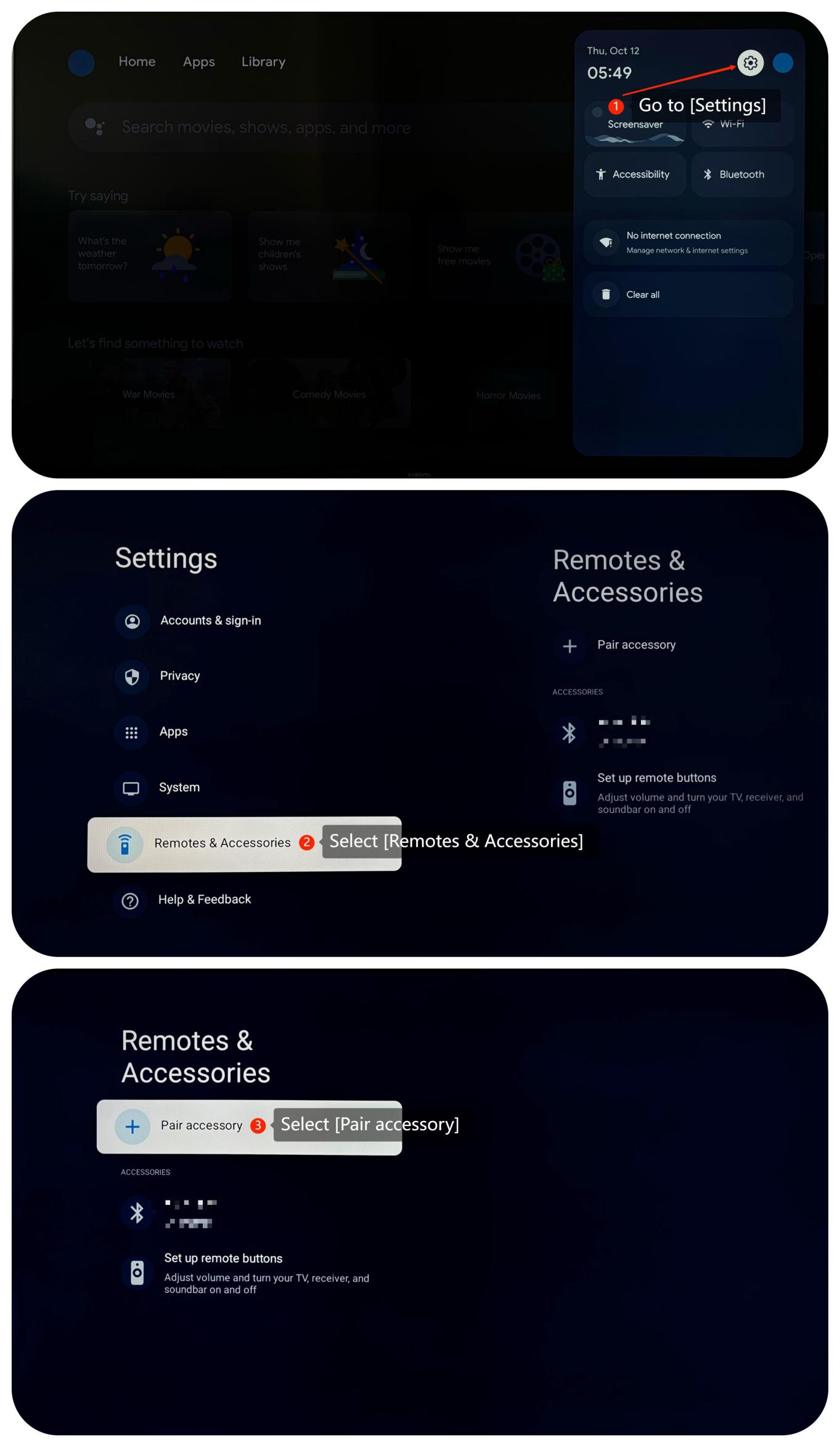
4. Make sure the remote is paired with the Xiaomi TV Box S (2nd Gen). If it’s not, re-pair the remote by going to [Settings] >> [Remotes & Accessories] >> [Pair accessory];
5. Try restarting the Xiaomi TV Box S (2nd Gen) by unplugging it from the power source, waiting for a minute or two, and then plugging it back in. This can often resolve minor issues;
6. Ensure there's no interference or direct light hitting the sensor on the Xiaomi TV Box S (2nd Gen). Interference from other electronic devices or direct sunlight can sometimes disrupt the signal between the remote and the device;
7. Ensure that the firmware of your Xiaomi TV Box S (2nd Gen) is up to date. You can check for updates in its settings menu by navigating to [Settings] >> [System] >> [About] >> [System update];
8. If other troubleshooting steps do not resolve the issue, you may consider performing a factory reset. Please go to [Settings] >> [System] >> [About] >> [Reset]. Please note that the operation will erase all data, so be sure to back up important information before proceeding.
If the above troubleshooting methods can’t resolve the issue, please contact our local official service center or your seller for further assistance. They will help you in this regard.
1. Ensure the batteries in the remote are correctly inserted and have enough power. Try replacing them with fresh batteries to see if it resolves the problem;
2. Dirt, dust, or debris may be obstructing the buttons. Use a cotton swab lightly dampened with rubbing alcohol to clean around the buttons. Be cautious not to use too much liquid that might seep into the remote;
3. Examine both the remote control and the Xiaomi TV Box S (2nd Gen) for any physical damage. Check for visible signs of wear, damage to buttons, or any issues;
4. Make sure the remote is paired with the Xiaomi TV Box S (2nd Gen). If it’s not, re-pair the remote by going to [Settings] >> [Remotes & Accessories] >> [Pair accessory];
5. Try restarting the Xiaomi TV Box S (2nd Gen) by unplugging it from the power source, waiting for a minute or two, and then plugging it back in. This can often resolve minor issues;
6. Ensure there's no interference or direct light hitting the sensor on the Xiaomi TV Box S (2nd Gen). Interference from other electronic devices or direct sunlight can sometimes disrupt the signal between the remote and the device;
7. Ensure that the firmware of your Xiaomi TV Box S (2nd Gen) is up to date. You can check for updates in its settings menu by navigating to [Settings] >> [System] >> [About] >> [System update];
8. If other troubleshooting steps do not resolve the issue, you may consider performing a factory reset. Please go to [Settings] >> [System] >> [About] >> [Reset]. Please note that the operation will erase all data, so be sure to back up important information before proceeding.
If the above troubleshooting methods can’t resolve the issue, please contact our local official service center or your seller for further assistance. They will help you in this regard.
Does it help?
Yes
No