

The Xiaomi TV Box S (2nd Gen) has color issues.
If your Xiaomi TV Box S (2nd Gen) has color issues, you can try the following troubleshooting steps to resolve the problem:
Scenario 1:
If the issue occurs when you are using apps on your Xiaomi TV Box S (2nd Gen), please refer to the following methods:
1. Ensure that the HDMI cable is firmly connected to both the Xiaomi TV Box S (2nd Gen) and the TV screen. If possible, use a different cable to eliminate the possibility of a faulty cable;
2. Turn off your Xiaomi TV Box S (2nd Gen), unplug it from the power source, wait for a minute, and then plug it back in and power it on;
3. If possible, connect the Xiaomi TV Box S (2nd Gen) to another TV to see if the issue persists. This can help determine whether the problem is with the Xiaomi TV Box S (2nd Gen) or the TV screen;
4. Ensure that the resolution settings on your Xiaomi TV Box S (2nd Gen) are compatible with your TV. You may need to adjust the resolution by navigating to [Settings] >> [Display & Sound] >> [Resolution] >> [Auto switch to best resolution];
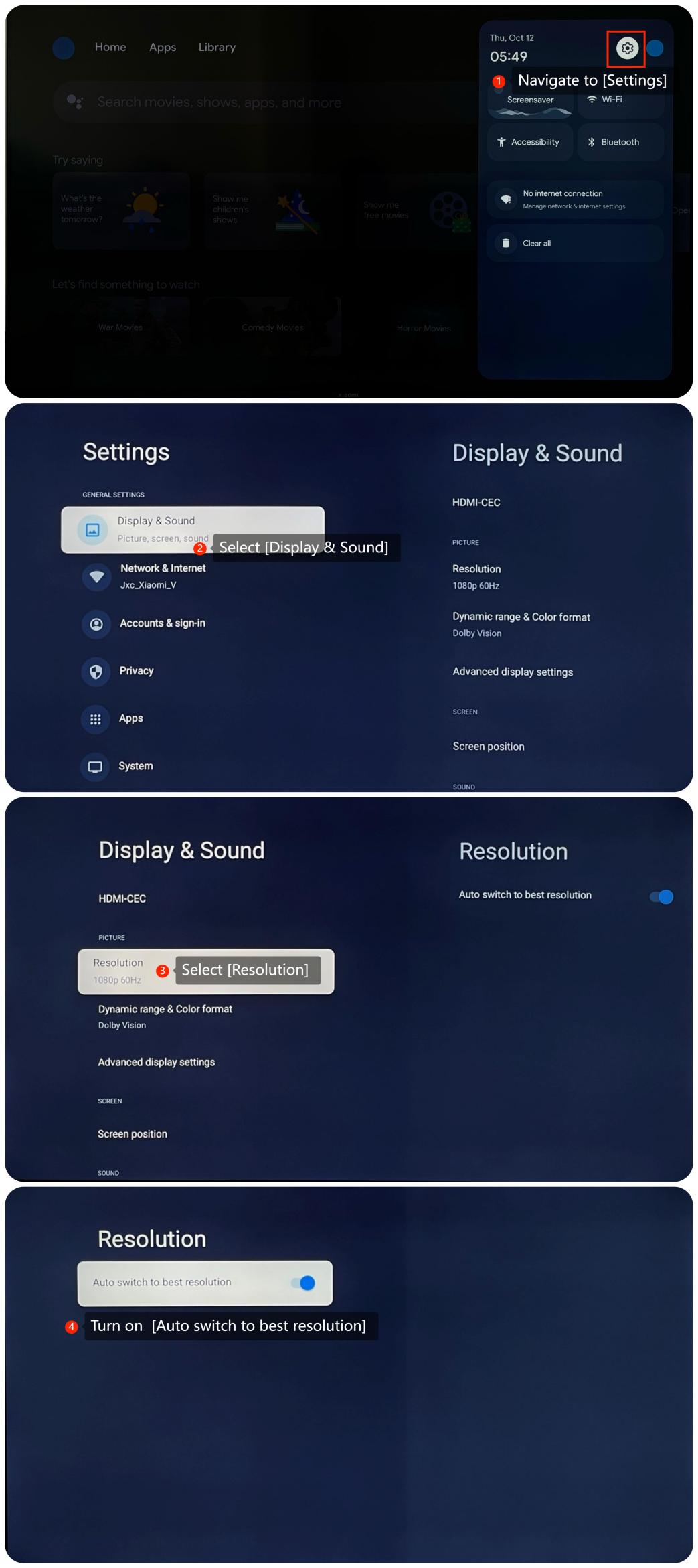
5. You can check if the app is updated to the latest version by going to the Google Play Store and navigating to your account >> [Manage apps & games] >> [Updates] >> [Check for updates];
6. If the issue persists, you can consider uninstalling and reinstalling the app;
7. Sometimes, system updates may resolve relative issues. You can check for system updates by going to [Settings] >> [System] >> [About] >> [System update]. If it is the latest version, a message will appear on the screen indicating that your system is up to date;
8. As a last resort, you can try performing a factory reset by going to [Settings] >> [System] >> [About] >> [Reset]. Please note that the operation will erase all the data, so be sure to back up important information before proceeding.
Scenario 2:
If the issue occurs when you connect other storage devices to the Xiaomi TV Box S (2nd Gen) using the USB port and watch the contents inside, please refer to the following methods:
1. Ensure that the external device is firmly connected to the Xiaomi TV Box S (2nd Gen). Check for physical damage on the USB port. If possible, use another storage device to see if the issue persists;
2. Unplug the storage device, wait for a minute, and then plug it back in;
3. Confirm that the external device is compatible with your Xiaomi TV Box S (2nd Gen);
4. Check if the content you’re watching has any specific color settings. You can try to play other content in this external device to confirm the origin of the problem.
Scenario 3:
If the issue occurs when you are using casting on your Xiaomi TV Box S (2nd Gen), please refer to the following methods:
1. Make sure that both your casting device and the TV are connected to the same Wi-Fi network;
2. On your casting device, check the screen mirroring or casting settings. Make sure you have selected the correct casting device and the settings are correct.
If the above troubleshooting methods can’t resolve the issue, please contact our local official service center or your seller for further assistance. They will help you in this regard.
Scenario 1:
If the issue occurs when you are using apps on your Xiaomi TV Box S (2nd Gen), please refer to the following methods:
1. Ensure that the HDMI cable is firmly connected to both the Xiaomi TV Box S (2nd Gen) and the TV screen. If possible, use a different cable to eliminate the possibility of a faulty cable;
2. Turn off your Xiaomi TV Box S (2nd Gen), unplug it from the power source, wait for a minute, and then plug it back in and power it on;
3. If possible, connect the Xiaomi TV Box S (2nd Gen) to another TV to see if the issue persists. This can help determine whether the problem is with the Xiaomi TV Box S (2nd Gen) or the TV screen;
4. Ensure that the resolution settings on your Xiaomi TV Box S (2nd Gen) are compatible with your TV. You may need to adjust the resolution by navigating to [Settings] >> [Display & Sound] >> [Resolution] >> [Auto switch to best resolution];
5. You can check if the app is updated to the latest version by going to the Google Play Store and navigating to your account >> [Manage apps & games] >> [Updates] >> [Check for updates];
6. If the issue persists, you can consider uninstalling and reinstalling the app;
7. Sometimes, system updates may resolve relative issues. You can check for system updates by going to [Settings] >> [System] >> [About] >> [System update]. If it is the latest version, a message will appear on the screen indicating that your system is up to date;
8. As a last resort, you can try performing a factory reset by going to [Settings] >> [System] >> [About] >> [Reset]. Please note that the operation will erase all the data, so be sure to back up important information before proceeding.
Scenario 2:
If the issue occurs when you connect other storage devices to the Xiaomi TV Box S (2nd Gen) using the USB port and watch the contents inside, please refer to the following methods:
1. Ensure that the external device is firmly connected to the Xiaomi TV Box S (2nd Gen). Check for physical damage on the USB port. If possible, use another storage device to see if the issue persists;
2. Unplug the storage device, wait for a minute, and then plug it back in;
3. Confirm that the external device is compatible with your Xiaomi TV Box S (2nd Gen);
4. Check if the content you’re watching has any specific color settings. You can try to play other content in this external device to confirm the origin of the problem.
Scenario 3:
If the issue occurs when you are using casting on your Xiaomi TV Box S (2nd Gen), please refer to the following methods:
1. Make sure that both your casting device and the TV are connected to the same Wi-Fi network;
2. On your casting device, check the screen mirroring or casting settings. Make sure you have selected the correct casting device and the settings are correct.
If the above troubleshooting methods can’t resolve the issue, please contact our local official service center or your seller for further assistance. They will help you in this regard.
Does it help?
Yes
No