

Cannot access the Internet video or audio content on the Xiaomi TV Box S (2nd Gen).
If the Xiaomi TV Box S (2nd Gen) is unable to play audio or video over the network, please refer to the following scenarios and steps:
Scenario 1:
If the issue only occurs when you are using a specific app, please refer to the following methods:
1. Make sure your Xiaomi TV Box S (2nd Gen) is connected to a high-speed and stable Wi-Fi network. Check the Wi-Fi status by navigating to [Settings] >> [Network & Internet];
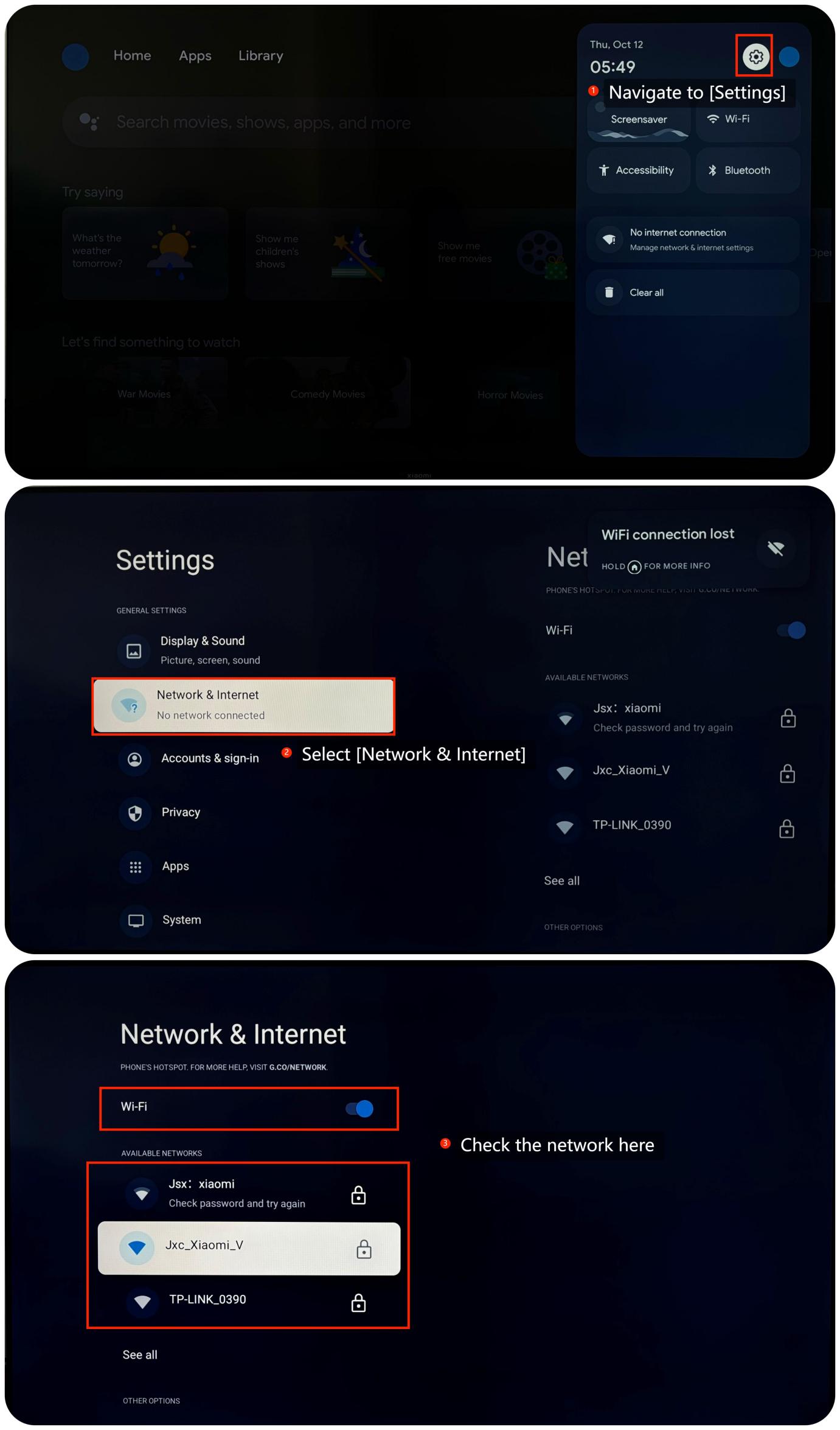
2. Try playing different types of content (like movies, music, or TV shows) to see if the issue persists. This can help determine if the problem is content-specific;
3. Try another streaming app, if the problem is resolved, it means the former app is not supported to stream content;
4. Check for updates for the app. An outdated app can cause issues. If the issue persists, you can consider uninstalling and reinstalling the app;
5. Power cycle your TV and the Xiaomi TV Box S (2nd Gen) by turning them off and unplugging them for a minute. Then, plug them back in and turn them on. This can refresh the network connection and resolve temporary issues;
6. Sometimes, system updates may resolve relative issues. You can check for system updates by going to [Settings] >> [System] >> [About] >> [System update]. If it is the latest version, a message will appear on the screen indicating that your system is up to date;
7. As a last resort, you can try performing a factory reset by going to [Settings] >> [System] >> [About] >> [Reset]. Please note that the operation will erase all the data, so be sure to back up important information before proceeding.
Friendly Tips:
The recommended bit rates of the video stream are shown as below:
1. The 4K UHD video stream requires 10Mbps;
2. The 2K video stream requires 5Mbps;
3. The 720p video stream requires 2.5Mbps.
Scenario 2:
If the issue occurs when you are using casting on your Xiaomi TV Box S (2nd Gen), please refer to the following methods:
1. Make sure that both your casting device and the TV are connected to the same Wi-Fi network. Check if the network status of your casting device is high-speed and stable;
2. On your casting device, check the screen mirroring or casting settings. Make sure you have selected the correct casting device and the settings are correct;
3. Ensure that the content being played from the casting device are not affected during downloading or copying.
If the above troubleshooting methods can’t resolve the issue, please contact our local official service center or your seller for further assistance. They will help you in this regard.
Scenario 1:
If the issue only occurs when you are using a specific app, please refer to the following methods:
1. Make sure your Xiaomi TV Box S (2nd Gen) is connected to a high-speed and stable Wi-Fi network. Check the Wi-Fi status by navigating to [Settings] >> [Network & Internet];
2. Try playing different types of content (like movies, music, or TV shows) to see if the issue persists. This can help determine if the problem is content-specific;
3. Try another streaming app, if the problem is resolved, it means the former app is not supported to stream content;
4. Check for updates for the app. An outdated app can cause issues. If the issue persists, you can consider uninstalling and reinstalling the app;
5. Power cycle your TV and the Xiaomi TV Box S (2nd Gen) by turning them off and unplugging them for a minute. Then, plug them back in and turn them on. This can refresh the network connection and resolve temporary issues;
6. Sometimes, system updates may resolve relative issues. You can check for system updates by going to [Settings] >> [System] >> [About] >> [System update]. If it is the latest version, a message will appear on the screen indicating that your system is up to date;
7. As a last resort, you can try performing a factory reset by going to [Settings] >> [System] >> [About] >> [Reset]. Please note that the operation will erase all the data, so be sure to back up important information before proceeding.
Friendly Tips:
The recommended bit rates of the video stream are shown as below:
1. The 4K UHD video stream requires 10Mbps;
2. The 2K video stream requires 5Mbps;
3. The 720p video stream requires 2.5Mbps.
Scenario 2:
If the issue occurs when you are using casting on your Xiaomi TV Box S (2nd Gen), please refer to the following methods:
1. Make sure that both your casting device and the TV are connected to the same Wi-Fi network. Check if the network status of your casting device is high-speed and stable;
2. On your casting device, check the screen mirroring or casting settings. Make sure you have selected the correct casting device and the settings are correct;
3. Ensure that the content being played from the casting device are not affected during downloading or copying.
If the above troubleshooting methods can’t resolve the issue, please contact our local official service center or your seller for further assistance. They will help you in this regard.
Does it help?
Yes
No