

The Bluetooth device is not recognized or connected to the Xiaomi TV Box S (2nd Gen).
If your Xiaomi TV Box S (2nd Gen) experiences difficulty in recognizing or connecting to Bluetooth devices, you can troubleshoot the issue using the following steps:
1. Make sure the Bluetooth device you're trying to connect to is compatible with the Xiaomi TV Box S (2nd Gen);
2. Try moving the Bluetooth device closer to the Xiaomi TV Box S (2nd Gen) for Bluetooth connectivity;
3. Power cycle your TV and the Xiaomi TV Box S (2nd Gen) by turning them off and unplugging them for a minute. Then, plug them back in and turn them on;
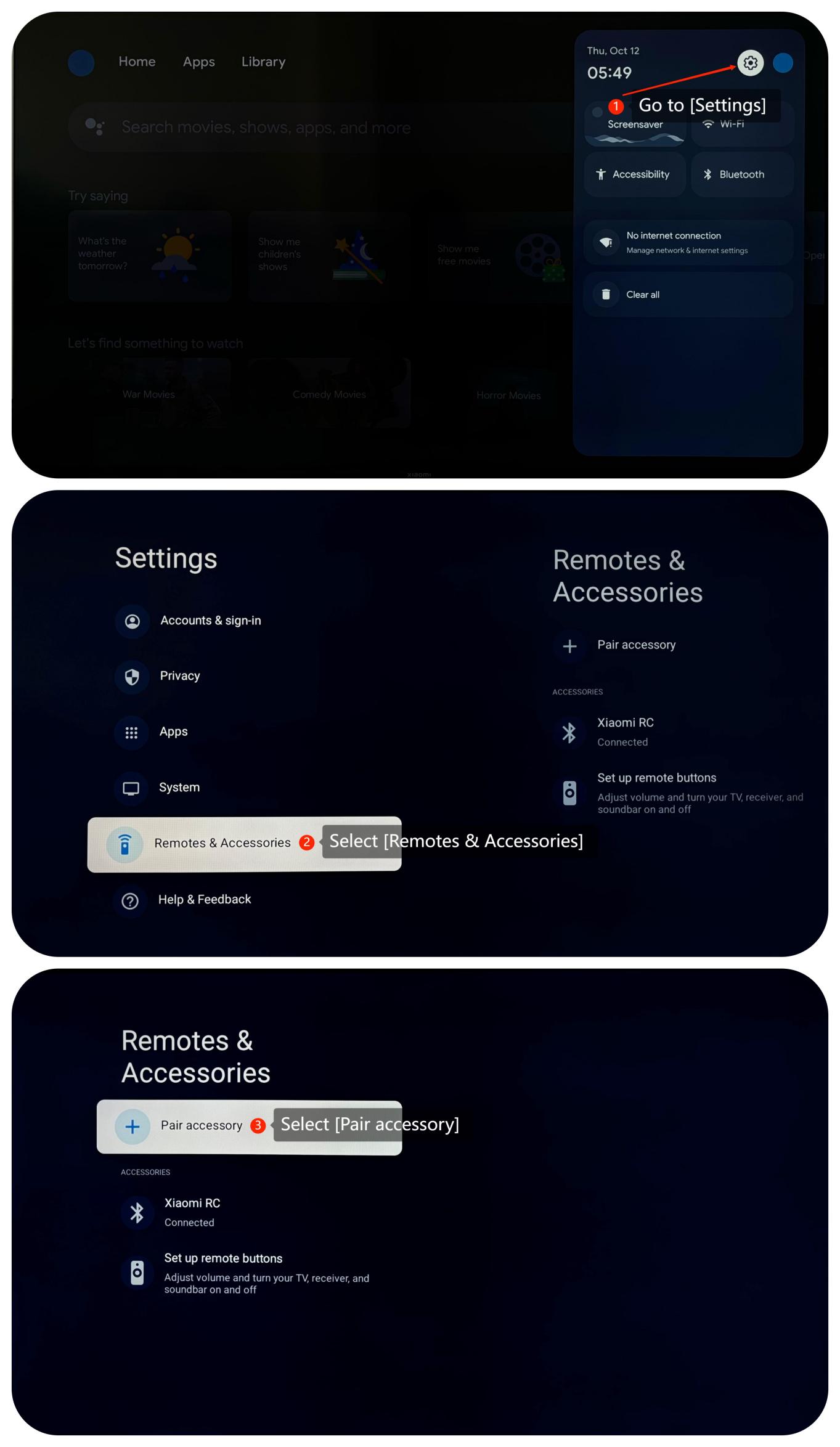
4. Make sure you have the right path to connect to your Bluetooth device by navigating to [Settings] >> [Remotes & Accessories] >> [Pair accessories];
5. Check if the Bluetooth device was previously paired with another device. If so, unpair it from any other devices and try pairing it again with the Xiaomi TV Box S (2nd Gen);
6. Check if your Bluetooth device can connect to other devices (e.g., a smartphone or another TV). This will help determine whether the issue is with the Xiaomi TV Box S (2nd Gen) or the Bluetooth device itself;
7. Sometimes, system updates may resolve relative issues. You can check for system updates by going to [Settings] >> [System] >> [About] >> [System update]. If it is the latest version, a message will appear on the screen indicating that your system is up to date;
8. As a last resort, you can try performing a factory reset by going to [Settings] >> [System] >> [About] >> [Reset]. Please note that the operation will erase all the data, so be sure to back up important information before proceeding.
If the above troubleshooting methods can’t resolve the issue, please contact our local official service center or your seller for further assistance. They will help you in this regard.
1. Make sure the Bluetooth device you're trying to connect to is compatible with the Xiaomi TV Box S (2nd Gen);
2. Try moving the Bluetooth device closer to the Xiaomi TV Box S (2nd Gen) for Bluetooth connectivity;
3. Power cycle your TV and the Xiaomi TV Box S (2nd Gen) by turning them off and unplugging them for a minute. Then, plug them back in and turn them on;
4. Make sure you have the right path to connect to your Bluetooth device by navigating to [Settings] >> [Remotes & Accessories] >> [Pair accessories];
5. Check if the Bluetooth device was previously paired with another device. If so, unpair it from any other devices and try pairing it again with the Xiaomi TV Box S (2nd Gen);
6. Check if your Bluetooth device can connect to other devices (e.g., a smartphone or another TV). This will help determine whether the issue is with the Xiaomi TV Box S (2nd Gen) or the Bluetooth device itself;
7. Sometimes, system updates may resolve relative issues. You can check for system updates by going to [Settings] >> [System] >> [About] >> [System update]. If it is the latest version, a message will appear on the screen indicating that your system is up to date;
8. As a last resort, you can try performing a factory reset by going to [Settings] >> [System] >> [About] >> [Reset]. Please note that the operation will erase all the data, so be sure to back up important information before proceeding.
If the above troubleshooting methods can’t resolve the issue, please contact our local official service center or your seller for further assistance. They will help you in this regard.
Does it help?
Yes
No