

The Xiaomi TV Box S (2nd Gen) experiences slow network performance.
If your Xiaomi TV Box S (2nd Gen) is experiencing slow network performance, here are several steps you can take to troubleshoot:
1. Ensure that your Xiaomi TV Box S (2nd Gen) is within a reasonable range of your Wi-Fi router. Walls and other obstacles can interfere with the Wi-Fi signal;
2. Verify if other devices connected to the same network are experiencing similar issues. If so, the problem may be with your internet service provider or the router;
3. Sometimes, a simple restart of both your router and the Xiaomi TV Box S (2nd Gen) can help resolve network issues;
4. If your router supports both 2.4GHz and 5GHz bands, switch to a different band to check if the problem persists;
5. If you have many apps running in the background, it might affect performance. Close unnecessary apps or consider uninstalling apps you don't use;
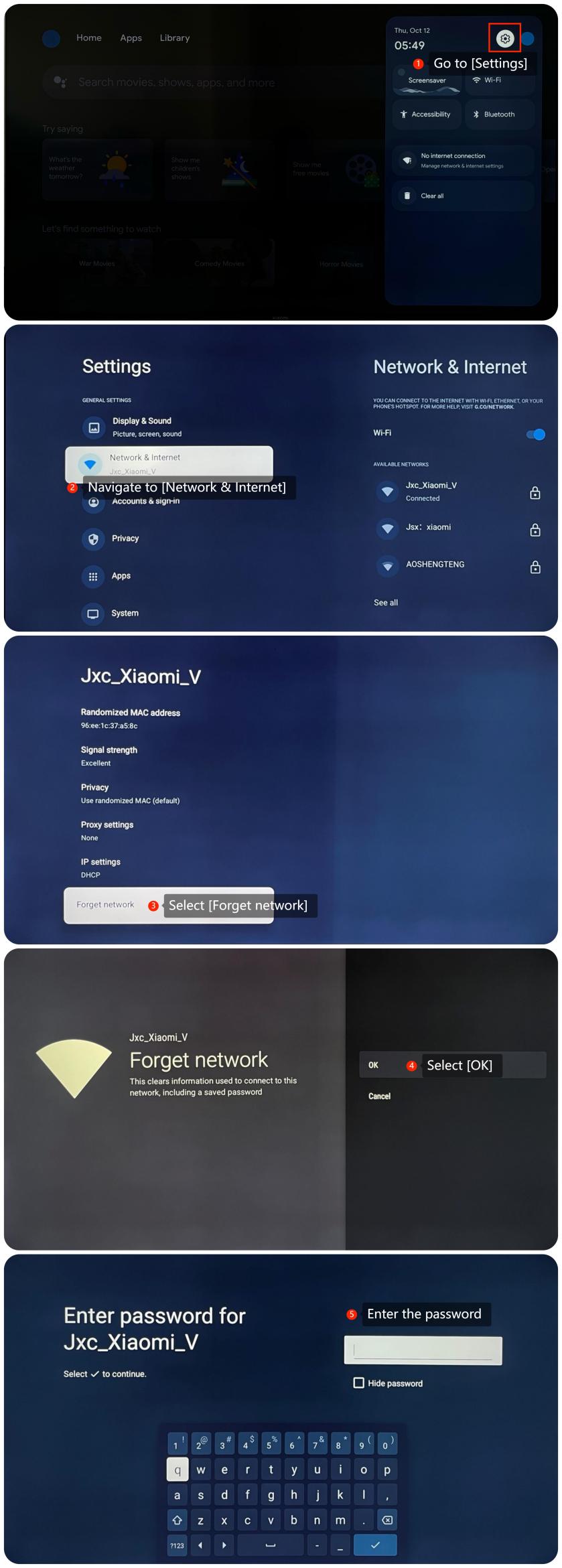
6. You can reconnect to the Wi-Fi network by going to [Settings] >> [Network & Internet] >> [Forget network] >> [OK] >> enter the password;
7. Ensure that the firmware of your Xiaomi TV Box S (2nd Gen) is up to date. You can check for updates in its settings menu by navigating to [Settings] >> [System] >> [About] >> [System update];
8. If other troubleshooting steps do not resolve the issue, you may consider performing a factory reset. Please go to [Settings] >> [System] >> [About] >> [Reset]. Please note that the operation will erase all data, so be sure to back up important information before proceeding.
If the above troubleshooting methods can’t resolve the issue, please contact our local official service center or your seller for further assistance. They will help you in this regard.
1. Ensure that your Xiaomi TV Box S (2nd Gen) is within a reasonable range of your Wi-Fi router. Walls and other obstacles can interfere with the Wi-Fi signal;
2. Verify if other devices connected to the same network are experiencing similar issues. If so, the problem may be with your internet service provider or the router;
3. Sometimes, a simple restart of both your router and the Xiaomi TV Box S (2nd Gen) can help resolve network issues;
4. If your router supports both 2.4GHz and 5GHz bands, switch to a different band to check if the problem persists;
5. If you have many apps running in the background, it might affect performance. Close unnecessary apps or consider uninstalling apps you don't use;
6. You can reconnect to the Wi-Fi network by going to [Settings] >> [Network & Internet] >> [Forget network] >> [OK] >> enter the password;
7. Ensure that the firmware of your Xiaomi TV Box S (2nd Gen) is up to date. You can check for updates in its settings menu by navigating to [Settings] >> [System] >> [About] >> [System update];
8. If other troubleshooting steps do not resolve the issue, you may consider performing a factory reset. Please go to [Settings] >> [System] >> [About] >> [Reset]. Please note that the operation will erase all data, so be sure to back up important information before proceeding.
If the above troubleshooting methods can’t resolve the issue, please contact our local official service center or your seller for further assistance. They will help you in this regard.
Does it help?
Yes
No