

The Xiaomi TV Box S (2nd Gen) cannot be powered off via the remote control.
If your Xiaomi TV Box S (2nd Gen) cannot be powered off via the remote control, here are some troubleshooting steps you can follow:
1. Ensure that the batteries in the remote control are not depleted. Replace them with fresh batteries and see if the issue persists;
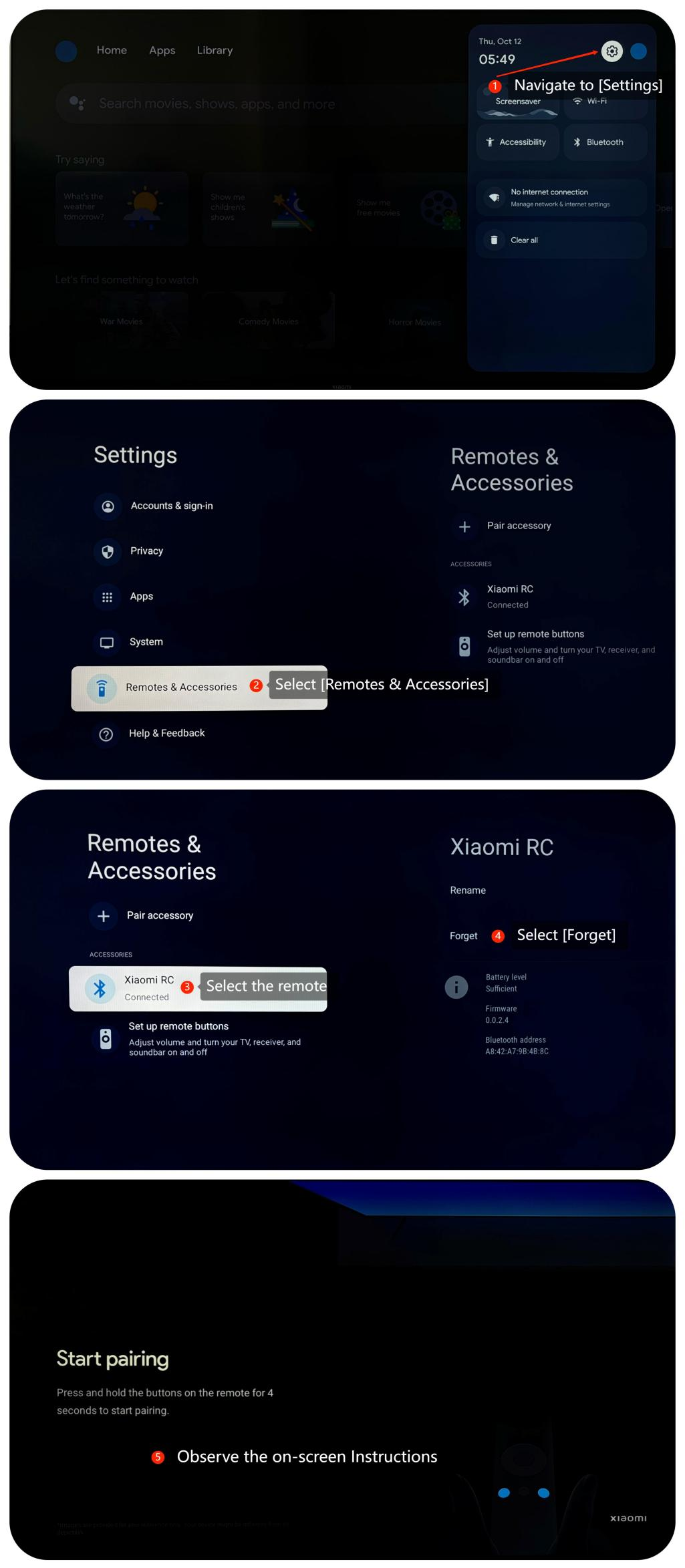
2. You can re-pairing the remote control with the Xiaomi TV Box S (2nd Gen) by going to [Settings] >> [Remotes & Accessories] >> [Forget];
3. Ensure that there are no obstructions between the remote control and the Xiaomi TV Box S (2nd Gen). Also, try using the remote control from different distances to rule out any signal range issues;
4. Examine both the remote control and the Xiaomi TV Box S (2nd Gen) for any physical damage. Check for visible signs of wear, damage to buttons, or any issues with the infrared sensor on the TV box;
5. Ensure that the firmware of your Xiaomi TV Box S (2nd Gen) is up to date. You can check for updates in its settings menu by navigating to [Settings] >> [System] >> [About] >> [System update];
6. If other troubleshooting steps do not resolve the issue, you may consider performing a factory reset. Please go to [Settings] >> [System] >> [About] >> [Reset]. Please note that the operation will erase all data, so be sure to back up important information before proceeding.
If the above troubleshooting methods can’t resolve the issue, please contact our local official service center or your seller for further assistance. They will help you in this regard.
1. Ensure that the batteries in the remote control are not depleted. Replace them with fresh batteries and see if the issue persists;
2. You can re-pairing the remote control with the Xiaomi TV Box S (2nd Gen) by going to [Settings] >> [Remotes & Accessories] >> [Forget];
3. Ensure that there are no obstructions between the remote control and the Xiaomi TV Box S (2nd Gen). Also, try using the remote control from different distances to rule out any signal range issues;
4. Examine both the remote control and the Xiaomi TV Box S (2nd Gen) for any physical damage. Check for visible signs of wear, damage to buttons, or any issues with the infrared sensor on the TV box;
5. Ensure that the firmware of your Xiaomi TV Box S (2nd Gen) is up to date. You can check for updates in its settings menu by navigating to [Settings] >> [System] >> [About] >> [System update];
6. If other troubleshooting steps do not resolve the issue, you may consider performing a factory reset. Please go to [Settings] >> [System] >> [About] >> [Reset]. Please note that the operation will erase all data, so be sure to back up important information before proceeding.
If the above troubleshooting methods can’t resolve the issue, please contact our local official service center or your seller for further assistance. They will help you in this regard.
Does it help?
Yes
No