

App on the Xiaomi TV Box S (2nd Gen) lags or freezes.
If you're experiencing lag or freezing issues with apps on the Xiaomi TV Box S (2nd Gen), you can refer to the following troubleshooting steps:
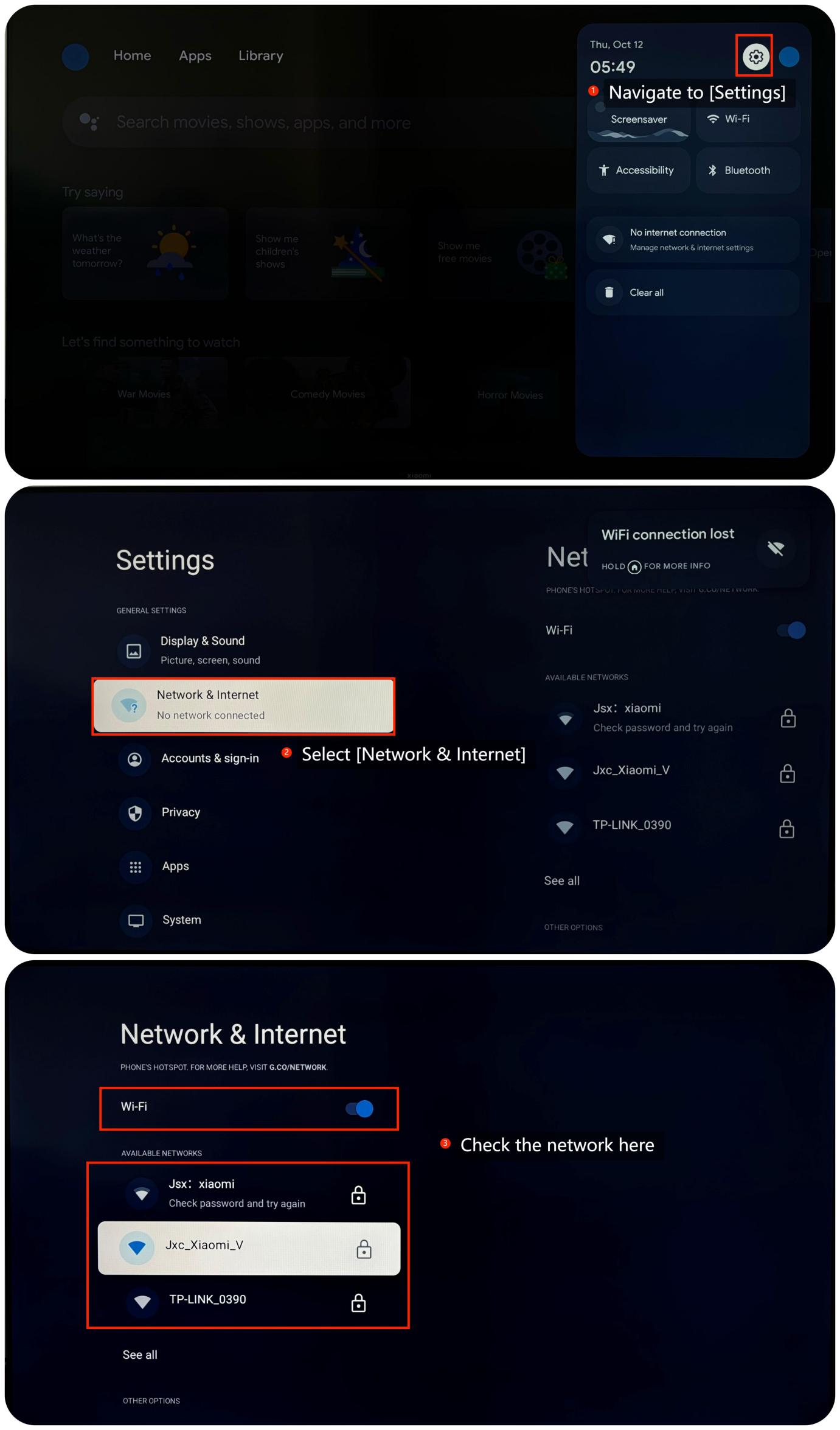
1. Ensure that the Xiaomi TV Box S (2nd Gen) is connected to a stable and active internet. You can check the internet by navigating to [Settings] >> [Network & internet] >> check if the Wi-Fi is turned on and connect to your network;
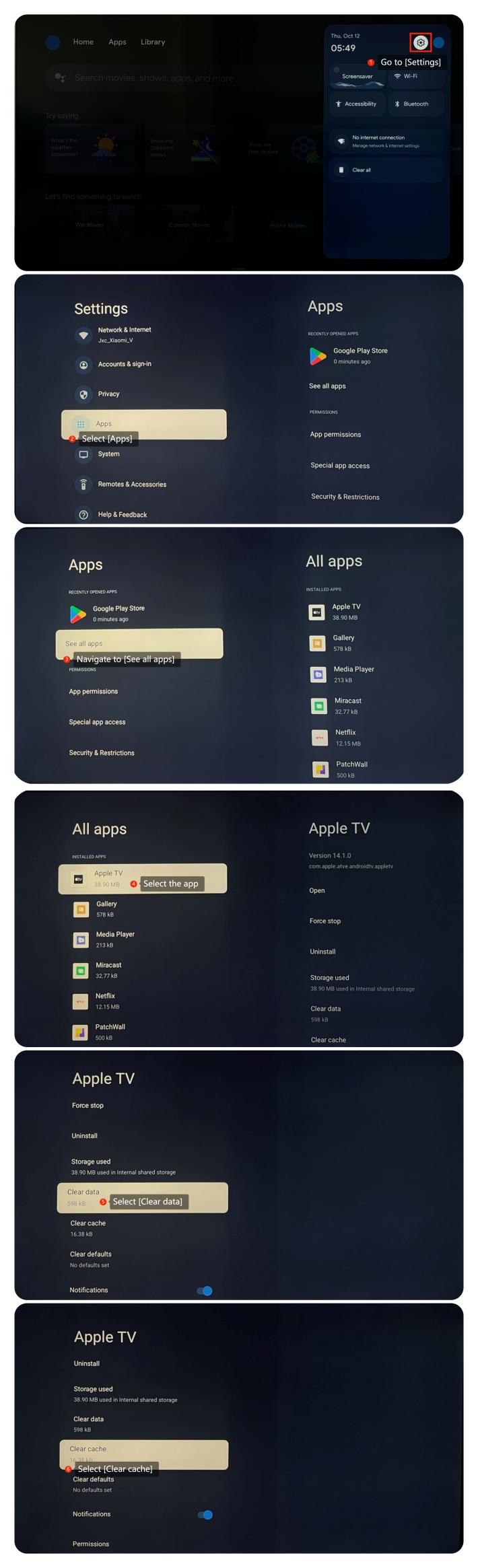
2. You can clear app cache and data by going to [Settings] >> [Apps] >> [See all apps] >> select the app for which you want to clear the cache and data >> [Clear Cache] and [Clear Data];
3. If multiple apps are running in the background, it can impact performance. You can close background apps by navigating to [Settings] >> [Apps] >> select the unnecessary apps and force stop it;
4. Try uninstalling the app and then reinstalling it;
5. You can check for system updates by going to [Settings] >> [System] >> [About] >> [System update]. If it is the latest version, a message will appear on the screen indicating that your system is up to date;
6. As a last resort, you can try performing a factory reset by going to [Settings] >> [System] >> [About] >> [Reset]. Please note that the operation will erase all the data, so be sure to back up important information before proceeding.
We hope the above methods can resolve the issue. If the issue still persists, you could submit your feedback on your Xiaomi TV Box S (2nd Gen) by going to [Settings] >> [Help & Feedback] >> [Send feedback], you can upload logs with your feedback.
1. Ensure that the Xiaomi TV Box S (2nd Gen) is connected to a stable and active internet. You can check the internet by navigating to [Settings] >> [Network & internet] >> check if the Wi-Fi is turned on and connect to your network;
2. You can clear app cache and data by going to [Settings] >> [Apps] >> [See all apps] >> select the app for which you want to clear the cache and data >> [Clear Cache] and [Clear Data];
3. If multiple apps are running in the background, it can impact performance. You can close background apps by navigating to [Settings] >> [Apps] >> select the unnecessary apps and force stop it;
4. Try uninstalling the app and then reinstalling it;
5. You can check for system updates by going to [Settings] >> [System] >> [About] >> [System update]. If it is the latest version, a message will appear on the screen indicating that your system is up to date;
6. As a last resort, you can try performing a factory reset by going to [Settings] >> [System] >> [About] >> [Reset]. Please note that the operation will erase all the data, so be sure to back up important information before proceeding.
We hope the above methods can resolve the issue. If the issue still persists, you could submit your feedback on your Xiaomi TV Box S (2nd Gen) by going to [Settings] >> [Help & Feedback] >> [Send feedback], you can upload logs with your feedback.
Does it help?
Yes
No