

Xiaomi Robot Vacuum S10T FAQ
Overview
1. Q : What are the features of Xiaomi Robot Vacuum S10T ?
A:
Vacuum with strong fan blower up to 8000Pa. Clear away all kinds of debris and dirts on the floor
Quick mapping and high-speed computing. A good aid to home cleaning
Next-generation LDS laser navigation. Quick mapping to stay one step ahead
Quad-core chip + SLAM algorithm. Precisely dynamic path mapping
Dual-mode fast pairing. Faster connection to the Mi Home/Xiaomi Home app
2. Q : How to use the buttons of Xiaomi Robot Vacuum S10T ?
A: On /off key: long press for 3 seconds, power on or off; short press, start or pause;
Recharge button: During operation, short press the Main unit to pause; during pause, short press to start recharging; during recharging, short press to stop recharging.
Long press the power button + recharge button for 3 seconds to enter the distribution network state.
3. Q : What is the indicator status of Xiaomi Robot Vacuum S10T ?
A: Steady yellow light: WiFi is offline
Blinking yellow light: Abnormal status/WiFi waiting for connection
Steady white light: booting complete/normal operation
White light breathing: charging
Blinking white light: firmware upgrade/recharging
4.Q : What sensors does Xiaomi Robot Vacuum S10T have?
A: The main sensors include IR recharge sensor, collision sensors, LDS laser radar, cliff sensors, dustbin sensors, water tank sensors, recharge sensors, etc.
5. Q : How to check the SN of Xiaomi Robot Vacuum S10T ?
A: Check the SN through the nameplate on the bottom of the device and the nameplate on the Docking station
Product introduction and use
1. Q : Can Xiaomi Robot Vacuum S10T be used directly?
A: Yes. It is recommended to be familiar with the use of the Robot Vacuum, and to determine whether the standard equipment is missing and whether the function is normal. When using it for the first time, please connect the Main unit to the Docking station, and align the charging pole piece with the charging shrapnel. Let the Robot Vacuum be fully charged first, and then start cleaning from the Docking station. It takes about 5 hours to fully charge. After building the map successfully, you can directly press the recharge button to start the smart recharge.
2. Q : What mode should I choose when using Xiaomi Robot Vacuum S10T for the first time ?
A:Cleaning mode is preferred . When there is a lot of dust and debris in the house, do not install dust cloth and water tank for the first use , select cleaning mode to complete the overall cleaning, and then install dust cloth and water tank to select sweeping mode or single dragging mode.
3. Q : Why does Xiaomi Robot Vacuum S10T need to clean regularly?
A: Xiaomi Robot Vacuum S10T is a cleaning appliance. It has cleaning functions such as sweeping, mopping, and garbage collection. It can regularly dump garbage, and cleaning the dust cloth and roller brush can restore the cleaning ability of The Robot Vacuum.
The whole body of the sweeper is covered with various sensors. It needs to explore the surrounding environment, build a map and avoid obstacles. Therefore, when the equipment is dirty, please clean the surrounding dust with a wet duster cloth wrung out of the water in time to remove foreign objects. , can restore the obstacle avoidance and recognition capabilities of the sweeper.
Tips: Do not use chemicals such as detergents or sprays to clean.
4. Q : How does Xiaomi Robot Vacuum S10T go into standby mode after completing tasks?
A: After the device cleaning task is completed, it is recommended to return the device to the Docking station to charge and standby to ensure that the device battery is fully charged. If it is not in standby on the Docking station , in order to avoid power consumption of the device, you can manually press and hold the power button to shut down the standby. (The device will automatically shut down during the long-term standby process when it is out of the Docking station , which is a normal phenomenon).
5. Q : Why is there water stain in the water tank of Xiaomi Robot Vacuum S10T out of the box ?
A:1. A small amount of water stains will remain in the water tank , which is normal and does not affect the normal use of the water tank . The water tank will be tested with water when it leaves the factory, and it will be packaged and shipped after passing the test.
2. When installing the Water tank for mopping and cleaning, just fill it with clean water . Do not add cleaning fluid and other items into the Water tank .
6. Q : What should I do if the Xiaomi Robot Vacuum S10T;s side brush is entangled?
A: When the side brush is entangled with objects, please clean up the side brush entanglement in time and check whether the side brush is detached and damaged. When cleaning again, you can first clean up the easily entangled items on the ground, such as wool, string, etc.
7. Q : Xiaomi Robot Vacuum S10T cannot be turned off on the Docking station ?
A: The Robot Vacuum will always be in the standby state when it is charging on the Docking station . If you need to shut down, you need to leave the Docking station and press and hold the power button for 3 seconds to complete the shutdown.
8. Q : What life scenarios can Xiaomi Robot Vacuum S10T be used for?
A: This product is only used for floor cleaning in the home environment. Do not use it in outdoor, non-ground, commercial or industrial environments, as it may cause equipment failure, loss and other consequences.
9. Q : How to place the Docking station of Xiaomi Robot Vacuum S10T ?
A: 1. Place the Docking station against the wall and connect the power cord.
2. Do not place the Docking station in direct sunlight;
3. Make sure that there is more than 1.5 meters in front of the Docking station and more than 0.5 meters of space on both sides;
4. Pay attention to the power cord, otherwise it may be dragged by the Robot Vacuum , causing displacement of the Docking station or power failure.
10. Q : How to switch on and off the Xiaomi Robot Vacuum S10T ?
A: Press and hold the power button for 3 seconds, the indicator light is on, and the Main unit is turned on. When the Main unit is not charging and is suspended, press and hold the power button for 3 seconds to shut down.
Tips: The main unit will automatically turn on when it is charging, and it cannot be turned off.
11. Q : How to charge Xiaomi Robot Vacuum S10T ?
A: Manually put the Main unit on the Docking station , and align the charging pole piece with the charging shrapnel. In daily use, you can directly press a short key to start smart recharging.
Tips: When the battery is low, it may not be able to turn on, please place the Main unit in the Docking station to charge. After the Main unit is connected to the Docking station , it will turn on automatically, and it cannot be turned off during charging.
1 2 . Q : How to install dustbin and water tank on Xiaomi Robot Vacuum S10T ?
A: Push the dustbin into the Main unit horizontally , and when you hear a "click" sound, it is installed in place.
Push the Water tank horizontally into the bottom of the Main unit , and there will be a "click" sound when it is in place.
13. Q : How does Xiaomi Robot Vacuum S10T inject water into the Water tank ?
A: Open the water tank cover, pour water into the water tank , and fill it up. Fasten the 2-in-1 Water tank cover after completion.
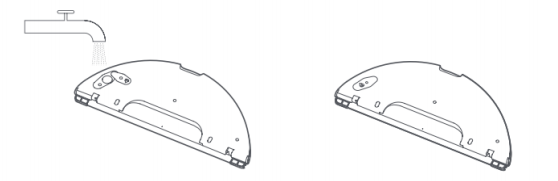
Tips: Do not use cleaning products such as detergents, disinfectants, and solid detergents, and do not inject hot water to avoid corrosion and damage to the Water tank .
1 4 . Q : How to install dust cloth on Xiaomi Robot Vacuum S10T ?
A: Insert the duster cloth along the slot of the duster cloth bracket, and paste it on the Velcro.
Push the Water tank horizontally into the bottom of the Main unit , and there will be a "click" sound when it is in place.
Tips:1. When mopping the floor, please set up a virtual wall or restricted area in the carpet area. (During the cleaning process, the Robot Vacuum does not enter the virtual wall and the restricted area for cleaning)
2. In the environment of stagnant water, please use the cleaning/mopping function after clearing the stagnant water.
3. After mopping the floor, please take out the Water tank in time, pour out the remaining water in the Water tank in time , and wash and dry the duster cloth to avoid odor and mildew.
4. Do not use the mopping function when there is no one at home.
15. Q : How does Xiaomi Robot Vacuum S10T dump the garbage in the dustbin?
A: 1. Press and hold the dustbin release button, and pull out the dustbin from the bottom of the Main unit .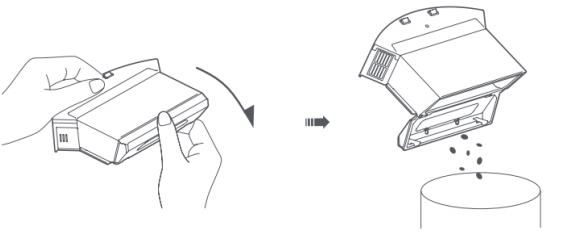
3. Open the buckle as shown in the figure and take out the filter .
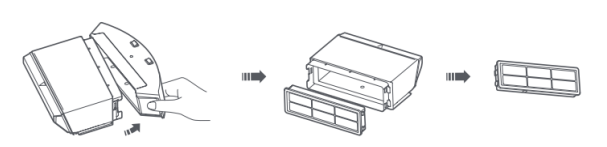
4. Use a cleaning brush to clean the main body and filter of the dustbin , then rinse with clean water, dry them fully and put them back together.
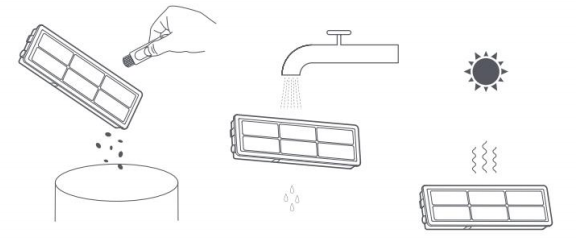
Tips:1. It is recommended to clean the dustbin thoroughly at least once a week . Please be sure to dry the dustbin main body and filter before use (at least 24 hours in the air).
2. Do not soak the filter in water .
3. To clean the filter , rinse and tap the frame of the Filter cartridges repeatedly to tap the dirt until it is clean.
16. Q : How does Xiaomi Robot Vacuum S10T clean the Main brush ?
A: 1. Turn the Main unit over , press and hold the two release keys to take off the Main brush cover.
Main brush upwards .
3. Use the knife on the cleaning brush to cut off the entangled hair on the Main brush , and clean the Main brush .
4. Reinstall the Main brush and Main brush cover, and press the Main brush cover into place.
Main brush cleaning method:
17. Q : How does Xiaomi Robot Vacuum S10T clean the side brush ?
A: 1. Turn over the Main unit and remove the fixing screws of the side brush .
2. Remove and clean the side brush .
3. Put back the side brush and tighten the screws.
Tips: It is recommended to change the side brush every 3-6 months.
18.Q : How to clean the caster wheels of Xiaomi Robot Vacuum S10T ?
A:1. Turn over the Main unit and pull out the universal wheel upwards.
2. Clean up the hair and dirt on the universal wheel.
3. Reinstall the universal wheel
19.Q : How to reset the system of Xiaomi Robot Vacuum S10T ?
A:Reset the system , turn over the main unit , use a needle-like object to press and hold the reset button for 3 seconds, hear the voice prompt, the main unit will automatically restart, and the related settings such as Pre-set cleaning and WiFi will be restored to the factory state.
20.Q : How to restore the system before upgrading Xiaomi Robot Vacuum S10T ?
A: Take out the dustbin or two- in-one Water tank from the main unit , erect the main unit , and perform the following operations:
restore the system , turn over the main unit , use a needle to press and hold the reset button for 10 seconds, hear the voice prompt, the main unit will automatically restart, the Pre-set cleaning and WiFi and other related settings will be restored to the factory state, and the system will be restored to the previous firmware Version.
21 .Q : What are the consumables for Xiaomi Robot Vacuum S10T ?
A: Xiaomi Robot Vacuum S10T consumables include Main brush , side brush , Main brush , cleaning brush, dustbin, filter , dust cloth , etc., which need to be replaced regularly to ensure the normal function and cleaning ability of the equipment.
22 .Q : Does Xiaomi Robot Vacuum S10T have water shortage reminder and dustbin full reminder?
A: Xiaomi Robot Vacuum S10T has no water shortage reminder and no dustbin full reminder.
23 .Q : Do I need to remove the water tank or dust cloth when charging Xiaomi Robot Vacuum S10T ?
A: When charging or not in use, please remove the Water tank and duster cloth to prevent the wooden floor from soaking wet or producing odors.
24 .Q : What kind of cleaning method does Xiaomi Robot Vacuum S10T use?
A: When cleaning the whole area, according to the room, it is cleaned along the edge first and then in a bow shape to ensure the cleaning coverage .
25 .Q : Can Xiaomi Robot Vacuum S10T use stickers?
A: When using stickers, please do not cover the lidar above the device and the obstacle avoidance sensor and infrared sensor in front of the collision plate, otherwise it will affect the operation of the device.
26 . Q : How to use the mopping function of Xiaomi Robot Vacuum S10T better?
A: It is recommended to wet the duster cloth first and wring it out before use, so that the mopping is more uniform and efficient.
27 .Q : How does Xiaomi Robot Vacuum S10T create maps?
A:1. For the first time use, select quick map building or global cleaning according to the APP prompts, and the APP will automatically save the map after the end.
2. When using in a new environment (such as different floors), create a new map in APP Settings > Map Management > Create Map. Maps in different environments can be distinguished by different names.
Keep the following in mind when creating a map:
A. The Main unit is triggered from the Docking station , please do not change the position of the Docking station in the drawing ;
B. After the main unit is automatically recharged, the new map will be saved, please do not interrupt or move the main unit during the construction ;
The existence of highly reflective objects, such as mirrors, windows, and shiny metal, will affect the mapping effect.
28 .Q : What is the minimum height that Xiaomi Robot Vacuum S10T can enter under the bed?
A: Xiaomi Robot Vacuum S10T recommends that the minimum accessible height is 110mm. When entering the bottom of beds, sofas, cabinets, etc., confirm whether the environment is flat and open, and clean up foreign objects and dust in time to prevent equipment from being trapped at the bottom.
29.Q : Does the Xiaomi Robot Vacuum S10T support washing with water after it gets dirty?
A: The Robot Vacuum does not support washing directly with water, otherwise it will cause water to enter the device and cause damage to the internal electronic components. It is recommended that after the equipment is dirty, remove the main brush cover, main brush , side brush , dustbin , water tank , duster cloth and other accessories and clean them separately. The main unit should be cleaned with a wet duster cloth that is twisted until it does not drip
30 . Q : How long can Xiaomi Robot Vacuum S10T mop a box of water in different gears?
A: The water outlet speed of the water tank is divided into three levels, the water outlet time of the low speed is about 150 minutes, and the water outlet time of the high speed is about 110 minutes.
Mi Home App related
1. Q : How to reset WiFi on Xiaomi Robot Vacuum S10T ?
A: After changing the router or WiFi password, the WiFi function needs to be reset. Please press and hold the "Power On" and "Recharge" buttons for 3 seconds at the same time in the power-on state. After hearing the prompt tone, the WiFi reset is successful and you can reconnect .
Tips: Only supports WiFi networks in the 2.4GHz frequency band.
2. Q : How does Xiaomi Robot Vacuum S10T build maps quickly?
A: Start up and run for the first time, there is no map in the APP, put the Main unit on the Docking station , select Quick Mapping in the APP, the Main unit will only build the map without cleaning, the Main unit will automatically return to the Docking station , and the map building is complete And automatically save the map.
Tips: During the construction process, please do not move the sweeper and keep away from children and pets.
3. Q : How to set the cleaning mode of Xiaomi Robot Vacuum S10T ?
A: In the power-on state, short press the power button, and the Main unit will automatically enter the cleaning mode according to the installed accessories .
The APP plug-in page performs sweeping/single dragging/sweeping and dragging according to the settings
4. Q : How to suspend Xiaomi Robot Vacuum S10T ?
A: When the Main unit is running, short press any button to pause, short press the power button to continue cleaning, short press the recharge button to return to the Docking station and end the cleaning.
5. Q : How to recharge Xiaomi Robot Vacuum S10T ?
A: In the power-on state, press the recharge button shortly, and the Main unit will enter the recharge mode; when the main unit is cleaned, it will automatically enter the recharge mode, and the indicator light will flash in white; when the power of the main unit is too low during cleaning, it will automatically After recharging, when the power is sufficient, it will automatically return to the interruption point and continue cleaning.
6. Q : How does the Xiaomi Robot Vacuum S10T continue to scan?
A: This machine has the function of continuous cleaning at breakpoints. During the cleaning process, when the battery is low, it will automatically find the Docking station to charge. After charging, it will return to the breakpoint to continue cleaning. If the cleaning is ended artificially during the charging process, the interrupted cleaning will be cancelled.
7. Q : Why does Xiaomi Robot Vacuum S10T shut down automatically?
A: In the non-charging state, if the main unit does not run or operate for more than 5 minutes, it will automatically enter the sleep state, and it will automatically shut down if it sleeps for more than 6 hours; the main unit can be awakened by pressing buttons and APP in the sleep state .
Tip: The Main unit will not go to sleep when it is on the Docking station .
8. Q : Can Xiaomi Robot Vacuum S10T add water to clean the dust cloth in the middle ?
A: If the main unit needs to add water or clean the dust cloth during the cleaning process , short press any key to pause, then remove the Water tank to add water or clean the dust cloth , and then put back the water tank and dust cloth , short press the start key to continue working.
9. Q : How to select the mode and gear of Xiaomi Robot Vacuum S10T ?
A: In the Mi Home App , you can choose a variety of cleaning modes and water levels.
10. Q : What is the Do Not Disturb function?
A: During the do-not-disturb time period, the main unit will not respond to interrupted scanning, Pre-set cleaning and active voice broadcast. The Do Not Disturb mode is turned off by default at the factory, and the default time period after it is turned on is from 23:00 in the evening to 9:00 in the morning. You can turn on and off the Do Not Disturb mode through the Mi Home App .
11. Q : What is the global cleaning function?
A: When the map is not saved, select global cleaning, and the Main unit will clean area by area in a square area of 6m×6m; after saving the map in the APP, select global cleaning, and the main unit will automatically plan the path to clean room by room, and return to Docking after cleaning is completed station .
12. Q : What is the area cleaning function?
A: You can set area cleaning in the Mi Home App , and the Main unit will clean according to the planned area.
Tips:During cleaning, the main unit may go beyond the marked area. Please pay attention to clear the ground obstacles around the marked area. The marking of this area does not play a role in safety isolation.
13. Q : What is the local cleaning function?
A: Select local cleaning in the Mi Home App , and then select the target point on the map, the Main unit will automatically plan the route to the target point, and clean in a square area of 1.5m×1.5m with the target point as the center.
14. Q : What is the Pre-set cleaning function?
A: Use the Mi Home App to set the Pre-set cleaning time, the Main unit will automatically start cleaning at the specified time, and automatically return to the Docking station after cleaning .
Pre-set cleaning will not be performed during the Do Not Disturb period .
15. Q : What is the restricted area function of the virtual wall?
A: Use the Mi Home App to set a virtual wall/restricted area to prohibit the main unit from entering areas that do not need to be cleaned.
Tips:1. Before using this function, you need to save the map in the APP.
2. Moving the main unit or significant changes in the home environment may cause the original map to become invalid and the virtual wall/restricted area to be lost.
16. Q : How many times of Pre-set cleaning does Xiaomi Robot Vacuum S10T support ?
A: Pre-set cleaning supports up to 10 tasks. When setting Pre-set cleaning , it is recommended that the interval be more than 2 hours to ensure that the last cleaning can be completed smoothly; if the interval is too short, the new appointment may not be executed.
17. Q : How many maps does Xiaomi Robot Vacuum S10T support?
A: The map supports creating up to 5 maps.
18. Q : How to rename the map of Xiaomi Robot Vacuum S10T ?
A: Map renaming is supported. Go to More Settings > Map Management > select the map that needs to be renamed and rename it.
FAQ and Troubleshooting
1. Q : How to solve the problem that Xiaomi Robot Vacuum S10T cannot connect to WiFi ?
A: 1. Confirm whether the entered WiFi password is correct. The WiFi user name or password cannot contain special characters such as @¥%. If so, please reset it to English or the account number and password with numbers and letters and try again;
2. Check whether the external network connection of the router is normal. You can try to open the webpage through your mobile phone or a computer connected to WiFi to see if it is smooth;
3. Confirm whether the distance between the router and the Robot Vacuum is too far (beyond the range of 5 meters or there is a partition in the middle), you can try to move the machine to within 1~2 meters from the router and try to reconnect;
4. Try to connect to the mobile phone WiFi hotspot;
5. Check whether the router is connected to more smart devices, causing the network to slow down or the router to fail to respond. You can try after restarting the router;
6. At present, the company's EAP 802.1x authentication network, 5G signal network or public WiFi network that requires webpage authentication is not supported, such as: CMCC, ChinaUnicom, etc., you need to switch the network again and try to connect;
7. After the network is turned off, if the device has not been connected to the Internet for more than 30 minutes, the WiFi module will turn off the network link function, and the WiFi indicator light will blink at the same time, and the connection can only be restored after restarting the device;
8. Check whether the mobile phone has restricted the permissions of the App, such as networking, positioning, etc., please allow the permissions and try again;
9. The connection failure may also be related to the mobile phone model. You can try to use other different models of mobile phones to try to connect.
2. Q : How to solve the fault of Xiaomi Robot Vacuum S10Tside brush ?
A: In the working state , the side brush does not turn, makes abnormal noise, and falls off. Follow the steps below to troubleshoot:
1. Check that the side brush is installed in place, the buckle is snapped in, and the screw is locked;
2. Check if there is any foreign matter or hair stuck at the side brush position;
3. Check whether the device is turning on the medium-long-haired carpet, or in the process of overcoming obstacles, it stops after hitting an obstacle while sweeping, and then runs normally. This situation is a normal phenomenon.
3. Q : How to solve the fault of Xiaomi Robot Vacuum S10Troller brush ?
A: If the roller brush makes abnormal noise or does not turn, follow the steps below to troubleshoot:
1. Check whether the parts at both ends of the roller brush are complete and whether there is any defect.
2. Check whether the roller brush cover is fastened.
3. The roller brush is entangled with debris and causes abnormal noise, please clean it in time.
4. Q : The Xiaomi Robot Vacuum S10TMain brush cover cannot be installed?
A: 1. Check whether the main brush cover is stuck by foreign objects (sundries, paper), etc., and remind the user to clean it and try to install it again.
2. Check whether the main brush is normally stuck to the device, remove the main brush and try to install it again.
5. Q : The left and right wheels of Xiaomi Robot Vacuum S10T do not turn?
A: The left and right wheels make abnormal noise and do not rotate. Follow the steps below to troubleshoot:
1. Check whether the side wheel is stuck or entangled by foreign objects;
2. Check whether there are detergents or other cleaning products in the water tank , which will cause the ground to be slippery and cause the side wheels to make noise when the equipment is running. You can take off the water tank and put it into the dustbin to try;
3. After changing the area of the device, restart and try to clean again.
6. Q : Xiaomi Robot Vacuum S10T cannot be turned on?
A: 1. Check whether the Docking station is powered on normally, whether the indicator light of the Docking station is on normally, and whether the adapter cable is properly inserted into the Docking station inlet.
2. Check whether the charging pole piece of the machine is in normal contact with the docking station pole piece, whether there is dust or dirt covering it, causing the device to fail to charge and start, clean the pole pieces or move the machine slightly to try to charge.
3. The power of the device is too low. The device needs to be correctly placed in the Docking station for about 5-10 minutes before it can be turned on normally.
4. The ambient temperature is lower than 0°C or higher than 40°C, return to normal temperature and try again.
7. Q : Xiaomi Robot Vacuum S10T has a voice broadcast after booting but does not run?
A: 1. Long press to turn off the device, then turn it on again and try again.
2. Put the machine into the distribution network mode. After the machine is successfully connected to the network first, check whether there is a software upgrade prompt, and click the software upgrade.
3. Click the map to reset in the APP, and try to restart the machine after the machine is turned off.
8. Q : Xiaomi Robot Vacuum S10T cannot be recharged?
A: 1. There are too many obstacles near the Docking station , please place the Docking station in an open area.
2. The main unit is too far away from the docking station , please try to put the main unit near the docking station .
3. The position of the recharging lamp of the charging pile is dirty, and the sweeper cannot receive the recharging signal. Please wipe the signal emission area of the charging pile of the main unit recharging lamp.
9. Q : Why is the Xiaomi Robot Vacuum S10T dusty?
A: 1. The dustbin is full, please clear the dustbin .
2. The filter has been blocked, please clear it.
3. The main brush is entangled by foreign matter, please clean the main brush .
10. Q : Why is Xiaomi Robot Vacuum S10T offline?
A: 1. The WiFi signal is not good, please make sure that the Main unit is in a good WiFi signal coverage area.
2. The WiFi connection is abnormal, reset the WiFi and download the latest APP to try to connect again.
3. If the WiFi name or password is changed, please reconfigure the network.
11. Q : Why can’t the Xiaomi Robot Vacuum S10T continue to scan?
A: 1. Please make sure that the main unit is not in the Do Not Disturb mode, and scanning will not continue in this mode.
2. Operating the APP to recharge, short pressing the recharge button, or moving the Main unit back to the Docking station will not continue to scan.
3. Partial cleaning will not perform continuous cleaning
12. Q : Xiaomi Robot Vacuum S10TPre-set cleaning not working?
A: 1. Please confirm that the device is connected to the Internet. If the device is not connected to the Internet, the scheduled cleaning tasks cannot be synchronized.
2. Please confirm that the Main unit is not in the Do Not Disturb mode, and Pre-set cleaning cannot be performed in this mode .
13. Q : Why is Xiaomi Robot Vacuum S10T often offline?
A: Please make sure that the device is configured successfully, and the Docking station and the device are always within the WiFi coverage.
14. Q : Xiaomi Robot Vacuum S10T What should I do if the APP map display is abnormal and skewed?
A: 1. When the equipment frequently encounters obstacles, it will affect the construction of the map, try to sort out the obstacles;
2. The device is under the bed or sofa, and it is covered by sheets or sofa covers, which will cause the sensor to be blocked and cause map deformation;
3. Moving the position of the machine during the operation of the equipment will cause the misalignment of the equipment positioning and cause the map to deform;
4. Check whether the network is normal;
5. Place the equipment in the middle (not in the aisle), or use a virtual wall to distinguish the cleaning environment.
15. Q : What should I do if the Xiaomi Robot Vacuum S10T creates chaotic and distorted maps?
A: 1. Delete the wrong map in the settings of the App plug-in > map management;
2. Recreate the map in Settings > Map Management of the App plugin.
16. Q : What is the reason for the long recharging time of The Robot Vacuum sweeper?
A: It is normal for the recharge time to be longer, and the possible reasons are:
1. During the recharging process, the path may be blocked, and the main unit will go around the obstacle after encountering an obstacle, which may lead to a longer visually recharging path and time.
2. The position of the Docking station is changed.
17. When the sweeper is about to be fully charged, what is the reason for the slow growth of power?
A: In order to protect the battery, when the charging is about to be fully charged, it will enter the trickle charging mode and dynamically adjust the charging speed, which is a normal phenomenon.
18. Q : What is the reason why the sweeper hits the wall when sweeping along the side?
A: When the main unit is cleaning along the side, it will keep a certain distance from the wall. However, when encountering some dark walls, the infrared sensor cannot detect and cause it to collide with the wall, which is normal.
19. Q : What if the power cord of the Docking station is wrapped around the Robot Vacuum during cleaning ?
A: It is recommended to tie the excess power cord with a cable tie before cleaning, and do not put it on the ground.
20.Q : What should I do if it is difficult to open the Xiaomi Robot Vacuum S10Tdustbin ?
A: Please pay attention to the logo on the dustbin where the dustbin is opened, and open the dustbin correctly .
21. Q : What is the reason why the Xiaomi Robot Vacuum S10T repeatedly connects to the Docking station when recharging ?
A: Please check whether the Docking station and the main unit charging sheet are stained with dust. When they are stained with dust, there will be repeated docking. Please wipe them before use.
22.Q : What is the reason for the repositioning failure of Xiaomi Robot Vacuum S10T ?
A: If Xiaomi Robot Vacuum S10T is moved to an area that has not been cleaned before, repositioning will fail. Please try to move it to an area that has been cleaned before.
23.Q : What should I do if the water tank falls off when Xiaomi Robot Vacuum S10T is mopping the floor ?
A: If the water tank is not installed in place and starts to work, it will cause the water tank to fall off. Please pay attention to the correct way to install the water tank . You need to hear a "click" sound when the snaps on both sides of the water tank are installed.
24.Q : What should I do if the noise of Xiaomi Robot Vacuum S10T is loud when cleaning?
A: In order to ensure the cleaning effect, the main unit adopts a fan with greater suction power, which has a stronger suction effect and a relatively louder sound. When cleaning, you can use quiet, standard, and powerful gears with less sound to work.
25.Q : What should I do if the Xiaomi Robot Vacuum S10T produces a lot of water when mopping the floor?
A:
1. Check if the duster cloth is not wrung out, try wringing out the duster cloth ;
2. Check whether the water tank cover is fastened enough;
3. Check whether the appearance of the water tank is damaged, and try to replace the water tank ;
4. After-sales inspection for machine failure.
26.Q : Is there a phenomenon that some narrow areas cannot be accessed during cleaning?
A: Xiaomi Robot Vacuum S10T has a minimum clearance of 40cm, and areas smaller than this distance may not be able to pass through.
27. Q : Is it normal that the cleaning path of Xiaomi Robot Vacuum S10T goes back and forth repeatedly?
A: Xiaomi Robot Vacuum S10T will clean according to the planned path. When cleaning, it will navigate to the uncleaned area. There will be some repeated back and forth visually. In fact, it is not repeated cleaning but "replenishment cleaning".
28.Q : Is it normal for Xiaomi Robot Vacuum S10T to go to another room to clean before finishing cleaning the current room?
A: After the main unit is built for the first time, it will be cleaned according to the room. If this happens, please check the partition situation. If there is a partition error, you can adjust the room partition on the APP in time.
29.Q : What should I do if the Xiaomi Robot Vacuum S10T consumes too much power?
A:
1. Check whether the battery is fully charged when the machine starts to work (connect the APP to check the battery, if it is not fully charged, the cleaning time will be shortened, please charge it first).
2. Check whether the machine has been "trapped" and "untrapped" during the working process --- a. Trapped: such as being entangled by wires, entering the bottom of the bed and unable to get out, adding a virtual wall to cause the machine to be trapped in the corner, resulting in power failure. run out
--- b. Difficulty escape: If the machine enters an environment with many stool legs and overcomes obstacles (over stool legs, slippers and other sundries), it will take a long time to escape from difficulties, resulting in fast power consumption.
4. Check whether Super mode is used .
30.Q : What should I do if Xiaomi Robot Vacuum S10TPre-set cleaning does not take effect?
Pre-set cleaning will only start when the remaining battery is greater than 15% . In Do Not Disturb mode, Pre-set cleaning will not be activated .
31. Q : What should I do if Xiaomi Robot Vacuum S10T is trapped by an obstacle?
A:
1. Check whether there are debris around the bottom of the sofa and other obstacles blocking the normal cleaning of the equipment, and try after cleaning;
1. Check whether there is any collapse or movable obstacles in the middle of the sofa. The device can enter normally but cannot exit. It is recommended to use a virtual wall;
3. Check whether there is any confusion in the equipment cleaning and construction map, and try to clean again.
Note: Cleaning efficiency will be reduced in complex environments. The minimum distance for the main unit to pass is 40cm, and areas smaller than this distance may not be able to pass.
32.Q : What should I do if the Xiaomi Robot Vacuum S10T makes a lot of noise?
A: There is a silicone scraper at the bottom of Xiaomi Robot Vacuum S10T , which can scrape up stubborn dust. When the scraper encounters unevenness or
It is normal for a slight abnormal sound to appear in places such as tile gaps. In order to ensure the cleaning coverage, the main unit will sweep to all corners. In complex environments, turning and edge movements will be increased, and the cleaning efficiency may be reduced. You can try to change the mode in the App, and you can choose "Quiet", "Standard" and "Powerful" suction levels.
33.Q : What should I do if Xiaomi Robot Vacuum S10T 's OTA updates fail?
A:
1. Check whether the device is connected to the network normally, and check whether the network is smooth;
2. Shut down the device first and then restart it. Wait for a few minutes. The download process of the new software package will take a few minutes, which is normal;
3. During the update process, please do not shut down the device and ensure the power of the device. The software update will have an update process, which is a normal phenomenon.
4. Try changing the time period.
34. : What should I do if there is abnormal noise during the operation of Xiaomi Robot Vacuum S10T ?
A: When working on smooth tiled floors and wooden floors, there may be a slight sound when the bottom scraper rubs against the ground. As the main unit passes through the tile and floor joints, it contacts and cleans the joints, which may produce a slight "clicking" sound.
The above sound does not affect the normal use of the machine. For other abnormal noises, please check as follows:
1. Check whether the main unit rollers, universal wheels, and roller brush rotate normally, and whether there are abnormal noises during the rotation. If so, check whether there are foreign objects stuck to the corresponding moving mechanism, and try again after removing the foreign objects;
2. Check whether the duster cloth bracket is installed in place, and whether the buckles on the left and right sides are correctly positioned in the card slots;
3. If the abnormal sound is irregular, it occurs occasionally during the cleaning process of the equipment (such as through the tile gap, wooden floor jam, etc.), at this time, it is the buffer sound when the equipment passes through the uneven ground, which is a normal phenomenon;
4. After-sales inspection to see if the Robot Vacuum is faulty.
35.Q : What should I do if there is a delay in pressing buttons on Xiaomi Robot Vacuum S10T or APP ?
A:
1. Check whether the network is normal, and try using a mobile phone hotspot;
2. After cleaning the background app of the mobile phone, try to enter the APP operation again;
3. After the device restarts, try to clean the button control again.
36.Q : What should I do if the Xiaomi Robot Vacuum S10T cannot vacuum or the suction is weak?
A:
1. Try to restart the device;
2. Check whether the Haipa is blocked by garbage or the dustbin is full so that it cannot continue to inhale dust;
3. Check whether the Robot Vacuum has sufficient power, and try after charging;
4. After-sales inspection to see if the Robot Vacuum is faulty.
37. Q : What should I do if the Xiaomi Robot Vacuum S10T anti- collision buffer shell cannot rebound?
A:
1. Check whether there is any foreign matter stuck;
2. Try to manually tap to check whether it can rebound;
3. It is recommended to clean up foreign objects regularly;
4. After-sales inspection to see if the Robot Vacuum is faulty.
38.Q: Will Xiaomi Robot Vacuum S10T anti-tangle main brush be harmful to the carpet ?
A: The roller brush has built-in horizontally opposed blades, which work periodically. When working, one set of blades is stationary, and the other set of blades reciprocates to cut off the hair that is tightly wrapped on the roller brush .
The blade is blunt, and there is a plastic step to prevent the blade from directly contacting the ground, which will not damage the floor and low-pile carpet.
39.Q: What should I do if the hair of the Xiaomi Robot Vacuum S10T anti-tangle Main brush cannot be cut cleanly?
A:
1. The blade works periodically. Please keep the sweeper working for a period of time to achieve the best anti-winding effect.
2. In order to ensure that the anti-tangle main brush will not damage the carpet, it will only cut off the hair that is tightly wrapped on the main brush . If the hair is not tightly wrapped, it will not be cut, and the untight hair will not affect the life of the floor brush and the vacuuming effect Please feel free to use it.
It is normal that the hair that inhaled dustbin is not completely cut off .
1. Q : What are the features of Xiaomi Robot Vacuum S10T ?
A:
Vacuum with strong fan blower up to 8000Pa. Clear away all kinds of debris and dirts on the floor
Quick mapping and high-speed computing. A good aid to home cleaning
Next-generation LDS laser navigation. Quick mapping to stay one step ahead
Quad-core chip + SLAM algorithm. Precisely dynamic path mapping
Dual-mode fast pairing. Faster connection to the Mi Home/Xiaomi Home app
2. Q : How to use the buttons of Xiaomi Robot Vacuum S10T ?
A: On /off key: long press for 3 seconds, power on or off; short press, start or pause;
Recharge button: During operation, short press the Main unit to pause; during pause, short press to start recharging; during recharging, short press to stop recharging.
Long press the power button + recharge button for 3 seconds to enter the distribution network state.
3. Q : What is the indicator status of Xiaomi Robot Vacuum S10T ?
A: Steady yellow light: WiFi is offline
Blinking yellow light: Abnormal status/WiFi waiting for connection
Steady white light: booting complete/normal operation
White light breathing: charging
Blinking white light: firmware upgrade/recharging
4.Q : What sensors does Xiaomi Robot Vacuum S10T have?
A: The main sensors include IR recharge sensor, collision sensors, LDS laser radar, cliff sensors, dustbin sensors, water tank sensors, recharge sensors, etc.
5. Q : How to check the SN of Xiaomi Robot Vacuum S10T ?
A: Check the SN through the nameplate on the bottom of the device and the nameplate on the Docking station
Product introduction and use
1. Q : Can Xiaomi Robot Vacuum S10T be used directly?
A: Yes. It is recommended to be familiar with the use of the Robot Vacuum, and to determine whether the standard equipment is missing and whether the function is normal. When using it for the first time, please connect the Main unit to the Docking station, and align the charging pole piece with the charging shrapnel. Let the Robot Vacuum be fully charged first, and then start cleaning from the Docking station. It takes about 5 hours to fully charge. After building the map successfully, you can directly press the recharge button to start the smart recharge.
2. Q : What mode should I choose when using Xiaomi Robot Vacuum S10T for the first time ?
A:Cleaning mode is preferred . When there is a lot of dust and debris in the house, do not install dust cloth and water tank for the first use , select cleaning mode to complete the overall cleaning, and then install dust cloth and water tank to select sweeping mode or single dragging mode.
3. Q : Why does Xiaomi Robot Vacuum S10T need to clean regularly?
A: Xiaomi Robot Vacuum S10T is a cleaning appliance. It has cleaning functions such as sweeping, mopping, and garbage collection. It can regularly dump garbage, and cleaning the dust cloth and roller brush can restore the cleaning ability of The Robot Vacuum.
The whole body of the sweeper is covered with various sensors. It needs to explore the surrounding environment, build a map and avoid obstacles. Therefore, when the equipment is dirty, please clean the surrounding dust with a wet duster cloth wrung out of the water in time to remove foreign objects. , can restore the obstacle avoidance and recognition capabilities of the sweeper.
Tips: Do not use chemicals such as detergents or sprays to clean.
4. Q : How does Xiaomi Robot Vacuum S10T go into standby mode after completing tasks?
A: After the device cleaning task is completed, it is recommended to return the device to the Docking station to charge and standby to ensure that the device battery is fully charged. If it is not in standby on the Docking station , in order to avoid power consumption of the device, you can manually press and hold the power button to shut down the standby. (The device will automatically shut down during the long-term standby process when it is out of the Docking station , which is a normal phenomenon).
5. Q : Why is there water stain in the water tank of Xiaomi Robot Vacuum S10T out of the box ?
A:1. A small amount of water stains will remain in the water tank , which is normal and does not affect the normal use of the water tank . The water tank will be tested with water when it leaves the factory, and it will be packaged and shipped after passing the test.
2. When installing the Water tank for mopping and cleaning, just fill it with clean water . Do not add cleaning fluid and other items into the Water tank .
6. Q : What should I do if the Xiaomi Robot Vacuum S10T;s side brush is entangled?
A: When the side brush is entangled with objects, please clean up the side brush entanglement in time and check whether the side brush is detached and damaged. When cleaning again, you can first clean up the easily entangled items on the ground, such as wool, string, etc.
7. Q : Xiaomi Robot Vacuum S10T cannot be turned off on the Docking station ?
A: The Robot Vacuum will always be in the standby state when it is charging on the Docking station . If you need to shut down, you need to leave the Docking station and press and hold the power button for 3 seconds to complete the shutdown.
8. Q : What life scenarios can Xiaomi Robot Vacuum S10T be used for?
A: This product is only used for floor cleaning in the home environment. Do not use it in outdoor, non-ground, commercial or industrial environments, as it may cause equipment failure, loss and other consequences.
9. Q : How to place the Docking station of Xiaomi Robot Vacuum S10T ?
A: 1. Place the Docking station against the wall and connect the power cord.
2. Do not place the Docking station in direct sunlight;
3. Make sure that there is more than 1.5 meters in front of the Docking station and more than 0.5 meters of space on both sides;
4. Pay attention to the power cord, otherwise it may be dragged by the Robot Vacuum , causing displacement of the Docking station or power failure.
10. Q : How to switch on and off the Xiaomi Robot Vacuum S10T ?
A: Press and hold the power button for 3 seconds, the indicator light is on, and the Main unit is turned on. When the Main unit is not charging and is suspended, press and hold the power button for 3 seconds to shut down.
Tips: The main unit will automatically turn on when it is charging, and it cannot be turned off.
11. Q : How to charge Xiaomi Robot Vacuum S10T ?
A: Manually put the Main unit on the Docking station , and align the charging pole piece with the charging shrapnel. In daily use, you can directly press a short key to start smart recharging.
Tips: When the battery is low, it may not be able to turn on, please place the Main unit in the Docking station to charge. After the Main unit is connected to the Docking station , it will turn on automatically, and it cannot be turned off during charging.
1 2 . Q : How to install dustbin and water tank on Xiaomi Robot Vacuum S10T ?
A: Push the dustbin into the Main unit horizontally , and when you hear a "click" sound, it is installed in place.
Push the Water tank horizontally into the bottom of the Main unit , and there will be a "click" sound when it is in place.
13. Q : How does Xiaomi Robot Vacuum S10T inject water into the Water tank ?
A: Open the water tank cover, pour water into the water tank , and fill it up. Fasten the 2-in-1 Water tank cover after completion.
Tips: Do not use cleaning products such as detergents, disinfectants, and solid detergents, and do not inject hot water to avoid corrosion and damage to the Water tank .
1 4 . Q : How to install dust cloth on Xiaomi Robot Vacuum S10T ?
A: Insert the duster cloth along the slot of the duster cloth bracket, and paste it on the Velcro.
Push the Water tank horizontally into the bottom of the Main unit , and there will be a "click" sound when it is in place.
Tips:1. When mopping the floor, please set up a virtual wall or restricted area in the carpet area. (During the cleaning process, the Robot Vacuum does not enter the virtual wall and the restricted area for cleaning)
2. In the environment of stagnant water, please use the cleaning/mopping function after clearing the stagnant water.
3. After mopping the floor, please take out the Water tank in time, pour out the remaining water in the Water tank in time , and wash and dry the duster cloth to avoid odor and mildew.
4. Do not use the mopping function when there is no one at home.
15. Q : How does Xiaomi Robot Vacuum S10T dump the garbage in the dustbin?
A: 1. Press and hold the dustbin release button, and pull out the dustbin from the bottom of the Main unit .
- Open the dust bin according to the picture and dump the dustbin .
3. Open the buckle as shown in the figure and take out the filter .
4. Use a cleaning brush to clean the main body and filter of the dustbin , then rinse with clean water, dry them fully and put them back together.
Tips:1. It is recommended to clean the dustbin thoroughly at least once a week . Please be sure to dry the dustbin main body and filter before use (at least 24 hours in the air).
2. Do not soak the filter in water .
3. To clean the filter , rinse and tap the frame of the Filter cartridges repeatedly to tap the dirt until it is clean.
16. Q : How does Xiaomi Robot Vacuum S10T clean the Main brush ?
A: 1. Turn the Main unit over , press and hold the two release keys to take off the Main brush cover.
Main brush upwards .
3. Use the knife on the cleaning brush to cut off the entangled hair on the Main brush , and clean the Main brush .
4. Reinstall the Main brush and Main brush cover, and press the Main brush cover into place.
Main brush cleaning method:
17. Q : How does Xiaomi Robot Vacuum S10T clean the side brush ?
A: 1. Turn over the Main unit and remove the fixing screws of the side brush .
2. Remove and clean the side brush .
3. Put back the side brush and tighten the screws.
Tips: It is recommended to change the side brush every 3-6 months.
18.Q : How to clean the caster wheels of Xiaomi Robot Vacuum S10T ?
A:1. Turn over the Main unit and pull out the universal wheel upwards.
2. Clean up the hair and dirt on the universal wheel.
3. Reinstall the universal wheel
19.Q : How to reset the system of Xiaomi Robot Vacuum S10T ?
A:Reset the system , turn over the main unit , use a needle-like object to press and hold the reset button for 3 seconds, hear the voice prompt, the main unit will automatically restart, and the related settings such as Pre-set cleaning and WiFi will be restored to the factory state.
20.Q : How to restore the system before upgrading Xiaomi Robot Vacuum S10T ?
A: Take out the dustbin or two- in-one Water tank from the main unit , erect the main unit , and perform the following operations:
restore the system , turn over the main unit , use a needle to press and hold the reset button for 10 seconds, hear the voice prompt, the main unit will automatically restart, the Pre-set cleaning and WiFi and other related settings will be restored to the factory state, and the system will be restored to the previous firmware Version.
21 .Q : What are the consumables for Xiaomi Robot Vacuum S10T ?
A: Xiaomi Robot Vacuum S10T consumables include Main brush , side brush , Main brush , cleaning brush, dustbin, filter , dust cloth , etc., which need to be replaced regularly to ensure the normal function and cleaning ability of the equipment.
22 .Q : Does Xiaomi Robot Vacuum S10T have water shortage reminder and dustbin full reminder?
A: Xiaomi Robot Vacuum S10T has no water shortage reminder and no dustbin full reminder.
23 .Q : Do I need to remove the water tank or dust cloth when charging Xiaomi Robot Vacuum S10T ?
A: When charging or not in use, please remove the Water tank and duster cloth to prevent the wooden floor from soaking wet or producing odors.
24 .Q : What kind of cleaning method does Xiaomi Robot Vacuum S10T use?
A: When cleaning the whole area, according to the room, it is cleaned along the edge first and then in a bow shape to ensure the cleaning coverage .
25 .Q : Can Xiaomi Robot Vacuum S10T use stickers?
A: When using stickers, please do not cover the lidar above the device and the obstacle avoidance sensor and infrared sensor in front of the collision plate, otherwise it will affect the operation of the device.
26 . Q : How to use the mopping function of Xiaomi Robot Vacuum S10T better?
A: It is recommended to wet the duster cloth first and wring it out before use, so that the mopping is more uniform and efficient.
27 .Q : How does Xiaomi Robot Vacuum S10T create maps?
A:1. For the first time use, select quick map building or global cleaning according to the APP prompts, and the APP will automatically save the map after the end.
2. When using in a new environment (such as different floors), create a new map in APP Settings > Map Management > Create Map. Maps in different environments can be distinguished by different names.
Keep the following in mind when creating a map:
A. The Main unit is triggered from the Docking station , please do not change the position of the Docking station in the drawing ;
B. After the main unit is automatically recharged, the new map will be saved, please do not interrupt or move the main unit during the construction ;
The existence of highly reflective objects, such as mirrors, windows, and shiny metal, will affect the mapping effect.
28 .Q : What is the minimum height that Xiaomi Robot Vacuum S10T can enter under the bed?
A: Xiaomi Robot Vacuum S10T recommends that the minimum accessible height is 110mm. When entering the bottom of beds, sofas, cabinets, etc., confirm whether the environment is flat and open, and clean up foreign objects and dust in time to prevent equipment from being trapped at the bottom.
29.Q : Does the Xiaomi Robot Vacuum S10T support washing with water after it gets dirty?
A: The Robot Vacuum does not support washing directly with water, otherwise it will cause water to enter the device and cause damage to the internal electronic components. It is recommended that after the equipment is dirty, remove the main brush cover, main brush , side brush , dustbin , water tank , duster cloth and other accessories and clean them separately. The main unit should be cleaned with a wet duster cloth that is twisted until it does not drip
30 . Q : How long can Xiaomi Robot Vacuum S10T mop a box of water in different gears?
A: The water outlet speed of the water tank is divided into three levels, the water outlet time of the low speed is about 150 minutes, and the water outlet time of the high speed is about 110 minutes.
Mi Home App related
1. Q : How to reset WiFi on Xiaomi Robot Vacuum S10T ?
A: After changing the router or WiFi password, the WiFi function needs to be reset. Please press and hold the "Power On" and "Recharge" buttons for 3 seconds at the same time in the power-on state. After hearing the prompt tone, the WiFi reset is successful and you can reconnect .
Tips: Only supports WiFi networks in the 2.4GHz frequency band.
2. Q : How does Xiaomi Robot Vacuum S10T build maps quickly?
A: Start up and run for the first time, there is no map in the APP, put the Main unit on the Docking station , select Quick Mapping in the APP, the Main unit will only build the map without cleaning, the Main unit will automatically return to the Docking station , and the map building is complete And automatically save the map.
Tips: During the construction process, please do not move the sweeper and keep away from children and pets.
3. Q : How to set the cleaning mode of Xiaomi Robot Vacuum S10T ?
A: In the power-on state, short press the power button, and the Main unit will automatically enter the cleaning mode according to the installed accessories .
The APP plug-in page performs sweeping/single dragging/sweeping and dragging according to the settings
4. Q : How to suspend Xiaomi Robot Vacuum S10T ?
A: When the Main unit is running, short press any button to pause, short press the power button to continue cleaning, short press the recharge button to return to the Docking station and end the cleaning.
5. Q : How to recharge Xiaomi Robot Vacuum S10T ?
A: In the power-on state, press the recharge button shortly, and the Main unit will enter the recharge mode; when the main unit is cleaned, it will automatically enter the recharge mode, and the indicator light will flash in white; when the power of the main unit is too low during cleaning, it will automatically After recharging, when the power is sufficient, it will automatically return to the interruption point and continue cleaning.
6. Q : How does the Xiaomi Robot Vacuum S10T continue to scan?
A: This machine has the function of continuous cleaning at breakpoints. During the cleaning process, when the battery is low, it will automatically find the Docking station to charge. After charging, it will return to the breakpoint to continue cleaning. If the cleaning is ended artificially during the charging process, the interrupted cleaning will be cancelled.
7. Q : Why does Xiaomi Robot Vacuum S10T shut down automatically?
A: In the non-charging state, if the main unit does not run or operate for more than 5 minutes, it will automatically enter the sleep state, and it will automatically shut down if it sleeps for more than 6 hours; the main unit can be awakened by pressing buttons and APP in the sleep state .
Tip: The Main unit will not go to sleep when it is on the Docking station .
8. Q : Can Xiaomi Robot Vacuum S10T add water to clean the dust cloth in the middle ?
A: If the main unit needs to add water or clean the dust cloth during the cleaning process , short press any key to pause, then remove the Water tank to add water or clean the dust cloth , and then put back the water tank and dust cloth , short press the start key to continue working.
9. Q : How to select the mode and gear of Xiaomi Robot Vacuum S10T ?
A: In the Mi Home App , you can choose a variety of cleaning modes and water levels.
10. Q : What is the Do Not Disturb function?
A: During the do-not-disturb time period, the main unit will not respond to interrupted scanning, Pre-set cleaning and active voice broadcast. The Do Not Disturb mode is turned off by default at the factory, and the default time period after it is turned on is from 23:00 in the evening to 9:00 in the morning. You can turn on and off the Do Not Disturb mode through the Mi Home App .
11. Q : What is the global cleaning function?
A: When the map is not saved, select global cleaning, and the Main unit will clean area by area in a square area of 6m×6m; after saving the map in the APP, select global cleaning, and the main unit will automatically plan the path to clean room by room, and return to Docking after cleaning is completed station .
12. Q : What is the area cleaning function?
A: You can set area cleaning in the Mi Home App , and the Main unit will clean according to the planned area.
Tips:During cleaning, the main unit may go beyond the marked area. Please pay attention to clear the ground obstacles around the marked area. The marking of this area does not play a role in safety isolation.
13. Q : What is the local cleaning function?
A: Select local cleaning in the Mi Home App , and then select the target point on the map, the Main unit will automatically plan the route to the target point, and clean in a square area of 1.5m×1.5m with the target point as the center.
14. Q : What is the Pre-set cleaning function?
A: Use the Mi Home App to set the Pre-set cleaning time, the Main unit will automatically start cleaning at the specified time, and automatically return to the Docking station after cleaning .
Pre-set cleaning will not be performed during the Do Not Disturb period .
15. Q : What is the restricted area function of the virtual wall?
A: Use the Mi Home App to set a virtual wall/restricted area to prohibit the main unit from entering areas that do not need to be cleaned.
Tips:1. Before using this function, you need to save the map in the APP.
2. Moving the main unit or significant changes in the home environment may cause the original map to become invalid and the virtual wall/restricted area to be lost.
16. Q : How many times of Pre-set cleaning does Xiaomi Robot Vacuum S10T support ?
A: Pre-set cleaning supports up to 10 tasks. When setting Pre-set cleaning , it is recommended that the interval be more than 2 hours to ensure that the last cleaning can be completed smoothly; if the interval is too short, the new appointment may not be executed.
17. Q : How many maps does Xiaomi Robot Vacuum S10T support?
A: The map supports creating up to 5 maps.
18. Q : How to rename the map of Xiaomi Robot Vacuum S10T ?
A: Map renaming is supported. Go to More Settings > Map Management > select the map that needs to be renamed and rename it.
- Q : Does the Robot Vacuum have consumables that need to be replaced regularly?
| part | maintenance advice |
| Main brush | Main brush every 6-12 months for cleaning effect. |
| filter | Filter cartridges every 3-6 months . |
| side brush | side brush every 3-6 months for cleaning effect. |
| duster cloth | Please be sure to remove the duster cloth for cleaning to avoid sewage from pouring back and blocking the water outlet; if the duster cloth is too dirty, it will affect the mopping effect, please clean it before using it; it is recommended to replace the duster cloth every 3-6 months to ensure the cleaning effect. |
FAQ and Troubleshooting
1. Q : How to solve the problem that Xiaomi Robot Vacuum S10T cannot connect to WiFi ?
A: 1. Confirm whether the entered WiFi password is correct. The WiFi user name or password cannot contain special characters such as @¥%. If so, please reset it to English or the account number and password with numbers and letters and try again;
2. Check whether the external network connection of the router is normal. You can try to open the webpage through your mobile phone or a computer connected to WiFi to see if it is smooth;
3. Confirm whether the distance between the router and the Robot Vacuum is too far (beyond the range of 5 meters or there is a partition in the middle), you can try to move the machine to within 1~2 meters from the router and try to reconnect;
4. Try to connect to the mobile phone WiFi hotspot;
5. Check whether the router is connected to more smart devices, causing the network to slow down or the router to fail to respond. You can try after restarting the router;
6. At present, the company's EAP 802.1x authentication network, 5G signal network or public WiFi network that requires webpage authentication is not supported, such as: CMCC, ChinaUnicom, etc., you need to switch the network again and try to connect;
7. After the network is turned off, if the device has not been connected to the Internet for more than 30 minutes, the WiFi module will turn off the network link function, and the WiFi indicator light will blink at the same time, and the connection can only be restored after restarting the device;
8. Check whether the mobile phone has restricted the permissions of the App, such as networking, positioning, etc., please allow the permissions and try again;
9. The connection failure may also be related to the mobile phone model. You can try to use other different models of mobile phones to try to connect.
2. Q : How to solve the fault of Xiaomi Robot Vacuum S10Tside brush ?
A: In the working state , the side brush does not turn, makes abnormal noise, and falls off. Follow the steps below to troubleshoot:
1. Check that the side brush is installed in place, the buckle is snapped in, and the screw is locked;
2. Check if there is any foreign matter or hair stuck at the side brush position;
3. Check whether the device is turning on the medium-long-haired carpet, or in the process of overcoming obstacles, it stops after hitting an obstacle while sweeping, and then runs normally. This situation is a normal phenomenon.
3. Q : How to solve the fault of Xiaomi Robot Vacuum S10Troller brush ?
A: If the roller brush makes abnormal noise or does not turn, follow the steps below to troubleshoot:
1. Check whether the parts at both ends of the roller brush are complete and whether there is any defect.
2. Check whether the roller brush cover is fastened.
3. The roller brush is entangled with debris and causes abnormal noise, please clean it in time.
4. Q : The Xiaomi Robot Vacuum S10TMain brush cover cannot be installed?
A: 1. Check whether the main brush cover is stuck by foreign objects (sundries, paper), etc., and remind the user to clean it and try to install it again.
2. Check whether the main brush is normally stuck to the device, remove the main brush and try to install it again.
5. Q : The left and right wheels of Xiaomi Robot Vacuum S10T do not turn?
A: The left and right wheels make abnormal noise and do not rotate. Follow the steps below to troubleshoot:
1. Check whether the side wheel is stuck or entangled by foreign objects;
2. Check whether there are detergents or other cleaning products in the water tank , which will cause the ground to be slippery and cause the side wheels to make noise when the equipment is running. You can take off the water tank and put it into the dustbin to try;
3. After changing the area of the device, restart and try to clean again.
6. Q : Xiaomi Robot Vacuum S10T cannot be turned on?
A: 1. Check whether the Docking station is powered on normally, whether the indicator light of the Docking station is on normally, and whether the adapter cable is properly inserted into the Docking station inlet.
2. Check whether the charging pole piece of the machine is in normal contact with the docking station pole piece, whether there is dust or dirt covering it, causing the device to fail to charge and start, clean the pole pieces or move the machine slightly to try to charge.
3. The power of the device is too low. The device needs to be correctly placed in the Docking station for about 5-10 minutes before it can be turned on normally.
4. The ambient temperature is lower than 0°C or higher than 40°C, return to normal temperature and try again.
7. Q : Xiaomi Robot Vacuum S10T has a voice broadcast after booting but does not run?
A: 1. Long press to turn off the device, then turn it on again and try again.
2. Put the machine into the distribution network mode. After the machine is successfully connected to the network first, check whether there is a software upgrade prompt, and click the software upgrade.
3. Click the map to reset in the APP, and try to restart the machine after the machine is turned off.
8. Q : Xiaomi Robot Vacuum S10T cannot be recharged?
A: 1. There are too many obstacles near the Docking station , please place the Docking station in an open area.
2. The main unit is too far away from the docking station , please try to put the main unit near the docking station .
3. The position of the recharging lamp of the charging pile is dirty, and the sweeper cannot receive the recharging signal. Please wipe the signal emission area of the charging pile of the main unit recharging lamp.
9. Q : Why is the Xiaomi Robot Vacuum S10T dusty?
A: 1. The dustbin is full, please clear the dustbin .
2. The filter has been blocked, please clear it.
3. The main brush is entangled by foreign matter, please clean the main brush .
10. Q : Why is Xiaomi Robot Vacuum S10T offline?
A: 1. The WiFi signal is not good, please make sure that the Main unit is in a good WiFi signal coverage area.
2. The WiFi connection is abnormal, reset the WiFi and download the latest APP to try to connect again.
3. If the WiFi name or password is changed, please reconfigure the network.
11. Q : Why can’t the Xiaomi Robot Vacuum S10T continue to scan?
A: 1. Please make sure that the main unit is not in the Do Not Disturb mode, and scanning will not continue in this mode.
2. Operating the APP to recharge, short pressing the recharge button, or moving the Main unit back to the Docking station will not continue to scan.
3. Partial cleaning will not perform continuous cleaning
12. Q : Xiaomi Robot Vacuum S10TPre-set cleaning not working?
A: 1. Please confirm that the device is connected to the Internet. If the device is not connected to the Internet, the scheduled cleaning tasks cannot be synchronized.
2. Please confirm that the Main unit is not in the Do Not Disturb mode, and Pre-set cleaning cannot be performed in this mode .
13. Q : Why is Xiaomi Robot Vacuum S10T often offline?
A: Please make sure that the device is configured successfully, and the Docking station and the device are always within the WiFi coverage.
14. Q : Xiaomi Robot Vacuum S10T What should I do if the APP map display is abnormal and skewed?
A: 1. When the equipment frequently encounters obstacles, it will affect the construction of the map, try to sort out the obstacles;
2. The device is under the bed or sofa, and it is covered by sheets or sofa covers, which will cause the sensor to be blocked and cause map deformation;
3. Moving the position of the machine during the operation of the equipment will cause the misalignment of the equipment positioning and cause the map to deform;
4. Check whether the network is normal;
5. Place the equipment in the middle (not in the aisle), or use a virtual wall to distinguish the cleaning environment.
15. Q : What should I do if the Xiaomi Robot Vacuum S10T creates chaotic and distorted maps?
A: 1. Delete the wrong map in the settings of the App plug-in > map management;
2. Recreate the map in Settings > Map Management of the App plugin.
16. Q : What is the reason for the long recharging time of The Robot Vacuum sweeper?
A: It is normal for the recharge time to be longer, and the possible reasons are:
1. During the recharging process, the path may be blocked, and the main unit will go around the obstacle after encountering an obstacle, which may lead to a longer visually recharging path and time.
2. The position of the Docking station is changed.
17. When the sweeper is about to be fully charged, what is the reason for the slow growth of power?
A: In order to protect the battery, when the charging is about to be fully charged, it will enter the trickle charging mode and dynamically adjust the charging speed, which is a normal phenomenon.
18. Q : What is the reason why the sweeper hits the wall when sweeping along the side?
A: When the main unit is cleaning along the side, it will keep a certain distance from the wall. However, when encountering some dark walls, the infrared sensor cannot detect and cause it to collide with the wall, which is normal.
19. Q : What if the power cord of the Docking station is wrapped around the Robot Vacuum during cleaning ?
A: It is recommended to tie the excess power cord with a cable tie before cleaning, and do not put it on the ground.
20.Q : What should I do if it is difficult to open the Xiaomi Robot Vacuum S10Tdustbin ?
A: Please pay attention to the logo on the dustbin where the dustbin is opened, and open the dustbin correctly .
21. Q : What is the reason why the Xiaomi Robot Vacuum S10T repeatedly connects to the Docking station when recharging ?
A: Please check whether the Docking station and the main unit charging sheet are stained with dust. When they are stained with dust, there will be repeated docking. Please wipe them before use.
22.Q : What is the reason for the repositioning failure of Xiaomi Robot Vacuum S10T ?
A: If Xiaomi Robot Vacuum S10T is moved to an area that has not been cleaned before, repositioning will fail. Please try to move it to an area that has been cleaned before.
23.Q : What should I do if the water tank falls off when Xiaomi Robot Vacuum S10T is mopping the floor ?
A: If the water tank is not installed in place and starts to work, it will cause the water tank to fall off. Please pay attention to the correct way to install the water tank . You need to hear a "click" sound when the snaps on both sides of the water tank are installed.
24.Q : What should I do if the noise of Xiaomi Robot Vacuum S10T is loud when cleaning?
A: In order to ensure the cleaning effect, the main unit adopts a fan with greater suction power, which has a stronger suction effect and a relatively louder sound. When cleaning, you can use quiet, standard, and powerful gears with less sound to work.
25.Q : What should I do if the Xiaomi Robot Vacuum S10T produces a lot of water when mopping the floor?
A:
1. Check if the duster cloth is not wrung out, try wringing out the duster cloth ;
2. Check whether the water tank cover is fastened enough;
3. Check whether the appearance of the water tank is damaged, and try to replace the water tank ;
4. After-sales inspection for machine failure.
26.Q : Is there a phenomenon that some narrow areas cannot be accessed during cleaning?
A: Xiaomi Robot Vacuum S10T has a minimum clearance of 40cm, and areas smaller than this distance may not be able to pass through.
27. Q : Is it normal that the cleaning path of Xiaomi Robot Vacuum S10T goes back and forth repeatedly?
A: Xiaomi Robot Vacuum S10T will clean according to the planned path. When cleaning, it will navigate to the uncleaned area. There will be some repeated back and forth visually. In fact, it is not repeated cleaning but "replenishment cleaning".
28.Q : Is it normal for Xiaomi Robot Vacuum S10T to go to another room to clean before finishing cleaning the current room?
A: After the main unit is built for the first time, it will be cleaned according to the room. If this happens, please check the partition situation. If there is a partition error, you can adjust the room partition on the APP in time.
29.Q : What should I do if the Xiaomi Robot Vacuum S10T consumes too much power?
A:
1. Check whether the battery is fully charged when the machine starts to work (connect the APP to check the battery, if it is not fully charged, the cleaning time will be shortened, please charge it first).
2. Check whether the machine has been "trapped" and "untrapped" during the working process --- a. Trapped: such as being entangled by wires, entering the bottom of the bed and unable to get out, adding a virtual wall to cause the machine to be trapped in the corner, resulting in power failure. run out
--- b. Difficulty escape: If the machine enters an environment with many stool legs and overcomes obstacles (over stool legs, slippers and other sundries), it will take a long time to escape from difficulties, resulting in fast power consumption.
4. Check whether Super mode is used .
30.Q : What should I do if Xiaomi Robot Vacuum S10TPre-set cleaning does not take effect?
Pre-set cleaning will only start when the remaining battery is greater than 15% . In Do Not Disturb mode, Pre-set cleaning will not be activated .
31. Q : What should I do if Xiaomi Robot Vacuum S10T is trapped by an obstacle?
A:
1. Check whether there are debris around the bottom of the sofa and other obstacles blocking the normal cleaning of the equipment, and try after cleaning;
1. Check whether there is any collapse or movable obstacles in the middle of the sofa. The device can enter normally but cannot exit. It is recommended to use a virtual wall;
3. Check whether there is any confusion in the equipment cleaning and construction map, and try to clean again.
Note: Cleaning efficiency will be reduced in complex environments. The minimum distance for the main unit to pass is 40cm, and areas smaller than this distance may not be able to pass.
32.Q : What should I do if the Xiaomi Robot Vacuum S10T makes a lot of noise?
A: There is a silicone scraper at the bottom of Xiaomi Robot Vacuum S10T , which can scrape up stubborn dust. When the scraper encounters unevenness or
It is normal for a slight abnormal sound to appear in places such as tile gaps. In order to ensure the cleaning coverage, the main unit will sweep to all corners. In complex environments, turning and edge movements will be increased, and the cleaning efficiency may be reduced. You can try to change the mode in the App, and you can choose "Quiet", "Standard" and "Powerful" suction levels.
33.Q : What should I do if Xiaomi Robot Vacuum S10T 's OTA updates fail?
A:
1. Check whether the device is connected to the network normally, and check whether the network is smooth;
2. Shut down the device first and then restart it. Wait for a few minutes. The download process of the new software package will take a few minutes, which is normal;
3. During the update process, please do not shut down the device and ensure the power of the device. The software update will have an update process, which is a normal phenomenon.
4. Try changing the time period.
34. : What should I do if there is abnormal noise during the operation of Xiaomi Robot Vacuum S10T ?
A: When working on smooth tiled floors and wooden floors, there may be a slight sound when the bottom scraper rubs against the ground. As the main unit passes through the tile and floor joints, it contacts and cleans the joints, which may produce a slight "clicking" sound.
The above sound does not affect the normal use of the machine. For other abnormal noises, please check as follows:
1. Check whether the main unit rollers, universal wheels, and roller brush rotate normally, and whether there are abnormal noises during the rotation. If so, check whether there are foreign objects stuck to the corresponding moving mechanism, and try again after removing the foreign objects;
2. Check whether the duster cloth bracket is installed in place, and whether the buckles on the left and right sides are correctly positioned in the card slots;
3. If the abnormal sound is irregular, it occurs occasionally during the cleaning process of the equipment (such as through the tile gap, wooden floor jam, etc.), at this time, it is the buffer sound when the equipment passes through the uneven ground, which is a normal phenomenon;
4. After-sales inspection to see if the Robot Vacuum is faulty.
35.Q : What should I do if there is a delay in pressing buttons on Xiaomi Robot Vacuum S10T or APP ?
A:
1. Check whether the network is normal, and try using a mobile phone hotspot;
2. After cleaning the background app of the mobile phone, try to enter the APP operation again;
3. After the device restarts, try to clean the button control again.
36.Q : What should I do if the Xiaomi Robot Vacuum S10T cannot vacuum or the suction is weak?
A:
1. Try to restart the device;
2. Check whether the Haipa is blocked by garbage or the dustbin is full so that it cannot continue to inhale dust;
3. Check whether the Robot Vacuum has sufficient power, and try after charging;
4. After-sales inspection to see if the Robot Vacuum is faulty.
37. Q : What should I do if the Xiaomi Robot Vacuum S10T anti- collision buffer shell cannot rebound?
A:
1. Check whether there is any foreign matter stuck;
2. Try to manually tap to check whether it can rebound;
3. It is recommended to clean up foreign objects regularly;
4. After-sales inspection to see if the Robot Vacuum is faulty.
38.Q: Will Xiaomi Robot Vacuum S10T anti-tangle main brush be harmful to the carpet ?
A: The roller brush has built-in horizontally opposed blades, which work periodically. When working, one set of blades is stationary, and the other set of blades reciprocates to cut off the hair that is tightly wrapped on the roller brush .
The blade is blunt, and there is a plastic step to prevent the blade from directly contacting the ground, which will not damage the floor and low-pile carpet.
39.Q: What should I do if the hair of the Xiaomi Robot Vacuum S10T anti-tangle Main brush cannot be cut cleanly?
A:
1. The blade works periodically. Please keep the sweeper working for a period of time to achieve the best anti-winding effect.
2. In order to ensure that the anti-tangle main brush will not damage the carpet, it will only cut off the hair that is tightly wrapped on the main brush . If the hair is not tightly wrapped, it will not be cut, and the untight hair will not affect the life of the floor brush and the vacuuming effect Please feel free to use it.
It is normal that the hair that inhaled dustbin is not completely cut off .
Does it help?
Yes
No