

Xiaomi Karaoke Microphone FAQ
Overview
1.Q: How to use Xiaomi Karaoke Microphone?
A:Xiaomi Karaoke Microphone can be used in two ways
1, Connect to your device (phone, Xiaomi TV) via Bluetooth and open the singing software to use
2, Connected via cable, the orange headphone hole is connected to a wired headphone with a double 3.5mm audio cable. One end is plugged into the audio hole of the microphone and the other end is plugged into the phone via an adapter (you need to buy the adapter separately for Android and IOS devices) and open the singing software.
2.Q:What are the selling points of the Xiaomi Karaoke Microphone?
A:
1.Great-sounding, fun private KTV
2.Dual 5W high-power opposed speakers with dual bass passive basin four-way sound. Create an immersive karaoke experience with powerful surround sound.
3.The 16mm large-diameter cardioid pickup core provides a wider range of sound pickup dynamics. Classic optimised curve, depth and tone for better vocal performance.
4.Connect to your smartphone to record in sync. Professional sound card-quality recording performance so you can sing your heart out.
5.Fitted with a professional karaoke DSP chip for professional echo and reverb effect
6.2500mAh high-capacity lithium battery with a smart energy-saving design provides up to 7 hours of continuous use.
3.Q:Xiaomi Karaoke Microphone’s Product Specifications
A:
FAQs and troubleshooting
1.Q:How to turn on the Xiaomi Karaoke Microphone?
A:Press and hold the power button for 2 seconds to turn on the device, and press and hold the power button for 2 seconds to turn off the device when it is on. If the battery is below 20%, the voice message will be "Low battery, please charge". Press and hold the power button for 5 seconds to reset the power on when it is switched off. The microphone has a battery protection function. The microphone has a battery over discharge protection function, when the microphone indicates low battery, it needs to be charged normally. The microphone will automatically switch off if it reaches the battery's over-discharge voltage. It takes about half an hour or more to charge.
2.Q:How to connect the Xiaomi Karaoke Microphone to Bluetooth?
A:
1. First time pairing: The microphone will automatically enter Bluetooth search pairing mode after powering on, a beep will sound and a white light will flash, find "Xiaomi Karaoke Microphone" on the Bluetooth settings page of your mobile device and pair it.
2. Automatic pairing: The microphone will automatically connect to the last successfully paired device when it is switched on, with a beep after connection. If the connection is unsuccessful, the microphone will automatically enter the pairing search mode.
3. Reset Bluetooth: Press and hold the Reset Bluetooth button for 1 second to disconnect the current Bluetooth connection and enter Bluetooth search mode.
Note: When the microphone is connected to the phone/TV, you need to use Bluetooth in the phone/TV settings to search for connected devices directly. Adding a microphone using third party software settings is not supported for mobile phones/TVs.
3.Q:What functions can I use with the Xiaomi Karaoke Microphone wired connection?
A:Connect the audio cable to the recording port on the bottom of the microphone and the other end to the audio port on your mobile device. When using the wired connection method, the microphone speaker will be muted and you must use headphones to monitor the microphone's monitor headphone jack.
Note: Please use the audio connection cable included in the package, using a cable other than the original package may result in the function being disabled. A special adaptor must be purchased depending on the phone model.
4.Q:Can the Xiaomi Karaoke Microphone be connected to the dock for charging?
A:The dock does not have a charging function, the gap on top of the dock is to ensure that the charging cable can be connected to the microphone.
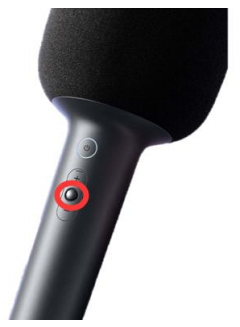
5.Q:How to adjust the volume of the Xiaomi Karaoke Microphone?
A:When the device is switched on, press the toggle button (MIC volume adjustment & accompaniment volume adjustment) briefly, then volume up or volume down.
6.Q:How to switch the sound effects on the Xiaomi Karaoke Microphone?
A:When the phone is on, press the power button briefly (if the interval between clicks is more than 5 seconds, it will indicate the current sound effect).
7.Q:How to eliminate the original sound with one key on Xiaomi Karaoke Microphone?
A:When the phone is on, press and hold the switch button, there will be a tone.
(Note: not all songs can be de-acousticised with one click, it depends on the format of the song, in the case of dual mics, de-acousticisation is not supported)
8.Q:How to pair the Xiaomi Karaoke Microphone with two microphones?
A:Two Xiaomi Karaoke Microphones can be paired together for two people. When the Bluetooth pairing is successful, double click the on both microphones to enter the dual-microphone pairing state, with a beep. When the pairing is successful, a beep will sound. The microphone that is successfully paired with the mobile device is the primary microphone and the other is the secondary microphone. When both microphones are not paired, the primary microphone is randomly configured. When neither microphone is Bluetooth paired, the primary microphone is randomly configured. When the two microphones are paired, a background tone will be emitted at the same time, but the user's voice will only come out of the current microphone.
Double click on the dual microphone button of either microphone to exit the dual microphone pairing mode.
9.Q:Is there a battery level indicator on the Xiaomi Karaoke Microphone?
A:When the battery is less than 20%, there will be a beep and an orange light will flash to remind you to recharge. The orange light will remain on while charging.
10.Q:Can the Xiaomi Karaoke Microphone be connected to the Mi Home APP?
A:No need to connect to the Mi Home APP product, Bluetooth pairs directly with your phone and other devices.
11.Q:What devices does the Xiaomi Karaoke Microphone support?
A:The Xiaomi Karaoke Microphone supports connection with mobile phones, Xiaomi TV, but not computers and notebooks. It does not support connection to computers and notebook speakers. When connected via Bluetooth, the sound from your mobile phone, TV will be output from the MIJIA Karaoke microphone and played back. The sound will be output from the MIJIA K-Song microphone and played back, but not from the built-in speakers on the phone or TV.
Note: Mobile phone connection is not limited to any model or brand, TV and projector support will be added later, if the above models cannot be connected you need to upgrade the TV or projector software to the latest firmware.
If the above models cannot be connected, you will need to upgrade your TV or projection software to the latest firmware version.
12.Q:Why can't the Xiaomi Karaoke Microphone be played out when connected to an audio cable?
A:You can use the audio cable to connect your mobile device for recording and live streaming. After connecting the audio cable, to ensure the quality of the recording and live Please plug in your headphones for recording and live monitoring.
13.Q:Why are the vocals/backing vocals too low/loud on the Xiaomi Karaoke Microphone?
A:1.Xiaomi Karaoke Microphone supports volume adjustment function, short press the switch button (MIC volume adjustment & accompaniment volume adjustment), then volume up or volume down, different mode sound will also be different, you can also try to switch. (MIC volume adjustment & accompaniment volume adjustment), then volume up or volume down, different modes of sound will also be different, you can also switch to try.
2.the microphone is connected to the phone after the default for the phone's volume, in adjusting the microphone volume, you can adjust the phone's volume at the same time The size of the phone can be adjusted simultaneously.
Note: If the accompaniment volume vocal is small, you need to press the switch button to prompt "eliminate the original sound off" in order to hear the normal sound.
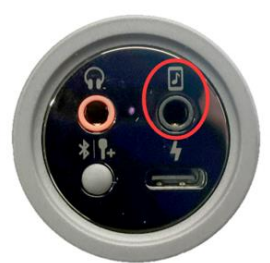
14.Q:Why does the Xiaomi Karaoke Microphone have low sound and noisy sound effects when recorded with a cable?
A:The recording effect is mainly affected by environmental factors, you can check whether the line recording connection is normal. Plug one end into the audio hole of the microphone, as shown below
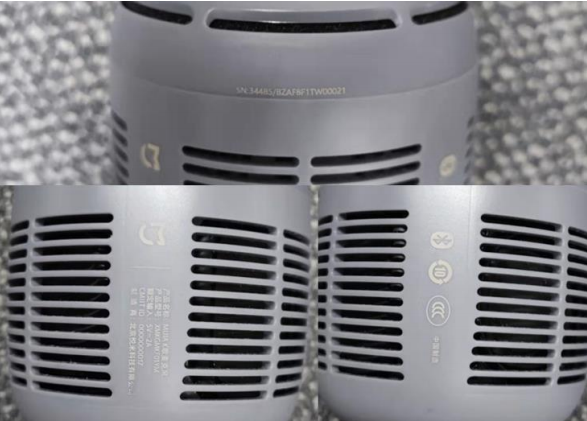
15.Q:Where is the Xiaomi Karaoke Microphone SN and other certification information located?
A:You need to take off the microphone sponge cover, the position of the body is as follows
16.Q:Why is the Xiaomi Karaoke Microphone silent after using the audio connection cable to switch on and off the microphone?
A:The microphone will not be able to play out after connecting the audio cable, you need to connect the microphone at the same time as using the headset. If there is no sound after connecting the microphone and audio cable at the same time, you need to check whether the interface is reversed and whether the separate device such as headphones can be used normally.
17.Q:Xiaomi Karaoke Microphone can switch which mode sound?
A:1.Acoustic⒉KTV 3.Pop 4.Soft 5.Super reverb 6.SFolk7.Leader's speech 8.Cartoon 9.Monster
18.Q:How to record audio on Xiaomi Karaoke Microphone?
A:The microphone can be recorded using mainstream Karaoke software with the headphones and audio cable connected, and supports mode sound switching.
Note: Some software may not be able to record background music, such as the phone's own recorder.
1.Q: How to use Xiaomi Karaoke Microphone?
A:Xiaomi Karaoke Microphone can be used in two ways
1, Connect to your device (phone, Xiaomi TV) via Bluetooth and open the singing software to use
2, Connected via cable, the orange headphone hole is connected to a wired headphone with a double 3.5mm audio cable. One end is plugged into the audio hole of the microphone and the other end is plugged into the phone via an adapter (you need to buy the adapter separately for Android and IOS devices) and open the singing software.
2.Q:What are the selling points of the Xiaomi Karaoke Microphone?
A:
1.Great-sounding, fun private KTV
2.Dual 5W high-power opposed speakers with dual bass passive basin four-way sound. Create an immersive karaoke experience with powerful surround sound.
3.The 16mm large-diameter cardioid pickup core provides a wider range of sound pickup dynamics. Classic optimised curve, depth and tone for better vocal performance.
4.Connect to your smartphone to record in sync. Professional sound card-quality recording performance so you can sing your heart out.
5.Fitted with a professional karaoke DSP chip for professional echo and reverb effect
6.2500mAh high-capacity lithium battery with a smart energy-saving design provides up to 7 hours of continuous use.
3.Q:Xiaomi Karaoke Microphone’s Product Specifications
A:
| Product model | XMKGMKF01YM |
| Wireless connection | Bluetooth 5.1 |
| Microphone Dimensions | 96*96*226 mm |
| Dimensions | 96*96*281 mm(including base) |
| Battery type | Lithium-ion battery |
| Battery specifications | 3.6V, 2500mAh *2500mAh battery is the nominal capacity |
| Rated power | 10W |
| Rated input | 5V-2A |
| Charging interface type | Type-C |
| Operating temperature | 0℃~45℃ |
| Weight | 840g(including packaging, microphone approx. 400g) |
| Protocols supported | A2DP、AVRCP、HFP |
| Battery life | 7 hours (70% volume) |
| CMIIT ID | 2021DP7871 |
| Product standard | Microphone x 1, Stand x 1, Audio cable x 1, Type-C charging cable x 1, Manual |
| Range of use | Mobile phone, Xiaomi TV (PC and laptop not supported) |
FAQs and troubleshooting
1.Q:How to turn on the Xiaomi Karaoke Microphone?
A:Press and hold the power button for 2 seconds to turn on the device, and press and hold the power button for 2 seconds to turn off the device when it is on. If the battery is below 20%, the voice message will be "Low battery, please charge". Press and hold the power button for 5 seconds to reset the power on when it is switched off. The microphone has a battery protection function. The microphone has a battery over discharge protection function, when the microphone indicates low battery, it needs to be charged normally. The microphone will automatically switch off if it reaches the battery's over-discharge voltage. It takes about half an hour or more to charge.
2.Q:How to connect the Xiaomi Karaoke Microphone to Bluetooth?
A:
1. First time pairing: The microphone will automatically enter Bluetooth search pairing mode after powering on, a beep will sound and a white light will flash, find "Xiaomi Karaoke Microphone" on the Bluetooth settings page of your mobile device and pair it.
2. Automatic pairing: The microphone will automatically connect to the last successfully paired device when it is switched on, with a beep after connection. If the connection is unsuccessful, the microphone will automatically enter the pairing search mode.
3. Reset Bluetooth: Press and hold the Reset Bluetooth button for 1 second to disconnect the current Bluetooth connection and enter Bluetooth search mode.
Note: When the microphone is connected to the phone/TV, you need to use Bluetooth in the phone/TV settings to search for connected devices directly. Adding a microphone using third party software settings is not supported for mobile phones/TVs.
3.Q:What functions can I use with the Xiaomi Karaoke Microphone wired connection?
A:Connect the audio cable to the recording port on the bottom of the microphone and the other end to the audio port on your mobile device. When using the wired connection method, the microphone speaker will be muted and you must use headphones to monitor the microphone's monitor headphone jack.
Note: Please use the audio connection cable included in the package, using a cable other than the original package may result in the function being disabled. A special adaptor must be purchased depending on the phone model.
4.Q:Can the Xiaomi Karaoke Microphone be connected to the dock for charging?
A:The dock does not have a charging function, the gap on top of the dock is to ensure that the charging cable can be connected to the microphone.
5.Q:How to adjust the volume of the Xiaomi Karaoke Microphone?
A:When the device is switched on, press the toggle button (MIC volume adjustment & accompaniment volume adjustment) briefly, then volume up or volume down.
6.Q:How to switch the sound effects on the Xiaomi Karaoke Microphone?
A:When the phone is on, press the power button briefly (if the interval between clicks is more than 5 seconds, it will indicate the current sound effect).
7.Q:How to eliminate the original sound with one key on Xiaomi Karaoke Microphone?
A:When the phone is on, press and hold the switch button, there will be a tone.
(Note: not all songs can be de-acousticised with one click, it depends on the format of the song, in the case of dual mics, de-acousticisation is not supported)
8.Q:How to pair the Xiaomi Karaoke Microphone with two microphones?
A:Two Xiaomi Karaoke Microphones can be paired together for two people. When the Bluetooth pairing is successful, double click the on both microphones to enter the dual-microphone pairing state, with a beep. When the pairing is successful, a beep will sound. The microphone that is successfully paired with the mobile device is the primary microphone and the other is the secondary microphone. When both microphones are not paired, the primary microphone is randomly configured. When neither microphone is Bluetooth paired, the primary microphone is randomly configured. When the two microphones are paired, a background tone will be emitted at the same time, but the user's voice will only come out of the current microphone.
Double click on the dual microphone button of either microphone to exit the dual microphone pairing mode.
9.Q:Is there a battery level indicator on the Xiaomi Karaoke Microphone?
A:When the battery is less than 20%, there will be a beep and an orange light will flash to remind you to recharge. The orange light will remain on while charging.
10.Q:Can the Xiaomi Karaoke Microphone be connected to the Mi Home APP?
A:No need to connect to the Mi Home APP product, Bluetooth pairs directly with your phone and other devices.
11.Q:What devices does the Xiaomi Karaoke Microphone support?
A:The Xiaomi Karaoke Microphone supports connection with mobile phones, Xiaomi TV, but not computers and notebooks. It does not support connection to computers and notebook speakers. When connected via Bluetooth, the sound from your mobile phone, TV will be output from the MIJIA Karaoke microphone and played back. The sound will be output from the MIJIA K-Song microphone and played back, but not from the built-in speakers on the phone or TV.
Note: Mobile phone connection is not limited to any model or brand, TV and projector support will be added later, if the above models cannot be connected you need to upgrade the TV or projector software to the latest firmware.
If the above models cannot be connected, you will need to upgrade your TV or projection software to the latest firmware version.
12.Q:Why can't the Xiaomi Karaoke Microphone be played out when connected to an audio cable?
A:You can use the audio cable to connect your mobile device for recording and live streaming. After connecting the audio cable, to ensure the quality of the recording and live Please plug in your headphones for recording and live monitoring.
13.Q:Why are the vocals/backing vocals too low/loud on the Xiaomi Karaoke Microphone?
A:1.Xiaomi Karaoke Microphone supports volume adjustment function, short press the switch button (MIC volume adjustment & accompaniment volume adjustment), then volume up or volume down, different mode sound will also be different, you can also try to switch. (MIC volume adjustment & accompaniment volume adjustment), then volume up or volume down, different modes of sound will also be different, you can also switch to try.
2.the microphone is connected to the phone after the default for the phone's volume, in adjusting the microphone volume, you can adjust the phone's volume at the same time The size of the phone can be adjusted simultaneously.
Note: If the accompaniment volume vocal is small, you need to press the switch button to prompt "eliminate the original sound off" in order to hear the normal sound.
14.Q:Why does the Xiaomi Karaoke Microphone have low sound and noisy sound effects when recorded with a cable?
A:The recording effect is mainly affected by environmental factors, you can check whether the line recording connection is normal. Plug one end into the audio hole of the microphone, as shown below
15.Q:Where is the Xiaomi Karaoke Microphone SN and other certification information located?
A:You need to take off the microphone sponge cover, the position of the body is as follows
16.Q:Why is the Xiaomi Karaoke Microphone silent after using the audio connection cable to switch on and off the microphone?
A:The microphone will not be able to play out after connecting the audio cable, you need to connect the microphone at the same time as using the headset. If there is no sound after connecting the microphone and audio cable at the same time, you need to check whether the interface is reversed and whether the separate device such as headphones can be used normally.
17.Q:Xiaomi Karaoke Microphone can switch which mode sound?
A:1.Acoustic⒉KTV 3.Pop 4.Soft 5.Super reverb 6.SFolk7.Leader's speech 8.Cartoon 9.Monster
18.Q:How to record audio on Xiaomi Karaoke Microphone?
A:The microphone can be recorded using mainstream Karaoke software with the headphones and audio cable connected, and supports mode sound switching.
Note: Some software may not be able to record background music, such as the phone's own recorder.
Does it help?
Yes
No