

What to do if you have forgotten your password for Xiaomi/REDMI Watch Series, Xiaomi /REDMI Band Series?
If you have forgotten your password for Xiaomi/REDMI Watch Series, Xiaomi /REDMI Band Series, please refer to the following methods:
Method 1:
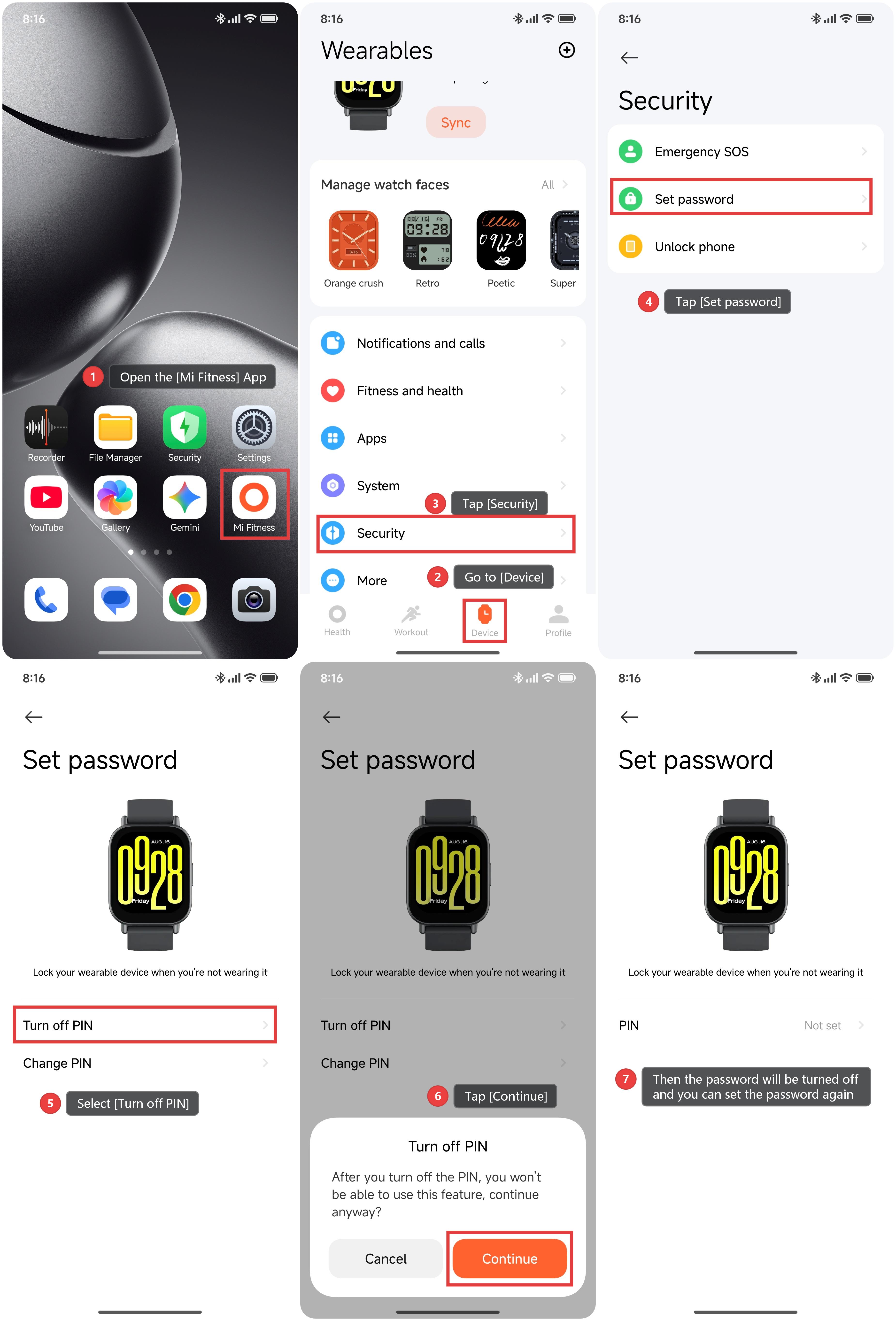
1. Open the [Mi Fitness] App.
2. Go to [Device] and ensure that your Smart Band or Watch is connected to the App.
3. Tap [Security].
4. Tap [Set password].
5. Select [Turn off PIN].
6. Tap [Continue].
7. Then the password will be turned off and you can set the password again.
Method 2:
Please enter [Settings] on the Smart Band or Watch, and enter [System] to reset the device. Then the password will be turned off.
Note:
The specific operating method varies depending on the product.
Does it help?
Yes
No