

Xiaomi Automatic Smart Door Lock FAQ
Overview
1.Q: What is a mechanical burglar lock?
A: Mechanical anti-theft locks open and close through A transmission device. Mechanical lock with anti-drilling, anti-saw, anti-skid, anti-pull, anti-impact, anti-opening technical requirements. Xiaomi Automatic Smart Door Lock is a mechanical anti-theft Lock.
2.Q:What is the Xiaomi Automatic Smart Door Lock security level?
A:Xiaomi Automatic Smart Door Lock product security level is B, Lock core security level is C, both are the highest level (according to the Lock industry standard GA/T 73-2015 Mechanical anti-theft Lock compiled by the Ministry of Public Security, PRC). Xiaomi Automatic Smart Door Lock adopts a safer C-level intelligent Lock core with direct core. The Lock core runs through the Lock body, and the Lock cannot be opened directly even if the panel is destroyed. At the same time also has the detection of emergency key unlock.
3.Q:What are the advantages of real cores over fake cores?
A: The lock core of the real core is embedded into the lock body. Compared with the fake core, its structure design is more complex. Even if the front panel is damaged and removed, it still needs a mechanical key to open it, improving the security level of the door lock.
4.Q: Why is a built-in clutch safer?
A: If the clutch is placed on the front panel of the door lock, after the front panel is forcibly damaged, the lock can be directly opened by pressing the clutch with the door handle, or inserted into the gap of the front panel with the steel ruler tool, and the lock can also be opened by the stuck square shaft. So rice home lock is placed in the scheme of lock body after using clutch, even if the front panel was destroyed, also won't affect the security of lock. All the clutches of the Xiaomi Automatic Smart Door Lock are inside the Lock body, so there is no need to worry about the security of the Lock.
5.Q:Which Xiaomi Automatic Smart Door Lock has passed?
A:Xiaomi Automatic Smart Door Lock has passed the security level B certification of the whole Lock, the Lock core level C certification, SRRC, BQB, RoHS and other certifications.
1.Q: What is a mechanical burglar lock?
A: Mechanical anti-theft locks open and close through A transmission device. Mechanical lock with anti-drilling, anti-saw, anti-skid, anti-pull, anti-impact, anti-opening technical requirements. Xiaomi Automatic Smart Door Lock is a mechanical anti-theft Lock.
2.Q:What is the Xiaomi Automatic Smart Door Lock security level?
A:Xiaomi Automatic Smart Door Lock product security level is B, Lock core security level is C, both are the highest level (according to the Lock industry standard GA/T 73-2015 Mechanical anti-theft Lock compiled by the Ministry of Public Security, PRC). Xiaomi Automatic Smart Door Lock adopts a safer C-level intelligent Lock core with direct core. The Lock core runs through the Lock body, and the Lock cannot be opened directly even if the panel is destroyed. At the same time also has the detection of emergency key unlock.
3.Q:What are the advantages of real cores over fake cores?
A: The lock core of the real core is embedded into the lock body. Compared with the fake core, its structure design is more complex. Even if the front panel is damaged and removed, it still needs a mechanical key to open it, improving the security level of the door lock.
4.Q: Why is a built-in clutch safer?
A: If the clutch is placed on the front panel of the door lock, after the front panel is forcibly damaged, the lock can be directly opened by pressing the clutch with the door handle, or inserted into the gap of the front panel with the steel ruler tool, and the lock can also be opened by the stuck square shaft. So rice home lock is placed in the scheme of lock body after using clutch, even if the front panel was destroyed, also won't affect the security of lock. All the clutches of the Xiaomi Automatic Smart Door Lock are inside the Lock body, so there is no need to worry about the security of the Lock.
5.Q:Which Xiaomi Automatic Smart Door Lock has passed?
A:Xiaomi Automatic Smart Door Lock has passed the security level B certification of the whole Lock, the Lock core level C certification, SRRC, BQB, RoHS and other certifications.
6.Q:What is the automatic locking body ?
A: The automatic lock body automatically retract the main lock tongue and release the scissors tongue according to the detection state; Lock tongue out automatically when the door is closed, lock the scissors tongue. Installation is more convenient, open the door more effortless;
7.Q: What are the functions and implementation methods of HomeKit?
A: After you authorize Apple Homekit through Mi Home App, use the "Home" App or Siri voice control to unlock the lock. When there is a visitor, voice control can open the lock;
Setting mode :Mi Home App- Settings -HomeKit binding and Authorization - Bind lock to HomeKit-Mi Home App needs to open Home permissions - Authorize HomeKit unlocking - Select Authorization time - Done.
Product introduction and use
1. Q: What is the Xiaomi Automatic Smart Door Lock's feature?
A:Xiaomi Automatic Smart Door Lock is an Internet of Things Smart Door Lock that supports fingerprint, password, temporary password, NFC, mobile phone Bluetooth, HomeKit and emergency key opening. It supports remote abnormal alarm, remote view of Lock opening record, child Lock mode and other functions. Mi Home App can be used to set the door lock. With rich Xiaoimi intelligent device, rich smart Home applications such as intelligent linkage control and linkage alarm can be realized. It comes with electronic doorbell and supports Apple HomeKit.
2. Q:What is the Xiaomi Automatic Smart Door Lock standard?
A:Xiaomi Automatic Smart Door Lock is equipped with: front panel *1, back panel *1, Lock body *1, intelligent Lock core *1, Door gusset *1, accessory package *1, emergency key *2, installation opening diagram *1, guide user*1.
3. Q:Xiaomi Automatic Smart Door Lock How do I connect to Mi Home App?
A:1. Download App: scan the two-dimensional code on the manual with your mobile phone or search "Xiaoimi" App in the mobile App store to download and install. Make sure your home WiFi is working properly.
2. Open Mi Home App and click "+" in the upper right corner to add it from nearby devices or manually; Follow the App prompts.
Tip: After the door lock is successfully added, it automatically connects to the Bluetooth gateway device under the account. No configuration is required. The effective Bluetooth communication distance of the door lock is 10m. Obstacles such as walls may affect the Bluetooth communication distance.
4.Q:How do I add a Xiaomi Automatic Smart Door Lock user?
A: Go to the door lock device page and add the first user (the default user is the administrator) as prompted by the APP.
Note: The lock cannot be locked properly without adding a user.
5. Q: What is the Xiaomi Automatic Smart Door Lock opening method?
A:1. Fingerprint unlocking: A. Lightly press the added finger on the fingerprint identification area; B. After the verification is successful, push or pull the handle to unlock the lock.

2. Unlock with password: a. Enter the added password and press the confirm key. B. After the verification is successful, push or pull the handle to unlock the lock.
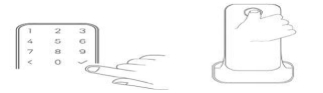
3.NFC Unlock:
A. Place the added NFC device close to the identification area. B. After the verification is successful, push or pull the handle to unlock the lock.
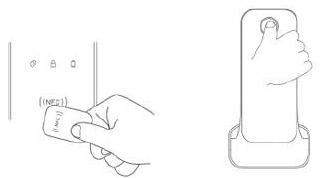
4.Emergency key to unlock
a.Press under the cover b.After the spring down cut open, revealing the keyhole; c. Use emergency keys to open locks.
Note: Do not lock the emergency key inside the house, should choose a safe and accessible place for safekeeping, so as to use in extreme circumstances.
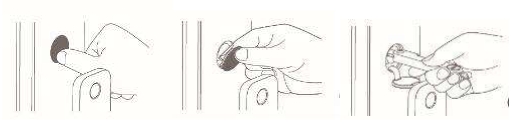
5.Indoor lock opening: A. Hold the inner sensing area of the handle (keep skin contact) and do not loosen; B. Press the door open button and push/pull the handle to open the door.
6. indoor electronic reverse lock: a. When you need to open the electronic reverse lock, long press the electronic reverse lock button for 1.5 seconds, the red light will turn on, and the red light will turn off after 10 seconds; To touch the reverse lock, long press the electronic reverse lock button for 1.5 seconds (the red light will light at the same time), with the sound prompt of unlocking the reverse lock, the reverse lock will be unlocked; B. Press the button for less than 1.5 seconds, the electronic locked state remains unchanged. C. When the electronic lock is open, the door will automatically solve the electronic lock.
6.Q:Is Xiaomi Automatic Smart Door Lock available without connecting to the APP?
A:The Xiaomi Automatic Smart Door Lock can be used without connecting to the APP. Firstly, confirm that the "local setting" function in the APP is enabled. If it is not convenient to use the mobile phone APP to set the door lock, press the "Setting" button under the battery cover of the door lock, and verify the administrator's fingerprint or password before setting the door locally:
1. Add/delete fingerprints:
2. Add/delete passwords;
3. Set the door lock volume;
4. set the lock language (support Chinese/English).
Note: You need to use Mi Home App to add door locks and users before entering the local setting mode.
7.Q:How many fingerprints can Xiaomi Automatic Smart Door Lock record at most? How many sets of passwords? How many NFC cards are supported for emulation?
A:Xiaomi Automatic Smart Door Lock can input up to 50 fingerprints, 50 groups of passwords, and support up to 25 NFC cards.
8.Q:How does the Xiaomi Automatic Smart Door Lock record fingerprints?
A:Xiaomi Automatic Smart Door Lock has two ways to record fingerprints:
a. After installing the Mi Home App on the mobile phone, add the door lock and connect the door lock, record the fingerprint according to the operation prompts of the Mi Home App.
b. After the rear panel of the door lock is opened, press the setting button above the battery compartment of the door lock, and record the fingerprint according to the voice prompt (you need to add the door lock through Mi Home App before enabling the local setting function).
9.Q:How many passwords does Xiaomi Automatic Smart Door Lock support? Are virtual passwords supported?
A:Xiaomi Automatic Smart Door Lock supports 6-10 digit Lock opening passwords and 20 digit virtual passwords. The virtual bit password contains 6 to 10 characters. The combination of the lock opening password and the virtual bit password is a maximum of 20 digits. (Virtual password refers to the correct password input before or after the addition of any garbled code, to prevent the password input by others peep)
10.Q:Does Xiaomi Automatic Smart Door Lock support setting temporary passwords?
A: Yes. When the phone connects to the door lock through Bluetooth, you can set a temporary password that takes effect at any time period through the Mi Home App. You can set a temporary password (nanny password) within a specified time period (for example, 10:00 to 11:00). The temporary password can be used to unlock locks only during the valid time period.
Note: Period-valid temporary passwords cannot be created remotely.
11.Q: Does Xiaomi Automatic Smart Door Lock have fingerprint anti-opening function?
A:Xiaomi Automatic Smart Door Lock prevents test opening from two aspects to ensure safety:
1. Xiaomi Automatic Smart Door Lock adopts PB deep customization algorithm to effectively eliminate false fingerprint opening.
2. After the fingerprint verification is wrong for 5 consecutive times, the fingerprint function will be locked for 5 minutes, and the door lock will give local alarm (that is, the door lock will give alarm sound and light display), and the alarm message will be pushed in the APP.
12.Q:Does Xiaomi Automatic Smart Door Lock have password anti-opening function?
A:With anti-password trial opening function, if the password is incorrectly entered for 5 consecutive times, the password input area will be locked for 5 minutes, and local alarm will be given (that is, the door lock will emit alarm sound and light display) and the APP will push alarm information. 5 minutes later, you can enter the password again. If you still enter the wrong password for 5 consecutive times, the keyboard will be locked for 15 minutes. The limit time of locking the door keyboard is when the third and fourth... The keyboard is still locked for 15 minutes if you enter the wrong password for 5 consecutive times.
13.Q:Xiaomi Automatic Smart Door Lock can be opened through Bluetooth?
A: If the lock has been successfully added through Mi Home App, the lock can be opened through Bluetooth (ensure that the lock is within the Bluetooth connection range).
14.Q: What kinds of NFC locks does Xiaomi Automatic Smart Door Lock support?
A: Xiaomi NFC card, Aqara NFC card
15.Q: Does Xiaomi Automatic Smart Door Lock have remote Lock opening function?
A: In order to ensure the security of the door lock, the door lock is not equipped with remote unlock function. However, one-time passwords can be provisioned remotely.
16.Q: When does Xiaomi need to use an emergency key?
A: In case of emergency, the lock cannot be opened normally by other means (fingerprint, password, mobile phone Bluetooth, Xiaomi mobile phone, NFC, Homekit).
The emergency key can be used to open the lock, so it is recommended to keep the emergency key properly.
17.Q: What is the Xiaomi Automatic Smart Door Lock locking method?
A: After closing, the Xiaomi Automatic Smart Door Lock will automatically Lock (anti-trailing).
18.Q: What is a backlock (child lock)?
A:Xiaomi Automatic Smart Door Lock design is designed to prevent children from misoperation. It needs to hold down the electronic Lock button for 1.5 seconds to Lock the Door, which effectively prevents young children from locking the Door at home alone. The lock can only be operated indoors. After the lock is locked, the security level of the lock will be improved. Only the administrator's fingerprint or password, emergency key or by logging in to the administrator Mi account and using the mobile APP can be unlocked outside the door.
19.Q: Does Xiaomi Automatic Smart Door Lock detect the status of doors?
A:Xiaomi Automatic Smart Door Lock can detect the Door status by sensing whether the angular tongue and oblique tongue on the Lock body extend or withdraw. The state that can be detected includes the open/closed state and the door ajar state. If the door is not properly closed, the door lock will alarm and push the message. Can also detect whether the lock.
20.Q: Under what conditions does Xiaomi Automatic Smart Door Lock provide alarm alerts?
A:Xiaomi Automatic Smart Door Lock has the following alarm alerts:
The door is ajar or not closed (need to open the reminder function in the APP), the lock is not lifted or locked (need to open the reminder function in the APP), the lock is pry, the battery is low, the password fails to open the lock for many times, the fingerprint fails to open the lock for many times, the NFC of Xiaomi phone fails to open the lock for many times.
21.Q:Xiaomi Automatic Smart Door Lock battery is dead.
A: If the battery of the Door Lock is out of power, the Xiaomi Automatic Smart Door Lock emergency charging interface can be used to power the Lock. The emergency charging interface is in the form of Type-C, which is located at the bottom of the outside panel of the Door Lock. The Lock can be powered by using the charging bank +Type-C line. Replace the battery after unlocking it.
22.Q: How often is the Xiaomi Automatic Smart Door Lock to change the battery?
A: When the Xiaomi Automatic Smart Door Lock battery power is lower than 20% (at this time, the Lock theory can still work for about 3 weeks), the Lock will make A local alarm and push A message to the APP to remind, and the battery can be replaced when the alarm is received.
23.Q: Does Xiaomi Automatic Smart Door Lock support outdoor use? Is it waterproof?
A:Xiaomi Automatic Smart Door Lock only supports indoor use, not outdoor use. Not waterproof.
24.Q: Which doors can Xiaomi install Automatic Smart Door Lock?
A:1. The standard lock body (6068 lock body) can be replaced and installed;
2,.Ba Wang, Wang Li, Pan Pan, Xiao Shuai and other brand lock body, need to be installed after the transformation of the door, after the installation of the standard lock body;
3,.special doors (iron door, fence door, double lock door, glass security door, hidden lock, etc.) can not be installed,
4. The door thickness needs to be between 40-120mm;
5. The distance between the center of the lock body and the front and rear door panels should be greater than 20mm.
25.Q: Does Xiaomi Automatic Smart Door Lock support connecting multiple phones at the same time?
A: Since the Bluetooth protocol itself only supports one-to-one connection, the Xiaomi Automatic Smart Door Lock can only be connected to one mobile phone at the same time.
26.Q: How does Xiaomi Automatic Smart Door Lock connect to the Bluetooth gateway?
A: When there is A Bluetooth gateway device near the Xiaomi Automatic Smart Door Lock and it is bound to the same Mi account, the Xiaomi Automatic Smart Door Lock will be automatically connected without additional configuration.
27.Q: What is the Xiaomi Automatic Smart Door Lock's function after connecting to the Bluetooth gateway?
A:Xiaomi Automatic Smart Door Lock, after connecting to the Bluetooth gateway, can remotely check the Lock log and Lock status from home, set up and execute linkage with other devices.
28.Q: Can Xiaomi Automatic Smart Door Lock be bound to multiple Mi accounts?
A:Xiaomi Automatic Smart Door Lock can only be bound by one Mi account. If you want to change the binding account, you need to delete the Xiaomi Automatic Smart Door Lock in the Mi Home App first
29.Q: What is the Xiaomi Automatic Smart Door Lock administrator account?
A:Xiaomi Automatic Smart Door Lock administrator refers to the account set after the Door Lock is added through Mi Home App for the first time. You can enter the local setting mode of the door lock through the administrator's fingerprint or password to set it. You can restore the door lock to factory Settings, lift the locked state of the door outdoors, and unlock it daily. A total of 50 accounts can be set for lock. If no common user is set, a maximum of 50 administrators can be set.
30.Q: Does Xiaomi Automatic Smart Door Lock support accounts with other permissions?
A: You can set A common user, and the permission of A common user is only for daily unlocking. To set the path, go to the first page of Mi Home App >> User Management >> + >> in the lower right corner and select A common user.
31. Q: Is the Xiaomi Automatic Smart Door Lock opened by the Tesla coil?
A:Xiaomi Automatic Smart Door Lock adopts A closed structure, built-in main chip, built-in motor latch, front and rear panel data communication encryption and other four-dimensional guarantee system, which greatly reduces the influence of electronic radiation. The product has passed the GB/T17618 radiation immunity test. Up to 10V/m continuous wave radiation level, even close to the lock body, the small black box still can not be unlocked.
32. Q: Does Xiaomi Automatic Smart Door Lock swap left and right, inside and outside normally?
A:Xiaomi Automatic Smart Door Lock supports left/right, inside/outside exchange.
33.Q: Does Xiaomi Automatic Smart Door Lock support fingerprint opening for children and the elderly?
A:Xiaomi Automatic Smart Door Lock supports fingerprint opening for people aged 7-70 years. The success rate of Lock opening will be reduced due to immature development or aging and wear of fingerprints of children and the elderly. It is suggested to use fingerprint with password.
34. Q: What is an emergency knob lock pick?
A: If there is no power or electronic fault in the door lock, the emergency knob can also be used to turn the lock from the house to ensure that it is not trapped in the house. At the same time, the sunken design can also prevent children from opening the lock by mistake. Twist 45 degrees can realize the door;
35.Q: Does Xiaomi need to push and pull the handle?
A: No need. At present, Xiaomi Automatic Smart Door Lock can open the Door with only one step. After successful verification, the Lock tongue will be recovered automatically.
36. Q:Xiaomi Automatic Smart Door Lock How to open the Door with Homekit?
A: In Mi Home App, set to add Homekit authorization; Scan the QR code to open the door using Homekit.
37.Q: Do it support manual defense deployment? How to do that?
A: Manual defense is supported. You need to set - lock setting - Manual defense in Mi Home App to enable the manual defense function. After the user goes out and locks the door, manually click the tick on the front board to activate it.
Troubleshooting
1.Q: How do I solve the Xiaomi Automatic Smart Door Lock when recording the fingerprint?
A:1. Please ensure that the fingerprinting finger is dry and the fingerprint is not damaged in A large area.
2. In the process of fingerprint entry (a fingerprint needs to be recorded for 8 times successfully), please press your finger completely on the fingerprint recognition area and try to change the input Angle according to the voice or APP prompt (do not repeatedly record at the same Angle).
3. In order to better unlock experience, it is recommended to use the thumb of the common hand for input.
2. Q:Xiaomi Automatic Smart Door Lock fingerprint verification fails.
A: please make sure that no stain on his fingers and keep dry, and the finger press completely in fingerprint recognition area to try again, if failed to fingerprint lock, then use the password lock, first remove the fingerprints on the App and re-enter, recorded fingerprints can be recorded several groups, to avoid problems occur because of A single finger fingerprint itself validation fails.
3. Q: What if I forget the Xiaomi Automatic Smart Door Lock password and the password input area is locked due to continuous mistyping?
A: Other methods can be used, such as fingerprint, mobile phone Bluetooth or Xiaomi phone NFC, including the use of emergency keys
Unlock, unlock, the keyboard lock release, will not affect the next use.
4. Q: When the door is not closed or locked, why is there no alarm and alarm message push from the APP?
A: The unlocked and unlocked alarm is in the closed state by default, which needs to be opened in the APP. After adding the connection door lock in the Mi Home APP, set the alarm in "Door Lock Settings" - "Unlocked Alarm".
5. Q:Xiaomi Automatic Smart Door Lock battery is dead.
A: If the battery of the Door Lock is out of power, the Xiaomi Automatic Smart Door Lock emergency charging interface can be used to power the Lock. The emergency charging interface is in the form of Type-C, which is located at the bottom of the outside panel of the Door Lock. The Lock can be powered by using the charging bank +Type-C line. Replace the battery after unlocking it.
6. Q: After Xiaomi Automatic Smart Door Lock is reset, other phones still cannot be added through Mi Home App?
A: Resetting the door lock will only clear the fingerprint, password and other information of the door lock, and will not be untied with the Mi account, so:
1. If the Door Lock has been connected with the mobile phone Bluetooth pairing before, the Xiaomi Automatic Smart Door Lock device under the Mi account needs to be deleted by the connected user in the Mi Home App, so that other users can connect normally.
2. If the previously bound mobile phone is not around, other users can log in to the previously bound Mi account and delete the Mi Xiaoimi smart door lock device before reconnecting.
7. Q: How do I troubleshoot the Xiaomi Automatic Smart Door Lock fingerprint identification failure?
A:1. Check whether the lock firmware is updated. In case of the above problems, please upgrade the lock firmware to the latest version;
2. Check whether the fingerprint unlocking gesture is consistent with the initial fingerprint recording gesture, and try to change the fingerprint unlocking posture.
3. For example, in the Mi Home App--Xiaomi Automatic Smart Door Lock -- user management, you can continue to add other fingerprints and try to add the same finger fingerprint twice.
4, the door lock fingerprint identification module or finger has water stains, dirt will affect the sensitivity of fingerprint identification, check whether there is dust, sweat or other dirty places on the fingerprint reader or finger, if there is dirt can be cleaned and then do fingerprint input attempt;
5, just get up in the morning, winter, dry and hot weather, will lead to dry fingers, peeling and affect fingerprint recognition, so that unlock the finger to ensure a certain humidity or press the force is larger, unlock can reach the ideal level;
6. If the above steps have not solved the user's problem, you can guide the user to apply for the after-sales test to see whether it is a performance fault.
8. Q:Xiaomi Automatic Smart Door Lock firmware upgrade fails. How do I troubleshoot?
A:1. During firmware upgrade, if the APP upgrade interface is stuck between 0-75%, put the phone close to the lock and try to upgrade again;
2. During the firmware upgrade, the APP upgrade interface is stuck at 75%, you can try again. If the upgrade still fails, the communication line between the front and rear panels of the door lock may be abnormal, and you can apply for after-sales detection;
3, firmware upgrade, APP interface stuck in 82%, exit the upgrade interface, enter the Mi Home APP door lock interface - door lock Settings - device information - check whether you can read the fingerprint version number, if you can not read the version number, you need to reset the door lock and add again upgrade, if not reset the after-sales detection, Check whether the cables and door locks on the front and rear panels are faulty.
4. If the door lock cannot detect the upgrade, check whether the network is normal, restart Mi Home App to re-test the upgrade, and change the time period to try.
9. Q: How to update the Xiaomi Automatic Smart Door Lock plug-in in Mi Home App?
A: With the firmware upgrade of the Door Lock, the Xiaomi Automatic Smart Door Lock plug-in in Mi Home App will also be upgraded. As for how to upgrade, the operation is as follows:
IOS phone :Mi Home App-> Profile -> Settings -> Clear Cache -> Restart Mi Home App->Xiaomi Automatic Smart Door Lock
For Android phones :Mi Home App-> Profile -> Settings -> Enable automatic plug-in updates.
10.Q:Xiaomi Automatic Smart Door Lock opens the two-factor verification function, but forgets the Lock password.
A: It can be solved in the following ways:
1. Turn off this function by connecting the door lock with your phone's Bluetooth
2. Open the lock with Bluetooth connection.
3. Use emergency keys to open locks.
A: The automatic lock body automatically retract the main lock tongue and release the scissors tongue according to the detection state; Lock tongue out automatically when the door is closed, lock the scissors tongue. Installation is more convenient, open the door more effortless;
7.Q: What are the functions and implementation methods of HomeKit?
A: After you authorize Apple Homekit through Mi Home App, use the "Home" App or Siri voice control to unlock the lock. When there is a visitor, voice control can open the lock;
Setting mode :Mi Home App- Settings -HomeKit binding and Authorization - Bind lock to HomeKit-Mi Home App needs to open Home permissions - Authorize HomeKit unlocking - Select Authorization time - Done.
Product introduction and use
1. Q: What is the Xiaomi Automatic Smart Door Lock's feature?
A:Xiaomi Automatic Smart Door Lock is an Internet of Things Smart Door Lock that supports fingerprint, password, temporary password, NFC, mobile phone Bluetooth, HomeKit and emergency key opening. It supports remote abnormal alarm, remote view of Lock opening record, child Lock mode and other functions. Mi Home App can be used to set the door lock. With rich Xiaoimi intelligent device, rich smart Home applications such as intelligent linkage control and linkage alarm can be realized. It comes with electronic doorbell and supports Apple HomeKit.
2. Q:What is the Xiaomi Automatic Smart Door Lock standard?
A:Xiaomi Automatic Smart Door Lock is equipped with: front panel *1, back panel *1, Lock body *1, intelligent Lock core *1, Door gusset *1, accessory package *1, emergency key *2, installation opening diagram *1, guide user*1.
3. Q:Xiaomi Automatic Smart Door Lock How do I connect to Mi Home App?
A:1. Download App: scan the two-dimensional code on the manual with your mobile phone or search "Xiaoimi" App in the mobile App store to download and install. Make sure your home WiFi is working properly.
2. Open Mi Home App and click "+" in the upper right corner to add it from nearby devices or manually; Follow the App prompts.
Tip: After the door lock is successfully added, it automatically connects to the Bluetooth gateway device under the account. No configuration is required. The effective Bluetooth communication distance of the door lock is 10m. Obstacles such as walls may affect the Bluetooth communication distance.
4.Q:How do I add a Xiaomi Automatic Smart Door Lock user?
A: Go to the door lock device page and add the first user (the default user is the administrator) as prompted by the APP.
Note: The lock cannot be locked properly without adding a user.
5. Q: What is the Xiaomi Automatic Smart Door Lock opening method?
A:1. Fingerprint unlocking: A. Lightly press the added finger on the fingerprint identification area; B. After the verification is successful, push or pull the handle to unlock the lock.
2. Unlock with password: a. Enter the added password and press the confirm key. B. After the verification is successful, push or pull the handle to unlock the lock.
3.NFC Unlock:
A. Place the added NFC device close to the identification area. B. After the verification is successful, push or pull the handle to unlock the lock.
4.Emergency key to unlock
a.Press under the cover
b.After the spring down cut open, revealing the keyhole; c. Use emergency keys to open locks.Note: Do not lock the emergency key inside the house, should choose a safe and accessible place for safekeeping, so as to use in extreme circumstances.
5.Indoor lock opening: A. Hold the inner sensing area of the handle (keep skin contact) and do not loosen; B. Press the door open button and push/pull the handle to open the door.
6. indoor electronic reverse lock: a. When you need to open the electronic reverse lock, long press the electronic reverse lock button for 1.5 seconds, the red light will turn on, and the red light will turn off after 10 seconds; To touch the reverse lock, long press the electronic reverse lock button for 1.5 seconds (the red light will light at the same time), with the sound prompt of unlocking the reverse lock, the reverse lock will be unlocked; B. Press the button for less than 1.5 seconds, the electronic locked state remains unchanged. C. When the electronic lock is open, the door will automatically solve the electronic lock.
6.Q:Is Xiaomi Automatic Smart Door Lock available without connecting to the APP?
A:The Xiaomi Automatic Smart Door Lock can be used without connecting to the APP. Firstly, confirm that the "local setting" function in the APP is enabled. If it is not convenient to use the mobile phone APP to set the door lock, press the "Setting" button under the battery cover of the door lock, and verify the administrator's fingerprint or password before setting the door locally:
1. Add/delete fingerprints:
2. Add/delete passwords;
3. Set the door lock volume;
4. set the lock language (support Chinese/English).
Note: You need to use Mi Home App to add door locks and users before entering the local setting mode.
7.Q:How many fingerprints can Xiaomi Automatic Smart Door Lock record at most? How many sets of passwords? How many NFC cards are supported for emulation?
A:Xiaomi Automatic Smart Door Lock can input up to 50 fingerprints, 50 groups of passwords, and support up to 25 NFC cards.
8.Q:How does the Xiaomi Automatic Smart Door Lock record fingerprints?
A:Xiaomi Automatic Smart Door Lock has two ways to record fingerprints:
a. After installing the Mi Home App on the mobile phone, add the door lock and connect the door lock, record the fingerprint according to the operation prompts of the Mi Home App.
b. After the rear panel of the door lock is opened, press the setting button above the battery compartment of the door lock, and record the fingerprint according to the voice prompt (you need to add the door lock through Mi Home App before enabling the local setting function).
9.Q:How many passwords does Xiaomi Automatic Smart Door Lock support? Are virtual passwords supported?
A:Xiaomi Automatic Smart Door Lock supports 6-10 digit Lock opening passwords and 20 digit virtual passwords. The virtual bit password contains 6 to 10 characters. The combination of the lock opening password and the virtual bit password is a maximum of 20 digits. (Virtual password refers to the correct password input before or after the addition of any garbled code, to prevent the password input by others peep)
10.Q:Does Xiaomi Automatic Smart Door Lock support setting temporary passwords?
A: Yes. When the phone connects to the door lock through Bluetooth, you can set a temporary password that takes effect at any time period through the Mi Home App. You can set a temporary password (nanny password) within a specified time period (for example, 10:00 to 11:00). The temporary password can be used to unlock locks only during the valid time period.
Note: Period-valid temporary passwords cannot be created remotely.
11.Q: Does Xiaomi Automatic Smart Door Lock have fingerprint anti-opening function?
A:Xiaomi Automatic Smart Door Lock prevents test opening from two aspects to ensure safety:
1. Xiaomi Automatic Smart Door Lock adopts PB deep customization algorithm to effectively eliminate false fingerprint opening.
2. After the fingerprint verification is wrong for 5 consecutive times, the fingerprint function will be locked for 5 minutes, and the door lock will give local alarm (that is, the door lock will give alarm sound and light display), and the alarm message will be pushed in the APP.
12.Q:Does Xiaomi Automatic Smart Door Lock have password anti-opening function?
A:With anti-password trial opening function, if the password is incorrectly entered for 5 consecutive times, the password input area will be locked for 5 minutes, and local alarm will be given (that is, the door lock will emit alarm sound and light display) and the APP will push alarm information. 5 minutes later, you can enter the password again. If you still enter the wrong password for 5 consecutive times, the keyboard will be locked for 15 minutes. The limit time of locking the door keyboard is when the third and fourth... The keyboard is still locked for 15 minutes if you enter the wrong password for 5 consecutive times.
13.Q:Xiaomi Automatic Smart Door Lock can be opened through Bluetooth?
A: If the lock has been successfully added through Mi Home App, the lock can be opened through Bluetooth (ensure that the lock is within the Bluetooth connection range).
14.Q: What kinds of NFC locks does Xiaomi Automatic Smart Door Lock support?
A: Xiaomi NFC card, Aqara NFC card
15.Q: Does Xiaomi Automatic Smart Door Lock have remote Lock opening function?
A: In order to ensure the security of the door lock, the door lock is not equipped with remote unlock function. However, one-time passwords can be provisioned remotely.
16.Q: When does Xiaomi need to use an emergency key?
A: In case of emergency, the lock cannot be opened normally by other means (fingerprint, password, mobile phone Bluetooth, Xiaomi mobile phone, NFC, Homekit).
The emergency key can be used to open the lock, so it is recommended to keep the emergency key properly.
17.Q: What is the Xiaomi Automatic Smart Door Lock locking method?
A: After closing, the Xiaomi Automatic Smart Door Lock will automatically Lock (anti-trailing).
18.Q: What is a backlock (child lock)?
A:Xiaomi Automatic Smart Door Lock design is designed to prevent children from misoperation. It needs to hold down the electronic Lock button for 1.5 seconds to Lock the Door, which effectively prevents young children from locking the Door at home alone. The lock can only be operated indoors. After the lock is locked, the security level of the lock will be improved. Only the administrator's fingerprint or password, emergency key or by logging in to the administrator Mi account and using the mobile APP can be unlocked outside the door.
19.Q: Does Xiaomi Automatic Smart Door Lock detect the status of doors?
A:Xiaomi Automatic Smart Door Lock can detect the Door status by sensing whether the angular tongue and oblique tongue on the Lock body extend or withdraw. The state that can be detected includes the open/closed state and the door ajar state. If the door is not properly closed, the door lock will alarm and push the message. Can also detect whether the lock.
20.Q: Under what conditions does Xiaomi Automatic Smart Door Lock provide alarm alerts?
A:Xiaomi Automatic Smart Door Lock has the following alarm alerts:
The door is ajar or not closed (need to open the reminder function in the APP), the lock is not lifted or locked (need to open the reminder function in the APP), the lock is pry, the battery is low, the password fails to open the lock for many times, the fingerprint fails to open the lock for many times, the NFC of Xiaomi phone fails to open the lock for many times.
21.Q:Xiaomi Automatic Smart Door Lock battery is dead.
A: If the battery of the Door Lock is out of power, the Xiaomi Automatic Smart Door Lock emergency charging interface can be used to power the Lock. The emergency charging interface is in the form of Type-C, which is located at the bottom of the outside panel of the Door Lock. The Lock can be powered by using the charging bank +Type-C line. Replace the battery after unlocking it.
22.Q: How often is the Xiaomi Automatic Smart Door Lock to change the battery?
A: When the Xiaomi Automatic Smart Door Lock battery power is lower than 20% (at this time, the Lock theory can still work for about 3 weeks), the Lock will make A local alarm and push A message to the APP to remind, and the battery can be replaced when the alarm is received.
23.Q: Does Xiaomi Automatic Smart Door Lock support outdoor use? Is it waterproof?
A:Xiaomi Automatic Smart Door Lock only supports indoor use, not outdoor use. Not waterproof.
24.Q: Which doors can Xiaomi install Automatic Smart Door Lock?
A:1. The standard lock body (6068 lock body) can be replaced and installed;
2,.Ba Wang, Wang Li, Pan Pan, Xiao Shuai and other brand lock body, need to be installed after the transformation of the door, after the installation of the standard lock body;
3,.special doors (iron door, fence door, double lock door, glass security door, hidden lock, etc.) can not be installed,
4. The door thickness needs to be between 40-120mm;
5. The distance between the center of the lock body and the front and rear door panels should be greater than 20mm.
25.Q: Does Xiaomi Automatic Smart Door Lock support connecting multiple phones at the same time?
A: Since the Bluetooth protocol itself only supports one-to-one connection, the Xiaomi Automatic Smart Door Lock can only be connected to one mobile phone at the same time.
26.Q: How does Xiaomi Automatic Smart Door Lock connect to the Bluetooth gateway?
A: When there is A Bluetooth gateway device near the Xiaomi Automatic Smart Door Lock and it is bound to the same Mi account, the Xiaomi Automatic Smart Door Lock will be automatically connected without additional configuration.
27.Q: What is the Xiaomi Automatic Smart Door Lock's function after connecting to the Bluetooth gateway?
A:Xiaomi Automatic Smart Door Lock, after connecting to the Bluetooth gateway, can remotely check the Lock log and Lock status from home, set up and execute linkage with other devices.
28.Q: Can Xiaomi Automatic Smart Door Lock be bound to multiple Mi accounts?
A:Xiaomi Automatic Smart Door Lock can only be bound by one Mi account. If you want to change the binding account, you need to delete the Xiaomi Automatic Smart Door Lock in the Mi Home App first
29.Q: What is the Xiaomi Automatic Smart Door Lock administrator account?
A:Xiaomi Automatic Smart Door Lock administrator refers to the account set after the Door Lock is added through Mi Home App for the first time. You can enter the local setting mode of the door lock through the administrator's fingerprint or password to set it. You can restore the door lock to factory Settings, lift the locked state of the door outdoors, and unlock it daily. A total of 50 accounts can be set for lock. If no common user is set, a maximum of 50 administrators can be set.
30.Q: Does Xiaomi Automatic Smart Door Lock support accounts with other permissions?
A: You can set A common user, and the permission of A common user is only for daily unlocking. To set the path, go to the first page of Mi Home App >> User Management >> + >> in the lower right corner and select A common user.
31. Q: Is the Xiaomi Automatic Smart Door Lock opened by the Tesla coil?
A:Xiaomi Automatic Smart Door Lock adopts A closed structure, built-in main chip, built-in motor latch, front and rear panel data communication encryption and other four-dimensional guarantee system, which greatly reduces the influence of electronic radiation. The product has passed the GB/T17618 radiation immunity test. Up to 10V/m continuous wave radiation level, even close to the lock body, the small black box still can not be unlocked.
32. Q: Does Xiaomi Automatic Smart Door Lock swap left and right, inside and outside normally?
A:Xiaomi Automatic Smart Door Lock supports left/right, inside/outside exchange.
33.Q: Does Xiaomi Automatic Smart Door Lock support fingerprint opening for children and the elderly?
A:Xiaomi Automatic Smart Door Lock supports fingerprint opening for people aged 7-70 years. The success rate of Lock opening will be reduced due to immature development or aging and wear of fingerprints of children and the elderly. It is suggested to use fingerprint with password.
34. Q: What is an emergency knob lock pick?
A: If there is no power or electronic fault in the door lock, the emergency knob can also be used to turn the lock from the house to ensure that it is not trapped in the house. At the same time, the sunken design can also prevent children from opening the lock by mistake. Twist 45 degrees can realize the door;
35.Q: Does Xiaomi need to push and pull the handle?
A: No need. At present, Xiaomi Automatic Smart Door Lock can open the Door with only one step. After successful verification, the Lock tongue will be recovered automatically.
36. Q:Xiaomi Automatic Smart Door Lock How to open the Door with Homekit?
A: In Mi Home App, set to add Homekit authorization; Scan the QR code to open the door using Homekit.
37.Q: Do it support manual defense deployment? How to do that?
A: Manual defense is supported. You need to set - lock setting - Manual defense in Mi Home App to enable the manual defense function. After the user goes out and locks the door, manually click the tick on the front board to activate it.
Troubleshooting
1.Q: How do I solve the Xiaomi Automatic Smart Door Lock when recording the fingerprint?
A:1. Please ensure that the fingerprinting finger is dry and the fingerprint is not damaged in A large area.
2. In the process of fingerprint entry (a fingerprint needs to be recorded for 8 times successfully), please press your finger completely on the fingerprint recognition area and try to change the input Angle according to the voice or APP prompt (do not repeatedly record at the same Angle).
3. In order to better unlock experience, it is recommended to use the thumb of the common hand for input.
2. Q:Xiaomi Automatic Smart Door Lock fingerprint verification fails.
A: please make sure that no stain on his fingers and keep dry, and the finger press completely in fingerprint recognition area to try again, if failed to fingerprint lock, then use the password lock, first remove the fingerprints on the App and re-enter, recorded fingerprints can be recorded several groups, to avoid problems occur because of A single finger fingerprint itself validation fails.
3. Q: What if I forget the Xiaomi Automatic Smart Door Lock password and the password input area is locked due to continuous mistyping?
A: Other methods can be used, such as fingerprint, mobile phone Bluetooth or Xiaomi phone NFC, including the use of emergency keys
Unlock, unlock, the keyboard lock release, will not affect the next use.
4. Q: When the door is not closed or locked, why is there no alarm and alarm message push from the APP?
A: The unlocked and unlocked alarm is in the closed state by default, which needs to be opened in the APP. After adding the connection door lock in the Mi Home APP, set the alarm in "Door Lock Settings" - "Unlocked Alarm".
5. Q:Xiaomi Automatic Smart Door Lock battery is dead.
A: If the battery of the Door Lock is out of power, the Xiaomi Automatic Smart Door Lock emergency charging interface can be used to power the Lock. The emergency charging interface is in the form of Type-C, which is located at the bottom of the outside panel of the Door Lock. The Lock can be powered by using the charging bank +Type-C line. Replace the battery after unlocking it.
6. Q: After Xiaomi Automatic Smart Door Lock is reset, other phones still cannot be added through Mi Home App?
A: Resetting the door lock will only clear the fingerprint, password and other information of the door lock, and will not be untied with the Mi account, so:
1. If the Door Lock has been connected with the mobile phone Bluetooth pairing before, the Xiaomi Automatic Smart Door Lock device under the Mi account needs to be deleted by the connected user in the Mi Home App, so that other users can connect normally.
2. If the previously bound mobile phone is not around, other users can log in to the previously bound Mi account and delete the Mi Xiaoimi smart door lock device before reconnecting.
7. Q: How do I troubleshoot the Xiaomi Automatic Smart Door Lock fingerprint identification failure?
A:1. Check whether the lock firmware is updated. In case of the above problems, please upgrade the lock firmware to the latest version;
2. Check whether the fingerprint unlocking gesture is consistent with the initial fingerprint recording gesture, and try to change the fingerprint unlocking posture.
3. For example, in the Mi Home App--Xiaomi Automatic Smart Door Lock -- user management, you can continue to add other fingerprints and try to add the same finger fingerprint twice.
4, the door lock fingerprint identification module or finger has water stains, dirt will affect the sensitivity of fingerprint identification, check whether there is dust, sweat or other dirty places on the fingerprint reader or finger, if there is dirt can be cleaned and then do fingerprint input attempt;
5, just get up in the morning, winter, dry and hot weather, will lead to dry fingers, peeling and affect fingerprint recognition, so that unlock the finger to ensure a certain humidity or press the force is larger, unlock can reach the ideal level;
6. If the above steps have not solved the user's problem, you can guide the user to apply for the after-sales test to see whether it is a performance fault.
8. Q:Xiaomi Automatic Smart Door Lock firmware upgrade fails. How do I troubleshoot?
A:1. During firmware upgrade, if the APP upgrade interface is stuck between 0-75%, put the phone close to the lock and try to upgrade again;
2. During the firmware upgrade, the APP upgrade interface is stuck at 75%, you can try again. If the upgrade still fails, the communication line between the front and rear panels of the door lock may be abnormal, and you can apply for after-sales detection;
3, firmware upgrade, APP interface stuck in 82%, exit the upgrade interface, enter the Mi Home APP door lock interface - door lock Settings - device information - check whether you can read the fingerprint version number, if you can not read the version number, you need to reset the door lock and add again upgrade, if not reset the after-sales detection, Check whether the cables and door locks on the front and rear panels are faulty.
4. If the door lock cannot detect the upgrade, check whether the network is normal, restart Mi Home App to re-test the upgrade, and change the time period to try.
9. Q: How to update the Xiaomi Automatic Smart Door Lock plug-in in Mi Home App?
A: With the firmware upgrade of the Door Lock, the Xiaomi Automatic Smart Door Lock plug-in in Mi Home App will also be upgraded. As for how to upgrade, the operation is as follows:
IOS phone :Mi Home App-> Profile -> Settings -> Clear Cache -> Restart Mi Home App->Xiaomi Automatic Smart Door Lock
For Android phones :Mi Home App-> Profile -> Settings -> Enable automatic plug-in updates.
10.Q:Xiaomi Automatic Smart Door Lock opens the two-factor verification function, but forgets the Lock password.
A: It can be solved in the following ways:
1. Turn off this function by connecting the door lock with your phone's Bluetooth
2. Open the lock with Bluetooth connection.
3. Use emergency keys to open locks.
Does it help?
Yes
No