

Xiaomi Smart Pet Food Feeder FAQ
Overview
Q1: What is the Xiaomi Smart Pet Food Feeder?
A: The Xiaomi Smart Pet Food Feeder is specially designed for pets and can meet the needs of feeding and taking care of pets when traveling, going to work, sleeping late, etc. The Xiaomi Smart Pet Food Feeder allows pets to eat smaller and more frequent meals, enabling better scientific feeding and preventing pets from becoming obese due to excessive eating. The Xiaomi Smart Pet Food Feeder supports remote feeding control and has a food shortage alert to prevent pets from running out of food.
Q2: What is dry food and what is wet food?
A: Dry food refers to pet food with low moisture content, generally within 12% moisture. It offers comprehensive and balanced nutrition, a long shelf life, and is easy to carry. The moisture content of wet food is generally between 74% and 78%, with canned pet food being a major example. It is generally made from fresh meat, has a good taste, and is typically used as a supplementary food. The Xiaomi Smart Pet Food Feeder only supports dry food.
Q3: What are the selling points of the Xiaomi Smart Pet Food Feeder?
A: The Xiaomi Smart Pet Food Feeder has the following selling points:
1. The Xiaomi Home App can accurately and quantitatively dispense food at regular intervals, and supports remote food dispensing control.
2. Unique six-grid dispensing structure with flexible soft silicone food stirrer and dispensing blades, tested to over 10,000 dispensing cycles for smooth dispensing via a wide channel that effectively prevents blockages.
3. Revolving door design prevents food jams and stops pets from accessing the food outlet. The detachable stainless steel food bowl features a 7° inclined angle for more comfortable eating.
4. 24-hour automatic pet feeding with a 1.8 kg large capacity design reduces the need for frequent refilling.
5. Triple-sealed design (360° silicone lid sealing ring, replaceable desiccant cartridges, and hidden revolving feeder door) keeps food fresh, dry, and delicious.
6. Real-time smart food level monitoring via the Xiaomi Home App. Two sets of sensors constantly monitor the remaining food and dispensing status.
7. Scheduled feeding even without power or the Internet. The saved feeding schedule and built-in emergency power supply ensure regular dispensing in the event of a network outage or power failure.
8. Food-grade 304 stainless steel food bowl conforms to FDA regulations on food contact materials.
9. Meticulous safety details include an open lid safety lock, a smart feeder that pops off in the event of resistance to avoid injury to paws, a braided nylon bite-resistant power cord, and a stowable power cord design.
Product Introduction and Use
Q1: What are the standard configurations of the Xiaomi Smart Pet Food Feeder?
A: The standard configuration of the Xiaomi Smart Pet Food Feeder includes: main unit, power cord, food bowl, desiccant cartridge (already installed in the top cover), and user guide.
Q2: How to install the Xiaomi Smart Pet Food Feeder?
A: The Xiaomi Smart Pet Food Feeder can be installed by following these steps:
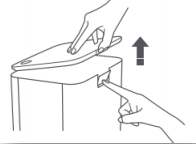
1. Remove the top cover: Press the safety lock on the back of the body and lift the top cover upwards.
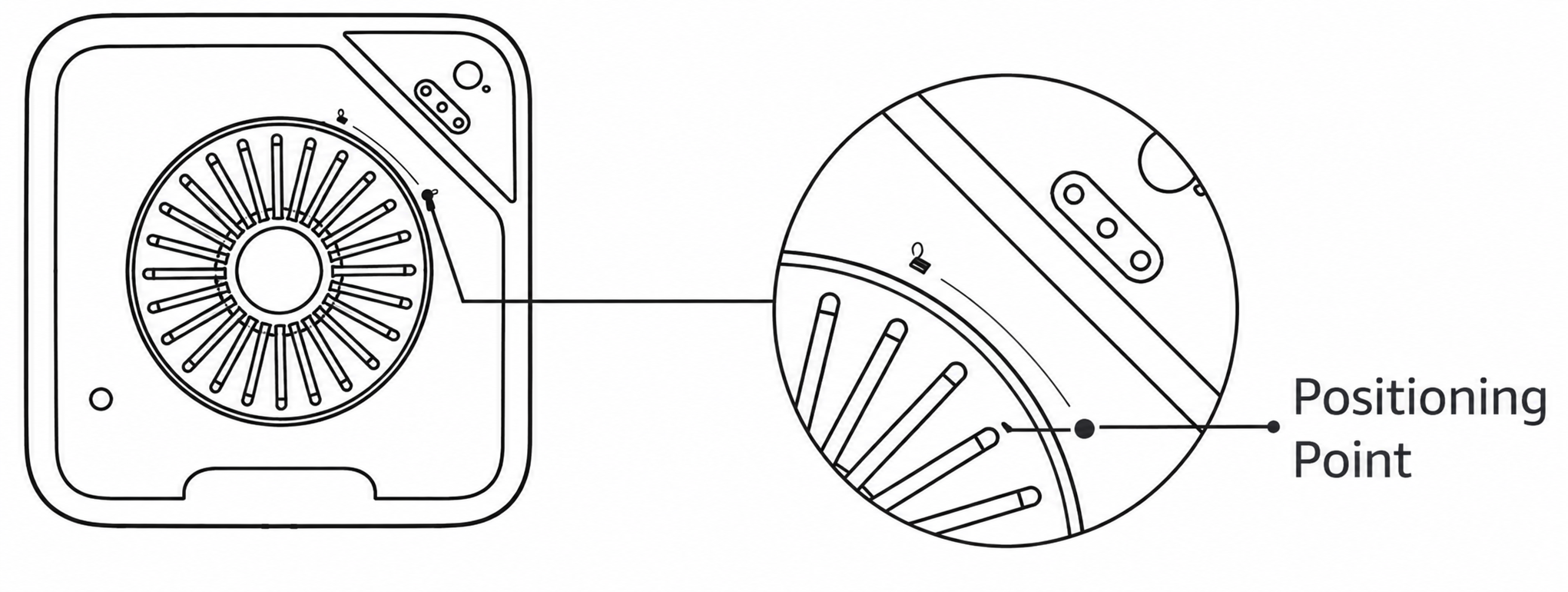
2. Install the desiccant cartridge: Open the top cover, install the desiccant cartridge in the card slot in the top cover, rotate it to the positioning point, and align the "lock" mark to fix it (it is recommended to replace the desiccant cartridge once a month).
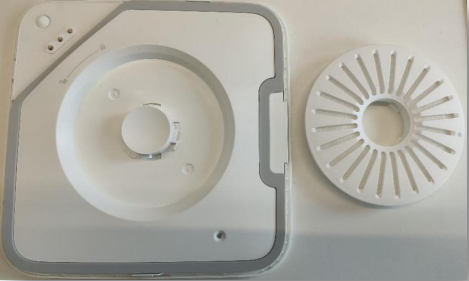
3. Installing the food ball: Place the food ball flat on the weighing tray, with the higher side facing the food outlet.
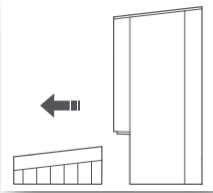
4. Connect the power supply: Insert the power cord vertically into the power port on the feeder base to connect the feeder to the power source. Keep the feeder powered on during use.
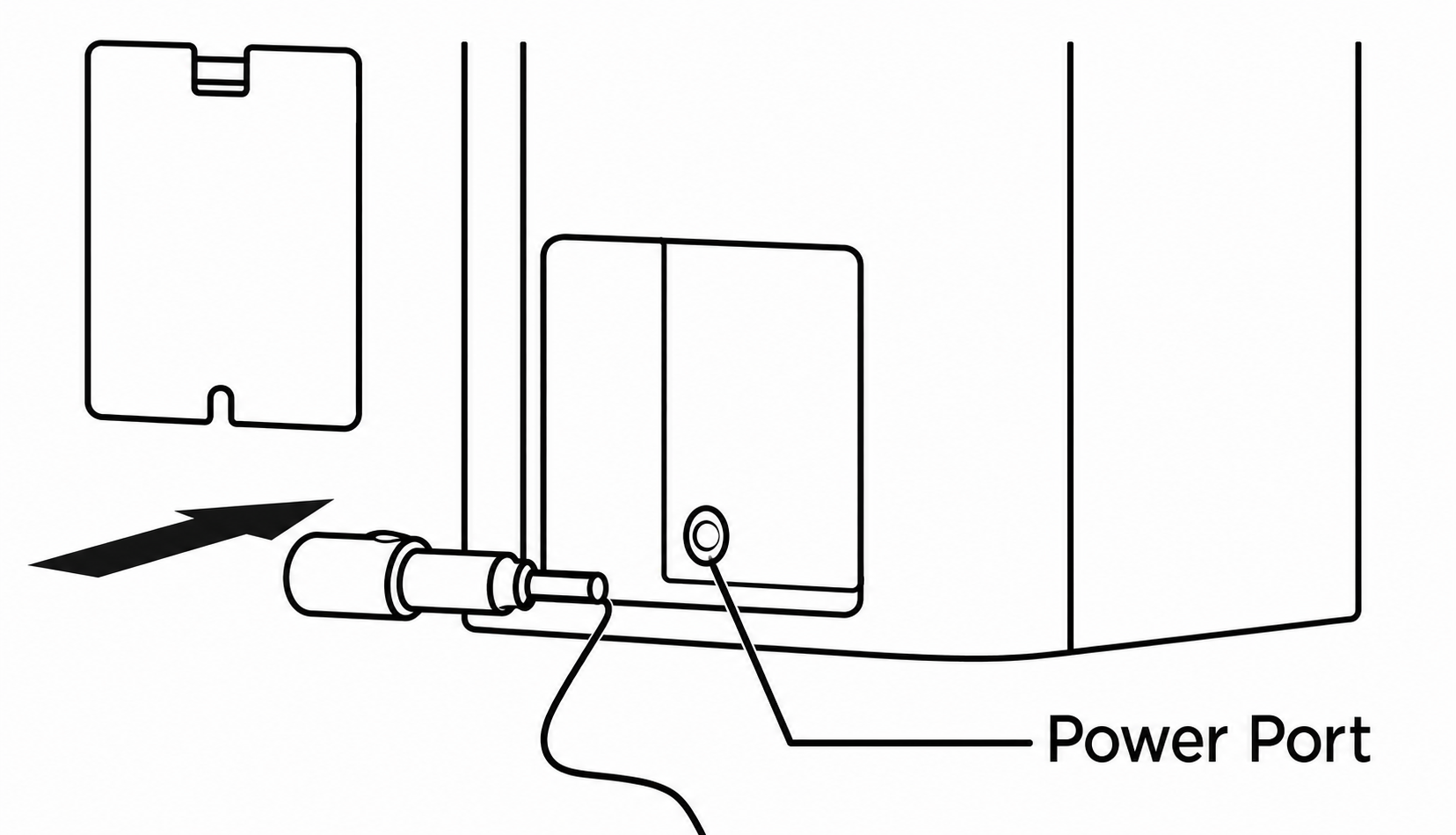
Note:
1. It is recommended to replace the desiccant cartridge once a month;
2. Do not use it if damaged.
3. Do not immerse it in water.
Q3: How to use the Xiaomi Smart Pet Food Feeder?
A: The Xiaomi Smart Pet Food Feeder is suitable for pets such as adult cats and small dogs. The usage methods are as follows:
Add dry food:
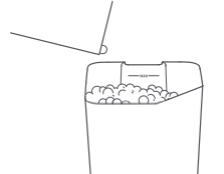
Add pet dry food to the food storage container. The height of the dry food should not exceed the MAX line, and the top cover should be replaced.
Note:
It is suitable for pet dry food with a particle diameter of 5–12 mm, and does not support freeze-dried food and special-shaped particle food (such as small dried fish, small quail, etc.).
Manual feeding:
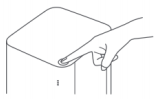
Quickly press the feeding button, 1 serving (about 5 g) each time. Press and hold the feeding button to continue feeding. A maximum of 30 servings can be accumulated at a time.
Note:
The reference value is 5 g. Due to the difference in the composition, shape, and particle size of the dry food used, the number of grams per serving may vary.
Planned grain delivery:
After connecting to the Xiaomi Home App, you can set up a grain delivery plan in the APP, and regularly and quantitatively deliver grain.
Install the backup battery:
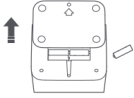
Open the battery cover at the bottom of the main unit with a screwdriver, put four AA batteries into the battery compartment (pay attention to the positive and negative poles), replace the battery cover, and tighten the screws.
Note:
Backup batteries need to be purchased separately; only alkaline batteries are supported. Before installing the battery, please make sure that the food storage container is empty. Install the battery for emergency backup in case of power failure. Please remove the battery when the backup battery is not used for a long time. When using different brands of batteries, please refer to the battery instructions to avoid battery leakage.
Q4: Does the Xiaomi Smart Pet Food Feeder have an emergency function?
A: Yes, the Xiaomi Smart Pet Food Feeder supports an emergency function. 4 AA batteries can be installed at the bottom of the feeder. After the power is cut off, the WiFi blue light of the feeder will go out, and the "automatic feeding plan" will be executed. The battery can last for about a week.
Note:
After the power is cut off, you can also manually dispense food. If the device is offline, it will appear offline in the Xiaomi Home App and cannot be controlled online.
Q5: What does the indicator light of the Xiaomi Smart Pet Food Feeder mean?
A: The indicator light status of the Xiaomi Smart Pet Food Feeder can be viewed in the Xiaomi Home App or by clicking the image in the product manual to view the complete indicator light table.
| Indicator name | Indicator status | Status |
| Wi-Fi indicator | blue light always on | device online |
| flashing blue | waiting for connection | |
| Orange light is always on | device offline | |
| Grain indicator light | White light is always on | Grain out |
| Orange light keeps flashing | The cover is not closed | |
| Orange light is always on | The grain output is abnormal, please clear the grain channel | |
| Grain remaining indicator | extinguished | Food surplus |
| Orange light is always on | Insufficient food left, please add food |
Note:
The three indicator lights are always on orange at the same time, which may indicate a fault with the equipment, which requires after-sales inspection.
Q6: How to maintain the Xiaomi Smart Pet Food Feeder?
A: Regular maintenance can extend the life of the Xiaomi Smart Pet Food Feeder and ensure pet food safety. Please follow these steps:
1. Open the top cover, take out the food storage container, rotate to remove the food distribution turntable at the bottom of the food storage container, and remove the food bowl.
2. Use a rag or brush to clean the "food channel" to keep the "food channel" clean and unobstructed.
3. Clean the food storage container, food stirring blade, dispensing blade, food distribution turntable, and food bowl one by one.
4. After washing and drying, put back the food distribution turntable, food storage container, and food bowl one by one.
5. When installing the food storage container, rotate the agitator until the food storage container is fully embedded in the feeder body.
Q7: How often should the desiccant cartridge of the Xiaomi Smart Pet Food Feeder be replaced?
A: The desiccant cartridge of the Xiaomi Smart Pet Food Feeder makes pet food less prone to moisture deterioration. It is recommended to replace it every 1 month.
Q8: What is the size and weight of the Xiaomi Smart Pet Food Feeder?
A: The Xiaomi Smart Pet Food Feeder size is 387 mm × 311 mm × 180 mm, and the net weight is about 3 kg.
Q9: What is the body material of the Xiaomi Smart Pet Food Feeder?
A: The Xiaomi Smart Pet Food Feeder body material is HIPS (body), PP (food storage container), and food-grade 304 stainless steel (food bowl).
Note:
HIPS is a thermoplastic material made of elastomer-modified polystyrene. PP (polypropylene) is a colorless, odorless, non-toxic, translucent solid substance formed by the polyaddition reaction of propylene, mainly used in automobiles, electronic products, medicine, and other fields. 304 stainless steel is a common material in stainless steel and is widely used in the food and medical industry. The food compartment, food stirrer, dispensing blade, and 304 stainless steel food bowl all conform to FDA regulations on food contact materials (inspection report code: SHAEC2200090002; testing organisation: SGS).
Q10: What is the capacity of the Xiaomi Smart Pet Food Feeder food storage container?
A: The Xiaomi Smart Pet Food Feeder has a capacity of approximately 1.8 kg (approximately 3.6 L). When filling food, it should not exceed the MAX line; otherwise, it will cause the pet food to overflow without closing the top cover.
Note:
The 1.8 kg capacity is sufficient for a grown cat or small dog for approximately 15 to 20 days. Actual duration may vary depending on food type, pet type, age, health, and behavior.
Q11: What are the requirements for the operating environment of the Xiaomi Smart Pet Food Feeder?
A: The Xiaomi Smart Pet Food Feeder requires the following operating environment: Working temperature: 0℃–50℃, humidity: 10%–90% RH.
Q12: Is the Xiaomi Smart Pet Food Feeder noisy?
A: The working noise of the Xiaomi Smart Pet Food Feeder is ≤30 dB when dispensing food, which will not affect normal rest.
Q13: How does the Xiaomi Smart Pet Food Feeder detect low food levels?
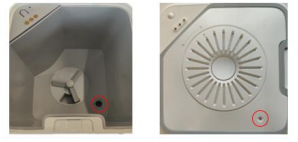
A: The Xiaomi Smart Pet Food Feeder uses an infrared sensor between the top cover and the base of the food storage container to detect the remaining amount of pet food, and it can remind you to add food through the device indicator light and App.
Note:
There are subtle differences in the size of different dry foods. When the machine prompts that the remaining food is insufficient, the amount of remaining food is not fixed. It is recommended to add food in time.
Q14: What are the precautions for the Xiaomi Smart Pet Food Feeder?
A: When using the Xiaomi Smart Pet Food Feeder, please pay attention to the following:
1. Do not put anything other than dry pet food into the food storage container; otherwise, it will cause abnormal operation of the equipment and even cause pet safety problems.
2. To prevent pets from knocking over the product, it is recommended to place it in a corner or against a wall. Please prevent pets from biting the wires.
3. Do not touch the food outlet door when dispensing food. This device is not recommended for pets within three months of age.
4. Children must use adult supervision.
5. It is recommended to replace the desiccant cartridge once a month. Do not use it if it is damaged.
6. Do not soak the desiccant cartridge in water.
7. Please clean the "food channel" regularly to keep the food dispensing smooth.
App Related
Q1: How does the Xiaomi Smart Pet Food Feeder connect to the Xiaomi Home App?
A: The Xiaomi Smart Pet Food Feeder can be controlled through the Xiaomi Home App. Please scan the product manual or download and install the Xiaomi Home App from the mobile phone's App Store.
Here's how to connect the Xiaomi Smart Pet Food Feeder to the Xiaomi Home App:
Android device:
1. Open the Xiaomi Home App, turn on the Bluetooth of the mobile phone at the same time, and confirm that the location permission of the Xiaomi Home App is allowed.
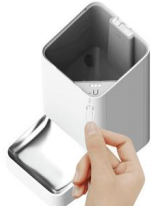
2. When the power is on, insert the card pin into the Reset hole shown in the figure, and press and hold for about 2 seconds until the WiFi indicator flashes blue.
3. Click the "+" in the upper right corner of the Xiaomi Home App interface to enter the automatic search. If there is a reminder that the device cannot be scanned, please check the Xiaomi Home App [Location] permission, [WiFi] permission, and [Bluetooth] permission in the Application Management of the phone settings.
4. After searching for the Xiaomi Smart Pet Food Feeder, click the Xiaomi Smart Pet Food Feeder and configure the network.
5. After the network configuration is successful, the mobile phone will automatically connect with the device. Wait for the connection to succeed.
iOS device:
1. Manually enter "Xiaomi Smart Pet Food Feeder" in the search box and click Search.
2. Select the device to work with WiFi. Note that the device only supports a 2.4 GHz WiFi connection.
3. Click to set up WiFi. Pay attention to connect the mobile phone WiFi to "mmgg-feeder_×××", then return to the Xiaomi Home App.
4. The device is connected.
5. The connection is successful.
Q2: What operations can be performed after the Xiaomi Smart Pet Food Feeder is connected to the Xiaomi Home App?
A: After the Xiaomi Smart Pet Food Feeder is connected to the Xiaomi Home App, it can be controlled by mobile phone, such as: adding a feeding plan, scheduled food dispensing, manual food dispensing, desiccant cartridge life reset, WiFi indicator on/off, etc.
Q3: How to add pet information to the Xiaomi Smart Pet Food Feeder?
A: The specific operation path is: [Xiaomi Home App] >> [select Xiaomi Smart Pet Food Feeder] >> [select "⋮" in the upper right corner] >> [add pet]. It can record the pet name, species, breed, gender, sterilization status, birthday, weight, and brand of staple food.
Note:
If no feeding plan has been set, you can add pet information to generate a feeding plan 3 times a day (ranging from 2–4 times) with one click, which can scientifically control the pet's single food intake. Please refer to the actual situation for details, such as increasing the number of feedings and the amount of food.
1. Different types of pets cannot be added together, such as a cat and a dog. Multiple pets of the same type can be added, such as multiple cats or multiple dogs, and up to five pets can be added.
2. If there are multiple feeders, the pet information will be automatically synchronized. Please set the feeding plan individually for each feeder.
Q4: How does the Xiaomi Smart Pet Food Feeder set the feeding plan through the Xiaomi Home App?
A: After opening the automatic feeding plan, the feeding plan can be generated naturally through the added pet information. The specific operation path is as follows: [Xiaomi Home App] >> [Select Xiaomi Smart Pet Food Feeder] >> [Add Feeding Plan].
Q5: How does the Xiaomi Smart Pet Food Feeder dispense food remotely through the Xiaomi Home App?
A: The Xiaomi Smart Pet Food Feeder can remotely dispense food through the Xiaomi Home App and can select the number of servings to be dispensed at a time. The specific operation path is: [Xiaomi Home App] >> [Select Xiaomi Smart Pet Food Feeder] >> [Manual Dispensing]. 1 serving = 5 g, maximum 30 servings per operation.
Q6: How does the Xiaomi Smart Pet Food Feeder turn on/off the WiFi indicator through the Xiaomi Home App?
A: The Xiaomi Smart Pet Food Feeder can turn on/off WiFi through the Xiaomi Home App. The specific operation path is: [Xiaomi Home App] >> [Select Xiaomi Smart Pet Food Feeder] >> [Select "⋮" in the upper right corner] >> [WiFi indicator switch].
Note:
The indicator light switch does not affect the fault light prompt. If the food dispensing is abnormal, the indicator light will still be on when the remaining food is insufficient.
Q7: How to update the firmware of the Xiaomi Smart Pet Food Feeder?
A: The Xiaomi Smart Pet Food Feeder is a smart device that can upgrade the firmware of the device. The specific operation path is: Xiaomi Home App, select [Select Xiaomi Smart Pet Food Feeder] >> [Click "⋮" in the upper right corner] >> [Click firmware upgrade]. If there is a new firmware version, click Firmware Upgrade.
Q8: After sharing the Xiaomi Smart Pet Food Feeder with family members, can family members upgrade the firmware?
A: It is not supported for the shared person to upgrade the firmware, add pet information, or add smart scenes.
FAQ and Troubleshooting
Q1: How often should the Xiaomi Smart Pet Food Feeder be cleaned?
A: According to the dry food type and pet feeding habits, it is recommended to clean the Xiaomi Smart Pet Food Feeder at least once a week (food storage container/food stirring blade/food distribution turntable/food bowl / "food channel"). Wipe with clean water / non-corrosive dishwashing agent, dry, and reinstall.
Note:
The whole machine is not washable, and the base is not washable.
Q2: Why is the Xiaomi Smart Pet Food Feeder unable to connect to the Internet?
A: The Xiaomi Smart Pet Food Feeder supports network control and is compatible with most personal routers on the market. To connect to the network, you need to download the Xiaomi Home App. It should be noted that the wireless network of the router has the following requirements:
1. The Xiaomi Smart Pet Food Feeder can only connect to a 2.4 GHz WiFi network; 5 GHz WiFi is not supported.
2. The SSID of the WiFi network cannot be in Chinese.
3. The WiFi encryption method needs to be WPA or WPA2; WEP is not supported.
4. The router needs to enable DHCP. Static IP, web authentication, and 802.1X enterprise authentication are not supported.
Note:
If the Xiaomi Home App cannot search for the device, you can restore the factory settings. Press the device's reset button and WiFi reset button at the same time and release it for 10 seconds. At this time, all the indicators are off. After about 1 minute, the first orange indicator of the device is always on. Disconnect the adapter and power on again to connect. Please upgrade to the latest firmware after connecting to the network.
Q3: What should I do if the Xiaomi Smart Pet Food Feeder always shows offline in the App or cannot connect to WiFi?
A: If the Xiaomi Smart Pet Food Feeder shows offline or cannot connect to WiFi, please try the following:
1. Check whether the Xiaomi Home App is the latest version. Upgrade the Xiaomi Home App to the latest version and try to restart the Xiaomi Home App.
2. Check whether the distance between the Xiaomi Smart Pet Food Feeder and the router is too far. Try to move it closer to the router.
3. Check whether the router has enabled MAC address filtering or black and white list settings. Disable MAC address filtering and black and white list settings and try again.
4. Try to reset the Xiaomi Smart Pet Food Feeder WiFi.
5. Try to change the network environment or use a mobile phone hotspot.
Q4: Will the power cord of the Xiaomi Smart Pet Food Feeder be bitten by pets? Will there be a safety hazard of electric shock?
A: There will be no safety hazards. The input power supply used by the Xiaomi Smart Pet Food Feeder adapter is 5.9 V low voltage and 1.0 A low current to ensure the safety of pets. The power cord is made of braided nylon material that is bite-resistant.
Q5: How to solve the failure of the Xiaomi Smart Pet Food Feeder?
A: If the Xiaomi Smart Pet Food Feeder encounters a failure, please follow these steps:
1. Check if the feeder indicator light is normal.
2. Check whether the power cord is firmly inserted or damaged.
3. Check whether the power cord connector on the back of the feeder is loose.
4. App operation food dispensing/press the feeder food dispensing button to confirm whether the feeder food stirring motor rotates and whether the food outlet door rotates.
5. Check whether there is food stuck on the blades inside the food storage container, and whether there is food stuck / residual in the "food channel".
6. Restart the device / App to confirm whether the fault is rectified.
7. Re-add the device to confirm whether the fault is rectified.
Q6: How to fix the Xiaomi Smart Pet Food Feeder not working after powering on?
A: If the Xiaomi Smart Pet Food Feeder does not work after powering on, please refer to FAQ Q5, steps 1–6 above. If the issue persists after completing all steps, please contact your local after-sales service center for further assistance.
Q7: Will the material of the Xiaomi Smart Pet Food Feeder affect pet health?
A: The materials of the Xiaomi Smart Pet Food Feeder that come into contact with food are all food-contact grade, which can ensure the safety of pet food.
Q8: Can the Xiaomi Smart Pet Food Feeder still be used after the network is disconnected?
A: The Xiaomi Smart Pet Food Feeder will execute the "Automatic Feeding Plan" after the network is disconnected. The App cannot operate "manual feeding", and the feeding data in the offline state will not be recorded in the feeding record.
Note:
You can manually press the food dispensing button on the body to control food dispensing.
Q9: What is the composition of the Xiaomi Smart Pet Food Feeder Desiccant Cartridge?
A: The material of the Xiaomi Smart Pet Food Feeder desiccant is the same as that of the medical desiccant, and the main component is silicon dioxide. It has the characteristics of non-toxic, odorless, non-corrosive, and non-polluting. If silica is accidentally ingested, it can be excreted naturally and does not require special treatment.
Q10: Why does the Xiaomi Smart Pet Food Feeder not weigh 5 g per serving?
A: The density, particle size, and shape of dry food have an impact on the weight of the food. There will be deviations between different brands and different types of food. "5 g" is the average weight per serving of common food on the market.
Q11: Why does the Xiaomi Smart Pet Food Feeder show food dispensing failure on the mobile phone when the food is dispensed successfully?
A: Food particles or food scraps may block the food dispensing monitoring sensor of the Xiaomi Smart Pet Food Feeder, resulting in a failure to read the data. Clear the "food channel" near the food outlet to confirm whether the fault is rectified.
Q12: The Xiaomi Home App shows that the food outlet is blocked. How to solve it?
A: Food particles or food debris may obstruct the food dispensing monitoring sensor of the Xiaomi Smart Pet Food Feeder, resulting in a failure to read the data. Clean up the "food channel" near the food outlet to confirm whether the fault is rectified. After the food jam is cleaned up, the food outlet door will not go back automatically. The food outlet door will open and close normally when food is dispensed next time. If food is dispensed normally, the error will be eliminated.
Note:
When an error is reported, it does not affect scheduled and manual food dispensing. Before each food dispensing, the system will detect whether the food outlet door is stuck and whether there is accumulated food in the "food channel". If it is stuck and there is an error with accumulated food, food will not be dispensed.
Q13: How to solve the "food storage container lid not covered" message displayed on the Xiaomi Home App?
A: Re-check and reinstall the top cover of the Xiaomi Smart Pet Food Feeder, confirm whether the top cover is tightly closed, and confirm whether the color of the "food dispensing indicator" is normal.
Note:
If the cover is not closed, the App cannot operate food dispensing. Food can be dispensed by pressing the button on the feeder manually.
Q14: What is the reason for the abnormal noise of the Xiaomi Smart Pet Food Feeder?
A: When the Xiaomi Smart Pet Food Feeder is working, abnormal noise may occur for the following reasons:
1. When the equipment is working, the rotation of the motor drives the food in the container to rotate, which will make a sound.
2. The food stirring blade and the dispensing blade are made of silicone material. When food is dispensed, the blade will make a sound when the blade deforms and rebounds.
3. This is normal operation and does not affect use.
Q15: Why can't pets within three months use the Xiaomi Smart Pet Food Feeder?
A: It is not recommended for pets within three months of age to use the Xiaomi Smart Pet Food Feeder, mainly because the pets have sensitive and fragile stomachs, and the pets are too small to eat. It is recommended to feed them under the supervision of the owner.
Q16: How long is the shelf life of the Xiaomi Smart Pet Food Feeder Desiccant Cartridge?
A: The shelf life of the desiccant cartridge depends on whether it is unopened or opened, as detailed below:
Unopened:
Under normal storage conditions, a desiccant cartridge with its aluminum foil packaging intact remains effective for up to 3 years from the date of manufacture.
Opened:
Once the aluminum foil packaging is opened, the effective lifespan is 12 months, calculated from the date of opening rather than the manufacture date on the package. To ensure optimal dehumidification performance, it is recommended to replace the desiccant cartridge monthly after opening, and to store unused cartridges in a cool, dry place away from high concentrations of formaldehyde, TVOCs, and humid environments.
If a desiccant cartridge has been open for more than 12 months, or if a significant drop in dehumidification performance is observed (e.g., pet food becoming soft or damp), please purchase a replacement promptly to ensure the freshness and quality of the food.
Q17: How often should the Xiaomi Smart Pet Food Feeder dispensing blade be replaced?
A: It is recommended to replace the Xiaomi Smart Pet Food Feeder dispensing blade every three months to ensure stable food dispensing.
Q18: How to replace the Xiaomi Smart Pet Food Feeder dispensing blade?
A: To replace the Xiaomi Smart Pet Food Feeder dispensing blade, use a Phillips screwdriver to loosen the screw counterclockwise to remove the original food stirring blade, fix the new food stirring blade, and tighten the screw clockwise.
Screw specification: M3×9 self-tapping screw with gasket; the gasket diameter is 10 mm.
Does it help?
Yes
No