

How to perform various system-level operations by enabling Recovery Mode on the Redmi Note 13?
The Recovery Mode on the Redmi Note 13 is a special bootable partition separate from the main operating system. It's designed to perform various maintenance and recovery tasks for your device.
You can perform Recovery Mode on the Redmi Note 13 with Xiaomi HyperOS by the following steps:
1. Please press and hold down the Power button until the power off menu appears. Then power off your phone by swiping up;
2. After the phone is turned off, press and hold the Volume Up button and Power button to enter [Main Menu];
3. Press the Volume Down button to select [Wipe Data] and press the Power button to confirm this operation;
4. Press the Volume Down button to select [Wipe All Data] and press the Power button to confirm this operation.
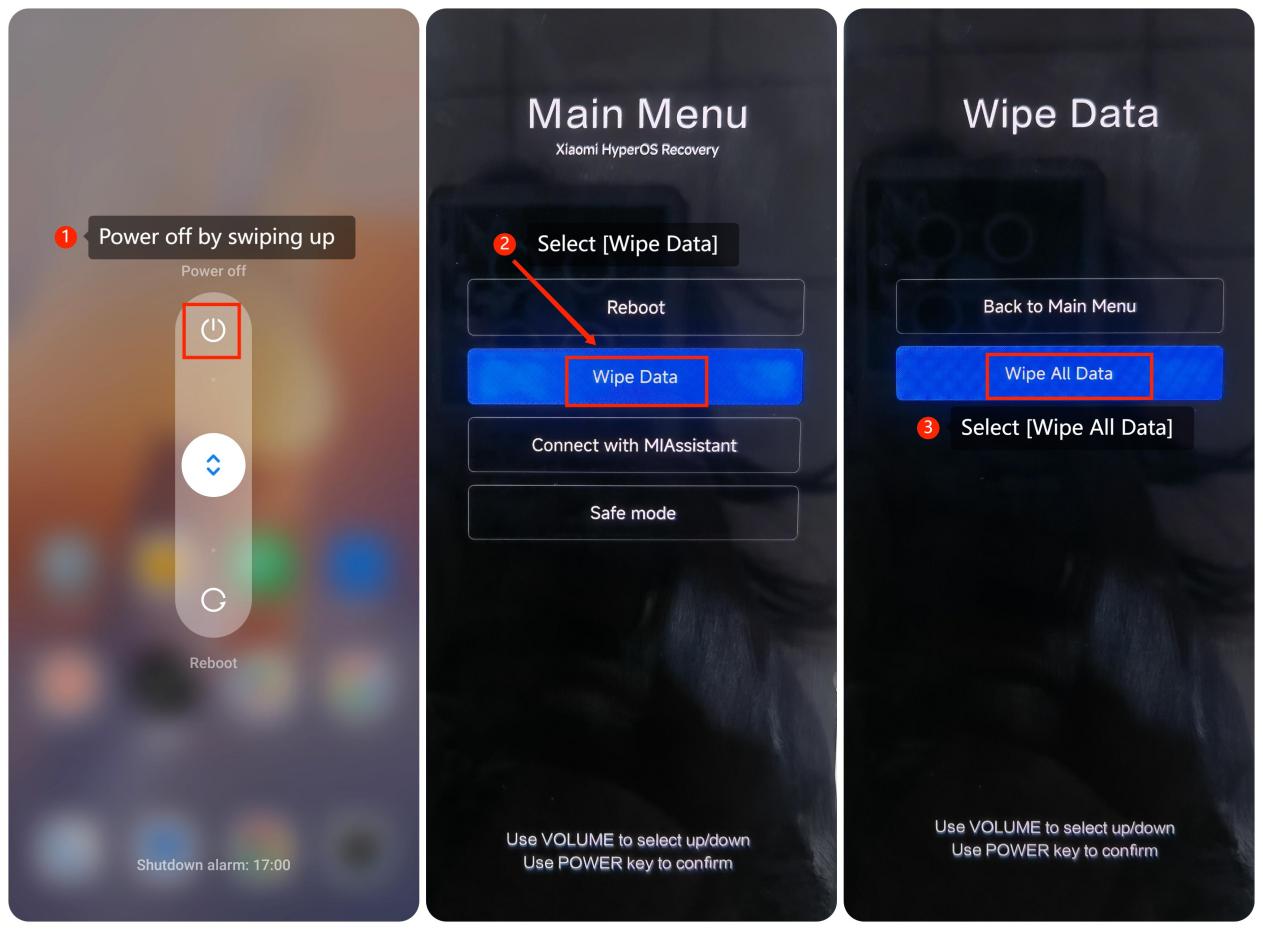
You can perform Recovery Mode on the Redmi Note 13 with Xiaomi HyperOS by the following steps:
1. Please press and hold down the Power button until the power off menu appears. Then power off your phone by swiping up;
2. After the phone is turned off, press and hold the Volume Up button and Power button to enter [Main Menu];
3. Press the Volume Down button to select [Wipe Data] and press the Power button to confirm this operation;
4. Press the Volume Down button to select [Wipe All Data] and press the Power button to confirm this operation.
Does it help?
Yes
No