

Xiaomi Smart Humidifier 2 FAQ
Overview
Q1:What is a humidifier?
A:A humidifier is a household appliance that can increase the humidity of a room. A humidifier can humidify a designated room, or it can be connected to a boiler or central air conditioning system to humidify the entire building.
According to the theory of heat and moisture exchange, humidifiers are divided into the following two types in practical engineering:
1. Iso-enthalpy humidifier: that is to use water to absorb the sensible heat of air for evaporative humidification, and its change on the enthalpy and wet map is an approximate iso-enthalpy process. (humidity increases, temperature drops), ultrasonic humidifiers belong to isenthalpic humidification.
2. Isothermal humidifier: that is, the use of heat energy to convert liquid water into steam and mix with air for humidification, and its changes in enthalpy and hygrogram are approximate isothermal processes. (Humidity increases, temperature does not change).
Humidifiers can be divided into three major categories: industrial humidifiers, commercial humidifiers and household humidifiers.
Q2: Are humidifiers harmful to the human body?
A: The risk of humidifiers is manifested in the humidity content in the air after use. Excessive humidity will affect the body. Indoor air humidification can be done by sprinkling water, placing water basins, etc., but the most convenient way is to use a humidifier.
When the humidifier is used, it should be cleaned regularly, otherwise the microorganisms such as mold in the humidifier will enter the air with the vapor and then enter the respiratory tract of the person, and it is easy to suffer from humidifier pneumonia. In addition, the humidity of the air is not as high as possible. In winter, the human body feels more comfortable humidity is about 50%. If the air humidity is too high, people will feel chest tightness and difficulty breathing, so it is better to humidify moderately.
Q3: What are the benefits of humidifiers?
A: For your reference, here are the benefits of humidifiers:
1. Proper humidification in the living room can effectively prevent the wooden furniture from being deformed and the walls just painted from getting cracked.
2. Turn on the humidifier when cutting onions to avoid tears.
3. Reduce indoor dust and static electricity.
Product introduction and use
Q1: What are the selling points of the Xiaomi Smart Humidifier 2?
A: The Xiaomi Smart Humidifier 2 is a new type of smart product, its main selling points are as follows:
1. The UV-C high-level sterilization system purifies the water, producing a cleaner and healthier mist.
2. With a humidification rate of 350 mL per hour and a 4.5 L water tank, it easily meets your daily needs.
3. The 360° adjustable inner and outer dual-ring design provides all-around, efficient humidification.
4. Through the Xiaomi Home App, you can remotely control the device and manage humidity levels with a single tap.
5. The hidden aromatherapy box offers a refreshing and unique aromatherapy experience.
6. Water can be added directly from the top, and the transparent tank design lets you easily check the water level.
7. Operating at less than 38 dB, the new floating plate structure ensures ultra-quiet performance for peaceful protection.
Q2: What is the appearance of the Xiaomi Smart Humidifier 2?
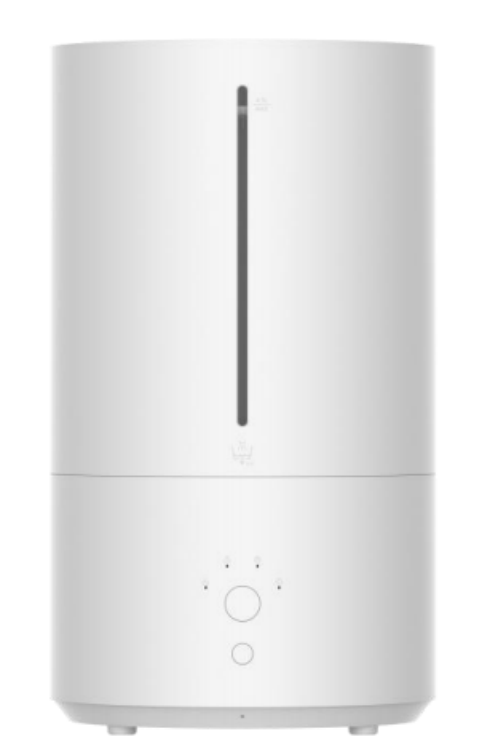
A: The appearance of the Xiaomi Smart Humidifier 2 is shown in the figure below.
There are Water Level Window, Mode Indicators, Mode Button, Power Button and a Wi-Fi Indicator on the appearance.
Q3: What are the standard accessories included with the Xiaomi Smart Humidifier 2?
A: Xiaomi Smart Humidifier 2 × 1.
Fiber Cotton x 3 (1 installed, 2 replacements).
Instruction Manual × 1.
Q4: How does the Xiaomi Smart Humidifier 2 work to generate water mist for humidification?
A: The Xiaomi Smart Humidifier 2 uses ultrasonic waves to generate 1.7 million high-frequency oscillations per second, atomizes water into ultra-fine particles, and diffuses the water mist into the air through a pneumatic device, so as to achieve the purpose of evenly humidifying the air. The room maintains the ideal humidity to prevent the generation of static electricity.
Q5: How to install the Xiaomi Smart Humidifier 2?
A: To install the Xiaomi Smart Humidifier 2, please follow the steps below:
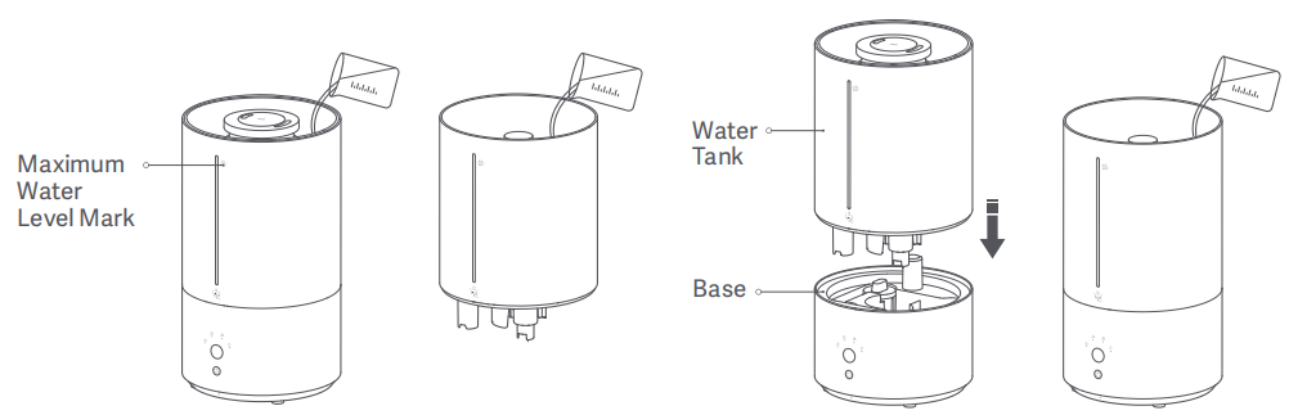
Add water to the water tank from the hollow part of the water tank cover up to the maximum water level mark.
Note:
1. Remove the floating board fastener from the base before use.
2. You can also remove the water tank and place it on a level surface, then open the water tank cover and add water. To reinstall the water tank, align the water level window with the power button and place the water tank onto the base. As well, you can open the water tank cover and add water directly without removing the water tank.
3. Make sure that the water tank and the base are placed steadily on a level surface when adding water.
4. Do not splash water on the mist outlets when adding water to avoid water leakage.
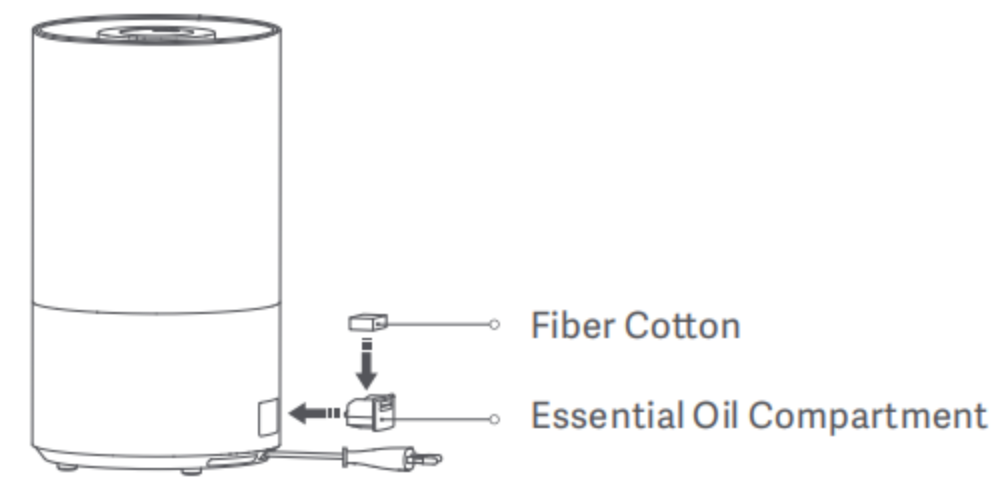
5. Put an appropriate amount of essential oil (sold separately) onto the fiber cotton. Then place the cotton in the crucial oil compartment and reinstall the compartment.
Note:
1. Do not add toxic and hazardous substances to the essential oil compartment.
2. Fill in an appropriate amount of clean tap water or distilled water, and the water level should not exceed the maximum water level.
Q6: How to power on/off the Xiaomi Smart Humidifier 2?
A: Press the power button to turn on/off the Xiaomi Smart Humidifier 2. When turned on for the first time, it is at level 1 by default.
Q7: How to set the humidification level on the Xiaomi Smart Humidifier 2?
A: Press the mode button to switch between levels 1, 2, 3, and constant humidity in a cycle, of which the corresponding indicator will remain white. After the humidifier is turned off and back on, the mode will revert to the last used one.
Note:
1. When the humidifier is running at levels I and II, and the humidifier detects that the ambient humidity reaches 85%RH, it will automatically switch to level I humidification. When ambient moisture reaches 85% RH or higher for more than 30 minutes, the humidifier will automatically power off.
This feature is disabled by default, which can be enabled in the App.
2. In constant humidity mode, the humidity around the humidifier is kept at 60%RH by default.
3. It is recommended to use the constant humidity mode to prevent tables from being wet due to inappropriate mode settings.
Q8: How does the Xiaomi Smart Humidifier 2 work in constant humidity mode?
A: The constant humidity mode of the Xiaomi Smart Humidifier 2 refers to the mode where the humidifier is running to create constant humidity with the continual humidity indicator on, and the ambient humidity is about 60% by default. When ambient humidity reaches this level, the humidifier will automatically switch to level I mist output.
Q9: How to control the indicator on the Xiaomi Smart Humidifier 2?
A: Turn the indicator on/off of the Xiaomi Smart Humidifier 2 via the Xiaomi Home App.
Q10: What is the Dry running protection on the Xiaomi Smart Humidifier 2?
A: When the water tank runs out of water, the Xiaomi Smart Humidifier 2 will beep three times, and the indicators will remain red for 30 seconds and go out. Then the humidifier will enter standby mode. Press the power button to turn the humidifier on.
Q11: What are the precautions for using the Xiaomi Smart Humidifier 2?
A: For your reference, here are the precautions for using the Xiaomi Smart Humidifier 2:
Installation
1. Make sure to install this product correctly according to the manual. Otherwise, there could be electric shock, fire, personal injury, and other damages.
2. Do not connect this product to the power supply until it is assembled.
3. Do not disassemble the humidifier.
Handling
1. Before handling this equipment, make sure to power it off and remove the power plug.
2. Before handling or moving the product, empty the humidifier first.
Placement
1. When using the humidifier for the first time in a new environment, please keep it stationary at room temperature for 30 minutes to prevent the water tank from being damaged by sudden temperature changes. Please place it in a level position and prevent it from tilting.
2. Please do not use the humidifier directly on a wooden surface to prevent it from being deformed and damaged by moisture.
3. Place the humidifier 2 meters away from furniture and electrical appliances to protect them from moisture.
4. Please keep it away from heat sources and avoid direct sunlight.
5. Empty the water tank before placing it separately.
Power cord
To avoid fires, electric shocks, or other damage, use the power cord and electrical outlet as instructed below:
1. The power cord needs to be plugged into a suitable electrical outlet.
2. Do not pull the power cord.
3. Remember to disconnect the power supply before maintaining or moving the humidifier.
Water tank
1. Do not fill hot water above 40 °C into the water tank and sink to avoid damage to the device.
2. Do not add water through the mist outlets.
3. When there is water at the bottom of the humidifier, please wipe it off with a dry cloth to prevent damage to the humidifier.
4. When the room temperature is lower than 0 ℃, please drain the water in the water tank and sink to prevent the water from freezing and causing damage to the device.
5. Do not put metal parts, chemicals, or detergents into the water tank or sink. Otherwise, the water will not be properly atomized.
6. Always turn off and unplug the humidifier before emptying the water tank.
Filling water
1. Remove the power plug when filling water and cleaning the equipment.
2. It is strictly forbidden to fill water via the mist outlet and air outlet
Operation
1. Immediately stop using the humidifier if it makes unusual sounds, gives off foul odors, or overheats.
2. Keep hair and fabrics away from the humidifier to prevent them from being caught in or blocking the air inlet and the air outlet.
3. Do not sit on, lean on, or tilt the humidifier.
4. Keep hair and fabrics away from the humidifier to prevent them from being caught in or blocking the air inlet and the air outlet. Ensure there is sufficient ventilation to avoid carbon monoxide poisoning.
Restrictions on usage
1. Do not use this equipment under the circumstances below in case of electric shock, fire and other damages.
2. When the main body of the humidifier is tilted, it can result in a water level error or even water overflow, so it needs to be kept stable in operation.
3. The voltage of the power supply needs to be consistent with the rated voltage of this product. Otherwise, do not connect this product to the power supply.
4. Please use this device at normal room temperature (5 ℃~40 ℃)
Cleaning
When cleaning this equipment, take steps to prevent water from entering the appliance.
Note:
If water is drained incorrectly, it can cause water leakage at the base or water ingress into the equipment.
Q12: Does the Xiaomi Smart Humidifier 2 support the Bluetooth gateway?
A: The Xiaomi Smart Humidifier 2 does not support the Bluetooth gateway.
Q13: Is the Xiaomi Smart Humidifier 2 noisy?
A: The noise of the Xiaomi Smart Humidifier 2 running is about ≤38 dB, which will not disturb you at rest.
Q14: How does Xiaomi Smart Humidifier 2 sterilize?
A: As for the Xiaomi Smart Humidifier 2 in service, the water source for humidification is critical. Tap water generally contains bacteria, and purified water can also contain bacteria after being stored in the water tank for a long time. In the Xiaomi Smart Humidifier 2, the water flows into the UV-C sterilization area before humidification and atomization each time, where it is sterilized and purified, preventing stored water and tap water from being contaminated. The purified water is oscillated and released as mist.
Q15: Can the water mist from the Xiaomi Smart Humidifier 2 moisturize your skin?
A: The Xiaomi Smart Humidifier 2 is equipped with a high-quality high-frequency ceramic atomizing plate that atomizes water into micron-sized droplets, which are instantly released through the mist outlet channel. These fine water molecules can penetrate the skin, helping achieve a moisturizing effect.
Q16: What is the capacity of the water tank on the Xiaomi Smart Humidifier 2?
A: The Xiaomi Smart Humidifier 2 is equipped with a 4.5 L large-capacity water tank, which is equivalent to 9 bottles of 500 ml mineral water, so the device can keep on humidifying for 32 hours when it is filled with water once, which allows you to say goodbye to the trouble of repeatedly filling water and makes your life and work convenient. The water tank is designed with a large-diameter opening, making it easy to clean.
Note:
The humidifier can run continuously for 32 hours at 23.7 ℃ and 62% RH with level I mist output for continuous humidification.
Q17: What is the humidifying capacity of the Xiaomi Smart Humidifier 2?
A: The humidifying capacity of the Xiaomi Smart Humidifier 2 is 350 mL/h.
Q18: What is the transparent line on the Xiaomi Smart Humidifier 2?
A: The line on the Xiaomi Smart Humidifier 2 is a transparent water gauge, which allows you to grasp the remaining water level of the humidifier more intuitively and clearly.
Q19: Is there an air inlet filter on the Xiaomi Smart Humidifier 2?
A: The Xiaomi Smart Humidifier 2 is not provided with an air inlet filter.
Q20: Does the Xiaomi Smart Humidifier 2 have a display?
A: The Xiaomi Smart Humidifier 2 is not equipped with a display.
Q21: Can the Xiaomi Smart Humidifier 2 be used with essential oils?
A: The Xiaomi Smart Humidifier 2 comes with a built-in essential oil compartment.
To add the essential oil, it needs to be dropped into the essential oil compartment. Otherwise, it will cause corrosion and damage to the device.
The Xiaomi Smart Humidifier 2 is made of ABS plastic except for the essential oil compartment. Since essential oils are corrosive chemicals, they will cause corrosion and damage to the device. Therefore, it is not recommended to add various types of essential oils while the humidifier is running.
Q22: Besides essential oils, can other additives (such as vinegar, Isatis root solution, disinfectants, or toilet water) be added to the Xiaomi Smart Humidifier 2?
A: Because the Xiaomi Smart Humidifier 2 works through the high-frequency vibrating atomizing sheet, the fine mist is dissolved into the air, and will be inhaled into the body along with human breathing. Therefore, it is not recommended to add any additives to the water during use to avoid harm to the body. It is recommended to use filtered or purified water.
Q23: What does the humidification efficiency rating of the Xiaomi Smart Humidifier 2 mean?
A: The humidification efficiency rating of the humidifier mainly refers to the ratio of the actual humidification capacity of the humidifier to the input power, which signifies the humidification capacity generated per unit of power consumption and is an important indicator to measure the performance of the humidifier.
Q24: How to clean and maintain the Xiaomi Smart Humidifier 2?
A: To clean and maintain the Xiaomi Smart Humidifier 2, please refer to the following information:
1. Make sure to turn off the power supply and unplug the device before cleaning it.
2. The humidifier can be wiped directly with a clean, soft, and damp cloth, and it is recommended to clean it once a week.
3. It is recommended to clean the filter at least once a week and the water tank every three days.
4. To remove scale in the water tank, pour citric acid (sold separately) into the tank, wipe off the scale with a cotton swab or soft brush, then fill the tank with water.
5. If the humidifier will not be used for an extended period, empty the water tank, but do not pour water along the side with buttons. Then clean and dry all the parts before storing the humidifier.
6. It is recommended to replace the fiber coon in the essential oil compartment every three months.
Q25: What are the safety instructions for using the Xiaomi Smart Humidifier 2?
A: The safety instructions for using the Xiaomi Smart Humidifier 2 are listed below:
1. Do not pull out the plug with wet hands to avoid the risk of electric shock.
2. Do not disassemble, repair, or modify this product without authorization.
3. When the humidifier starts, please do not touch the atomizing sheet with your hands. Otherwise, you will feel stung.
4. The power cord shall not be knotted, damaged, or crimped by heavy objects or modified for use. Otherwise, it can cause electric shock, short circuits, and fire.
5. In case of any fault when the product is running, please remove the plug immediately and contact the after-sales service personnel.
6. If the power cord is damaged, it needs to be replaced by a professional from the manufacturer, its repair department, or similar departments to prevent hazards.
7. Do not separate the water tank from the base when the humidifier is in operation, and do not touch the water and parts in the water tank.
8. This humidifier is for indoor purposes only.
9. Remove the power plug in thunderstorm weather or when the humidifier is not in use for a long time.
10. Do not overturn the device when it is powered on and there is water inside to avoid damage to the internal electronic components.
11. Do not allow children or persons incapable of taking care of themselves to operate the device.
Note:
1. When the room temperature is below 0 ℃, please drain the water from the water tank and sink to prevent it from freezing and causing damage to the device.
2. If it is not used for a long time, dust will accumulate on the atomizing sheet, and dust and foreign matter will accumulate in the water tank. It is recommended to clean it before starting it up. Otherwise, there will be insufficient mist or no mist at the beginning.
3. When the humidifier is running, foreign objects can fall into the water tank. Remove the foreign objects in the water tank/base regularly. Otherwise, foreign objects can block the water valve.
App related
Q1: How to connect the Xiaomi Smart Humidifier 2 to the Xiaomi Home App?
A: The Xiaomi Smart Humidifier 2 works with the Xiaomi Home App. Use the Xiaomi Home App to control your device and interact with other smart home devices.
Please scan the code in the manual or download and install the Xiaomi Home App in the App Store.
The specific operation steps of the Xiaomi Home App are listed below:
1. Open the Xiaomi Home App and enable Bluetooth on the mobile phone at the same time.
2. Tap the "+" button in the upper right corner of the Xiaomi Home App interface to activate automatic search.
3. After the Xiaomi Smart Humidifier 2 is found, tap the humidifier.
4. Configure the network.
5. After the network is successfully configured, the mobile phone will be automatically connected to the device. Just wait for the successful connection.
Q2: What can the Xiaomi Smart Humidifier 2 do after being connected to the Xiaomi Home App?
A: Once the Xiaomi Smart Humidifier 2 is connected to the Xiaomi Home App, you can control the humidifier directly from your smartphone. This includes turning the device on or off, adjusting the humidification level, setting timers for power-on/off, enabling or disabling the indicator and notification sound, and enabling or disabling over-humidity protection.
Q3: How to power on/off the Xiaomi Smart Humidifier 2 via Xiaomi Home App?
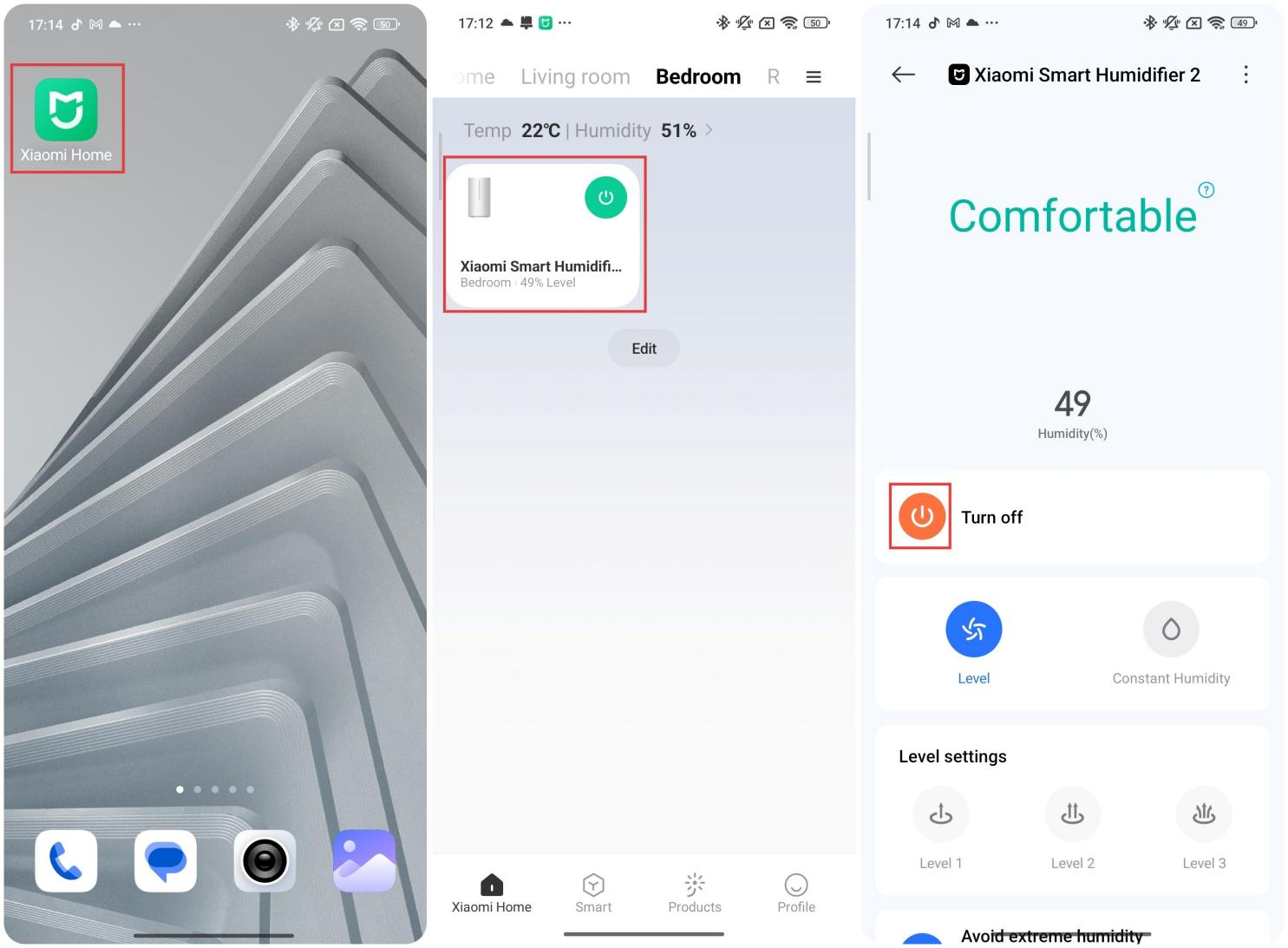
A: The Xiaomi Smart Humidifier 2 can be turned on/off via the Xiaomi Home App in the specific operation path below:
1. Open the Xiaomi Home App.
2. Select the Xiaomi Smart Humidifier 2.
3. Tap the [Power] icon to turn on/off the humidifier.
Q4: How to set the humidification level of the Xiaomi Smart Humidifier 2 via Xiaomi Home App?
A: The humidification level of the Xiaomi Smart Humidifier 2 can be set via the Xiaomi Home App.
To set the humidification level, please refer to the following steps:
1. Open the Xiaomi Home App.
2. Select the Xiaomi Smart Humidifier 2.
3. Tap [Level].
4. Choose the humidification level as needed.
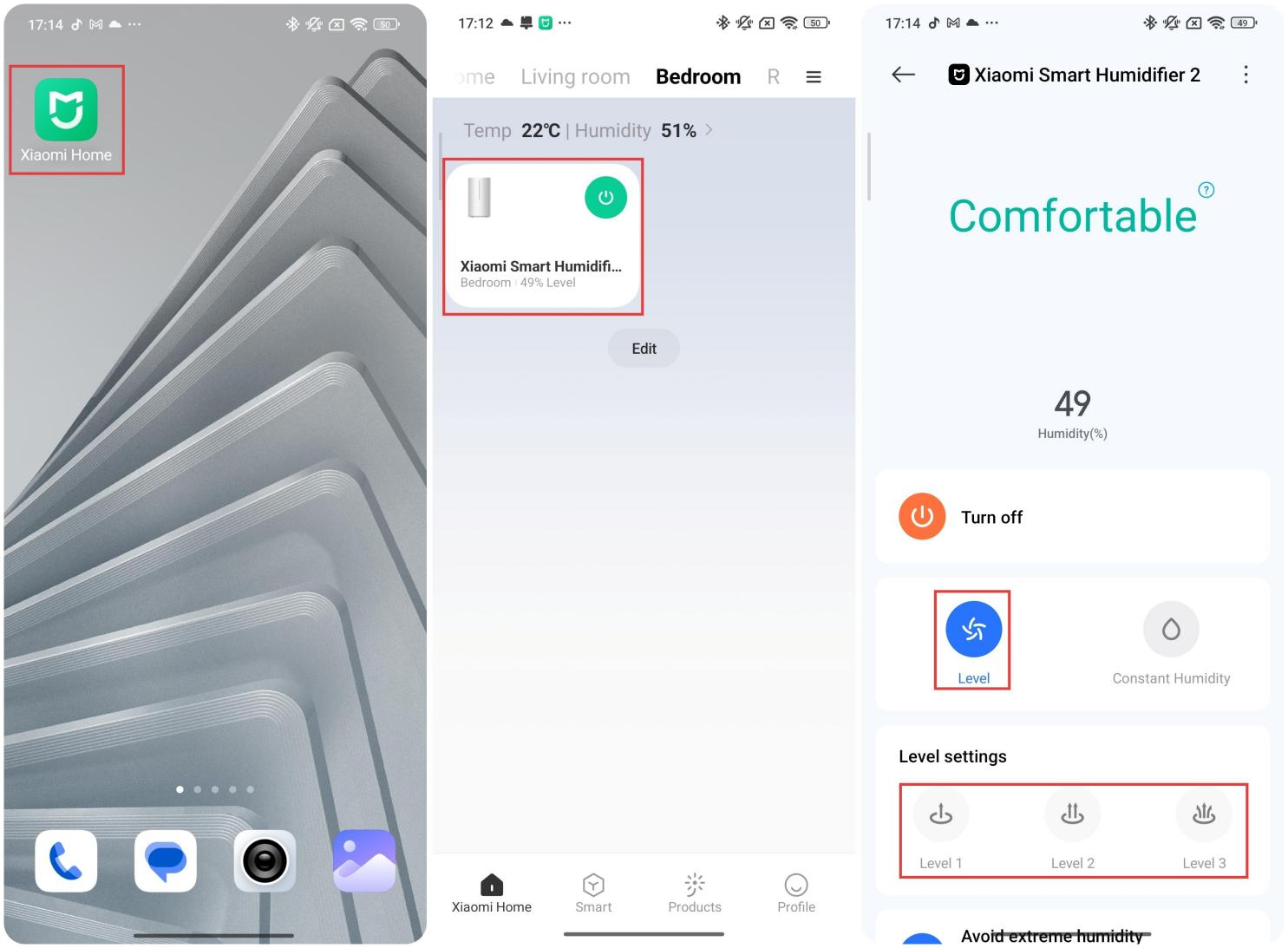
There are four levels available: Level 1, Level 2, Level 3, and constant humidity mode.
Note:
1. If the humidifier detects that the ambient humidity reaches 85%RH when running in level 2 or level 3, it will automatically switch to Level 1 humidification. When ambient humidity reaches 85% RH or higher for more than 30 minutes, the humidifier will automatically shut down.
2. This feature is disabled by default, which can be enabled in the App.
Q5: How to set the On/Off Timer of the Xiaomi Smart Humidifier 2?
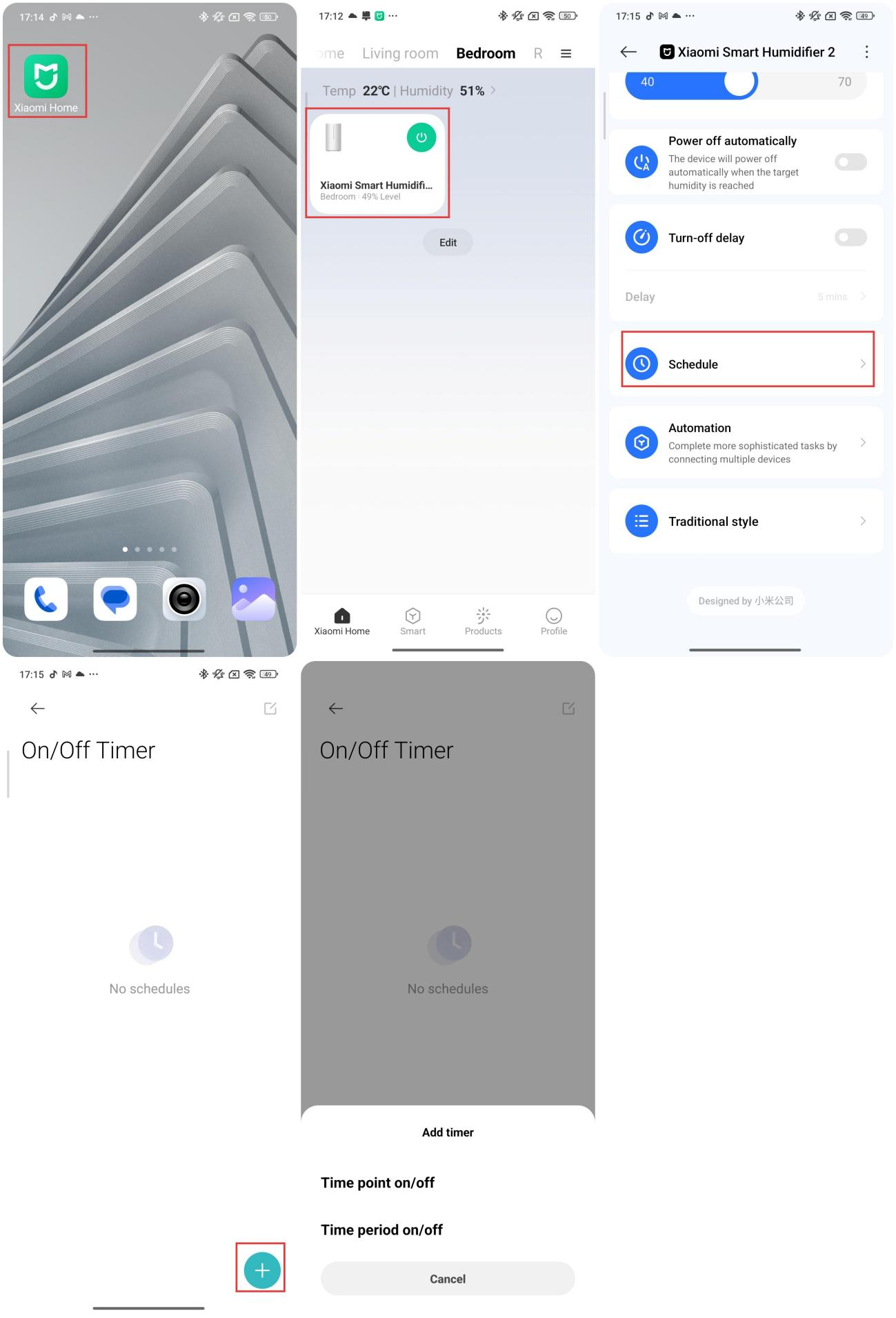
A: To set the On/Off Timer of the Xiaomi Smart Humidifier 2, please refer to the steps:
1. Open the Xiaomi Home App.
2. Select the Xiaomi Smart Humidifier 2.
3. Scroll down and tap [Schedule].
4. Select the [+] button in the lower right corner.
There are two timing modes available: Time period on/off and time point on/off. You can set the timer to your own schedule.
Q6: How to cancel the On/Off Timer on the Xiaomi Smart Humidifier 2?
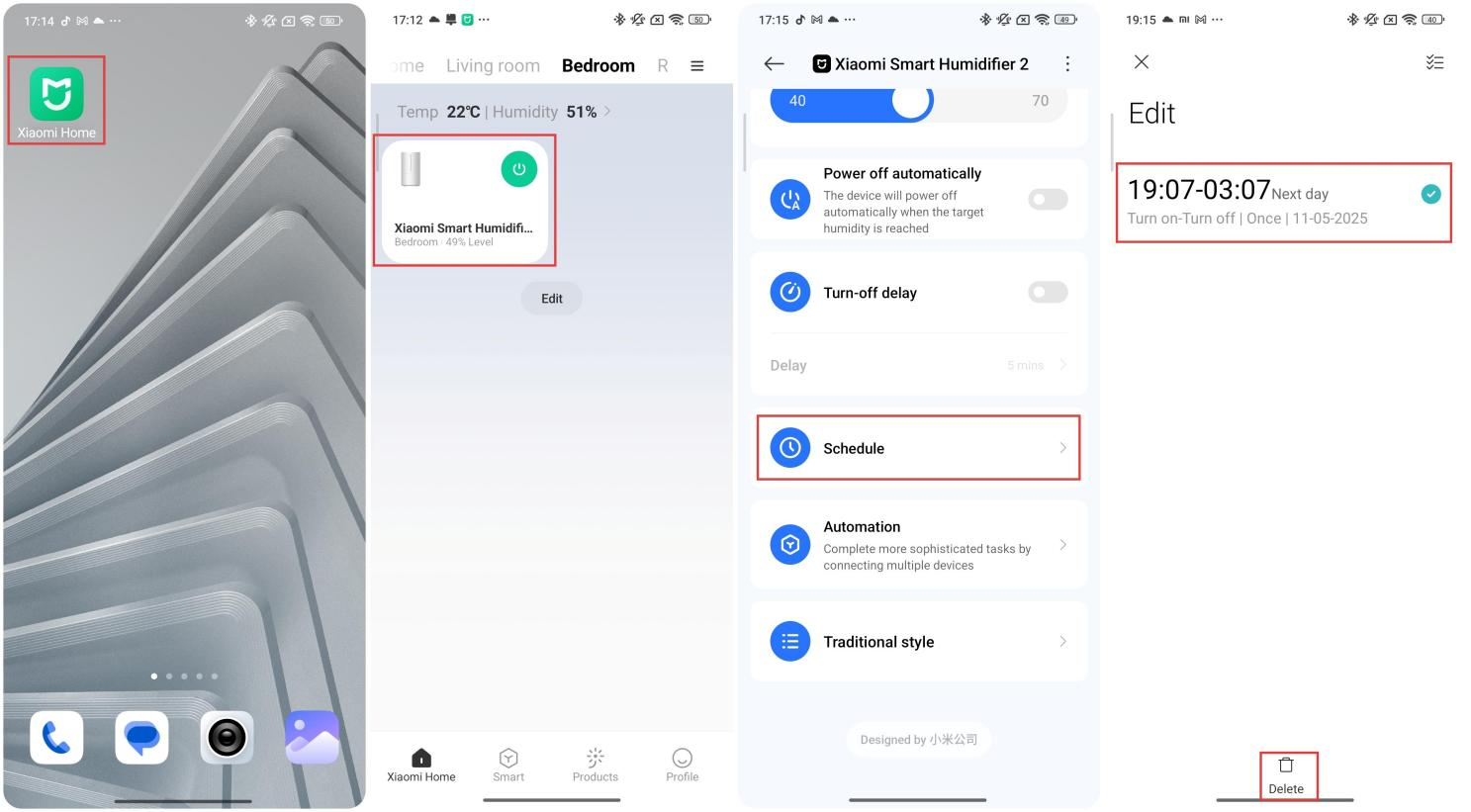
A: To cancel the On/Off Timer of the Xiaomi Smart Humidifier 2, please refer to the steps:
1. Open the Xiaomi Home App.
2. Select the Xiaomi Smart Humidifier 2.
3. Scroll down and tap [Schedule].
4. Press and hold and select the On/Off Timer event.
5. Tap [Delete].
Q7: How to turn on/off the mode indicator on the Xiaomi Smart Humidifier 2 via the Xiaomi Home App?
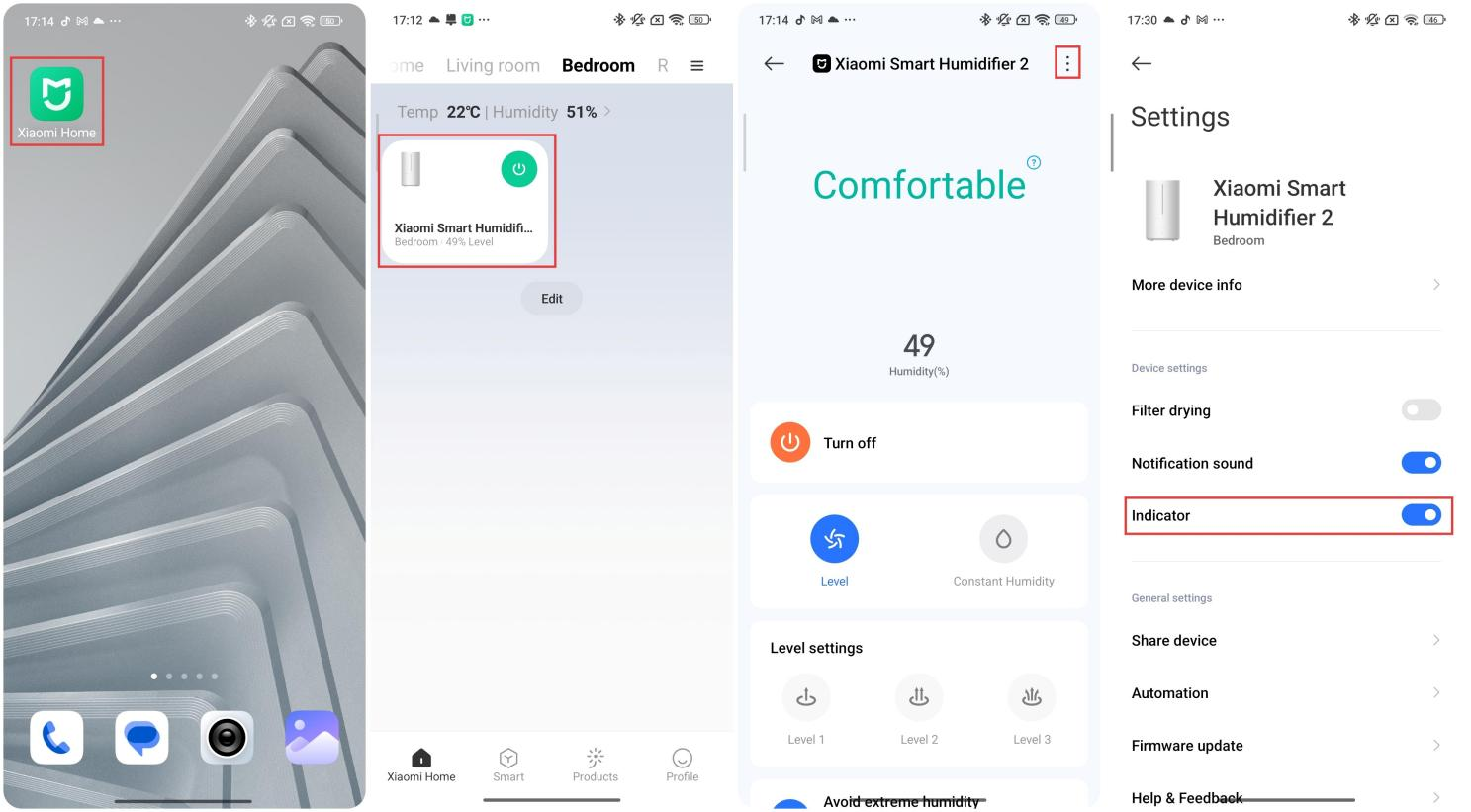
A: To turn on/off the mode indicator on the Xiaomi Smart Humidifier 2, please refer to the following steps:
1. Open the Xiaomi Home App.
2. Select the Xiaomi Smart Humidifier 2.
3. Tap the three-dot icon in the upper right corner.
4. Enable/disable [Indicator].
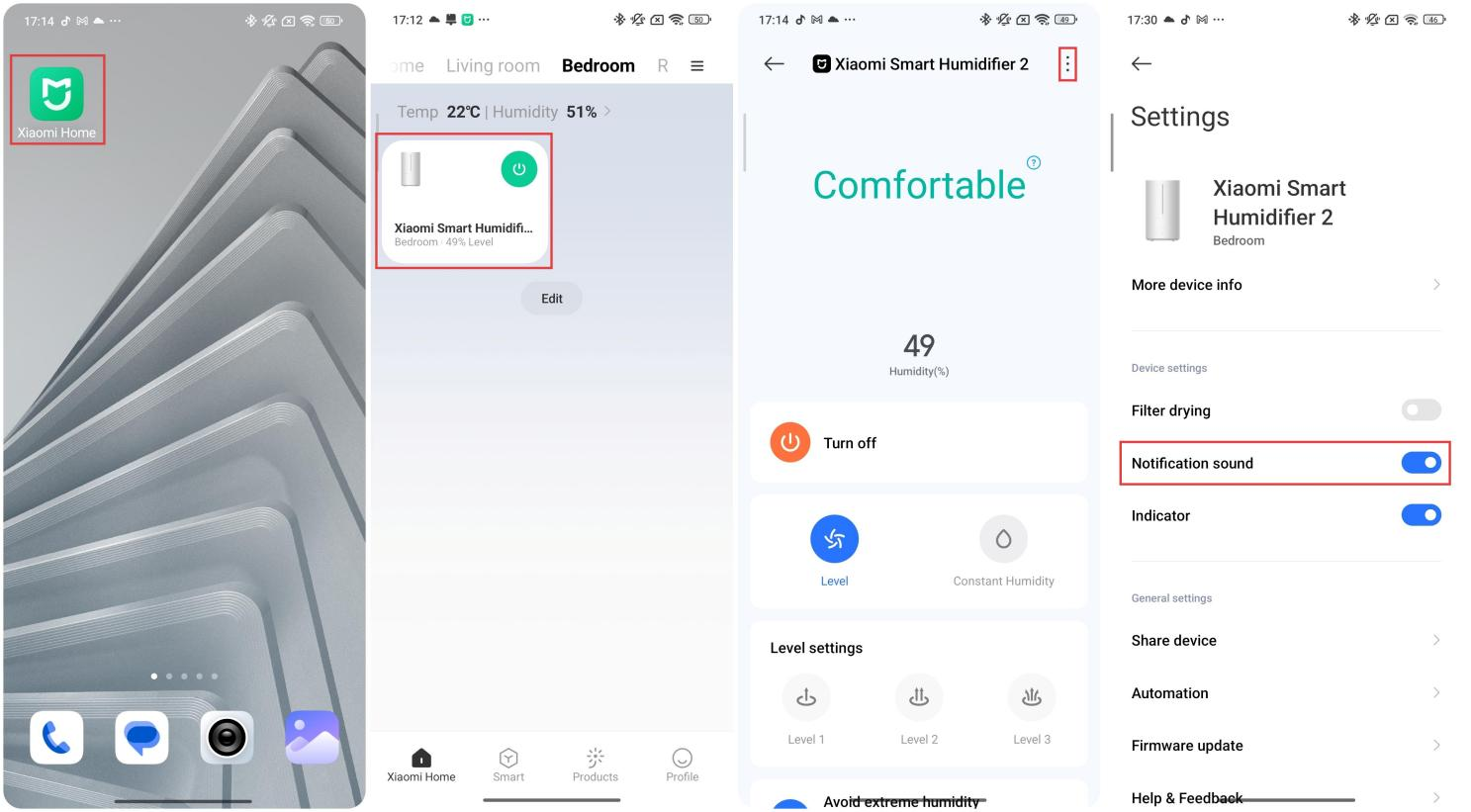
Q8: How to enable/disable the Notification sound of the Xiaomi Smart Humidifier 2 via Xiaomi Home App?
A: The Notification sound of the Xiaomi Smart Humidifier 2 can be enabled/disabled via the Xiaomi Home App.
To enable/disable the Notification sound of the Xiaomi Smart Humidifier 2, please refer to the following steps:
1. Open the Xiaomi Home App.
2. Select the Xiaomi Smart Humidifier 2.
3. Tap the three-dot icon in the upper right corner.
4. Enable/disable [Notification sound].
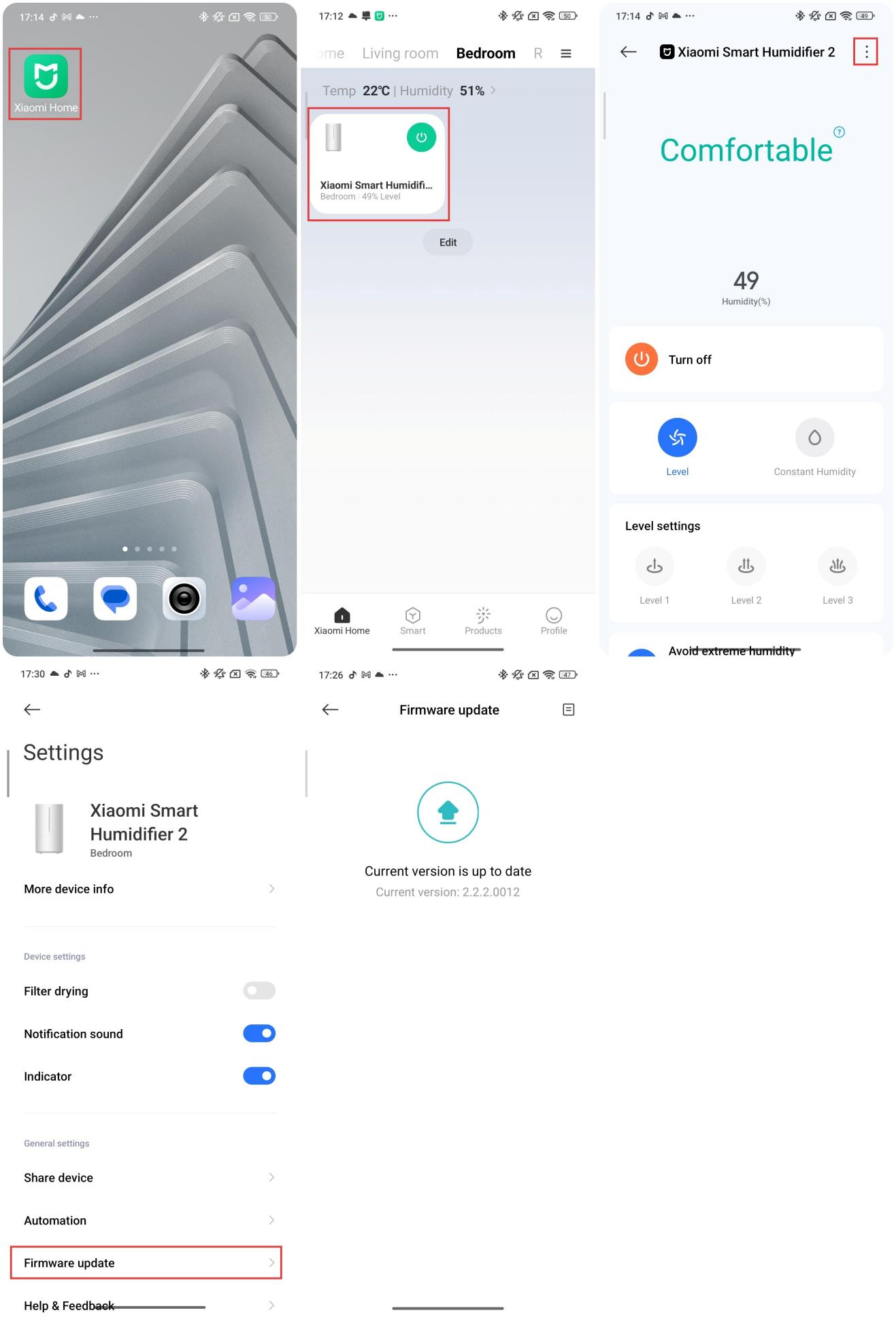
Q9: How to update the firmware of the Xiaomi Smart Humidifier 2?
A: To update the firmware of the Xiaomi Smart Humidifier 2, please refer to the following steps:
1. Open the Xiaomi Home App.
2. Select the Xiaomi Smart Humidifier 2.
3. Tap the three-dot icon in the upper right corner.
4. Choose [Firmware update]. If there is a new firmware version, tap the Firmware update option.
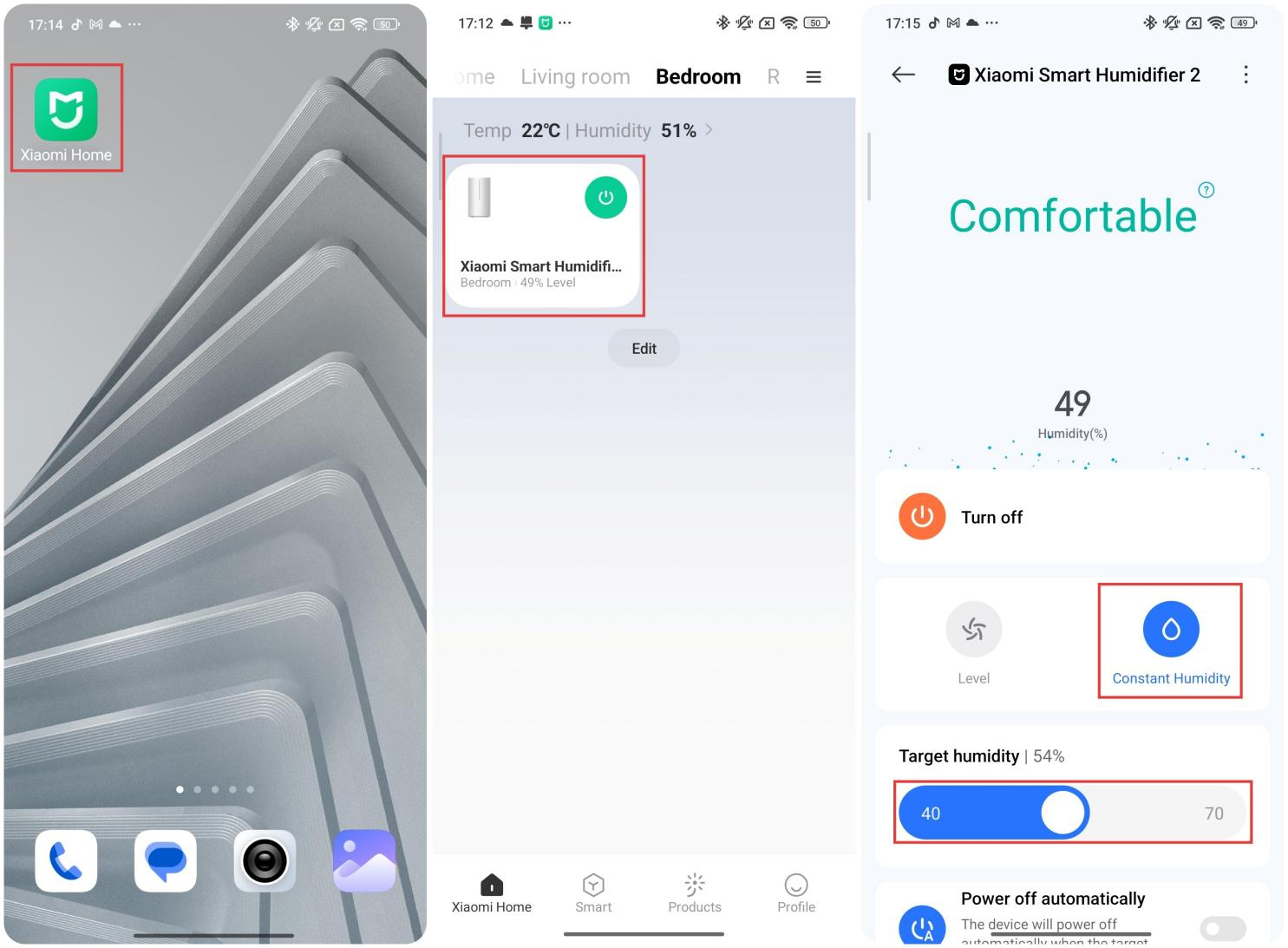
Q10: Can the constant humidity mode of the Xiaomi Smart Humidifier 2 be adjusted via the Xiaomi Home App?
A: The constant humidity mode of the Xiaomi Smart Humidifier 2 can be adjusted via the Xiaomi Home App:
1. Open the Xiaomi Home App.
2. Select the Xiaomi Smart Humidifier 2.
3. Tap [Constant Humidity].
4. Slide the bar to adjust the Target humidity.
After enabling constant humidity mode, the Xiaomi Smart Humidifier 2 will remain in that mode, with a default humidity of about 60%. When the humidifier is powered on and switched to the continuous humidity mode, the mist output will be high.
When the humidity sensor inside the device detects that the surrounding humidity is above 60% of the current constant humidity setting, the humidifier will automatically switch to low mist output. When the sensor detects that the ambient humidity around the device is below 60% of the current constant humidity setting, the humidifier will automatically switch to high mist output. The device will not shut down throughout the whole process.
Note:
The adjustable constant-humidity range in the App is 40-70%.
Common issues and troubleshooting
Q1: Does it mean that the Xiaomi Smart Humidifier 2 is leaking if there is water around the device?
A: If there is water around the Xiaomi Smart Humidifier 2, please follow the information below:
1. The humidifier can be set to level I if water accumulates around it during operation. It can be caused by excessive indoor humidity. Please adjust the mist output appropriately to avoid excessive humidity.
2. It is recommended to place the humidifier slightly higher to increase airflow, which can also help prevent the floor from becoming too wet.
3. Do not overfill the water, which should not exceed the maximum water level.
4. If water leakage is confirmed, please check whether the humidifier is securely placed.
5. If this problem persists, please contact the after-sales service center for inspection.
Note:
If the base is cleaned and the water is filled incorrectly, or if water accumulates in the mist outlet, water leakage can occur at the joints of the water tank or in the base.
Q2: Why does the Xiaomi Smart Humidifier 2 fail to generate mist/generate low mist after being powered on?
A: If the Xiaomi Smart Humidifier 2 is out of service for a long time, there will be dirt, scale, etc. that block the air outlet and sink into the humidifier, which will cause the mist blockage of the humidifier.
Please refer to the steps to troubleshoot:
1. In case of any dirt, please wipe it off with a clean, soft, damp cloth directly.
2. If there is any scale, please pour white vinegar or citric acid into the sink (to dissolve the scale), after which it can be washed with water.
3. Check whether the water in the water tank is sufficient, and the water level should be higher than the water level sensor.
Note:
1. The indicator is on, but there is no air supply or mist: The water level in the base is too high, just pour out some water in the base and restart the device.
2. The indicator is off, and there is no air supply or mist: Check whether the power supply is connected. If it still doesn't work when powered on, please contact the after-sales service center for inspection.
Q3: Is it difficult to clean the Xiaomi Smart Humidifier 2?
A: Gently scrub the sink with a soft brush when cleaning. Wipe the atomizer with a soft cloth or cotton swab, shake it a few times after filling the water tank, and then pour it out. After not using it for a long time, drain the water tank, clean and dry all parts of the humidifier, and then store it in a cool, dry place.
Q4: What is the purpose of UV-C light in the base of the Xiaomi Smart Humidifier 2? Is it harmful to the human body?
A: The UV light in the base of the Xiaomi Smart Humidifier 2 is the ultraviolet sterilization light. It is harmless to the human body.
For your reference, here is the detailed information:
1. The built-in ultraviolet sterilization light on the humidifier first kills 99.9% of germs in the water, purifying it. The pure moisture will be converted to vapor and released into the room air, increasing the room's humidity.
2. The sterilization light on the Xiaomi Smart Humidifier 2 is enclosed, so the light source cannot be seen and will not cause any harm to the human body. It is recommended to turn off the power supply before opening the base for cleaning or filling water.
Q5: What to do if the Xiaomi Smart Humidifier 2 does not respond when powered on, and the indicator does not light up?
A: If the Xiaomi Smart Humidifier 2 does not respond when powered on, and the indicator light does not light up, do the following:
1. Check whether the socket is plugged in and whether the power is turned on.
2. Poor contact with the power switch will cause no response to powering on.
3. It is because the wires in the base are loose and fall off during transportation. It is recommended to contact the after-sales service center.
Q6: What to do if the indicator of the Xiaomi Smart Humidifier 2 does not light up?
A: If the indicator of the Xiaomi Smart Humidifier 2 does not light up, please follow the steps below:
1. Check whether the socket is plugged in and whether the power is turned on.
2. Power off and restart the humidifier to see if the indicator will be on.
3. Check if the indicator switch is disabled in the App.
4. If the indicator is off all the time, but the humidifier works properly, it is recommended to contact the after-sales service center.
Q7: What to do if using the Xiaomi Smart Humidifier 2 at the same time as an air purifier and a PM2.5 detector causes both devices to display abnormal PM2.5 readings?
A: Since the Xiaomi Smart Humidifier 2 will break up water into relatively small water mist particles, the diameter of water droplets is similar to that of various air dusts, such as PM2.5, but it is the same for the particle sensor of the Xiaomi Air Purifier, which mistakes smaller water droplet particles for airborne dust.
Therefore, in automatic mode, when the purifier detects high PM2.5 levels in the air, it will run at a higher power level, which is normal. The PM2.5 detector will also increase the PM2.5 reading, which is normal. Happening.
It is recommended to use the air purifier and the humidifier as differently as possible at the same time. If they need to be used at the same time, try to keep the air purifier, PM2.5 detector, and humidifier farther apart or out of the same room.
This is not a quality issue, nor is it a product issue. Most of the current sensor solutions will cause this situation. When using it, try not to use it at the same time or use it at a long distance.
Q8: What to do if the Xiaomi Smart Humidifier 2 cannot be connected to the Xiaomi Home App?
A: If the Xiaomi Smart Humidifier 2 cannot be connected to the Xiaomi Home App, please refer to the steps to troubleshoot:
1. Check whether the Wi-Fi passwords entered for connection are correct. There will be no Chinese characters in Wi-Fi usernames or in passwords, and no special characters such as @¥% in either. Otherwise, please reset the account and password to English letters and numbers, then try again.
2. Check whether the router is correctly connected to the external network, and whether the webpage opens smoothly on the mobile phone or PC connected to the Wi-Fi.
3. Check if the distance between the router and the humidifier is too far (beyond 5 meters) or if there is a partition wall in the middle. If so, you can try moving the router to within 1~2 meters of the humidifier and reconnecting it.
4. You can use your mobile phone as a Wi-Fi hotspot and connect it to another mobile phone. If they can be connected properly, refer to (3) to perform troubleshooting. If the equipment fails to connect with the hotspot, you can contact the after-sales service center.
5. Check whether the router is connected to many devices, which can cause the network to jam or the router to become unresponsive. You can restart the router and try again.
6. The current humidifier is incompatible with EAP 802.1x networks, 5 GHz signal networks, or public Wi-Fi networks that require web authentication. You need to swap the network and try to connect to it.
7. The connection failure can also be attributable to the mobile phone. It is recommended to use another mobile phone to try the link, or download the Xiaomi Home App again. Try upgrading to the latest version.
8. When you need to reconnect the humidifier, it is recommended to reset the humidifier’s Wi-Fi and reconnect it. The humidifier can be reset using the method below: Press and hold the power button for 7 seconds. When the Wi-Fi indicator flashes orange, it has been reset successfully. After it is connected, open the App to reconnect the device with the Wi-Fi and bind it.
Q9: Is it normal to see water on the base when you lift the water tank of the Xiaomi Smart Humidifier 2?
A: If you find water in the base after lifting the water tank and are worried about electrical leakage, please rest assured that this is normal. The humidifier is easy to use.
The water in the tank first flows into the base tank, then through the sterilization zone, atomizer, and other components to complete the water sterilization process. Finally, the atomizer atomizes the water into droplets, which are then sprayed out through the outlet to achieve humidification.
Q10: Is it normal that there is water in the Xiaomi Smart Humidifier 2 after opening the new device?
A: The reason why the Xiaomi Smart Humidifier 2 has a small amount of water droplets is that the product has been tested before leaving the factory. It is normal to see a small number of water droplets inside the device, and they will not affect the product's hygiene or safety performance. As long as the products are sold through official channels, they are new and not second-hand. Don't worry, you can use them with confidence.
Q11: How to deal with the water accumulated in the mist outlet when using the Xiaomi Smart Humidifier 2?
A: To deal with the water accumulated in the mist outlet when using the Xiaomi Smart Humidifier 2, please refer to the information:
1. If this device is used for the first time or after a long shutdown, water droplets may appear at the mist outlet initially.
2. In high-humidity, low-ventilation conditions, water accumulation can be aggravated.
3. When there are water droplets, wipe them off, and the device will run properly without any water droplets again.
4. If such an issue occurs repeatedly, please contact the local after-sales maintenance or replacement, or other assistance in this regard.
Note:
If water is present at the water outlet and the fog cannot be discharged, it will cause water droplets to flow back and leak from the joints of the water tank.
Q12: Why is the humidity displayed on the Xiaomi Home App of the Xiaomi Smart Humidifier 2 inconsistent with that on the hygrometer?
A: The Xiaomi Smart Humidifier 2 is designed with humidity detection, and the sensor is located in the base.
If different humidity values are displayed on various devices, you can make judgments based on the points below:
1. The humidity measured by a hygrometer can vary widely depending on its location within the indoor environment. Therefore, the hygrometer can be placed near the humidifier to measure humidity for 10 minutes, until the value stabilizes.
2. For different products, the humidity detection method and working method may differ slightly, resulting in slight differences in the values reported by various measuring instruments. Each product undergoes strict quality inspection before delivery and also includes a product performance certification report issued by the national certification agency.
Does it help?
Yes
No