

Mi Robot Vacuum-Mop 2 Lite FAQ
1.Q: What is the gyroscope navigation technology of the sweeping robot?
A: Gyro navigation uses sensor information such as gyroscope directional information and code disc ranging information to realize the perception of direction and distance, and combines infrared and mechanical collision sensors, along the wall sensor data to calculate the spatial area map in the process of traveling. , Obstacle location data. Finally finished the cleaning and construction.
2.Q: What are the features of Mi Robot Vacuum-Mop 2 Lite?
A: 1. Mi Robot Vacuum-Mop 2 Lite is an intelligent sweeping and mopping robot device. No manual intervention is required during cleaning. After cleaning, the device can automatically clean and recharge, freeing hands.
2. By combining a large-diameter suction inlet and a powerful brush, the vacuum-mop uses 2,200 Pa * suction to pull up dirt effortlessly, achieving a better cleaning effect.
3. Support Mi Home App control, a mobile phone can control the robot.
4. It has a variety of motion sensors, equipped with gyroscope navigation algorithm, records motion trajectory, and draws cleaning map.
5. The method of sweeping before and after dragging is adopted, and the super sweeping suction cooperates with the electronically controlled water tank mopping system to make the cleaning more thorough.
3.Q: How does Mi Robot Vacuum-Mop 2 Lite cover every corner of your house ?
A: After startup, Vacuum-mop will be in Zigzag Cleaning Path to complete the cleaning of the room in sequence. After all areas are covered, Vacuum-mop will clean along the wall, orderly, efficient and fully covered without omissions. After cleaning, Vacuum-mop will automatically return to the charging stand to charge.
Product introduction and use
1.Q: What are the package contents of Mi Robot Vacuum-Mop 2 Lite?
A: Vacuum-mop × 1
User Manual × 1
Dustbin x 1
Brush × 1
Brush Cover × 1
Side Brush × 1
Water Tank (Mop pad pre-installed) × 1
Mop Pad (Replacement) × 1
Charging Dock × 1
Power Cord × 1
Side Brush (Replacement) × 1
Cleaning Tool × 1
2.Q: What is the status of the indicator lights of Mi Robot Vacuum-Mop 2 Lite?
A: The status and meaning of the indicator lights of Mi Robot Vacuum-Mop 2 Lite are as follows:
Blinking orange: low battery charging/abnormal
Orange breathing: charging (low battery)
White breathing: charging (battery>20%)
Flashing white: recharge/pause
Steady white: cleaning/charging completed (the indicator will turn off after 10 minutes of charging)
3.Q: What does the side Brush of Mi Robot Vacuum-Mop 2 Lite do?
A: Mi Robot Vacuum-Mop 2 Lite adopts dual side brush design, which is mainly responsible for sweeping the garbage in the corner of the wall or in front of the obstacle to the bottom of the robot brush and suck it into the dustbin when moving along the wall or along the obstacle.
4.Q: What is the function of the Mi Robot Vacuum-Mop 2 Lite body and the two metal bars of the charging Dock?
A: The two metal strips on the Mi Robot Vacuum-Mop 2 Lite body are charging contacts, and the metal strips on the charging Dock are charging shrapnel.
5. Q: What is the function of the rotating ball at the bottom of Mi Robot Vacuum-Mop 2 Lite?
A: This is the universal wheel of Mi Robot Vacuum-Mop 2 Lite, which can rotate 360°. The wheel body is made of flexible material, which can effectively prevent the floor from being scratched.
6.Q: Is the top cover of Mi Robot Vacuum-Mop 2 Lite strong?
A: The upper cover and connection of Mi Robot Vacuum-Mop 2 Lite are made of tough materials, and the upper cover will not be damaged under normal use.
7.Q: What is the function of a circle of gray-black soft glue on Mi Robot Vacuum-Mop 2 Lite dustbin?
A: The gray-black soft rubber ring on the Dustbin is a sealing ring, which has the advantage of tight sealing.
8. Q: Why does Mi Robot Vacuum-Mop 2 Lite adopt the double side brush design?
A: The side Brush of Mi Robot Vacuum-Mop 2 Lite is mainly used to clean the garbage at the corners and the roots of obstacles. The design of gyro navigation and double side brushes can relatively improve the cleaning efficiency, so Mi Robot Vacuum-Mop 2 Lite has designed a double side brush. side Brush.
9.Q: How to install side Brush on Mi Robot Vacuum-Mop 2 Lite?
A: The two side brushes of Mi Robot Vacuum-Mop 2 Lite have been installed on the body at the factory and are fixed by screws, and a screwdriver is required for disassembly and cleaning.
10.Q: Does Mi Robot Vacuum-Mop 2 Lite support divided room cleaning?
A: Due to the general accuracy of infrared navigation, Mi Robot Vacuum-Mop 2 Lite does not support divided rooms for cleaning.
11.Q: Can Mi Robot Vacuum-Mop 2 Lite do not touch the furniture at all?
A: Mi Robot Vacuum-Mop 2 Lite may hit dark furniture when cleaning, but the impact force is small, please use it with confidence.
12.Q: What sensors does Mi Robot Vacuum-Mop 2 Lite have?
A: Mi Robot Vacuum-Mop 2 Lite has ir sensor, gyroscope, collision sensor, cliff sensor, etc.
13.Q: How should the charging Dock of Mi Robot Vacuum-Mop 2 Lite be placed?
A: The charging Dock pendulum method requires a space of about 0.5 meters on the left and right sides, and a space of more than 1.5 meters in front and placed against the wall. Generally, it is recommended to place the charging Dock in an open area such as the living room. Do not place the charging Dock in a crowded and narrow place.
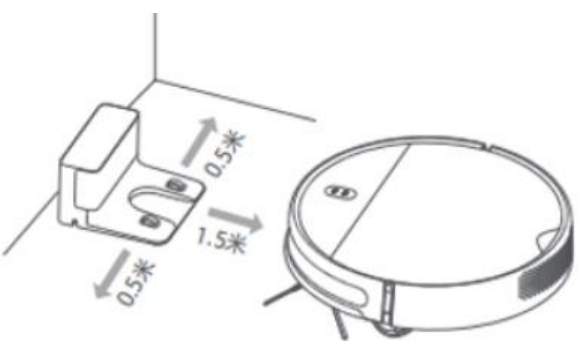 Tip:
Tip:
1. Please place the charging Dock within the WiFi coverage.
2. The charging Dock should avoid direct sunlight or block the charging Dock identification area, which may cause the Vacuum-mop to fail to automatically return to the charging Dock.
14.Q: How to charge Mi Robot Vacuum-Mop 2 Lite?
A: After connecting the charging base to the power socket, make the charging contacts of Mi Robot Vacuum-Mop 2 Lite touch the springs of the charging Dock to charge. 0 It takes about 4-5 hours to charge to 100%. Mi Robot Vacuum-Mop 2 Lite supports overcharge protection. It will automatically power off when fully charged. After cleaning, it is recommended to place the device on a powered charging Dock to ensure sufficient power.
15.Q: How to turn on/off Mi Robot Vacuum-Mop 2 Lite?
A: When the Vacuum-mop is charging on the charging Dock, it will automatically turn on and cannot be turned off. Long press , the power indicator lights up, and the Vacuum-mop enters the power-on state. When the Vacuum-mop is not stationary on the charging Dock, press and hold
  to power off.
16.Q: How to start cleaning/mopping the Mi Robot Vacuum-Mop 2 Lite?
A: In the power-on state, short press , Vacuum-mop will automatically enter the sweeping/mopping state according to the installed accessories
17.Q: How does Mi Robot Vacuum-Mop 2 Lite enter the recharge mode?
A: In the power-on state, short press , the Vacuum-mop enters the recharge mode;
Tip:
When the Vacuum-mop automatically shuts down when it is out of power, please manually put the Vacuum-mop back on the charging Dock to charge to ensure that the electrodes are in good contact.
18.Q: How to pause the cleaning of Mi Robot Vacuum-Mop 2 Lite?
A: When the Vacuum-mop is running, press to pause the machine, press
  to continue cleaning, the key will return to the charging Dock and end the cleaning.
19.Q: Will Mi Robot Vacuum-Mop 2 Lite sleep automatically?
A: If there is no operation for more than 5 minutes, the Vacuum-mop will automatically enter the sleep state, and the Vacuum-mop can be woken up by pressing the button or the APP in the sleep state.
The Vacuum-mop will not go to sleep while charging on the charging Dock.
It is normal to automatically shut down when the sleep time exceeds 12 hours. During the standby time, it consumes about 20% -30% of the power. If the power is less than 30% during standby, it may be that the battery cannot be turned on due to the low power after the shutdown. is a normal phenomenon.
20. Q: What is the function of the accessories of Mi Robot Vacuum-Mop 2 Lite?
A: Mi Robot Vacuum-Mop 2 Lite comes standard with a two-in-one water tank, which can use single sweeping mode and sweeping and mopping integrated mode.
21.Q: How does Mi Robot Vacuum-Mop 2 Lite use single sweeping mode?
A: Assemble the two-in-one water tank, click the device or the sweeping interface on the APP side to start cleaning, and the device enters the single sweep mode. At this time, the fan of the device is working, which can be vacuumed but not mopped.
22.Q: Does Mi Robot Vacuum-Mop 2 Lite have motor overload protection function?
A: All the motors on Mi Robot Vacuum-Mop 2 Lite have overload protection, including the vacuum fan, brush motor, side Brush motor, main wheel motor, and the protection will be automatically activated when foreign objects enter or become overloaded due to serious blockage.
23.Q: How does Mi Robot Vacuum-Mop 2 Lite use the sweeping and dragging mode?
A: 1. Open the plastic cover of the water tank, pour water into the water tank, fasten the plastic cover and put the two-in-one water tank into the Vacuum-mop.
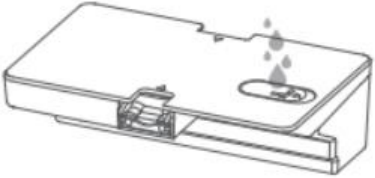
Push the installed mop pad horizontally into the bottom of the Vacuum-mop according to the direction shown in the figure.
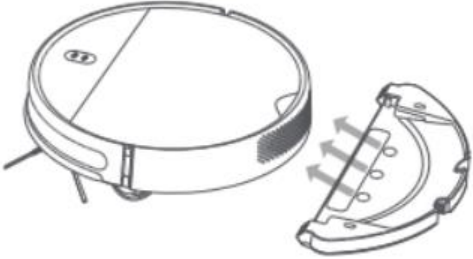
3. Start Vacuum-mop to enter sweeping and dragging mode (if mop pad is not installed, enter sweeping mode).
Tip:
Do not use the mopping function on carpets or when no one is at home.
Please remove the mopping module when charging or not in use, pour out the remaining water in the water tank and clean the mop to avoid mold or odor.
24.Q: How to install and remove the mop and support on Mi Robot Vacuum-Mop 2 Lite?
A: 1. Install the mop: insert one end of the mop into the slot of the support plate, and then turn the mop over to make the mop stick and the magic on the mop pad firmly.
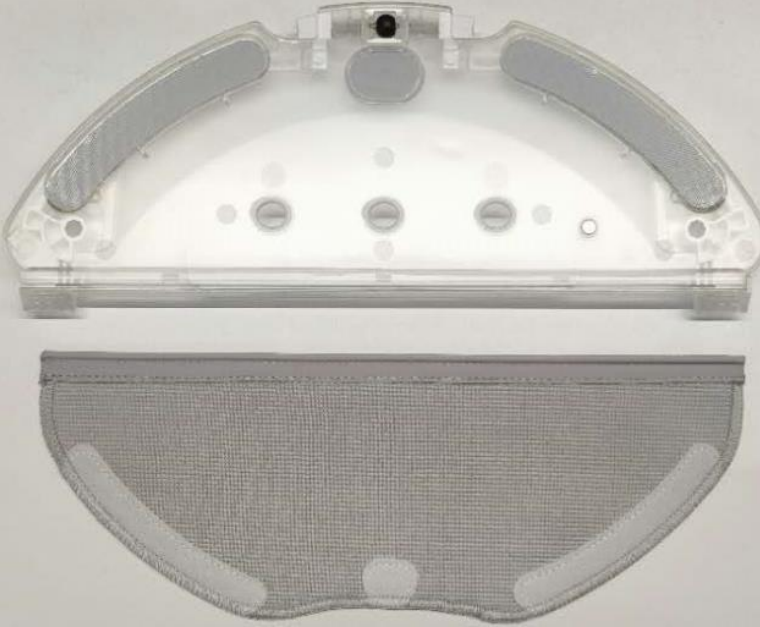
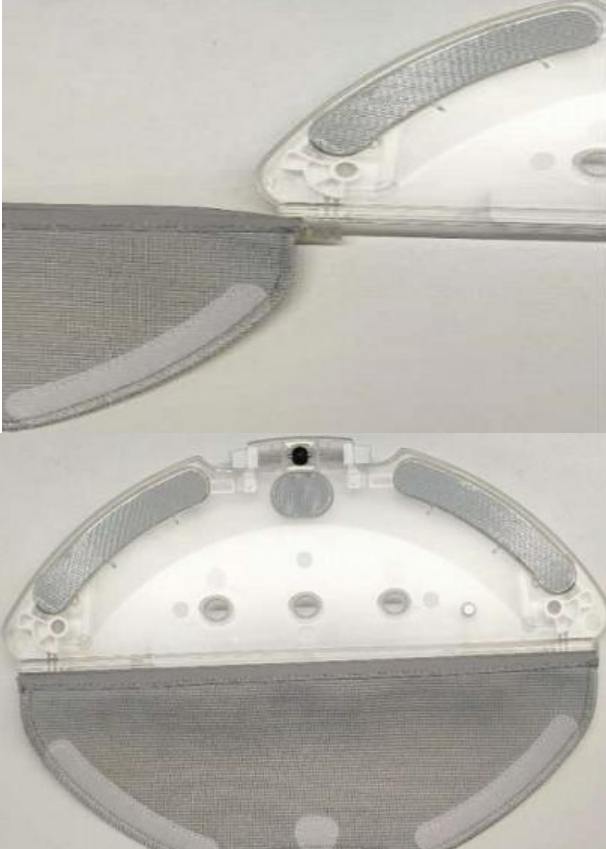
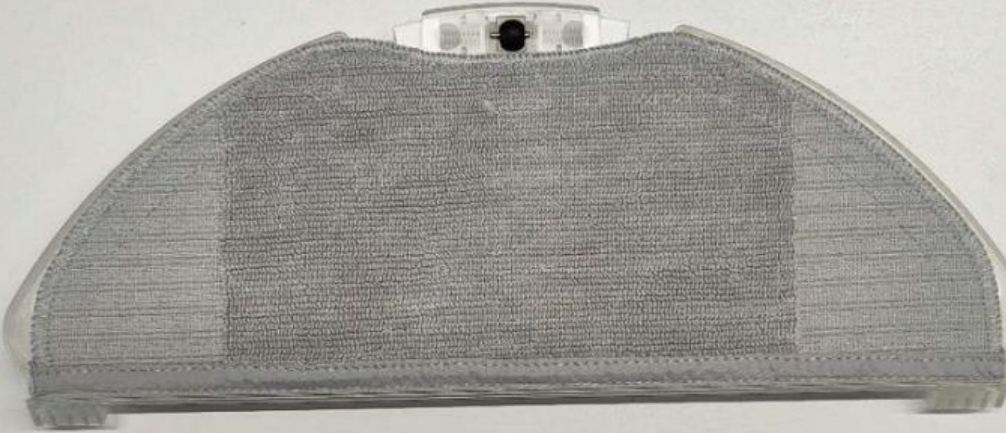
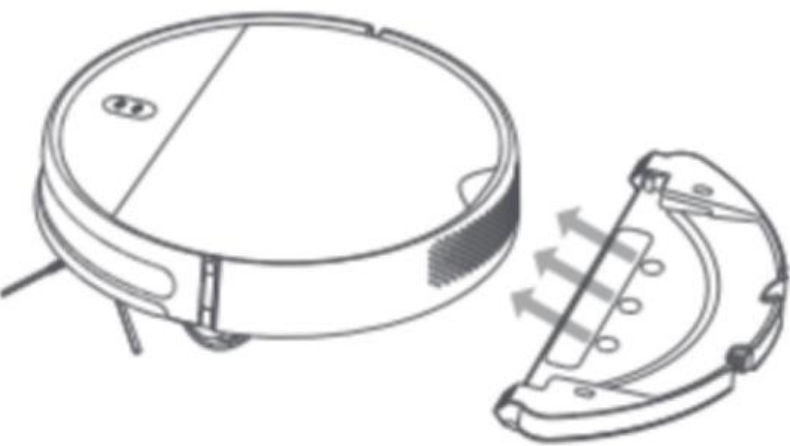
3. Remove the tank: Press and hold the two buttons of the tank at the same time and pull it out.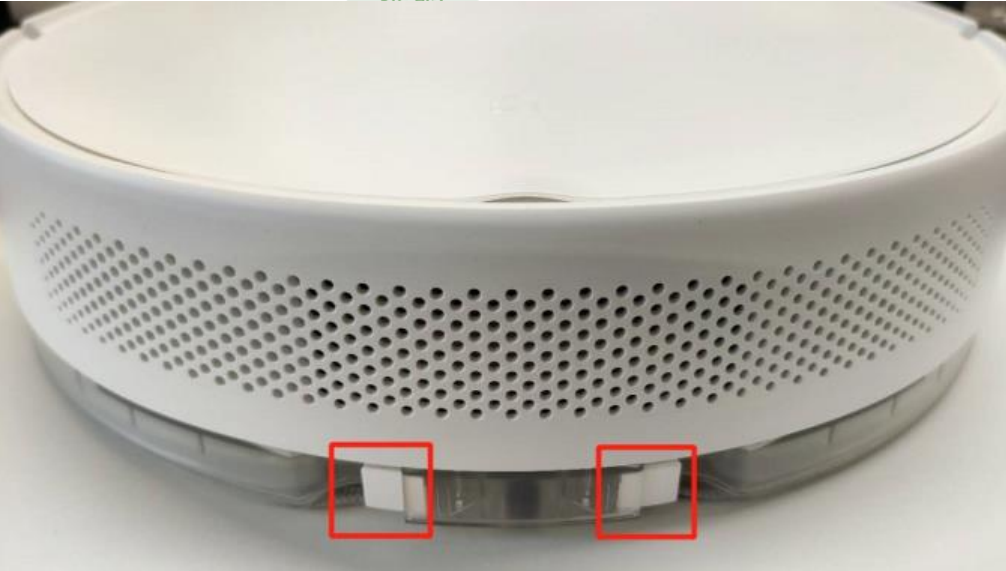
25.Q: Is the standard mop that comes with Mi Robot Vacuum-Mop 2 Lite reusable?
A: A mop is standard. It can be reused after cleaning. If the mop becomes hard, does not absorb water, or sheds abnormally after repeated use, it is recommended to replace the mop. It is recommended to pay attention to various sales channels of Xiaomi when purchasing a mop.
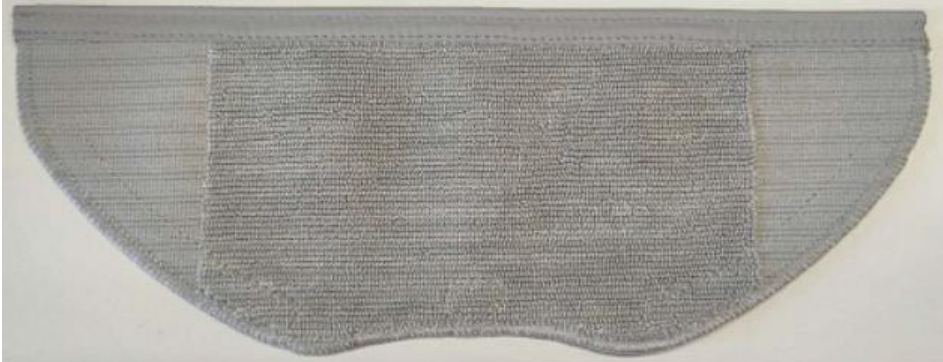
Cleaning method: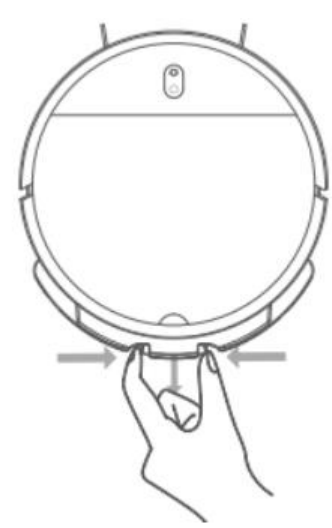
2. Open the mop from the back of the mop pad, and slide the mop out to the right as shown in the figure. The mop is washable.
It is recommended to replace the mop every 3-6 months (or when there is significant wear).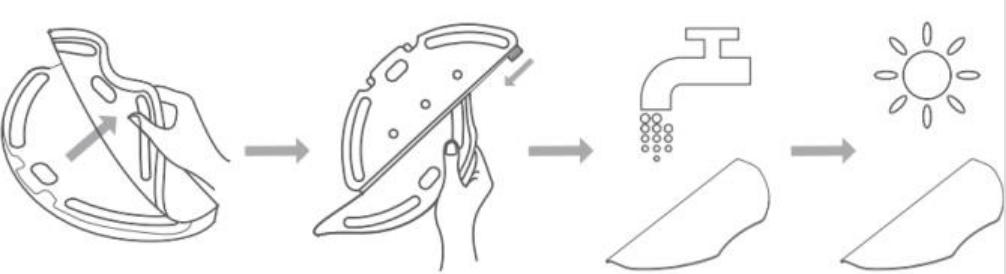
26. Q: Can Mi Robot Vacuum-Mop 2 Lite refill the water tank or replace the mop halfway?
A: Yes. If vacuum-mop needs to add water or clean the mop during the cleaning process, press any key to pause, then remove the water tank to add water or clean/replace the mop, and then put back the water tank and mop, and press to continue working.
27. Q: Does Mi Robot Vacuum-Mop 2 Lite have the function of continuous scanning?
A: Mi Robot Vacuum-Mop 2 Lite supports continuous scan function.
28. Q: What is the difference between the single-sweep and sweep-drag all-in-one modes of Mi Robot Vacuum-Mop 2 Lite?
A: 1. In the single sweep mode of Mi Robot Vacuum-Mop 2 Lite, the fan of the equipment works, but the water pump of the water tank does not work. At this time, the sweeper has high cleaning efficiency and can vacuum but not mop the floor.
29. Q: Can Mi Robot Vacuum-Mop 2 Lite mop the floor directly?
A: 1. When using Mi Robot Vacuum-Mop 2 Lite for the first time, it is recommended to perform cleaning mode first.
30. Q: Can Mi Robot Vacuum-Mop 2 Lite not be placed in the charging Dock?
A: 1. After the cleaning task of the device is completed, it is recommended to return the device to the charging Dock for charging and standby to ensure the battery power of the device.
2. If the device is not in the charging Dock standby state, there will be power consumption. In the standby state of the device, the internal programs are running and waiting for user commands to consume power.
3. The device is not in the charging Dock standby mode. In order to avoid the device power consumption, you can manually press and hold the power button to turn off the device and try to wait.
31. Q: Can Mi Robot Vacuum-Mop 2 Lite be used directly after unpacking?
A: The Mi Robot Vacuum-Mop 2 Lite is not fully charged when it leaves the factory. It is recommended to charge it for more than 5 hours before cleaning, and it is best to use it after it is fully charged.
32. Q: What is the charging time of Mi Robot Vacuum-Mop 2 Lite?
A: The charging time of Mi Robot Vacuum-Mop 2 Lite is generally around 4h.
33. Q: When using Mi Robot Vacuum-Mop 2 Lite to mop the floor, can I add detergent such as disinfectant?
A: It is not recommended to add liquids other than water to prevent damage to the electronic control device.
34. Q: What is the battery life of Mi Robot Vacuum-Mop 2 Lite when it is fully charged?
A: After the Mi Robot Vacuum-Mop 2 Lite is fully charged, it can work for about 90 minutes using the standard gear, and the working time of other gears will increase slightly, which is subject to the actual use environment.
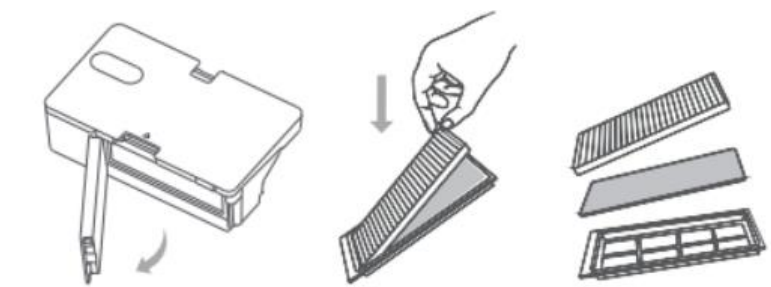
35. Q: Does the 2-in-1 water tank of Mi Robot Vacuum-Mop 2 Lite have a filter and how to clean it?
A: The 2-in-1 water tank of Mi Robot Vacuum-Mop 2 Lite has a filter, which can be rinsed gently with water.
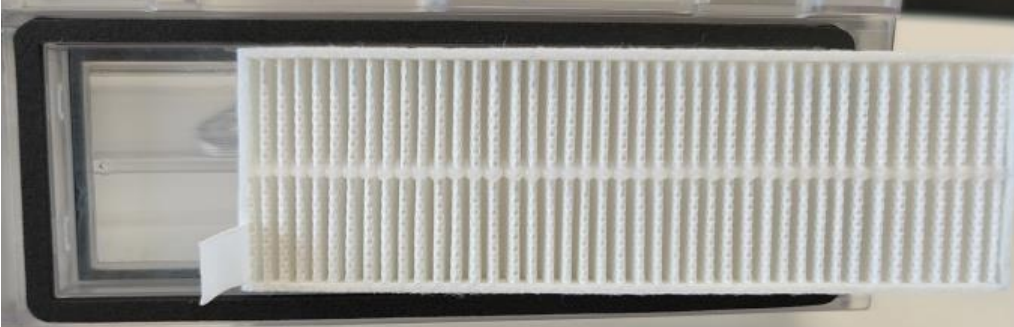 Take out the filter assembly as shown, then take out the filter and filter sponge and clean it.
 Tip:
Tip:
After washing the filter element, please dry it and then put it back into the two-in-one water tank as it is;
To avoid blockage of the filter element, it is recommended to use a cleaning brush to clean the filter element regularly;
It is recommended to replace the filter element every 3-6 months.
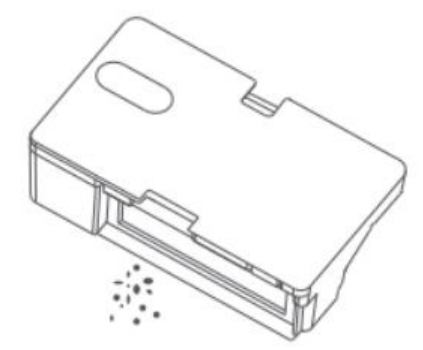
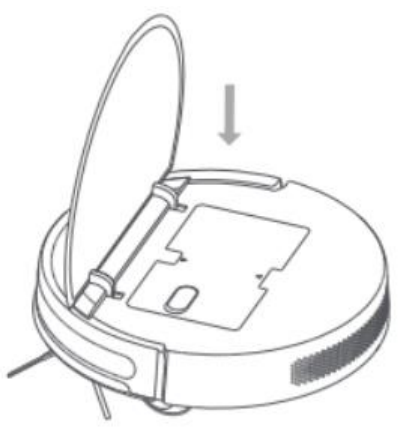
36. Q: How to clean the 2-in-1 water tank of Mi Robot Vacuum-Mop 2 Lite?
A: The 2-in-1 water tank of Mi Robot Vacuum-Mop 2 Lite can be directly rinsed with water. After cleaning, be sure to wipe it dry before use.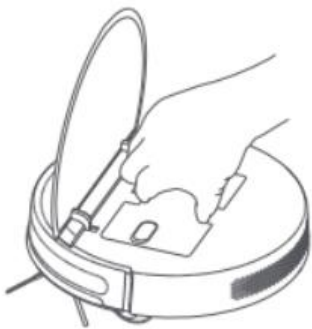
Take out the filter assembly as shown, then take out the filter and filter sponge and clean it.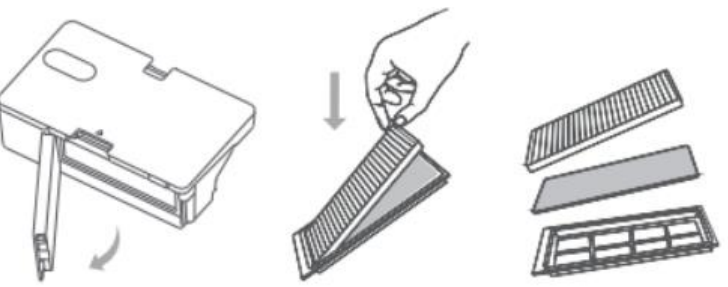
37.Q: Are the consumables of Mi Robot Vacuum-Mop 2 Lite the same as other cleaning robot consumables? When is the replacement time?
A: The consumables of Mi Robot Vacuum-Mop 2 Lite are: brush, mop, side brush, filter, two-in-one water tank, etc. It is recommended to pay attention to various Xiaomi sales channels. Not compatible with other Mi Robot Vacuum consumables.
Brush: It is recommended to clean every week, and replace the brush every 6-12 months to ensure the cleaning effect.
Filter: It is recommended to clean it weekly and replace the filter every 3-6 months.
Side Brush: It is recommended to clean it once a month and replace the side brush every 3-6 months to ensure the cleaning effect.
Mop: Be sure to remove the mop to clean it to prevent sewage from pouring back into the water outlet; if the mop is too dirty, it will affect the mopping effect, please
Wash it before use; it is recommended to replace the mop every 3-6 months to ensure the cleaning effect.
38. Q: Is the Mi Robot Vacuum-Mop 2 Lite ir sensor harmful to eyes, children or pets?
A: The infrared power consumption of the ir sensor is extremely low, and it is safe light and will not cause harm to children or pets.
39.Q: What are the precautions in the cleaning process of Mi Robot Vacuum-Mop 2 Lite?
A: 1. Please clean up the cables and sundries scattered on the ground before starting, and remove the fallible, fragile, valuable and potentially dangerous items to avoid being entangled, stuck, dragged or knocked down by the sweeper. Personal or property damage.
2. For the first use, it is recommended to use the global cleaning mode. During the cleaning process, please follow the robot throughout the process to assist in dealing with some possible minor problems. After the cleaning process, the robot can smoothly perform autonomous cleaning in subsequent cleanings.
3. In the cleaning mode, if there is a lot of dust on the ground, it is recommended to clean first and then mop the floor.
40. Q: Does the Mi Robot Vacuum-Mop 2 Lite consume power when the Dock has been charging?
A: When Mi Robot Vacuum-Mop 2 Lite has been charging the Dock, the charging Dock will supply power to the robot. In the sleep state, the battery consumption is low, and at this time the battery goes to sleep to maintain the best performance.
41.Q: Does Mi Robot Vacuum-Mop 2 Lite have water shortage reminder and dustbin full reminder?
A: Mi Robot Vacuum-Mop 2 Lite has no water shortage reminder and no dustbin full reminder.
42. Q: Do I need to take out the water tank when charging Mi Robot Vacuum-Mop 2 Lite?
A: Mi Robot Vacuum-Mop 2 Lite uses an electronically controlled water tank with a built-in water pump. The water pump is controlled by a program to adjust the water flow rate, so that the floor is evenly mopped and the charging is not leaking. However, when charging or not in use, please empty the remaining water in the water tank and remove the mop bracket to prevent the floor from soaking. If the dustbin or water tank is not placed during charging, it will lead to inability to charge. It is recommended to place the dustbin for charging. After the water is emptied, put it in the Vacuum-mop and recharge it.
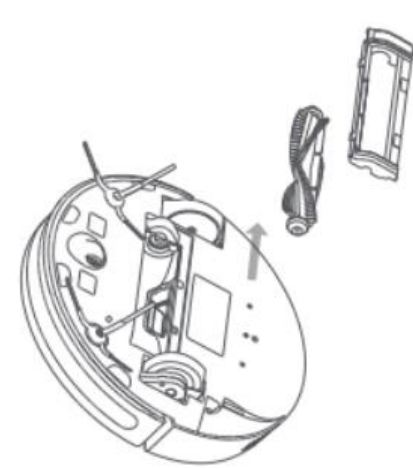
43. Q: How to clean the brush of Mi Robot Vacuum-Mop 2 Lite?
A: 1. Flip the Vacuum-mop over, press the buckle to remove the brush cover
2. Take out the brush and brush bearing upwards;
3. Reinstall the brush and press the fixing clips of the brush cover.
Tip: It is recommended to replace the brush every 6-12 months to ensure the cleaning effect.
44. Q: What kind of battery does Mi Robot Vacuum-Mop 2 Lite use?
A: Mi Robot Vacuum-Mop 2 Lite uses a 2600mAh high-performance lithium-ion rechargeable battery pack.
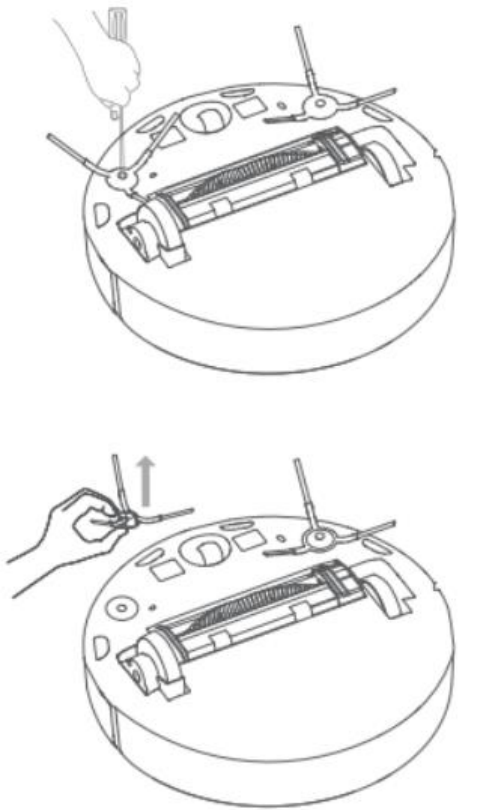
45. Q: How to clean the side brush of Mi Robot Vacuum-Mop 2 Lite?
A: Use a screwdriver to remove the screws holding the side brush, clean the side brush and put it back in.
It is recommended to replace the side brush every 3-6 months to ensure the cleaning effect.
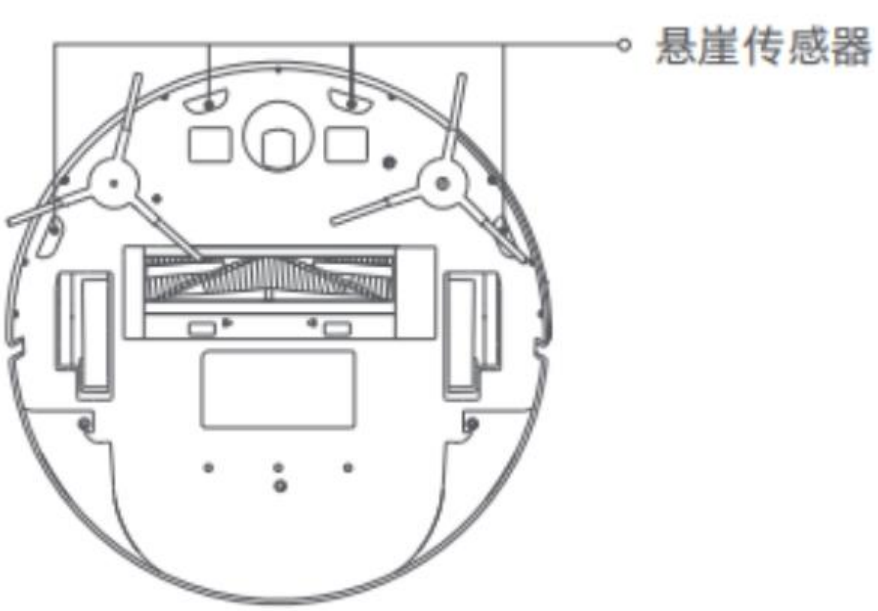
46. Q: How to clean the cliff sensor of Mi Robot Vacuum-Mop 2 Lite?
A: Clean the cliff sensor with a soft cloth every 3 months.
Mi Home App related
1. Q: How to add Mi Robot Vacuum-Mop 2 Lite to Mi Home App?
A: Android Mi Home App connection method:
1. Power on the Mi Robot Vacuum-Mop 2 Lite, and simultaneously press and
and  for 3 seconds to reset the device.
2. Open the Mi Home App, click + in the upper right corner, enter the Add Device page, click the searched Mi Robot Vacuum-Mop 2 Lite,
Or select in manual addition.
3. Select the WiFi to be connected, enter the password, and click Next. During the connection process, if "Do you want to allow access?" pops up, click Allow once and wait for the addition to succeed.
iOS Mi Home App connection method:
1. Power on the Mi Robot Vacuum-Mop 2 Lite, and simultaneously press and hold the and keys for 3 seconds to reset the device.
2. Open the Mi Home App, click + in the upper right corner to enter the Add Device page, click the searched Mi Robot Vacuum-Mop 2 Lite, or manually select it in [Home Appliances].
3. Select the WiFi to be connected, enter the password, and click Next.
4. Click [Go to WiFi Settings], connect the WiFi of the mobile phone to [Mi-vacuum_xxx], return to Mi Home App, and wait for the connection to be successful.
2.Q: How to make Mi Robot Vacuum-Mop 2 Lite sweep the floor in the app?
A: Do not install the mop component, only install the two-in-one water tank, open the Mijia robot vacuum cleaner G1 plug-in, click the sweeping icon,
Select the gear, and then click to start cleaning. On the page, you can view the cleaned area, cleaning time, and remaining power. mopping mode
is an S-shaped path.
1. Recharge: Click to make the robot go back to the charging Dock for charging.
2. Start cleaning: click to start cleaning when it is not cleaning, and to pause cleaning during cleaning.
3. Suction setting: quiet, standard, mid-range, strong can be selected.
3. Q: How to make Mi Robot Vacuum-Mop 2 Lite mop the floor in the app?
A: Mi Robot Vacuum-Mop 2 Lite has installed the mop assembly and the two-in-one water tank, click the start cleaning icon, set the suction and water volume, and then click to start cleaning (if the mop assembly is not installed, the water volume is set to gray and cannot be adjusted) , only sweeps the floor).
On the page, you can view the cleaned area, cleaning time, and remaining power. Sweep and drag mode is S-shaped path.
1. Recharge (full): Click to make the robot go back to the charging Dock for charging.
2. Start cleaning: click to start cleaning when it is not cleaning, and to pause cleaning during cleaning.
3. Suction setting: quiet, standard, mid-range, strong can be selected.
4. Water volume setting: You can set the mopping water output, and you can choose 1st gear, 2nd gear and 3rd gear.
4. Q: How to clean Mi Robot Vacuum-Mop 2 Lite regularly?
A: Open the Mi Home App, click the Mi Robot Vacuum-Mop 2 Lite icon to open the plug-in, click … in the upper right corner, clean regularly, Click to have the bottom corner +:
Repeating rules: You can choose to execute once, every day, and customize (optional on Sunday, Monday, Tuesday, Wednesday, Thursday, Friday, and Saturday).
Open: You can set the opening time, such as 20:05, 08:26, 03:10, and the time can be set according to the actual situation.
5. Q: How does Mi Robot Vacuum-Mop 2 Lite perform spot cleaning?
A: Open the Mi Home App, click the Mi Robot Vacuum-Mop 2 Lite icon to open the plug-in, click … in the upper right corner, spot cleaning,
[The mobile phone and the sweeping robot need to be connected to the same local area network], the fixed-point cleaning will clean the area with a radius of 1 meter around the robot, click the direction button to adjust the position, and click the switch on the APP.
6.Q: How to check the cleaning records of Mi Robot Vacuum-Mop 2 Lite?
A: Yes. Open the Mi Home App, click the Mi Robot Vacuum-Mop 2 Lite icon to open the plug-in, click … in the upper right corner to view the cleaning record, and click the cleaning record to view the cleaning map.
7.Q: Does Mi Robot Vacuum-Mop 2 Lite have a Do Not Disturb mode?
A: Yes. Open the Mi Home App, tap the Mi Robot Vacuum-Mop 2 Lite icon to open the plug-in, tap… in the upper right corner, tap the do not disturb mode switch to turn on or off the do not disturb mode, tap the text to set the do not disturb mode start time and end time, time You can set it by yourself, it can only be on the hour, such as 03:00 to enter Do Not Disturb mode, and 10:00 to exit Do Not Disturb mode
Tip:
After the Do Not Disturb mode is turned on, the scheduled cleaning does not take effect, and the robot has no voice broadcast.
8.Q: How to adjust the volume of Mi Robot Vacuum-Mop 2 Lite? How to change language?
A: Open the Mi Home App, click the Mi Robot Vacuum-Mop 2 Lite icon to open the plug-in, click the upper right corner... , click the voice setting, click the button to switch the voice broadcast, slide the voice volume bar to adjust the volume, click the voice language to switch the language ( Chinese English).
9.Q: How to check the statistics of consumables on Mi Robot Vacuum-Mop 2 Lite?
A: Open the Mi Home App, click the Mi Robot Vacuum-Mop 2 Lite icon to open the plug-in, click on the upper right corner… , consumable statistics, you can view the estimated usable time and remaining percentage, click accessories to enter the accessories introduction page, after replacing the consumables, click The supplies at the bottom of the page can be reset.
Tip:
If you have not replaced the consumables and clicked the consumables reset, it will affect the statistics of the consumables of the device.
10. Q: How does Mi Robot Vacuum-Mop 2 Lite use the APP to find the device location?
A: Open the Mi Home App, click the Mi Robot Vacuum-Mop 2 Lite icon to open the plug-in, click … in the upper right corner, click to find the robot, and the robot will issue a voice prompt of [I am here].
11.Q: Can Mi Robot Vacuum-Mop 2 Lite clean along the edge?
A: Yes. Open the Mi Home App, click the Mi Robot Vacuum-Mop 2 Lite icon to open the plug-in, click … in the upper right corner, and turn on the edge cleaning switch. After turning it on, the new edge cleaning will be performed next time.
12.Q: What are the general settings for Mi Robot Vacuum-Mop 2 Lite?
A: Open the Mi Home App, click the Mi Robot Vacuum-Mop 2 Lite icon to open the plug-in, click … in the upper right corner, in the general settings:
Device name: The name of the door lock in the Mi Home App can be customized
Manage location: Can change the room location of the robot in Mi Home App
Share device: Share the device to others for control
Automation: Firmware upgrade for robots when new firmware is available.
13.Q: Can Mi Robot Vacuum-Mop 2 Lite clean specific rooms?
A: No.
14. Q: How many mopping modes does Mi Robot Vacuum-Mop 2 Lite have?
A: Mi Robot Vacuum-Mop 2 Lite has only 1 mopping mode, which is S type.
FAQ and Troubleshooting
1. Q: What should I do if Mi Robot Vacuum-Mop 2 Lite cannot connect to the Internet?
A: 1. Confirm whether the WiFi password entered when connecting is correct. The WiFi username cannot contain Chinese characters or special characters such as @¥% in the password setting. If so, please reset it to an account in English or with numbers and letters. and password and try again;
2. Check whether the external network connection of the router is normal. You can try to open the web page through a mobile phone or a computer connected to WiFi to see if it is smooth;
3. Confirm whether the distance between the router and the robot is too far (beyond the range of 5 meters or there is a gap in between), you can try to move the machine within 1~2 meters of the router and try to reconnect;
4. Try to connect to the mobile phone WiFi hotspot;
5. Check whether the router is connected to many smart devices, which causes the network to slow down or the router does not respond. You can try after restarting the router;
6. At present, it does not support the company's EAP 802.1x authentication network, 5G signal network or public WiFi network that requires web page authentication, such as: CMCC, ChinaUnicom, etc., you need to switch the network and try to connect;
7. After the network is turned off, if the device is not connected to the Internet for more than 1 hour, the WiFi module will turn off the network link function, and the WiFi indicator will flash, and the connection can be restored after restarting the device;
8. Check whether the mobile phone restricts the permissions of the App, such as networking, positioning, etc., please allow the permissions and try again;
9. The connection failure may also be related to the mobile phone model. You can try to use other different models of mobile phones to try the connection.
2. Q: What should I do if the side brush of Mi Robot Vacuum-Mop 2 Lite does not rotate?
A: 1. Check whether there are foreign objects or hair stuck in the position of the side sweeping brush;
2. Please check whether the side brush hair planting is stuck by the gap;
3. Check whether the equipment is turned on a medium and long-haired carpet, or during the obstacle crossing process, the side brush stops after hitting the obstacle, and then runs normally;
4. After restarting the robot to work for 30 minutes, check whether there is any recurrence.
5. Check whether the robot is faulty after sale.
3. Q: What should I do if the roller brush of Mi Robot Vacuum-Mop 2 Lite does not rotate?
A: 1. Check the roller brush or whether there is hair at both ends, etc., which is caused by debris stuck;
2. It is recommended to clean and restart the inspection regularly;
3. Check whether it is faulty after sale.
4.Q: What should I do if the Mi Robot Vacuum-Mop 2 Lite makes abnormal noise?
A: 1. Check whether the parts at both ends of the roller brush are complete and whether there is any defect;
2. Check whether the roller brush cover is not fastened;
3. It may be caused by the entanglement of the roller brush, try after cleaning;
4. Check whether it is faulty after sale.
5. Q: What should I do if the Mi Robot Vacuum-Mop 2 Lite roller/swivel does not rotate?
A: If the rollers do not rotate on one side or fly around, the equipment will spin on the spot. If the universal wheel does not rotate, the equipment will run abnormally.
1. Check whether there are foreign objects stuck in the roller/universal wheel, causing the side wheel to not rotate normally. If foreign objects (paper, sundries, etc.) are stuck in the side wheel, it is recommended that the user check and clean and try again;
2. Restart the machine after moving the location;
3. Check whether there is any fault after sale.
6.Q: What should I do if Mi Robot Vacuum-Mop 2 Lite cannot be charged?
A: 1. Check whether the adapter is plugged in properly, whether it is in good contact with the back of the rechargeable seat, and whether the socket has electricity;
2. Check whether the metal shrapnel at the bottom of the charging Dock and the bottom shrapnel of the robot are dirty and cause poor recharging contact;
3. Confirm whether the machine is manually placed in the recharge seat and not aligned;
4. Check whether the height of the charging Dock shrapnel is the same as that of the robot charging contact;
5. It may be that the charging Dock is in a remote location and there is insufficient space, causing automatic recharging to fail;
6. Check whether there is any fault after sale.
7. Q: What should I do if the Mi Robot Vacuum-Mop 2 Lite bumper can’t rebound?
A: 1. Check whether there are foreign objects stuck;
2. Try to slap manually to check whether it can rebound;
3. It is recommended to clean up foreign objects regularly;
4. Check whether there is any fault after sale.
8. Q: What should I do if Mi Robot Vacuum-Mop 2 Lite cannot mop the floor?
A: 1. Check whether the water tank and mop are in place;
2. After removing the rag from the water tank, install the dustbin to check whether it is running normally;
3. Check whether there are sundries in the threshold, blanket, floor mat and other areas when the equipment is mopping the floor;
4. Check whether there is any fault after sale.
9. Q: What should I do if Mi Robot Vacuum-Mop 2 Lite cannot vacuum/low suction?
A: 1. Try to restart the device;
2. Check whether the Hypa is blocked by garbage or the dustbin is full and cannot continue to inhale dust;
3. Check whether the power of the robot is sufficient, and try after charging;
4. Check whether there is any fault after sale.
10. Q: What should I do if there is a delay in pressing the buttons on Mi Robot Vacuum-Mop 2 Lite or App?
A: 1. Check whether the network is normal and try using the mobile phone hotspot;
2. After cleaning the mobile phone background applications, try to enter the APP operation again;
3. After the device restarts, try to clean the button control again;
11. Q: What should I do if Mi Robot Vacuum-Mop 2 Lite cannot be recharged/slowly/recharged repeatedly?
A: 1. To start cleaning, you must start from the charging Dock. If you do not start from the charging Dock, it may not be recharged;
2. Check whether the power supply of the charging Dock is normal, and try after wiping the charging pole piece;
3. Check whether the charging Dock is placed against the wall, whether there is 2 meters in front, and an open area of more than 0.5 meters left and right. The charging Dock recognizes it.
The area is a 180° sector in front, check whether the device and the charging pole of the charging Dock correspond to a horizontal line;
4. Check whether the charging Dock stickers are placed on the ground;
5. Check whether it is stuck by foreign objects, or the Vacuum-mop has been moved;
6. Check the trapped area of the equipment, it is recommended to clean it manually and try again;
7. After the cleaning of the equipment is completed, there will be a recharging process when returning to the departure area of the equipment, which is normal operation;
9. Check whether the robot is faulty after sale.
12. Q: What should I do if the Mi Robot Vacuum-Mop 2 Lite makes abnormal noises during operation?
A: 1. Check whether the Vacuum-mop roller, universal wheel, and roller brush rotate normally, and whether there is abnormal noise during the rotation. If there is, check whether there is a foreign body stuck in the corresponding movable mechanism, and try again after removing the foreign body;
2. Check whether the mop bracket is installed in place, and whether the clips on the left and right sides are correctly positioned in the slot;
3. If the abnormal sound is irregular, it occurs occasionally during the cleaning process of the equipment (such as through the gaps in the tiles, the cracks on the wooden floor, etc.), at this time, it is the buffer sound when the equipment passes through the uneven ground, which is a normal phenomenon;
4. Check whether the robot is faulty after sale.
13. Q: What should I do if the firmware of Mi Robot Vacuum-Mop 2 Lite fails to update?
A: 1. When upgrading the firmware, the Vacuum-mop is required to be upgraded when the battery is more than 20% while charging the Dock.
2. Check whether the device is connected to the Internet normally, and check whether the network condition is smooth;
3. Shut down the device first, then restart, wait for a few minutes, the new software package download will take a few minutes to download, which is a normal phenomenon;
4. During the update process, please do not shut down the device and ensure the power of the device. The software update will have an update process, which is a normal phenomenon.
5. Try changing the time period.
14. Q: What should I do if the Mi Robot Vacuum-Mop 2 Lite is working very noisy?
A: You can try to change the mode in the app, you can choose "quiet" or "standard" suction gear.
Mi Robot Vacuum-Mop 2 Lite quiet mode is about 60.8 decibels, standard cleaning is about 61.8 decibels, mid-range cleaning is about 65.6 decibels, and powerful mode cleaning is about 68.9 decibels, which is the normal sound of the device.
15. Q: What should I do if the Mi Robot Vacuum-Mop 2 Lite runs around when the charging Dock is powered off?
A: 1. It is normal for the device to automatically search for the charging dock when the charging Dock is powered off during charging;
16. Q: What should I do if Mi Robot Vacuum-Mop 2 Lite is trapped by an obstacle?
A: 1. Check whether there are sundries around the bottom of obstacles such as sofas that block the normal cleaning of the equipment, and try after cleaning;
17. Q: What should I do if the cleaning path of Mi Robot Vacuum-Mop 2 Lite is chaotic and some areas are repeatedly cleaned?
A: 1. Check whether the real-time cleaning path is chaotic in the APP;
2. Check whether the device scanning map on the APP is skewed, and try to clean it again;
3. Check whether the equipment is trapped when the equipment runs to the step or the carpet;
4. Check whether there are curtains or other objects blocking the sensor, clean up and try again;
5. Check whether the equipment is exposed to direct sunlight during cleaning, or other direct lighting affects the equipment construction. It is recommended to temporarily turn off the direct light and try, or pull down the window curtains and try to clean again.
18. Q: After using Mi Robot Vacuum-Mop 2 Lite for a period of time, what should I do if the cleaning ability decreases and dust leaks out?
A: 1. Check the dustbin, if the dustbin is full, please clean it up in time.
2. Check whether the filter or cleaning filter needs to be cleaned, and whether the brush is entangled by foreign objects.
3. Check whether the robot is faulty after sale.
19. Q: Why can't Mi Robot Vacuum-Mop 2 Lite return to the charging Dock after partial cleaning or relocation?
A: The robot will regenerate the map after partial cleaning or long-distance movement. If the charging Dock is far away, it may not be able to automatically recharge. Please manually put the sweeper back into the charging Dock for charging.
20. Q: What should I do if the regular cleaning of Mi Robot Vacuum-Mop 2 Lite does not take effect?
A: 1. Confirm whether the power is sufficient and the remaining power is greater than 20% to start regular cleaning.
21. Q: What should I do if the Mi Robot Vacuum-Mop 2 Lite consumes power quickly?
A: 1. Check whether the power is fully charged when the machine starts to work (connect the APP to check the power, see the picture on the right; if it is not fully charged, the cleaning time will be shortened, please charge it first).
2. Check whether the machine has been "trapped" and "extricated" during the working process
a. Trapped: If it is entangled by wires, it cannot get out from the bottom of the bed, which will cause the battery to run out;
b. Getting out of trouble: If the machine enters a multi-stool-leg environment and crosses obstacles (crossing stool legs, slippers and other debris), it will take a long time to get out of trouble, resulting in fast power consumption.
3. Check whether the time corresponding to the cleaning mode used is too large. The cleaning time is different in different modes:
Quiet mode is about 110 minutes, standard mode is about 90 minutes, mid-range mode is about 60 minutes, and powerful mode is about 50 minutes.
4. Check whether the robot is faulty after sale.
22. Q: What should I do if the water tank of Mi Robot Vacuum-Mop 2 Lite leaks?
A: 1. If you pick up the water tank and leak water, please check as follows:
a. Check whether the silica gel of the water injection port is airtight. If it is not closed, because the air pressure is connected to the outside, the water tank is not airtight, and the water will flow out of the water tank;
b. Confirm whether the water tank is lifted horizontally. If there are individual water outlet holes in the water tank that are not covered by water, the air pressure inside and outside the water tank will be connected, and the water will flow out from other leaking holes;
c. Check whether there is any extra force applied to the water, such as lifting up and down quickly, the extra force will help the water to overcome the tension and flow out of the water tank;
d. Check the appearance of the water tank for bumps, cracks and other damages.
e. After being filled with water, there is still water leakage (or non-water leakage at the water outlet) when placed horizontally, and it is necessary to check whether the water tank is faulty after sale.
2. If there is residual water on the floor during mopping, please check as follows:
a. Check the mopping water volume setting, the factory default is 2nd gear, it is recommended to use 1st gear to try;
b. Check whether the mop cloth has not been disassembled after the last mopping, which is caused by a lot of residual moisture in the mop;
c. If you are using a fully wet mop, try to replace it with a semi-wet mop, or try a new one;
d. Confirm whether the humidity in the environment is too high;
e. After-sale inspection to see if the robot is faulty.
23. Q: What should I do if the Mi Robot Vacuum-Mop 2 Lite does not get water when mopping the floor?
A: 1. Check whether the water volume of the water tank is sufficient, please try it after filling it with water;
2. Check whether the water tank of the equipment is installed correctly, and check whether the rubber cover of the water tank is tightly covered;
3. Check whether the water tank power supply shrapnel is dirty or deformed;
4. Check whether the equipment pallet is installed correctly, you can remove the pallet and try to install it again;
5. Check whether the water outlet hole at the bottom of the water tank is blocked, and try after cleaning;
6. Try to adjust the water output of the machine to 3 gears in the APP;
7. If there is still no water, it is necessary to check whether the machine is faulty after sale.
24. Q: What should I do if the Mi Robot Vacuum-Mop 2 Lite has less water when mopping the floor?
A: 1. Check whether the mop bracket is installed in place;
2. Check whether the water outlet hole at the bottom of the water tank is blocked, and try after cleaning;
3. Check whether the mop used is a semi-wet mop, and try to replace the full-wet mop after it is slightly soaked;
4. Try to adjust the water output of the machine to 3 gears in the APP;
5. Check whether the firmware is the latest version, and try after updating;
6. If there is still no water, it is necessary to check whether the machine is faulty after sale.
A: Gyro navigation uses sensor information such as gyroscope directional information and code disc ranging information to realize the perception of direction and distance, and combines infrared and mechanical collision sensors, along the wall sensor data to calculate the spatial area map in the process of traveling. , Obstacle location data. Finally finished the cleaning and construction.
2.Q: What are the features of Mi Robot Vacuum-Mop 2 Lite?
A: 1. Mi Robot Vacuum-Mop 2 Lite is an intelligent sweeping and mopping robot device. No manual intervention is required during cleaning. After cleaning, the device can automatically clean and recharge, freeing hands.
2. By combining a large-diameter suction inlet and a powerful brush, the vacuum-mop uses 2,200 Pa * suction to pull up dirt effortlessly, achieving a better cleaning effect.
3. Support Mi Home App control, a mobile phone can control the robot.
4. It has a variety of motion sensors, equipped with gyroscope navigation algorithm, records motion trajectory, and draws cleaning map.
5. The method of sweeping before and after dragging is adopted, and the super sweeping suction cooperates with the electronically controlled water tank mopping system to make the cleaning more thorough.
3.Q: How does Mi Robot Vacuum-Mop 2 Lite cover every corner of your house ?
A: After startup, Vacuum-mop will be in Zigzag Cleaning Path to complete the cleaning of the room in sequence. After all areas are covered, Vacuum-mop will clean along the wall, orderly, efficient and fully covered without omissions. After cleaning, Vacuum-mop will automatically return to the charging stand to charge.
Product introduction and use
1.Q: What are the package contents of Mi Robot Vacuum-Mop 2 Lite?
A: Vacuum-mop × 1
User Manual × 1
Dustbin x 1
Brush × 1
Brush Cover × 1
Side Brush × 1
Water Tank (Mop pad pre-installed) × 1
Mop Pad (Replacement) × 1
Charging Dock × 1
Power Cord × 1
Side Brush (Replacement) × 1
Cleaning Tool × 1
2.Q: What is the status of the indicator lights of Mi Robot Vacuum-Mop 2 Lite?
A: The status and meaning of the indicator lights of Mi Robot Vacuum-Mop 2 Lite are as follows:
Blinking orange: low battery charging/abnormal
Orange breathing: charging (low battery)
White breathing: charging (battery>20%)
Flashing white: recharge/pause
Steady white: cleaning/charging completed (the indicator will turn off after 10 minutes of charging)
3.Q: What does the side Brush of Mi Robot Vacuum-Mop 2 Lite do?
A: Mi Robot Vacuum-Mop 2 Lite adopts dual side brush design, which is mainly responsible for sweeping the garbage in the corner of the wall or in front of the obstacle to the bottom of the robot brush and suck it into the dustbin when moving along the wall or along the obstacle.
4.Q: What is the function of the Mi Robot Vacuum-Mop 2 Lite body and the two metal bars of the charging Dock?
A: The two metal strips on the Mi Robot Vacuum-Mop 2 Lite body are charging contacts, and the metal strips on the charging Dock are charging shrapnel.
5. Q: What is the function of the rotating ball at the bottom of Mi Robot Vacuum-Mop 2 Lite?
A: This is the universal wheel of Mi Robot Vacuum-Mop 2 Lite, which can rotate 360°. The wheel body is made of flexible material, which can effectively prevent the floor from being scratched.
6.Q: Is the top cover of Mi Robot Vacuum-Mop 2 Lite strong?
A: The upper cover and connection of Mi Robot Vacuum-Mop 2 Lite are made of tough materials, and the upper cover will not be damaged under normal use.
7.Q: What is the function of a circle of gray-black soft glue on Mi Robot Vacuum-Mop 2 Lite dustbin?
A: The gray-black soft rubber ring on the Dustbin is a sealing ring, which has the advantage of tight sealing.
8. Q: Why does Mi Robot Vacuum-Mop 2 Lite adopt the double side brush design?
A: The side Brush of Mi Robot Vacuum-Mop 2 Lite is mainly used to clean the garbage at the corners and the roots of obstacles. The design of gyro navigation and double side brushes can relatively improve the cleaning efficiency, so Mi Robot Vacuum-Mop 2 Lite has designed a double side brush. side Brush.
9.Q: How to install side Brush on Mi Robot Vacuum-Mop 2 Lite?
A: The two side brushes of Mi Robot Vacuum-Mop 2 Lite have been installed on the body at the factory and are fixed by screws, and a screwdriver is required for disassembly and cleaning.
10.Q: Does Mi Robot Vacuum-Mop 2 Lite support divided room cleaning?
A: Due to the general accuracy of infrared navigation, Mi Robot Vacuum-Mop 2 Lite does not support divided rooms for cleaning.
11.Q: Can Mi Robot Vacuum-Mop 2 Lite do not touch the furniture at all?
A: Mi Robot Vacuum-Mop 2 Lite may hit dark furniture when cleaning, but the impact force is small, please use it with confidence.
12.Q: What sensors does Mi Robot Vacuum-Mop 2 Lite have?
A: Mi Robot Vacuum-Mop 2 Lite has ir sensor, gyroscope, collision sensor, cliff sensor, etc.
13.Q: How should the charging Dock of Mi Robot Vacuum-Mop 2 Lite be placed?
A: The charging Dock pendulum method requires a space of about 0.5 meters on the left and right sides, and a space of more than 1.5 meters in front and placed against the wall. Generally, it is recommended to place the charging Dock in an open area such as the living room. Do not place the charging Dock in a crowded and narrow place.
Tip:1. Please place the charging Dock within the WiFi coverage.
2. The charging Dock should avoid direct sunlight or block the charging Dock identification area, which may cause the Vacuum-mop to fail to automatically return to the charging Dock.
14.Q: How to charge Mi Robot Vacuum-Mop 2 Lite?
A: After connecting the charging base to the power socket, make the charging contacts of Mi Robot Vacuum-Mop 2 Lite touch the springs of the charging Dock to charge. 0 It takes about 4-5 hours to charge to 100%. Mi Robot Vacuum-Mop 2 Lite supports overcharge protection. It will automatically power off when fully charged. After cleaning, it is recommended to place the device on a powered charging Dock to ensure sufficient power.
15.Q: How to turn on/off Mi Robot Vacuum-Mop 2 Lite?
A: When the Vacuum-mop is charging on the charging Dock, it will automatically turn on and cannot be turned off. Long press
, the power indicator lights up, and the Vacuum-mop enters the power-on state. When the Vacuum-mop is not stationary on the charging Dock, press and hold to power off.16.Q: How to start cleaning/mopping the Mi Robot Vacuum-Mop 2 Lite?
A: In the power-on state, short press
, Vacuum-mop will automatically enter the sweeping/mopping state according to the installed accessories17.Q: How does Mi Robot Vacuum-Mop 2 Lite enter the recharge mode?
A: In the power-on state, short press
, the Vacuum-mop enters the recharge mode;Tip:
When the Vacuum-mop automatically shuts down when it is out of power, please manually put the Vacuum-mop back on the charging Dock to charge to ensure that the electrodes are in good contact.
18.Q: How to pause the cleaning of Mi Robot Vacuum-Mop 2 Lite?
A: When the Vacuum-mop is running, press
to pause the machine, press to continue cleaning, the key will return to the charging Dock and end the cleaning.19.Q: Will Mi Robot Vacuum-Mop 2 Lite sleep automatically?
A: If there is no operation for more than 5 minutes, the Vacuum-mop will automatically enter the sleep state, and the Vacuum-mop can be woken up by pressing the button or the APP in the sleep state.
The Vacuum-mop will not go to sleep while charging on the charging Dock.
It is normal to automatically shut down when the sleep time exceeds 12 hours. During the standby time, it consumes about 20% -30% of the power. If the power is less than 30% during standby, it may be that the battery cannot be turned on due to the low power after the shutdown. is a normal phenomenon.
20. Q: What is the function of the accessories of Mi Robot Vacuum-Mop 2 Lite?
A: Mi Robot Vacuum-Mop 2 Lite comes standard with a two-in-one water tank, which can use single sweeping mode and sweeping and mopping integrated mode.
21.Q: How does Mi Robot Vacuum-Mop 2 Lite use single sweeping mode?
A: Assemble the two-in-one water tank, click the device
or the sweeping interface on the APP side to start cleaning, and the device enters the single sweep mode. At this time, the fan of the device is working, which can be vacuumed but not mopped.22.Q: Does Mi Robot Vacuum-Mop 2 Lite have motor overload protection function?
A: All the motors on Mi Robot Vacuum-Mop 2 Lite have overload protection, including the vacuum fan, brush motor, side Brush motor, main wheel motor, and the protection will be automatically activated when foreign objects enter or become overloaded due to serious blockage.
23.Q: How does Mi Robot Vacuum-Mop 2 Lite use the sweeping and dragging mode?
A: 1. Open the plastic cover of the water tank, pour water into the water tank, fasten the plastic cover and put the two-in-one water tank into the Vacuum-mop.
Push the installed mop pad horizontally into the bottom of the Vacuum-mop according to the direction shown in the figure.
3. Start Vacuum-mop to enter sweeping and dragging mode (if mop pad is not installed, enter sweeping mode).
Tip:
Do not use the mopping function on carpets or when no one is at home.
Please remove the mopping module when charging or not in use, pour out the remaining water in the water tank and clean the mop to avoid mold or odor.
24.Q: How to install and remove the mop and support on Mi Robot Vacuum-Mop 2 Lite?
A: 1. Install the mop: insert one end of the mop into the slot of the support plate, and then turn the mop over to make the mop stick and the magic on the mop pad firmly.
- Install the mop pad: push the bottom of the Vacuum-mop horizontally in the direction shown in the figure.
3. Remove the tank: Press and hold the two buttons of the tank at the same time and pull it out.
25.Q: Is the standard mop that comes with Mi Robot Vacuum-Mop 2 Lite reusable?
A: A mop is standard. It can be reused after cleaning. If the mop becomes hard, does not absorb water, or sheds abnormally after repeated use, it is recommended to replace the mop. It is recommended to pay attention to various sales channels of Xiaomi when purchasing a mop.
Cleaning method:
- Hold down the buckles on both sides and take out the mop pad as shown in the figure.
2. Open the mop from the back of the mop pad, and slide the mop out to the right as shown in the figure. The mop is washable.
It is recommended to replace the mop every 3-6 months (or when there is significant wear).
26. Q: Can Mi Robot Vacuum-Mop 2 Lite refill the water tank or replace the mop halfway?
A: Yes. If vacuum-mop needs to add water or clean the mop during the cleaning process, press any key to pause, then remove the water tank to add water or clean/replace the mop, and then put back the water tank and mop, and press
to continue working.27. Q: Does Mi Robot Vacuum-Mop 2 Lite have the function of continuous scanning?
A: Mi Robot Vacuum-Mop 2 Lite supports continuous scan function.
28. Q: What is the difference between the single-sweep and sweep-drag all-in-one modes of Mi Robot Vacuum-Mop 2 Lite?
A: 1. In the single sweep mode of Mi Robot Vacuum-Mop 2 Lite, the fan of the equipment works, but the water pump of the water tank does not work. At this time, the sweeper has high cleaning efficiency and can vacuum but not mop the floor.
- In Mi Robot Vacuum-Mop 2 Lite sweeping and mopping integrated mode, the equipment fan works and the water tank pump works. At this time, the sweeper can have both vacuuming and mopping functions, which can quickly clean the whole house.
29. Q: Can Mi Robot Vacuum-Mop 2 Lite mop the floor directly?
A: 1. When using Mi Robot Vacuum-Mop 2 Lite for the first time, it is recommended to perform cleaning mode first.
- When there is a lot of dust in the family and the floor needs to be mopped, it is best to complete a global cleaning mode first.
30. Q: Can Mi Robot Vacuum-Mop 2 Lite not be placed in the charging Dock?
A: 1. After the cleaning task of the device is completed, it is recommended to return the device to the charging Dock for charging and standby to ensure the battery power of the device.
2. If the device is not in the charging Dock standby state, there will be power consumption. In the standby state of the device, the internal programs are running and waiting for user commands to consume power.
3. The device is not in the charging Dock standby mode. In order to avoid the device power consumption, you can manually press and hold the power button to turn off the device and try to wait.
31. Q: Can Mi Robot Vacuum-Mop 2 Lite be used directly after unpacking?
A: The Mi Robot Vacuum-Mop 2 Lite is not fully charged when it leaves the factory. It is recommended to charge it for more than 5 hours before cleaning, and it is best to use it after it is fully charged.
32. Q: What is the charging time of Mi Robot Vacuum-Mop 2 Lite?
A: The charging time of Mi Robot Vacuum-Mop 2 Lite is generally around 4h.
33. Q: When using Mi Robot Vacuum-Mop 2 Lite to mop the floor, can I add detergent such as disinfectant?
A: It is not recommended to add liquids other than water to prevent damage to the electronic control device.
34. Q: What is the battery life of Mi Robot Vacuum-Mop 2 Lite when it is fully charged?
A: After the Mi Robot Vacuum-Mop 2 Lite is fully charged, it can work for about 90 minutes using the standard gear, and the working time of other gears will increase slightly, which is subject to the actual use environment.
35. Q: Does the 2-in-1 water tank of Mi Robot Vacuum-Mop 2 Lite have a filter and how to clean it?
A: The 2-in-1 water tank of Mi Robot Vacuum-Mop 2 Lite has a filter, which can be rinsed gently with water.
Take out the filter assembly as shown, then take out the filter and filter sponge and clean it.Tip: After washing the filter element, please dry it and then put it back into the two-in-one water tank as it is;
To avoid blockage of the filter element, it is recommended to use a cleaning brush to clean the filter element regularly;
It is recommended to replace the filter element every 3-6 months.
36. Q: How to clean the 2-in-1 water tank of Mi Robot Vacuum-Mop 2 Lite?
A: The 2-in-1 water tank of Mi Robot Vacuum-Mop 2 Lite can be directly rinsed with water. After cleaning, be sure to wipe it dry before use.
- Open the Vacuum-mop cover, press the buckle, and take out the two-in-one water tank as shown in the figure.
Take out the filter assembly as shown, then take out the filter and filter sponge and clean it.
- Dump the garbage in the dustbin, clean it with a cleaning brush, and install the filter element as it is.
- Put the two-in-one water tank back into the Vacuum-mop, fasten the buckle, and cover the Vacuum-mop cover.
37.Q: Are the consumables of Mi Robot Vacuum-Mop 2 Lite the same as other cleaning robot consumables? When is the replacement time?
A: The consumables of Mi Robot Vacuum-Mop 2 Lite are: brush, mop, side brush, filter, two-in-one water tank, etc. It is recommended to pay attention to various Xiaomi sales channels. Not compatible with other Mi Robot Vacuum consumables.
Brush: It is recommended to clean every week, and replace the brush every 6-12 months to ensure the cleaning effect.
Filter: It is recommended to clean it weekly and replace the filter every 3-6 months.
Side Brush: It is recommended to clean it once a month and replace the side brush every 3-6 months to ensure the cleaning effect.
Mop: Be sure to remove the mop to clean it to prevent sewage from pouring back into the water outlet; if the mop is too dirty, it will affect the mopping effect, please
Wash it before use; it is recommended to replace the mop every 3-6 months to ensure the cleaning effect.
38. Q: Is the Mi Robot Vacuum-Mop 2 Lite ir sensor harmful to eyes, children or pets?
A: The infrared power consumption of the ir sensor is extremely low, and it is safe light and will not cause harm to children or pets.
39.Q: What are the precautions in the cleaning process of Mi Robot Vacuum-Mop 2 Lite?
A: 1. Please clean up the cables and sundries scattered on the ground before starting, and remove the fallible, fragile, valuable and potentially dangerous items to avoid being entangled, stuck, dragged or knocked down by the sweeper. Personal or property damage.
2. For the first use, it is recommended to use the global cleaning mode. During the cleaning process, please follow the robot throughout the process to assist in dealing with some possible minor problems. After the cleaning process, the robot can smoothly perform autonomous cleaning in subsequent cleanings.
3. In the cleaning mode, if there is a lot of dust on the ground, it is recommended to clean first and then mop the floor.
40. Q: Does the Mi Robot Vacuum-Mop 2 Lite consume power when the Dock has been charging?
A: When Mi Robot Vacuum-Mop 2 Lite has been charging the Dock, the charging Dock will supply power to the robot. In the sleep state, the battery consumption is low, and at this time the battery goes to sleep to maintain the best performance.
41.Q: Does Mi Robot Vacuum-Mop 2 Lite have water shortage reminder and dustbin full reminder?
A: Mi Robot Vacuum-Mop 2 Lite has no water shortage reminder and no dustbin full reminder.
42. Q: Do I need to take out the water tank when charging Mi Robot Vacuum-Mop 2 Lite?
A: Mi Robot Vacuum-Mop 2 Lite uses an electronically controlled water tank with a built-in water pump. The water pump is controlled by a program to adjust the water flow rate, so that the floor is evenly mopped and the charging is not leaking. However, when charging or not in use, please empty the remaining water in the water tank and remove the mop bracket to prevent the floor from soaking. If the dustbin or water tank is not placed during charging, it will lead to inability to charge. It is recommended to place the dustbin for charging. After the water is emptied, put it in the Vacuum-mop and recharge it.
43. Q: How to clean the brush of Mi Robot Vacuum-Mop 2 Lite?
A: 1. Flip the Vacuum-mop over, press the buckle to remove the brush cover
2. Take out the brush and brush bearing upwards;
3. Reinstall the brush and press the fixing clips of the brush cover.
Tip: It is recommended to replace the brush every 6-12 months to ensure the cleaning effect.
44. Q: What kind of battery does Mi Robot Vacuum-Mop 2 Lite use?
A: Mi Robot Vacuum-Mop 2 Lite uses a 2600mAh high-performance lithium-ion rechargeable battery pack.
45. Q: How to clean the side brush of Mi Robot Vacuum-Mop 2 Lite?
A: Use a screwdriver to remove the screws holding the side brush, clean the side brush and put it back in.
It is recommended to replace the side brush every 3-6 months to ensure the cleaning effect.
46. Q: How to clean the cliff sensor of Mi Robot Vacuum-Mop 2 Lite?
A: Clean the cliff sensor with a soft cloth every 3 months.
Mi Home App related
1. Q: How to add Mi Robot Vacuum-Mop 2 Lite to Mi Home App?
A: Android Mi Home App connection method:
1. Power on the Mi Robot Vacuum-Mop 2 Lite, and simultaneously press
and for 3 seconds to reset the device.2. Open the Mi Home App, click + in the upper right corner, enter the Add Device page, click the searched Mi Robot Vacuum-Mop 2 Lite,
Or select in manual addition.
3. Select the WiFi to be connected, enter the password, and click Next. During the connection process, if "Do you want to allow access?" pops up, click Allow once and wait for the addition to succeed.
iOS Mi Home App connection method:
1. Power on the Mi Robot Vacuum-Mop 2 Lite, and simultaneously press and hold the and keys for 3 seconds to reset the device.
2. Open the Mi Home App, click + in the upper right corner to enter the Add Device page, click the searched Mi Robot Vacuum-Mop 2 Lite, or manually select it in [Home Appliances].
3. Select the WiFi to be connected, enter the password, and click Next.
4. Click [Go to WiFi Settings], connect the WiFi of the mobile phone to [Mi-vacuum_xxx], return to Mi Home App, and wait for the connection to be successful.
2.Q: How to make Mi Robot Vacuum-Mop 2 Lite sweep the floor in the app?
A: Do not install the mop component, only install the two-in-one water tank, open the Mijia robot vacuum cleaner G1 plug-in, click the sweeping icon,
Select the gear, and then click to start cleaning. On the page, you can view the cleaned area, cleaning time, and remaining power. mopping mode
is an S-shaped path.
1. Recharge: Click to make the robot go back to the charging Dock for charging.
2. Start cleaning: click to start cleaning when it is not cleaning, and to pause cleaning during cleaning.
3. Suction setting: quiet, standard, mid-range, strong can be selected.
3. Q: How to make Mi Robot Vacuum-Mop 2 Lite mop the floor in the app?
A: Mi Robot Vacuum-Mop 2 Lite has installed the mop assembly and the two-in-one water tank, click the start cleaning icon, set the suction and water volume, and then click to start cleaning (if the mop assembly is not installed, the water volume is set to gray and cannot be adjusted) , only sweeps the floor).
On the page, you can view the cleaned area, cleaning time, and remaining power. Sweep and drag mode is S-shaped path.
1. Recharge (full): Click to make the robot go back to the charging Dock for charging.
2. Start cleaning: click to start cleaning when it is not cleaning, and to pause cleaning during cleaning.
3. Suction setting: quiet, standard, mid-range, strong can be selected.
4. Water volume setting: You can set the mopping water output, and you can choose 1st gear, 2nd gear and 3rd gear.
4. Q: How to clean Mi Robot Vacuum-Mop 2 Lite regularly?
A: Open the Mi Home App, click the Mi Robot Vacuum-Mop 2 Lite icon to open the plug-in, click … in the upper right corner, clean regularly, Click to have the bottom corner +:
Repeating rules: You can choose to execute once, every day, and customize (optional on Sunday, Monday, Tuesday, Wednesday, Thursday, Friday, and Saturday).
Open: You can set the opening time, such as 20:05, 08:26, 03:10, and the time can be set according to the actual situation.
5. Q: How does Mi Robot Vacuum-Mop 2 Lite perform spot cleaning?
A: Open the Mi Home App, click the Mi Robot Vacuum-Mop 2 Lite icon to open the plug-in, click … in the upper right corner, spot cleaning,
[The mobile phone and the sweeping robot need to be connected to the same local area network], the fixed-point cleaning will clean the area with a radius of 1 meter around the robot, click the direction button to adjust the position, and click the switch on the APP.
6.Q: How to check the cleaning records of Mi Robot Vacuum-Mop 2 Lite?
A: Yes. Open the Mi Home App, click the Mi Robot Vacuum-Mop 2 Lite icon to open the plug-in, click … in the upper right corner to view the cleaning record, and click the cleaning record to view the cleaning map.
7.Q: Does Mi Robot Vacuum-Mop 2 Lite have a Do Not Disturb mode?
A: Yes. Open the Mi Home App, tap the Mi Robot Vacuum-Mop 2 Lite icon to open the plug-in, tap… in the upper right corner, tap the do not disturb mode switch to turn on or off the do not disturb mode, tap the text to set the do not disturb mode start time and end time, time You can set it by yourself, it can only be on the hour, such as 03:00 to enter Do Not Disturb mode, and 10:00 to exit Do Not Disturb mode
Tip:
After the Do Not Disturb mode is turned on, the scheduled cleaning does not take effect, and the robot has no voice broadcast.
8.Q: How to adjust the volume of Mi Robot Vacuum-Mop 2 Lite? How to change language?
A: Open the Mi Home App, click the Mi Robot Vacuum-Mop 2 Lite icon to open the plug-in, click the upper right corner... , click the voice setting, click the button to switch the voice broadcast, slide the voice volume bar to adjust the volume, click the voice language to switch the language ( Chinese English).
9.Q: How to check the statistics of consumables on Mi Robot Vacuum-Mop 2 Lite?
A: Open the Mi Home App, click the Mi Robot Vacuum-Mop 2 Lite icon to open the plug-in, click on the upper right corner… , consumable statistics, you can view the estimated usable time and remaining percentage, click accessories to enter the accessories introduction page, after replacing the consumables, click The supplies at the bottom of the page can be reset.
Tip:
If you have not replaced the consumables and clicked the consumables reset, it will affect the statistics of the consumables of the device.
10. Q: How does Mi Robot Vacuum-Mop 2 Lite use the APP to find the device location?
A: Open the Mi Home App, click the Mi Robot Vacuum-Mop 2 Lite icon to open the plug-in, click … in the upper right corner, click to find the robot, and the robot will issue a voice prompt of [I am here].
11.Q: Can Mi Robot Vacuum-Mop 2 Lite clean along the edge?
A: Yes. Open the Mi Home App, click the Mi Robot Vacuum-Mop 2 Lite icon to open the plug-in, click … in the upper right corner, and turn on the edge cleaning switch. After turning it on, the new edge cleaning will be performed next time.
12.Q: What are the general settings for Mi Robot Vacuum-Mop 2 Lite?
A: Open the Mi Home App, click the Mi Robot Vacuum-Mop 2 Lite icon to open the plug-in, click … in the upper right corner, in the general settings:
Device name: The name of the door lock in the Mi Home App can be customized
Manage location: Can change the room location of the robot in Mi Home App
Share device: Share the device to others for control
Automation: Firmware upgrade for robots when new firmware is available.
13.Q: Can Mi Robot Vacuum-Mop 2 Lite clean specific rooms?
A: No.
14. Q: How many mopping modes does Mi Robot Vacuum-Mop 2 Lite have?
A: Mi Robot Vacuum-Mop 2 Lite has only 1 mopping mode, which is S type.
FAQ and Troubleshooting
1. Q: What should I do if Mi Robot Vacuum-Mop 2 Lite cannot connect to the Internet?
A: 1. Confirm whether the WiFi password entered when connecting is correct. The WiFi username cannot contain Chinese characters or special characters such as @¥% in the password setting. If so, please reset it to an account in English or with numbers and letters. and password and try again;
2. Check whether the external network connection of the router is normal. You can try to open the web page through a mobile phone or a computer connected to WiFi to see if it is smooth;
3. Confirm whether the distance between the router and the robot is too far (beyond the range of 5 meters or there is a gap in between), you can try to move the machine within 1~2 meters of the router and try to reconnect;
4. Try to connect to the mobile phone WiFi hotspot;
5. Check whether the router is connected to many smart devices, which causes the network to slow down or the router does not respond. You can try after restarting the router;
6. At present, it does not support the company's EAP 802.1x authentication network, 5G signal network or public WiFi network that requires web page authentication, such as: CMCC, ChinaUnicom, etc., you need to switch the network and try to connect;
7. After the network is turned off, if the device is not connected to the Internet for more than 1 hour, the WiFi module will turn off the network link function, and the WiFi indicator will flash, and the connection can be restored after restarting the device;
8. Check whether the mobile phone restricts the permissions of the App, such as networking, positioning, etc., please allow the permissions and try again;
9. The connection failure may also be related to the mobile phone model. You can try to use other different models of mobile phones to try the connection.
2. Q: What should I do if the side brush of Mi Robot Vacuum-Mop 2 Lite does not rotate?
A: 1. Check whether there are foreign objects or hair stuck in the position of the side sweeping brush;
2. Please check whether the side brush hair planting is stuck by the gap;
3. Check whether the equipment is turned on a medium and long-haired carpet, or during the obstacle crossing process, the side brush stops after hitting the obstacle, and then runs normally;
4. After restarting the robot to work for 30 minutes, check whether there is any recurrence.
5. Check whether the robot is faulty after sale.
3. Q: What should I do if the roller brush of Mi Robot Vacuum-Mop 2 Lite does not rotate?
A: 1. Check the roller brush or whether there is hair at both ends, etc., which is caused by debris stuck;
2. It is recommended to clean and restart the inspection regularly;
3. Check whether it is faulty after sale.
4.Q: What should I do if the Mi Robot Vacuum-Mop 2 Lite makes abnormal noise?
A: 1. Check whether the parts at both ends of the roller brush are complete and whether there is any defect;
2. Check whether the roller brush cover is not fastened;
3. It may be caused by the entanglement of the roller brush, try after cleaning;
4. Check whether it is faulty after sale.
5. Q: What should I do if the Mi Robot Vacuum-Mop 2 Lite roller/swivel does not rotate?
A: If the rollers do not rotate on one side or fly around, the equipment will spin on the spot. If the universal wheel does not rotate, the equipment will run abnormally.
1. Check whether there are foreign objects stuck in the roller/universal wheel, causing the side wheel to not rotate normally. If foreign objects (paper, sundries, etc.) are stuck in the side wheel, it is recommended that the user check and clean and try again;
2. Restart the machine after moving the location;
3. Check whether there is any fault after sale.
6.Q: What should I do if Mi Robot Vacuum-Mop 2 Lite cannot be charged?
A: 1. Check whether the adapter is plugged in properly, whether it is in good contact with the back of the rechargeable seat, and whether the socket has electricity;
2. Check whether the metal shrapnel at the bottom of the charging Dock and the bottom shrapnel of the robot are dirty and cause poor recharging contact;
3. Confirm whether the machine is manually placed in the recharge seat and not aligned;
4. Check whether the height of the charging Dock shrapnel is the same as that of the robot charging contact;
5. It may be that the charging Dock is in a remote location and there is insufficient space, causing automatic recharging to fail;
6. Check whether there is any fault after sale.
7. Q: What should I do if the Mi Robot Vacuum-Mop 2 Lite bumper can’t rebound?
A: 1. Check whether there are foreign objects stuck;
2. Try to slap manually to check whether it can rebound;
3. It is recommended to clean up foreign objects regularly;
4. Check whether there is any fault after sale.
8. Q: What should I do if Mi Robot Vacuum-Mop 2 Lite cannot mop the floor?
A: 1. Check whether the water tank and mop are in place;
2. After removing the rag from the water tank, install the dustbin to check whether it is running normally;
3. Check whether there are sundries in the threshold, blanket, floor mat and other areas when the equipment is mopping the floor;
4. Check whether there is any fault after sale.
9. Q: What should I do if Mi Robot Vacuum-Mop 2 Lite cannot vacuum/low suction?
A: 1. Try to restart the device;
2. Check whether the Hypa is blocked by garbage or the dustbin is full and cannot continue to inhale dust;
3. Check whether the power of the robot is sufficient, and try after charging;
4. Check whether there is any fault after sale.
10. Q: What should I do if there is a delay in pressing the buttons on Mi Robot Vacuum-Mop 2 Lite or App?
A: 1. Check whether the network is normal and try using the mobile phone hotspot;
2. After cleaning the mobile phone background applications, try to enter the APP operation again;
3. After the device restarts, try to clean the button control again;
11. Q: What should I do if Mi Robot Vacuum-Mop 2 Lite cannot be recharged/slowly/recharged repeatedly?
A: 1. To start cleaning, you must start from the charging Dock. If you do not start from the charging Dock, it may not be recharged;
2. Check whether the power supply of the charging Dock is normal, and try after wiping the charging pole piece;
3. Check whether the charging Dock is placed against the wall, whether there is 2 meters in front, and an open area of more than 0.5 meters left and right. The charging Dock recognizes it.
The area is a 180° sector in front, check whether the device and the charging pole of the charging Dock correspond to a horizontal line;
4. Check whether the charging Dock stickers are placed on the ground;
5. Check whether it is stuck by foreign objects, or the Vacuum-mop has been moved;
6. Check the trapped area of the equipment, it is recommended to clean it manually and try again;
7. After the cleaning of the equipment is completed, there will be a recharging process when returning to the departure area of the equipment, which is normal operation;
9. Check whether the robot is faulty after sale.
12. Q: What should I do if the Mi Robot Vacuum-Mop 2 Lite makes abnormal noises during operation?
A: 1. Check whether the Vacuum-mop roller, universal wheel, and roller brush rotate normally, and whether there is abnormal noise during the rotation. If there is, check whether there is a foreign body stuck in the corresponding movable mechanism, and try again after removing the foreign body;
2. Check whether the mop bracket is installed in place, and whether the clips on the left and right sides are correctly positioned in the slot;
3. If the abnormal sound is irregular, it occurs occasionally during the cleaning process of the equipment (such as through the gaps in the tiles, the cracks on the wooden floor, etc.), at this time, it is the buffer sound when the equipment passes through the uneven ground, which is a normal phenomenon;
4. Check whether the robot is faulty after sale.
13. Q: What should I do if the firmware of Mi Robot Vacuum-Mop 2 Lite fails to update?
A: 1. When upgrading the firmware, the Vacuum-mop is required to be upgraded when the battery is more than 20% while charging the Dock.
2. Check whether the device is connected to the Internet normally, and check whether the network condition is smooth;
3. Shut down the device first, then restart, wait for a few minutes, the new software package download will take a few minutes to download, which is a normal phenomenon;
4. During the update process, please do not shut down the device and ensure the power of the device. The software update will have an update process, which is a normal phenomenon.
5. Try changing the time period.
14. Q: What should I do if the Mi Robot Vacuum-Mop 2 Lite is working very noisy?
A: You can try to change the mode in the app, you can choose "quiet" or "standard" suction gear.
Mi Robot Vacuum-Mop 2 Lite quiet mode is about 60.8 decibels, standard cleaning is about 61.8 decibels, mid-range cleaning is about 65.6 decibels, and powerful mode cleaning is about 68.9 decibels, which is the normal sound of the device.
15. Q: What should I do if the Mi Robot Vacuum-Mop 2 Lite runs around when the charging Dock is powered off?
A: 1. It is normal for the device to automatically search for the charging dock when the charging Dock is powered off during charging;
- You can turn on the device do not disturb mode through the APP, and turn off the device to automatically search for the charging Dock when the device is powered off.
16. Q: What should I do if Mi Robot Vacuum-Mop 2 Lite is trapped by an obstacle?
A: 1. Check whether there are sundries around the bottom of obstacles such as sofas that block the normal cleaning of the equipment, and try after cleaning;
- Check whether the middle of the sofa has collapsed or movable obstacles, and the equipment can enter normally but cannot exit;
17. Q: What should I do if the cleaning path of Mi Robot Vacuum-Mop 2 Lite is chaotic and some areas are repeatedly cleaned?
A: 1. Check whether the real-time cleaning path is chaotic in the APP;
2. Check whether the device scanning map on the APP is skewed, and try to clean it again;
3. Check whether the equipment is trapped when the equipment runs to the step or the carpet;
4. Check whether there are curtains or other objects blocking the sensor, clean up and try again;
5. Check whether the equipment is exposed to direct sunlight during cleaning, or other direct lighting affects the equipment construction. It is recommended to temporarily turn off the direct light and try, or pull down the window curtains and try to clean again.
18. Q: After using Mi Robot Vacuum-Mop 2 Lite for a period of time, what should I do if the cleaning ability decreases and dust leaks out?
A: 1. Check the dustbin, if the dustbin is full, please clean it up in time.
2. Check whether the filter or cleaning filter needs to be cleaned, and whether the brush is entangled by foreign objects.
3. Check whether the robot is faulty after sale.
19. Q: Why can't Mi Robot Vacuum-Mop 2 Lite return to the charging Dock after partial cleaning or relocation?
A: The robot will regenerate the map after partial cleaning or long-distance movement. If the charging Dock is far away, it may not be able to automatically recharge. Please manually put the sweeper back into the charging Dock for charging.
20. Q: What should I do if the regular cleaning of Mi Robot Vacuum-Mop 2 Lite does not take effect?
A: 1. Confirm whether the power is sufficient and the remaining power is greater than 20% to start regular cleaning.
- Confirm whether the timing time is within the time period of Do Not Disturb mode. The reservation will not take effect in Do Not Disturb mode.
21. Q: What should I do if the Mi Robot Vacuum-Mop 2 Lite consumes power quickly?
A: 1. Check whether the power is fully charged when the machine starts to work (connect the APP to check the power, see the picture on the right; if it is not fully charged, the cleaning time will be shortened, please charge it first).
2. Check whether the machine has been "trapped" and "extricated" during the working process
a. Trapped: If it is entangled by wires, it cannot get out from the bottom of the bed, which will cause the battery to run out;
b. Getting out of trouble: If the machine enters a multi-stool-leg environment and crosses obstacles (crossing stool legs, slippers and other debris), it will take a long time to get out of trouble, resulting in fast power consumption.
3. Check whether the time corresponding to the cleaning mode used is too large. The cleaning time is different in different modes:
Quiet mode is about 110 minutes, standard mode is about 90 minutes, mid-range mode is about 60 minutes, and powerful mode is about 50 minutes.
4. Check whether the robot is faulty after sale.
22. Q: What should I do if the water tank of Mi Robot Vacuum-Mop 2 Lite leaks?
A: 1. If you pick up the water tank and leak water, please check as follows:
a. Check whether the silica gel of the water injection port is airtight. If it is not closed, because the air pressure is connected to the outside, the water tank is not airtight, and the water will flow out of the water tank;
b. Confirm whether the water tank is lifted horizontally. If there are individual water outlet holes in the water tank that are not covered by water, the air pressure inside and outside the water tank will be connected, and the water will flow out from other leaking holes;
c. Check whether there is any extra force applied to the water, such as lifting up and down quickly, the extra force will help the water to overcome the tension and flow out of the water tank;
d. Check the appearance of the water tank for bumps, cracks and other damages.
e. After being filled with water, there is still water leakage (or non-water leakage at the water outlet) when placed horizontally, and it is necessary to check whether the water tank is faulty after sale.
2. If there is residual water on the floor during mopping, please check as follows:
a. Check the mopping water volume setting, the factory default is 2nd gear, it is recommended to use 1st gear to try;
b. Check whether the mop cloth has not been disassembled after the last mopping, which is caused by a lot of residual moisture in the mop;
c. If you are using a fully wet mop, try to replace it with a semi-wet mop, or try a new one;
d. Confirm whether the humidity in the environment is too high;
e. After-sale inspection to see if the robot is faulty.
23. Q: What should I do if the Mi Robot Vacuum-Mop 2 Lite does not get water when mopping the floor?
A: 1. Check whether the water volume of the water tank is sufficient, please try it after filling it with water;
2. Check whether the water tank of the equipment is installed correctly, and check whether the rubber cover of the water tank is tightly covered;
3. Check whether the water tank power supply shrapnel is dirty or deformed;
4. Check whether the equipment pallet is installed correctly, you can remove the pallet and try to install it again;
5. Check whether the water outlet hole at the bottom of the water tank is blocked, and try after cleaning;
6. Try to adjust the water output of the machine to 3 gears in the APP;
7. If there is still no water, it is necessary to check whether the machine is faulty after sale.
24. Q: What should I do if the Mi Robot Vacuum-Mop 2 Lite has less water when mopping the floor?
A: 1. Check whether the mop bracket is installed in place;
2. Check whether the water outlet hole at the bottom of the water tank is blocked, and try after cleaning;
3. Check whether the mop used is a semi-wet mop, and try to replace the full-wet mop after it is slightly soaked;
4. Try to adjust the water output of the machine to 3 gears in the APP;
5. Check whether the firmware is the latest version, and try after updating;
6. If there is still no water, it is necessary to check whether the machine is faulty after sale.
Does it help?
Yes
No