

Xiaomi Smart Air Purifier 4 FAQ
Overview
Q1: What are the selling points of the Xiaomi Smart Air Purifier 4?
A: The selling points of the Xiaomi Smart Air Purifier 4 are as follows:
1. It has a Particle CADR of up to 400m³/h and supports purifying a large 20m² room in approx. 10 minutes.
2. It supports a three-in-one filtration, which supports 99.97% elimination of 0.3μm particles.
3. It has a TÜV Rheinland Allergy Care Certification.
4. It can effectively reduce the H1N1 virus in the air with an FCADR of 150 m³/h.
5. It supports low-noise 32.1dB(A) in Night mode.
6. With support for smart control, you can connect the device to the Xiaomi Home App.
Q2: What information does the Xiaomi Smart Air Purifier 4 display?
A: The display can show temperature, humidity, air quality status light, PM2.5 value, operating mode, Wi-Fi indicator, and negative ion indicator. The buttons include the power button and the mode switch button.
Q3: How to place the Xiaomi Smart Air Purifier 4?
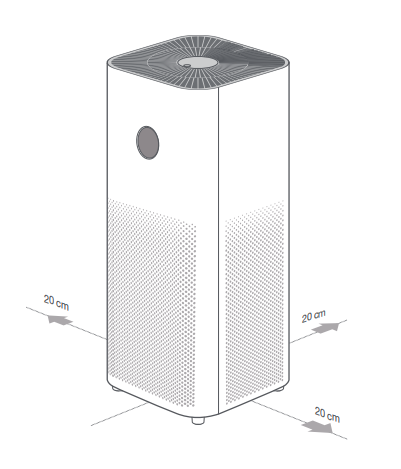
A: In order to better exert the performance of the Xiaomi Smart Air Purifier 4, the air inlet of the main unit should be kept at least 20 cm from the wall and other obstructions during use (refer to the following figure for details).
Q4: How does the Xiaomi Smart Air Purifier 4 connect to the power supply?
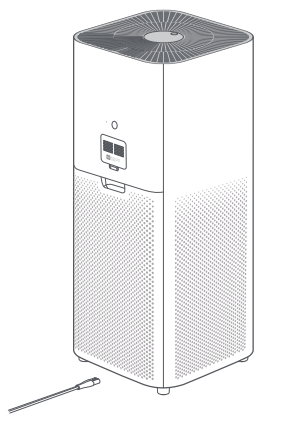
A: Connect the power cord to the power port on the bottom of the main unit, and then connect it to the power supply.
Product introduction and use
Q1: How to turn the Xiaomi Smart Air Purifier 4 on or off?
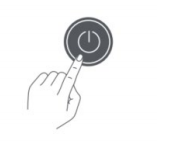
A: Press the power button to turn it on. When powered on, press the power button to power off.
When connected to the App, enter the plug-in and tap on/off to switch the device on and off.
Q2: How to switch modes on the Xiaomi Smart Air Purifier 4?
A: In the power-on state, press the mode switch button to cycle through automatic, sleep, gear, and manual modes.
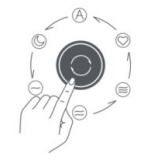
When connected to the App, enter the plug-in and tap Auto/Sleep/Favorite/Gear to switch the mode.
Q3: How to adjust the display brightness of the Xiaomi Smart Air Purifier 4?
A: Press the display on/off button to cycle through its brightness levels: on, dim, and off.
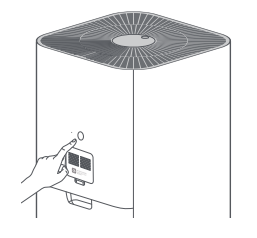
When connected to the App, enter the plug-in and tap the brightness of the display screen to adjust the screen off/slightly bright/normal brightness
Q4: How to switch the child lock on the Xiaomi Smart Air Purifier 4?
A: Press and hold the mode switch button for 7 seconds to turn the child lock on or off. The purifier emits the corresponding prompt sound, and the display screen displays the corresponding icon.
When the child lock function is on, the buttons are disabled.
When connected to the App, enter the plug-in and tap the child lock to enable or disable the child lock. After it is turned on, only the App can be used to control the purifier.
When the child lock function is on, the buttons are disabled.
When connected to the App, enter the plug-in and tap the child lock to enable or disable the child lock. After it is turned on, only the App can be used to control the purifier.
Q5: How to clean the fan blades and air duct of the Xiaomi Smart Air Purifier 4?
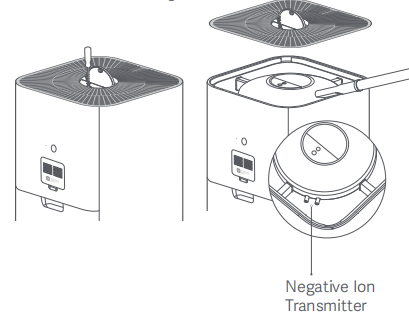
A: 1. Press the indentation on the cover to open it. Use a screwdriver to loosen the screw, and then pull the cover upwards to remove the grille.
2. Use a vacuum cleaner to clean the dust attached to the air duct and fan blades, or wipe gently with a soft cloth.
3. Gently wipe the negative ion emitter with a brush or soft cloth.
4. After cleaning is complete, replace the grille.
3. Gently wipe the negative ion emitter with a brush or soft cloth.
4. After cleaning is complete, replace the grille.
Note:
1. To avoid missing, the screw is not removable. Loosen the screw to remove the grille.
2. To avoid damaging the purifier, do not rinse or spray the air duct and fan blades directly with water, or wipe them with a soaking wet cloth.
Q6: How to clean the filter compartment of the Xiaomi Smart Air Purifier 4?
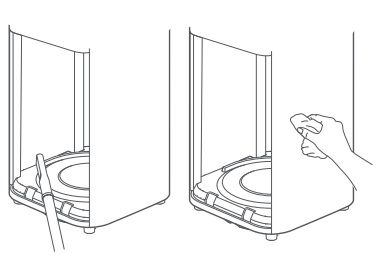
A: In order to ensure the ventilation and purification effect, you can use a vacuum cleaner to clean the dust attached to the air inlet hole and the warehouse wall, or gently wipe it with a soft cloth.
Note:
Do not directly rinse, spray with water, or wipe the filter compartment with a wet cloth with dripping water, so as not to damage the machine.
Q7: How to clean the laser particle sensor of the Xiaomi Smart Air Purifier 4?
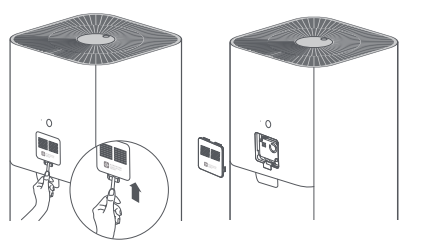
A: Use a non-sharp tool to open the door of the laser particle sensor, and use an air blow gun or a hair dryer to clean the door filter and sensor.
Note:
Do not use hot air.
Q8: What motor does the Xiaomi Smart Air Purifier 4 use?
A: The Xiaomi Smart Air Purifier 4 uses a DC brushless motor, supports stepless speed regulation, low noise, long life, the maximum noise of the whole machine is ≤62 dB(A), and sleep mode can be turned on when sleeping.
Q9: What is the upper position of the back of the Xiaomi Smart Air Purifier 4?
A: The position at the top of the back is the laser particle sensor, whose main function is to monitor the PM2.5 content in the ambient air.
Q10: Can the Xiaomi Smart Air Purifier 4 be placed sideways?
A: It is not recommended to place it horizontally. In order to form the maximum air circulation in the use space, let clean air blow all over the corner, and ensure the best purification effect, it is recommended to place the purifier vertically, and keep a distance of at least 20 cm from the back of the machine (there is a laser particle sensor on the back). Keep a space of 20 cm on the side and front (avoid blocking the air inlet). Placing the purifier horizontally will hinder the air circulation, resulting in poor purification effect.
Q11: Will the humidifier affect the PM2.5 value of the Xiaomi Smart Air Purifier 4?
A: Yes. Ultrasonic humidifiers atomize water into tiny water particles with high concentrations. The sensor of Xiaomi Smart Air Purifier 4 is very sensitive and can detect tiny water particles, so the detection reading will be high or even burst. When the humidifier is turned off, the reading will slowly return to normal. This is normal.
Q12: Why does the button on Xiaomi Smart Air Purifier 4 fail?
A: Xiaomi Smart Air Purifier 4 has a "child lock" function. If the child lock is turned on, pressing the button on the purifier will invalidate it. At this time, the child lock function needs to be released, and then the buttons can be operated on the purifier. Turning off the power and re-powering on or resetting the Wi-Fi will also release the child lock.
Q13: How to turn off/on the display on the Xiaomi Smart Air Purifier 4?
A: There is a display on/off button on the back of the Xiaomi Smart Air Purifier 4. Each time you press the button, the screen brightness will switch between on, dim, and off. If the Xiaomi Home App is connected, you can also adjust the brightness of the control screen in the App.
Q14: What filter does the Xiaomi Smart Air Purifier 4 come with as standard?
A: The standard Filter of Xiaomi Smart Air Purifier 4 is a combination of an antibacterial and antiviral high-quality filter and an activated carbon filter, which is an integrated high-quality filter.
Q15: What do the different colors of the air quality status light mean?
A: The air quality indicator corresponds to four colors of green, yellow, orange, and red with the change of the PM2.5 value.
Green: 1-20 μg/m³
Yellow: 21-35 μg/m³
Orange: 36-55 μg/m³
Red: >55 μg/m³
Q16: Why does the air quality indicator occasionally jump?
A: The air quality indicator of the Xiaomi Smart Air Purifier 4 is an intuitive response to PM2.5 concentration, and changes in color as the air quality data changes. When the value jumps at the critical point, the color of the indicator will also change with the corresponding value.
Q17: How is the lifespan of the Xiaomi Smart Air Purifier 4 Filter calculated?
A: Xiaomi Smart Air Purifier 4 will automatically and comprehensively calculate the service life of the Filter according to the air quality of the use environment, the purifier operating mode, operating speed, and time. If the air quality of the purifier is poor, the filter life will be shorter; if the air quality is better, the filter life will be longer. Overall, the filter life is about 6 to 12 months.
Q18: How often should the Filter of the Xiaomi Smart Air Purifier 4 be replaced?
A: If the purifier is in poor air quality, the filter life will be shorter; if the air quality is better, the filter life will be longer. Overall, the filter life is about 6 to 12 months. If the filter life recorded by the purifier is less than or equal to 10%, you will be reminded to recommend replacement from the display screen and App.
Q19: What are the precautions for the use of the formaldehyde removal filter?
A: Activated carbon products will adsorb formaldehyde, toluene, ammonia, TVOC, etc. The Filter activated carbon used by Xiaomi Smart Air Purifier 4 is a catalyst-activated carbon, which has a certain adsorption and neutralization effect on formaldehyde. However, the correct way to use it is to take out the filter element for a period of time (about 1 month) and ventilate it for relief. If the environment is not good, it will be shortened. Otherwise, there will be a risk of secondary pollution.
Q20: What to do if the formaldehyde removal filter is not effective?
A: The formaldehyde removal filter uses catalytic activated carbon, which mainly has a strong adsorption and reaction to formaldehyde. If the purifiers on the market now use granular carbon to remove formaldehyde, they basically belong to this category. The use of activated carbon to remove formaldehyde mainly involves using the adsorption effect of activated carbon, through repeated filtration of indoor air by the purifier, to adsorb formaldehyde in the air to achieve the effect of purification. This method is very scientific and environmentally friendly, and will not derive other components that are harmful to the human body. Formaldehyde is a slow-release gaseous pollutant. It is not released at one time, but is released slowly, even for several years. When the indoor temperature is higher than 19 degrees Celsius, formaldehyde will volatilize faster, and as the temperature rises, formaldehyde will volatilize faster. High, the volatilization rate will be accelerated. Safe filtration of formaldehyde requires a process.
If you are in a closed space and open the purifier for filtration, if it is 0.45 before filtration and 0.5 after opening overnight, it may be that the concentration of this closed space is too high. If it does not pass through the purifier overnight, the formaldehyde concentration may be much higher than 0.5. In addition, the instrument used by the customer to detect formaldehyde concentration also needs to be considered. As for the embodiment of the more intuitive filtering effect, at this stage, our purifier can not reflect it.
If it is found through accurate detection that the effect of the purifier in removing formaldehyde is not satisfactory, it is very likely that there is a source of pollution that continuously releases formaldehyde in the confined space environment. Prolonged ventilation is recommended.
Q21: Does the Xiaomi Smart Air Purifier 4 smell bad?
A: The purifier and the filter itself have no source of odor. After the new filter is used, it needs to filter PM2.5 and other pollutants in the air. The filter absorbs more pollutants, has been used for a long time, and the environment is relatively humid, etc. It is possible to produce peculiar odors in this case. At this time, the Filter needs to be ventilated and dried outdoors to relieve it, but it cannot be restored to the new state. This phenomenon is normal.
Q22: Does the Xiaomi Smart Air Purifier 4 Filter need to be reset after the replacement expires?
A: Xiaomi Smart Air Purifier 4 has an RFID tag module. When a new filter is replaced, there is no need to manually reset the filter life.
Q23: Why does Xiaomi Smart Air Purifier 4 have a poor purification effect?
A: Please check whether the area of use environment is consistent with the adaptable area and gear position of the machine. The airtightness and height of the room will also affect the purification effect.
Q24: Why is the value of PM2.5 high, and is it higher indoors than outdoors?
A: The water mist and oil fumes generated by using a humidifier indoors, smoking, cooking, etc., will affect the purifier's judgment of the pollution value. At the same time, the outdoor value in the App will be different from the actual value in local areas.
Q25: Why does the PM2.5 value of the Xiaomi Smart Air Purifier 4 also change when running without a filter element?
A: Without a filter element, PM2.5 may drop or rise. It is related to the use environment. Without a filter element, it is equivalent to a fan, which will make the indoor air circulate and mix the indoor air with high or low PM2.5 concentration. During this period, the air PM2.5 detected by the sensor is random. After a long time, the concentration of PM2.5 in the air tends to be uniform, and the sensor value will also tend to be stable.
Q26: Will the life of the Xiaomi Smart Air Purifier 4 decrease without changing the filter?
A: Without a filter element, filter life will not decrease. The life of the filter element is calculated automatically by the machine according to the air quality, operating state, and operating time, and is written on the label, so the life of the filter element will not be reduced if the filter element is not installed in the running state.
Q27: Will the humidity of the room decrease when the air purifier is turned on for a long time?
A: Yes, because the purifier will filter the particulate matter in the air and also filter the water vapor in the air; it will reduce the ambient air humidity, which is a normal phenomenon. Water molecules will attach to the filter material and activated carbon, resulting in lower humidity, interference with the performance of the purifier, and deviations in the displayed particle value.
Q28: Can the Xiaomi Smart Air Purifier 4 remove odors such as oil fumes?
A: Yes, but depending on the environment, it usually takes a long time for purification to be effective. At the same time, the amount of activated carbon in the filter and the length of time the filter has been used will affect the effectiveness of purifying odors.
Q29: Does the Xiaomi Smart Air Purifier 4 have an ion function?
A: Yes, the ion function is turned on by default, and it needs to be turned on or off through the Xiaomi Home App after the machine is connected to the Internet. After the ion function is turned on, the ion indicator on the screen lights up, and the product regularly releases negative ions during operation, and the negative ions combine with oxygen to form a form of negative oxygen ions to assist in the removal of pollutants in the air. After the normal environment is opened, ordinary people can't feel it.
Xiaomi Home App related
Q1: What are the networking precautions for the Xiaomi Smart Air Purifier 4?
A: The Xiaomi Smart Air Purifier 4 supports network control and is compatible with most personal routers on the market.
It should be noted that the wireless network of the router has the following requirements:
1. The Xiaomi Smart Air Purifier 4 can only connect to the 2.4GHz Wi-Fi network; 5GHz Wi-Fi is not supported.
2. The Wi-Fi encryption method needs to be WPA or WPA2, and WEP is not supported.
3. The router needs to enable DHCP. It does not support specifying static IP, web authentication, and 802.1X for enterprises.
Note:
The Xiaomi Home App needs to be downloaded to control the Xiaomi Smart Air Purifier 4.
Q2: How to remotely control the Xiaomi Smart Air Purifier 4 with a mobile phone?
A: Use the mobile phone to scan the QR code on the manual or install the Xiaomi Home App through the App Store, and bind the Xiaomi account to ensure that the Wi-Fi at home can be connected to the Internet normally, the mobile phone is connected to the Wi-Fi.
Turn on the purifier, and open the Xiaomi Home App. The App will automatically search for nearby Xiaomi smart devices and prompt, or tap the plus sign in the upper right corner to manually add devices. After adding the Xiaomi Smart Air Purifier 4 according to the prompts, you can control the purifier on/off, switch the operating mode, check the current indoor air quality, temperature and humidity, etc. through the mobile App.
Q3: How to reset the Wi-Fi on the Xiaomi Smart Air Purifier 4?
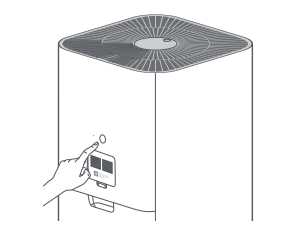
A: When connecting to the App for the first time or unable to connect to the App, press and hold the display on/off button on the back of the device for 7 seconds. The purifier will make a sound, and the networking precautions will be reset successfully
Q4: What to do if the Xiaomi Smart Air Purifier 4 keeps showing offline or is unable to connect to Wi-Fi in the App?
A: If the Xiaomi Smart Air Purifier 4 keeps showing offline or is unable to connect to Wi-Fi in the App, please refer to the following:
1. Confirm whether the Xiaomi Smart Air Purifier 4 is powered on and running normally.
2. Confirm whether the Wi-Fi is normal. Try rebooting the router and checking if the network is normal.
3. Please unplug the power cord, and then turn it on after 10 seconds (the power needs to be discharged for a while), try to reset the Wi-Fi of the Xiaomi Smart Air Purifier 4, and reconnect to the Wi-Fi.
Q5: What is the manual mode of the Xiaomi Smart Air Purifier 4?
A: The so-called favorite mode, that is, you can set the speed of the purifier fan through the Xiaomi Home App according to your needs, and can adjust the speed steplessly to adapt to the use area to achieve your favorite purification effect.
Q6: How to turn off the sound of the Xiaomi Smart Air Purifier 4?
A: When connected to the App, enter the plug-in and tap on the prompt tone to turn on and off the prompt tone.
FAQ and Troubleshooting
Q1: Why can't the Xiaomi Smart Air Purifier 4 be turned on?
A: If the Xiaomi Smart Air Purifier 4 can not be turned on, please refer to the following:
1. First, confirm that the socket is powered, and then confirm whether the power cord is properly inserted.
2. After the power cord is powered on, the machine will beep, and the screen turns on and then turns off. At this time, press the power button again.
3. If the machine beeps and the screen displays a prompt that the door is not closed or the top grille is not closed, it means that the machine is powered on. Often, the top grille or filter hatch is not in place and will need to be reinstalled.
4. If the above is invalid, please contact the after-sales inspection.
Q2: Are there vertical lines on the display of the Xiaomi Smart Air Purifier 4?
A: If the phenomenon persists after powering off for more than 10 seconds and then being plugged in again, the display screen has a performance failure and needs to be contacted for after-sales inspection.
Q3: Why does the screen of the Xiaomi Smart Air Purifier 4 show that the filter door is not closed?
A: Check whether the filter door is closed tightly, reassemble, and power off for 10 seconds to restart. If the above is invalid, please contact the after-sales inspection.
Q4: Why does the Xiaomi Smart Air Purifier 4 show that the top grille is not closed?
A: Check whether the top grille is closed tightly, reassemble, and power off for 10 seconds. If the above is invalid, please contact the after-sales inspection.
Q5: Why does the Xiaomi Smart Air Purifier 4 prompt motor failure?
A: Check whether the Filter is installed in place and reinstall the Filter.
Check whether there are foreign objects in the fan that cause the motor to be blocked or abnormal, and restart after 10 seconds of power failure. If the above is invalid, please contact the after-sales inspection.
Q6: What to do if the PM2.5 value is displayed abnormally or not on time?
A: When the PM2.5 value display is inaccurate or abnormal, you can check whether the door of the laser particle sensor on the back of the device is dirty and blocked. If it is clogged with dirt, open the laser particle sensor door with a non-sharp tool, use an air gun or blower (Do not use hot air.) The filter and sensor door can be cleaned. Use a waste toothbrush dipped in clean water to gently scrub the filter of the laser particle sensor door, clean it, and dry it before putting it back for testing. If the cleaning is invalid, please contact the after-sales service, and professional after-sales technicians will handle it. The values of multiple air cleaners in the same environment are different, and the values will also be different due to environmental factors such as different heights. It can be tested in sleep mode and with different levels of smoke. If the error value increases linearly, it means that the laser particle sensor is faulty. If the error value is within a certain range, it means it is normal.
Q7: Why is there a current sound when the Xiaomi Smart Air Purifier 4 is turned off?
A: This sound is the current sound produced by the inductor on the DC-DC circuit. Since the motherboard needs to convert the 24 V voltage into 5 V or 3.3 V voltage, it needs to constantly switch the inductor at high frequency, and the inductor has been converting electrical energy into a magnetic field energy, and then converts the magnetic field energy into electrical energy. This energy conversion will cause the inductor to generate a slight current sound, which is a normal phenomenon.
Q8: Why does the fan of the purifier laser particle sensor sometimes not turn?
A: The boot screen is displayed normally, the sensor is always working, and the value is displayed in real time. When the display is off, in order to reduce the use time of the sensor and increase the service life, the sensor will start every 2 minutes and continue to work for 12-15 seconds. The sensor will continue to work when the App is open, and the sensor will work intermittently after the App is closed and the screen is turned off for 5 minutes.
Q9: How to deal with the abnormal noise of the Xiaomi Smart Air Purifier 4?
A: 1. If there is abnormal noise during work, firstly check whether the filter installation is normal and whether the filter bag is removed.
2. Next, check whether there are foreign objects entering the purifier. If any foreign objects fall into the purifier, open the filter compartment and take out the foreign objects.
3. Check whether there is foreign matter entering the laser particle sensor.
Q10: When multiple air purifiers are used in the same environment, why are the air quality indicators displayed in different colors?
A: First of all, in the actual environment, since dust will flow with the flow of air, it is difficult to ensure that the dust value in any two places is the same, even in the same small room. The Xiaomi Smart Air Purifier 4 sensor sensitivity is very high, so there will be differences as well. PM2.5 difference between two air purifiers (difference calculation method: (average-reading)/average), within 10% is a normal phenomenon.
Second, any electronic device is subject to tolerances, which can cause differences in sensor-related voltages, which in turn cause differences in sensor output values. If the PM2.5 readings of the two purifiers are quite different, there may be dust accumulation on the sensor door. You can remove the sensor door to clean the dust. The colors of the air quality indicators of the two purifiers are different in the same environment. As mentioned above, due to the difference in PM2.5, the values detected by the two sensors are both near the critical value, one is above the critical value, and the other is at the critical value. Under the air quality indicator, the color of the air quality indicator is different
Q11: Why does it prompt to use the genuine filter after replacing the filter?
A: Xiaomi Smart Air Purifier 4 has an RFID tag module. When a new genuine filter with an RFID tag is replaced, the life of each filter can be accurately identified without the need to manually reset the filter life. When the new genuine filter is installed and the prompt to install the genuine filter appears, please confirm whether the original genuine filter is used, check whether the filter installation position is in place, reinstall the filter, power off for 10 seconds, and restart. If the above is invalid, please contact the after-sales inspection.
Q12: Can the Xiaomi Smart Air Purifier 4 be retrofitted?
A: No. There are other third-party purifier accessories to change the way the purifier itself is used, and they cannot be used in combination with purifier products. For example, connect the outdoor air to the purifier Filter through a pipe, or add a humidifier to the air outlet of the machine etc. Once the modification is used, it may affect the performance, stability, and safety of the product. Therefore, it is forbidden to change the original usage mode of the purifier
Does it help?
Yes
No