

Xiaomi Smart Doorbell 3S FAQ
Xiaomi Smart Doorbell 3S FAQ
Features
1. Q: What are the features of the Xiaomi Smart Doorbell 3S?
A: For your reference, here are some features of the Xiaomi Smart Doorbell 3S as below:
1. The Xiaomi Smart Doorbell 3S comes with a 2K HD resolution and 3 million ultra-clear pixels, making each frame clear;
2. It has a built-in 5200mAh rechargeable lithium battery, ridding the trouble of changing batteries frequently;
3. It has a 180° diagonal ultra-wide field of vision, grasping the dynamics in front of the door fully;
4. With the new generation local AI humanoid detection algorithm, the video does not need to be uploaded to the cloud for recognition, which can quickly identify the humanoid contours and track shooting;
5. With the IP65 dustproof and waterproof, it is suitable for outdoor installation and use;
6. It provides the dual power supply options. You can choose between a lithium battery and a wired power supply.
2. Q: What are the upgrades of the Xiaomi Smart Doorbell 3S compared to the Xiaomi Smart Doorbell 3?
A: For your reference, here are some upgrades of the Xiaomi Smart Doorbell 3S compared to the Xiaomi Smart Doorbell 3:
1. The Xiaomi Smart Doorbell 3S supports IP65 dustproof and waterproof, and can be installed and used outdoors;
2. The Xiaomi Smart Doorbell 3S supports dual power supply modes, with a choice of lithium battery or wired power supply;
3. The Xiaomi Smart Doorbell 3S supports custom detection areas. You can customize the detection areas according to your needs so that you can only receive the notifications you care about;
4. The Xiaomi Smart Doorbell 3S has a new night vision sensitivity adjustment function to avoid inaccurate night vision switching.
3. Q: What does the Xiaomi Smart Doorbell 3S include as standard?
A: The Xiaomi smart doorbell 3S, mounting base, angle holder, chime, removal pin, Type-C charging cable, screws bag (wall screw × 2, wall plug × 2, angle holder screw × 2), U-type extension wire × 2, insulating cap × 2, U-type double terminal wire, user manual, and attention sticker.
4. Q: What is the weight of the Xiaomi Smart Doorbell 3S?
A: The doorbell’s net weight is 217g and the chime’s net weight is 61g.
5. Q: What is the appearance of the Xiaomi Smart Doorbell 3S?
A: The appearance of the Xiaomi Smart Doorbell 3S is introduced as follows:
There is a Microphone, Lens, Infrared Sensor, Doorbell Button, Speaker, Mounting Base, Removal Hole, Charging Indicator, Anti-removal Button, Reset Button, Charging Port, and Binding Post.
The appearance of the Xiaomi Smart Doorbell Chime is introduced as follows:
There is a Power Port on the top of the chime, and a Pairing/Volume Button located below the chime.
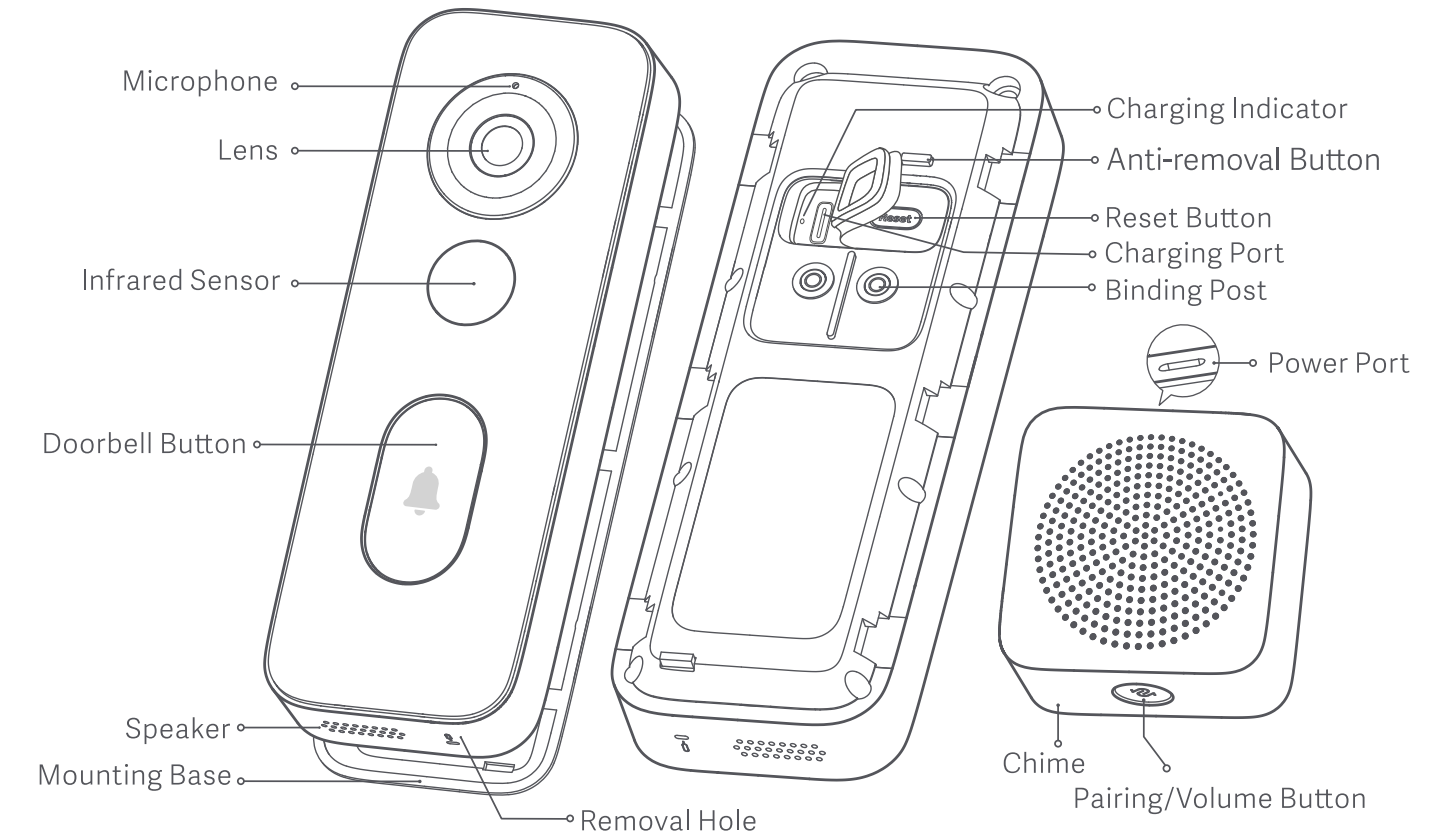
The actual picture is as follows:
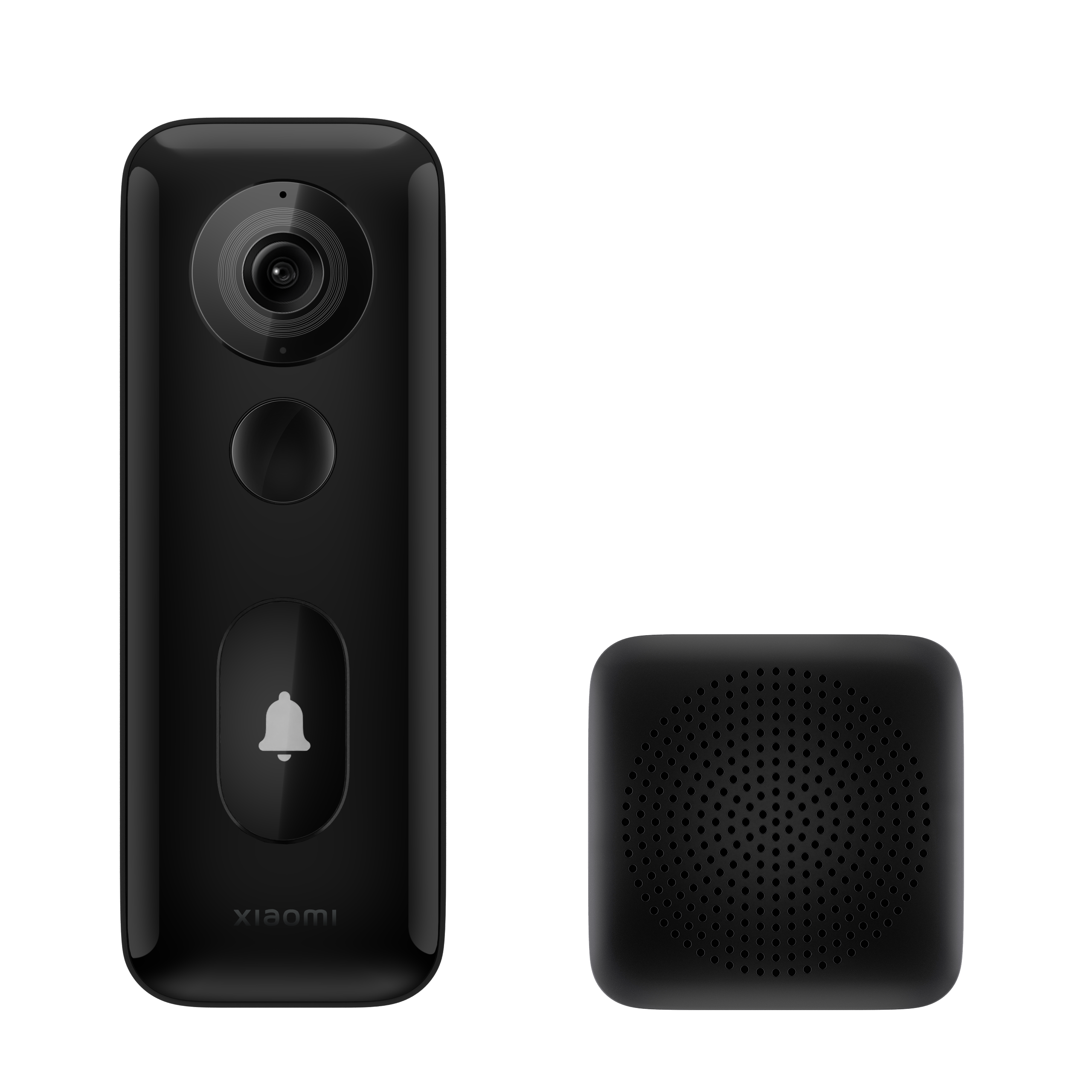
The dimensions of the Xiaomi Smart Doorbell 3S are 146mm* 52mm* 28.5mm and the dimensions of the Xiaomi Smart Doorbell Chime are 60mm* 60mm* 55.95mm.
6. Q: What is the power supply method of the Xiaomi Smart Doorbell 3S?
A: For dual power supply options, please choose either a lithium battery or a wired power supply. The Xiaomi Smart Doorbell 3S has a built-in 5200mAh rechargeable lithium battery and the doorbell can be removed and recharged when the battery is low or depleted. For Type-C interface charging, please use a safety-certified 5V2A or 5V/1A mobile phone charging adapter to charge the doorbell.
Wiring installation is only suitable for existing old-fashioned doorbells and speakers and the wiring installation operation is relatively complicated. So it is recommended for those with some hands-on skills.
7. Q: What are the installation methods for the Xiaomi Smart Doorbell 3S?
A: For your reference, there are two installation methods as below:
1. Double-sided tape installation:
It is suitable for surfaces made of smooth wood, metal, and smooth ceramic tiles. Please clean the surface before installation, peel off the release liner from the double-sided tape and stick the mounting base on the selected location with the arrow pointing upward;
2. Expansion screw installation:
Use an electric drill to drill holes and use expansion screws to install on the wall on one side of the door lock. It is suitable for cement and gray walls.
8. Q: What are the steps to install the Xiaomi Smart Doorbell 3S on the wall (expansion screws)?
A: For your reference, here are the steps to install the Xiaomi Smart Doorbell 3S:
1: According to the real-time image of the doorbell, select the appropriate installation location (The recommended installation height is 1.4-1.6 meters) and write down the installation location of the doorbell. Then you can use a pencil to mark the screw holes;
Note:
If you need to install an angle bracket, you need to mark the opening position of the angle holder.
2: Use an electric drill to create a hole with a diameter of 6mm at the opening position, and insert wall plugs into the openings;
3: Fix the mounting base. If you need an angle holder, fix the angle holder first, then install the doorbell base on the angle holder;
4: After securing the doorbell base in place, simply snap the doorbell onto the base, and the installation is complete.
Note:
1. The installation wall must be able to withstand at least 10 times the total weight of the doorbell;
2. To prevent injury, it is essential to securely fasten the device to the wall following the installation instructions;
3. The doorbell does not come with installation services, so handle installation and removal carefully to avoid damage to the wall or other surfaces;
4. Detailed installation tutorials can be found on the doorbell settings page.
9. Q: How to wire and power the Xiaomi Smart Doorbell 3S?
A: Please follow the installation instructions strictly:
Open the [Mi Home] app >> select your doorbell card >> [Settings] (3 dots icon at the upper right corner) >> [Installation Tutorial].
10. Q: How to choose the installation height and location of the Xiaomi Smart Doorbell 3S?
A: You can choose the installation height and location of the Xiaomi Smart Doorbell 3S as below:
1. Installation height:
After adding the doorbell to Mi Home, enter the real-time screen before installation. Select the installation height and location according to the screen displayed on the mobile phone. After selecting the location, tear off the 3M adhesive release paper and proceed with mounting.
It is recommended to install the camera should a height of 1.4-1.6 meters above the ground. Please choose the installation height and position based on the heights of you and your family members;

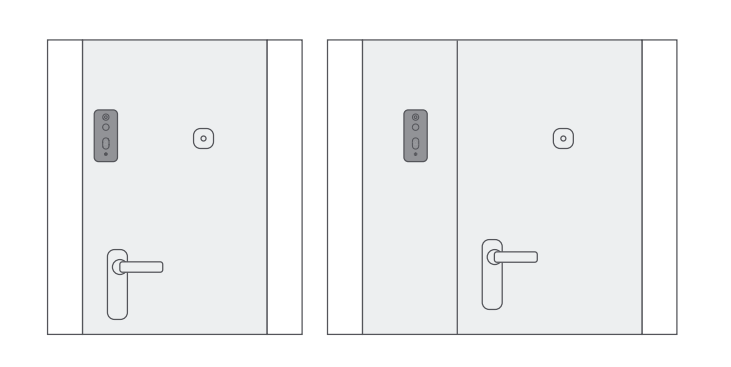
2. Installation location:
Before installation, enter the real-time video intercom interface and select the installation height and location according to the screen displayed on the mobile phone. After selecting the location, please tear off the 3M adhesive release paper and mount it.
The recommended installation location is as shown in the figure:
11. Q: What status indicators does the Xiaomi Smart Doorbell 3S have? What do they mean?
A: Xiaomi Smart Doorbell 3S has a two-color button light and a two-color charging indicator light.
1. When you get the doorbell for the first time and reset it while waiting to connect to the network, the indicator flashes in orange;
2. When the binding and connecting network fails, the orange light is always on, and you need to reconnect at this time;
3. After the doorbell is successfully bound, the white light on the indicator will turn on, and the white light will go off after entering sleep mode;
4. When someone passes by the door and triggers the doorbell to take a photo or presses the doorbell, the white indicator will illuminate;
5. When the charging indicator light is red, the doorbell is being charged. When it is green, the doorbell is fully charged.
12. Q: Does the Xiaomi Smart Doorbell 3S support to expand Micro SD cards?
A: The Xiaomi Smart Doorbell 3S does not support to expand Micro SD cards.
Doorbell recording and storage of videos only supports cloud storage.
13. Q: How to restore the factory settings of the Xiaomi Smart Doorbell 3S?
A: If you need to change the network or Mi Home App account to connect to the doorbell, use the pin to separate the doorbell from the installation base. Press and hold the RESET button on the back of the doorbell until you hear the prompt "Reset successful, beep." The doorbell is now successfully reset. If the doorbell is not deleted from the original account, other accounts cannot be bound.
14. Q: Does the Xiaomi Smart Doorbell 3S support infrared night vision function?
A: Support. After the Xiaomi Smart Doorbell 3S infrared night vision mode switch is adjusted to automatic mode, the doorbell can automatically switch to night vision mode according to changes in surrounding light. The light wave of the infrared lamp is 940nm, which is invisible to the naked eye. When the infrared light is on, it can be seen through the mobile phone camera, which is normal.
15. Q: In which countries or regions can the Xiaomi Smart Doorbell 3S be used?
A: The Xiaomi Smart Doorbell 3S can be used in any country or region where the Xiaomi Smart Doorbell 3S can be purchased through formal channels.
16. Q: Does the Xiaomi Smart Doorbell 3S support the NAS transfer function?
A: Not support.
17. Q: How to check the SN of the Xiaomi Smart Doorbell 3S?
A: The SN can be checked from the product packaging and the label on the back of the doorbell (The chime is an accessory, and the chime SN is the factory serial number. It is normal to be inconsistent with the doorbell SN).
1. The SN barcode label is located on the back of the product packaging box. You can find the SN number here;
2. The label on the back of the doorbell.
18. Q: What are the specifications of the lens of the Xiaomi Smart Doorbell 3S?
A: 1. The Xiaomi Smart Doorbell 3S uses a 180° diagonal ultra-wide viewing angle lens and a 3M high-definition pixel sensor, making the image real and clear;
2. The F2.0 large aperture lens significantly increases the amount of light entering, allowing you to capture picture details even in weak light.
19. Q: What is the infrared detection angle of the Xiaomi Smart Doorbell 3S?
A: The infrared detection angle of the Xiaomi Smart Doorbell 3S is 100° (the angle that motion detection can detect). This angle does not correlate with the camera's wide-angle perspective.
20. Q: What are the principles and characteristics of infrared detection of the Xiaomi Smart Doorbell 3S?
A: The Xiaomi Smart Doorbell 3S is equipped with a PIR sensor, which can detect the infrared radiation emitted by a human body (or other objects) within the monitoring range. This allows the doorbell to promptly detect the presence of individuals in front of the door and react accordingly.
Note:
Infrared detection is greatly affected by temperature. In winter, spring, and autumn, when there is a significant temperature difference between the human body and the environment, the triggering distance is longer. In summer, when the temperature difference is smaller, the triggering distance is shorter.
21. Q: Can the Xiaomi Smart Doorbell 3S be installed outdoors?
A: The Xiaomi Smart Doorbell 3S supports IP65 dustproof and waterproof, and can be installed and used outdoors.
22. Q: How to charge the Xiaomi Smart Doorbell 3S when the battery is low?
A: Before disassembly, please turn off the removal alarm in the Mi Home App.
1. Insert the removal pin into the pinhole on the top of the doorbell, and press the removal pin firmly;
2. Press the removal pin and push the doorbell upward to remove the doorbell from the base;
3. Use the Type-C power cord to connect to the charging port under the doorbell, and use the mobile phone power adapter (The charging head is 5V2A with safety certification. A safety-certified wiring board with a charging interface can also be used). It takes about 3-5 hours (The charging time is related to the power adapter used. It is recommended that the output capacity of the power adapter is 2A, and the full charging time is about 3.5 hours. If the output current capacity is lower than 2A, the charging time will be longer);
4. After it is fully charged, just press the correct direction and fasten it to the installation base. There is no need to turn on the doorbell, and the doorbell will turn on automatically.

23. Q: How long is the standby time of the Xiaomi Smart Doorbell 3S after it is fully charged?
A: In the standard mode (Do not turn on the real-time image switch) and a laboratory environment (The temperature is 25° and the Wi-Fi signal strength is greater than 70%), you can shoot 20 10-second videos per day and it will last approximately 3.7 months. The actual battery life is related to the specific doorbell settings and usage environment. Please refer to the actual situation.
24. Q: What is the power supply method and working power of the Xiaomi Smart Doorbell 3S chime?
A: The chime is powered by a Type-C power cable. Please use a safety-certified 5V/1A mobile phone charging adapter (charging head) to power the chime. The most appropriate working power is 2W.
25. Q: How many ringtones does the Xiaomi Smart Doorbell 3S chime have?
A: There are 4 built-in ringtones, and custom ringtones are not available.
26. Q: How to adjust the volume of the Xiaomi Smart Doorbell 3S chime?
A: Press the pairing/volume button to adjust the volume cyclically.
27. Q: Can the Xiaomi Smart Doorbell 3S be connected to the Xiaomi Smart Doorbell 3 chime?
A: It can be used universally. Please follow the pairing method of the Xiaomi Smart Doorbell 3S.
28. Q: Can Xiaomi Smart Doorbell 3S connect to multiple chimes? How to connect?
A: Yes, it can. Please follow the instructions in the manual for pairing. Up to 4 chimes can be paired.
29. Q: What is the normal working distance between the Xiaomi Smart Doorbell 3S and the chime?
A: The 433MHz connection is used between the chime and the doorbell, which can reach 100 meters without interference and obstruction. Actual conditions will vary depending on the layout of your home. 433MHz is a public civilian frequency band (The car remote keys use this frequency band). If the interference in similar frequency bands in the use environment is large, the transmission distance and use effect will be reduced.
30. Q: Will the doorbell ring if you press the doorbell button after the Xiaomi Smart Doorbell 3S is disconnected from the Internet?
A: When the doorbell is disconnected from the network, after pressing the doorbell button, the doorbell will ring. If the chime is powered normally, the chime will ring, too. But the doorbell cannot upload the captured video to the cloud, and the App cannot view the video during the network disconnection.
31. Q: Can the Xiaomi Smart Doorbell 3S make the existing doorbell speaker ring?
A: No, the Xiaomi Smart Doorbell 3S cannot make the indoor speaker used by the original ordinary doorbell ring.
32. Q: Does the Xiaomi Smart Doorbell 3S support two-way voice calls?
A: Support. The Xiaomi Smart Doorbell 3S has a built-in microphone and uses active noise reduction technology to eliminate speaker echo and effectively improve the call experience.
33. Q: Can the Xiaomi Smart Doorbell 3S connect to 5GHz Wi-Fi?
A: No, it can not.
34. Q: Does the Xiaomi Smart Doorbell 3S support the Bluetooth gateway function?
A: Not support.
35. Q: Can the Xiaomi Smart Doorbell 3S be linked with the Xiaomi/ Redmi touch screen speakers/ Xiaomi Bluetooth speakers?
A: Not support.
36 Q: Can the Xiaomi Smart Doorbell 3S be linked to Google Assistant or Alexa?
A: Yes, it can.
You can follow the steps below to link the Xiaomi Smart Doorbell 3S with Alexa:
1. Open the Alexa App and tap [More] at the lower right corner;
2. Tap on [Skills & Games];
3. Tap the search box in the picture;
4. Enter “Mi Home” in the search box;
5. Tap [Mi Home];
6. Follow the prompts to link your Amazon and Mi account;
7. After association, you can find the doorbell on the [Devices] interface and set it up.
You can also follow the steps as below to link the Xiaomi Smart Doorbell 3S with Google Assistant:
1. Open Google Home;
2. After adding the residence, tap [Settings];
3. Scroll to the bottom of the page and tap [Compatible with Google Services];
4. Search for “Mi Home” in the search box;
5. Log into your Mi account and establish an association with your Google account;
6. Select the Xiaomi Smart Doorbell 3S on the pop-up page;
7. Tap Xiaomi Smart Doorbell 3S on the main page to set it up.
37. Q: Does the Xiaomi Smart Doorbell 3S support HomeKit?
A: Not support.
38. Q: Can the Xiaomi Smart Doorbell 3S be linked with the Xiaomi TV?
A: No, it can not.
39. Q: What should I pay attention to when using the Xiaomi Smart Doorbell 3S?
A: 1. The applicable working temperature of this product is -20℃~50℃. Please do not use this product in an environment where the temperature is too high or too low;
2. This product is a precision electronic product. Please do not use this product in an environment that is excessively humid or may cause water to enter the product, so as not to affect normal use;
3. For you to better use this product, avoid placing the front and side of the lens close to the glass, white walls and other reflective objects, so as not to cause the picture to be bright near, dark or white in the distance;
4. Please ensure that this product is installed within the coverage of Wi-Fi signal, and place it in a location with better Wi-Fi signal as much as possible. Try to install it as far away from metal and microwave ovens as possible, which may affect the signal.
Related to Mi Home App
1. Q: How to connect the Xiaomi Smart Doorbell 3S to the Mi Home App?
A: For your reference, you can connect the Xiaomi Smart Doorbell 3S to the Mi Home App as follows:
Method 1:
1. Open the [Mi Home] App >> select [Device] >> tap [+] at the upper right corner >> tap [Scan] and scan the QR code on the back of the doorbell;
2. Press and hold the reset button on the back of the doorbell. When the doorbell plays “reset successfully” and continuously broadcasts a "beep" sound, the doorbell enters the mode to be bound;
3. Follow the Mi Home App prompts, after the doorbell enters the binding mode, tap [Device has been reset] >> Mi Home App jumps to the page for scanning nearby devices >> select 2.4GHz Wi-Fi >> enter the Wi-Fi password >> tap [Next] >> wait for the device to connect and pair;
4. After the pairing is completed, select the device location and name the device. Then the device is added successfully.
Method 2:
Note:
This way is only supported by Android phones and iOS devices are not supported.
1. Go to the [Mi Home] App >> tap [Device] >> tap the [+] icon at the upper right corner >> tap [Add a device];
2. Press and hold the [Reset] button on the back of the doorbell. When the doorbell plays “reset successfully” and continuously broadcasts a "beep" sound, the doorbell enters the mode to be bound;
3. The Mi Home App automatically searches for nearby doorbells that have entered the binding mode;
4. Tap the doorbell icon to be bound displayed in the automatic search to enter the router selection interface. And the mobile phone will prompt “Connect to other routers”. If the mobile phone is connected to a Wi-Fi that meets the requirements, the Wi-Fi will be automatically displayed in the list below, and you can tap to connect directly;
5. Tap to connect to other routers. The mobile phone interface displays the name of the wireless network in the current environment;
6. Tap the network you want to connect to. The mobile phone interface will display the password input interface. Tap [OK];
7. You can search for "Xiaomi Smart Doorbell 3S", follow the prompts and wait for the binding to be successful.
Method 3:
1. Go to [Mi Home] App >> tap [Device] at the lower left corner >> tap the [+] icon at the upper right corner >> tap [Add device];
2. Select cat's eye doorbell >> select Xiaomi Smart Doorbell 3S;
3. Press and hold the [RESET] button on the back of the doorbell. When the doorbell plays “reset successfully” and continuously broadcasts a "beep" sound, the doorbell enters the mode to be bound;
4. The Mi Home App automatically searches for nearby doorbells that have entered the binding mode.
2. Q: How to troubleshoot the problem when the Xiaomi Smart Doorbell 3S cannot be found on the nearby devices in the Mi Home App?
A: 1. Check and confirm that the version of Mi Home App is the latest;
2. Confirm that you are using an Android phone and the Wi-Fi is turned on (IOS phones do not support automatic search for nearby devices);
3. In the Mi Home App, select [Profile] >> [Settings] >> [Region] >> you can modify the country or region where the Xiaomi Smart Doorbell 3S can be used;
4. Check whether the doorbell has been bound by others. The doorbell can only be actively bound by one account;
5. Confirm that the location permission of Mi Home App has not been closed. Manually closing the application location permission may prevent automatic device discovery;
6. Ensure that the distance between the mobile phone and the device is close enough, and there is no strong interference in the surrounding network environment;
7. Confirm that the doorbell is in the state to be bound (The doorbell continues to broadcast the sound of beep after resetting).
3. Q: Can Xiaomi Smart Doorbell 3S be automatically found by nearby devices in the Mi Home App?
A: Yes, but it only supports Android phones at present. IOS devices such as iPhone are not supported temporarily. You need to turn on mobile Wi-Fi and the doorbell is in the mode to be connected.
4. Q: How to set the doorbell button light of the Xiaomi Smart Doorbell 3S?
A: Go to the [Mi Home] App >> select the Doorbell >> [Setting] (three dot icons at the upper right corner) >> [Doorbell settings] >> choose to turn on/off [Doorbell button light].
Additionally, here are some statuses of the indicator for your reference:
1. After the switch is turned on, when someone triggers the doorbell shooting or rings the doorbell, the white indicator will be continuously on until the video shooting is finished;
2. When charging, the white indicator is breathing;
3. The indicator is on for a long time after being fully charged;
4. When the charging state is abnormal, the indicator flashes.
Note:
The setup is completed just on the App, and the doorbell needs to be triggered (triggered by pressing the doorbell or by someone moving) before the doorbell comes online again to take effect.
5. Q: How to set the ringing tone of the Xiaomi Smart Doorbell 3S (not chime)?
A: Go to the [Mi Home] App >> select doorbell card >> [Settings] (three dot icons at the upper right corner) >> [Doorbell settings] >> [Ringtone settings] >> select [Ringtone 1], [Ringtone 2] or [Ringtone 3].
Note:
The setup is completed just on the App, and the doorbell needs to be triggered (triggered by pressing the doorbell or by someone moving) before the doorbell comes online again to take effect.
6. Q: How to set and modify the volume of the Xiaomi Smart Doorbell 3S(not chime)?
A: Go to the [Mi Home] App >> select doorbell card >> [Settings] (three dot icons at the upper right corner) >> [Doorbell settings] >> [Adjust volume] >> select the volume (0%, 25%, 50%, 75%, 100%).
Note:
Ringtone volume is related to all volumes of the doorbell. If 0% is selected, it is normal to be silent during the voice call.
7. Q: How to set the auto reply of the Xiaomi Smart Doorbell 3S?
A: 1. Go to the [Mi Home] App >> select doorbell card >> [Settings] (three dot icons in the upper right corner) >> [Doorbell settings] >> turn on [Auto reply];
2. Select [Effective time] >> select [Daily];
3. Select [Scheduled replies] >> you can choose to reply throughout the day, or you can choose to reply at a scheduled time;
4. Select [Voice reply] >> select [Please wait a moment] or [Add voice reply].
Note:
The setup is completed just on the App, and the doorbell needs to be triggered (triggered by pressing the doorbell or by someone moving) before the doorbell comes online again to take effect.
8. Q: How to add /delete the auto reply voice of the Xiaomi Smart Doorbell 3S?
A: Go to the [Mi Home] App >> select doorbell card >> [Settings] (three dot icons in the upper right corner) >> [Doorbell settings] >> turn on [Auto reply] >> [Voice reply] >> [Add voice reply] >> recording is completed >> name the recorded audio >> [OK].
Note:
1. The setup is completed just on the App, and the doorbell needs to be triggered (triggered by pressing the doorbell or by someone moving) before the doorbell comes online again to take effect;
2. The Xiaomi Smart Doorbell 3S supports adding 2 automatic reply voice messages. The maximum length of recorded voice is 10 seconds.
9. Q: How to turn off or turn on the Xiaomi Smart Doorbell 3S removal alarm switch?
A: Go to the [Mi Home] App >> select doorbell card >> tap [Settings] (three dot icons in the upper right corner) >> tap [Doorbell settings] >> turn on/off [Removal alarm].
Note:
1. When the doorbell is being removed, the alarm will go off and will record and send a notification to the phone;
2. The setup is completed just on the App, and the doorbell needs to be triggered (triggered by pressing the doorbell or by someone moving) before the doorbell comes online again to take effect;
3. The prerequisite for the removal alarm to be effective is that the doorbell has power and the Internet is normal.
10. Q: How to open the real-time footage function of the Xiaomi Smart Doorbell 3S?
A: Go to the [Mi Home] App >> select doorbell card >> [Settings] (three dot icons at the upper right corner) >> [Doorbell settings] >> select [Real-time footage] >> select [Standard mode] or [Real-time mode].
Note:
The setup is completed just on the App, and the doorbell needs to be triggered (triggered by pressing the doorbell or by someone moving) before the doorbell comes online again to take effect.
11. Q: How to set the infrared night vision function of the Xiaomi Smart Doorbell 3S?
A: Go to [Mi Home] App >> select doorbell card >> [Settings] (three dot icons in the upper right corner) >> [Doorbell settings] >> [Infrared night vision] >> select [Auto], [Always off] or [Always on].
After the setting is completed, it is only set on the App side. After the doorbell needs to be triggered (press the doorbell or move the trigger), the doorbell will go online again and take effect.
Note:
1. Xiaomi Smart Doorbell 3S infrared night vision lamp is invisible to the eye;
2. When the infrared night vision is set in auto mode, the doorbell decides to shoot black-and-white or color video according to the ambient light;
3. When the infrared night vision is set in always-on mode, the doorbell will always shoot black-and-white video, which has nothing to do with the ambient light. This is a normal phenomenon;
4. When the infrared night vision is set to always off, the doorbell will always take color video, but when there is no light in front of the doorbell, the video taken by the doorbell will be dark. The dark one is also colored, which is the same as what human eyes see in the dark. At the same time, the naked eye can't see the environmental objects.
12. Q: How to set the night vision sensitivity of the Xiaomi Smart Doorbell 3S?
A: Go to the [Mi Home] App >> select doorbell card >> [Settings] (three dot icons at the upper right corner) >> [Doorbell settings]>> [Infrared night vision] >> select [Auto] >> select sensitivity.
13. Q: How to connect the Xiaomi Smart Doorbell 3S to the indoor chime?
A: It should be noted that the Xiaomi Smart Doorbell 3S and the chime have been paired before leaving the factory, and the chime can be used directly after being powered on.
For your reference, you can pair the Xiaomi Smart Doorbell 3S with the indoor chime as follows:
Go to the [Mi Home] App >> select doorbell card >> [Settings] (three dot icons at the upper right corner) >> [Indoor chime settings] >> [Connect to doorbell chime] >> [Connect]. After the chime is powered on, press and hold the pairing button for 3 seconds and select it when you hear a "beep" sound. Then tap [Next] >> press the doorbell button >> [Send pairing code]. When the chime rings, the connection is successful.
14. Q: How to set the ringing sound effect of the Xiaomi Smart Doorbell 3S chime?
A: Go to the [Mi Home] App >> select doorbell card >> [Settings] (three dot icons at the upper right corner) >> [Doorbell settings] >> [Indoor chime settings] >> [Ringtone] >> select [Ding-dong/Fantasy/Comic/Clarinet].
Features
1. Q: What are the features of the Xiaomi Smart Doorbell 3S?
A: For your reference, here are some features of the Xiaomi Smart Doorbell 3S as below:
1. The Xiaomi Smart Doorbell 3S comes with a 2K HD resolution and 3 million ultra-clear pixels, making each frame clear;
2. It has a built-in 5200mAh rechargeable lithium battery, ridding the trouble of changing batteries frequently;
3. It has a 180° diagonal ultra-wide field of vision, grasping the dynamics in front of the door fully;
4. With the new generation local AI humanoid detection algorithm, the video does not need to be uploaded to the cloud for recognition, which can quickly identify the humanoid contours and track shooting;
5. With the IP65 dustproof and waterproof, it is suitable for outdoor installation and use;
6. It provides the dual power supply options. You can choose between a lithium battery and a wired power supply.
2. Q: What are the upgrades of the Xiaomi Smart Doorbell 3S compared to the Xiaomi Smart Doorbell 3?
A: For your reference, here are some upgrades of the Xiaomi Smart Doorbell 3S compared to the Xiaomi Smart Doorbell 3:
1. The Xiaomi Smart Doorbell 3S supports IP65 dustproof and waterproof, and can be installed and used outdoors;
2. The Xiaomi Smart Doorbell 3S supports dual power supply modes, with a choice of lithium battery or wired power supply;
3. The Xiaomi Smart Doorbell 3S supports custom detection areas. You can customize the detection areas according to your needs so that you can only receive the notifications you care about;
4. The Xiaomi Smart Doorbell 3S has a new night vision sensitivity adjustment function to avoid inaccurate night vision switching.
3. Q: What does the Xiaomi Smart Doorbell 3S include as standard?
A: The Xiaomi smart doorbell 3S, mounting base, angle holder, chime, removal pin, Type-C charging cable, screws bag (wall screw × 2, wall plug × 2, angle holder screw × 2), U-type extension wire × 2, insulating cap × 2, U-type double terminal wire, user manual, and attention sticker.
4. Q: What is the weight of the Xiaomi Smart Doorbell 3S?
A: The doorbell’s net weight is 217g and the chime’s net weight is 61g.
5. Q: What is the appearance of the Xiaomi Smart Doorbell 3S?
A: The appearance of the Xiaomi Smart Doorbell 3S is introduced as follows:
There is a Microphone, Lens, Infrared Sensor, Doorbell Button, Speaker, Mounting Base, Removal Hole, Charging Indicator, Anti-removal Button, Reset Button, Charging Port, and Binding Post.
The appearance of the Xiaomi Smart Doorbell Chime is introduced as follows:
There is a Power Port on the top of the chime, and a Pairing/Volume Button located below the chime.
The actual picture is as follows:
The dimensions of the Xiaomi Smart Doorbell 3S are 146mm* 52mm* 28.5mm and the dimensions of the Xiaomi Smart Doorbell Chime are 60mm* 60mm* 55.95mm.
6. Q: What is the power supply method of the Xiaomi Smart Doorbell 3S?
A: For dual power supply options, please choose either a lithium battery or a wired power supply. The Xiaomi Smart Doorbell 3S has a built-in 5200mAh rechargeable lithium battery and the doorbell can be removed and recharged when the battery is low or depleted. For Type-C interface charging, please use a safety-certified 5V2A or 5V/1A mobile phone charging adapter to charge the doorbell.
Wiring installation is only suitable for existing old-fashioned doorbells and speakers and the wiring installation operation is relatively complicated. So it is recommended for those with some hands-on skills.
7. Q: What are the installation methods for the Xiaomi Smart Doorbell 3S?
A: For your reference, there are two installation methods as below:
1. Double-sided tape installation:
It is suitable for surfaces made of smooth wood, metal, and smooth ceramic tiles. Please clean the surface before installation, peel off the release liner from the double-sided tape and stick the mounting base on the selected location with the arrow pointing upward;
2. Expansion screw installation:
Use an electric drill to drill holes and use expansion screws to install on the wall on one side of the door lock. It is suitable for cement and gray walls.
8. Q: What are the steps to install the Xiaomi Smart Doorbell 3S on the wall (expansion screws)?
A: For your reference, here are the steps to install the Xiaomi Smart Doorbell 3S:
1: According to the real-time image of the doorbell, select the appropriate installation location (The recommended installation height is 1.4-1.6 meters) and write down the installation location of the doorbell. Then you can use a pencil to mark the screw holes;
Note:
If you need to install an angle bracket, you need to mark the opening position of the angle holder.
2: Use an electric drill to create a hole with a diameter of 6mm at the opening position, and insert wall plugs into the openings;
3: Fix the mounting base. If you need an angle holder, fix the angle holder first, then install the doorbell base on the angle holder;
4: After securing the doorbell base in place, simply snap the doorbell onto the base, and the installation is complete.
Note:
1. The installation wall must be able to withstand at least 10 times the total weight of the doorbell;
2. To prevent injury, it is essential to securely fasten the device to the wall following the installation instructions;
3. The doorbell does not come with installation services, so handle installation and removal carefully to avoid damage to the wall or other surfaces;
4. Detailed installation tutorials can be found on the doorbell settings page.
9. Q: How to wire and power the Xiaomi Smart Doorbell 3S?
A: Please follow the installation instructions strictly:
Open the [Mi Home] app >> select your doorbell card >> [Settings] (3 dots icon at the upper right corner) >> [Installation Tutorial].
10. Q: How to choose the installation height and location of the Xiaomi Smart Doorbell 3S?
A: You can choose the installation height and location of the Xiaomi Smart Doorbell 3S as below:
1. Installation height:
After adding the doorbell to Mi Home, enter the real-time screen before installation. Select the installation height and location according to the screen displayed on the mobile phone. After selecting the location, tear off the 3M adhesive release paper and proceed with mounting.
It is recommended to install the camera should a height of 1.4-1.6 meters above the ground. Please choose the installation height and position based on the heights of you and your family members;
2. Installation location:
Before installation, enter the real-time video intercom interface and select the installation height and location according to the screen displayed on the mobile phone. After selecting the location, please tear off the 3M adhesive release paper and mount it.
The recommended installation location is as shown in the figure:
11. Q: What status indicators does the Xiaomi Smart Doorbell 3S have? What do they mean?
A: Xiaomi Smart Doorbell 3S has a two-color button light and a two-color charging indicator light.
1. When you get the doorbell for the first time and reset it while waiting to connect to the network, the indicator flashes in orange;
2. When the binding and connecting network fails, the orange light is always on, and you need to reconnect at this time;
3. After the doorbell is successfully bound, the white light on the indicator will turn on, and the white light will go off after entering sleep mode;
4. When someone passes by the door and triggers the doorbell to take a photo or presses the doorbell, the white indicator will illuminate;
5. When the charging indicator light is red, the doorbell is being charged. When it is green, the doorbell is fully charged.
12. Q: Does the Xiaomi Smart Doorbell 3S support to expand Micro SD cards?
A: The Xiaomi Smart Doorbell 3S does not support to expand Micro SD cards.
Doorbell recording and storage of videos only supports cloud storage.
13. Q: How to restore the factory settings of the Xiaomi Smart Doorbell 3S?
A: If you need to change the network or Mi Home App account to connect to the doorbell, use the pin to separate the doorbell from the installation base. Press and hold the RESET button on the back of the doorbell until you hear the prompt "Reset successful, beep." The doorbell is now successfully reset. If the doorbell is not deleted from the original account, other accounts cannot be bound.
14. Q: Does the Xiaomi Smart Doorbell 3S support infrared night vision function?
A: Support. After the Xiaomi Smart Doorbell 3S infrared night vision mode switch is adjusted to automatic mode, the doorbell can automatically switch to night vision mode according to changes in surrounding light. The light wave of the infrared lamp is 940nm, which is invisible to the naked eye. When the infrared light is on, it can be seen through the mobile phone camera, which is normal.
15. Q: In which countries or regions can the Xiaomi Smart Doorbell 3S be used?
A: The Xiaomi Smart Doorbell 3S can be used in any country or region where the Xiaomi Smart Doorbell 3S can be purchased through formal channels.
16. Q: Does the Xiaomi Smart Doorbell 3S support the NAS transfer function?
A: Not support.
17. Q: How to check the SN of the Xiaomi Smart Doorbell 3S?
A: The SN can be checked from the product packaging and the label on the back of the doorbell (The chime is an accessory, and the chime SN is the factory serial number. It is normal to be inconsistent with the doorbell SN).
1. The SN barcode label is located on the back of the product packaging box. You can find the SN number here;
2. The label on the back of the doorbell.
18. Q: What are the specifications of the lens of the Xiaomi Smart Doorbell 3S?
A: 1. The Xiaomi Smart Doorbell 3S uses a 180° diagonal ultra-wide viewing angle lens and a 3M high-definition pixel sensor, making the image real and clear;
2. The F2.0 large aperture lens significantly increases the amount of light entering, allowing you to capture picture details even in weak light.
19. Q: What is the infrared detection angle of the Xiaomi Smart Doorbell 3S?
A: The infrared detection angle of the Xiaomi Smart Doorbell 3S is 100° (the angle that motion detection can detect). This angle does not correlate with the camera's wide-angle perspective.
20. Q: What are the principles and characteristics of infrared detection of the Xiaomi Smart Doorbell 3S?
A: The Xiaomi Smart Doorbell 3S is equipped with a PIR sensor, which can detect the infrared radiation emitted by a human body (or other objects) within the monitoring range. This allows the doorbell to promptly detect the presence of individuals in front of the door and react accordingly.
Note:
Infrared detection is greatly affected by temperature. In winter, spring, and autumn, when there is a significant temperature difference between the human body and the environment, the triggering distance is longer. In summer, when the temperature difference is smaller, the triggering distance is shorter.
21. Q: Can the Xiaomi Smart Doorbell 3S be installed outdoors?
A: The Xiaomi Smart Doorbell 3S supports IP65 dustproof and waterproof, and can be installed and used outdoors.
22. Q: How to charge the Xiaomi Smart Doorbell 3S when the battery is low?
A: Before disassembly, please turn off the removal alarm in the Mi Home App.
1. Insert the removal pin into the pinhole on the top of the doorbell, and press the removal pin firmly;
2. Press the removal pin and push the doorbell upward to remove the doorbell from the base;
3. Use the Type-C power cord to connect to the charging port under the doorbell, and use the mobile phone power adapter (The charging head is 5V2A with safety certification. A safety-certified wiring board with a charging interface can also be used). It takes about 3-5 hours (The charging time is related to the power adapter used. It is recommended that the output capacity of the power adapter is 2A, and the full charging time is about 3.5 hours. If the output current capacity is lower than 2A, the charging time will be longer);
4. After it is fully charged, just press the correct direction and fasten it to the installation base. There is no need to turn on the doorbell, and the doorbell will turn on automatically.
23. Q: How long is the standby time of the Xiaomi Smart Doorbell 3S after it is fully charged?
A: In the standard mode (Do not turn on the real-time image switch) and a laboratory environment (The temperature is 25° and the Wi-Fi signal strength is greater than 70%), you can shoot 20 10-second videos per day and it will last approximately 3.7 months. The actual battery life is related to the specific doorbell settings and usage environment. Please refer to the actual situation.
24. Q: What is the power supply method and working power of the Xiaomi Smart Doorbell 3S chime?
A: The chime is powered by a Type-C power cable. Please use a safety-certified 5V/1A mobile phone charging adapter (charging head) to power the chime. The most appropriate working power is 2W.
25. Q: How many ringtones does the Xiaomi Smart Doorbell 3S chime have?
A: There are 4 built-in ringtones, and custom ringtones are not available.
26. Q: How to adjust the volume of the Xiaomi Smart Doorbell 3S chime?
A: Press the pairing/volume button to adjust the volume cyclically.
27. Q: Can the Xiaomi Smart Doorbell 3S be connected to the Xiaomi Smart Doorbell 3 chime?
A: It can be used universally. Please follow the pairing method of the Xiaomi Smart Doorbell 3S.
28. Q: Can Xiaomi Smart Doorbell 3S connect to multiple chimes? How to connect?
A: Yes, it can. Please follow the instructions in the manual for pairing. Up to 4 chimes can be paired.
29. Q: What is the normal working distance between the Xiaomi Smart Doorbell 3S and the chime?
A: The 433MHz connection is used between the chime and the doorbell, which can reach 100 meters without interference and obstruction. Actual conditions will vary depending on the layout of your home. 433MHz is a public civilian frequency band (The car remote keys use this frequency band). If the interference in similar frequency bands in the use environment is large, the transmission distance and use effect will be reduced.
30. Q: Will the doorbell ring if you press the doorbell button after the Xiaomi Smart Doorbell 3S is disconnected from the Internet?
A: When the doorbell is disconnected from the network, after pressing the doorbell button, the doorbell will ring. If the chime is powered normally, the chime will ring, too. But the doorbell cannot upload the captured video to the cloud, and the App cannot view the video during the network disconnection.
31. Q: Can the Xiaomi Smart Doorbell 3S make the existing doorbell speaker ring?
A: No, the Xiaomi Smart Doorbell 3S cannot make the indoor speaker used by the original ordinary doorbell ring.
32. Q: Does the Xiaomi Smart Doorbell 3S support two-way voice calls?
A: Support. The Xiaomi Smart Doorbell 3S has a built-in microphone and uses active noise reduction technology to eliminate speaker echo and effectively improve the call experience.
33. Q: Can the Xiaomi Smart Doorbell 3S connect to 5GHz Wi-Fi?
A: No, it can not.
34. Q: Does the Xiaomi Smart Doorbell 3S support the Bluetooth gateway function?
A: Not support.
35. Q: Can the Xiaomi Smart Doorbell 3S be linked with the Xiaomi/ Redmi touch screen speakers/ Xiaomi Bluetooth speakers?
A: Not support.
36 Q: Can the Xiaomi Smart Doorbell 3S be linked to Google Assistant or Alexa?
A: Yes, it can.
You can follow the steps below to link the Xiaomi Smart Doorbell 3S with Alexa:
1. Open the Alexa App and tap [More] at the lower right corner;
2. Tap on [Skills & Games];
3. Tap the search box in the picture;
4. Enter “Mi Home” in the search box;
5. Tap [Mi Home];
6. Follow the prompts to link your Amazon and Mi account;
7. After association, you can find the doorbell on the [Devices] interface and set it up.
You can also follow the steps as below to link the Xiaomi Smart Doorbell 3S with Google Assistant:
1. Open Google Home;
2. After adding the residence, tap [Settings];
3. Scroll to the bottom of the page and tap [Compatible with Google Services];
4. Search for “Mi Home” in the search box;
5. Log into your Mi account and establish an association with your Google account;
6. Select the Xiaomi Smart Doorbell 3S on the pop-up page;
7. Tap Xiaomi Smart Doorbell 3S on the main page to set it up.
37. Q: Does the Xiaomi Smart Doorbell 3S support HomeKit?
A: Not support.
38. Q: Can the Xiaomi Smart Doorbell 3S be linked with the Xiaomi TV?
A: No, it can not.
39. Q: What should I pay attention to when using the Xiaomi Smart Doorbell 3S?
A: 1. The applicable working temperature of this product is -20℃~50℃. Please do not use this product in an environment where the temperature is too high or too low;
2. This product is a precision electronic product. Please do not use this product in an environment that is excessively humid or may cause water to enter the product, so as not to affect normal use;
3. For you to better use this product, avoid placing the front and side of the lens close to the glass, white walls and other reflective objects, so as not to cause the picture to be bright near, dark or white in the distance;
4. Please ensure that this product is installed within the coverage of Wi-Fi signal, and place it in a location with better Wi-Fi signal as much as possible. Try to install it as far away from metal and microwave ovens as possible, which may affect the signal.
Related to Mi Home App
1. Q: How to connect the Xiaomi Smart Doorbell 3S to the Mi Home App?
A: For your reference, you can connect the Xiaomi Smart Doorbell 3S to the Mi Home App as follows:
Method 1:
1. Open the [Mi Home] App >> select [Device] >> tap [+] at the upper right corner >> tap [Scan] and scan the QR code on the back of the doorbell;
2. Press and hold the reset button on the back of the doorbell. When the doorbell plays “reset successfully” and continuously broadcasts a "beep" sound, the doorbell enters the mode to be bound;
3. Follow the Mi Home App prompts, after the doorbell enters the binding mode, tap [Device has been reset] >> Mi Home App jumps to the page for scanning nearby devices >> select 2.4GHz Wi-Fi >> enter the Wi-Fi password >> tap [Next] >> wait for the device to connect and pair;
4. After the pairing is completed, select the device location and name the device. Then the device is added successfully.
Method 2:
Note:
This way is only supported by Android phones and iOS devices are not supported.
1. Go to the [Mi Home] App >> tap [Device] >> tap the [+] icon at the upper right corner >> tap [Add a device];
2. Press and hold the [Reset] button on the back of the doorbell. When the doorbell plays “reset successfully” and continuously broadcasts a "beep" sound, the doorbell enters the mode to be bound;
3. The Mi Home App automatically searches for nearby doorbells that have entered the binding mode;
4. Tap the doorbell icon to be bound displayed in the automatic search to enter the router selection interface. And the mobile phone will prompt “Connect to other routers”. If the mobile phone is connected to a Wi-Fi that meets the requirements, the Wi-Fi will be automatically displayed in the list below, and you can tap to connect directly;
5. Tap to connect to other routers. The mobile phone interface displays the name of the wireless network in the current environment;
6. Tap the network you want to connect to. The mobile phone interface will display the password input interface. Tap [OK];
7. You can search for "Xiaomi Smart Doorbell 3S", follow the prompts and wait for the binding to be successful.
Method 3:
1. Go to [Mi Home] App >> tap [Device] at the lower left corner >> tap the [+] icon at the upper right corner >> tap [Add device];
2. Select cat's eye doorbell >> select Xiaomi Smart Doorbell 3S;
3. Press and hold the [RESET] button on the back of the doorbell. When the doorbell plays “reset successfully” and continuously broadcasts a "beep" sound, the doorbell enters the mode to be bound;
4. The Mi Home App automatically searches for nearby doorbells that have entered the binding mode.
2. Q: How to troubleshoot the problem when the Xiaomi Smart Doorbell 3S cannot be found on the nearby devices in the Mi Home App?
A: 1. Check and confirm that the version of Mi Home App is the latest;
2. Confirm that you are using an Android phone and the Wi-Fi is turned on (IOS phones do not support automatic search for nearby devices);
3. In the Mi Home App, select [Profile] >> [Settings] >> [Region] >> you can modify the country or region where the Xiaomi Smart Doorbell 3S can be used;
4. Check whether the doorbell has been bound by others. The doorbell can only be actively bound by one account;
5. Confirm that the location permission of Mi Home App has not been closed. Manually closing the application location permission may prevent automatic device discovery;
6. Ensure that the distance between the mobile phone and the device is close enough, and there is no strong interference in the surrounding network environment;
7. Confirm that the doorbell is in the state to be bound (The doorbell continues to broadcast the sound of beep after resetting).
3. Q: Can Xiaomi Smart Doorbell 3S be automatically found by nearby devices in the Mi Home App?
A: Yes, but it only supports Android phones at present. IOS devices such as iPhone are not supported temporarily. You need to turn on mobile Wi-Fi and the doorbell is in the mode to be connected.
4. Q: How to set the doorbell button light of the Xiaomi Smart Doorbell 3S?
A: Go to the [Mi Home] App >> select the Doorbell >> [Setting] (three dot icons at the upper right corner) >> [Doorbell settings] >> choose to turn on/off [Doorbell button light].
Additionally, here are some statuses of the indicator for your reference:
1. After the switch is turned on, when someone triggers the doorbell shooting or rings the doorbell, the white indicator will be continuously on until the video shooting is finished;
2. When charging, the white indicator is breathing;
3. The indicator is on for a long time after being fully charged;
4. When the charging state is abnormal, the indicator flashes.
Note:
The setup is completed just on the App, and the doorbell needs to be triggered (triggered by pressing the doorbell or by someone moving) before the doorbell comes online again to take effect.
5. Q: How to set the ringing tone of the Xiaomi Smart Doorbell 3S (not chime)?
A: Go to the [Mi Home] App >> select doorbell card >> [Settings] (three dot icons at the upper right corner) >> [Doorbell settings] >> [Ringtone settings] >> select [Ringtone 1], [Ringtone 2] or [Ringtone 3].
Note:
The setup is completed just on the App, and the doorbell needs to be triggered (triggered by pressing the doorbell or by someone moving) before the doorbell comes online again to take effect.
6. Q: How to set and modify the volume of the Xiaomi Smart Doorbell 3S(not chime)?
A: Go to the [Mi Home] App >> select doorbell card >> [Settings] (three dot icons at the upper right corner) >> [Doorbell settings] >> [Adjust volume] >> select the volume (0%, 25%, 50%, 75%, 100%).
Note:
Ringtone volume is related to all volumes of the doorbell. If 0% is selected, it is normal to be silent during the voice call.
7. Q: How to set the auto reply of the Xiaomi Smart Doorbell 3S?
A: 1. Go to the [Mi Home] App >> select doorbell card >> [Settings] (three dot icons in the upper right corner) >> [Doorbell settings] >> turn on [Auto reply];
2. Select [Effective time] >> select [Daily];
3. Select [Scheduled replies] >> you can choose to reply throughout the day, or you can choose to reply at a scheduled time;
4. Select [Voice reply] >> select [Please wait a moment] or [Add voice reply].
Note:
The setup is completed just on the App, and the doorbell needs to be triggered (triggered by pressing the doorbell or by someone moving) before the doorbell comes online again to take effect.
8. Q: How to add /delete the auto reply voice of the Xiaomi Smart Doorbell 3S?
A: Go to the [Mi Home] App >> select doorbell card >> [Settings] (three dot icons in the upper right corner) >> [Doorbell settings] >> turn on [Auto reply] >> [Voice reply] >> [Add voice reply] >> recording is completed >> name the recorded audio >> [OK].
Note:
1. The setup is completed just on the App, and the doorbell needs to be triggered (triggered by pressing the doorbell or by someone moving) before the doorbell comes online again to take effect;
2. The Xiaomi Smart Doorbell 3S supports adding 2 automatic reply voice messages. The maximum length of recorded voice is 10 seconds.
9. Q: How to turn off or turn on the Xiaomi Smart Doorbell 3S removal alarm switch?
A: Go to the [Mi Home] App >> select doorbell card >> tap [Settings] (three dot icons in the upper right corner) >> tap [Doorbell settings] >> turn on/off [Removal alarm].
Note:
1. When the doorbell is being removed, the alarm will go off and will record and send a notification to the phone;
2. The setup is completed just on the App, and the doorbell needs to be triggered (triggered by pressing the doorbell or by someone moving) before the doorbell comes online again to take effect;
3. The prerequisite for the removal alarm to be effective is that the doorbell has power and the Internet is normal.
10. Q: How to open the real-time footage function of the Xiaomi Smart Doorbell 3S?
A: Go to the [Mi Home] App >> select doorbell card >> [Settings] (three dot icons at the upper right corner) >> [Doorbell settings] >> select [Real-time footage] >> select [Standard mode] or [Real-time mode].
Note:
The setup is completed just on the App, and the doorbell needs to be triggered (triggered by pressing the doorbell or by someone moving) before the doorbell comes online again to take effect.
11. Q: How to set the infrared night vision function of the Xiaomi Smart Doorbell 3S?
A: Go to [Mi Home] App >> select doorbell card >> [Settings] (three dot icons in the upper right corner) >> [Doorbell settings] >> [Infrared night vision] >> select [Auto], [Always off] or [Always on].
After the setting is completed, it is only set on the App side. After the doorbell needs to be triggered (press the doorbell or move the trigger), the doorbell will go online again and take effect.
Note:
1. Xiaomi Smart Doorbell 3S infrared night vision lamp is invisible to the eye;
2. When the infrared night vision is set in auto mode, the doorbell decides to shoot black-and-white or color video according to the ambient light;
3. When the infrared night vision is set in always-on mode, the doorbell will always shoot black-and-white video, which has nothing to do with the ambient light. This is a normal phenomenon;
4. When the infrared night vision is set to always off, the doorbell will always take color video, but when there is no light in front of the doorbell, the video taken by the doorbell will be dark. The dark one is also colored, which is the same as what human eyes see in the dark. At the same time, the naked eye can't see the environmental objects.
12. Q: How to set the night vision sensitivity of the Xiaomi Smart Doorbell 3S?
A: Go to the [Mi Home] App >> select doorbell card >> [Settings] (three dot icons at the upper right corner) >> [Doorbell settings]>> [Infrared night vision] >> select [Auto] >> select sensitivity.
13. Q: How to connect the Xiaomi Smart Doorbell 3S to the indoor chime?
A: It should be noted that the Xiaomi Smart Doorbell 3S and the chime have been paired before leaving the factory, and the chime can be used directly after being powered on.
For your reference, you can pair the Xiaomi Smart Doorbell 3S with the indoor chime as follows:
Go to the [Mi Home] App >> select doorbell card >> [Settings] (three dot icons at the upper right corner) >> [Indoor chime settings] >> [Connect to doorbell chime] >> [Connect]. After the chime is powered on, press and hold the pairing button for 3 seconds and select it when you hear a "beep" sound. Then tap [Next] >> press the doorbell button >> [Send pairing code]. When the chime rings, the connection is successful.
14. Q: How to set the ringing sound effect of the Xiaomi Smart Doorbell 3S chime?
A: Go to the [Mi Home] App >> select doorbell card >> [Settings] (three dot icons at the upper right corner) >> [Doorbell settings] >> [Indoor chime settings] >> [Ringtone] >> select [Ding-dong/Fantasy/Comic/Clarinet].
15. Q: How to set the do not disturb mode of the Xiaomi Smart Doorbell 3S chime?
A: Go to the [Mi Home] App >> select doorbell card >> [Settings] (three dot icons at the upper right corner) >> [Doorbell settings] >> [Indoor chime settings] >> [Ringtone] >> select [DND mode].
16. Q: How to check the running status of the Xiaomi Smart Doorbell 3S?
A: Go to the [Mi Home] App >> select doorbell card >> tap [Settings] (three dot icons at the upper right corner) >> tap [Doorbell settings] >> select [Device info].
The equipment status information is as follows:
1. Firmware version refers to the current firmware version of doorbell;
2. Wi-Fi Name refers to the name of the Wi-Fi connected to the doorbell;
3. Wi-Fi signal strength refers to the Wi-Fi signal strength when last connected (If it is lower than 40%, it is recommended to adjust the router’s position or install a Wi-Fi signal amplifier to try to improve the Wi-Fi signal strength of the doorbell installation position);
4. IP address refers to the IP address assigned to the doorbell by the router;
5. MAC address refers to the MAC address of the doorbell.
17. Q: How do I turn on/off the motion detection function of the Xiaomi Smart Doorbell 3S?
A: Go to the [Mi Home] App >> select doorbell card >> [Settings] (three dot icons at the upper right corner) >> [Motion detection] >> turn on/off [Motion detection].
Note:
After completing the setup, configuring the motion detection only occurs on the App. Once the motion detection is turned off, the function is disabled, and the doorbell won't work when someone passes by. Therefore, after adjusting the settings, it is necessary to press the doorbell so that it can sync with the App settings and operate according to the new configuration.
18. Q: How to set the Scheduled detection of the Xiaomi Smart Doorbell 3S?
A: Go to the [Mi Home] App >> select doorbell card >> [Settings] (three dot icons in the upper right corner) >> [Motion detection] >> turn on [Motion detection] >> select [Scheduled detection].
Note:
The setup is completed just on the App, and the doorbell needs to be triggered (triggered by pressing the doorbell or by someone moving) before the doorbell comes online again to take effect.
19. Q: How to set the motion detection range of the Xiaomi Smart Doorbell 3S?
A: Go to the [Mi Home] App >> select doorbell card >> [Settings] (three dot icons in the upper right corner) >> [Motion detection] >> turn on [Motion detection] >> select [Detection range].
20. Q: How to set Customize the detected area of the Xiaomi Smart Doorbell 3S?
A: Go to the [Mi Home] App >> select doorbell card >> [Settings] (three dot icons at the upper right corner) >> [Motion detection] >> customize the detected area.
Note:
None of the vertices of the hexagonal detection area can be concave. If any vertex is concave, the outline will turn red and become ineffective.
21. Q: How to set the Xiaomi Smart Doorbell 3S delayed recording?
A: Go to the [Mi Home] App >> select doorbell card >> [Settings] (three dot icons at the upper right corner) >> [Motion detection] >> after the human motion detection switch is turned on >> select [Duration]. There is a 0-10s delay that can be set.
Note:
The setup is completed just on the App, and the doorbell needs to be triggered (triggered by pressing the doorbell or by someone moving) before the doorbell comes online again to take effect.
22. Q: How to set the recording interval of the Xiaomi Smart Doorbell 3S?
A: Go to [Mi Home] >> select doorbell card >> [Settings] (three dot icons at the upper right corner) >> [Motion detection] >> after the human motion detection switch is turned on, tap [Recording interval].
Note:
1. The recording interval is divided into 0s/5s/15s/30s/60s/3min. During the interval, shooting and recording will not be carried out even if someone moves. The longer the interval, the longer the standby time of the device;
2. The setup is completed just on the App, and the doorbell needs to be triggered (triggered by pressing the doorbell or by someone moving) before the doorbell comes online again to take effect.
23. Q: How to set the maximum recording time of the Xiaomi Smart Doorbell 3S?
A: Go to [Mi Home] >> select doorbell card >> [Settings] (three dot icons in the upper right corner) >> [Motion detection] >> after the human motion detection switch is turned on, select [Max. recording duration].
Note:
1. The maximum recording time is 10s/20s/30s. The shorter the shooting time setting, the lower the power consumption of the device;
2. The video is at least 3 seconds (Generally, the doorbell is triggered by the displacement of the doorbell. If no human is detected, only 3-5 seconds of video is taken for uploading).
24. Q: How to set the message notification of the Xiaomi Smart Doorbell 3S?
A: Go to [Mi Home] >> select doorbell card >> [Settings] (three dot icons at the upper right corner) >> [Message notification].
Friendly tips:
1. Notify when someone rings the doorbell: Someone rings the switch of the doorbell;
2. Motion detection notification: Switch for motion detection;
3. Notification category: (1). Notify when someone appears; (2). Notify again when someone stays at the door for a while (13s).
Note:
The setup is completed just on the App, and the doorbell needs to be triggered (triggered by pressing the doorbell or by someone moving) before the doorbell comes online again to take effect.
25. Q: How do I download the recorded video of the Xiaomi Smart Doorbell 3S?
A: Go to [Mi Home] >> select doorbell card >> [Settings] (three dot icons in the upper right corner) >> [Storage management] >> [Local] >> [Download list] >> download the required video. The downloaded videos can be downloaded in batches up to 50. The storage location is a local album. (IOS and Android are the same).
26. Q: How do I view videos downloaded locally from the Xiaomi Smart Doorbell 3S?
A: Go to [Mi Home] >> select doorbell card >> [Settings] (three dot icons in the upper right corner) >> [Storage management] >> [Local] >> [Downloaded].
27. Q: How to delete the video recorded by the Xiaomi Smart Doorbell 3S?
A: You can delete the video recorded by the Xiaomi Smart Doorbell 3S as following methods:
Method 1:
Enter the main interface >> open the video you want to delete under "all events" >> tap the video details >> tap the small trash can icon in the upper right corner >> then the deletion is successful.
Note:
Deleting videos from your phone's local albums will delete the videos here in the Mi Home App as well.
Method 2:
Go to [Mi Home] >> select doorbell card >> [Settings] >> [Storage management] >> [Cloud] >> tap [Edit] at the upper right corner >> select the video you want to delete >> [Delete].
28. Q: Can I restore the video recorded by the Xiaomi Smart Doorbell 3S after deleting or automatically overwriting it?
A: No.
29. Q: How to modify the device name of the Xiaomi Smart Doorbell 3S in Mi Home App?
A: Go to [Mi Home] >> select doorbell card >> [Settings] (three dot icons at the upper right corner) >> [Device name] >> confirm it after changing device name.
30. Q: How to modify the manage location of the Xiaomi Smart Doorbell 3S in the Mi Home App?
A: Go to [Mi Home] >> select doorbell card >> [Settings] (three dot icons at the upper right corner) >> [Manage location] >> select the room >> tap [√] at the upper right corner.
31. Q: How to share the Xiaomi Smart Doorbell 3S for others in Mi Home App?
A: You can share your Xiaomi Smart Doorbell 3S with others as following steps:
1. Use the same account to log into the Mi Home App on multiple mobile phones or devices;
2. Share doorbell to other accounts (three methods);
(1). Go to [Mi Home] >> select doorbell card >> [Settings] (three dot icons at the upper right corner) >> [Share device] >> [Mi Account] (Phone) >> enter the other party's Mi account ID /Phone/Email >> [OK];
(2). Go to [Mi Home] >> select doorbell card >> press and hold the icon of the doorbell used >> [SHARE] >> [Mi Account] (Phone) >> enter the other party's Mi account ID /Phone/Email >> [OK];
(3). Go to [Mi Home] >> [Profile] >> [Share] >> [Share the device] >> [Share] >> Select [Doorbell] >> [Share device] >> [Mi Account] (Phone) >> enter the other party's Mi account ID /Phone/Email >> [OK].
3. The other party: Go to [Mi Home] >> [Message Center] >> [Device sharing] >> [OK].
Friendly tips:
1. You can check your Xiaomi account by going to the [Mi Home] App >> [Profile] (lower right corner) >> [Avatar] (upper left corner);
2. If your account is not bound with a mobile phone number, each login method may generate an associated Xiaomi account (You can also manually associate the relevant login method after login). You can select whether to bind the association in the [Mi Home] App >> [Profile] >> [Avatar] (upper left corner) >> [Personal data] >> [Account binding & secret protection data].
32. Q: How to cancel or delete the Xiaomi Smart Doorbell 3S from sharing with others?
A: Go to [Mi Home] >> [Settings] (three dot icons at the upper right corner) >> [Device sharing] >> tap [Edit] at the upper right corner >> select the device you want to delete sharing.
33. Q: Does the Xiaomi Smart Doorbell 3S support smart scenes?
A: Yes.
34. Q: What are the functions of the buttons on the real-time interface of the Xiaomi Smart Doorbell 3S?
A: For your reference, here are some details about the functions of the buttons on the real-time interface of the Xiaomi Smart Doorbell 3S:
1. Mute button:
Each time you enter the real-time screen, the default monitoring interface is the mute interface. If you want to have a sound when viewing the monitoring screen, tap the mute button to turn on the sound;
2. Definition:
The definition of the monitoring picture can be adjusted here, with options of 360p, 2k and automatic (automatic means that the doorbell will automatically adjust the definition of the picture according to the network environment);
3. Full screen:
Tap this button, and the real-time screen of the doorbell will enter the horizontal screen interface;
4. Screenshot:
The screenshots can be taken off the current monitoring screen, and a picture will be generated and saved to the local photo album and Mi Home App;
5. Screen recording:
Tap the screen recording button to record the current monitoring interface and save the video to the local photo album and Mi Home App;
6. Voice call:
Tap the microphone button to make a remote call with the doorbell through the mobile phone Mi Home App;
7. Voice reply:
You can select the edited copy for quick reply, or customize the quick reply.
35. Q: Does the Xiaomi Smart Doorbell 3S have human shape recognition function? How to set it?
A: Support. But there are not any settings required.
Xiaomi Smart Doorbell 3S adopts hardware human shape recognition. Activate the person recognition after the doorbell is triggered, the person disappears and the doorbell stops recording.
36. Q: How do I update the firmware of the Xiaomi Smart Doorbell 3S?
A: Go to [Mi Home] >> select doorbell card >> [Settings] (three points at the upper right corner) >> [Firmware update] >> check for firmware updates.
37. Q: How to feed back the problems encountered during the use of the Xiaomi Smart Doorbell 3S in Mi Home App?
A: Go to [Mi Home] >> select doorbell card >> [Settings] (three dot icons at the upper right corner) >> [Help & Feedback] >> [Feedback] >> describe your problem >> [Submit log].
38. Q: How to view the plug-in version of the Xiaomi Smart Doorbell 3S in Mi Home App?
A: Go to [Mi Home] >> select doorbell card >> [Settings] (three dot icons at the upper right corner) >> [Additional settings] >> [Plugin version].
39. Q: How to set the password for the Xiaomi Smart Doorbell 3S in the Mi Home App?
A: Go to [Mi Home] >> select doorbell card >> [Settings] (three dot icons at the upper right corner) >> [Additional settings] >> [Security settings].
40. Q: How to view the network information of the Xiaomi Smart Doorbell 3S in the Mi Home App?
A: Go to [Mi Home] >> select doorbell card >> [Settings] (three dot icons at the upper right corner) >> [Additional settings] >> [Network info].
41. Q: How to view the Xiaomi Smart Doorbell 3S's user agreement/privacy policy in Mi Home App?
A: Go to [Mi Home] >> select doorbell card >> [Settings] (three dot icons at the upper right corner) >> [Additional settings] >> [Legal information] >> [User Agreement/Privacy Policy].
42. Q: How to revoke the authorization of the Xiaomi Smart Doorbell 3S's user agreement/privacy policy in Mi Home App?
A: Go to [Mi Home] >> select doorbell card >> [Settings] (three dot icons in the upper right corner) >> [Additional settings] >> [Legal information] >> [Withdraw authorization].
43. Q: How to add the desktop shortcut of the Xiaomi Smart Doorbell 3S in the Mi Home App?
A: Go to [Mi Home] >> select doorbell card >> [Settings] (three dot icons in the upper right corner) >> [Additional settings] >> [Add to Home screen].
44. Q: How to add the Xiaomi Smart Doorbell 3S to the commonly used device page in the Mi Home App?
A: Go to [Mi Home] >> select doorbell card >> [Settings] (the three-dot icon at the upper right corner) >> [Favorites] >> turn on [Add to favorites].
45. Q: How to delete the Xiaomi Smart Doorbell 3S in the Mi Home App?
A: Go to [Mi Home] >> select doorbell card >> [Settings] (the three-dot icon at the upper right corner) >> [Delete device] >> tap [OK].
46. Q: How to view the push notification message of the Xiaomi Smart Doorbell 3S in the Mi Home App?
A: Open the [Mi Home] App >> [Messaging] >> select [Xiaomi Smart Doorbell 3S].
Troubleshooting:
1. Q: What should I do if there is a noise during real-time conversation with the Xiaomi Smart Doorbell 3S in Mi Home App?
A: 1. Check whether the microphone hole of the doorbell is covered or foreign objects are present;
2. If there is a noise in the real-time video, please keep the mobile phone away from the doorbell (avoid screaming) and avoid installing the doorbell next to electronic devices such as electronic door locks.
2. Q: What should I do when viewing the Xiaomi Smart Doorbell 3S real-time video, video gets stuck and the video is out of sync with the sound?
A: 1. When the video is stuck or displays loading frequently, please switch the definition of the video to automatic or smooth mode;
2. When the picture is out of sync with the sound, please check whether the network connected to the doorbell is normal. If the delay is too great, you can try to exit the video and re-enter;
3. You can check the Wi-Fi signal strength by opening the [Mi Home] App >> [Xiaomi Smart Doorbell 3S] >> [Settings] (the three-dot icon at the upper right corner) >> [Device information] >> [Wi-Fi strength].
Friendly tips:
1. When the Wi-Fi signal strength is 40% - 70%, the signal strength is poor, and there may be jamming during use;
2. When the Wi-Fi signal strength is below 40%, the Wi-Fi signal strength is poor and may not be used normally (subject to the actual situation);
3. Please place the router as close to the doorbell as possible, or replace the router with a better signal.
3. Q: What should I do when I can't hear sound on my mobile phone when viewing the Xiaomi Smart Doorbell 3S real-time video?
A: 1. Check whether the doorbell ring has been turned off in the App or the volume is selected lower;
2. Check whether the volume of the mobile phone is adjusted to mute or the volume is selected lower;
3. Check whether the Mic hole of the doorbell is blocked.
4. Q: What should I do when I can't hear the sound at the doorbell when viewing the real-time picture of the Xiaomi Smart Doorbell 3S?
A: 1. Check if the sound on the mobile phone is turned down too low resulting in no sound;
2. Check whether the Mi Home App has obtained permission to use the mobile phone microphone or recording. If not, please turn on the relevant permission in the mobile phone settings.
5. Q: What should I do when watching the video recorded by the Xiaomi Smart Doorbell 3S is discontinuous or not smooth?
A: Watching the video recorded by the doorbell in the Mi Home App is from the cloud. If the video gets stuck, it may be due to the network. Check whether there are too many connected devices in the network or whether there are other devices playing video at the same time. Please switch to view through mobile data traffic. Stuttering while watching cloud-stored videos has little relevance to the doorbell.
6. Q: What should I do if the "device is offline" is prompted in Mi Home App?
A: The doorbell is a non-real-time online product. When the doorbell turns on the real-time mode and the network connected to the doorbell is abnormal for more than 3 minutes, the App will display that the device is offline. If the real-time viewing mode is not enabled, the doorbell is not triggered for more than 18 hours (movement detection or doorbell button is pressed) or the connected network is abnormal for more than 18 hours, the App will display device is offline.
You can refer to the following methods to troubleshoot the issue:
1. Confirm whether no one has triggered the doorbell for a long time;
2. Please check whether the doorbell is fully charged;
3. Check whether the network is normal and whether the router name or routing password has been modified, and then try to restart the router;
4. Check whether the doorbell has been reset (press the reset button) and add the doorbell in the App again.
7. Q: Why does the Xiaomi Smart Doorbell 3S whistle during voice calls?
A: During a call, please try not to place the mobile phone and the doorbell in the same space, and keep away from the doorbell for more than 10 meters. The echo whistling caused by a close call is a normal phenomenon. Additionally, there will be a howl when two mobile phones are talking in the same space.
8. Q: What should I do when the night vision video shot by the Xiaomi Smart Doorbell 3S is blurred?
A: 1. Please ensure that the lens (camera) of the doorbell is clean and dust-free;
2. In the night vision mode (the infrared light is on), the captured video is black and white, and black and white will be blurrier than colour to the eye.
9. Q: What should I do if the Xiaomi Smart Doorbell 3S indicator does not light up?
A: 1. Confirm that the doorbell button light switch has been turned on in the Mi Home App;
2. Check whether the power of the doorbell has been exhausted. If so, please charge it.
10. Q: What should I do when watching the high-definition video clip recorded by the Xiaomi Smart Doorbell 3S with iphone6/6s series (or older phones)?
A: The Xiaomi Smart Doorbell 3S has 3 million pixel HD video, which requires higher decoding for mobile phones. Due to the limited CPU computing power of iPhone6/ 6S series models (or older models), it will cause lag when watching HD video. It is recommended to switch to smooth mode for viewing.
11. Q: Why doesn't the battery level update in the app after charging the Xiaomi Smart Doorbell 3S?
A: For your reference, here is the showing principle of Xiaomi Smart Doorbell 3S’ battery power in the App:
1. The doorbell depends on obtaining the battery voltage, which is converted into the number or percentage of electricity and displayed in the App;
2. The power display is not real-time. The doorbell needs to be online to transmit the data to the cloud, which feeds back to the Mi Home App for display;
3. If the network is abnormal and the power consumption is abnormal in a short time, the Mi Home App cannot accurately obtain the doorbell synchronization data.
After charging, you can press the doorbell several times. After the doorbell is connected to the Internet and the power information is transferred to the cloud, refresh the Mi Home App, and the App can quickly display the battery power of the doorbell.
12. Q: Why does the Xiaomi Smart Doorbell 3S generate heat when charging?
A: The main board of Xiaomi Smart Doorbell 3S is located in the front of the doorbell. Like the mobile phone, it will generate heat when charging. The doorbell has been professionally tested and will not have potential safety hazards. Please rest assured to use it.
13. Q: Why the mobile phone can't receive the notice of App when someone rings the Xiaomi Smart Doorbell 3S or passes in front of the door?
A: If the doorbell works normally (The video recorded by the doorbell is visible in the video list and the event message triggered by the doorbell in the message notification is normal). The reason for not receiving doorbell push message notifications on mobile phones is related to 4 aspects:
1. You can set the message notification setting switch of the doorbell by opening the [Mi Home] App >> select doorbell card >> [Settings] (the three-dot icon at the upper right corner) >> [Message notification] >> there are two switch settings in message notification;
2. You can set the Mi Home App notification management by opening the [Mi Home] App >> [Profile] >> [Settings] >> [Message settings] >> [Device notifications] >> [Device notification management] >> [Allow notification];
3. You can check whether the mobile phone allows the Mi Home App to push notifications by going to [Settings] >> [Notifications] >> [Mi Home] (Android mobile phone) or by going to [Settings] >> [Notifications] >> [Mi Home] (iOS mobile phone);
4. Additionally, there are other settings unknown to the mobile phone (Android mobile phone), such as self-startup management (App has been running in the background).
There are methods to troubleshoot this problem are as follows:
1. Check whether the message in center message is normal;
2. Check whether the cloud video in the video list is normal;
3. The above two points are normal, indicating that the doorbell works normally. Four aspects of message push need to be detected sequentially;
4. Log out of the Mi Home and re-login to the Mi Home App (log in with the same account and the device will not disappear);
5. Restart the phone;
6. After the operation is completed, if the mobile phone still cannot receive the notification information normally, the device can be shared with other people's mobile phones for testing. If other mobile phones can receive the notification message push normally, it indicates no problem with the setting. The probability is that the app and mobile phone adaptation or mobile phone unknown settings permissions. Call your mobile phone’s customer service to inquire about the reason.
14. Q: Why the doorbell prompt bound by other accounts when adding (binding) the Xiaomi Smart Doorbell 3S in the Mi Home App?
A: The root cause is because the doorbell can only be bound by one Xiaomi account. After binding, it can’t be added (bound) to other accounts.
Friendly tips:
There are several login methods for Mi Home App:
1. Login via mobile phone number verification code;
2. Login via the password of Xiaomi account and the password of your email.
Note:
1. If your account is not bound with a mobile phone number, each login method may generate an associated Xiaomi account and you can also manually associate the relevant login method after login. You can check whether to bind the association by going to the Mi home App >> [Profile] >> [Avatar] (upper left corner) >> [Personal data] >> [Account binding & secret protection data];
2. If you log in to bind the doorbell using any of the above login methods, and then changes another login methods, there must be no doorbell in the new account. No other account can bind this doorbell until the original account has been unbound.
You can refer to the following methods to troubleshoot this issue:
1. Confirm whether the bound mobile phone number is the primary bound mobile phone number. If it is the primary bound mobile phone number, please try to log in to the Mi Home App with the mobile phone number, and Xiaomi account respectively to see which account is bound. After unbinding, you can change the binding of other accounts after unbinding the device. Non-primary bound mobile phones cannot be unbound;
2. If you confirm that there is no device in the Mi Home App by the two ways above, you can contact the customer service.
15. Q: What should I do when the Xiaomi Smart Doorbell 3S and indoor chime cannot be paired successfully?
A: 1. The chime will ring the default ringtone once by default when it is powered on. If it does not ring, check whether the power supply of the socket is normal. If the power supply is confirmed to be normal, it can be judged that the chime is abnormal;
2. Press and hold the chime pairing key for 3 seconds as prompted, then the chime will ring the "drip" sound, and the doorbell enters the pairing mode. The pairing mode lasts for 2 minutes. After didi rings twice, the chime exits the pairing mode;
3. When pairing, the network connected to the doorbell should be normal;
4. The best pairing distance is 2m between the doorbell and the chime (do not install the doorbell on the door);
5. Avoid inserting the chime and other electronic devices into the same socket.
Friendly tips:
433MHz is a public and civil frequency band used by car remote keys. If the interference of similar frequency bands in the use environment is large, the transmission distance and use effect will be reduced.
16. Q: What should I do if I press the Xiaomi Smart Doorbell 3S and the chime doesn't ring when the doorbell is far from the chime?
A: 1. Check whether the doorbell and chime are powered on normally and paired successfully. If powered on and paired successfully, please put the chime close to the doorbell and try again;
2. The doorbell and the chime are connected by RF 433MHz, and the transmission distance is affected by the obstacles between them.
17. Q: What to do if the Xiaomi Smart Doorbell 3S consumes abnormal power or has the short standby time?
A: For your reference, here are some reasons affecting power consumption:
1. The signal strength is high, and the video recorded by the doorbell will be uploaded soon. The signal strength is low, and the upload time of the recorded video becomes longer;
If there is a high signal strength, the transmission power of doorbell is low, and the power and power consumption is low. If there is a low signal strength, he transmission power of doorbell is high, and the power and power consumption is high;
2. For all batteries, if the temperature is lower than 0 ℃, the battery capacity will decrease significantly;
3. The boot time is affected by the time of video shot and uploaded by doorbell, the time for real-time video (live monitoring), the shooting interval, and the duration of stay;
Note:
Even if the doorbell is not bound in the Mi Home App, when used as a normal doorbell, the mobile detection is turned on by default. After someone triggers the doorbell (someone rings the doorbell or detects someone moving), the doorbell will try to connect to the Internet and record the video. However, the doorbell cannot connect to Wi-Fi successfully and cannot upload the video to the cloud.
4. The most power-saving mode needs to turn off the motion detection function in the App. After it takes effect, photos or videos can be taken only when the doorbell is pressed.
18. Q: What is the knowledge about the Xiaomi Smart Doorbell 3S infrared night vision lamp?
A: Xiaomi Smart Doorbell 3S infrared night vision lamp is invisible to the eye.
The infrared light does not come on in all cases. Here is the information about the infrared light:
1. When infrared night vision is set in auto mode, the doorbell decides whether to shoot black-and-white or color video according to the ambient light;
2. When the infrared night vision is set in always-on mode, the doorbell will always shoot black-and-white video, which has nothing to do with the ambient light;
3. When the infrared night vision is set in always-off mode, the doorbell will always take color video, but when there is no light in front of the doorbell, the video taken by the doorbell will be dark. The dark one is also colored, which is the same as what human eyes see in the dark. At the same time, the naked eye can't see the environmental objects.
You can refer to the following methods to troubleshoot the issue:
1. Press the doorbell several times after the infrared night vision switch in the App is turned on to get the setting of the doorbell;
2. After the setting takes effect, trigger the doorbell by pressing the doorbell or pass in front of the doorbell and check whether the infrared light is on by using the mobile phone camera to check the light.
19. Q: What should I do if I fail to add a doorbell in the Mi Home App?
A: 1. Check whether the Wi-Fi is 2.4G Wi-Fi;
2. Check whether the Wi-Fi password is entered correctly;
3. Check whether the router is connected to the network normally;
4. Check whether the router is set with a blacklist;
5. Confirm the mobile phone model and whether the Wi-Fi list of the mobile phone can search the Wi-Fi beginning with ‘madv’ after resetting the doorbell;
6. Check whether the doorbell has been bound by other accounts. If it is bound by other accounts, please delete the doorbell under the original account first.
20. Q: What should I do when the Xiaomi Smart Doorbell 3S cannot be charged?
A: 1. When the doorbell 3S is charged, the button light will be in the state of white breathing light, and it will be white for a long time after it is full;
2. If the key light does not light up after being plugged in and charged for some time, please try to press the start button or reset button for a long time. If the doorbell does not respond, after-sales detection can be carried out;
3. You can also use a power meter to check the charging current.
21. Q: What should I do if the Xiaomi Smart Doorbell 3S in the Mi Home App is fully charged (the doorbell charging indicator light shows a white light that is always on) and shows a low battery or the battery level does not update?
A: The battery level report can only be done when the doorbell is online (pressing the doorbell button or detecting a human body). After charging, please tap the doorbell (physical) button and check the battery level display on the Mi Home App. Therefore, you need to refresh the App (or log out and log in again).
22. Q: Why is the data in the device information not updated after the Xiaomi Smart Doorbell 3S is fully charged (the doorbell charging indicator light shows a white light always on) in the Mi Home App?
A: The information in the device information will only be recalculated when the battery level must be below 10% and charged to more than 50%.
Does it help?
Yes
No