

How to edit the data card in the Zepp Life App for the Mi Smart Band 5?
The Mi Smart Band 5 comes with the built-in feature of editing the data card on the Zepp Life App’s Home page to give you quick access to check your preferred features and meet your personalized requirements.
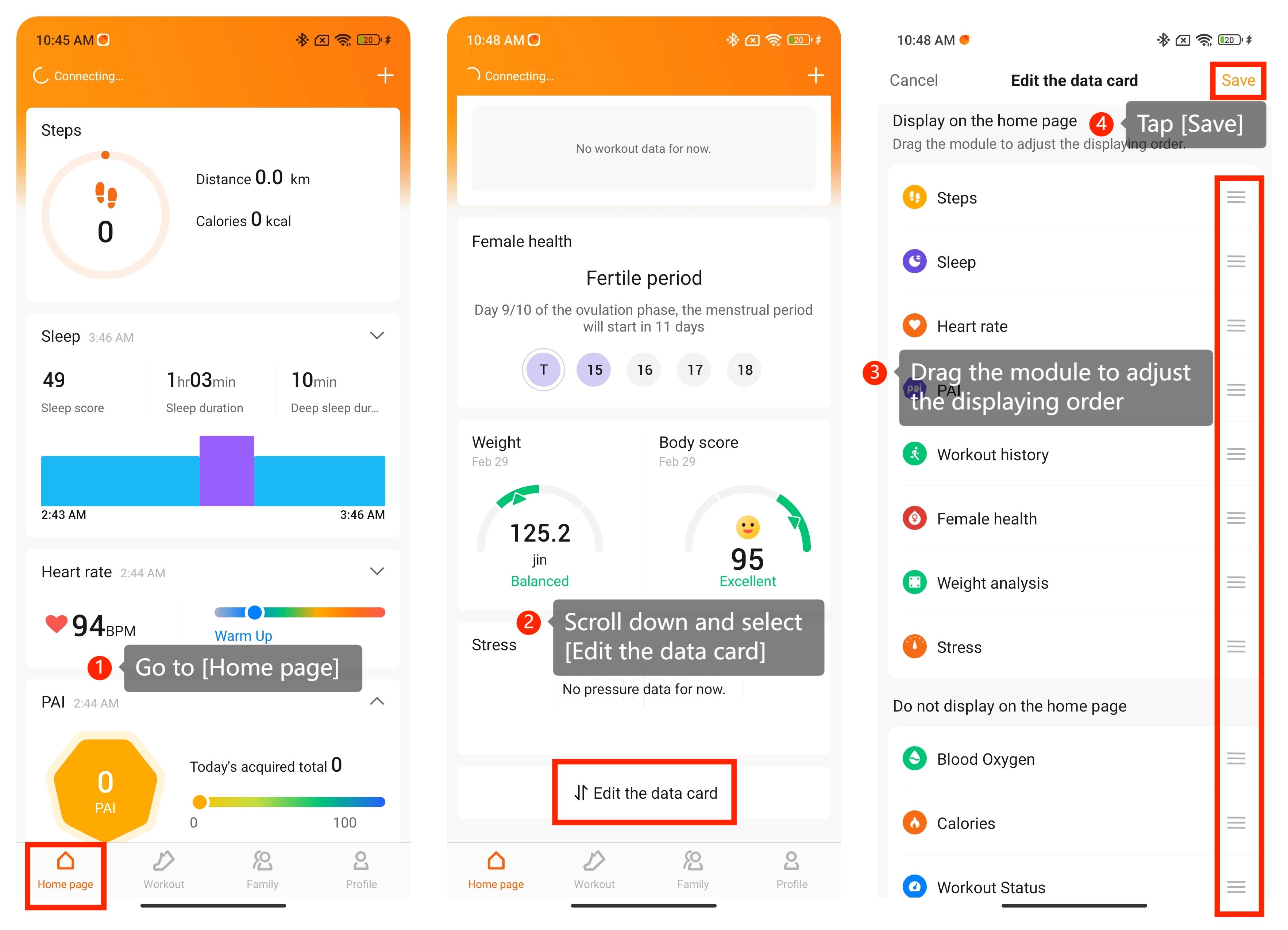
To edit the data card in the Zepp Life App of your Mi Smart Band, please refer to the following steps:
1. Open the Zepp Life App and go to [Home page];
2. Scroll down and select [Edit the data card];
3. Drag the module to adjust the displaying order. You can use this feature to adjust the order of the displayed data card, hide your displayed data card, and add the hidden data card to the Home page;
4. Tap [Save] to save your changes.
To edit the data card in the Zepp Life App of your Mi Smart Band, please refer to the following steps:
1. Open the Zepp Life App and go to [Home page];
2. Scroll down and select [Edit the data card];
3. Drag the module to adjust the displaying order. You can use this feature to adjust the order of the displayed data card, hide your displayed data card, and add the hidden data card to the Home page;
4. Tap [Save] to save your changes.
Does it help?
Yes
No