

Xiaomi Robot Vacuum E5 FAQ
Xiaomi Robot Vacuum E5 FAQ
Overview
1Q: What is Xiaomi Robot Vacuum E5 and why is it called Vacuum?
A: Xiaomi Robot Vacuum E5 is an entry-level gyro-guided vacuuming and mopping robot, so called because it has both suction cleaning and water tank mopping functions.
2Q: What are the features of Xiaomi Robot Vacuum E5?
A: In terms of software features, it can be controlled via the Mi Home app and through voice assistants like Alexa and Google Assistant. You can schedule cleaning times, switch cleaning modes, set customized cleaning modes, and manage the overall cleanliness of the home.
Xiaomi Robot Vacuum E5 consists of a main unit and a charging dock:
1. The Main Unit Part:
The main unit is equipped with various high-precision motion sensors and utilizes gyro navigation algorithms to perform bow-shaped path cleaning. It is capable of meeting the cleaning needs of daily household environments, with features including mechanical obstacle avoidance, overcoming obstacles, and escape capabilities. The main unit utilizes a floating-type water tank mop for mopping, effectively cleaning floating dust on the floor. It is easy and convenient to use, suitable for small households.
2. The Charging Dock Part:
The charging dock provides power for the main unit, which can automatically dock with the charging dock for recharging.
Product introduction
1Q: What comes standard with the Xiaomi Robot Vacuum E5?
A: The Xiaomi Robot Vacuum E5 consists of a main unit and a charging dock. The accessories installed on the main unit include the main brush, main brush cover, dustbin, and side brush. Other accessories include the adapter, mop bracket, mop (installed on the mop bracket), cleaning brush, and user manual.
2Q: What is a Charging Dock on the Xiaomi Robot Vacuum E5?
A: The charging dock only supports charging the main unit. The indicator on the charging dock can display whether the main unit is charging or not. When the main unit is not charging, the indicator on the charging dock turns white. When the main unit is fully charged, the indicator on the charging dock turns off.
3Q: What is the size of the Xiaomi Robot Vacuum E5?
A: The size of the main unit is 300*300*70 mm and the size of the universal base is 146*122*87.5 mm.
Note:
The error range is within ±2mm.
4Q: How to use the on button of Xiaomi Robot Vacuum E5?
A: For your reference, here is how to use the power button:
1. Power button:
Press and hold for 3 seconds to power on or power off. After powering on, press once to start cleaning.
2. Status indicator:
A white light indicates working/charging completed/standby;
If the indicator flashes in white, it indicates restoring factory settings/returning to the charging dock;
A breathing white light indicates charging (battery level ≥30%);
An orange light indicates low-power standby/main unit Wi-Fi offline;
A breathing orange light indicates charging (battery level <30%).
Note:
The main unit cannot be powered off while charging. Please press any key to pause during cleaning or returning to the charging dock.
5Q: How to use the return-to-charging button on the Xiaomi Robot Vacuum E5?
A: Press the return-to-charging button once. Then the device will return to the charging dock automatically.
6Q: How to set up the network connection for the Xiaomi Robot Vacuum E5?
A: To set up the network connection, please refer to the following steps:
Go to the [Mi Home] app >> tap the [+] icon >> [Add a device] >> select your device >> select a Wi-Fi network and enter the passwords >> wait for the connection to be successful.
7Q: How to use the charging dock for Xiaomi Robot Vacuum E5?
A: For your reference, here is the method of use as follows:
1. Before use, please tear off the protective film on the lens of the charging dock, place the charging dock against the wall, and connect it to the power outlet.
Note:
(1). Please do not place the charging dock in a place exposed to direct sunlight;
(2). Ensure that there are no objects placed within 0.5 meters on both sides and 1.5 meters in front of the charging dock.
2. Place the vacuuming and mopping robot on the charging dock for charging.
Note:
(1). It is recommended to fully charge the device before its first use to maintain its optimal performance and extend its lifespan;
(2). The device will automatically turn on when placed on the charging dock, and it cannot be turned off while charging.
8Q: How to use the Do Not Disturb mode on the Xiaomi Robot Vacuum E5?
A: The Do Not Disturb mode is enabled by default upon factory settings, with the default period set from 10:00 PM to 08:00 AM. You can choose to turn off the Do Not Disturb mode or modify the period in the Mi Home app >> [Settings] >> [Do Not Disturb Period]. During the Do Not Disturb period, the robot will not initiate cleaning tasks, voice announcements, or turn on the indicators. Scheduled cleaning will not take effect, and the interrupted cleaning will resume after the Do Not Disturb period ends.
9Q: How to save a complete map for the Xiaomi Robot Vacuum E5?
A: Xiaomi Robot Vacuum E5 creates a new map with each cleaning session, but it does not save the map, and the map is not displayed on the app interface either.
10Q: How does the Xiaomi Robot Vacuum E5 vacuum the entire house?
A: Xiaomi Robot Vacuum E5 adopts a bow-shaped cleaning pattern in a 4x4m area during each cleaning session. It continues this pattern until it reaches the walls, where it then conducts edge cleaning before moving on to the next area. Once all areas are cleaned, it performs a complete edge cleaning around the perimeter.
11Q: Can the Xiaomi Robot Vacuum E5 be charged continuously?
A: The Xiaomi Robot Vacuum E5 can be continuously placed on the charging dock for standby charging. In situations such as short-term outings or long periods away from home, it is recommended to turn off the power. Additionally, you can press and hold the power button on the device to shut it down. The Xiaomi Robot Vacuum E5 supports overcharge protection. After it is fully charged, it will automatically adjust to trickle charging.
12Q: What type of battery does the Xiaomi Robot Vacuum E5 use?
A: The Xiaomi Robot Vacuum E5 uses a high-performance lithium battery pack with a nominal capacity of 2600mAh.
13Q: How long does it take for the Xiaomi Robot Vacuum E5 to fully charge?
A: Under normal circumstances, the Xiaomi Robot Vacuum E5 takes less than 5.5 hours to charge from 0% to 100%.
14Q: Does the Xiaomi Robot Vacuum E5 have a motor overload protection function?
A: All motors on the machine, including the side brush motor, main wheel motor, and fan motor, have an overload protection function. When they encounter foreign objects or severe blockages that lead to overload, the protection mechanism will automatically activate to prevent motor damage.
15Q: Does the Xiaomi Robot Vacuum E5 require consumables that need to be replaced regularly?
A: The components should be replaced frequently. The side brush should be maintained every two weeks and replaced every 3-6 months. The filter should be maintained weekly and be replaced every 3-6 months. The mop pad should be maintained after each use and be replaced every 3-6 months.
16Q: How to use the vacuuming and mopping synchronization function of the Xiaomi Robot Vacuum E5?
A: Ensure that the main unit has the water tank mop bracket component installed and the water tank is filled with water. Then, start the cleaning process using the app or by pressing the power button on the main unit. The main unit will start cleaning from the charging dock. A full water tank can mop for 45 minutes. If mopping exceeds 45 minutes due to a larger area, it is recommended to refill the water tank midway. After cleaning, you will need to manually empty the dustbin, manually clean the mop, and air dry it.
Note:
The Xiaomi Robot Vacuum E5 does not have a low water reminder function.
17Q: How to use the vacuum-first, mop-later function of the Xiaomi Robot Vacuum E5?
A: The Xiaomi Robot Vacuum E5 does not have a vacuum-first, mop-later function.
It only has two cleaning modes:
1. Vacuum-only function;
2. Vacuum and mop function.
18Q: How to use the vacuum-only function of the Xiaomi Robot Vacuum E5?
A: Ensure that the main unit removes the water tank mop bracket component. Start the cleaning process using the app or by pressing the power button on the main unit. The cleaning will commence from the charging dock and return to it after completing the vacuum.
19Q: How to use the mop-only function of the Xiaomi Robot Vacuum E5?
A: The Xiaomi Robot Vacuum E5 does not have a mop-only function.
It only has two cleaning modes:
1. Vacuum-only function;
2. Vacuum and mop function.
20Q: How does the Xiaomi Robot Vacuum E5 return to recharge?
A: For your reference, here are the methods to recharge the device:
1. After the cleaning is completed, the main unit will automatically return to the charging dock to recharge;
2. In a paused state, press the recharge button on the main unit to initiate the return to recharge;
3. You can manually place the main unit back on the charging dock. Align the charging pins on the bottom front of the main unit with the corresponding pins on the charging dock. When properly aligned, the charging indicator on the charging dock will turn off, indicating that automatic charging has started.
4. While the main unit is charging, the buzzer will emit a short beep lasting 100 milliseconds, and the power button will flash in a breathing pattern, indicating a successful connection to the charging dock.
Note:
If the main unit cannot find the charging dock, it will automatically return to the starting point of cleaning. In such cases, please manually place the main unit on the charging dock to recharge
21Q: How to clean the mop of the Xiaomi Robot Vacuum E5? How often should it be cleaned?
A: The mop of the Xiaomi Robot Vacuum E5 needs to be manually cleaned. It is recommended to clean the mop once every one to two times of mopping. Alternatively, you can adjust the cleaning frequency based on the actual dirtiness of your home environment.
22Q: Does the Xiaomi Robot Vacuum E5 automatically lift the mop when encountering carpets?
A: The main unit's water tank mop bracket does not support carpet recognition or automatic lifting of the mop. However, it can automatically float up and down slightly when encountering obstacles.
23Q: When does the Xiaomi Robot Vacuum E5 perform mop drying?
A: The Xiaomi Robot Vacuum E5 does not support mop drying. You need to manually clean and air dry the mop.
24Q: When does the Xiaomi Robot Vacuum E5 perform dust collection?
A: The Xiaomi Robot Vacuum E5 does not support automatic dust collection. You need to manually empty the dustbin.
25Q: Does the Xiaomi Robot Vacuum E5 have obstacle avoidance function?
A: The main unit of the Xiaomi Robot Vacuum E5 is equipped with infrared obstacle avoidance sensors and mechanical collision sensors at the front, which can detect obstacles ahead and autonomously plan to decelerate in advance to avoid collisions.
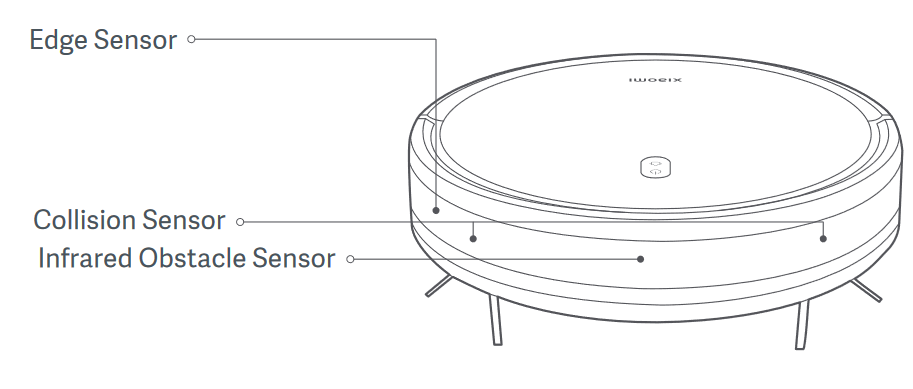
26Q: Why does the Xiaomi Robot Vacuum E5 still experience collisions despite being equipped with obstacle avoidance sensors?
A: For your reference, here are the reasons as follows:
1. The Xiaomi Robot Vacuum E5 comes with infrared obstacle avoidance sensors and mechanical collision sensors. The infrared sensors have slightly lower resolution and accuracy. Please wipe the front collision transparent window of the main unit with a soft dry cloth to ensure there are no fingerprints or dust;
2. Some darker-colored, highly reflective surfaces (such as metal), transparent objects (glass walls), small-sized table or chair legs, and lower obstacles, or obstacles appearing in blind spots, may occasionally go undetected, resulting in collisions;
3. When the machine encounters flexible obstacles such as curtains or partially closed doors, it will decelerate and lightly touch or avoid contact altogether. Occasional light contact in such situations is considered normal;
4. If the environment in your home is complex with a lot of ground obstacles, the main unit may get trapped, leading to collisions while trying to free itself.
27Q: How to maintain the main brush of the Xiaomi Robot Vacuum E5?
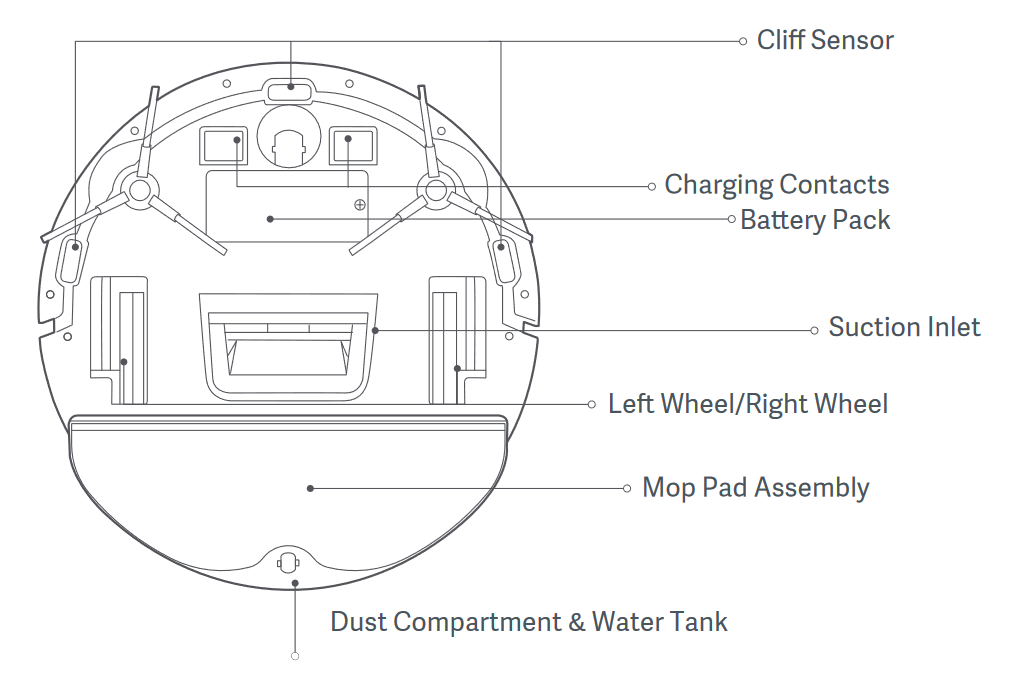
A: The Xiaomi Robot Vacuum E5 does not have a main brush, only a suction inlet. The advantage of the suction inlet is that it does not get entangled with hair, so it generally does not require maintenance. You can flip open the bottom of the main unit and clear any lint or blockages from the suction inlet.
Note:
It is recommended to clean it every 2 weeks.
28Q: How to clean the dust compartment of the Xiaomi Robot Vacuum E5?
A: For your reference, here are the methods as follows:
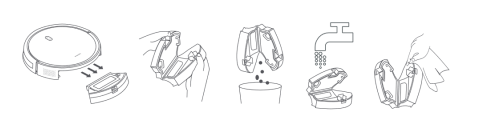
1. Press the dust compartment release button to remove the dust compartment, and open it to empty the contents.
2. Wipe the dust compartment dry after washing. Do not expose it to direct sunlight for a long time.
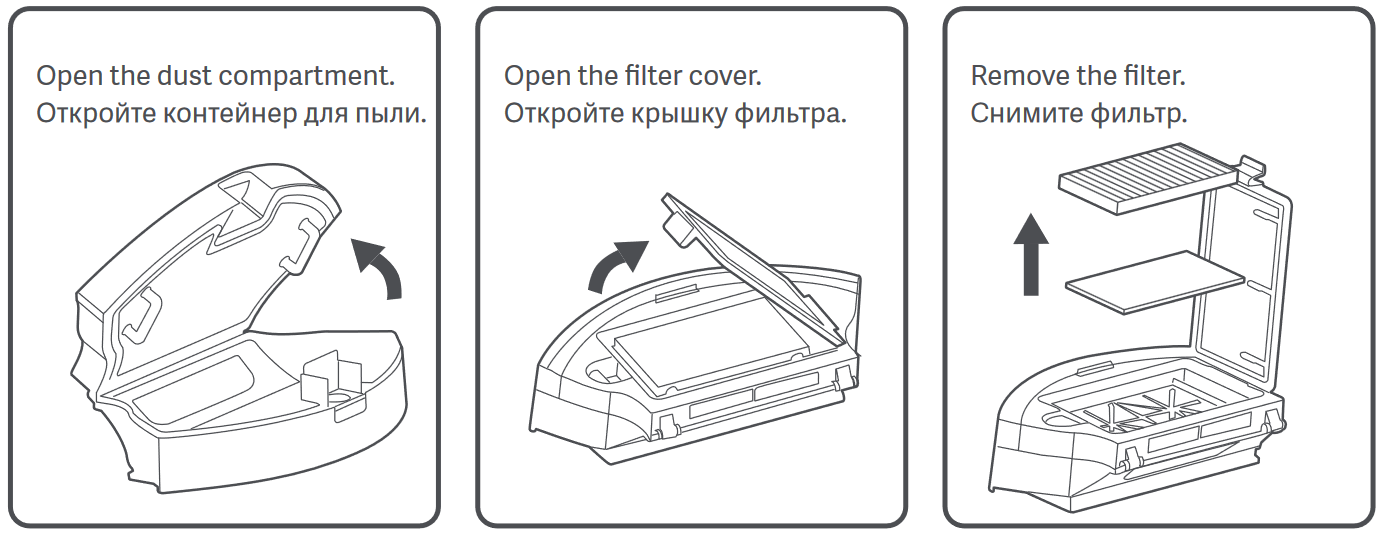
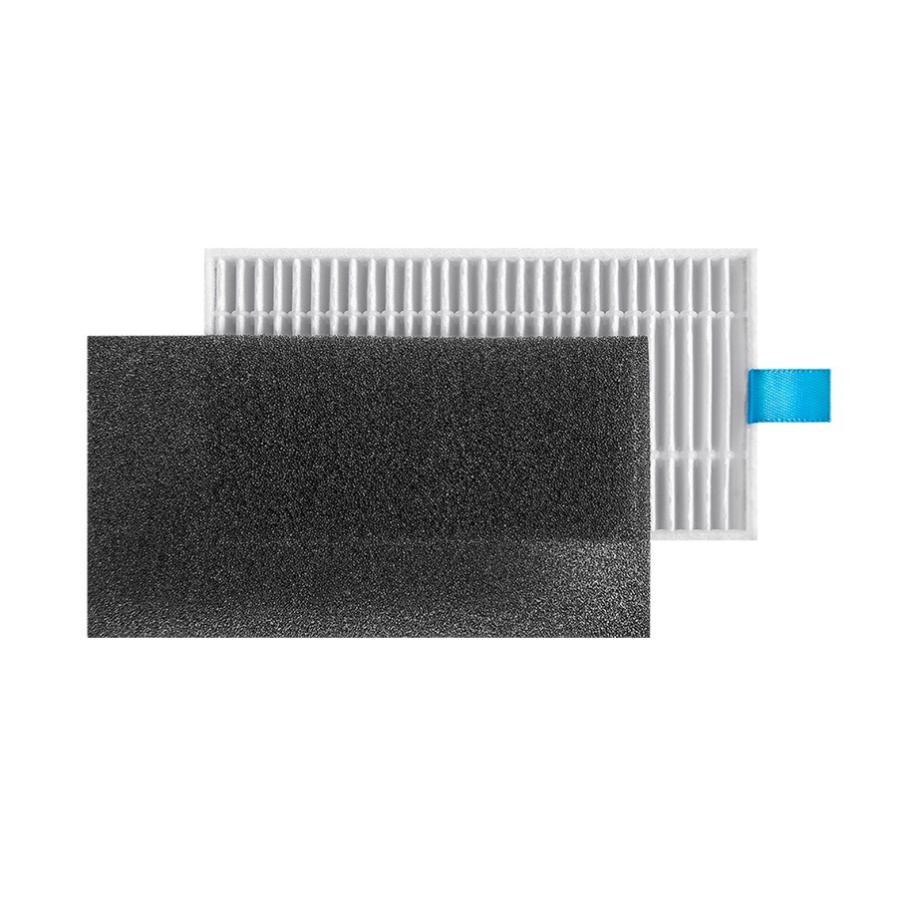
3. Please remove the filter and sponge, and rinse them repeatedly until they are clean. Then, let them air dry thoroughly before reassembling.
Note:
Please do not use brushes, fingers, or other objects to clean the filter and sponge. It is recommended to clean the filter every two weeks.
29Q: How to maintain the universal wheel of the Xiaomi Robot Vacuum E5?
A: For your reference, here are the methods as follows:
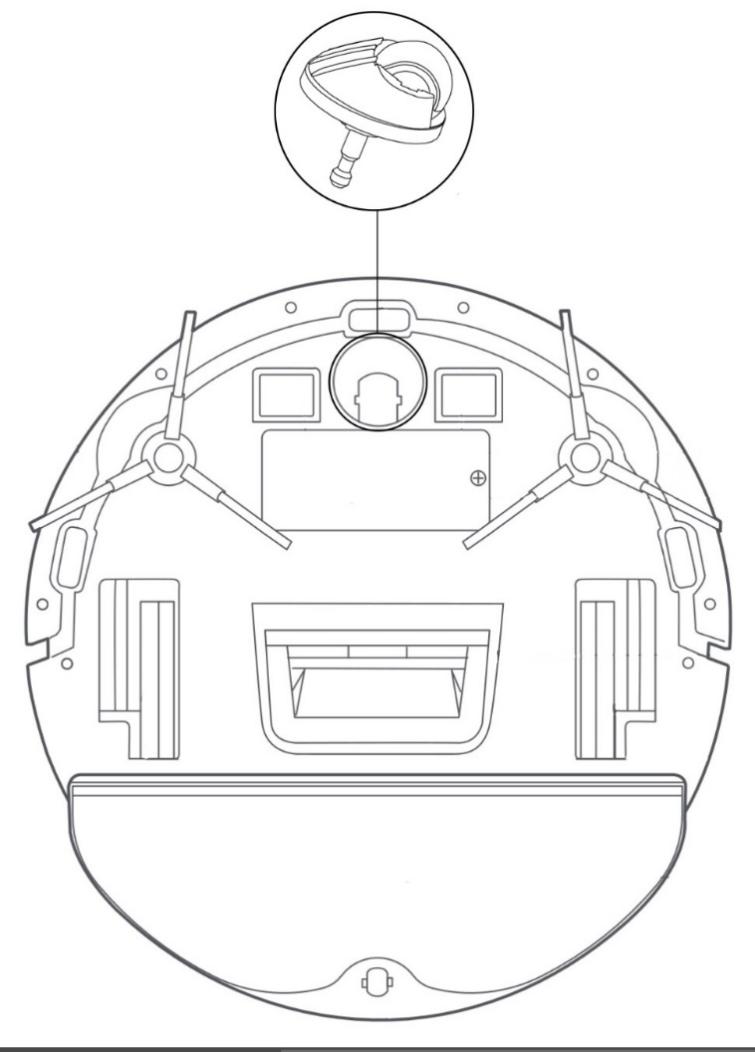
1. Flip the machine over and pull out the universal wheel upwards;
2. Clean the hair and dirt from the wheel body and axle;
3. Reinstall the wheel body and press it firmly.
Note:
You can rinse it with tap water, air dry it, and then reinstall it.
30Q: How to maintain the side brush of the Xiaomi Robot Vacuum E5?
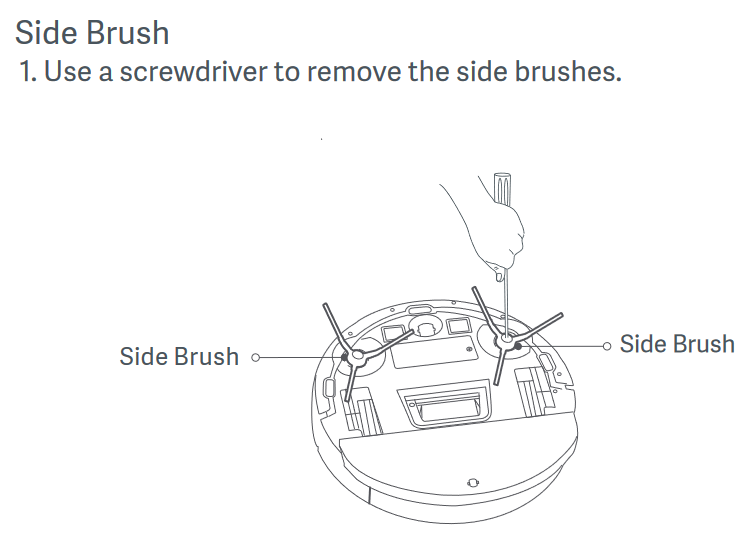
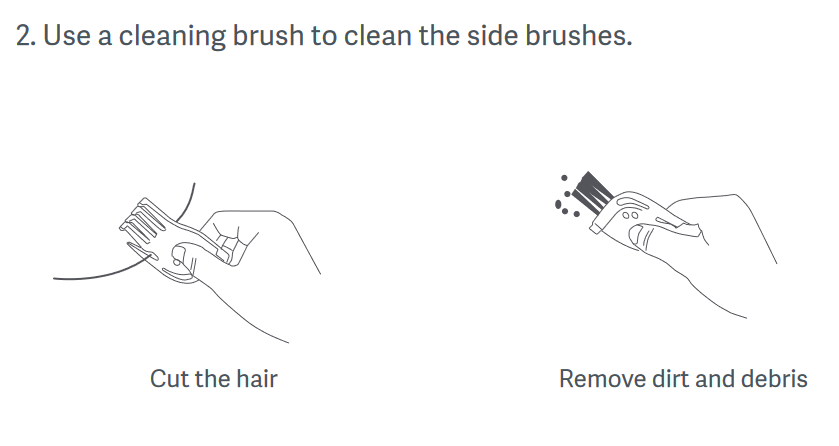
A: Flip the machine over and use a cleaning brush to remove hair and debris from the side brush.
Note:
It is recommended to clean the side brush once a month and replace it every 3-6 months to ensure effective cleaning.
31Q: How to maintain the mop of the Xiaomi Robot Vacuum E5?
A: Remove the mop from the water tank mop bracket for replacement.
Note:
It is recommended to replace the mop every 3-6 months to ensure effective cleaning.
32Q: How to clean and maintain the sensors and charging contacts of the Xiaomi Robot Vacuum E5?
A: Wipe the sensors and charging contacts of the main unit with a soft dry cloth for cleaning.
33Q: How to clean and maintain the cleaning bracket of the Xiaomi Robot Vacuum E5?
A: For your reference, here are the methods as follows:
1. Please refer to the detailed instructions on the labels of the water tank and dustbin for regular cleaning;
2. It is recommended to clean the sensors and charging contacts with a cloth every three months;
3. Please refer to the table below for maintenance and replacement to ensure effective cleaning.
34Q: How to clean the clean water tank of the Xiaomi Robot Vacuum E5?
A: After completing the vacuuming and mopping tasks, promptly empty any remaining water from the water tank, then clean and air dry the mop to prevent odors and mold growth.
35Q: How to maintain the battery of the Xiaomi Robot Vacuum E5?
A: The Xiaomi Robot Vacuum E5 features a built-in high-performance lithium-ion rechargeable battery pack. For maintaining battery performance, it is recommended to keep the main unit charged during daily use.
Note:
If not in use for an extended period, please power off and store it. Charge at least once every three months to prevent battery damage due to over-discharge.
36Q: Does the Xiaomi Robot Vacuum E5 support child lock?
A: The Xiaomi Robot Vacuum E5 does not support the child lock function.
app related:
1Q: How to connect the Xiaomi Robot Vacuum E5 to the Mi Home app?
A: The Xiaomi Robot Vacuum E5 is compatible with the Mi Home app, allowing control and integration with other smart devices. Simply scan the QR code to download and install the Mi Home app. If you already have the Mi Home app installed, you will be directed to the device connection page. Alternatively, you can search for “Mi Home” in the app store to download and install the app. Once installed, open the [Mi Home] app >> tap the [+] icon at the top right corner of the homepage, and follow the app's instructions to add the device.
Note:
Due to updates and revisions of the Mi Home app, actual procedures may vary slightly from the description provided. Please follow the current instructions.
2Q: How to reset the Wi-Fi on the Xiaomi Robot Vacuum E5?
A: When the router configuration is modified, the password is forgotten, or other reasons prevent the phone from connecting to the main unit. Simultaneously press and hold the vacuum and return buttons for 7 seconds until the buzzer beeps once. Wait for the Wi-Fi indicator to start flashing again, indicating that the reset is successful.
3Q: How to perform a firmware update on the Xiaomi Robot Vacuum E5?
A: You can update the main unit firmware using the Mi Home app. Before updating, please ensure that the main unit is on the charging dock and the battery level is above 30%. During firmware update, all buttons will flash in blue.
For your reference, here is a general path as follows:
Go to the [Mi Home] app >> [Settings] >> [General settings] >> [Firmware update]. It is recommended to update the firmware to the latest version for optimal performance.
4Q: How to restore the factory settings on the Xiaomi Robot Vacuum E5?
A: If the system fails to function properly after rebooting, please press and hold on to the Return button for 7 seconds until you hear a short beep from the buzzer. Then, press and hold on the Return button again for 7 seconds, and you will hear three short beeps. The main unit will then be restored to its factory settings.
5Q: Does the Xiaomi Robot Vacuum E5 support fast mapping?
A: The Xiaomi Robot Vacuum E5 does not support fast mapping.
6Q: How many maps can the Xiaomi Robot Vacuum E5 save?
A: The Xiaomi Robot Vacuum E5 does not display maps on the app interface, nor does it support map saving.
7Q: What is the global cleaning function on the Xiaomi Robot Vacuum E5 save?
A: Global cleaning function refers to pressing the clean button on the main unit once or tapping the clean button once in the app interface. The main unit will then proceed to clean in a square area of 4m x 4m. It will autonomously plan the path and clean room by room, then return to the charging dock after cleaning is completed.
8Q: Does the Xiaomi Robot Vacuum E5 have the feature of area cleaning?
A: The Xiaomi Robot Vacuum E5's app interface does not display maps and does not support area cleaning.
9Q: What is the scheduled cleaning function on the Xiaomi Robot Vacuum E5?
A: Using the Mi Home app, you can set a scheduled cleaning time, suction power, and repetition time. The main unit will automatically start cleaning at the specified time and return to the charging dock after cleaning is completed.
Note:
If the “Do Not Disturb” mode is enabled, scheduled cleaning will not be executed during the “Do Not Disturb” period.
10Q: Does the Xiaomi Robot Vacuum E5 have a virtual wall function for restricted areas?
A: The Xiaomi Robot Vacuum E5 does not support the virtual wall function for restricted areas.
11Q: How to perform area editing on the Xiaomi Robot Vacuum E5?
A: The Xiaomi Robot Vacuum E5 does not display maps and it does not support area editing.
12Q: How to reset the map on the Xiaomi Robot Vacuum E5?
A: The Xiaomi Robot Vacuum E5 does not display maps and it does not support resetting the map.
13Q: Does the Xiaomi Robot Vacuum E5 support setting suction power?
A: The Xiaomi Robot Vacuum E5 supports setting suction power. You can adjust the suction level in the app, with three options available: Silent, Standard, and Strong.
14Q: What to do if the Xiaomi Robot Vacuum E5 cannot connect to the network?
A: Please follow the steps below to troubleshoot:
1. Make sure the Wi-Fi password entered during the connection is correct. Wi-Fi usernames should not contain Chinese characters, and passwords should not contain special characters like @, ¥, or %. If present, please reset them to English or alphanumeric format before retrying;
2. Check if the router's internet connection is working properly. You can try opening a webpage on your phone or a computer connected to Wi-Fi to see if browsing is smooth;
3. Ensure that the distance between the router and the robot is not too far (within 5 meters or without obstructions like walls in between). Try moving the robot closer to the router within a range of 1-2 meters and then attempt to reconnect;
4. Try connecting to your phone's Wi-Fi hotspot;
5. Check if the router is connected to many smart devices, causing the network to slow down or become unresponsive. Try restarting the router and then attempting to reconnect;
6. Note that certain types of networks are not supported, such as EAP802.1x authentication networks used in some companies, 5G networks, or public Wi-Fi networks that require webpage authentication. Try connecting to a different network before attempting to reconnect;
7. If the network is turned off, the Wi-Fi module will close the network connection function after the device has been offline for more than 1 hour. The Wi-Fi indicator will blink. Restart the device to restore the connection;
8. Check if your phone has restricted app permissions, such as network connection and location. Allow these permissions and then try again;
9. Connection failures may also be related to the phone model. Try using a different phone model to attempt the connection;
10. If all else fails, you can try resetting the main unit and then attempting to reconnect to the network.
15Q: What should I do if there is an abnormality during the charging of the Xiaomi Robot Vacuum E5?
A: Please check if there is dust on the charging dock and the charging pins of the main unit. Dust on these components may cause charging abnormalities. Please wipe them clean before use. If the charging dock is not powered, please ensure that both ends of the charging dock adapter are properly plugged in.
16Q: What are the precautions before cleaning with the Xiaomi Robot Vacuum E5?
A: Please ensure that the main unit is fully charged before starting cleaning from the charging dock. Before cleaning, please tidy up the furniture in the home environment and remove any fragile items and clutter from the floor.
17Q: Do the first three uses of the Xiaomi Robot Vacuum E5 require a 16-hour charge?
A: The lithium battery can be charged as needed without a memory effect. It can be used after being fully charged, and there is no need to wait for 16 hours.
18Q: What is the battery life of the vacuuming and mopping mode of the Xiaomi Robot Vacuum E5 main unit?
A: The standard mode has a battery life of approximately 110 minutes. The actual working time depends on the specific working conditions and cleaning environment.
19Q: What is the battery life of the vacuuming mode of the Xiaomi Robot Vacuum E5 main unit?
A: The battery life of the vacuuming mode of the Xiaomi Robot Vacuum E5 main unit is as follows:
1. Silent mode: approximately 210 minutes;
2. Standard mode: approximately 190 minutes;
3. Strong mode: approximately 150 minutes;
4. Turbo mode: approximately 85 minutes.
Actual working time may vary depending on the specific conditions and cleaning environment.
20Q: Should I update the firmware if the Xiaomi Robot Vacuum E5 main unit discovers a new firmware version?
A: The new firmware version usually includes optimization content. It is recommended to update to the latest firmware version as soon as it is discovered to ensure the best cleaning experience.
21Q: Does the Xiaomi Robot Vacuum E5 exhibit a phenomenon where it moves to another room for cleaning before completing cleaning in one room?
A: If there is a missed spot after the normal cleaning process, the robot considers the cleaning task complete upon returning to the charging dock, and therefore, it does not perform any additional spot cleaning.
If there are missed spots during the cleaning process, the robot will check for any remaining missed areas during the final edge cleaning phase and perform spot cleaning to address them.
22Q: Does the Xiaomi Robot Vacuum E5 exhibit a phenomenon of repeatedly moving back and forth during the cleaning process?
A: The main unit will follow the planned path for cleaning. During cleaning, it navigates to areas that haven't been cleaned yet, which may appear to involve some back and forth movement visually, but it's not repeating the cleaning process.
23Q: Does the Xiaomi Robot Vacuum E5 encounter situations where it cannot enter certain narrow areas during cleaning?
A: The main unit can navigate through spaces with a minimum width of approximately 30cm. Areas narrower than this distance may be inaccessible.
24Q: Does the cleaning efficiency of the Xiaomi Robot Vacuum E5 decrease in complex environments?
A: To ensure thorough coverage, the main unit will clean all corners, which may involve increased turning and edge-cleaning actions in complex environments, potentially reducing cleaning efficiency.
25Q: Does the Xiaomi Robot Vacuum E5 make a loud noise while cleaning?
A: To ensure effective cleaning, the main unit is equipped with a larger suction fan for better dust removal, resulting in slightly louder noise. You can opt for the silent mode during cleaning for reduced noise levels.
26Q: Does the Xiaomi Robot Vacuum E5 produce unusual noises during cleaning?
A: Possible reasons for unusual noises during cleaning with the Xiaomi Robot Vacuum E5 include:
1. When the main unit is operating on smooth tile floors or wooden surfaces, there might be a slight "hissing" sound caused by friction between the bottom scraper and the floor. Such sounds do not affect the normal operation of the machine;
2. The side brush may become entangled with hair or foreign objects.
Solutions for unusual noises during cleaning with the Xiaomi Robot Vacuum E5 include:
Please check if the side brush is entangled with any foreign objects and clean it.
27Q: How to deal with Xiaomi Robot Vacuum E5 when it encounters jamming on its surface during cleaning?
A: When the main unit is cleaning, it may get stuck on household items such as slippers or plastic bags. After resolving the jamming issue, try to place the main unit in an area that has already been cleaned to continue the cleaning process.
Note:
It is recommended to tidy up household items before cleaning to avoid the main unit getting stuck during cleaning.
28Q: How to deal with Xiaomi Robot Vacuum E5 when it encounters jamming on its surface during cleaning?
A: When the main unit encounters jamming on its surface during cleaning, likely when it encounters furniture with a similar height to its body, please remove the machine and restart the cleaning task.
29Q: What should I do when the Xiaomi Robot Vacuum E5 encounters entanglement with the side brush during cleaning?
A: When the main unit is cleaned, the side brush may become entangled with power cords or charging cables in the house. After resolving the entanglement issue, please try to place the main unit back in the nearby cleaned area to resume cleaning.
It's recommended to tidy up any clutter in the house before cleaning to avoid entanglement issues during the cleaning process.
30Q: When the Xiaomi Robot Vacuum E5 is cleaning and gets entangled with the power cord of the charging dock adapter, what should I do?
A: Before cleaning, please tidy up the excess power cord of the charging dock adapter and avoid leaving it on the floor.
31Q: What is the reason why the Xiaomi Robot Vacuum E5 repeats cleaning the areas that have already been cleaned after being moved?
A: The Xiaomi Robot Vacuum E5 uses gyro navigation and cannot create precise maps. If it is moved during a cleaning task, it may repeat cleaning certain areas. It is recommended to avoid moving the robot during cleaning tasks as much as possible.
32Q: What height of obstacles does the main unit of the Xiaomi Robot Vacuum E5 can pass over?
A: The dry state vertical obstacle height (without the water tank) is ≥15mm, the round tube is 13mm (with the water tank) and the wet state obstacle height is ≥10mm (with a full water tank).
33Q: Why does the mop bracket of the Xiaomi Robot Vacuum E5 main unit drop during operation?
A: When the machine climbs over carpets, doorsteps, or small steps, the mop bracket may get stuck, causing it to drop. You can set some areas as no-mopping zones. Please tidy up the floor cables and cords before cleaning to prevent entanglement, which may cause the mop bracket to drop.
34Q: What to do if the Xiaomi Robot Vacuum E5 cannot be turned on?
A: If the Xiaomi Robot Vacuum E5 cannot be turned on, please charge it on the charging dock first if the battery is low. Ensure that the operating environment temperature is within the range of 0-40℃.
35Q: What is the reason why Xiaomi Robot Vacuum E5 consumes power fast while vacuuming?
A: After the main unit completes charging and is left for an extended period, there may be a phenomenon of rapid battery depletion during the first few minutes of cleaning. This is considered a normal occurrence, and the battery consumption will return to normal after a few minutes. Additionally, when using the strong suction mode for cleaning, the main unit's battery may deplete faster.
36Q: Does the Xiaomi Robot Vacuum E5 consume power when it is constantly on the charging dock?
A: When the main unit is constantly on the charging dock, power is supplied from the base to the main unit. During this time, the power consumption is very low in sleep mode, and the battery enters a sleep state to maintain optimal performance.
37Q: What are the possible reasons for Xiaomi Robot Vacuum E5 failing to return to the charging dock?
A: The possible reasons for Xiaomi Robot Vacuum E5 failing to return to the charging dock are as follows:
1. There are too many obstacles near the charging dock. Please place the charging dock in an open area, ensuring there are no obstacles within 0.5 meters on both sides and 1.5 meters in front;
2. The robot did not start cleaning from the charging dock, or it did not detect the charging dock during cleaning. Please try to ensure that the robot starts cleaning from the charging dock;
3. The robot was moved during the cleaning process, initiating a new task;
4. There is water accumulation on the charging dock or the ground in front of it, causing the wheels to slip. Please dry it before trying again.
38Q: What should I do if I can not open the dust bin of Xiaomi Robot Vacuum E5?
A: Please pay attention to the markings on the dustbin opening, open the dustbin correctly, and do not try to open the dustbin by removing the dustbin filter.
39Q: What should I do if Xiaomi Robot Vacuum E5 can not remove the stubborn stains during mopping?
A: Stubborn stains that cannot be removed while mopping may require manual assistance for cleaning.
40Q: What should I do if the floor becomes dirtier after mopping with the Xiaomi Robot Vacuum E5?
A: When the floor is too dirty, please regularly clean the mopping cloth during mopping.
41Q: Why the scheduled cleaning function doesn't work on the Xiaomi Robot Vacuum E5?
A: For your reference, here are the reasons as follows:
1. It may be due to insufficient battery power, as the scheduled cleaning function only activates when the remaining battery level is above 30%;
2. It may be because the "Do Not Disturb" mode is enabled, which prevents scheduled cleaning from taking place during the specified quiet hours.
42Q: The Xiaomi Robot Vacuum E5 returns to recharge due to low battery during cleaning, but does not resume cleaning afterward. What could be the reason?
A: Please make sure that the main unit is not in "Do Not Disturb" mode, as it does not resume cleaning during the "Do Not Disturb" period. Manual return to recharge or placing the main unit back on the charging dock does not trigger the resumption of cleaning.
43Q: What are the reasons for the decreased cleaning performance or occurrence of missed spots of the Xiaomi Robot Vacuum E5?
A: For your reference, here are the reasons as follows:
1. The dustbin is full and the dustbin filter is clogged. Please clean the dustbin and the filter;
2. Check if any foreign objects are blocking the dust collection port of the main unit. Please clean the dust collection port.
44Q: Can the Xiaomi Robot Vacuum E5 main unit operate in dimly lit environments?
A: The Xiaomi Robot Vacuum E5 main unit can operate in environments with dim lighting. Gyro navigation machines are not affected by lighting conditions. However, in environments with weak lighting, the effectiveness of infrared obstacle avoidance may be reduced, resulting in poorer obstacle avoidance performance.
45Q: What are the possible reasons why the firmware can not be updated in the Xiaomi Robot Vacuum E5?
A: The firmware update requires the main unit to be placed on the charging dock and the battery level to be above 30%. Please check the status of your home network.
46Q: What should I do if the data cannot be loaded when using the app for the Xiaomi Robot Vacuum E5?
A: Please check if your home network is functioning properly. Try exiting the app and then reopening it to see if the issue persists.
47Q: What should I do if the Xiaomi Robot Vacuum E5 reports being trapped?
A: The Xiaomi Robot Vacuum E5 may get stuck between objects in some narrow spaces. If the gap is less than 32cm, it may be difficult for the robot to escape on its own. You may need to assist the robot to continue its cleaning.
48Q: What are the possible reasons for the strange smell from the mop and dustbin of the Xiaomi Robot Vacuum E5?
A: The strange smell from the mop could be due to dirty floors, and the main unit may suck in liquids during cleaning. If the dustbin is not cleaned promptly, it may produce an odor. After completing the job, please remember to clean the dustbin and mop promptly.
49Q: What to do if the Xiaomi Robot Vacuum E5's path is abnormal?
A: If the Xiaomi Robot Vacuum E5's path is abnormal, please refer to the following steps:
1. It is recommended for you to check if the drive wheel is entangled with foreign objects;
2. Please try tapping the collision board to ensure it can bounce back;
3. Wipe the transparent window in front of the collision sensor to avoid fingerprints and dust;
4. Try restarting the main unit and then retry.
50Q: What should I do if the Xiaomi Robot Vacuum E5 reports a collision board anomaly?
A: If the Xiaomi Robot Vacuum E5 reports a collision board anomaly, please refer to the following steps:
1. Please try tapping the collision board to ensure it can bounce back;
2. Please try restarting the main unit and then try again.
51Q: What should I do if the Xiaomi Robot Vacuum E5 reports an abnormality with the side brush?
A: If the Xiaomi Robot Vacuum E5 reports an abnormality with the side brush, please refer to the following steps:
1. Please check if there are any foreign objects stuck in the side brush or its components, or if the hair is entangled;
2. Please try restarting the main unit and then retry.
52Q: Does the Xiaomi Robot Vacuum E5 support multi-user connection?
A: The Xiaomi Robot Vacuum E5 does not support multi-user connection. However, you can share the device with others by going to the [Mi Home] app >> select the device card >> [Settings] >> [Share device]. Shared users will have access to basic machine operations and settings, such as starting, pausing, ending cleaning, and adjusting suction power.
53Q: What should I do if the Xiaomi Robot Vacuum E5 is offline on the Mi Home app?
A: If the Xiaomi Robot Vacuum E5 is offline on the Mi Home app, please refer to the following steps:
1. If the Xiaomi Robot Vacuum E5 is powered off, the app cannot connect to it. Press and hold the power button to turn it on;
2. The online/offline status of the Xiaomi Robot Vacuum E5 may change depending on the strength of the network signal where the device is located. If the network signal is weak or unstable in the device's location, it may go offline;
3. You can add or reset the network for the device by selecting a router network that is closer to the device;
4. Check if the Wi-Fi network is functioning properly.
54Q: How to power off the Xiaomi Robot Vacuum E5/dock?
A: After completing the cleaning task, the robot will autonomously return to the charging dock to recharge. During the charging process, the power indicator on the dock will turn off. After 10 minutes of completing the charge, the robot will enter standby mode, and the indicator on the robot will also turn off. The dock will only shut down when it loses power. If you wish to turn off the dock, please unplug the power adapter. After the dock loses power, the robot will not continue charging, which may lead to the robot running out of battery and shutting down if left for an extended period. When using it next time, please plug in the power adapter of the dock and charge the robot.
55Q: Why does the Xiaomi Robot Vacuum E5 automatically turn off?
A: The reasons the Xiaomi Robot Vacuum E5 automatically turns off are as follows:
The robot automatically shuts down when the battery level drops below 5%.
The solution of the Xiaomi Robot Vacuum E5 automatically turns off is as follows:
1. Place the robot on the charging dock to recharge;
2. If the robot shuts down automatically while on the dock, check if the dock is connected to power or if the robot is properly docked.
56Q: Why does the mop of the Xiaomi Robot Vacuum E5 have an odor?
A: The mop may not have been cleaned thoroughly or dried properly. It is recommended to clean the mop 1-2 times after mopping, and let it air dry before installing it on the mop bracket to avoid any odor.
57Q: Why does the Xiaomi Robot Vacuum E5 dock twice on the charging dock during recharging?
A: During recharging, the main unit needs to ensure that the charging electrodes are in place with high precision. It automatically adjusts the recharging route based on signals from the charging dock. If the charging dock is not perfect, the main unit may back off and dock again, which is a normal phenomenon. Please ensure that the charging dock is placed on a flat surface and that there is no water residue on or near the charging dock to avoid slipping.
58Q: Does the Xiaomi Robot Vacuum E5 leave watermarks and streaks after mopping?
A: After mopping, it is normal for some watermarks to be left behind as the floor dries. The visibility of these watermarks depends largely on the type of flooring and lighting conditions. It is recommended to schedule regular cleanings with the robot and replace the mop promptly. As the floor becomes cleaner over time, the watermarks will become less noticeable.
Overview
1Q: What is Xiaomi Robot Vacuum E5 and why is it called Vacuum?
A: Xiaomi Robot Vacuum E5 is an entry-level gyro-guided vacuuming and mopping robot, so called because it has both suction cleaning and water tank mopping functions.
2Q: What are the features of Xiaomi Robot Vacuum E5?
A: In terms of software features, it can be controlled via the Mi Home app and through voice assistants like Alexa and Google Assistant. You can schedule cleaning times, switch cleaning modes, set customized cleaning modes, and manage the overall cleanliness of the home.
Xiaomi Robot Vacuum E5 consists of a main unit and a charging dock:
1. The Main Unit Part:
The main unit is equipped with various high-precision motion sensors and utilizes gyro navigation algorithms to perform bow-shaped path cleaning. It is capable of meeting the cleaning needs of daily household environments, with features including mechanical obstacle avoidance, overcoming obstacles, and escape capabilities. The main unit utilizes a floating-type water tank mop for mopping, effectively cleaning floating dust on the floor. It is easy and convenient to use, suitable for small households.
2. The Charging Dock Part:
The charging dock provides power for the main unit, which can automatically dock with the charging dock for recharging.
3Q: What is Gyro Navigation Technology on the Xiaomi Robot Vacuum E5?
A: Gyro Navigation Technology is a method of navigation that utilizes signals of angular velocity detected by gyroscopes to determine navigation direction. Gyroscopes are instruments that measure angular velocity, based on the principle of the inherent stability of rotating machinery. This technology enables the main unit to perform bow-shaped path cleaning.
A: Gyro Navigation Technology is a method of navigation that utilizes signals of angular velocity detected by gyroscopes to determine navigation direction. Gyroscopes are instruments that measure angular velocity, based on the principle of the inherent stability of rotating machinery. This technology enables the main unit to perform bow-shaped path cleaning.
4Q: What are the advantages of Gyro Navigation on the Xiaomi Robot Vacuum E5 over LDS Laser Navigation?
A: The Xiaomi Robot Vacuum E5 utilizes gyro navigation technology, which offers a high cost-performance ratio compared to LDS laser navigation technology.
A: The Xiaomi Robot Vacuum E5 utilizes gyro navigation technology, which offers a high cost-performance ratio compared to LDS laser navigation technology.
Product introduction
1Q: What comes standard with the Xiaomi Robot Vacuum E5?
A: The Xiaomi Robot Vacuum E5 consists of a main unit and a charging dock. The accessories installed on the main unit include the main brush, main brush cover, dustbin, and side brush. Other accessories include the adapter, mop bracket, mop (installed on the mop bracket), cleaning brush, and user manual.
2Q: What is a Charging Dock on the Xiaomi Robot Vacuum E5?
A: The charging dock only supports charging the main unit. The indicator on the charging dock can display whether the main unit is charging or not. When the main unit is not charging, the indicator on the charging dock turns white. When the main unit is fully charged, the indicator on the charging dock turns off.
3Q: What is the size of the Xiaomi Robot Vacuum E5?
A: The size of the main unit is 300*300*70 mm and the size of the universal base is 146*122*87.5 mm.
Note:
The error range is within ±2mm.
4Q: How to use the on button of Xiaomi Robot Vacuum E5?
A: For your reference, here is how to use the power button:
1. Power button:
Press and hold for 3 seconds to power on or power off. After powering on, press once to start cleaning.
2. Status indicator:
A white light indicates working/charging completed/standby;
If the indicator flashes in white, it indicates restoring factory settings/returning to the charging dock;
A breathing white light indicates charging (battery level ≥30%);
An orange light indicates low-power standby/main unit Wi-Fi offline;
A breathing orange light indicates charging (battery level <30%).
Note:
The main unit cannot be powered off while charging. Please press any key to pause during cleaning or returning to the charging dock.
5Q: How to use the return-to-charging button on the Xiaomi Robot Vacuum E5?
A: Press the return-to-charging button once. Then the device will return to the charging dock automatically.
6Q: How to set up the network connection for the Xiaomi Robot Vacuum E5?
A: To set up the network connection, please refer to the following steps:
Go to the [Mi Home] app >> tap the [+] icon >> [Add a device] >> select your device >> select a Wi-Fi network and enter the passwords >> wait for the connection to be successful.
7Q: How to use the charging dock for Xiaomi Robot Vacuum E5?
A: For your reference, here is the method of use as follows:
1. Before use, please tear off the protective film on the lens of the charging dock, place the charging dock against the wall, and connect it to the power outlet.
Note:
(1). Please do not place the charging dock in a place exposed to direct sunlight;
(2). Ensure that there are no objects placed within 0.5 meters on both sides and 1.5 meters in front of the charging dock.
2. Place the vacuuming and mopping robot on the charging dock for charging.
Note:
(1). It is recommended to fully charge the device before its first use to maintain its optimal performance and extend its lifespan;
(2). The device will automatically turn on when placed on the charging dock, and it cannot be turned off while charging.
8Q: How to use the Do Not Disturb mode on the Xiaomi Robot Vacuum E5?
A: The Do Not Disturb mode is enabled by default upon factory settings, with the default period set from 10:00 PM to 08:00 AM. You can choose to turn off the Do Not Disturb mode or modify the period in the Mi Home app >> [Settings] >> [Do Not Disturb Period]. During the Do Not Disturb period, the robot will not initiate cleaning tasks, voice announcements, or turn on the indicators. Scheduled cleaning will not take effect, and the interrupted cleaning will resume after the Do Not Disturb period ends.
9Q: How to save a complete map for the Xiaomi Robot Vacuum E5?
A: Xiaomi Robot Vacuum E5 creates a new map with each cleaning session, but it does not save the map, and the map is not displayed on the app interface either.
10Q: How does the Xiaomi Robot Vacuum E5 vacuum the entire house?
A: Xiaomi Robot Vacuum E5 adopts a bow-shaped cleaning pattern in a 4x4m area during each cleaning session. It continues this pattern until it reaches the walls, where it then conducts edge cleaning before moving on to the next area. Once all areas are cleaned, it performs a complete edge cleaning around the perimeter.
11Q: Can the Xiaomi Robot Vacuum E5 be charged continuously?
A: The Xiaomi Robot Vacuum E5 can be continuously placed on the charging dock for standby charging. In situations such as short-term outings or long periods away from home, it is recommended to turn off the power. Additionally, you can press and hold the power button on the device to shut it down. The Xiaomi Robot Vacuum E5 supports overcharge protection. After it is fully charged, it will automatically adjust to trickle charging.
12Q: What type of battery does the Xiaomi Robot Vacuum E5 use?
A: The Xiaomi Robot Vacuum E5 uses a high-performance lithium battery pack with a nominal capacity of 2600mAh.
13Q: How long does it take for the Xiaomi Robot Vacuum E5 to fully charge?
A: Under normal circumstances, the Xiaomi Robot Vacuum E5 takes less than 5.5 hours to charge from 0% to 100%.
14Q: Does the Xiaomi Robot Vacuum E5 have a motor overload protection function?
A: All motors on the machine, including the side brush motor, main wheel motor, and fan motor, have an overload protection function. When they encounter foreign objects or severe blockages that lead to overload, the protection mechanism will automatically activate to prevent motor damage.
15Q: Does the Xiaomi Robot Vacuum E5 require consumables that need to be replaced regularly?
A: The components should be replaced frequently. The side brush should be maintained every two weeks and replaced every 3-6 months. The filter should be maintained weekly and be replaced every 3-6 months. The mop pad should be maintained after each use and be replaced every 3-6 months.
16Q: How to use the vacuuming and mopping synchronization function of the Xiaomi Robot Vacuum E5?
A: Ensure that the main unit has the water tank mop bracket component installed and the water tank is filled with water. Then, start the cleaning process using the app or by pressing the power button on the main unit. The main unit will start cleaning from the charging dock. A full water tank can mop for 45 minutes. If mopping exceeds 45 minutes due to a larger area, it is recommended to refill the water tank midway. After cleaning, you will need to manually empty the dustbin, manually clean the mop, and air dry it.
Note:
The Xiaomi Robot Vacuum E5 does not have a low water reminder function.
17Q: How to use the vacuum-first, mop-later function of the Xiaomi Robot Vacuum E5?
A: The Xiaomi Robot Vacuum E5 does not have a vacuum-first, mop-later function.
It only has two cleaning modes:
1. Vacuum-only function;
2. Vacuum and mop function.
18Q: How to use the vacuum-only function of the Xiaomi Robot Vacuum E5?
A: Ensure that the main unit removes the water tank mop bracket component. Start the cleaning process using the app or by pressing the power button on the main unit. The cleaning will commence from the charging dock and return to it after completing the vacuum.
19Q: How to use the mop-only function of the Xiaomi Robot Vacuum E5?
A: The Xiaomi Robot Vacuum E5 does not have a mop-only function.
It only has two cleaning modes:
1. Vacuum-only function;
2. Vacuum and mop function.
20Q: How does the Xiaomi Robot Vacuum E5 return to recharge?
A: For your reference, here are the methods to recharge the device:
1. After the cleaning is completed, the main unit will automatically return to the charging dock to recharge;
2. In a paused state, press the recharge button on the main unit to initiate the return to recharge;
3. You can manually place the main unit back on the charging dock. Align the charging pins on the bottom front of the main unit with the corresponding pins on the charging dock. When properly aligned, the charging indicator on the charging dock will turn off, indicating that automatic charging has started.
4. While the main unit is charging, the buzzer will emit a short beep lasting 100 milliseconds, and the power button will flash in a breathing pattern, indicating a successful connection to the charging dock.
Note:
If the main unit cannot find the charging dock, it will automatically return to the starting point of cleaning. In such cases, please manually place the main unit on the charging dock to recharge
21Q: How to clean the mop of the Xiaomi Robot Vacuum E5? How often should it be cleaned?
A: The mop of the Xiaomi Robot Vacuum E5 needs to be manually cleaned. It is recommended to clean the mop once every one to two times of mopping. Alternatively, you can adjust the cleaning frequency based on the actual dirtiness of your home environment.
22Q: Does the Xiaomi Robot Vacuum E5 automatically lift the mop when encountering carpets?
A: The main unit's water tank mop bracket does not support carpet recognition or automatic lifting of the mop. However, it can automatically float up and down slightly when encountering obstacles.
23Q: When does the Xiaomi Robot Vacuum E5 perform mop drying?
A: The Xiaomi Robot Vacuum E5 does not support mop drying. You need to manually clean and air dry the mop.
24Q: When does the Xiaomi Robot Vacuum E5 perform dust collection?
A: The Xiaomi Robot Vacuum E5 does not support automatic dust collection. You need to manually empty the dustbin.
25Q: Does the Xiaomi Robot Vacuum E5 have obstacle avoidance function?
A: The main unit of the Xiaomi Robot Vacuum E5 is equipped with infrared obstacle avoidance sensors and mechanical collision sensors at the front, which can detect obstacles ahead and autonomously plan to decelerate in advance to avoid collisions.
26Q: Why does the Xiaomi Robot Vacuum E5 still experience collisions despite being equipped with obstacle avoidance sensors?
A: For your reference, here are the reasons as follows:
1. The Xiaomi Robot Vacuum E5 comes with infrared obstacle avoidance sensors and mechanical collision sensors. The infrared sensors have slightly lower resolution and accuracy. Please wipe the front collision transparent window of the main unit with a soft dry cloth to ensure there are no fingerprints or dust;
2. Some darker-colored, highly reflective surfaces (such as metal), transparent objects (glass walls), small-sized table or chair legs, and lower obstacles, or obstacles appearing in blind spots, may occasionally go undetected, resulting in collisions;
3. When the machine encounters flexible obstacles such as curtains or partially closed doors, it will decelerate and lightly touch or avoid contact altogether. Occasional light contact in such situations is considered normal;
4. If the environment in your home is complex with a lot of ground obstacles, the main unit may get trapped, leading to collisions while trying to free itself.
27Q: How to maintain the main brush of the Xiaomi Robot Vacuum E5?
A: The Xiaomi Robot Vacuum E5 does not have a main brush, only a suction inlet. The advantage of the suction inlet is that it does not get entangled with hair, so it generally does not require maintenance. You can flip open the bottom of the main unit and clear any lint or blockages from the suction inlet.
Note:
It is recommended to clean it every 2 weeks.
28Q: How to clean the dust compartment of the Xiaomi Robot Vacuum E5?
A: For your reference, here are the methods as follows:
1. Press the dust compartment release button to remove the dust compartment, and open it to empty the contents.
2. Wipe the dust compartment dry after washing. Do not expose it to direct sunlight for a long time.
3. Please remove the filter and sponge, and rinse them repeatedly until they are clean. Then, let them air dry thoroughly before reassembling.
Note:
Please do not use brushes, fingers, or other objects to clean the filter and sponge. It is recommended to clean the filter every two weeks.
29Q: How to maintain the universal wheel of the Xiaomi Robot Vacuum E5?
A: For your reference, here are the methods as follows:
1. Flip the machine over and pull out the universal wheel upwards;
2. Clean the hair and dirt from the wheel body and axle;
3. Reinstall the wheel body and press it firmly.
Note:
You can rinse it with tap water, air dry it, and then reinstall it.
30Q: How to maintain the side brush of the Xiaomi Robot Vacuum E5?
A: Flip the machine over and use a cleaning brush to remove hair and debris from the side brush.
Note:
It is recommended to clean the side brush once a month and replace it every 3-6 months to ensure effective cleaning.
31Q: How to maintain the mop of the Xiaomi Robot Vacuum E5?
A: Remove the mop from the water tank mop bracket for replacement.
Note:
It is recommended to replace the mop every 3-6 months to ensure effective cleaning.
32Q: How to clean and maintain the sensors and charging contacts of the Xiaomi Robot Vacuum E5?
A: Wipe the sensors and charging contacts of the main unit with a soft dry cloth for cleaning.
33Q: How to clean and maintain the cleaning bracket of the Xiaomi Robot Vacuum E5?
A: For your reference, here are the methods as follows:
1. Please refer to the detailed instructions on the labels of the water tank and dustbin for regular cleaning;
2. It is recommended to clean the sensors and charging contacts with a cloth every three months;
3. Please refer to the table below for maintenance and replacement to ensure effective cleaning.
34Q: How to clean the clean water tank of the Xiaomi Robot Vacuum E5?
A: After completing the vacuuming and mopping tasks, promptly empty any remaining water from the water tank, then clean and air dry the mop to prevent odors and mold growth.
35Q: How to maintain the battery of the Xiaomi Robot Vacuum E5?
A: The Xiaomi Robot Vacuum E5 features a built-in high-performance lithium-ion rechargeable battery pack. For maintaining battery performance, it is recommended to keep the main unit charged during daily use.
Note:
If not in use for an extended period, please power off and store it. Charge at least once every three months to prevent battery damage due to over-discharge.
36Q: Does the Xiaomi Robot Vacuum E5 support child lock?
A: The Xiaomi Robot Vacuum E5 does not support the child lock function.
app related:
1Q: How to connect the Xiaomi Robot Vacuum E5 to the Mi Home app?
A: The Xiaomi Robot Vacuum E5 is compatible with the Mi Home app, allowing control and integration with other smart devices. Simply scan the QR code to download and install the Mi Home app. If you already have the Mi Home app installed, you will be directed to the device connection page. Alternatively, you can search for “Mi Home” in the app store to download and install the app. Once installed, open the [Mi Home] app >> tap the [+] icon at the top right corner of the homepage, and follow the app's instructions to add the device.
Note:
Due to updates and revisions of the Mi Home app, actual procedures may vary slightly from the description provided. Please follow the current instructions.
2Q: How to reset the Wi-Fi on the Xiaomi Robot Vacuum E5?
A: When the router configuration is modified, the password is forgotten, or other reasons prevent the phone from connecting to the main unit. Simultaneously press and hold the vacuum and return buttons for 7 seconds until the buzzer beeps once. Wait for the Wi-Fi indicator to start flashing again, indicating that the reset is successful.
3Q: How to perform a firmware update on the Xiaomi Robot Vacuum E5?
A: You can update the main unit firmware using the Mi Home app. Before updating, please ensure that the main unit is on the charging dock and the battery level is above 30%. During firmware update, all buttons will flash in blue.
For your reference, here is a general path as follows:
Go to the [Mi Home] app >> [Settings] >> [General settings] >> [Firmware update]. It is recommended to update the firmware to the latest version for optimal performance.
4Q: How to restore the factory settings on the Xiaomi Robot Vacuum E5?
A: If the system fails to function properly after rebooting, please press and hold on to the Return button for 7 seconds until you hear a short beep from the buzzer. Then, press and hold on the Return button again for 7 seconds, and you will hear three short beeps. The main unit will then be restored to its factory settings.
5Q: Does the Xiaomi Robot Vacuum E5 support fast mapping?
A: The Xiaomi Robot Vacuum E5 does not support fast mapping.
6Q: How many maps can the Xiaomi Robot Vacuum E5 save?
A: The Xiaomi Robot Vacuum E5 does not display maps on the app interface, nor does it support map saving.
7Q: What is the global cleaning function on the Xiaomi Robot Vacuum E5 save?
A: Global cleaning function refers to pressing the clean button on the main unit once or tapping the clean button once in the app interface. The main unit will then proceed to clean in a square area of 4m x 4m. It will autonomously plan the path and clean room by room, then return to the charging dock after cleaning is completed.
8Q: Does the Xiaomi Robot Vacuum E5 have the feature of area cleaning?
A: The Xiaomi Robot Vacuum E5's app interface does not display maps and does not support area cleaning.
9Q: What is the scheduled cleaning function on the Xiaomi Robot Vacuum E5?
A: Using the Mi Home app, you can set a scheduled cleaning time, suction power, and repetition time. The main unit will automatically start cleaning at the specified time and return to the charging dock after cleaning is completed.
Note:
If the “Do Not Disturb” mode is enabled, scheduled cleaning will not be executed during the “Do Not Disturb” period.
10Q: Does the Xiaomi Robot Vacuum E5 have a virtual wall function for restricted areas?
A: The Xiaomi Robot Vacuum E5 does not support the virtual wall function for restricted areas.
11Q: How to perform area editing on the Xiaomi Robot Vacuum E5?
A: The Xiaomi Robot Vacuum E5 does not display maps and it does not support area editing.
12Q: How to reset the map on the Xiaomi Robot Vacuum E5?
A: The Xiaomi Robot Vacuum E5 does not display maps and it does not support resetting the map.
13Q: Does the Xiaomi Robot Vacuum E5 support setting suction power?
A: The Xiaomi Robot Vacuum E5 supports setting suction power. You can adjust the suction level in the app, with three options available: Silent, Standard, and Strong.
14Q: What to do if the Xiaomi Robot Vacuum E5 cannot connect to the network?
A: Please follow the steps below to troubleshoot:
1. Make sure the Wi-Fi password entered during the connection is correct. Wi-Fi usernames should not contain Chinese characters, and passwords should not contain special characters like @, ¥, or %. If present, please reset them to English or alphanumeric format before retrying;
2. Check if the router's internet connection is working properly. You can try opening a webpage on your phone or a computer connected to Wi-Fi to see if browsing is smooth;
3. Ensure that the distance between the router and the robot is not too far (within 5 meters or without obstructions like walls in between). Try moving the robot closer to the router within a range of 1-2 meters and then attempt to reconnect;
4. Try connecting to your phone's Wi-Fi hotspot;
5. Check if the router is connected to many smart devices, causing the network to slow down or become unresponsive. Try restarting the router and then attempting to reconnect;
6. Note that certain types of networks are not supported, such as EAP802.1x authentication networks used in some companies, 5G networks, or public Wi-Fi networks that require webpage authentication. Try connecting to a different network before attempting to reconnect;
7. If the network is turned off, the Wi-Fi module will close the network connection function after the device has been offline for more than 1 hour. The Wi-Fi indicator will blink. Restart the device to restore the connection;
8. Check if your phone has restricted app permissions, such as network connection and location. Allow these permissions and then try again;
9. Connection failures may also be related to the phone model. Try using a different phone model to attempt the connection;
10. If all else fails, you can try resetting the main unit and then attempting to reconnect to the network.
15Q: What should I do if there is an abnormality during the charging of the Xiaomi Robot Vacuum E5?
A: Please check if there is dust on the charging dock and the charging pins of the main unit. Dust on these components may cause charging abnormalities. Please wipe them clean before use. If the charging dock is not powered, please ensure that both ends of the charging dock adapter are properly plugged in.
16Q: What are the precautions before cleaning with the Xiaomi Robot Vacuum E5?
A: Please ensure that the main unit is fully charged before starting cleaning from the charging dock. Before cleaning, please tidy up the furniture in the home environment and remove any fragile items and clutter from the floor.
17Q: Do the first three uses of the Xiaomi Robot Vacuum E5 require a 16-hour charge?
A: The lithium battery can be charged as needed without a memory effect. It can be used after being fully charged, and there is no need to wait for 16 hours.
18Q: What is the battery life of the vacuuming and mopping mode of the Xiaomi Robot Vacuum E5 main unit?
A: The standard mode has a battery life of approximately 110 minutes. The actual working time depends on the specific working conditions and cleaning environment.
19Q: What is the battery life of the vacuuming mode of the Xiaomi Robot Vacuum E5 main unit?
A: The battery life of the vacuuming mode of the Xiaomi Robot Vacuum E5 main unit is as follows:
1. Silent mode: approximately 210 minutes;
2. Standard mode: approximately 190 minutes;
3. Strong mode: approximately 150 minutes;
4. Turbo mode: approximately 85 minutes.
Actual working time may vary depending on the specific conditions and cleaning environment.
20Q: Should I update the firmware if the Xiaomi Robot Vacuum E5 main unit discovers a new firmware version?
A: The new firmware version usually includes optimization content. It is recommended to update to the latest firmware version as soon as it is discovered to ensure the best cleaning experience.
21Q: Does the Xiaomi Robot Vacuum E5 exhibit a phenomenon where it moves to another room for cleaning before completing cleaning in one room?
A: If there is a missed spot after the normal cleaning process, the robot considers the cleaning task complete upon returning to the charging dock, and therefore, it does not perform any additional spot cleaning.
If there are missed spots during the cleaning process, the robot will check for any remaining missed areas during the final edge cleaning phase and perform spot cleaning to address them.
22Q: Does the Xiaomi Robot Vacuum E5 exhibit a phenomenon of repeatedly moving back and forth during the cleaning process?
A: The main unit will follow the planned path for cleaning. During cleaning, it navigates to areas that haven't been cleaned yet, which may appear to involve some back and forth movement visually, but it's not repeating the cleaning process.
23Q: Does the Xiaomi Robot Vacuum E5 encounter situations where it cannot enter certain narrow areas during cleaning?
A: The main unit can navigate through spaces with a minimum width of approximately 30cm. Areas narrower than this distance may be inaccessible.
24Q: Does the cleaning efficiency of the Xiaomi Robot Vacuum E5 decrease in complex environments?
A: To ensure thorough coverage, the main unit will clean all corners, which may involve increased turning and edge-cleaning actions in complex environments, potentially reducing cleaning efficiency.
25Q: Does the Xiaomi Robot Vacuum E5 make a loud noise while cleaning?
A: To ensure effective cleaning, the main unit is equipped with a larger suction fan for better dust removal, resulting in slightly louder noise. You can opt for the silent mode during cleaning for reduced noise levels.
26Q: Does the Xiaomi Robot Vacuum E5 produce unusual noises during cleaning?
A: Possible reasons for unusual noises during cleaning with the Xiaomi Robot Vacuum E5 include:
1. When the main unit is operating on smooth tile floors or wooden surfaces, there might be a slight "hissing" sound caused by friction between the bottom scraper and the floor. Such sounds do not affect the normal operation of the machine;
2. The side brush may become entangled with hair or foreign objects.
Solutions for unusual noises during cleaning with the Xiaomi Robot Vacuum E5 include:
Please check if the side brush is entangled with any foreign objects and clean it.
27Q: How to deal with Xiaomi Robot Vacuum E5 when it encounters jamming on its surface during cleaning?
A: When the main unit is cleaning, it may get stuck on household items such as slippers or plastic bags. After resolving the jamming issue, try to place the main unit in an area that has already been cleaned to continue the cleaning process.
Note:
It is recommended to tidy up household items before cleaning to avoid the main unit getting stuck during cleaning.
28Q: How to deal with Xiaomi Robot Vacuum E5 when it encounters jamming on its surface during cleaning?
A: When the main unit encounters jamming on its surface during cleaning, likely when it encounters furniture with a similar height to its body, please remove the machine and restart the cleaning task.
29Q: What should I do when the Xiaomi Robot Vacuum E5 encounters entanglement with the side brush during cleaning?
A: When the main unit is cleaned, the side brush may become entangled with power cords or charging cables in the house. After resolving the entanglement issue, please try to place the main unit back in the nearby cleaned area to resume cleaning.
It's recommended to tidy up any clutter in the house before cleaning to avoid entanglement issues during the cleaning process.
30Q: When the Xiaomi Robot Vacuum E5 is cleaning and gets entangled with the power cord of the charging dock adapter, what should I do?
A: Before cleaning, please tidy up the excess power cord of the charging dock adapter and avoid leaving it on the floor.
31Q: What is the reason why the Xiaomi Robot Vacuum E5 repeats cleaning the areas that have already been cleaned after being moved?
A: The Xiaomi Robot Vacuum E5 uses gyro navigation and cannot create precise maps. If it is moved during a cleaning task, it may repeat cleaning certain areas. It is recommended to avoid moving the robot during cleaning tasks as much as possible.
32Q: What height of obstacles does the main unit of the Xiaomi Robot Vacuum E5 can pass over?
A: The dry state vertical obstacle height (without the water tank) is ≥15mm, the round tube is 13mm (with the water tank) and the wet state obstacle height is ≥10mm (with a full water tank).
33Q: Why does the mop bracket of the Xiaomi Robot Vacuum E5 main unit drop during operation?
A: When the machine climbs over carpets, doorsteps, or small steps, the mop bracket may get stuck, causing it to drop. You can set some areas as no-mopping zones. Please tidy up the floor cables and cords before cleaning to prevent entanglement, which may cause the mop bracket to drop.
34Q: What to do if the Xiaomi Robot Vacuum E5 cannot be turned on?
A: If the Xiaomi Robot Vacuum E5 cannot be turned on, please charge it on the charging dock first if the battery is low. Ensure that the operating environment temperature is within the range of 0-40℃.
35Q: What is the reason why Xiaomi Robot Vacuum E5 consumes power fast while vacuuming?
A: After the main unit completes charging and is left for an extended period, there may be a phenomenon of rapid battery depletion during the first few minutes of cleaning. This is considered a normal occurrence, and the battery consumption will return to normal after a few minutes. Additionally, when using the strong suction mode for cleaning, the main unit's battery may deplete faster.
36Q: Does the Xiaomi Robot Vacuum E5 consume power when it is constantly on the charging dock?
A: When the main unit is constantly on the charging dock, power is supplied from the base to the main unit. During this time, the power consumption is very low in sleep mode, and the battery enters a sleep state to maintain optimal performance.
37Q: What are the possible reasons for Xiaomi Robot Vacuum E5 failing to return to the charging dock?
A: The possible reasons for Xiaomi Robot Vacuum E5 failing to return to the charging dock are as follows:
1. There are too many obstacles near the charging dock. Please place the charging dock in an open area, ensuring there are no obstacles within 0.5 meters on both sides and 1.5 meters in front;
2. The robot did not start cleaning from the charging dock, or it did not detect the charging dock during cleaning. Please try to ensure that the robot starts cleaning from the charging dock;
3. The robot was moved during the cleaning process, initiating a new task;
4. There is water accumulation on the charging dock or the ground in front of it, causing the wheels to slip. Please dry it before trying again.
38Q: What should I do if I can not open the dust bin of Xiaomi Robot Vacuum E5?
A: Please pay attention to the markings on the dustbin opening, open the dustbin correctly, and do not try to open the dustbin by removing the dustbin filter.
39Q: What should I do if Xiaomi Robot Vacuum E5 can not remove the stubborn stains during mopping?
A: Stubborn stains that cannot be removed while mopping may require manual assistance for cleaning.
40Q: What should I do if the floor becomes dirtier after mopping with the Xiaomi Robot Vacuum E5?
A: When the floor is too dirty, please regularly clean the mopping cloth during mopping.
41Q: Why the scheduled cleaning function doesn't work on the Xiaomi Robot Vacuum E5?
A: For your reference, here are the reasons as follows:
1. It may be due to insufficient battery power, as the scheduled cleaning function only activates when the remaining battery level is above 30%;
2. It may be because the "Do Not Disturb" mode is enabled, which prevents scheduled cleaning from taking place during the specified quiet hours.
42Q: The Xiaomi Robot Vacuum E5 returns to recharge due to low battery during cleaning, but does not resume cleaning afterward. What could be the reason?
A: Please make sure that the main unit is not in "Do Not Disturb" mode, as it does not resume cleaning during the "Do Not Disturb" period. Manual return to recharge or placing the main unit back on the charging dock does not trigger the resumption of cleaning.
43Q: What are the reasons for the decreased cleaning performance or occurrence of missed spots of the Xiaomi Robot Vacuum E5?
A: For your reference, here are the reasons as follows:
1. The dustbin is full and the dustbin filter is clogged. Please clean the dustbin and the filter;
2. Check if any foreign objects are blocking the dust collection port of the main unit. Please clean the dust collection port.
44Q: Can the Xiaomi Robot Vacuum E5 main unit operate in dimly lit environments?
A: The Xiaomi Robot Vacuum E5 main unit can operate in environments with dim lighting. Gyro navigation machines are not affected by lighting conditions. However, in environments with weak lighting, the effectiveness of infrared obstacle avoidance may be reduced, resulting in poorer obstacle avoidance performance.
45Q: What are the possible reasons why the firmware can not be updated in the Xiaomi Robot Vacuum E5?
A: The firmware update requires the main unit to be placed on the charging dock and the battery level to be above 30%. Please check the status of your home network.
46Q: What should I do if the data cannot be loaded when using the app for the Xiaomi Robot Vacuum E5?
A: Please check if your home network is functioning properly. Try exiting the app and then reopening it to see if the issue persists.
47Q: What should I do if the Xiaomi Robot Vacuum E5 reports being trapped?
A: The Xiaomi Robot Vacuum E5 may get stuck between objects in some narrow spaces. If the gap is less than 32cm, it may be difficult for the robot to escape on its own. You may need to assist the robot to continue its cleaning.
48Q: What are the possible reasons for the strange smell from the mop and dustbin of the Xiaomi Robot Vacuum E5?
A: The strange smell from the mop could be due to dirty floors, and the main unit may suck in liquids during cleaning. If the dustbin is not cleaned promptly, it may produce an odor. After completing the job, please remember to clean the dustbin and mop promptly.
49Q: What to do if the Xiaomi Robot Vacuum E5's path is abnormal?
A: If the Xiaomi Robot Vacuum E5's path is abnormal, please refer to the following steps:
1. It is recommended for you to check if the drive wheel is entangled with foreign objects;
2. Please try tapping the collision board to ensure it can bounce back;
3. Wipe the transparent window in front of the collision sensor to avoid fingerprints and dust;
4. Try restarting the main unit and then retry.
50Q: What should I do if the Xiaomi Robot Vacuum E5 reports a collision board anomaly?
A: If the Xiaomi Robot Vacuum E5 reports a collision board anomaly, please refer to the following steps:
1. Please try tapping the collision board to ensure it can bounce back;
2. Please try restarting the main unit and then try again.
51Q: What should I do if the Xiaomi Robot Vacuum E5 reports an abnormality with the side brush?
A: If the Xiaomi Robot Vacuum E5 reports an abnormality with the side brush, please refer to the following steps:
1. Please check if there are any foreign objects stuck in the side brush or its components, or if the hair is entangled;
2. Please try restarting the main unit and then retry.
52Q: Does the Xiaomi Robot Vacuum E5 support multi-user connection?
A: The Xiaomi Robot Vacuum E5 does not support multi-user connection. However, you can share the device with others by going to the [Mi Home] app >> select the device card >> [Settings] >> [Share device]. Shared users will have access to basic machine operations and settings, such as starting, pausing, ending cleaning, and adjusting suction power.
53Q: What should I do if the Xiaomi Robot Vacuum E5 is offline on the Mi Home app?
A: If the Xiaomi Robot Vacuum E5 is offline on the Mi Home app, please refer to the following steps:
1. If the Xiaomi Robot Vacuum E5 is powered off, the app cannot connect to it. Press and hold the power button to turn it on;
2. The online/offline status of the Xiaomi Robot Vacuum E5 may change depending on the strength of the network signal where the device is located. If the network signal is weak or unstable in the device's location, it may go offline;
3. You can add or reset the network for the device by selecting a router network that is closer to the device;
4. Check if the Wi-Fi network is functioning properly.
54Q: How to power off the Xiaomi Robot Vacuum E5/dock?
A: After completing the cleaning task, the robot will autonomously return to the charging dock to recharge. During the charging process, the power indicator on the dock will turn off. After 10 minutes of completing the charge, the robot will enter standby mode, and the indicator on the robot will also turn off. The dock will only shut down when it loses power. If you wish to turn off the dock, please unplug the power adapter. After the dock loses power, the robot will not continue charging, which may lead to the robot running out of battery and shutting down if left for an extended period. When using it next time, please plug in the power adapter of the dock and charge the robot.
55Q: Why does the Xiaomi Robot Vacuum E5 automatically turn off?
A: The reasons the Xiaomi Robot Vacuum E5 automatically turns off are as follows:
The robot automatically shuts down when the battery level drops below 5%.
The solution of the Xiaomi Robot Vacuum E5 automatically turns off is as follows:
1. Place the robot on the charging dock to recharge;
2. If the robot shuts down automatically while on the dock, check if the dock is connected to power or if the robot is properly docked.
56Q: Why does the mop of the Xiaomi Robot Vacuum E5 have an odor?
A: The mop may not have been cleaned thoroughly or dried properly. It is recommended to clean the mop 1-2 times after mopping, and let it air dry before installing it on the mop bracket to avoid any odor.
57Q: Why does the Xiaomi Robot Vacuum E5 dock twice on the charging dock during recharging?
A: During recharging, the main unit needs to ensure that the charging electrodes are in place with high precision. It automatically adjusts the recharging route based on signals from the charging dock. If the charging dock is not perfect, the main unit may back off and dock again, which is a normal phenomenon. Please ensure that the charging dock is placed on a flat surface and that there is no water residue on or near the charging dock to avoid slipping.
58Q: Does the Xiaomi Robot Vacuum E5 leave watermarks and streaks after mopping?
A: After mopping, it is normal for some watermarks to be left behind as the floor dries. The visibility of these watermarks depends largely on the type of flooring and lighting conditions. It is recommended to schedule regular cleanings with the robot and replace the mop promptly. As the floor becomes cleaner over time, the watermarks will become less noticeable.
Does it help?
Yes
No