

Xiaomi Body Composition Scale S400 FAQ
Xiaomi Body Composition Scale S400 FAQ
Help and feedback
Q1: How to view "Help and Feedback" of the Xiaomi Body Composition Scale S400?
A:
1. Open the Mi Home/Xiaomi Home app >> Xiaomi Body Composition Scale S400 >> Settings in the upper right corner >> Help & Feedback.
Q2: How to provide feedback of the Xiaomi Body Composition Scale S400 on issues and upload logs through the app?
A: Open the Mi Home/Xiaomi Home app >> Profile >> Help & Feedback >> Xiaomi Body Composition Scale S400 >> Feedback, fill in the problem description and video or image, check the box to send the problem log, and click submit to complete.
Binding connection issue
Q1: What apps can the Xiaomi Body Composition Scale S400 be connected to?
A: Support binding and usage with the Mi Home/Xiaomi Home app (Note: binding to Mi Fitness is not supported).
1. Please ensure that the Mi Home/Xiaomi Home app has been updated to the latest version. You need to use the Mi Home/Xiaomi Home app iOS 8.7.204/Android 8.7.703 or higher (see path: Mi Home/Xiaomi Home app >> Profile >> Additional settings >> About Mi Home/Xiaomi Home);
2. The Mi Home/Xiaomi Home app supports Android 8.0 or iOS 12.0 and above system versions.
Q2: How to bind the Xiaomi Body Composition Scale S400?
A:
1. Step lightly on one foot to awaken the Xiaomi Body Composition Scale S400. Open the Mi Home/Xiaomi Home app, click on the “+” sign in the upper right corner, select Add Device, and select Xiaomi Body Composition Scale S400 in the device list. Wait for the APP to search for the device;
2. Select the device you want to connect to and click Connect Device;
3. Get close to the Xiaomi Body Composition Scale S400 and complete the binding. Set room information after binding.
Q3: How to unbind/delete the Xiaomi Body Composition Scale S400?
A:
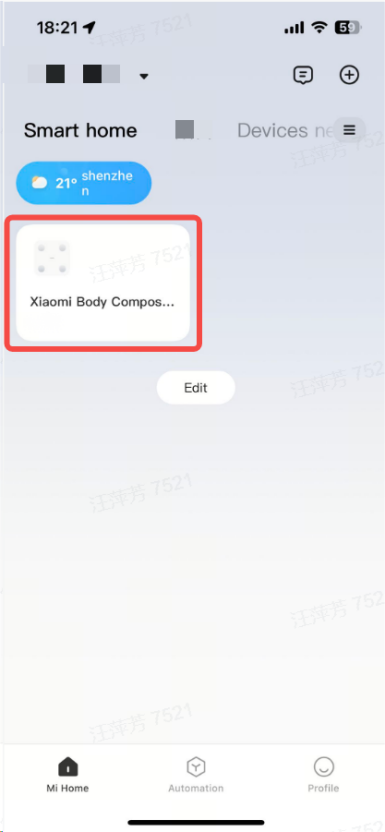
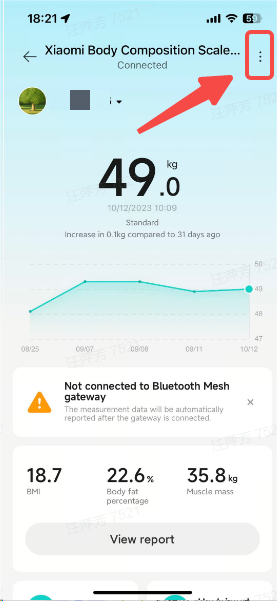
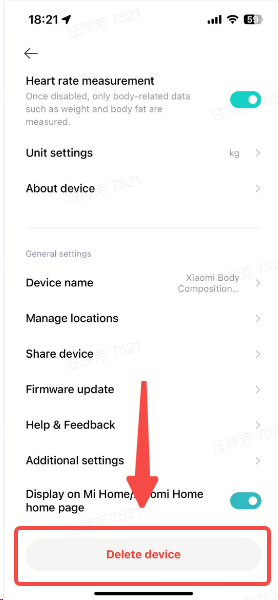
1. Open the "Mi Home/Xiaomi Home app" and connect to the device. Select Device >> Settings in the upper right corner >> Pull to the bottom Delete Device to unbind the current device in the cloud;
2. After deleting the device, when you return to the homepage of the Mi Home/Xiaomi Home app, you will see that the scale is still there. At this time, refreshing the drop-down list will disappear;
3. If other phones are bound to this device, please open the battery cover on the bottom, use a pin or a slender object to press and hold “Reset” for 7 seconds to reset the scale body, and then proceed with the binding operation.
Special reminder: When changing the device bound to the phone, it is necessary to press and hold "Reset" for 7 seconds before it can be searched and bound.
Q4: Why can I still see the device on the homepage of the Mi Home/Xiaomi Home app after deleting the device?
A: After deleting the device, if you see the Xiaomi Body Composition Scale S400 on the homepage of the Mi Home/Xiaomi Home app. Please pull to refresh the list. It will disappear.
Q5: Delete the Xiaomi Body Composition Scale S400 on the Mi Home/Xiaomi Home app, rebind and keep failing to connect?
A: After deleting the device in the Mi Home/Xiaomi Home app, open the battery cover at the bottom of the scale, press and hold the reset button for more than 7 seconds, and then try connecting again.
Q6: Why cannot I bind/connect the Xiaomi Body Composition Scale S400?
A:
1. Please check if you have found any devices in the Mi Home/Xiaomi Home app. If not, please open the Mi Home/Xiaomi Home app to add the device manually (the scale does not support searching for bound devices in System Settings Bluetooth);
2. Please check if the Mi Home/Xiaomi Home app has been updated to the latest version, and use the Mi Home/Xiaomi Home app iOS 8.7.204/Android 8.7.703 or above (path: Mi Home/Xiaomi Home app >> Profile >> Additional settings >> About Mi Home/Xiaomi Home);
3. Please check if your phone has Bluetooth and location services enabled. If it is not enabled, please enable it and try again;
4. Please check if the scale is connected to another phone. If so, please disconnect and try again;
5. Please check if the distance between your phone and the scale is too far. If so, please place your phone as close to the scale as possible and try again;
6. Please check if the power of the scale is sufficient. If the "low battery" icon on the display screen lights up, it indicates the battery is low. Please replace the battery and try again;
7. Please check if the mobile system version meets the requirements. Only supports Android 8.0 or iOS 12.0 and above versions. If so, please try again with a different phone;
8. If all the above have been ruled out and the device still cannot be connected, please open the battery cover at the bottom of the scale, press and hold the reset button for 7 seconds to reset, and then try connecting again.
Q7: Why cannot Bluetooth be connected after binding?
A:
1. Please check that the Mi Home/Xiaomi Home app has been updated to the latest version and requires the use of Mi Home/Xiaomi Home app iOS 8.7.204/Android 8.7.703 or above (path: Mi Home/Xiaomi Home app >> Profile >> Additional settings >> About Mi Home/Xiaomi Home);
2. Please open the Mi Home/Xiaomi Home app to see if a pop-up message appears: "Configuration information synchronization failed, please restart the plugin". If so, please restart Bluetooth and try connecting to the scale again;
3. Please reset the device, reset the device, and then rebind it (before rebinding, you need to delete the bound device in the Mi Home/Xiaomi Home app), otherwise you will not be able to connect.
Scale display and troubleshooting issues
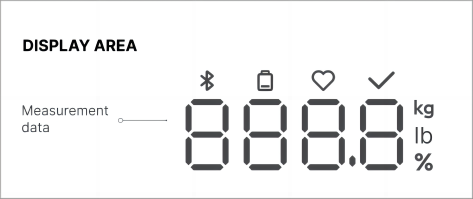
Q1: What do the icons displayed on the Xiaomi Body Composition Scale S400 represent?
A:
1. % is the body fat rate display, kg/lb is the weight display, and the heart rate display will appear as a heart icon;
2. The following is a detailed explanation (same as the manual);
Q2: Is there a problem when the battery is fully charged while the battery icon lights up when powered on?
A: When the scale is powered on, all icons on the scale surface will light up for 2 seconds. The low battery icon is designed in red, so it appears red. When entering normal mode after full display. If the battery is fully charged, the icon will not be displayed. If the battery is low, the low battery icon will light up.
Q3: How do you troubleshoot and solve issues such as crashes, black screens, scale jamming, and not turning on?
A:
1. Remove the battery and power it on again to check if it returns to normal;
2. If normal is not restored, it is recommended to rebind after RESET;
3. If the issue has not been resolved, please provide feedback through the Help & Feedback section of the Mi Home/Xiaomi Home app and contact customer service for assistance.
Q4: Is it normal to hear the sound of the spring when pressing the foot of the Xiaomi Body Composition Scale S400?
A: This phenomenon is normal. There are four weighing sensors inside the Xiaomi Body Composition Scale S400, and there must be a gap between the scale feet and the sensors to ensure accurate weighing. It is a normal phenomenon to have shaking sounds.
Q5: What does the scale display "--" for measurement failure mean?
A:
Scenario 1:
Display ---, measurement abnormal: Indicates abnormal measurement, with no good contact between feet and the scale.
1. Please make sure to be barefoot and remove shoes and socks. Ensure that both feet are full in contact with the scales;
2. If there is dust or dirt on the surface of the scale, it may cause poor electrode contact. You can try wiping the scale surface with a damp tissue.
Scenario 2:
Display ---, user identification exception:
Indicates that the user with this weight was not recognized.
1. If measuring online, please allocate data to the corresponding user according to the APP prompt;
2. If measuring offline, please claim the data in the To be Claimed data section and connect to the app to complete a measurement.
Scenario 3:
Indicates that the weight is recognized as a unique user, but the user information is incorrect.
1. Please modify user information in the plugin settings - user management to ensure it is within the supported measurement range;
2. Age: 6-80 years old; Height: 90-220cm; Weight: 20-150kg;
3. If measuring offline, please claim the data to the corresponding measurement member in the plugin - Pending Claim Data.
Scenario 4:
1. Multiple users with similar weights have been identified. Please manage the users on the app and assign measurement data;
2. If measuring offline, please claim the data to the corresponding measurement member in the plugin - Pending Claim Data.
Zero related issues
Q1: What does it mean that the scale surface keeps rotating after the power is on?
A: To ensure weight accuracy, the scale will enter the zero chasing mode after each power-on. The equipment needs to be placed on hard and flat ground and can be used when the zero chasing display is 0.0kg.
Q2: Is there a small weight on the scale that does not return to zero?
A:
1. Please check if the ground is hard and flat, as uneven ground can have residual effects;
2. To ensure the accuracy of weighing, the scale has a dynamic zero-chasing mechanism;
3. The scale will track zero when the balance screen stops, clear the weight on the scale surface, and return to the zero state;
4. During the use of the scale, if the scale body is moved, the zero point will change. After the scale is placed on the ground, a small weight value will be primary on the display screen. At this time, you need to wait 5 seconds to clear the screen, then wake up the scale surface to display 0.0kg before using it.
Weighing related issues
Q1: What are the precautions for the Xiaomi Body Composition Scale S400 when weighing?
A:
1. Please ignore the results of the first weighing or the first weighing after moving the scale;
2. Avoid stepping on the edge of the scale to prevent tipping and falling;
3. Place the scale on a hard and flat floor for weighing;
4. For weighing small objects weighing less than 5kg, it is necessary to lightly step on or press the scale surface, wake up the scale body, and wait for the scale surface to display 0.0kg before measuring.
When there is a weight residual value on the empty scale. Please wait 5 seconds for the scale surface to rest, lightly step on it to wake up the display of 0.0kg, and then load the scale for measurement.
Q2: What is the weighing range for small objects for the Xiaomi Body Composition Scale S400?
A:
1. The function of weighing small objects is enabled by default, and the device can recognize small objects weighing between 0.1kg and 10kg. It only measures the weight and does not save it;
2. For weighing small objects weighing less than 5kg, it is necessary to lightly step on or press the scale surface, wake up the scale body, and wait for the scale surface to display 0.0kg before measuring.
Q3: What is the accuracy and division of weighing?
A: The Xiaomi Body Composition Scale S400 has a measurement accuracy error. Generally speaking, the higher the weight, the greater the error, and the accuracy deviation it has is as follows:
100g ≤ m<10kg, maximum error ± 0.1kg;
10kg ≤ m<50kg, maximum error ± 0.1kg;
50kg ≤ m<100kg, maximum error ± 0.2kg;
100kg ≤ m ≤ 150kg, maximum error ± 0.3kg;
Deviation within the range is considered normal measurement, please feel free to use it. Due to biased loading, there may be significant deviations in real-person measurement. Users need to smoothly load the scale and maintain the center of gravity in the middle of the scale body to ensure that the correct value is obtained.
Q4: Is the data for continuous weighing different?
A: You can troubleshoot by following these steps:
1. Please place the equipment on a hard and flat surface before re-weighing and measuring. Do not place on soft or uneven surfaces;
2. Check if the equipment casing is in contact with walls or other objects. If available, please keep the scale away from walls or objects;
3. Did you move the body of the scale during use? After moving the scale, the zero point will change. After the scale is placed on the ground, a small weight value will be primary on the display screen. At this time, you need to wait for 5 seconds to clear the screen, then wake up the scale to display 0.0kg before using it;
4. Use the correct weighing and standing posture, keep the center at the center of the scale, and do not shake your body during the measurement process.
Q5: How much weight fluctuation is normal for the human body in one day?
A:
1. The normal daily weight fluctuation of a person is about 1-3kg, which is within the normal range;
2. Because everyone's daily dietary composition is different, the amount of food they eat is not very constant, and the amount of water they drink and the amount of exercise they exercise have a certain impact on their weight. It is best to set a fixed time every day when weighing, which can be after using the toilet in the morning, before meals, or at night. In short, it is necessary to set a fixed time for comparability;
3. We should fully understand the daily weight fluctuations. If the weight continues to decline, for example, if the weight drops more than 10% of the original weight every month, we should pay attention to whether there are pathological factors. In addition to deliberate weight loss, we should pay attention to whether there are diabetes, hyperthyroidism, tuberculosis, tumors, and gastrointestinal diseases that may lead to weight loss.
Pattern related issues
Q1: How to use the visitor measurement function of the Xiaomi Body Composition Scale S400?
A: Open the "Mi Home" app and connect to the device, select Devices >> Visitor Measurement, enter the visitor's personal information according to the page prompts, click Measurement, and after the measurement is completed, the visitor's body composition measurement report will be displayed.
Note: Measurement data in visitor weighing mode will not be saved.
Q2: How to set the unit of the Xiaomi Body Composition Scale S400?
A: The default unit of the scale is "kg". Please open the "Mi Home" app and connect to the scale. Select Equipment>Settings in the upper right corner>Unit Settings to modify it. The scale supports displaying two units: "kg" and "jin".
If the Mi Home shared account does not currently support setting up units.
Q3: How to use the balance testing function of the Xiaomi Body Composition Scale S400?
A: Open the Mi Home app and connect with the device, select Device >> Balance Test, and follow the prompts to stand on one foot and weigh. After weighing, start timing, the app and device will display the standing time and test results.
Attention:
1. Please stand in the middle of the scale during measurement. Before feeling out of balance, be sure to open your eyes and stand on both feet;
2. Unsuitable population: Pregnant women, elderly and individuals with poor balance like abnormal vestibular function in the brain.
Q4: Can heart rate detection of the Xiaomi Body Composition Scale S400 be turned off?
A:
1. Yes, heart rate detection is enabled by default. If you don't want to measure heart rate every time, you can turn off the heart rate detection function in the settings;
2. Only the first account bound to the scale can enable/disable this function.
Attention: When adjusting the heart rate switch, it is necessary to connect with the scale. Otherwise, the set command cannot be transmitted to the device end.
Measurement related issues
Q1: Is there a significant difference in body fat percentage compared to other scales?
A:
1. The Xiaomi Body Composition Scale S400 adopts dual frequency measurement technology for more accurate measurement;
2. The correlation between the core indicators of fat mass and muscle mass of Xiaomi Body Composition Scale S400 and DEXA reached 0.93 or above. Which was verified by Dr Mei Tao's research team from the Chinese Institute of Sports and Health at Beijing Sport University. (DEXA is the gold standard for measuring human body composition, and the closer its correlation is to 1, the more accurate it is.)
Each brand's scale has its algorithm, and we do not comment on its accuracy.
Q2: Is the comparison data between the Xiaomi Body Composition Scale S400 and Mi Smart Scale 2 inconsistent?
A:
1. The Xiaomi Body Composition Scale S400 adopts more advanced dual-frequency technology and algorithms and has made a new upgrade and iteration in measurement accuracy, upgrading the number of measurable data items to 25;
2. There may be some differences between the new algorithm and the old algorithm, which is a normal phenomenon and does not affect use;
3. When using a scale in practice, it is recommended that you adopt the latest and more user-friendly features to avoid cross-use that may affect the presentation of data trends.
Q3: Is the comparison data between the Xiaomi Body Composition Scale S400 and the Xiaomi eight-electrode scale inconsistent?
A:
1. The Xiaomi Body Composition Scale S400 adopts dual-frequency four-electrode measurement technology, which calculates the body composition of the whole body by measuring the impedance data of the lower body. The Xiaomi eight-electrode scale adopts a dual-frequency eight-electrode segmented algorithm, which can measure impedance data of the whole body and is relatively more accurate;
2. The four-electrode and eight-electrode lipid scales have different uses, and you can choose the appropriate product according to your needs;
3. The four-electrode scale is easy to operate and measures quickly. Through long-term measurement data accumulation, it can present the trend of changes in body composition, guide personal diet and exercise plans, and is suitable for most people who want to lose weight and exercise;
4. The eight-electrode scale is suitable for higher-order weight loss and fitness enthusiasts due to its more accurate data, complex operation, and longer measurement time.
Q4: Is there a significant difference in body score between consecutive measurements?
A: The scale measures body scores based on comprehensive indicators of the whole body. If there is a significant difference in body scores measured continuously, it may be due to improper operation. It is recommended to perform the correct operation and try again.
Q5: Is there a significant difference in body composition data between last night and this morning?
A:
1. The Xiaomi Body Composition Scale S400 measures the current state of the body's indicators. After a night of physiological metabolism, the body's state changes. It's normal to have a difference;
2. We generally recommend conducting continuous measurements at the same time and state every day, as the trend changes in the data are more meaningful in guiding us towards healthy eating and scientific exercise.
Q6: Why is the measuring time of the Xiaomi Body Composition Scale S400 so long?
A:
1. The Xiaomi Body Composition Scale S400 adopts dual-frequency fat measurement technology, which is more accurate. A complete measurement is expected to take 30 seconds;
2. After weighing, measure body weight, body fat, and heart rate in sequence, with fat measurement taking 2 seconds and heart rate measurement taking 12 seconds;
3. If you don't need to measure your heart rate every time, you can turn off the heart rate measurement switch in the Mi Home/Xiaomi Home app, which can shorten the single measurement time by half.
Q7: How to conduct multi-person measurement/member measurement?
A:
1. Please first create user information and fill in the measurement person's age, height, gender, and weight information;
2. After creating a member user, return to the homepage and click on the top left corner to switch to the current user;
3. Switch to using the user and directly scale or click Measure on the APP homepage to perform measurement actions.
Note: After creating member users online, offline measurement is supported. If there are two or more users with similar weights, they cannot be recognized as current users.
Q8: Does family measurement always fail?
A: Please follow the following steps to troubleshoot:
1. If the account of the family member is not bound to this device, they can use "device sharing" to bind the device for measurement;
2. If already bound, please follow the operating instructions to correctly operate the measurement;
3. There is a situation where the weight of family members and oneself is close, with a deviation of within ± 2kg. The scale body cannot recognize which user's data it is. Please claim it in the pending data section of the app.
Note: If two members in a family with similar weight need to be measured for long-term use. It is recommended to purchase a new one and use it separately.
Q9: What age and height are suitable measurements for the Xiaomi Body Composition Scale S400?
A:
1. The Xiaomi Body Composition Scale S400 is suitable for people aged 6-80 for full data measurement;
2. For Under 6 years old and above 80 years old. Fat measurement is not supported currently. Only weight measurement is allowed;
3. The supported height range is 90-200cm;
4. The weight range supported by the algorithm is 20~150kg.
Q10: What if body composition analysis fails?
A: The following steps can be followed for troubleshooting:
1. Please confirm if the scale has been bound and connected;
2. Please check if the user information on the Profile page of the app, such as gender, birthday, and height, is correct. At present, the supported range of fat measurement algorithms is age: 6-80 years old; Height: 90-220cm; Weight: 20-150kg;
3. Please confirm if you are weighing barefoot, with your feet separated and your feet in full contact with the electrode;
4. Please ensure that the measurement process does not involve pre-weighing;
5. During the measurement process, there is no movement of the feet.
Reminder: The weather in the autumn and winter is cold and dry, which may lead to poor electrode contact and measurement failure. I suggest you use a damp towel to lightly wipe and wet the soles of your feet before trying again.
Q11: How do the Xiaomi Body Composition Scale S400 identify users?
A: After device binding, the scale end will save user information. Later measurements will match users based on weight differences (the system will identify users with weight differences within 2kg as the same user). And synchronize measurement data.
Q12: Can two people with similar weights be recognized?
A:
1. Users with a weight difference in the range of ± 2kg cannot recognize it;
2. It is recommended to use the Share device function of the account and share it with another person. When using it, keep the Bluetooth connection to measure. When offline, the scale side cannot recognize the only user.
Q13: How is pending data generated?
A:
1. When the scale measures the weight, it is identified with the last weight record of the existing user in the scale end or APP to determine whether it is within the range of ± 2kg;
2. If a unique user is identified, this data will be attributed to this account;
3. If the user is not recognized (scale display ----) or to identify multiple users (scale display ----), will this data be determined to be claimed data, stored in the scale or APP, APP to be connected next to be claimed in the library by the user to select the home;
4. After claiming the data, the APP will assign the data to the corresponding date according to the time. To query, you need to check the claimed data in all the data.
Q14: Is there any error in weight and body fat measurement data?
A: Please check and confirm the following:
1. Open the Mi Home/Xiaomi Home app, select "Settings" >> "User Management" >> Select Account, and check whether the gender, birthday, and height information is filled in correctly;
2. Please ensure the scale is on a hard, flat floor. Do not place it against the wall to ensure the foot of the scale is free of foreign matter and is not in the brick seam;
3. Please ensure the scale surface is clean and free from metal foreign or water stains;
4. When measuring, please go barefoot on the scale and stand on the scale surface correctly, with your feet fully in contact with the electrode sheet, your hands naturally droop, and maintain the correct measuring posture;
5. Stand upright and steady without shaking your body or feet when taking measurements. Bending over, kneeling or leaving your feet may result in inaccurate measurements;
6. If the weight measurement is not accurate after moving the scale body, please put the scale in place and step on the bright scale. When the scale shows "0.0kg", the scale can be used to measure the weight normally;
7. It is suggested to measure at the same time and under the same conditions every day, to observe the change trend of these data more accurately.
Q15: Is there any error in the heart rate measurement data?
A: When the scale is inaccurate in measuring heart rate, please conduct the following investigation:
1. The heart rate measured by the scale in a calm state is a single heart rate. There will be differences between the "heart rate" measured in a calm state and that measured in different scenes just after exercise. The normally measured "heart rate" value in a calm state is 60~ 100 (times/minute). When you do not measure the "heart rate" in a calm state, the "heart rate" data measurement will be affected if there is body shaking, large-scale movements or loud talking. It is recommended to keep calm during the "heart rate" measurement and avoid body shaking, large-scale movements or loud talking;
Note: The heart rate measurement on the scale needs to be detected at rest, which is not suitable for measurement during or immediately after exercise.
2. Use the correct measurement method As the heart rate changes dynamically and different devices measure the heart rate on different principles, there will be certain differences in measurement, and the heart rate measured by the scale is compared and calibrated with the industry gold standard heart rate band, and the heart rate measurement accuracy is high. Attention should be paid when using the scale to measure the heart rate:
(1). Open your feet, keep from sole to thigh and do not contact each other;
(2). To maintain foot muscle relaxation;
(3). Keep a steady state of rest, don't shake;
(4). Don't talk while measuring;
(5). Maintain normal breathing, do not breathe sharply or deeply;
(6). Maintain full contact between the sole and the electrode sheet.
Q16: Which 25 comprehensive indicators does the Xiaomi Body Composition Scale S400 support?
A: Weight, heart rate, BMI, body score, body moisture, body moisture, body fat rate, fat mass, protein mass, protein rate, muscle mass, muscle rate, bone salt content, bone salt rate, visceral fat grade, basal metabolic rate, degreased weight, body type, estimated waist-to-hip ratio, body age, skeletal muscle mass, weight control, muscle control, fat control, standard weight.
Q17: What is the meaning of the 25 comprehensive indicators?
A:
1. Weight: Weight refers to the sum of the components of the human body;
2. Degreasing weight: De-fat body weight, also known as "lean body weight", refers to the body weight after removing all fat. Skin, muscles, bones and internal organs are the primary components of de-fat body weight;
3. BMI (Body Mass Index): BMI (Body Mass Index) reflects the relationship between weight (kg) and height (m) squared, is closely related to body fat content, and is an important indicator of human adiposity. It is commonly used internationally to measure human body fat and thinness. One of the standards;
4. Body fat rate: Body fat rate refers to the proportion of body fat weight in the total body weight, also known as body fat percentage, which reflects the amount of body fat content;
5. Amount of fat: The amount of fat refers to the total amount of all fat in the human body. Fat is necessary for the brain, nerves, bone marrow, heart and cell membranes to function;
6. Skeletal muscle mass: Skeletal muscle is attached to the bone and is the source of human exercise energy. Muscle volume and weight directly determine the human body's exercise ability and play an important role in regulating energy metabolism;
7. Muscle mass: The muscle is the largest human body tissue. It plays an important role in maintaining body temperature and human body movements, maintaining heart beating and generating heat. Muscle tissue contains some water and protein;
8. Muscle rate: Muscle rate refers to the proportion of muscle mass in total body weight;
9. Body moisture(Body moisture rate): The body moisture rate is the proportion of water in the body's total body weight. Usually, muscle tissue contains more water;
10. Body moisture: Refers to the water content of the human body, including blood, lymph, extracellular fluid, intracellular fluid, etc;
11. Bone salt content: Bone salt amount refers to the total amount of minerals in the bone;
12. Bone salt rate: Bone salt rate refers to the proportion of bone salt in total body weight;
13. Protein quality: Protein refers to the total amount of protein in the human body;
14. Protein rate: Protein rate refers to the proportion of protein mass in total body weight;
15. Body score: The primary parameters of the body score are BMI, body fat rate, muscle mass and (specific parameters). Assume that each parameter is 100 points under the most standard range, and the scores beyond and below the standard range decrease accordingly (set the decreasing layer), and then set the weight according to the influence of each parameter on the physical condition. The final score is based on the combination of each parameter;
16. Visceral fat grade: Visceral fat is a kind of human body fat essential for stabilizing and protecting human organs. However, too much visceral fat will increase the risk of cardiovascular diseases and metabolic diseases;
17. Basal metabolic rate: Basic metabolism refers to the energy metabolism per unit time in the basic state(the human body is quiet, awake, fasting, and the room temperature is 20~25 degrees Celsius). This energy metabolism is the minimum energy needed to maintain life activities;
18. Weight control: Weight control = standard weight reference value-current weight, for reference only;
19. Muscle control: Muscle control = standard muscle mass reference value-current muscle mass, for reference only;
20. Fat control: Fat control amount = standard fat amount reference value-current fat amount, for reference only;
21. Body type(Body shape judgment): According to the user's body fat rate and BMl, the body shape is comprehensively determined;
22. Presumed waist-to-hip ratio: The estimated waist-to-hip ratio mainly reflects the state of fat distribution in the human body. It can be obtained by calculating the ratio of waist circumference(cm) and hip circumference(cm). The estimated waist-to-hip ratio is for reference only;
23. Physical age: Physical age refers to a combination of weight, height, fat, muscle and other indicators based on basal metabolic rate, which mainly depends on lifestyle and health status;
24. Heart rate: Heart rate refers to the number of heartbeats per minute, which directly reflects the sign of heart health;
25. Standard weight: According to the standard weight (SBW) calculation method, the standard weight reference value is calculated to represent the ideal weight of various heights, which is the goal to be achieved in weight control.
Device sharing
Q1: How to share devices with other users?
A:
1. Open the Mi Home/Xiaomi Home app and connect the device, select Devices >> Tap Settings at the upper right corner >> Share device >> Xiaomi Account (Phone) >> enter the Xiaomi Account >> OK. The primary user can share the device with 5 Xiaomi accounts as sharing users;
2. The device can only be connected to one account at the same time via Bluetooth. If the primary account is connected, the shared account cannot be connected, and vice versa. You can disconnect the currently connected account Bluetooth to keep the device in a pending connection state. At this time, other accounts can be connected;
3. After the primary account initiates the Share device successfully, the shared account will receive a confirmation pop-up window in the Mi Home/Xiaomi Home app, please follow the instructions to bind;
4. If there is no pop-up confirmation, please try multiple operations on the primary account.
Note: Please ensure that the primary account and shared account use the latest version of the Mi Home/Xiaomi Home app: Android APP version 8.0 or above, iOS APP version 12.0 or above
Q2: What are "master account", "family member" and "shared account" respectively?
A:
1. Master account: The first user to bind the device is the master account. The master account supports all functions of the scale (binding, deleting devices, managing family members, device sharing, firmware upgrade, modifying units, etc.);
2. Shared Account: The primary account shares the equipment with 5 millet accounts as shared accounts;
3. Family members: sub-accounts created under the primary or shared account, also support all body composition measurements.
Note:
1. Six accounts can be bound to use equipment together, and 30 family accounts can be created, totaling 36 users;
2. The primary and shared account (Xiaomi account ID) only supports age information filling is 14 years old and above, the age filling of family users is not limited, and the age range supported by the fat measurement algorithm is 6-80 years old.
Q2: Many people share the Xiaomi Body Composition Scale S400.
A:
1. When it is necessary to measure and record physical data for a long time, it can be shared with other Xiaomi account users through the "Share device" function on the Mi Home/Xiaomi Home app device page;
2. When visitors need to measure, they can use the "Weight Diagrams" in the Mi Home/Xiaomi Home app equipment page to measure, and the data is not saved;
3. Xiaomi Body Composition Scale S400 can bind 1 Xiaomi account as the primary account, and the primary account can be bound to 5 Xiaomi accounts through "Share device". You can add 5 home users under both primary and shared users.
Q3: Did not receive the "Share device" message pop-up window?
A:
1. It is recommended to try to restart the Mi Home/Xiaomi Home app first to see if you can receive the "Device Sharing" push notification;
2. Please update the Mi Home/Xiaomi Home app to the latest version: Android 8.0 or iOS 12.0 and above. After the update, check whether you can receive the "Share device" push notification. If not, please re-initiate the sharing from the primary account.
Q4: Failed device binding after "Share device".
A:
1. Check whether the Bluetooth icon on the scale is always on. If it is always on, please turn off the Bluetooth of the mobile phone in the primary account and disconnect the connection between the mobile phone and the scale;
2. The device can only be connected to one account at a time via Bluetooth. When the primary account is connected. The shared account cannot be connected, and vice versa. You can disconnect the currently connected Bluetooth account to keep the device in a paired state. Other accounts can be connected at this time.
Add member
Q1: How to add/delete members of the scale?
A: The primary account and shared account support adding/deleting members.
Open the Mi Home/Xiaomi Home app, select Devices >> Settings at the upper right corner >> User Management >> Select Members >> Delete.
1. After clicking Add Member, fill in the member name according to the page prompt and save it. In addition to the above pages, you can also create a member according to the page prompt when the primary user weighs it;
2. Delete members: Select the members to be deleted, and click the delete icon to delete the selected members and data. The deleted data cannot be recovered, please be careful;
3. During the measurement process, the APP prompts to select users and can add members by themselves.
When the scale is connected to the APP, after the user is measured on the scale, if the unfamiliar weight is identified (i.e. the weight in the user list is outside ± 2kg), the APP will pop up a pop-up window to select the user and click "Add" to create a member according to the page prompt.
Q2: Is the user list synchronized with Mi Fitness APP?
A:
1. We attach great importance to your personal information and privacy protection. After you agree to the Privacy Policy of Xiaomi Body Composition Scale S400, we will associate the user list and user information of the current Xiaomi account in the Mi Fitness APP and import them into the Mi Home/Xiaomi Home app. User information is only used for the body data measurement service of the scale, and some measurement data are related to user information;
2. Modify user information in any end APP, Mi Home/Xiaomi Home app and Mi Fitness APP will keep pace.
Note: The user measurement data is not synchronized with Mi Fitness, only the user list is synchronized with Mi Fitness.
Q3: Will the weighing data be synchronized with Mi Fitness APP?
A: Xiaomi Body Composition Scale S400 currently does not support synchronous weighing data to the Mi Fitness app, only user information on the Mi Home/Xiaomi Home app and Mi Fitness app will remain synchronized.
Q4: Why do I keep popping up windows to delete users?
A: It may be that the number of users that the current device can create exceeds the upper limit.
1. In Mi Home/Xiaomi Home app >> Xiaomi Body Composition Scale S400 >> Settings at the upper right corner >> User Management, delete the members of the scale that are not commonly used;
2. Please select Xiaomi Body Composition Scale S400 in the Mi Home/Xiaomi Home app >> Settings at the upper right corner >> Share device >> and delete the infrequent sharing users in the page of the selected device.
Bluetooth Gateway
Q1: What is a Bluetooth gateway?
A:
1. Gateway is a product that assists the networking of smart home devices. All devices in smart homes need to be connected to the Internet. Wi-Fi is a common connection method, but not all devices are suitable for Wi-Fi connection. Some other connection methods are needed to solve the problems or needs of Wi-Fi interference, low power consumption and group control of devices;
2. Please check the link for details:
https://home.mi.com/views/article.html?articleId=713752525000000001
Q2: How does the scale access the gateway?
A: After the scale is successfully added to the Mi Home/Xiaomi Home app, it will automatically connect to the gateway device under the account. After the scale is connected to the gateway, in the scenario where the APP is not opened, the user stands on the scale for measurement, and the measurement data will be uploaded to the server through the gateway, so that the measurement data can be viewed in the Mi Home/Xiaomi Home app.
1. Gateway equipment that supports access: You can query detailed information in the Mi Home/Xiaomi Home app >> Profile >> Hubs & gateway;
2. Ensure the gateway device is bound to the Mi Home/Xiaomi Home app and upgraded to the latest firmware version;
3. Data uploaded through the gateway will be delayed by 1-10 minutes, depending on the network environment.
Q3: Why is there no scale in the gateway sub-device?
A:
1. Please place the scale next to the gateway equipment, not more than 10 meters apart;
2. Please check whether the gateway is on and online and whether the gateway device has been upgraded to the latest firmware version;
3. Please check whether the gateway is bound to the same Xiaomi account with the Xiaomi Body Composition Scale S400;
4. Try to restart the gateway, unplug the power plug of the gateway and plug it back in.
Q4: The connection gateway is used, and some data is not uploaded. What should I do?
A:
1. If the data is not uploaded successfully through the gateway, the measurement data will be stored in the scale first;
2. You can connect with the Xiaomi Body Composition Scale S400 by opening the Mi Home/Xiaomi Home app, and the scale will automatically synchronize the data in the device to the Mi Home/Xiaomi Home app;
3. Use the gateway to synchronize data after the initial binding. Due to network reasons, the first weighing data may not be synchronized; you can automatically synchronize the first data to the Mi Home/Xiaomi Home app by opening the Mi Home/Xiaomi Home app and connecting with the scale;
4. Due to the design of the gateway, if the gateway is powered off, the online status of the scale plug-in homepage gateway will be delayed for 144 minutes before updating to the offline status of the gateway. During this period, measurement data cannot be uploaded through the gateway. But can be used through a Bluetooth direct connection.
Firmware upgrade
Q1: How to update the firmware of the Xiaomi Body Composition Scale S400?
A: Open the Mi Home/Xiaomi Home app and connect the device, select Devices >> Settings at the upper right corner >> Firmware update, if you find a new version, you can update the firmware, and the server level will push the upgrade package to the device, and the device will automatically upgrade and restart after receiving the upgrade package. When the body fat monitor displays "0.0kg". It means the upgrade is complete.
Note:
1. Update the device firmware, only for the primary user;
2. Before you update, make sure the device is connected normally and that the low battery icon is not displayed;
3. During the update process, please do not measure on the scale, remove the battery or quit the Mi Home/Xiaomi Home app.
Q2: What if the device upgrade fails?
A: Please check and confirm the following:
1. Ensure normal connection
(1). During the upgrade process, the scale needs to be connected to the mobile phone;
(2). Please ensure that the APP is running at the front desk and the mobile phone screen is always on;
(3). If the APP is cleared by the background of the mobile phone, please open the Mi Home/Xiaomi Home app, reconnect with the scale, and upgrade again;
(4). Please do not measure or press the scale during the upgrade process.
2. Check the power of the scale
When upgrading, ensure the scale has sufficient power.
Q3: How to restore factory settings?
A: Open the battery cover on the back of the device and press the Reset key for 7 seconds. When "0.0kg" is displayed after all the LEDs are lit, the factory settings will be restored.
Note:
1. Restore the factory settings to delete the user data and device binding relationship on the device side. The data that the device is not synchronized to the APP will be cleared. Please operate carefully;
2. The Delete Device function in the Mi Home/Xiaomi Home app can only be unbound from the device in the cloud, and the device itself needs to be "RESET" before it can be discovered and bound.

Q4: How to solve the problem that the scale shows that it has been turning around and does not turn on?
A:
1. Remove the battery and reinstall it to check whether the scale is back to normal;
2. If it does not return to normal, it is recommended to bind the scale again after returning to factory settings;
3. If the problem can not be solved, please submit feedback in Mi Home/Xiaomi Home app >> Profile >> Help & Feedback, or contact after-sales personnel for processing.
Data View
Q1: How do I check my weight data?
A:
1. The primary user, home user data query:
Open the Mi Home/Xiaomi Home app, and click the Xiaomi Body Composition Scale S400 >> Select the corresponding account >> View Report. You can view the latest measurement data of the current user. Select History to view the reports.
Note: The users who hold babies and weigh belong to family users.
Switch user:
View Record Report:
Q2: How to download the measurement report?
A: Open the Mi Home/Xiaomi Home app >> View Report >> Share in the upper right corner.
Q3: How to delete measurement records and data?
A: Open the Mi Home/Xiaomi Home app >> Select Device >> History >> All Records >> Edit in the upper right corner >> Select the record to be deleted, and click Delete at the bottom to delete the data.
Q4: How many pieces of measurement data can be kept on the scale?
A:
Q5: How does the measurement data synchronize with Apple Health?
1. How to turn it on: In Mobile Settings >> Health >> Data Access Permissions and Devices >> Mi Home/Xiaomi Home app, turn on the permission of Weight, Body Fat Rate, Height Body Fat Index. If the permission is not turned on, the data cannot be synchronized;
2. After opening, the newly measured data of the user will be automatically synchronized to Apple Health, and only the data of the current Xiaomi primary account will be synchronized.
Note: Support synchronization to Apple health data: weight, body fat rate, height and body mass index data. This function needs to update the Mi Home/Xiaomi Home app to the latest version before it can be used normally (iOS: Mi Home/Xiaomi Home version 8.7 and above).
Q6: Why can I see the data of the previous scale?
A: Because the historical measurement data is stored under the current account in the cloud, it will not be affected by the binding/unbinding of the scale. If the user has bound Xiaomi Body Composition Scale S400 in the APP, which supports viewing the historical measurement data in the newly bound same scale.
Q7: Compared with other scales, is there a big difference in body age?
A:
1. The Body Age Index is generally calculated according to the metabolism of the human. Different brands have different calculation methods and there is no industry standard. This index is compared between scales of different brands and has no significant meaning;
2. Physical age reflects the current physical condition of the tester to some extent, which can remind us to strengthen exercise and adjust our diet to maintain the best physical condition.
Q8: The Mi Home/Xiaomi Home app shows that Bluetooth is connected, but the measurement data is not synchronized?
A: The Mi Home/Xiaomi Home app version may be outdated. Please reinstall the latest version from the application store and try again.
Other issues
Q1: What is BIA?
A:
1. Bia (Bio-impedance analysis) refers to the measurement of biological resistance;
2. The basic principle of BIA measurement is the simple division of the body into conductive body fluids, muscles, etc. and non-conductive fat tissue. During the measurement, a very small current is passed through the body from the electrode plate. If the fat content is high, the measured biological resistance is high and vice versa. BIA is the measurement of body fat percentage by this device.
Q2: In the Mi Home/Xiaomi Home app device page >> more settings >> add shortcuts, the page does not respond?
A: Some models such as Huawei mobile phones, cannot automatically obtain permission to create shortcuts. You need to check and open this permission in the system settings of the mobile phone.
Help and feedback
Q1: How to view "Help and Feedback" of the Xiaomi Body Composition Scale S400?
A:
1. Open the Mi Home/Xiaomi Home app >> Xiaomi Body Composition Scale S400 >> Settings in the upper right corner >> Help & Feedback.
Q2: How to provide feedback of the Xiaomi Body Composition Scale S400 on issues and upload logs through the app?
A: Open the Mi Home/Xiaomi Home app >> Profile >> Help & Feedback >> Xiaomi Body Composition Scale S400 >> Feedback, fill in the problem description and video or image, check the box to send the problem log, and click submit to complete.
Binding connection issue
Q1: What apps can the Xiaomi Body Composition Scale S400 be connected to?
A: Support binding and usage with the Mi Home/Xiaomi Home app (Note: binding to Mi Fitness is not supported).
1. Please ensure that the Mi Home/Xiaomi Home app has been updated to the latest version. You need to use the Mi Home/Xiaomi Home app iOS 8.7.204/Android 8.7.703 or higher (see path: Mi Home/Xiaomi Home app >> Profile >> Additional settings >> About Mi Home/Xiaomi Home);
2. The Mi Home/Xiaomi Home app supports Android 8.0 or iOS 12.0 and above system versions.
Q2: How to bind the Xiaomi Body Composition Scale S400?
A:
1. Step lightly on one foot to awaken the Xiaomi Body Composition Scale S400. Open the Mi Home/Xiaomi Home app, click on the “+” sign in the upper right corner, select Add Device, and select Xiaomi Body Composition Scale S400 in the device list. Wait for the APP to search for the device;
2. Select the device you want to connect to and click Connect Device;
3. Get close to the Xiaomi Body Composition Scale S400 and complete the binding. Set room information after binding.
Q3: How to unbind/delete the Xiaomi Body Composition Scale S400?
A:
1. Open the "Mi Home/Xiaomi Home app" and connect to the device. Select Device >> Settings in the upper right corner >> Pull to the bottom Delete Device to unbind the current device in the cloud;
2. After deleting the device, when you return to the homepage of the Mi Home/Xiaomi Home app, you will see that the scale is still there. At this time, refreshing the drop-down list will disappear;
3. If other phones are bound to this device, please open the battery cover on the bottom, use a pin or a slender object to press and hold “Reset” for 7 seconds to reset the scale body, and then proceed with the binding operation.
Special reminder: When changing the device bound to the phone, it is necessary to press and hold "Reset" for 7 seconds before it can be searched and bound.
 |  |  |
Q4: Why can I still see the device on the homepage of the Mi Home/Xiaomi Home app after deleting the device?
A: After deleting the device, if you see the Xiaomi Body Composition Scale S400 on the homepage of the Mi Home/Xiaomi Home app. Please pull to refresh the list. It will disappear.
Q5: Delete the Xiaomi Body Composition Scale S400 on the Mi Home/Xiaomi Home app, rebind and keep failing to connect?
A: After deleting the device in the Mi Home/Xiaomi Home app, open the battery cover at the bottom of the scale, press and hold the reset button for more than 7 seconds, and then try connecting again.
Q6: Why cannot I bind/connect the Xiaomi Body Composition Scale S400?
A:
1. Please check if you have found any devices in the Mi Home/Xiaomi Home app. If not, please open the Mi Home/Xiaomi Home app to add the device manually (the scale does not support searching for bound devices in System Settings Bluetooth);
2. Please check if the Mi Home/Xiaomi Home app has been updated to the latest version, and use the Mi Home/Xiaomi Home app iOS 8.7.204/Android 8.7.703 or above (path: Mi Home/Xiaomi Home app >> Profile >> Additional settings >> About Mi Home/Xiaomi Home);
3. Please check if your phone has Bluetooth and location services enabled. If it is not enabled, please enable it and try again;
4. Please check if the scale is connected to another phone. If so, please disconnect and try again;
5. Please check if the distance between your phone and the scale is too far. If so, please place your phone as close to the scale as possible and try again;
6. Please check if the power of the scale is sufficient. If the "low battery" icon on the display screen lights up, it indicates the battery is low. Please replace the battery and try again;
7. Please check if the mobile system version meets the requirements. Only supports Android 8.0 or iOS 12.0 and above versions. If so, please try again with a different phone;
8. If all the above have been ruled out and the device still cannot be connected, please open the battery cover at the bottom of the scale, press and hold the reset button for 7 seconds to reset, and then try connecting again.
Q7: Why cannot Bluetooth be connected after binding?
A:
1. Please check that the Mi Home/Xiaomi Home app has been updated to the latest version and requires the use of Mi Home/Xiaomi Home app iOS 8.7.204/Android 8.7.703 or above (path: Mi Home/Xiaomi Home app >> Profile >> Additional settings >> About Mi Home/Xiaomi Home);
2. Please open the Mi Home/Xiaomi Home app to see if a pop-up message appears: "Configuration information synchronization failed, please restart the plugin". If so, please restart Bluetooth and try connecting to the scale again;
3. Please reset the device, reset the device, and then rebind it (before rebinding, you need to delete the bound device in the Mi Home/Xiaomi Home app), otherwise you will not be able to connect.
Scale display and troubleshooting issues
Q1: What do the icons displayed on the Xiaomi Body Composition Scale S400 represent?
A:
1. % is the body fat rate display, kg/lb is the weight display, and the heart rate display will appear as a heart icon;
2. The following is a detailed explanation (same as the manual);
 Bluetooth icon: White constantly on, indicating normal connection; Bluetooth icon: White constantly on, indicating normal connection;White flashing indicates not connected. |
 Standard icon: White continuously lit, indicating that the indicator is within the standard range; Standard icon: White continuously lit, indicating that the indicator is within the standard range;Not lit indicates that the indicator is outside the standard range. |
 Low battery icon: The red light is constantly on, indicating that the battery is low and needs to be replaced. Low battery icon: The red light is constantly on, indicating that the battery is low and needs to be replaced. |
 Body fat percentage icon: When displaying body fat percentage, the white color is always on. Body fat percentage icon: When displaying body fat percentage, the white color is always on. |
 Heart rate icon: When measuring and displaying heart rate, the white color is constantly on. Heart rate icon: When measuring and displaying heart rate, the white color is constantly on. |
 The measured object exceeds 150kg The measured object exceeds 150kg |
Q2: Is there a problem when the battery is fully charged while the battery icon lights up when powered on?
A: When the scale is powered on, all icons on the scale surface will light up for 2 seconds. The low battery icon is designed in red, so it appears red. When entering normal mode after full display. If the battery is fully charged, the icon will not be displayed. If the battery is low, the low battery icon will light up.
Q3: How do you troubleshoot and solve issues such as crashes, black screens, scale jamming, and not turning on?
A:
1. Remove the battery and power it on again to check if it returns to normal;
2. If normal is not restored, it is recommended to rebind after RESET;
3. If the issue has not been resolved, please provide feedback through the Help & Feedback section of the Mi Home/Xiaomi Home app and contact customer service for assistance.
Q4: Is it normal to hear the sound of the spring when pressing the foot of the Xiaomi Body Composition Scale S400?
A: This phenomenon is normal. There are four weighing sensors inside the Xiaomi Body Composition Scale S400, and there must be a gap between the scale feet and the sensors to ensure accurate weighing. It is a normal phenomenon to have shaking sounds.
Q5: What does the scale display "--" for measurement failure mean?
A:
Scenario 1:
Display ---, measurement abnormal: Indicates abnormal measurement, with no good contact between feet and the scale.
1. Please make sure to be barefoot and remove shoes and socks. Ensure that both feet are full in contact with the scales;
2. If there is dust or dirt on the surface of the scale, it may cause poor electrode contact. You can try wiping the scale surface with a damp tissue.
Scenario 2:
Display ---, user identification exception:
Indicates that the user with this weight was not recognized.
1. If measuring online, please allocate data to the corresponding user according to the APP prompt;
2. If measuring offline, please claim the data in the To be Claimed data section and connect to the app to complete a measurement.
Scenario 3:
Indicates that the weight is recognized as a unique user, but the user information is incorrect.
1. Please modify user information in the plugin settings - user management to ensure it is within the supported measurement range;
2. Age: 6-80 years old; Height: 90-220cm; Weight: 20-150kg;
3. If measuring offline, please claim the data to the corresponding measurement member in the plugin - Pending Claim Data.
Scenario 4:
1. Multiple users with similar weights have been identified. Please manage the users on the app and assign measurement data;
2. If measuring offline, please claim the data to the corresponding measurement member in the plugin - Pending Claim Data.
Zero related issues
Q1: What does it mean that the scale surface keeps rotating after the power is on?
A: To ensure weight accuracy, the scale will enter the zero chasing mode after each power-on. The equipment needs to be placed on hard and flat ground and can be used when the zero chasing display is 0.0kg.
Q2: Is there a small weight on the scale that does not return to zero?
A:
1. Please check if the ground is hard and flat, as uneven ground can have residual effects;
2. To ensure the accuracy of weighing, the scale has a dynamic zero-chasing mechanism;
3. The scale will track zero when the balance screen stops, clear the weight on the scale surface, and return to the zero state;
4. During the use of the scale, if the scale body is moved, the zero point will change. After the scale is placed on the ground, a small weight value will be primary on the display screen. At this time, you need to wait 5 seconds to clear the screen, then wake up the scale surface to display 0.0kg before using it.
Weighing related issues
Q1: What are the precautions for the Xiaomi Body Composition Scale S400 when weighing?
A:
1. Please ignore the results of the first weighing or the first weighing after moving the scale;
2. Avoid stepping on the edge of the scale to prevent tipping and falling;
3. Place the scale on a hard and flat floor for weighing;
4. For weighing small objects weighing less than 5kg, it is necessary to lightly step on or press the scale surface, wake up the scale body, and wait for the scale surface to display 0.0kg before measuring.
When there is a weight residual value on the empty scale. Please wait 5 seconds for the scale surface to rest, lightly step on it to wake up the display of 0.0kg, and then load the scale for measurement.
Q2: What is the weighing range for small objects for the Xiaomi Body Composition Scale S400?
A:
1. The function of weighing small objects is enabled by default, and the device can recognize small objects weighing between 0.1kg and 10kg. It only measures the weight and does not save it;
2. For weighing small objects weighing less than 5kg, it is necessary to lightly step on or press the scale surface, wake up the scale body, and wait for the scale surface to display 0.0kg before measuring.
Q3: What is the accuracy and division of weighing?
A: The Xiaomi Body Composition Scale S400 has a measurement accuracy error. Generally speaking, the higher the weight, the greater the error, and the accuracy deviation it has is as follows:
100g ≤ m<10kg, maximum error ± 0.1kg;
10kg ≤ m<50kg, maximum error ± 0.1kg;
50kg ≤ m<100kg, maximum error ± 0.2kg;
100kg ≤ m ≤ 150kg, maximum error ± 0.3kg;
Deviation within the range is considered normal measurement, please feel free to use it. Due to biased loading, there may be significant deviations in real-person measurement. Users need to smoothly load the scale and maintain the center of gravity in the middle of the scale body to ensure that the correct value is obtained.
Q4: Is the data for continuous weighing different?
A: You can troubleshoot by following these steps:
1. Please place the equipment on a hard and flat surface before re-weighing and measuring. Do not place on soft or uneven surfaces;
2. Check if the equipment casing is in contact with walls or other objects. If available, please keep the scale away from walls or objects;
3. Did you move the body of the scale during use? After moving the scale, the zero point will change. After the scale is placed on the ground, a small weight value will be primary on the display screen. At this time, you need to wait for 5 seconds to clear the screen, then wake up the scale to display 0.0kg before using it;
4. Use the correct weighing and standing posture, keep the center at the center of the scale, and do not shake your body during the measurement process.
Q5: How much weight fluctuation is normal for the human body in one day?
A:
1. The normal daily weight fluctuation of a person is about 1-3kg, which is within the normal range;
2. Because everyone's daily dietary composition is different, the amount of food they eat is not very constant, and the amount of water they drink and the amount of exercise they exercise have a certain impact on their weight. It is best to set a fixed time every day when weighing, which can be after using the toilet in the morning, before meals, or at night. In short, it is necessary to set a fixed time for comparability;
3. We should fully understand the daily weight fluctuations. If the weight continues to decline, for example, if the weight drops more than 10% of the original weight every month, we should pay attention to whether there are pathological factors. In addition to deliberate weight loss, we should pay attention to whether there are diabetes, hyperthyroidism, tuberculosis, tumors, and gastrointestinal diseases that may lead to weight loss.
Pattern related issues
Q1: How to use the visitor measurement function of the Xiaomi Body Composition Scale S400?
A: Open the "Mi Home" app and connect to the device, select Devices >> Visitor Measurement, enter the visitor's personal information according to the page prompts, click Measurement, and after the measurement is completed, the visitor's body composition measurement report will be displayed.
Note: Measurement data in visitor weighing mode will not be saved.
Q2: How to set the unit of the Xiaomi Body Composition Scale S400?
A: The default unit of the scale is "kg". Please open the "Mi Home" app and connect to the scale. Select Equipment>Settings in the upper right corner>Unit Settings to modify it. The scale supports displaying two units: "kg" and "jin".
If the Mi Home shared account does not currently support setting up units.
Q3: How to use the balance testing function of the Xiaomi Body Composition Scale S400?
A: Open the Mi Home app and connect with the device, select Device >> Balance Test, and follow the prompts to stand on one foot and weigh. After weighing, start timing, the app and device will display the standing time and test results.
Attention:
1. Please stand in the middle of the scale during measurement. Before feeling out of balance, be sure to open your eyes and stand on both feet;
2. Unsuitable population: Pregnant women, elderly and individuals with poor balance like abnormal vestibular function in the brain.
Q4: Can heart rate detection of the Xiaomi Body Composition Scale S400 be turned off?
A:
1. Yes, heart rate detection is enabled by default. If you don't want to measure heart rate every time, you can turn off the heart rate detection function in the settings;
2. Only the first account bound to the scale can enable/disable this function.
Attention: When adjusting the heart rate switch, it is necessary to connect with the scale. Otherwise, the set command cannot be transmitted to the device end.
Measurement related issues
Q1: Is there a significant difference in body fat percentage compared to other scales?
A:
1. The Xiaomi Body Composition Scale S400 adopts dual frequency measurement technology for more accurate measurement;
2. The correlation between the core indicators of fat mass and muscle mass of Xiaomi Body Composition Scale S400 and DEXA reached 0.93 or above. Which was verified by Dr Mei Tao's research team from the Chinese Institute of Sports and Health at Beijing Sport University. (DEXA is the gold standard for measuring human body composition, and the closer its correlation is to 1, the more accurate it is.)
Each brand's scale has its algorithm, and we do not comment on its accuracy.
Q2: Is the comparison data between the Xiaomi Body Composition Scale S400 and Mi Smart Scale 2 inconsistent?
A:
1. The Xiaomi Body Composition Scale S400 adopts more advanced dual-frequency technology and algorithms and has made a new upgrade and iteration in measurement accuracy, upgrading the number of measurable data items to 25;
2. There may be some differences between the new algorithm and the old algorithm, which is a normal phenomenon and does not affect use;
3. When using a scale in practice, it is recommended that you adopt the latest and more user-friendly features to avoid cross-use that may affect the presentation of data trends.
Q3: Is the comparison data between the Xiaomi Body Composition Scale S400 and the Xiaomi eight-electrode scale inconsistent?
A:
1. The Xiaomi Body Composition Scale S400 adopts dual-frequency four-electrode measurement technology, which calculates the body composition of the whole body by measuring the impedance data of the lower body. The Xiaomi eight-electrode scale adopts a dual-frequency eight-electrode segmented algorithm, which can measure impedance data of the whole body and is relatively more accurate;
2. The four-electrode and eight-electrode lipid scales have different uses, and you can choose the appropriate product according to your needs;
3. The four-electrode scale is easy to operate and measures quickly. Through long-term measurement data accumulation, it can present the trend of changes in body composition, guide personal diet and exercise plans, and is suitable for most people who want to lose weight and exercise;
4. The eight-electrode scale is suitable for higher-order weight loss and fitness enthusiasts due to its more accurate data, complex operation, and longer measurement time.
Q4: Is there a significant difference in body score between consecutive measurements?
A: The scale measures body scores based on comprehensive indicators of the whole body. If there is a significant difference in body scores measured continuously, it may be due to improper operation. It is recommended to perform the correct operation and try again.
Q5: Is there a significant difference in body composition data between last night and this morning?
A:
1. The Xiaomi Body Composition Scale S400 measures the current state of the body's indicators. After a night of physiological metabolism, the body's state changes. It's normal to have a difference;
2. We generally recommend conducting continuous measurements at the same time and state every day, as the trend changes in the data are more meaningful in guiding us towards healthy eating and scientific exercise.
Q6: Why is the measuring time of the Xiaomi Body Composition Scale S400 so long?
A:
1. The Xiaomi Body Composition Scale S400 adopts dual-frequency fat measurement technology, which is more accurate. A complete measurement is expected to take 30 seconds;
2. After weighing, measure body weight, body fat, and heart rate in sequence, with fat measurement taking 2 seconds and heart rate measurement taking 12 seconds;
3. If you don't need to measure your heart rate every time, you can turn off the heart rate measurement switch in the Mi Home/Xiaomi Home app, which can shorten the single measurement time by half.
Q7: How to conduct multi-person measurement/member measurement?
A:
1. Please first create user information and fill in the measurement person's age, height, gender, and weight information;
2. After creating a member user, return to the homepage and click on the top left corner to switch to the current user;
3. Switch to using the user and directly scale or click Measure on the APP homepage to perform measurement actions.
Note: After creating member users online, offline measurement is supported. If there are two or more users with similar weights, they cannot be recognized as current users.
Q8: Does family measurement always fail?
A: Please follow the following steps to troubleshoot:
1. If the account of the family member is not bound to this device, they can use "device sharing" to bind the device for measurement;
2. If already bound, please follow the operating instructions to correctly operate the measurement;
3. There is a situation where the weight of family members and oneself is close, with a deviation of within ± 2kg. The scale body cannot recognize which user's data it is. Please claim it in the pending data section of the app.
Note: If two members in a family with similar weight need to be measured for long-term use. It is recommended to purchase a new one and use it separately.
Q9: What age and height are suitable measurements for the Xiaomi Body Composition Scale S400?
A:
1. The Xiaomi Body Composition Scale S400 is suitable for people aged 6-80 for full data measurement;
2. For Under 6 years old and above 80 years old. Fat measurement is not supported currently. Only weight measurement is allowed;
3. The supported height range is 90-200cm;
4. The weight range supported by the algorithm is 20~150kg.
Q10: What if body composition analysis fails?
A: The following steps can be followed for troubleshooting:
1. Please confirm if the scale has been bound and connected;
2. Please check if the user information on the Profile page of the app, such as gender, birthday, and height, is correct. At present, the supported range of fat measurement algorithms is age: 6-80 years old; Height: 90-220cm; Weight: 20-150kg;
3. Please confirm if you are weighing barefoot, with your feet separated and your feet in full contact with the electrode;
4. Please ensure that the measurement process does not involve pre-weighing;
5. During the measurement process, there is no movement of the feet.
Reminder: The weather in the autumn and winter is cold and dry, which may lead to poor electrode contact and measurement failure. I suggest you use a damp towel to lightly wipe and wet the soles of your feet before trying again.
Q11: How do the Xiaomi Body Composition Scale S400 identify users?
A: After device binding, the scale end will save user information. Later measurements will match users based on weight differences (the system will identify users with weight differences within 2kg as the same user). And synchronize measurement data.
Q12: Can two people with similar weights be recognized?
A:
1. Users with a weight difference in the range of ± 2kg cannot recognize it;
2. It is recommended to use the Share device function of the account and share it with another person. When using it, keep the Bluetooth connection to measure. When offline, the scale side cannot recognize the only user.
Q13: How is pending data generated?
A:
1. When the scale measures the weight, it is identified with the last weight record of the existing user in the scale end or APP to determine whether it is within the range of ± 2kg;
2. If a unique user is identified, this data will be attributed to this account;
3. If the user is not recognized (scale display ----) or to identify multiple users (scale display ----), will this data be determined to be claimed data, stored in the scale or APP, APP to be connected next to be claimed in the library by the user to select the home;
4. After claiming the data, the APP will assign the data to the corresponding date according to the time. To query, you need to check the claimed data in all the data.
Q14: Is there any error in weight and body fat measurement data?
A: Please check and confirm the following:
1. Open the Mi Home/Xiaomi Home app, select "Settings" >> "User Management" >> Select Account, and check whether the gender, birthday, and height information is filled in correctly;
2. Please ensure the scale is on a hard, flat floor. Do not place it against the wall to ensure the foot of the scale is free of foreign matter and is not in the brick seam;
3. Please ensure the scale surface is clean and free from metal foreign or water stains;
4. When measuring, please go barefoot on the scale and stand on the scale surface correctly, with your feet fully in contact with the electrode sheet, your hands naturally droop, and maintain the correct measuring posture;
5. Stand upright and steady without shaking your body or feet when taking measurements. Bending over, kneeling or leaving your feet may result in inaccurate measurements;
6. If the weight measurement is not accurate after moving the scale body, please put the scale in place and step on the bright scale. When the scale shows "0.0kg", the scale can be used to measure the weight normally;
7. It is suggested to measure at the same time and under the same conditions every day, to observe the change trend of these data more accurately.
Q15: Is there any error in the heart rate measurement data?
A: When the scale is inaccurate in measuring heart rate, please conduct the following investigation:
1. The heart rate measured by the scale in a calm state is a single heart rate. There will be differences between the "heart rate" measured in a calm state and that measured in different scenes just after exercise. The normally measured "heart rate" value in a calm state is 60~ 100 (times/minute). When you do not measure the "heart rate" in a calm state, the "heart rate" data measurement will be affected if there is body shaking, large-scale movements or loud talking. It is recommended to keep calm during the "heart rate" measurement and avoid body shaking, large-scale movements or loud talking;
Note: The heart rate measurement on the scale needs to be detected at rest, which is not suitable for measurement during or immediately after exercise.
2. Use the correct measurement method As the heart rate changes dynamically and different devices measure the heart rate on different principles, there will be certain differences in measurement, and the heart rate measured by the scale is compared and calibrated with the industry gold standard heart rate band, and the heart rate measurement accuracy is high. Attention should be paid when using the scale to measure the heart rate:
(1). Open your feet, keep from sole to thigh and do not contact each other;
(2). To maintain foot muscle relaxation;
(3). Keep a steady state of rest, don't shake;
(4). Don't talk while measuring;
(5). Maintain normal breathing, do not breathe sharply or deeply;
(6). Maintain full contact between the sole and the electrode sheet.
Q16: Which 25 comprehensive indicators does the Xiaomi Body Composition Scale S400 support?
A: Weight, heart rate, BMI, body score, body moisture, body moisture, body fat rate, fat mass, protein mass, protein rate, muscle mass, muscle rate, bone salt content, bone salt rate, visceral fat grade, basal metabolic rate, degreased weight, body type, estimated waist-to-hip ratio, body age, skeletal muscle mass, weight control, muscle control, fat control, standard weight.
Q17: What is the meaning of the 25 comprehensive indicators?
A:
1. Weight: Weight refers to the sum of the components of the human body;
2. Degreasing weight: De-fat body weight, also known as "lean body weight", refers to the body weight after removing all fat. Skin, muscles, bones and internal organs are the primary components of de-fat body weight;
3. BMI (Body Mass Index): BMI (Body Mass Index) reflects the relationship between weight (kg) and height (m) squared, is closely related to body fat content, and is an important indicator of human adiposity. It is commonly used internationally to measure human body fat and thinness. One of the standards;
4. Body fat rate: Body fat rate refers to the proportion of body fat weight in the total body weight, also known as body fat percentage, which reflects the amount of body fat content;
5. Amount of fat: The amount of fat refers to the total amount of all fat in the human body. Fat is necessary for the brain, nerves, bone marrow, heart and cell membranes to function;
6. Skeletal muscle mass: Skeletal muscle is attached to the bone and is the source of human exercise energy. Muscle volume and weight directly determine the human body's exercise ability and play an important role in regulating energy metabolism;
7. Muscle mass: The muscle is the largest human body tissue. It plays an important role in maintaining body temperature and human body movements, maintaining heart beating and generating heat. Muscle tissue contains some water and protein;
8. Muscle rate: Muscle rate refers to the proportion of muscle mass in total body weight;
9. Body moisture(Body moisture rate): The body moisture rate is the proportion of water in the body's total body weight. Usually, muscle tissue contains more water;
10. Body moisture: Refers to the water content of the human body, including blood, lymph, extracellular fluid, intracellular fluid, etc;
11. Bone salt content: Bone salt amount refers to the total amount of minerals in the bone;
12. Bone salt rate: Bone salt rate refers to the proportion of bone salt in total body weight;
13. Protein quality: Protein refers to the total amount of protein in the human body;
14. Protein rate: Protein rate refers to the proportion of protein mass in total body weight;
15. Body score: The primary parameters of the body score are BMI, body fat rate, muscle mass and (specific parameters). Assume that each parameter is 100 points under the most standard range, and the scores beyond and below the standard range decrease accordingly (set the decreasing layer), and then set the weight according to the influence of each parameter on the physical condition. The final score is based on the combination of each parameter;
16. Visceral fat grade: Visceral fat is a kind of human body fat essential for stabilizing and protecting human organs. However, too much visceral fat will increase the risk of cardiovascular diseases and metabolic diseases;
17. Basal metabolic rate: Basic metabolism refers to the energy metabolism per unit time in the basic state(the human body is quiet, awake, fasting, and the room temperature is 20~25 degrees Celsius). This energy metabolism is the minimum energy needed to maintain life activities;
18. Weight control: Weight control = standard weight reference value-current weight, for reference only;
19. Muscle control: Muscle control = standard muscle mass reference value-current muscle mass, for reference only;
20. Fat control: Fat control amount = standard fat amount reference value-current fat amount, for reference only;
21. Body type(Body shape judgment): According to the user's body fat rate and BMl, the body shape is comprehensively determined;
22. Presumed waist-to-hip ratio: The estimated waist-to-hip ratio mainly reflects the state of fat distribution in the human body. It can be obtained by calculating the ratio of waist circumference(cm) and hip circumference(cm). The estimated waist-to-hip ratio is for reference only;
23. Physical age: Physical age refers to a combination of weight, height, fat, muscle and other indicators based on basal metabolic rate, which mainly depends on lifestyle and health status;
24. Heart rate: Heart rate refers to the number of heartbeats per minute, which directly reflects the sign of heart health;
25. Standard weight: According to the standard weight (SBW) calculation method, the standard weight reference value is calculated to represent the ideal weight of various heights, which is the goal to be achieved in weight control.
Device sharing
Q1: How to share devices with other users?
A:
1. Open the Mi Home/Xiaomi Home app and connect the device, select Devices >> Tap Settings at the upper right corner >> Share device >> Xiaomi Account (Phone) >> enter the Xiaomi Account >> OK. The primary user can share the device with 5 Xiaomi accounts as sharing users;
2. The device can only be connected to one account at the same time via Bluetooth. If the primary account is connected, the shared account cannot be connected, and vice versa. You can disconnect the currently connected account Bluetooth to keep the device in a pending connection state. At this time, other accounts can be connected;
3. After the primary account initiates the Share device successfully, the shared account will receive a confirmation pop-up window in the Mi Home/Xiaomi Home app, please follow the instructions to bind;
4. If there is no pop-up confirmation, please try multiple operations on the primary account.
Note: Please ensure that the primary account and shared account use the latest version of the Mi Home/Xiaomi Home app: Android APP version 8.0 or above, iOS APP version 12.0 or above
 | 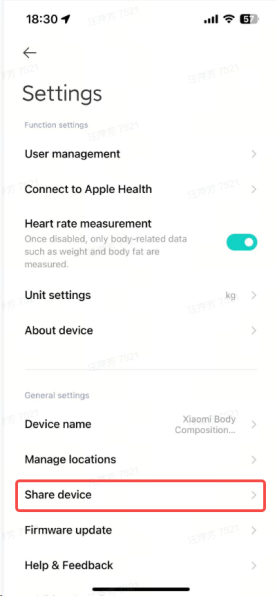 |  | 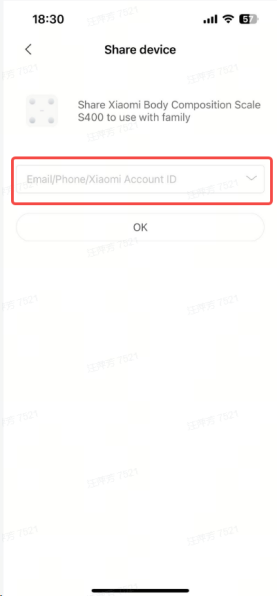 |
Q2: What are "master account", "family member" and "shared account" respectively?
A:
1. Master account: The first user to bind the device is the master account. The master account supports all functions of the scale (binding, deleting devices, managing family members, device sharing, firmware upgrade, modifying units, etc.);
2. Shared Account: The primary account shares the equipment with 5 millet accounts as shared accounts;
3. Family members: sub-accounts created under the primary or shared account, also support all body composition measurements.
Note:
1. Six accounts can be bound to use equipment together, and 30 family accounts can be created, totaling 36 users;
2. The primary and shared account (Xiaomi account ID) only supports age information filling is 14 years old and above, the age filling of family users is not limited, and the age range supported by the fat measurement algorithm is 6-80 years old.
Q2: Many people share the Xiaomi Body Composition Scale S400.
A:
1. When it is necessary to measure and record physical data for a long time, it can be shared with other Xiaomi account users through the "Share device" function on the Mi Home/Xiaomi Home app device page;
2. When visitors need to measure, they can use the "Weight Diagrams" in the Mi Home/Xiaomi Home app equipment page to measure, and the data is not saved;
3. Xiaomi Body Composition Scale S400 can bind 1 Xiaomi account as the primary account, and the primary account can be bound to 5 Xiaomi accounts through "Share device". You can add 5 home users under both primary and shared users.
Q3: Did not receive the "Share device" message pop-up window?
A:
1. It is recommended to try to restart the Mi Home/Xiaomi Home app first to see if you can receive the "Device Sharing" push notification;
2. Please update the Mi Home/Xiaomi Home app to the latest version: Android 8.0 or iOS 12.0 and above. After the update, check whether you can receive the "Share device" push notification. If not, please re-initiate the sharing from the primary account.
Q4: Failed device binding after "Share device".
A:
1. Check whether the Bluetooth icon on the scale is always on. If it is always on, please turn off the Bluetooth of the mobile phone in the primary account and disconnect the connection between the mobile phone and the scale;
2. The device can only be connected to one account at a time via Bluetooth. When the primary account is connected. The shared account cannot be connected, and vice versa. You can disconnect the currently connected Bluetooth account to keep the device in a paired state. Other accounts can be connected at this time.
Add member
Q1: How to add/delete members of the scale?
A: The primary account and shared account support adding/deleting members.
Open the Mi Home/Xiaomi Home app, select Devices >> Settings at the upper right corner >> User Management >> Select Members >> Delete.
1. After clicking Add Member, fill in the member name according to the page prompt and save it. In addition to the above pages, you can also create a member according to the page prompt when the primary user weighs it;
2. Delete members: Select the members to be deleted, and click the delete icon to delete the selected members and data. The deleted data cannot be recovered, please be careful;
3. During the measurement process, the APP prompts to select users and can add members by themselves.
When the scale is connected to the APP, after the user is measured on the scale, if the unfamiliar weight is identified (i.e. the weight in the user list is outside ± 2kg), the APP will pop up a pop-up window to select the user and click "Add" to create a member according to the page prompt.
Q2: Is the user list synchronized with Mi Fitness APP?
A:
1. We attach great importance to your personal information and privacy protection. After you agree to the Privacy Policy of Xiaomi Body Composition Scale S400, we will associate the user list and user information of the current Xiaomi account in the Mi Fitness APP and import them into the Mi Home/Xiaomi Home app. User information is only used for the body data measurement service of the scale, and some measurement data are related to user information;
2. Modify user information in any end APP, Mi Home/Xiaomi Home app and Mi Fitness APP will keep pace.
Note: The user measurement data is not synchronized with Mi Fitness, only the user list is synchronized with Mi Fitness.
Q3: Will the weighing data be synchronized with Mi Fitness APP?
A: Xiaomi Body Composition Scale S400 currently does not support synchronous weighing data to the Mi Fitness app, only user information on the Mi Home/Xiaomi Home app and Mi Fitness app will remain synchronized.
Q4: Why do I keep popping up windows to delete users?
A: It may be that the number of users that the current device can create exceeds the upper limit.
1. In Mi Home/Xiaomi Home app >> Xiaomi Body Composition Scale S400 >> Settings at the upper right corner >> User Management, delete the members of the scale that are not commonly used;
2. Please select Xiaomi Body Composition Scale S400 in the Mi Home/Xiaomi Home app >> Settings at the upper right corner >> Share device >> and delete the infrequent sharing users in the page of the selected device.
Bluetooth Gateway
Q1: What is a Bluetooth gateway?
A:
1. Gateway is a product that assists the networking of smart home devices. All devices in smart homes need to be connected to the Internet. Wi-Fi is a common connection method, but not all devices are suitable for Wi-Fi connection. Some other connection methods are needed to solve the problems or needs of Wi-Fi interference, low power consumption and group control of devices;
2. Please check the link for details:
https://home.mi.com/views/article.html?articleId=713752525000000001
Q2: How does the scale access the gateway?
A: After the scale is successfully added to the Mi Home/Xiaomi Home app, it will automatically connect to the gateway device under the account. After the scale is connected to the gateway, in the scenario where the APP is not opened, the user stands on the scale for measurement, and the measurement data will be uploaded to the server through the gateway, so that the measurement data can be viewed in the Mi Home/Xiaomi Home app.
1. Gateway equipment that supports access: You can query detailed information in the Mi Home/Xiaomi Home app >> Profile >> Hubs & gateway;
2. Ensure the gateway device is bound to the Mi Home/Xiaomi Home app and upgraded to the latest firmware version;
3. Data uploaded through the gateway will be delayed by 1-10 minutes, depending on the network environment.
Q3: Why is there no scale in the gateway sub-device?
A:
1. Please place the scale next to the gateway equipment, not more than 10 meters apart;
2. Please check whether the gateway is on and online and whether the gateway device has been upgraded to the latest firmware version;
3. Please check whether the gateway is bound to the same Xiaomi account with the Xiaomi Body Composition Scale S400;
4. Try to restart the gateway, unplug the power plug of the gateway and plug it back in.
Q4: The connection gateway is used, and some data is not uploaded. What should I do?
A:
1. If the data is not uploaded successfully through the gateway, the measurement data will be stored in the scale first;
2. You can connect with the Xiaomi Body Composition Scale S400 by opening the Mi Home/Xiaomi Home app, and the scale will automatically synchronize the data in the device to the Mi Home/Xiaomi Home app;
3. Use the gateway to synchronize data after the initial binding. Due to network reasons, the first weighing data may not be synchronized; you can automatically synchronize the first data to the Mi Home/Xiaomi Home app by opening the Mi Home/Xiaomi Home app and connecting with the scale;
4. Due to the design of the gateway, if the gateway is powered off, the online status of the scale plug-in homepage gateway will be delayed for 144 minutes before updating to the offline status of the gateway. During this period, measurement data cannot be uploaded through the gateway. But can be used through a Bluetooth direct connection.
Firmware upgrade
Q1: How to update the firmware of the Xiaomi Body Composition Scale S400?
A: Open the Mi Home/Xiaomi Home app and connect the device, select Devices >> Settings at the upper right corner >> Firmware update, if you find a new version, you can update the firmware, and the server level will push the upgrade package to the device, and the device will automatically upgrade and restart after receiving the upgrade package. When the body fat monitor displays "0.0kg". It means the upgrade is complete.
Note:
1. Update the device firmware, only for the primary user;
2. Before you update, make sure the device is connected normally and that the low battery icon is not displayed;
3. During the update process, please do not measure on the scale, remove the battery or quit the Mi Home/Xiaomi Home app.
Q2: What if the device upgrade fails?
A: Please check and confirm the following:
1. Ensure normal connection
(1). During the upgrade process, the scale needs to be connected to the mobile phone;
(2). Please ensure that the APP is running at the front desk and the mobile phone screen is always on;
(3). If the APP is cleared by the background of the mobile phone, please open the Mi Home/Xiaomi Home app, reconnect with the scale, and upgrade again;
(4). Please do not measure or press the scale during the upgrade process.
2. Check the power of the scale
When upgrading, ensure the scale has sufficient power.
Q3: How to restore factory settings?
A: Open the battery cover on the back of the device and press the Reset key for 7 seconds. When "0.0kg" is displayed after all the LEDs are lit, the factory settings will be restored.
Note:
1. Restore the factory settings to delete the user data and device binding relationship on the device side. The data that the device is not synchronized to the APP will be cleared. Please operate carefully;
2. The Delete Device function in the Mi Home/Xiaomi Home app can only be unbound from the device in the cloud, and the device itself needs to be "RESET" before it can be discovered and bound.
Q4: How to solve the problem that the scale shows that it has been turning around and does not turn on?
A:
1. Remove the battery and reinstall it to check whether the scale is back to normal;
2. If it does not return to normal, it is recommended to bind the scale again after returning to factory settings;
3. If the problem can not be solved, please submit feedback in Mi Home/Xiaomi Home app >> Profile >> Help & Feedback, or contact after-sales personnel for processing.
Data View
Q1: How do I check my weight data?
A:
1. The primary user, home user data query:
Open the Mi Home/Xiaomi Home app, and click the Xiaomi Body Composition Scale S400 >> Select the corresponding account >> View Report. You can view the latest measurement data of the current user. Select History to view the reports.
Note: The users who hold babies and weigh belong to family users.
Switch user:
 |  | 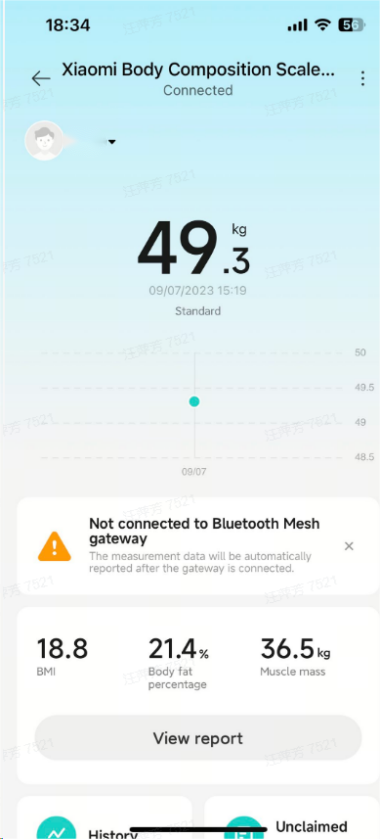 |
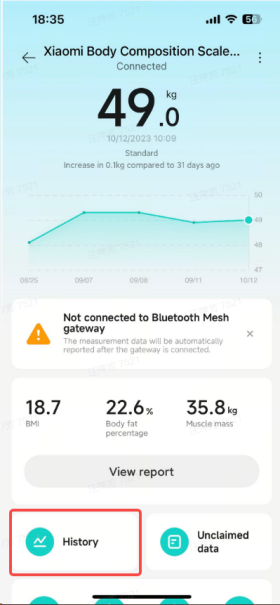 |  | 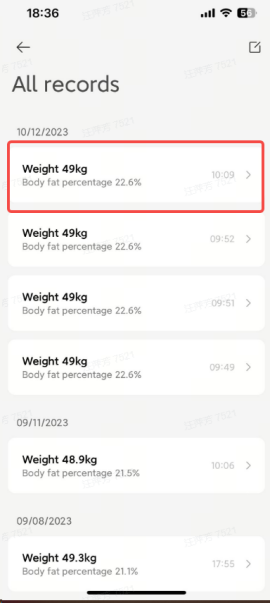 | 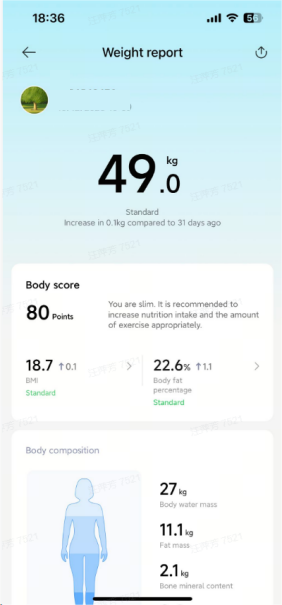 |
Q2: How to download the measurement report?
A: Open the Mi Home/Xiaomi Home app >> View Report >> Share in the upper right corner.
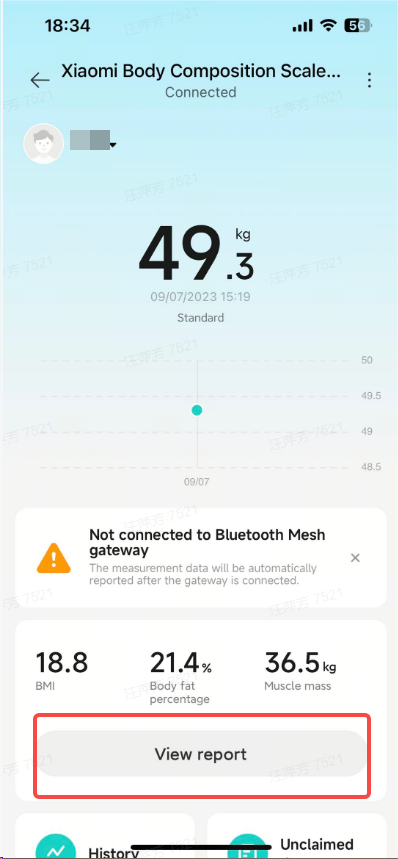 | 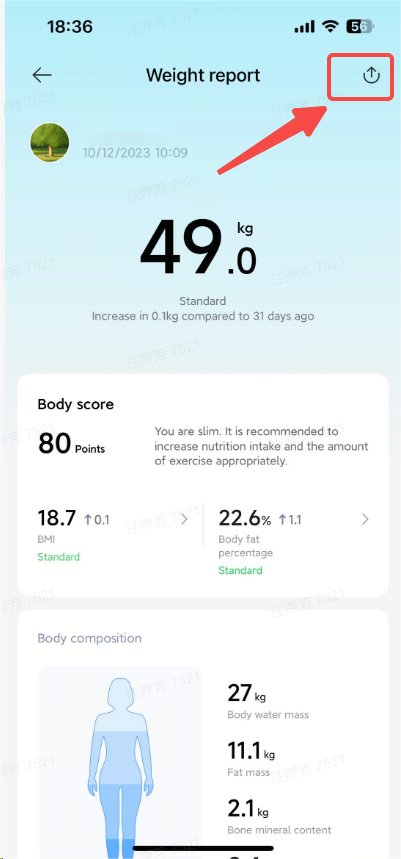 |
Q3: How to delete measurement records and data?
A: Open the Mi Home/Xiaomi Home app >> Select Device >> History >> All Records >> Edit in the upper right corner >> Select the record to be deleted, and click Delete at the bottom to delete the data.
 | 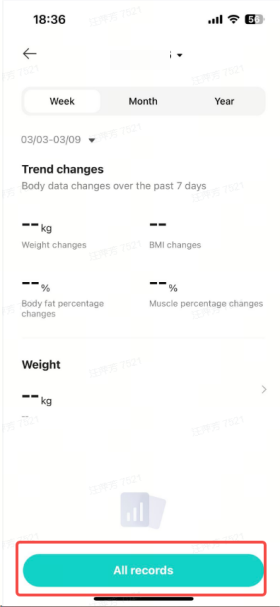 | 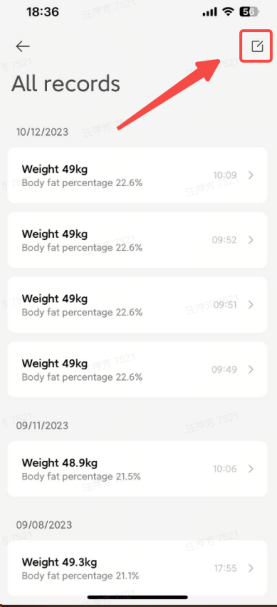 |  |
Q4: How many pieces of measurement data can be kept on the scale?
A:
The weighing end can store up to 160 sets. When offline measurement, the data is stored on the weighing end. After the mobile phone is connected to the device, the data is synchronized to the APP;
2. After the data exceeds 160 groups, it will be covered from the earliest data. For example, based on the calculation of measuring three times a day, the complete measurement data can be stored for about 20 days, and the duration of offline measurement should preferably not exceed 20 days.Q5: How does the measurement data synchronize with Apple Health?
1. How to turn it on: In Mobile Settings >> Health >> Data Access Permissions and Devices >> Mi Home/Xiaomi Home app, turn on the permission of Weight, Body Fat Rate, Height Body Fat Index. If the permission is not turned on, the data cannot be synchronized;
2. After opening, the newly measured data of the user will be automatically synchronized to Apple Health, and only the data of the current Xiaomi primary account will be synchronized.
Note: Support synchronization to Apple health data: weight, body fat rate, height and body mass index data. This function needs to update the Mi Home/Xiaomi Home app to the latest version before it can be used normally (iOS: Mi Home/Xiaomi Home version 8.7 and above).
Q6: Why can I see the data of the previous scale?
A: Because the historical measurement data is stored under the current account in the cloud, it will not be affected by the binding/unbinding of the scale. If the user has bound Xiaomi Body Composition Scale S400 in the APP, which supports viewing the historical measurement data in the newly bound same scale.
Q7: Compared with other scales, is there a big difference in body age?
A:
1. The Body Age Index is generally calculated according to the metabolism of the human. Different brands have different calculation methods and there is no industry standard. This index is compared between scales of different brands and has no significant meaning;
2. Physical age reflects the current physical condition of the tester to some extent, which can remind us to strengthen exercise and adjust our diet to maintain the best physical condition.
Q8: The Mi Home/Xiaomi Home app shows that Bluetooth is connected, but the measurement data is not synchronized?
A: The Mi Home/Xiaomi Home app version may be outdated. Please reinstall the latest version from the application store and try again.
Other issues
Q1: What is BIA?
A:
1. Bia (Bio-impedance analysis) refers to the measurement of biological resistance;
2. The basic principle of BIA measurement is the simple division of the body into conductive body fluids, muscles, etc. and non-conductive fat tissue. During the measurement, a very small current is passed through the body from the electrode plate. If the fat content is high, the measured biological resistance is high and vice versa. BIA is the measurement of body fat percentage by this device.
Q2: In the Mi Home/Xiaomi Home app device page >> more settings >> add shortcuts, the page does not respond?
A: Some models such as Huawei mobile phones, cannot automatically obtain permission to create shortcuts. You need to check and open this permission in the system settings of the mobile phone.
Does it help?
Yes
No