

What information can be displayed on the dashboard of the Xiaomi Electric Scooter 4 Pro Plus series?
The dashboard can display speed, speed mode, battery level, temperature warning, fault prompt, front light switch indicator, turn signal indicator, etc.
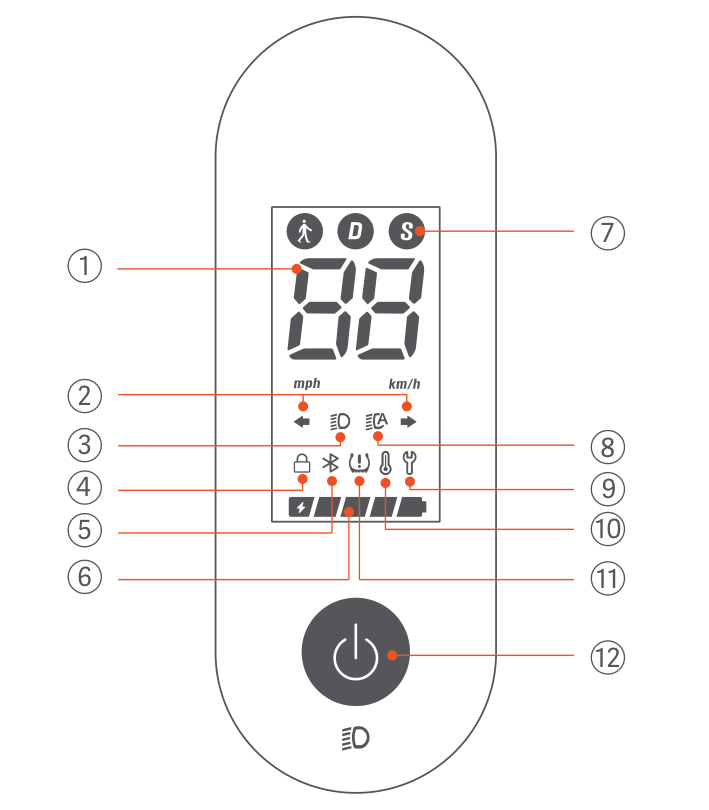
① Digital display: It can display speed, battery level, and error codes (in red);
② Turn signal indicator icon: When the turn signal is turned on, the turn signal indicator icon flashes;
③ Headlight indicator icon: Click the power button to turn on/off the headlights;
④ Lock icon: When the lock icon lights up, it indicates that the scooter is locked. The scooter can be locked/unlocked in the Mi Home app;
⑤ Bluetooth display: When this icon lights up, it indicates that the scooter has successfully connected to the mobile device (supports Bluetooth 5.0 connection);
⑥ Battery display: There are five grids in total, each representing approximately 20% of the battery (constantly lit at 20%, flashing at 10%);
⑦ Speed mode: It represents walking mode (front and tail lights always on), with a maximum speed limit of 6km/h for the scooter. D represents standard mode, S represents sport mode;
⑧ Automatic lighting icon: After the vehicle is connected to Bluetooth, the automatic lighting function can be turned on in the APP. After turning it on, the vehicle will enter the automatic lighting mode and the instrument icon will light up. In automatic light mode, the headlights will automatically turn on or off according to changes in ambient light;
* If the vehicle headlights are on before turning on the automatic light function: when the ambient light is bright, the headlights will turn off after 30 seconds; when the ambient light is dark, the headlights will remain on.
* If the vehicle headlights are turned off before turning on the automatic light function: when the surrounding light is dark, the headlights will turn on immediately; when the surrounding light is bright, the headlights will remain off.
Tip: This function is only available in D and S modes. When switching to pedestrian mode, the headlights are always on.
⑨ Fault display: When the wrench icon displays in red, it means that the scooter needs repair;
⑩ Temperature warning: When the scooter is not charging, if the ambient temperature is lower than -10°C or higher than 45°C, the temperature warning icon will flash on the dashboard. Riding in these conditions may result in reduced scooter performance and other risks, and it is recommended to use the scooter after the temperature returns to normal range;
* When the scooter is charging, if the ambient temperature is below 0°C or above 40°C, the temperature warning icon will flash on the dashboard. The scooter may not charge. Continuing to charge the scooter may even pose a risk. When the ambient temperature returns to the range of 0°C to 40°C, the temperature warning icon will go out and the scooter can be charged again.
⑪ Tire pressure reminder icon: When the tire pressure reminder is enabled in the Mi Home, the icon will remind the user to check the tire pressure every 30 (±7) days. The user can reset the reminder in the APP;
⑫ Power button: Short press to turn on, long press for 3 seconds to turn off. When the phone is powered on, click to turn on/off the headlights and taillights; double-click to switch speed mode.
① Digital display: It can display speed, battery level, and error codes (in red);
② Turn signal indicator icon: When the turn signal is turned on, the turn signal indicator icon flashes;
③ Headlight indicator icon: Click the power button to turn on/off the headlights;
④ Lock icon: When the lock icon lights up, it indicates that the scooter is locked. The scooter can be locked/unlocked in the Mi Home app;
⑤ Bluetooth display: When this icon lights up, it indicates that the scooter has successfully connected to the mobile device (supports Bluetooth 5.0 connection);
⑥ Battery display: There are five grids in total, each representing approximately 20% of the battery (constantly lit at 20%, flashing at 10%);
⑦ Speed mode:
It represents walking mode (front and tail lights always on), with a maximum speed limit of 6km/h for the scooter. D represents standard mode, S represents sport mode;⑧ Automatic lighting icon: After the vehicle is connected to Bluetooth, the automatic lighting function can be turned on in the APP. After turning it on, the vehicle will enter the automatic lighting mode and the instrument icon will light up. In automatic light mode, the headlights will automatically turn on or off according to changes in ambient light;
* If the vehicle headlights are on before turning on the automatic light function: when the ambient light is bright, the headlights will turn off after 30 seconds; when the ambient light is dark, the headlights will remain on.
* If the vehicle headlights are turned off before turning on the automatic light function: when the surrounding light is dark, the headlights will turn on immediately; when the surrounding light is bright, the headlights will remain off.
Tip: This function is only available in D and S modes. When switching to pedestrian mode, the headlights are always on.
⑨ Fault display: When the wrench icon displays in red, it means that the scooter needs repair;
⑩ Temperature warning: When the scooter is not charging, if the ambient temperature is lower than -10°C or higher than 45°C, the temperature warning icon will flash on the dashboard. Riding in these conditions may result in reduced scooter performance and other risks, and it is recommended to use the scooter after the temperature returns to normal range;
* When the scooter is charging, if the ambient temperature is below 0°C or above 40°C, the temperature warning icon will flash on the dashboard. The scooter may not charge. Continuing to charge the scooter may even pose a risk. When the ambient temperature returns to the range of 0°C to 40°C, the temperature warning icon will go out and the scooter can be charged again.
⑪ Tire pressure reminder icon: When the tire pressure reminder is enabled in the Mi Home, the icon will remind the user to check the tire pressure every 30 (±7) days. The user can reset the reminder in the APP;
⑫ Power button: Short press to turn on, long press for 3 seconds to turn off. When the phone is powered on, click to turn on/off the headlights and taillights; double-click to switch speed mode.
Does it help?
Yes
No