

POCO Buds Pro Genshin Impact Edition FAQ
Product overview
1. Q:What features does POCO Buds Pro Genshin Impact Edition have?
A: 1.The POCO Buds Pro Genshin Impact Edition support fast wired charging, allowing you to listen for up to 3 hours after a 10-minute charge*. They also support Qi wireless charging — when the battery level is low, simply place the case on the wireless charger and come back after a few minutes.
2.Built-in energy-efficient chip for longer battery life. Enjoy your music for longer — the earbuds last for up to 6 hours* on a single charge, and up to 28 hours* with the portable charging case.
3.The POCO Buds Pro Genshin Impact Edition are equipped with an AI-powered algorithm that automatically adjusts the noise cancellation settings based on ambient noise levels and your daily usage habits to give you a more immersive experience.
4.The earbuds come with three built-in microphones and use a neural-network algorithm for noise cancellation to effectively reduce background noise and accurately detect voices, giving you crystal-clear call quality even in noisy environments.
5.The POCO Buds Pro Genshin Impact Edition come with a 9 mm composite dynamic driver that produces an unparalleled listening experience. Professional acoustic tuning delivers even better performance with detail-rich, immersive sound.
2.Q:How to check POCO Buds Pro Genshin Impact Edition charge status and electric quantity?
A:The charging case has only 1 LED light, which is located on the front of the charging case (the side with function keys).The white indicator light is on when charging, and the white indicator light is off when finish charging.
1. Check the buds battery
After the buds is connected to the phone, you can check the headset power in the status bar of the phone.
Note: The phone's status bar only shows the lower battery of the two buds.Some mobile phones do not support buds battery viewing.
2. Check the battery capacity of the charging box
When the charging box cover is closed, press the function button or open the charging box cover:
(1) The white indicator light of the charging case is on for about 5 seconds, indicating that the battery is sufficient.
(2) The white indicator light of the charging case blinks, indicating that the power is low, and it needs to be charged in time.
3. Use your Mi phone to quickly check your battery
After successfully connecting the phone, put the buds into the charging case, close the cover and close to the Mi phone that unlocked and enabled bluetooth, open the cover of the charging box, the phone will pop up a dialog box, you can check the buds and charging case power.
Note: To use the quick view power function, you need to update the mobile phone system to the latest stable version.It is currently only supported by some Xiaomi phones.
Note: When the charging case is opened, the buds automatically starts up. When the buds put back to the charging case and the cover is closed, the buds automatically disconnects and enters the rest state.
3.Q:How does POCO Buds Pro Genshin Impact Edition connect to phone?
A:1.First connection
① Put the buds into the charging case and long press the function button for about 2 seconds. The white indicator light of the charging case blinks and the buds is waiting to be connected.
② Turn on bluetooth of the device, search for and connect "POCO Buds Pro Genshin Impact Edition".If you need a connection password, enter 0000.
2.Use Xiaomi phone quick charge function
Put the buds into the charging case, close to the unlocked Xiaomi phone with Bluetooth function on, open the cover of the charging case, and connect the buds according to the instructions on the phone interface.
Note: To use the fast connection function, you need to update the mobile phone system to the latest stable version.The feature is currently only available on some Xiaomi phones.
3. Dual-device smart connectivity:Compatible with multiple systems
Capable of connecting to two devices simultaneously Smart switching between entertainment and work. The same set of earbuds can be connected to two devices crossing platforms such as Android, iOS, and Windows simultaneously, allowing you to easily switch between entertainment and work. Pairs with Bluetooth through opening the earbud box near your phone* or by quickly clicking the pop-up window* which enables you to enjoy the new fast connection method.
*The dual-device connectivity feature is turned on by default. For some third-party media applications, sound might be played via a speaker or switching might fail when switching between operations. If you choose to turn off this feature, please connect to your Xiaomi,Redmi cellphones and upgrade your phone operating system to the latest MIUI version. The compatible models will be published in succession.
*You need to upgrade your phone operating system to the latest stable version in order to quickly pair through the pop-up window. The compatible models are being tested and are expected to be completed soon.
4.Q:How to clear the pair record of POCO Buds Pro Genshin Impact Edition?How to reset the buds?
A:Clear the pair record fron the phone:Phone->Settings->Bluetooth->POCO Buds Pro Genshin Impact Edition->Unpair
Note: If the mobile phone has logged in to the Mi account, after buds unpair,it will also delete other devices pair record that have been connected to this buds under the account.
Reset method: Put the left and right bud into the charging case, long press the function button for more than 10 seconds, and when the white indicator light will keep on, then release the button.
The reset clears the left and right buds and the connection records between the buds and the device.After the reset is completed, the buds will automatically start up and enter the pairing mode again.
Note: Due to the connection characteristics of the Bluetooth signal, intermittent disconnection or silence may occur in areas where the 2.4ghz electromagnetic signal interference is dense.
5.Q:How to operate POCO Buds Pro Genshin Impact Edition?
A:Touch the rear of the earbuds for controls including switching modes, music pause and playback etc. Also supports the wake-up voice control feature.
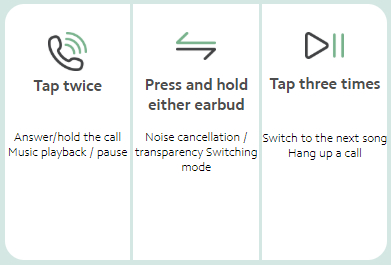
*The wake-up voice control feature needs to be set in the corresponding MIUI version of the applicable model.
*It can also operate through gestures which can be set in the corresponding MIUI version of the applicable model.
6.Q:How about POCO Buds Pro Genshin Impact Edition noise cancellation?
35dB deep noise cancellation:
1.Allowing you to enjoy a world with less background noise
The earbuds adopt the dual active noise cancellation technology with feedback and feed-forward microphones. They effectively cancel ambient noise and reduce excess noise in the ear canal. Noise cancellation can be as deep as 35dB.
2.Noise cancellation is enabled through active noise cancellation technology. It supports a maximum noise cancellation depth of 35dB, which can reduce background noise by up to 98%. The test data are provided by the National Institute of Metrology, China. Actual results may vary depending on size of a user's ears, buds selected, ear canal structure, how earbuds are worn, whether the user is chewing or exercising etc.
7.Q:Will POCO Buds Pro Genshin Impact Edition announce the contact name when the phone calls?
A:POCO Buds Pro Genshin Impact Edition will only ring the bell when calling, and will not broadcast the name and phone number of the caller.
8.Q:Does POCO Buds Pro Genshin Impact Edition support to connect to Mi Smart Band or other bluetooth band?
A:Not support, because both the headset and the Bluetooth band belong to the receiving terminal.
9.Q:Why is the "this is not your buds" popup?
A:If the buds has been connected to another device, the popover phone will prompt "This is not your headset", which is a normal phenomenon.At this point, there are two ways to connect the buds:
1. Put the buds into the box, open the cover, and press the button of the buds box for 2 seconds to connect the phone with the device.
2. Reset the buds (put the buds into the charging case, open the cover and press the button of the buds case for more than 10 seconds, and when the indicator blinks, it means that the headset is successfully reset and enters the pairing state).
10.Q:How to use the POCO Buds Pro Genshin Impact Edition wireless camera function?
A:POCO Buds Pro Genshin Impact Edition supports wireless camera function: For some Xiaomi phones, in the camera camera/shooting interface, you can countdown to taking/shooting by double-clicking the buds.
Troubleshooting
1.Q:POCO Buds Pro Genshin Impact Edition can be searched on the device, but how to do if it cannot be connected?
A:If the device can search POCO Buds Pro Genshin Impact Edition but cannot connect, it may be the device's Bluetooth data is abnormal. Try to delete the previous connection record at the device end, restart the device, and then try to connect with the device.
2.Q:How to deal with the prompts of wrong PIN code or paired password when the device is connected to the headset?
A:You can try to enter "0000". If it is still wrong, it may be the abnormal Bluetooth data on the device side. Try to delete the previous connection record on the device side, restart the device, and then try to pair the connection again.
3.Q:What if the sound is intermittent or noisy when using POCO Buds Pro Genshin Impact Edition?
A:1. It may be because the battery of the phone or earphone is low, please observe it after full charge;
2. If the distance between the mobile phone and the earphone or between the two earphones is too far or there is an object blocking the signal (such as wall), there may be a problem of intermittent sound or noise. Put the mobile phone and the earphone or the two earphones close to avoid the signal being blocked;
3, there may be signal interference in the use environment, you can try to compare this phenomenon in other use environment;
4. Reset the headset, delete the connection record of the mobile phone, restart the mobile phone and then pair it for use. If there is still discontinuous sound, replace it with other mobile phones for testing.
4.Q:How to use POCO Buds Pro Genshin Impact Edition when making phone calls or listening to music?
A:1. First, determine whether the volume of the mobile phone is adjusted too low. If the volume is normal, enter the "Bluetooth Settings" of the mobile phone to check whether the "Mobile Audio" and "Media Audio" of the connected device.
2. Reset the headset, restart the phone and then connect to see if there is sound. If it is still silent, connect to other phones for a test.
5.Q:Why doesn't POCO Buds Pro Genshin Impact Edition display the quantity of electricity or the quantity of electricity is inaccurately?
A:Not all mobile phones support the function of displaying battery level in the notification bar. If the mobile phone doesn't support this function, the battery level cannot be displayed.The electric quantity displayed on the notification bar of the mobile phone cannot be very accurate. Please refer to the headphone battery indicator light and headphone prompt tone.
6.Q:Why POCO Buds Pro Genshin Impact Edition makes sound when connected to a mobile phone, but not have sound when listening to music?
A:Enter the Bluetooth Settings of the phone -> and click POCO Buds Pro Genshin Impact Edition-> turn on the option of "Media Audio". When this option is off, it will be silent when listening to music or watching videos.
7.Q:How to do if the sound of the left and right earbuds is not sync?
A:1. Turn off the headset and restart it to test whether the sound of the left and right headsets is synchronized.
2. Reset the headset. After resetting, reconnect the headset and test whether the sound of the left and right headsets is synchronized.
Does it help?