

Xiaomi Smart Standing Fan 2 Pro FAQ
Product introduction and use
1.Q: What are the features of Xiaomi Smart Standing Fan 2 Pro?
A: 1. Xiaomi Smart Standing Fan 2 Pro supports desktop/floor-standing dual use;
2. The double-layer feather leaves 7+5 blow out the surrounding natural wind;
3. With a larger air supply angle of 140°;
4. Better energy saving and power saving, only 15W;
5. Air supply distance of 14 meters, APP100 speed regulation;
6. The 2800mAh (33.6Wh) battery has a long battery life of 18H (first gear shakes its head).
2.Q: Who is Xiaomi Smart Standing Fan 2 Pro suitable for?
A: 1. People who are not suitable for air conditioners and susceptible people (the elderly, children, and some adults);
2. People who pay attention to the taste of life and pursue comfort and health;
3. Seasons alternate, blowing air conditioners is cold, blowing ordinary fans feels too "hard", and people who have cooling needs;
4. People who need to cool down at night and think it is too cold to blow air conditioners;
5. Because the air conditioner cannot open the windows, it is aimed at people who have both cooling needs and indoor ventilation requirements.
3.Q:What’s the Xiaomi Smart Standing Fan 2 Pro Package contents?
A:
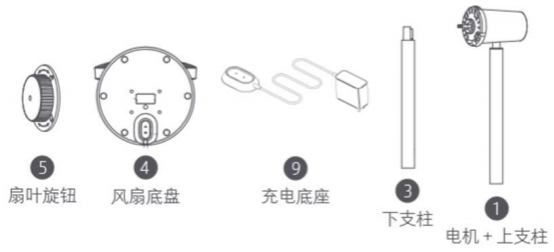
Lower pole x 1
Fan base (with built-in lithium battery) x 1
Fan blade cap x 1
Rear fan guard nut x 1
Motor & upper pole x 1
Fan assembly (front fan guard, fan blade assembly, rear fan guard) x 1
Spanner x 1
Fan guard screw x 1
Charging base x 1
User manual x 1
4.Q: How to install Xiaomi Smart Standing Fan 2 Pro?
A:
Step 1: Open the fan assembly
Take out ② the fan assembly, and turn the front fan cover counterclockwise as shown in ① as shown in the figure below until the front and rear fan covers are tightly fitted and loose.
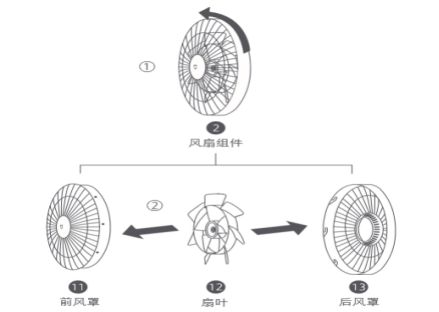
Step 2: Install the rear hood
⑬ Turn the direction mark "↑" of the rear air cover upwards and install it to the motor, and then install the knob of the ⑥ rear air cover to the motor and tighten it clockwise to fix the rear air cover and the motor.
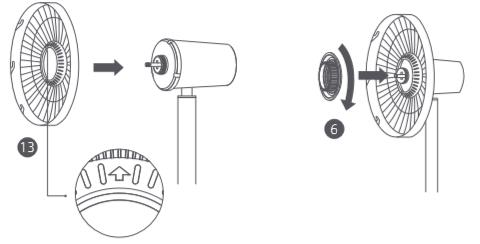
Step 3: Install the fan blades
Align the center hole of the ⑫ fan blade with the motor shaft, install it in place, and then install the ⑤ fan blade knob to the motor shaft and tighten it counterclockwise to fix the fan blade.
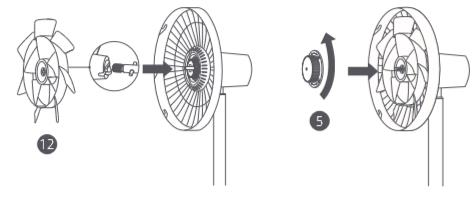
Step 4: Install the front air cover
Align the ⑪ front air cover alignment mark with the ⑬ rear air cover left alignment mark, and then insert it into the rear air cover slot. Rotate the front windshield clockwise to align the alignment mark of the front windshield with the right alignment mark of the rear windshield.
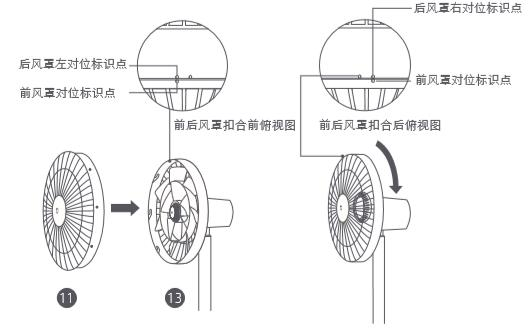
Step 5: Fix the front windshield
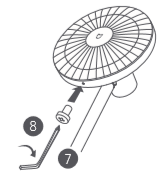
Insert the ⑧ fan cover screw into the hole at the bottom of the fan cover, and use the ⑦ special wrench to tighten it clockwise.
Step 6: Install the Fan Chassis
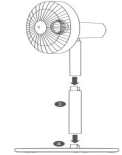
Floor fan mode: According to the direction shown in the figure, install the lower end of the upper pillar to the upper end of the ③ lower pillar, and then install the lower end of the lower pillar to the socket of the ④ fan chassis, the lock makes a "click" sound, that is, the installation is successful.
Desk fan mode: Install the lower end of the upper pillar to the socket of the ④ fan chassis, and the lock makes a "click" sound, that is, the installation is successful.
Tip: Press the remove button to remove the strut.
5. Q: How does Xiaomi Smart Standing Fan 2 Pro connect to the power supply?
A: 1. Connect the charging base to the charging interface at the bottom of the fan chassis, and then turn on the power.
2. When the power indicator flashes, the power connection is successful.
3. This product can be used with or without a power supply.
4. The fan has a built-in Wi-Fi module, which will also generate energy consumption when it is turned off. When it is turned off when it is fully charged, it can stand by for 2 days. To maintain battery performance, it is recommended to keep it charged when not in use.
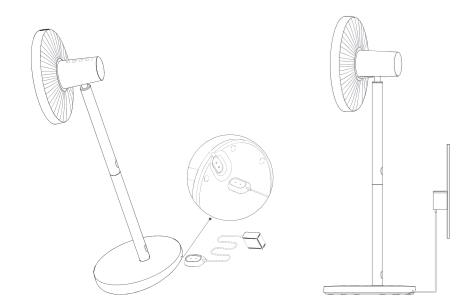
Tip: Before using the product, it is recommended to fully charge it. Be sure to charge/use in a flat and stable place.
6.Q: How to switch on Xiaomi Smart Standing Fan 2 Pro?
A: Power on: Press the button  , the fan starts to work. The first time you use it, the default is the direct blowing mode, and the power-on air volume is 1 block. After shutting down and turning it on again, the fan defaults to the gear of the air volume when it was last used.
Shutdown: Press the button  in the power-on state, the fan will stop working.
7.Q: How to adjust the air volume of Xiaomi Smart Standing Fan 2 Pro body?
A: Short press the button  to switch the fan speed gear. The corresponding air volume indicator light is always on (see table below). The next time you turn it on, the default is the air volume gear used when you turned it off last time.
|
Gear |
1gear |
2 gear |
3 gear |
4 gear |
|
indicator light condition |
|
|
|
|
|
Tip:
|
|
|
|
|


8.Q: How to switch the mode of Xiaomi Smart Standing Fan 2 Pro body?
A: Press and hold the button  to switch between "straight air" and "natural wind" modes. In the direct air mode, the natural wind indicator is off and on, and in the natural wind mode, the natural wind indicator is always on. After shutting down and turning it on again, the mode defaults to the mode when it was last used.
9.Q: How does Xiaomi Smart Standing Fan 2 Pro turn on or off the shaking head?
A: Press the button  to turn on or off the shaking head, and set the shaking angle range in the APP. The next time you turn it on, the fan defaults to the shaking head setting that was used when it was last turned off.
10.Q: How to shut down the Xiaomi Smart Standing Fan 2 Pro regularly?
A: Press the button to switch the timing gears cyclically: 1 hour, 2 hours, 3 hours, 4 hours, and "close timing" 5 gears switch once. The corresponding timer indicator lights up for 5 seconds (see table below). After the timer indicator is on for 5 seconds, it returns to the air volume indicator mode.
|
Gear |
close timer |
1 hour |
2 hours |
3 hours |
4 hours |
|
indicator light condition |
|
|
|
|
|


Tip:  is ON state;
 is OFF state
Tip: Use the Mi Home App to achieve more timed settings for gears, and support up to 8 hours of timed shutdown.
11.Q: How to clean Xiaomi Smart Standing Fan 2 Pro?
A: 1. Parts that can be cleaned
The following parts can be cleaned with clean water or diluted neutral detergent with a soft cloth or sponge.
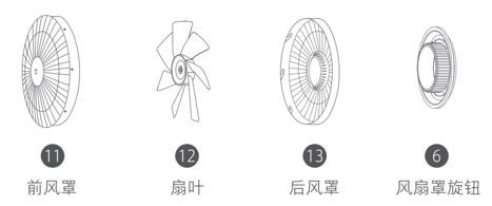
Note: Be sure to stop the fan, and then disassemble and clean it after power off; after cleaning, please completely dry the parts before installing and use, and avoid direct sunlight.
2.Parts that cannot be cleaned
Wipe the following parts gently with a soft dry cloth.
Note: Do not rinse the above parts with water. Do not use thinners, benzine, cleaners, or alkaline cleaners.
12.Q: Why does Xiaomi Smart Standing Fan 2 Pro use 7 blades?
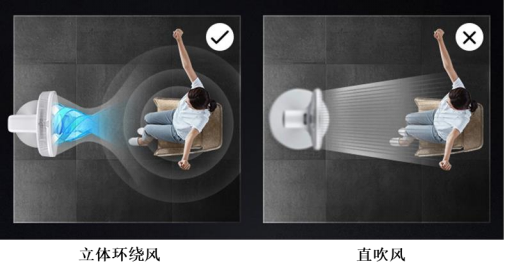
A: The double-layer 7-ply structure fan blades rotate inside and outside at the same time, generating fast wind speed and slow wind speed, forming two wind speeds with a pressure difference, which collide with each other to eliminate vortexes, and cooperate with the guide net cover, the output range is larger, more three-dimensional, and more genial At the same time, the more fan blades, the more delicate the wind will be "cut", and the softness and softness of the natural wind will be more truly restored.
13.Q: Why are the fan blades of Xiaomi Smart Standing Fan 2 Pro odd?
A: Odd-numbered blades are easier to correct the center of rotation when the fan blades are in dynamic balance correction, and even-numbered blades are easy to cause the system to resonate. If the material of the blades cannot resist the fatigue caused by vibration, the blades or bearings are easily broken, so the shaft An odd number of blades with asymmetric hearts is more suitable.
14.Q: How does Xiaomi Smart Standing Fan 2 Pro adjust the air supply angle up and down?
A: When adjusting the Xiaomi Smart Standing Fan 2 Pro to send air up or down, you can slightly lift or press the head or the air cover to adjust.

15.Q: How does Xiaomi Smart Standing Fan 2 Pro move?
A: If you need to move the Xiaomi Smart Standing Fan 2 Pro, please hold the support and move it slowly after the power is turned off.
16.Q: Can the Xiaomi Smart Standing Fan 2 Pro adjust the height?
A: It supports two modes: floor fan and table fan. The height of the floor fan is 1 meter, and the height of the table fan is 0.626 meters.
17.Q: How long will the Xiaomi Smart Standing Fan 2 Pro last? What is the battery capacity?
A: There are differences in the battery life of different gears. The first gear (straight blowing) can last for 18 hours, and the fourth gear (straight blowing and shaking your head) lasts for 2.7 hours. The battery capacity is 2800mAh (33.6Wh), and it takes about 4 hours to fully charge.
18.Q:What does the Xiaomi Smart Standing Fan 2 Pro indicator light mean?
A:
Connect the power supply
|
fan status |
power |
Battery indicator status |
|
Power on/off |
W30% |
flashing orange |
|
30%-100% |
flashing white |
|
|
100% |
Off |
Not connected to power
|
fan status |
power |
Battery indicator status |
|
Power on |
30%-100% |
white long light |
|
1%-30% |
Orange long bright |
|
|
0% |
Off (automatic shutdown) |
|
|
Power off |
0%-100% |
Off |
Note: After the orange light prompts, the 4-block direct blower can be used for 1 hour, and the1-block straight blower can be used for 5 hours (do not shake fan’s head for 9 hours).
Mi Home APP
1. Q: Does Xiaomi Smart Standing Fan 2 Pro support networking?
A: Xiaomi Smart Standing Fan 2 Pro supports WiFi function. After connecting to the network through the Mi Home APP, it can realize functions such as remote control of the fan on/off.
2. Q: Does Xiaomi Smart Standing Fan 2 Pro have to be connected to a Xiaomi router?
A: Xiaomi Smart Standing Fan 2 Pro is compatible with mainstream routers on the market. It should be noted that the Mi Home DC inverter floor fan 2 battery version has the following requirements for the wireless network:
Can only connect to 2.4G WiFi network, does not support 5G WiFi;
The SSID of WiFi does not support Chinese and special characters;
WiFi encryption method needs to be WPA/WPA2, WEP is not supported;
The router needs to enable the DHCP function. Currently, it does not support specifying static IP, web authentication and enterprise-oriented 802.1X networks.
3.Q: How to reset WiFi on Xiaomi Smart Standing Fan 2 Pro?
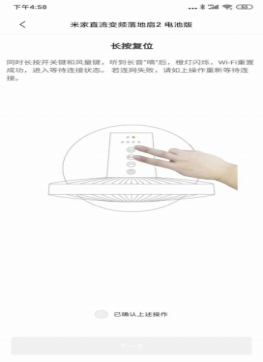
A: Press  and hold
  and at the same time, after hearing the long beep "di", the WiFi is reset successfully, and it enters the waiting state.
The WiFi of Xiaomi Smart Standing Fan 2 Pro needs to be reset in the following situations: 1. Change the Mi Home APP account bound to the fan;
2. Replace the router connected to the fan;
3. Change the password and account of the router;
4. The Mi Home APP cannot control the fan.
4. Q: How to use Mi Home APP to bind Mi Home DC inverter floor fan 2 battery version?
A: Download the APP: Use your mobile phone to scan the QR code on the manual or search for "Mi Home" APP through the mobile app store to download and install. Make sure that your home WiFi can access the Internet normally.
1. Open the Mi Home APP, click the "+" in the upper right corner, you can add it from a nearby device, or you can add it manually; follow the APP prompts.
2. Select the WiFi that Xiaomi Smart Standing Fan 2 Pro should connect to and enter the password, click "Next", if "Mi Home is trying to turn on or off WiFi" pops up during the networking process, click "Allow once".
After the device is successfully connected to the Internet, click "Use Now".

5. Q: What is the status of the WiFi indicator of Xiaomi Smart Standing Fan 2 Pro?
A: The status of the WiFi indicator is as follows:
|
WiFi status |
Waiting to connect |
Connecting |
Connected |
Failed to connect |
|
Display status |
Orange light flashes |
Blue light flashes |
Blue light is always on |
Orange light is always on |
6. Q: Does Xiaomi Smart Standing Fan 2 Pro have a Bluetooth gateway function?
A: Xiaomi Smart Standing Fan 2 Pro has no Bluetooth gateway function.
7. Q: How to switch on and off the Xiaomi Smart Standing Fan 2 Pro through the APP?
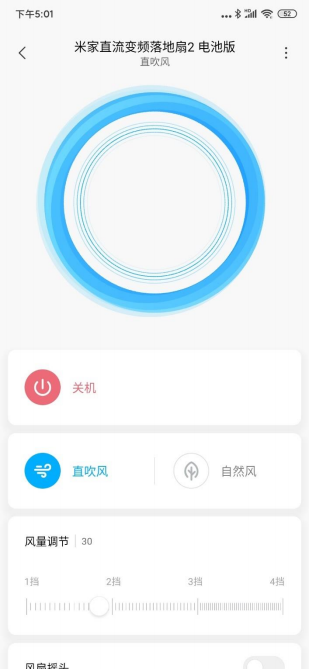
A: Open Mi Home APP, click Xiaomi Smart Standing Fan 2 Pro, click the power button to turn it on, click again to turn off.
8. Q: How does Xiaomi Smart Standing Fan 2 Pro switch between direct air/natural air through the APP?
A: Open the Mi Home APP, click on Xiaomi Smart Standing Fan 2 Pro, and then click on the direct blower to switch between the direct blower and the natural wind. The icon will light up when the corresponding mode is turned on.8. Q: How does Xiaomi Smart Standing Fan 2 Pro switch between direct air/natural air through the APP?
9. Q: How does Xiaomi Smart Standing Fan 2 Pro adjust the air volume through the APP?
A: Open the Mi Home APP, click on Xiaomi Smart Standing Fan 2 Pro, and select the gear setting after booting, there are 100 gears in total.
10. Q: How does Xiaomi Smart Standing Fan 2 Pro adjust the fan's head via APP?
A: Open the Mi Home APP, click on Xiaomi Smart Standing Fan 2 Pro, and then click on the fan rocking switch after powering on, you can turn on the rocking function, you can choose 30°, 60°, 90°, 120°, 140°.
11. Q: How does Xiaomi Smart Standing Fan 2 Pro set the timed shutdown through the APP?
A: Open the Mi Home APP, click Xiaomi Smart Standing Fan 2 Pro, and click the value in the timer shutdown option after powering on to set the timer shutdown time. Maximum 8 hours timing, accurate to minutes (local timing, APP setting requires network). You can also turn on the 24-hour long timer in the settings (the server timing requires the device network to be online).
12. Q: How to turn on/off the indicator light/tone/child lock of Xiaomi Smart Standing Fan 2 Pro through Mi Home APP?
A: Open the Mi Home APP, click on Xiaomi Smart Standing Fan 2 Pro, swipe up to the bottom to display the relevant function switches, click to turn on or off. After the fan turns on the child lock, press any button, all the indicators flash twice, the buzzer beeps twice, the fan does not respond to the button operation; in the Mi Home APP plug-in of this product, the child lock function can be turned off; You can also turn off the child lock function by setting up Wi-Fi or unplugging the power plug and then turning it on again.
13. Q: Does Xiaomi Smart Standing Fan 2 Pro support multiplayer control?
A: Support multiple people to control the same Xiaomi Smart Standing Fan 2 Pro, provided that it needs to be shared with designated users through the "Mi Home" APP. Open the Mi Home APP, click Xiaomi Smart Standing Fan 2 Pro, click "…" in the upper right corner to select device sharing, which can be shared with Xiaomi accounts, etc.
14. Q: Does Xiaomi Smart Standing Fan 2 Pro support firmware upgrade?
A: Xiaomi Smart Standing Fan 2 Pro supports firmware upgrade. Check for Firmware Updates Click … in the upper right corner of the Xiaomi Smart Standing Fan 2 Pro plug-in, select General Settings, and check for firmware updates. If there is new firmware, click Update Now.
15. Q: After the Xiaomi Smart Standing Fan 2 Pro is shared with others, can the shared person upgrade the firmware?
A: Currently, users who are shared are not supported to upgrade the firmware of the product, and the fan can be turned on and off through the network.
16.Q: How to unbind Xiaomi Smart Standing Fan 2 Pro?
A: 1. Via APP: Open the Xiaomi Smart Standing Fan 2 Pro plug-in, click the "…" in the upper right corner to enter the settings, and click the delete device below to unbind it.
- You can also unbind by resetting the WiFi on the device.
FAQ and Troubleshooting
1. Q: Xiaomi Smart Standing Fan 2 Pro in Mi Home APP always shows offline, or cannot connect to WiFi, how to solve it?
A: 1. Confirm whether the Xiaomi Smart Standing Fan 2 Pro is powered on and running normally.
2. Confirm whether the WiFi is normal.
3. Check whether the fan has been offline for more than half an hour, and the Wi-Fi needs to be reset for more than half an hour. Check whether the router frequency band is 2.4G frequency band, and adjust the router frequency band to 2.4G frequency band;
4. Please unplug the power cord, turn it on again after 10 seconds (the power supply needs to be discharged for a period of time), try to reset the WiFi of Xiaomi Smart Standing Fan 2 Pro, and reconnect, it is recommended to be within 1 meter from the router when connecting, the connection is successful Then move.
5. Reset the fan Wi-Fi and reconnect to the APP. If the connection fails, you can try again after changing the network environment such as a mobile phone hotspot.
Note: The device supports automatic reconnection after WiFi is disconnected.
2.Q: Why can't the Mi Home APP on my phone discover the device?
A: You need to select "Trust this app" in the phone settings - permission management - Mi Home APP - set a single permission; and pull down the phone screen to enable the "Location Information" function, or enable "Access Me" through Settings - Advanced Settings - Location Services location information". Different mobile phone manufacturers have different opening positions. To confirm the position, you can contact the mobile phone manufacturer. If the region information of the Mi Home APP is outside the mainland region, it is recommended to log out of the Mi Home account and select the mainland region when logging in again.
3.Q: What are the requirements for the router to connect the fan to the network?
A: The fan is compatible with most home routers on the market; the router encryption method supports WPA, WPA2, but not WEP; the router must enable DHCP, and does not support specifying a static IP; it does not support web authentication and enterprise-oriented 802.1X network authentication.
4. Q: Why does Xiaomi Smart Standing Fan 2 Pro produce resonance sound?
A: The fan blade knob is too tight, and it will produce resonance sound when it is completely attached to the fan blade. After the fan blade knob is naturally in place, it can be tightened by 30~60 degrees. From the side, the fan blade knob and the fan blade have a gap.
5.Q: What should I do if the fan blades of Xiaomi Smart Standing Fan 2 Pro swing?
A: 1. Check whether the fan blade knob is tightened;
2. Check whether the fan blade is deformed;
3. Remove the fan blade and rotate it 180 degrees, and then try to see if the fan blade still swings after installing it;
4. Check whether it is a performance failure after sales.
6. Q: What should I do if the Xiaomi Smart Standing Fan 2 Pro makes abnormal noises?
A: When there is abnormal noise when Xiaomi Smart Standing Fan 2 Pro is working, you need to check whether the fan cover knob is tightened (left-hand thread, the fan blade will be automatically tightened when it is turned right), and whether there is any foreign matter in the fan assembly.
7. Q: What should I do if the Xiaomi Smart Standing Fan 2 Pro does not turn on?
A: Press the Mi Home DC variable frequency floor fan switch/mode switch button, when there is no response or an alarm sound:
1. Check whether the power outlet has electricity;
2. Check whether the base bolts are loose;
3. Check whether the connection between the pillar and the base is correct;
4. If the knowledge light is on and the operation cannot respond, turn off the child lock and try;
5. Check whether it is a performance failure after sale.
8. Q: Can Xiaomi Smart Standing Fan 2 Pro remotely control the fan at home?
A: After downloading the Mi Home APP and binding it, the fan can be controlled remotely.
9. Q: Why can't I turn on the shaking head function of Xiaomi Smart Standing Fan 2 Pro?
A:
1. When the fan head stays on the far left (stand on the left hand side opposite to the fan), unplug the fan power supply, and then turn the power on again, turn on the shaking head function (the button or APP is turned on), the fan will automatically calibrate the shaking head angle, Start shaking your head after the calibration is complete. The longest calibration time is 14 seconds. At this time, there will be no response from the fan when the shaking head function is turned on.
2. You can manually turn the center point of the fan head to the center point of the base. If the fan starts to shake its head, the fan is normal.
3. Stand on the opposite side of the fan, turn the fan head to the far right, or the fan starts to shake its head to the left, it means that the fan is in the adjustment of the shaking angle, and the fan is normal. If you don't shake your head, after-sales inspection is required.
4. If the physical button of opening the child lock will be invalid, you can turn on the shaking head or turn off the child lock in the APP.
10. Q: Why does the fan head turn when the Xiaomi Smart Standing Fan 2 Pro is turned on?
A: Don't worry, this problem is normal due to the low damping coefficient of the DC fan.
Does it help?