

Xiaomi Buds 3Tpro FAQ
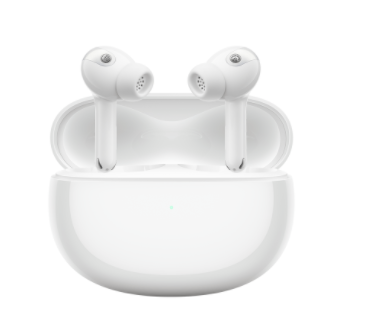
1. Q: What is the appearance of Xiaomi Buds 3T Pro?
A: Xiaomi's Buds 3T Pro are small and exquisite, with the following appearance.
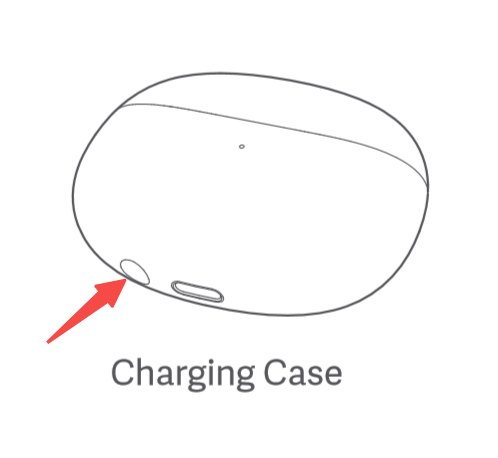
When the headset is in the charging box, the functions of the function keys:
① long press for 2 seconds to trigger pairing;
② long press for 10 seconds to reset (clear the pairing record).
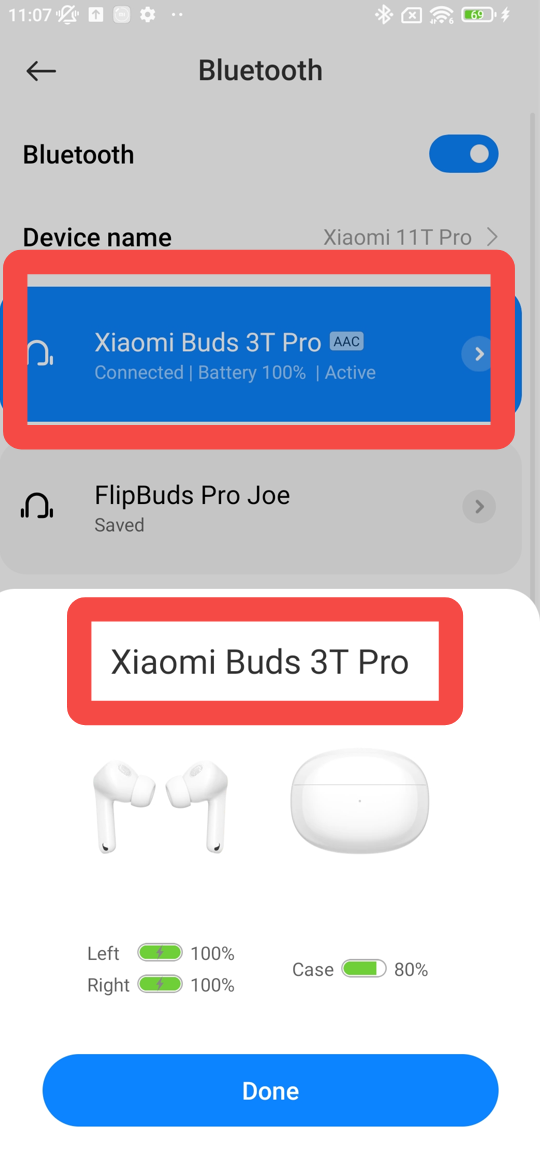
2. Q: What is the name displayed in Bluetooth list of the mobile phone?
A: The English name corresponding to the headset "Xiaomi Buds 3T Pro" is "Xiaomi Buds 3T Pro", as shown below.
3. Q: Are Xiaomi Buds 3T Pro compatible with other true wireless Bluetooth headset charging boxes?
A: Not applicable.
4. Q: What is the Bluetooth version of Xiaomi Buds 3T Pro?
A: Xiaomi Buds 3T Pro use Bluetooth 5.2 technology. With the commercialization of the latest technology standards, more and more smartphones begin to adopt the Bluetooth 5.2 standard. When the Bluetooth headset is also Bluetooth 5.2, it will maximize the technical advantages of 5.2 and bring you a better experience. Bluetooth 5.2 technology has faster transmission rate, more power saving and more stable.
5. Q: How long does the Xiaomi Buds 3T Pro battery life?
A: When the active noise reduction (ANC) is turned off, the earphone can last up to 6 hours for a single listening song, and up to 27 hours with the charging case. Listening song endurance test conditions: When the headset is fully charged, turn off active noise reduction, head tracking and voice hot words, 50% volume, AAC format, music playback time can reach 6 hours. When the headset is fully charged and the charging case is fully charged, the total battery life of playing music can reach about 27 hours.
Tip 1: The above is the laboratory test data, and the actual battery life varies depending on factors such as volume, sound source, environmental interference, product functions and usage habits.
Tip 2: The battery life of different mobile phones will vary. If the mobile phone turns on LHDC or the head tracking function, the battery life of the headset will be shortened.
6. Q: Does Xiaomi Buds 3T Pro support battery replacement?
A: The battery cannot be disassembled and cannot be replaced.
7. Q: Are Xiaomi Buds 3T Pro dustproof and waterproof?
A: The headset can reach IP55 dustproof and waterproof level, and the charging box does not support it. The Xiaomi Buds 3T Pro are designed with IP55 dust and water resistance, which can prevent water splashing from all directions from being immersed in. Whether it is sweating sports (such as fitness), or walking and cycling in the light rain, the headphones will work normally. work, safe and sound. It is recommended to wipe the earphones in time after sweating.
Note 1: The splash-proof, water-proof and dust-proof functions are not permanent, and the protective performance may decrease due to daily wear and tear. Do not charge the earphones while wet, and do not swim with the earphones on; damage caused by immersion in liquids is not covered under warranty.
Note 2: It is not resistant to hot water and cannot be worn in the shower. It is recommended to avoid strenuous exercise to prevent damage due to perspiration infiltration.
8. Q: What is the noise reduction effect of Xiaomi Buds 3T Pro?
A: The headset adopts an in-ear design with active adaptive noise reduction.
Note 1: Considering safety issues, it is recommended that you do not wear headphones when you need to pay attention to the external environment such as riding a bicycle or crossing the road.
Note 2: Adaptive noise reduction means that according to the noise level of the surrounding environment, the headset automatically switches between three levels of noise reduction (weak, balanced, and strong), and the default is mid-range (balanced) to adjust to the appropriate ear pressure .
Note 3: This headset supports setting noise reduction options: light, balanced, deep, adaptive, as shown below.
Common problem
1. Q: How to wear the Xiaomi Buds 3T Pro?
A: Take the earphones out of the charging case and wear them according to the left and right (L&R) signs of the earphones.
Note: After use, put the earphones back in the charging case in time to prolong the service life and prevent loss.
2. Q: How does Xiaomi Buds 3T Pro use Dynamic Noise Cancellation?
A: In order to avoid the discomfort caused by long-term ear pressure when the earphone is in a state of strong noise reduction, the earphone will automatically switch between 3 levels of noise reduction (mild, balanced, and deep) according to the noise level of the surrounding environment to adjust to the appropriate level. The ear pressure feeling and the noise reduction effect to adapt to the environment.
Note 1: There are two conditions for switching adaptive dynamic noise reduction - ①Binaural wearing, ②Non -call mode.
Note 2: Noise reduction depth range - mild mode (20dB~30dB), equalization mode (30dB~35dB), depth mode (35dB~40dB). The noise reduction mode defaults to the deep noise reduction mode.
3. Q: How to charge the headset? Does it support wireless charging?
A: For Xiaomi Buds 3T Pro, this product supports wired and wireless charging.
1. Charge the earphones: Put the earphones into the charging case and it will automatically charge. When the charging case is fully charged, it takes about 45 minutes for the earphones to go from low to full.
2. Wired charging of the charging case: Use the Type-C charging cable to charge the charging case. It takes about 45 minutes to 60 minutes to fully charge the headset + charging box (depending on the power status of the charging box).
3. Wirelessly charge the charging case: the earphone + charging case takes about 3 hours to fully charge (the wireless charging time may be extended under the condition of high ambient temperature).
4. Q: What should I pay attention to when charging the headset?
A: For Xiaomi Buds 3T Pro, please refer to the following precautions.
①It is recommended to use a 5V regular brand charger; (the latest input parameter of the charging box is 5V-1A)
②Do not charge in an environment with high temperature, high heat, high humidity or low temperature;
③The earphone battery box is not used after it is fully charged. After about 90 days, the battery will be exhausted and shut down. In order to better protect the service life of the battery, it is recommended to charge it once every 1 month (the earphone battery box is fully charged) to avoid battery damage.
5. Q: What does the indicator light on the earphone charging box mean?
A: For Xiaomi Buds 3T Pro, the position of the red arrow in the figure below is the position of the indicator light of the charging box.
1. Charging: the indicator light is steady red when the battery is low, and the indicator is steady green when the battery is fully charged;
2. After opening the cover, press and hold the function key for 2 seconds, the indicator light of the charging box will flash white, and the earphones are waiting to be connected; if the earphones are not connected for 1 minute, the earphones will go to sleep and the indicator light will be turned off;
3. When the charging box cover is closed, press the function button or open the charging box cover: when the power of the charging box is less than or equal to 40%, the indicator light will be on red for 7 seconds and then turn off; if the power in the charging box is greater than 40%, the indicator light will be on green for 7 seconds. seconds, then turns off.
4. Into the box to detect the light effect: When the earphones are put into the box, the green light of the charging box will be on for 7 seconds.
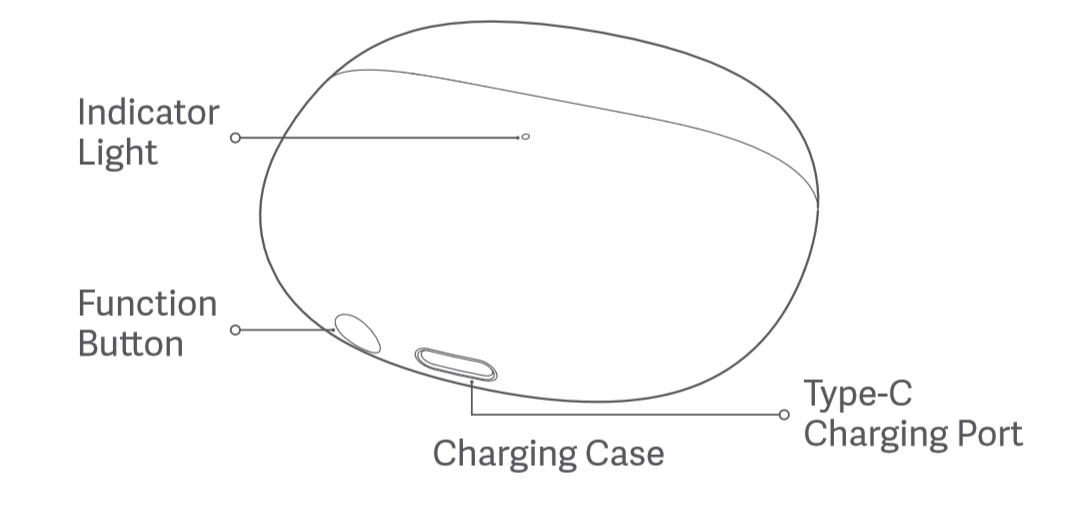
6. Q: How to check the battery level of Xiaomi Buds 3T Pro?
A: You can refer to the following 4 methods.
Method 1: Support checking the power of the headset on Apple mobile phones and Android phones, and only display the power of the headset with the lowest power;
Method 2: Display the power of dual headphones and battery box through the pop-up window of Xiaomi mobile phone (some mobile phones);
Method : Automatically detect the power when the charging box is opened, or click the side button when the charging box is closed, both of which will trigger the indicator light to show the power status:
①If the battery of the charging box is extremely low (battery ≤5%), the red indicator light of the charging box will flash slowly, once every 1 second, and then 5 times;
② When the battery is low (5% < battery < 40%), the red indicator light of the charging box will stay on for 7 seconds and then go off;
③ When the power of the charging box is high (battery ≥ 40%), the green indicator light of the charging box will stay on for 7 seconds and then turn off.
7. Q: Why is the power level of the headset displayed on the mobile phone sometimes inaccurate?
A: During the continuous use or charging process of the headset, the battery will fluctuate, and the power information received by the mobile phone will also fluctuate, and the power is reported at 5%, and there will be instant differences.
8. Q: How to connect mobile phones and other devices?
A: For Xiaomi Buds 3T Pro, the connection steps are as follows.
1. Connect the new device:
①Put the earphones into the charging box, press and hold the function button for 2 seconds after opening the cover, the indicator light of the charging box will flash in white, and the earphones will wait to be connected (the earphones will go to sleep if there is no connection for 1 minute, and the indicator light will be turned off).
②Turn on your phone's Bluetooth, search for and connect to "Xiaomi Buds 3T Pro". (For connection password, enter "0000").
2: For the first use, the headset needs to be activated, there are 2 ways (a and b):
a. Manual power on: Please put the headset into the charging case, and press and hold the function key for 5 seconds to activate the headset. After activation, the headset automatically enters the waiting state for connection. (At this time, the indicator light of the charging box is not on)
b. Power on: When the headset is in the charging box, connect the power supply to the charging box to activate the headset. (At this time, the indicator light of the charging box lights up and enters the charging state) 2. Use the Xiaomi mobile phone to quickly connect
Put the earphones into the charging box, close the cover and approach the unlocked Xiaomi mobile phone with the Bluetooth function turned on, open the charging box cover, and follow the instructions on the mobile phone interface to connect the earphones.
3. The connection is interrupted
When the device turns off Bluetooth or exceeds the connection range of the headset, the Bluetooth is disconnected, the headset will emit a disconnection prompt, and then automatically enter the waiting state for connection; go to sleep after a few minutes,
Wear it again to wake up and enter the state of waiting for connection.
4. Automatically connect back
When the headset is in the charging box, open the charging box, and the headset will automatically reconnect to the recently connected Bluetooth device; if no connection record is detected or any Bluetooth device cannot be successfully reconnected, the headset will automatically enter the waiting state for connection.
9. Q: How to clear the pairing record between the headset and the device and reset the headset?
A: For Xiaomi Buds 3T Pro, there are 2 methods, which are organized as follows.
1. Mobile phone deletion:
Phone- >Settings->Bluetooth->Xiaomi Buds 3T Pro Pro->Click->Cancel pairing (take Xiaomi mobile phone as an example).
2. Reset method:
①Put the earphones into the charging case.
②Press and hold the function button of the charging box for more than 10 seconds, the indicator light of the charging box will light up in white, release the button. The headset is reset, the old connection record is cleared, the indicator light of the charging box enters the white flashing state, and the pairing mode is re-entered.
10. Q: How to control the Xiaomi Buds 3T Pro?
A: This headset adopts the pressure-sensitive control method. The pressure-sensitive areas and functions are introduced as follows. The prompt information is as follows:
● When using the left earphone with one ear, put the right earphone into the charging case and close the cover.
● You cannot switch the noise canceling mode to "Noise On" when wearing a single ear
④Through Xiaoai classmates can
11. Q: Does Xiaomi Buds 3T Pro support wearing detection?
A: This headset supports the wearing detection function, which is enabled by default.
12. Q: Does Xiaomi Buds 3T Pro support automatic answering of incoming calls?
A: Not supported.
13. Q: Can Xiaomi Buds 3T Pro be connected to two mobile phones at the same time?
A: Support.
14. Q: Does Xiaomi Buds 3T Pro support connection with Xiaomi bracelet or other Bluetooth bracelets?
A: Connection not supported
15. Q: Two Xiaomi Buds 3T Pro, the left and right earphones are lost/damaged respectively, can the remaining right and left earphones be recombined?
A: No.
16. Q: Is it possible to connect the left and right earphones to a mobile phone and other devices and use them as two single-ear earphones?
A: Xiaomi Buds 3T Pro are not supported.
17. Q: Does Xiaomi Buds 3T Pro support single-ear mode?
A: Support single ear use (need to keep another earphone in the box and close the cover).
If you want to use both ears after using one ear for a period of time, after wearing another earphone, both ears will automatically connect and make sound.
18. Q: Can Xiaomi Buds 3T Pro be used during charging?
A : The different scenarios are introduced as follows.
①The charging box is charged separately: the headset can be used.
②When the charging box and the earphone are charged at the same time: No, the earphone needs to be put into the charging box during the charging process, so it cannot be taken out and worn. ③ When charging the headset with the charging box: No, the headset needs to be put into the charging box during the charging process, so it cannot be taken out and worn. Note: If the charging box only charges one earphone, the other earphone can be used alone.
19. Q: Are Xiaomi Buds 3T Pro two-channel headphones?
A: Yes.
20. Q: After playing music on one ear for a period of time, when the other earphone is put into the charging box , will the song pause?
A: Put a single ear into the box, and the mobile phone music will be suspended. The current design logic is like this.
21. Q: During music playback, if I take off any earphones and wear them again, will the music play automatically?
A: If you take off the headphones while playing music, the music will automatically pause; if you put on the headphones again, the music will be played automatically (regardless of whether the taken off headphones are in the box or not).
22. Q: Why is there a difference in power/life time between the Xiaomi Buds 3T Pro and the left and right earphones?
A: The right ear of this earphone is the main ear by default. When it is responsible for the same function as the left ear, it is also responsible for transmitting data to the left ear and connecting the mobile phone, so the power consumption will be higher than that of the left ear, and the usage time will be relatively short.
Tip: TWS headphones are divided into master and slave roles in use. The power consumption of the master and slave ears is different under different working states. The power of the left and right ears is inconsistent in the APP), and it is normal for the battery life to be different.
23 Q: Will there be any adverse reactions when wearing Xiaomi Buds 3T Pro?
A: The power of the earphone is very small, and there will be no heat generation. Please use it with confidence.
1. The earphone adopts an in-ear design, which may cause fatigue and a little pain after wearing it for a long time. Eczema may occur in a high temperature environment. It is recommended to take off the earphones and take a rest after 1 hour of continuous use.
2. The earplugs should not be too large. If the earplugs are too large, it is easy to cause pain when the earplugs squeeze the ear canal.
3T. The volume of the earphones should not be too high. Using too high volume for a long time will make your hearing and ear canal nerves tired, and it is easy to make your ears feel pain and soreness. It is recommended that you lower the volume and take off the earphones to give a relaxing or rubbing massage to your ears after every 2 hours of wearing.
24. Q: Why is there a difference between the first picture displayed in the pop-up window of the mobile phone and the animation effect behind it?
A: The first pop-up window of Xiaomi mobile phone is a schematic diagram, which is the initial setting of the App. Because there are many headset models, the animations of all models are not downloaded to the mobile phone by default to avoid taking up unnecessary space. The dynamic image needs to be automatically downloaded from the cloud. Under normal circumstances, the headset can be switched to the animation effect when the headset is connected to the mobile phone for the second time.
25. Q: What should I do if the Xiaomi Buds 3T Pro does not have the MIUI pop-up function?
A: The MIUI pop-up function supports some models, please refer to the following steps. 1. Confirm whether the model supports it and whether the system version is the latest.
2. Check whether Xiaomi Quick Connect is turned on. The way to turn it on is: Phone Settings -> Bluetooth -> Advanced Settings -> Turn on the "Mi Quick Connect" switch. When this switch is turned off, the MIUI pop-up function cannot be used.
3. If the above troubleshooting is not resolved, please pay attention to the firmware update released recently; if not approved, please apply for after-sales service.
Note 1: When using it for the first time, the mobile phone must be connected to WiFi (not a mobile phone hotspot). Because the quick connect function recognizes the headset product and uses it for the first time, it needs to download the headset motion picture data through WiFi. Not using the hotspot is to avoid the consumption of mobile data traffic; after the first download of the quick connection resource through WiFi is completed, the pop-up window can be normally popped up even if the same headset is used without WiFi.
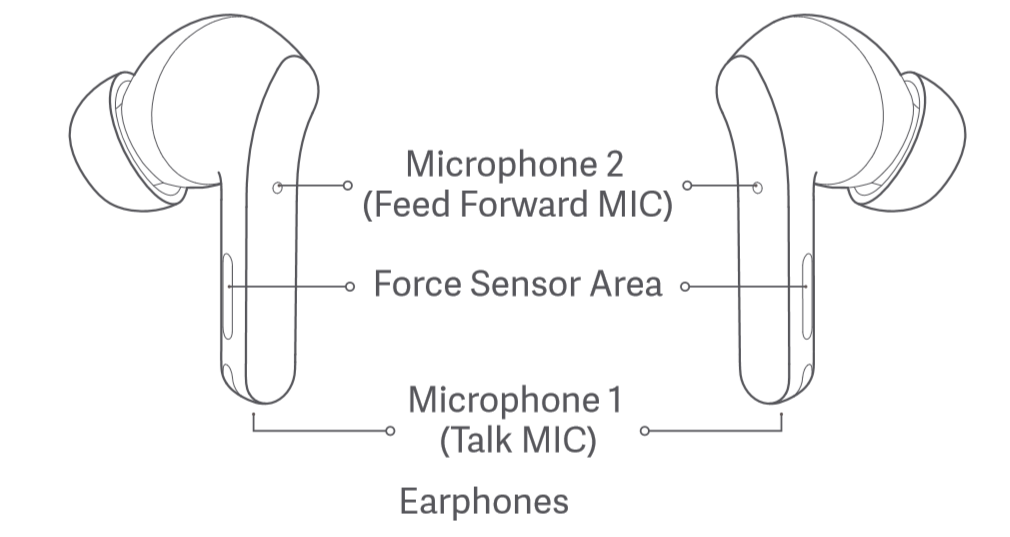
26. Q: How many microphones does Xiaomi Buds 3T Pro have?
A: The Xiaomi Buds 3T Pro headphone body has a total of 3T microphones, the main microphone, the feed-forward microphone (sub microphone), and the feed-back microphone. The positions of the main microphone and auxiliary microphone are as shown in the figure below, and the back-feed microphone is located inside the ear cap.
27. Q: What is the effective use distance of Xiaomi Buds 3T Pro?
A: The effective connection distance between the headset and the mobile phone is about 10 meters in an unobstructed environment. If it is in the office or at home, the effective use distance will be reduced because of the wall or other obstacles. Therefore, there will be a situation where the mobile phone will be stuck or the Bluetooth will be disconnected from the living room with the headset to the bedroom.
28. Q: Why does the pop-up window prompt "This is not your headset"?
A: If the headset has been connected to other devices, it is normal that the mobile phone that supports the pop-up window will prompt "This is not your headset". At this point, the headset can be reset and then connected to the phone.
29. Q: Does Xiaomi Buds 3T Pro have an anti-wind noise mode?
A: No.
30. Q: Does Xiaomi Buds 3T Pro support Active Noise Cancellation technology?
A: Yes, using ANC active noise reduction technology.
31. Q: After the headset is too far away from the mobile phone and the connection is disconnected, can it still be automatically connected when it returns to the vicinity?
A: In the case of no obstruction and no interference, the effective transmission distance of Bluetooth is more than 10 meters. When the effective transmission distance is exceeded, the connection between the headset and the mobile phone will be automatically disconnected. The current setting logic of Xiaomi Buds 3T Pro is as follows.
①If the connection is disconnected, it can be automatically reconnected after returning within 5 minutes; after more than 5 minutes, the headset will go to sleep, and it can be automatically reconnected again after wearing it once.
②If the headset cannot be automatically reconnected to the mobile phone, please restart the Bluetooth on the mobile phone, and press and hold the function key of the charging box for 2 seconds. After the indicator light of the charging box flashes to enter the pairing state, reconnect the mobile phone.
32. Q: Will the earphones be automatically disconnected after they are placed in the charging case?
A: At present, the setting logic of Xiaomi Buds 3T Pro is as follows.
①After the earphones are put into the charging box, if the cover is not closed, the connection will not be automatically disconnected and the connection will remain. ②After the earphones are put into the charging case, if the cover is closed, the earphones and the mobile phone will be automatically disconnected after 5S.
③ If you want to disconnect the mobile phone from the headset, you can turn off the Bluetooth on the mobile phone or put the headset into the box and close the cover.
33. Q: Will there be crosstalk in the headset?
A: Xiaomi Buds 3T Pro will not have crosstalk. By default, the headset can only be connected to one device at a time, and there will be no crosstalk with other devices. Please use it with confidence. Hear what you have to say.
34. Q: Did you use the headset or the phone's microphone when recording video or recording?
A: When recording video and audio, different mobile phones and software have different settings, depending on the specific scene you use.
1. You can test by the following methods:
After the headset is connected to the mobile phone, open the recording software, wear the headset and leave the mobile phone for a distance (about 3~5 meters) to start recording. After stopping the recording, check whether the recorded video or audio has sound. If there is no sound or the sound is low, it means the mobile phone microphone is used for recording, and if the sound is clear, it means the headset microphone is used for recording.
35. Q: Why does the music sometimes pause automatically?
A: If there is a situation where the music is not paused manually but the music is automatically paused, it may be that the earphones slip out of the ear canal due to the earmuffs being too small or due to exercise. It is recommended to put on the headset again and start the music (start through the mobile phone or double-click the right headset), and choose the earmuffs that suit you so that the headset and the ear can fit tightly.
36. Q: Why is the music still playing when the headset is in the charging box?
A: It may be because: the power of the charging box is lower than 10%, or the power is turned off at low power. At this time, the state of the earphones in the box cannot be detected, resulting in the situation that the earphones continue to play in the box.
37. Q: After the headset is connected to the Apple mobile phone, the sound of the call is on the mobile phone?
A: When the iPhone calls, you need to choose the answering method (mobile phone or headset). You can double-click the pressure-sensitive area of the earphone to answer the call , or manually select whether to answer the call on the mobile phone or the earphone. When the Apple phone calls out, you can also choose whether to call with the phone or the headset. If there is no choice, the call will be made through the headset by default.
38. Q: Will the charging case affect the use of the headset?
A: When the earphones are fully charged, the charging box will not affect the use of the earphones; overdischarge may cause the battery performance to deteriorate. It is recommended that you use it as you go.
39. Q: What will be the impact after the charging box is turned off at low power?
A: The following situations may occur.
①The LED light of the opened box does not light up.
②It is not possible to connect the second mobile phone by pressing the pairing button.
③The state of being in the box cannot be detected when the earphones are in the box.
④ The factory settings cannot be restored.
⑤The headset firmware cannot be upgraded by OTA.
40. Q: There is no problem with the sound quality when listening to music, but the sound quality becomes worse when playing games?
A: Because the enabled protocols are different.
①When listening to music, the A2DP protocol is activated;
② When playing the game, the game APP will start the HFP call protocol, but the audio bandwidth of the HFP protocol is narrow and the sound quality is slightly poor.
41. Q: How to maintain the headset?
A: It is recommended to refer to the following information for maintenance.
1. Do not expose the headset to liquids or moisture;
2. Do not use abrasive solvents to clean the earphones;
3. Please try to avoid placing the earphones in a low temperature (below 0 ℃ ), high temperature (above 45 ℃ ) or a large temperature difference environment for a long time. In these environments for a long time, the activity of the battery is easily damaged, causing the battery damage;
4. Do not expose the headset to open flames to avoid the danger of explosion;
5. Do not touch the headset with sharp objects, it will cause scratches or damage;
6. Do not insert any object into the earphone, it will damage the internal components;
7. Do not attempt to disassemble the headset;
8. If you do not use the earphones for a long time, please make sure to place them in a dry place. If you leave them for more than a month, charge them on time to ensure the working performance of the batteries and earphones.
42. Q: Why does the sound of the earphone become smaller after using the earphone for a period of time?
A: It is recommended to check whether the speaker hole is dirty and blocked. You can use a brush to brush the speaker hole. At this time, the volume of the earphones returns to normal.
43. Q: After using for a period of time, the volume of the mobile phone has been turned to the maximum, and the volume of the earphone is still half of the previous volume?
A: Please refer to the following steps.
① Unpair the Bluetooth headset, search and connect again.
② If the sound of the headset is still low after reconnecting, you can switch the "absolute volume" option of the mobile phone to try again, as shown in the figure below.
44. Q: Is the LHDC4.0 of Xiaomi Buds 3T Pro backward compatible?
A: Not backward compatible with LHDC3.0.
The MTK platform mobile phone has an LHDC switch in the LHDC3.0 version, which will automatically turn off after two seconds of turning on, which is currently known.
45. Q: Why is it easy to hang up when taking off the headset when making a call?
A: The protruding area on the side of the headset is the pressure-sensitive button. When the headset is removed during a call, if the hand touches the pressure-sensitive area (as shown in the figure), it may be sensed as a control operation. At this time, please try to adjust the position of the pinching when taking off the earphone to avoid touching the pressure-sensitive area.
Troubleshooting
1. Q: What should I do if the headset cannot be charged, cannot be turned on, and the indicator light does not light up?
A: The earphones may not be able to be charged or the charging may be unstable due to long-term unused storage, poor contact between the earphones and the charging box (dirty contacts) and other reasons. Please follow the following methods to troubleshoot.
1. Charge the headset for at least 3T0 minutes to ensure activation.
2. Check whether the charging contacts of the headset are dirty, collapsed or damaged, and clean up the dirt in time to ensure that the charging contacts and the charging box are in good contact.
Note: Put the earphones in and out of the box 3T times, if the contact is normal, the LED light will be on for 1 second when the earphones are in the box.
3T. Put both earphones into the charging box, keep the cover open, then connect with your mobile phone, and check whether there is a lightning symbol on the green icon of the battery level in the MIUI pop-up window (as shown in the figure below):
①If there is no lightning logo, please apply for after-sales service.
②Check whether the charging box has power. If the charging box has no power, charge the charging box and then charge the earphone, and try to turn on the earphone after charging the earphone; rise.
2. Q: What should I do if the charging box cannot be charged?
A: Please check according to the following methods:
1. Replace the charging cable and the charger and try to see if it can be charged. If it can be charged after the replacement, it may be that the charging cable or the charger is faulty;
2. If it is wireless charging, the center of the charging box needs to be aligned with the center of the wireless charging, otherwise it will not be able to charge, or the charging will be slow; when charging wirelessly, try to avoid using too thick earphone protective covers, otherwise it will appear Can not charge phenomenon.
3. Use the charging cable and charger to charge other devices, and verify whether the charging cable and charger are normal. If you charge other devices normally, please charge the charging box for half an hour and then observe it. If it still cannot be charged, please apply for after-sales inspection.
Note: It may also be that the charger is not compatible.
3. Q: What should I do if the Xiaomi Buds 3T Pro cannot be paired or searched?
A : When searching for a Bluetooth headset on the mobile phone, the Bluetooth headset also needs to be paired.
①First of all, please make sure that the headset is fully charged (open the charging box and the indicator light is always on).
Open the cover of the charging box and press and hold the function key 2S, the indicator light flashes continuously, and the Bluetooth headset is in the pairing state. Please try to search for the Bluetooth headset "Xiaomi Buds 3T Pro" on your mobile phone to pair.
② Make sure the binding steps are correct. The headset is in the pairing state and waiting to be connected. If there is no connection for 1 minute, the headset will go to sleep and the indicator will turn off.
④If none of the above work, please try to restore the headset to factory settings.
Reset steps: Put the dual earphones into the charging box and open the box cover, press and hold the function key for 10 seconds, the indicator light will flash, and after the indicator light turns off, the factory reset is completed and the pairing state is completed. At this time, please try to pair again.
⑤ There may be more interference around, please move to another location and try. Due to the characteristics of Bluetooth headsets, electromagnetic waves in your area may interfere with the Bluetooth connection, and may even be silent or disconnected after connection.
4. Q: What should I do if the device can search for the headset, but cannot connect?
A: If the device can search for the Xiaomi Buds 3T Pro, but cannot connect, it may be that the Bluetooth data of the device is abnormal. Try to delete the previous connection record on the device, press and hold the earphone charging box for 10 seconds to reset the device, and then try again. Try pairing to connect.
Delete the Bluetooth record on the mobile phone: Mobile -> Settings -> Bluetooth -> "Xiaomi Buds 3T Pro" -> Unpair.
5. Q: After the headset has been connected to the mobile phone, what should I do if it does not automatically reconnect after opening the box?
A: Please refer to the following.
1. The headset automatically reconnects to the last connected device by default. If the last connection is not your current phone, you need to reset the headset and reconnect to the phone.
2. The mobile phone is far away from the headset, exceeding the effective transmission distance (10m), or there is an obstacle between the headset and the mobile phone.
3. The Bluetooth of the mobile phone is not turned on.
4. Due to the particularity of the Bluetooth headset, the electromagnetic waves in your area may interfere with the Bluetooth connection, and the headset may be disconnected and cannot be automatically reconnected in time.
6. Q: Will I be allergic to earphones? What if there is an adverse reaction (such as inflammation)?
A: The earphones, ear caps, etc. of this product and the parts that come into contact with the skin have passed the strict detection of harmful substances and will not affect the human body. When you use the headset, please avoid wearing it for a long time (such as sleeping), keep your ears clean, and avoid sweat or dirt residues that may cause discomfort, inflammation, suspected allergies and other problems in your ears after wearing them.
Possible causes of suspected allergy symptoms:
① Wear it for a long time (such as when sleeping), it is not breathable, and the earphones have sweat residue;
②The earphones are dirty and have not been cleaned for a long time. The accumulation of residues leads to suspected allergic symptoms.
③If the user has serious discomfort in the ear after wearing it, or is allergic to inflammation, it is recommended to stop wearing it and consult a doctor in time; if there is only mild itching symptoms, it is recommended that the user follow the following guidelines for wearing:
➢ After wearing the earphones for exercise, please check whether there is sweat on the earphones, and if so, please wipe them clean before putting them in the box;
➢ For daily use, regularly check whether there is dirt in the earphones, ear caps and charging box, if any, please clean it in time;
➢ After wearing it continuously for a long time, you can remove the earphone and let the ear rest for about half an hour to relieve ear fatigue;
➢ After bathing, if there are residual water droplets inside the ear, please clean it up before wearing the earphones.
7. Q: What should I do if the sound is low or there is noise when using the Xiaomi Buds 3T Pro?
A : Please check according to the following methods:
①It may be because the power of the mobile phone or earphone is insufficient, please fully charge it and then observe;
②If the distance between the mobile phone and the earphone or between the two earphones is too far or there is an object blocking the signal (such as a wall), there may be a problem of intermittent sound or noise. Avoid signal blocking;
③ There may be signal interference in the use environment or weak mobile phone signal, you can try to compare whether there is such phenomenon in other use environments or places with good mobile phone signals;
④If there is an object with large electromagnetic interference nearby, it may cause the other party to hear a small sound and noise. It is recommended to keep away from objects with large electromagnetic interference such as microwave ovens during use.
⑤Reset the headset, delete the connection record of the mobile phone, restart the mobile phone and then pair it for use. If there is still intermittent sound or noise, replace it with another mobile phone for testing. If the problem still exists, please apply for after-sales inspection.
Note: There will be a problem that the sound will become smaller in the environment with high wind speed .
8. Q: Why is there no sound or freeze when the headset is connected?
A: Please deal with it according to the following ideas.
1. Cause Analysis
①Due to the particularity of the Bluetooth headset, the electromagnetic waves in your area may interfere with the Bluetooth connection, resulting in a silent situation. When the LHDC code stream is large, the anti-interference ability is poor, and the surrounding environment is poor, there will be such problems.
②Please check the volume setting of the mobile phone, whether the volume of the mobile phone is not turned on, and it is in a mute state.
③ The mobile phone is far away from the headset, exceeding the effective transmission distance (10m), or there is an obstacle between the headset and the mobile phone.
④ When the mobile phone is connected to two Bluetooth devices at the same time, the sound is emitted from the second device, and the first connected device has no sound.
2. Solutions
① Please confirm whether your headphones are in an environment with strong interference, and keep them away from objects with large electromagnetic interference such as microwave ovens. When the environment is bad, it is recommended to turn off the LHDC.
② Unmute the phone on the phone, and try turning up the volume to see if the sound is normal.
③ Use the phone and the headset together, or reconnect.
④Disconnect , put the earphones back into the charging box and close the box cover for 5 seconds, then open the box cover to reconnect to the phone or disconnect the phone from another Bluetooth device.
⑤If none of the above work, please try to restore the factory settings: put the dual earphones into the charging box and open the box cover, press and hold the function key for 10 seconds, the indicator light will flash white, and the factory reset will be completed after the indicator light goes out.
9. Q: Why is the sound still out when the earphone is connected?
A: The headset and mobile phone have been connected, but the sound of music, video, calls and other sounds are still played out. It may be that the "Media Audio" option is not checked.
Solution: After the headset is connected to the phone, click "Settings" --> "Bluetooth", find "Xiaomi Buds 3T Pro" and click the icon on the right to open "Media Audio". Then refer to the following steps for processing.
①On the Bluetooth setting page of the mobile phone, disconnect the Bluetooth and connect the Bluetooth again to restore.
②Turn off the bluetooth on the mobile phone and turn on the bluetooth again. After the headset and the mobile phone are automatically reconnected, they can be restored.
③ Put both ears into the charging box, press the box button for 2s, re-pair the Bluetooth, and it can be restored.
④If none of the above can be solved, please try to restore the factory settings: put the dual earphones into the charging box and open the box cover, after long pressing the function key for 10 seconds, the indicator light will flash alternately in white, and the factory settings will be restored after the indicator light goes out.
10. Q: Why is the actual battery life of Xiaomi Buds 3T Pro shorter than the advertised time?
A: Battery life is strongly related to usage habits, and the battery life data in the publicity corresponds to specific scenarios.
1. Reasons affecting battery life:
①The battery of the earphone is low,
②Or if the volume is louder, the battery will be consumed faster.
③ Or the headset may be in an environment with large electromagnetic interference or there are obstacles such as walls between the headset and the mobile phone.
2. Suggestions for improving battery life:
① It is recommended to use the earphones after they are fully charged.
②It is recommended to turn down the volume to see if the usage time is normal
③ Pay attention to keep away from objects with large electromagnetic interference such as microwave ovens as far as possible when using, and ensure that there are no obstacles between the headset and the mobile phone.
3. The test data was tested in the Xiaomi laboratory, and it is normal to have some differences due to signal interference and electromagnetic interference in the actual environment. For example, the test conditions of listening to songs: when the headset is fully charged, turn off active noise reduction, head tracking and voice hot words, 50% volume, AAC format, and the music playback time can reach 6 hours.
11. Q: What should I do if the sound of the Xiaomi Buds 3T Pro is out of sync?
A: Please refer to the following steps to troubleshoot.
1. Reconnect the earphones (put the earphones back into the charging box, close the charging box, then open and take it out), and test whether the sound of the left and right earphones is synchronized.
2. Check and upgrade the firmware version of the headset.
3. Reset the earphones, reconnect them after resetting, and then test whether the sound of the left and right earphones is synchronized.
12. Q: After the headset is connected to the mobile phone, what should I do if a single headset is silent?
A: Please refer to the following ideas for processing.
1. Cause Analysis
①The unilateral earphone is in poor contact, resulting in only the unilateral earphone being paired;
②The unilateral headset may be powered off at low power;
③ Whether there is dirt in the earphone earplugs blocking the speaker;
④Whether the earphones get into water or sweat, which leads to short-circuit crash.
2. Solutions
①Please put the headset back into the box, confirm that the indicator light on the charging box will be on when it is put in the box, and then re-pair the Bluetooth;
②If the battery is low, after confirming that the headset is in good contact, put it in the box to charge for 10 minutes , and pair it with Bluetooth again;
③Check and clean up the dirt on the earbuds of the headset;
④Reset the headset. Put the earphones back into the charging box, open the charging box, press and hold the button at the bottom of the 10S charging box, the indicator light of the charging box will be on for a long time, you can clear the pairing record, and then perform the pairing operation again;
⑤ Apply for after-sales testing.
13. Q: Why do I sometimes hear the sound of the wind blowing the microphone in my ear, and the wind blowing sound will disappear after a few seconds, but sometimes it will not disappear?
A: The reason is that the continuity and intensity of the wind by the earphones are logically limited in the algorithm. This is mainly to avoid a random gust of wind or in the case of a small wind such as an indoor air conditioner. A non-windy environment has an impact on Active Noise Cancellation (ANC).
14. Q: Why does it sometimes take less than 3T hours to listen to music with headphones? Sometimes up to 6 hours?
A: The main reason is that the LHDC function is a high-stream transmission, and the noise reduction function of headphones, hot word wake-up, spatial audio and other functions are turned on at the same time, the power consumption of the headphones will reach the highest, and it can only reach about 3T hours at this time. Continue. It is recommended to turn off the functions that are not frequently used, which can greatly improve the battery life.
15. Q: Why is the noise reduction effect not good sometimes?
A: Please refer to the following ideas.
First of all, the effect of active noise reduction (ANC) is based on the good effect of passive noise reduction, so please choose a headset model that suits you first to optimize the passive noise reduction effect.
Secondly, the earphone has an adaptive noise reduction function, which has obvious effect on low frequency, but has little effect on high frequency noise, which is very suitable for flying.
Noise reduction on planes, trains, and subways, and high-frequency signals such as car horns and human voices will not be filtered for safety reasons. If you find that the noise reduction effect on the surrounding environment is not obvious during use, please adjust the size of the earplugs you are wearing and experience it again.
16. Q: Why does the noise reduction experience of headphones change when riding the subway?
A: Because the headset has an adaptive noise reduction function, when the subway is running, the noise is large, and the headset will enter a strong noise reduction state. When parking, there is a chance to reach the "balanced" threshold of noise reduction, and it will switch to the "balanced" state. This situation does not belong to the abnormal noise reduction function of the headset.
17. Q: Why is it that when using spatial audio, if you lie down for a while with your head turned 90 degrees , the sound will be turned to the side of the head, and the sound will not come back as the front?
A: In order to avoid such a long-term holding angle that is inconsistent with the opening angle during use, the spatial audio function will turn to an angle and keep it for 10 seconds. After turning around, it does not follow the original original position as the front, you can also keep still for 10 seconds, and it will automatically switch back.
18. Q: Why does the music reappear after I take off a headset?
A: Because the in-ear recognition of the earphone is collected by the sensing components distributed above and below the sound cavity, if you take off the earphone, if your finger or palm just covers the upper and lower positions of the sound cavity, it means that the earphone has recognized the wearing. The wear detection is activated, and the music is played again.
Does it help?
Yes
No