

Xiaomi Temperature and Humidity Monitor Clock FAQ
Product introduction
1.Q: What is the package contents of Xiaomi Temperature and Humidity Monitor Clock?
A: Includes Xiaomi Temperature and Humidity Monitor Clock, Bracket, Wall mount, Flexible magnet, User manual, Warranty card
2.Q:What is the function of Xiaomi Temperature and Humidity Monitor Clock?
A: An electronic watch that accurately detects changes in temperature and humidity, displays the time, and can be linked to smart devices.
3.Q:How to place Xiaomi Temperature and Humidity Monitor Clock?
A: Place the Xiaomi Temperature and Humidity Monitor Clock on the table, wall or refrigerator door.
Weighing just 60g and with a thickness of 10.1mm, the Xiaomi Temperature and Humidity Monitor Clock can be easily placed on a table using the stand, attached to a wall or secured with the soft magnet, making it easy to use as well as visually appealing. You can freely place the Xiaomi Temperature and Humidity Monitor Clock on your bedside table, desk, refrigerator door or wall.
4.Q:What’s Product dimensions of Xiaomi Temperature and Humidity Monitor Clock?
A: 110mm × 55mm × 10.1mm
FAQ
1.Q:Can Xiaomi Temperature and Humidity Monitor Clock connect to other smart devices through Mi Smart Home Hub?
A:The Xiaomi Temperature and Humidity Monitor Clock can connect with other Xiaomi smart devices (air conditioners and humidifiers) via Mi Smart Home Hub.
2.Q:Does Xiaomi Temperature and Humidity Monitor Clock consume power when using it?
A: Due to the use of e-ink screen + low-power Bluetooth, two CR2032s can be used for up to 1 year in various scenarios.
3.Q:Can Xiaomi Temperature and Humidity Monitor Clock view temperature and humidity history?
A: The Xiaomi Temperature and Humidity Monitor Clock can record the temperature and humidity trends for the past six months. You can search and add Xiaomi Temperature and Humidity Monitoring Clock in Mi Home / Xiaomi Home app to view the details in the history.
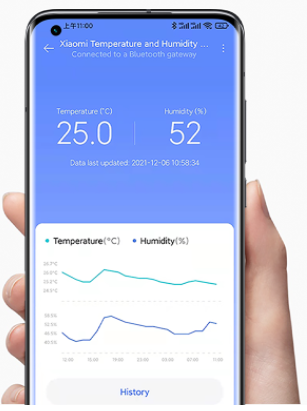
*The unit of temperature can be easily switched between Celsius and Fahrenheit in the Mi Home/Xiaomi Home app, allowing the device to serve more scenarios and meet a wider range of needs.
4.Q:Can the Xiaomi Temperature and Humidity Monitor Clock be charged?
A: Xiaomi Temperature and Humidity Monitor Clock only supports power supply by battery, when the battery is low, just replace the battery, the battery model is: CR2032, the quantity is 2, which must be purchased separately
5.Q:How to replace the battery of Xiaomi Temperature and Humidity Monitor Clock?
A: Xiaomi Temperature and Humidity Monitor Clock battery can be replaced by opening the back cover of the product.
6.Q:Can Xiaomi Temperature and Humidity Monitor Clock be used abroad?
A: In order to ensure the product experience, the products purchased in the mainland can only be used in the mainland. If you take them abroad, you cannot guarantee that the product experience is the same as the mainland.
Note: The product use experience includes: connecting to the Mi Home App, intelligent interconnection with other smart devices, etc.
7.Q:Is it normal for the screen to flicker during use?
A: In order to improve the display effect of the screen and eliminate afterimages, the screen will be refreshed globally every 30 minutes (the screen font and background color will flash in reverse black and white once).
8.Q:How does Xiaomi Temperature and Humidity Monitor Clock ensure the accuracy of time and temperature and humidity?
A: Xiaomi Temperature and Humidity Monitor Clock has a built-in high-precision RTC sensor, which displays the correct time when it is powered on, and is still correct after replacing the battery. At the same time, the Swiss Sensirion high-precision sensor is selected to accurately sense the subtle changes in temperature and humidity, thus ensuring the accurate and high-definition display of the value.
*The time displayed at startup is Beijing time, and it can be updated automatically after connecting to [Mi Home APP] in other time zones.
9.Q: Why does Xiaomi Temperature and Humidity Monitor Clock use E-ink e-ink screen? What are the advantages?
A:The 3.7'' (88mm x 33mm) e-ink display features ultra-low power consumption and a battery life of about a year, with just two button cell batteries. The display appears more like printed text, and can be seen easily and clearly from multiple angles.
*Note: The "inch" in 3.7 inches is not a unit of measurement. It is used to distinguish product models. Please refer to product parameters for actual size data.
10.Q:Can Xiaomi Temperature and Humidity Monitor Clock be used outdoors?
A: Due to the complex outdoor environment, which affects the performance of the product, and the Xiaomi Temperature and Humidity Monitor Clock is an electronic device, the complex outdoor environment may affect its service life. Therefore, in order to obtain a better product experience, it is not recommended to use it outdoors.
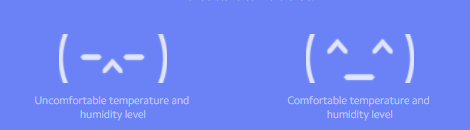
11.Q:What do the various expressions of Xiaomi Temperature and Humidity Monitor Clock mean?
A: The expression meaning of Xiaomi Temperature and Humidity Monitor Clock, as shown in the figure:
12.Q:What should I do if the Xiaomi Temperature and Humidity Monitor Clock screen does not change?
A: When it is found that the Xiaomi Temperature and Humidity Monitor Clock's time/temperature and humidity have not changed, it may be that the battery is exhausted, and it can be restored by replacing only 2 CR2032 batteries.
13.Q:Why Xiaomi Temperature and Humidity Monitor Clock consumes power quickly?
A: Xiaomi Temperature and Humidity Monitor Clock has a battery life of about 1 year in a laboratory environment (if the temperature and humidity changes are not drastic), if the ambient temperature is too low, the product may have a shorter battery life. When it is used for more than half a year and the screen time does not change, it is recommended to replace the battery.
14. Q:Why doesn't the Xiaomi Temperature and Humidity Monitor Clock display a low battery symbol when the battery is too low?
A: Some products may not have a low battery symbol when the battery is about to run out. This problem is not a hardware problem of the product itself, and will be optimized in the future.
Does it help?