

Xiaomi Robot Vacuum-Mop 2C FAQ
Overview
Q1: What are the standard configurations of the Xiaomi Robot Vacuum-Mop 2C?
A: The standard configuration of the Xiaomi Robot Vacuum-Mop 2C is as follows: Vacuum-mop, Charging Dock, Side Brush, Power Cord, Water Tank, Mop Pad, User Manual, and Warranty Notice.
Q2: What is the function of the side brush of Xiaomi Robot Vacuum-Mop 2C?
A: The side brush of the Xiaomi Robot Vacuum-Mop 2C sweeps the garbage in the corner or near the obstacle to the bottom of the main brush of the robot and sucking it into the dust box when moving along the wall or along the obstacle.
Q3: What is the function of the metal sheet on the back of the Xiaomi Robot Vacuum-Mop 2C and the charging dock?
A: The metal plate on the back of the Xiaomi Robot Vacuum-Mop 2C is the charging contact, while the metal part on the charging dock is the charging shrapnel. The robot vacuum charges by making contact between its charging contacts and the charging dock's shrapnel contacts.
Q4: What is the function of the rotatable ball at the bottom of Xiaomi Robot Vacuum-Mop 2C?
A: This is the universal wheel of the Xiaomi Robot Vacuum-Mop 2C. It can rotate 360°. The wheel body is made of flexible material to effectively prevent the floor from being scratched.
Q5: What is the function of the black hair on the side brush and the main brush cover of Xiaomi Robot Vacuum-Mop 2C?
A: This is the hair isolation bundle of Xiaomi Robot Vacuum-Mop 2C. It is specially designed to prevent hair from tangling. The hair isolation bundle can prevent hair from entering the bearing and causing overheating or jamming.
Q6: Is the top cover of Xiaomi Robot Vacuum-Mop 2C strong?
A: The upper cover and connection of the Xiaomi Robot Vacuum-Mop 2C are made of tough materials, and the upper cover will not be damaged under normal use.
Q7: What is the function of the black soft glue on the Xiaomi Robot Vacuum-Mop 2C dust compartment?
A: The black soft rubber ring on the dust compartment is a sealing ring formed using an FIP dispensing on-site molding process. It has the advantages of tight sealing and no fear of dust. The FIP sealing ring allows the dust box to be tightly combined with the air ducts on both sides.
Q8: Why does Xiaomi Robot Vacuum-Mop 2C adopt a single-side brush design?
A: The side brush of Xiaomi Robot Vacuum-Mop 2C is mainly used to clean the garbage in the corners and the roots of obstacles. The side brush is not the main cleaning structure when cleaning in other areas. For example, if the side brush is kept at a high speed during non-wall cleaning. Rotating may cause garbage to fly. Xiaomi Robot Vacuum-Mop 2C uses dynamic side brush speed regulation. When not along the wall, reducing the side brush speed to prevent flying garbage is the main cleaning work. Secondly, only one side of the robot vacuum will always clean against the wall, or the root of the obstacle, and the other side does not need to be brushed. Finally, when the double-sided brush touches the cable entanglement, the two side brushes with the opposite rotation direction are more difficult to detach from the entanglement than the single-sided brush. So Xiaomi Robot Vacuum-Mop 2C is only designed with one side brush.
Q9: Can Xiaomi Robot Vacuum-Mop 2C not touch the furniture at all?
A: To get the best cleaning effect, the Xiaomi Robot Vacuum-Mop 2C uses an extreme cleaning distance. If there is no collision, the garbage at the root of the furniture may not be cleaned well, so we adopted a light touch method to the best cleaning effect is guaranteed, but please rest assured, the Xiaomi Robot Vacuum-Mop 2C has an infrared distance sensor, most furniture can correctly recognize and slow down and lightly touch, so it will not bring damage to the furniture or itself.
Q10: What sensors does Xiaomi Robot Vacuum-Mop 2C have?
A: The Xiaomi Robot Vacuum-Mop 2C has a camera sensor, gyroscope, acceleration sensor, electronic compass, odometer, infrared deceleration sensor, edge sensor, collision sensor, cliff sensor, falling bed dry up, back flush brigade connection sensor, dust compartment installation detection sensor, water tank installation detection sensor, and fan speed sensor.
Q11: What is VSLAM/visual navigation technology?
A: VSLAM visual navigation technology is a new navigation technology that collects spatial features of the surrounding environment through camera sensors, and performs software algorithm processing, completes its own position determination and path recognition, and makes navigation decisions. Xiaomi Robot Vacuum-Mop 2C is equipped with a professional OV vision sensor and a 166° wide-angle lens. It collects 30,000 feature points per second and extracts complex spatial features. At the same time, it is equipped with 50 times/second path calculations to achieve fast and accurate map creation and navigation.
Q12: What are the advantages of VSLAM/visual navigation compared to LDS laser navigation?
A: The visual navigation technology adopted by the Xiaomi Robot Vacuum-Mop 2C, due to the use of built-in visual sensors, makes the body height only 8.2cm. Compared with LDS laser navigation products, the body is lower, and it is easier to enter the bottom of the bed and cabinet. The bottom of furniture such as the bottom, thereby improving the cleaning coverage. However, visual navigation has higher requirements for light and poor recognition ability for black.
Q13: Will the camera of Xiaomi Robot Vacuum-Mop 2C violate privacy?
A: No, the camera of the Xiaomi Robot Vacuum-Mop 2C is only used for host positioning and navigation, and will not infringe on personal privacy.
Product introduction and use
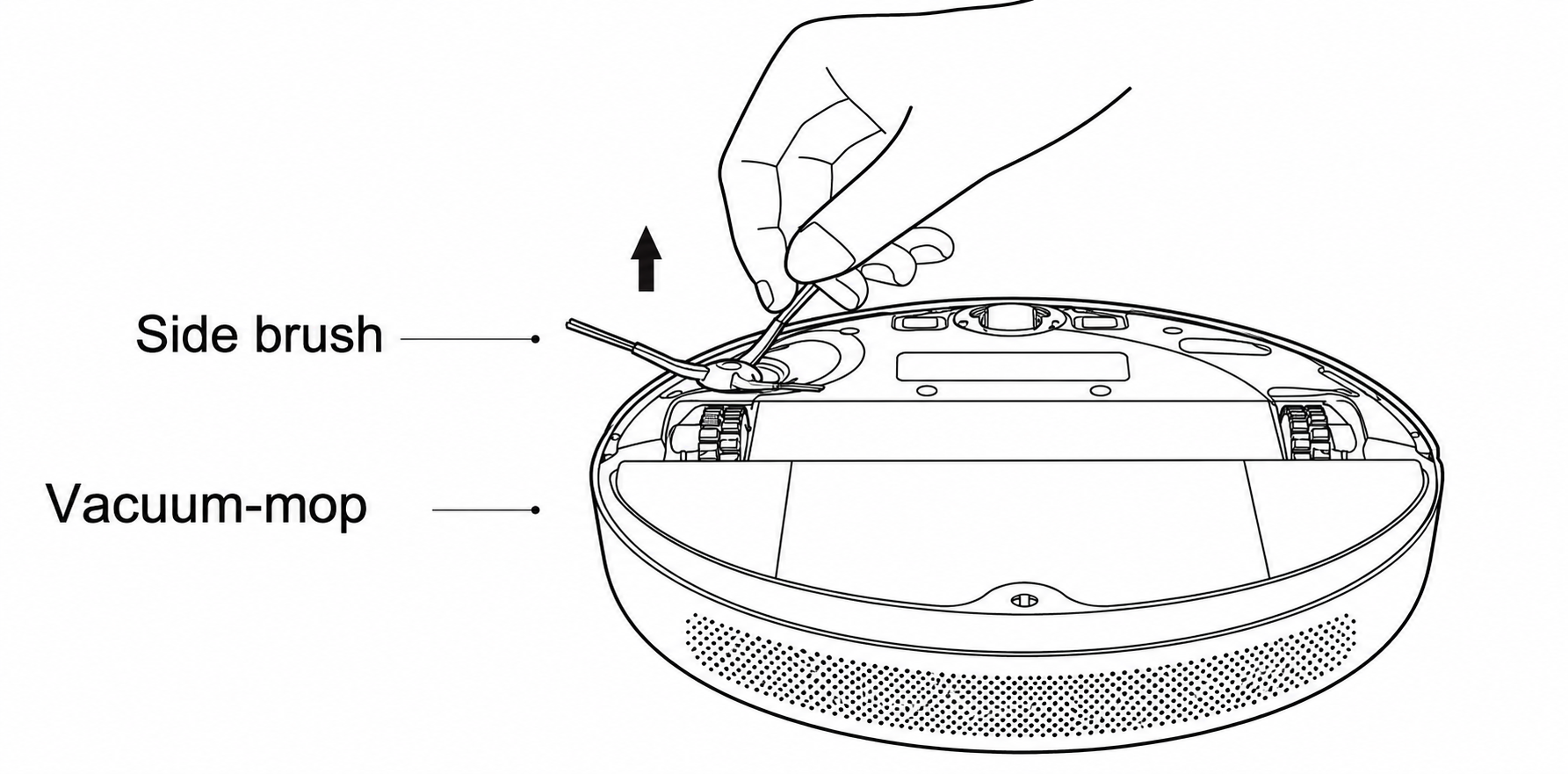
Q1: How to install the side brush for the Xiaomi Robot Vacuum-Mop 2C?
A: Take out the side brush of the Xiaomi Robot Vacuum-Mop 2C and install it into the buckle on the upper left corner of the main chassis, as shown in the figure. A little force is required to install the side brush firmly. If it is not installed properly, it will fall off.
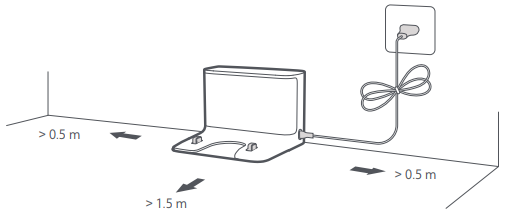
Q2: How to place the charging dock of the Xiaomi Robot Vacuum-Mop 2C?
A: The charging dock requires a space of about 0.5 meters on the left and right sides, and a space of more than 1.5 meters in front, and should be placed against the wall. Generally, it is recommended to place the charging dock in an open area such as the living room. Do not place the charging dock in a crowded and narrow area. Please store the excess wires to avoid being dragged by the main unit, causing the charging dock to shift or power off.
Q3: How to charge the Xiaomi Robot Vacuum-Mop 2C?
A: After connecting the charging dock to the power socket, press and hold the power button, wait for the power indicator to turn on, and then put the main unit on the charging dock to charge. The power indicator shows orange if the battery is less than 15%, and white is greater than or equal to 15%.
Friendly tips:
You will not be able to turn it on when the battery is low; please put the main unit directly on the charging dock.
Q4: How to turn on/off the Xiaomi Robot Vacuum-Mop 2C?
A: When charging, the Xiaomi Robot Vacuum-Mop 2C will automatically turn on. Press and hold the power button to turn on or off the robot vacuum.
Q5: Will Xiaomi Robot Vacuum-Mop 2C automatically sleep?
A: If there is no operation for more than 10 minutes, the main unit will automatically enter the sleep state, and the power and recharge indicator will turn off in the sleep state. You can press any button to wake it up.
Friendly tips:
The host will not enter the sleep state when charging; it will enter the sleep state after being fully charged.
Q6: What are the functions of the dust compartment/water tank and other accessories of the Xiaomi Robot Vacuum-Mop 2C?
A: Xiaomi Robot Vacuum-Mop 2C comes standard with the dust compartment and water tank.
The dust compartment is used for dust collection.
The water tank and mop are used when mopping the floor.
Clean up gadgets and handle tangled hair with the roller brush, side brush, etc.
Q7: Can Xiaomi Robot Vacuum-Mop 2C fill the water tank halfway or replace the mop?
A: Yes. If the main unit needs to add water or clean the mop during the cleaning process, press any button to pause, remove the water tank to add water or clean/replace the mop, reinstall the water tank and the mop after completion, and press the button to continue working.
Q8: How to use the cleaning function of the Xiaomi Robot Vacuum-Mop 2C?
A: After turning on the device, start cleaning by pressing the button or using the App, and the device will start cleaning. It is possible to install the mop before cleaning.
Note:
If the cleaning task is less than 10 minutes, it will be cleaned twice by default.
Q9: Does the Xiaomi Robot Vacuum-Mop 2C clean well?
A: The floating main brush structure of Xiaomi Robot Vacuum-Mop 2C can tightly fit the ground to roll up the garbage and send it into the dust compartment. The large suction fan provides strong negative pressure to collect the dust. The automatic speed control side brush can sweep the garbage in the corners and in front of the furniture. The path planning navigation algorithm allows the robot to cover all areas to be cleaned, so the Xiaomi Robot Vacuum-Mop 2C can clean the ground for you.
Friendly tips:
Some stubborn stains cannot be removed when mopping the floor, so manual assistance is required to clean up.
Q10: Can Xiaomi Robot Vacuum-Mop 2C be used for mopping the floor for the first time?
A: 1. When using the Xiaomi Robot Vacuum-Mop 2C for the first time, it is recommended not to install the mopping module; first sweep the floor, and then install it.
2. When the household is dusty and needs to be mopped, it is best not to install the mopping module and complete a global cleaning mode first.
Q11: Can Xiaomi Robot Vacuum-Mop 2C not be placed in the charging dock?
A: 1. After the device cleaning task is completed, it is recommended to return the device to the charging dock for charging standby to ensure the battery power of the device.
2. The internal programs of the device in the standby state will be running while waiting for instructions.
3. The device is not on standby in the charging dock. To avoid power consumption of the device, you can manually press and hold the power button to turn off the device and try to put it in standby.
Friendly tips:
If you don't use it for a long time, please turn it off for storage, and charge it at least once every three months to avoid damage to the battery due to over-discharge.
Q12: When using Xiaomi Robot Vacuum-Mop 2C to mop the floor, can I add detergent such as disinfectant?
A: Please add clean water to use; do not add cleaning liquid or disinfectant.
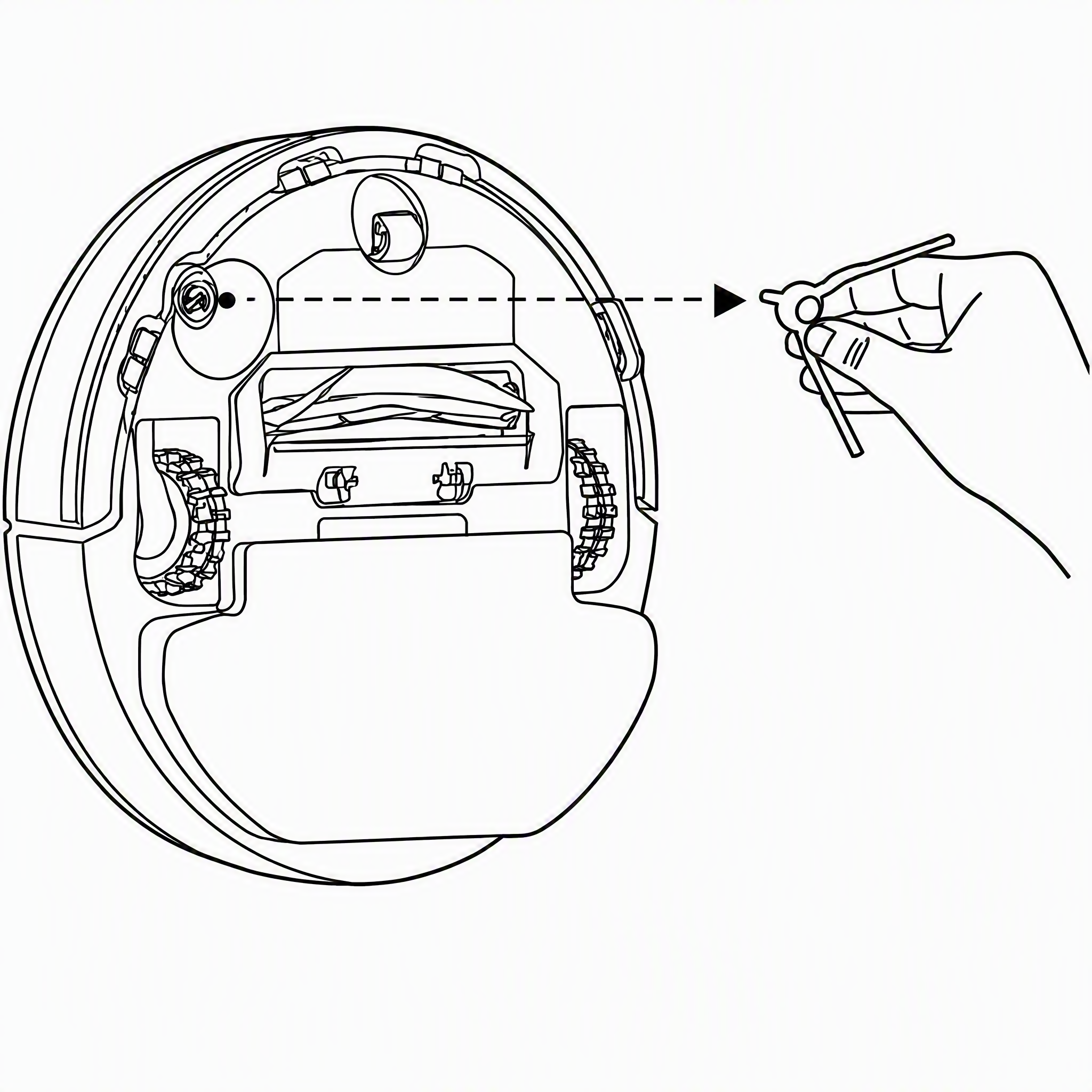
Q13: How to clean the side brush of the Xiaomi Robot Vacuum-Mop 2C?
A: Remove and clean the side brush regularly as shown in the figure.
Q14: How to clean the main brush of the Xiaomi Robot Vacuum-Mop 2C?
A: 1. Flip the vacuum-mop over and pinch the clips to remove the brush cover.
2. Lift the brush out of the vacuum-mop, then clean the brush bearings.
3. Reinsert the brush, then put the cover back on and press on it until the clips lock into place.
Note:
It is recommended to clean the brush weekly and replaced every 6 to 12 months
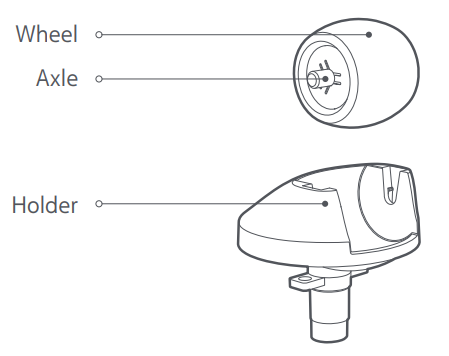
Q15: How to clean the omnidirectional wheel of the Xiaomi Robot Vacuum-Mop 2C?
A: 1. Turn the machine over and pull out the omnidirectional wheel upward.
2. Clean the hair and dirt on the wheel body and axle.
3. Reinstall the wheel body and press it firmly.
Friendly tips:
You can use tap water to rinse, dry, and reinstall.
Q16: How to clean the side brush of the Xiaomi Robot Vacuum-Mop 2C?
A: 1. Turn the machine over, pull out the side brush, and clean it up as shown in the figure below.
2. Install the backside brush.
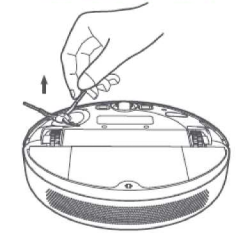
Friendly tips:
It is recommended to clean it once a month and replace the side brush every 3-6 months to ensure the cleaning effect.
Q17: Does the Xiaomi Robot Vacuum-Mop 2C have a motor overload protection function?
A: All motors on the Xiaomi Robot Vacuum-Mop 2C have overload protection, including the vacuum fan, main brush motor, side brush motor, and wheel motor. The protection will automatically start when foreign matter enters or is seriously blocked and overloaded.
Q18: Can Xiaomi Robot Vacuum-Mop 2C operate in a low-light environment?
A: It can run. To ensure the best cleaning experience, please keep the ambient light as bright as possible.
Q19: What could be causing the unpleasant odor coming from the mop pad and dust
compartment of the Xiaomi Robot Vacuum-Mop 2C?
A: If the mop pad of the Xiaomi Robot Vacuum-Mop 2C is not cleaned promptly after mopping, leaving it unattended for an extended period may result in unpleasant odors; please clean the mop pad promptly after use.
The Xiaomi Robot Vacuum-Mop 2C may ingest liquid during the cleaning process; failure to empty the dust compartment promptly could lead to unpleasant odors, so please empty the dust bin promptly after the device finishes its task.
Q20: What is the height of obstacles that Xiaomi Robot Vacuum-Mop 2C can pass through? How about suction power?
A: Xiaomi Robot Vacuum-Mop 2C can pass 20 mm high obstacles. After installing the water tank, the obstacle height will be slightly reduced. On slippery ground, the obstacle height of the main unit will be reduced. Its powerful suction is about 2,200 Pa.
Troubleshooting
Q1: What to do if Xiaomi Robot Vacuum-Mop 2C cannot connect to the Internet?
A: 1. Confirm whether the Wi-Fi password entered during connection is correct. The Wi-Fi name cannot
contain Chinese characters or special characters such as @, ¥, or % in the password setting. If so, please reset it to
English or an account with a numbers-and-letters format. Change the password and try again.
2. Check whether the router's external network connection is normal. You can try to open a web page and browse through your mobile phone or a computer.
3. Confirm whether the distance between the router and the robot is too far (beyond 5 meters or there is a partition wall in between). You can try to move the machine within 1 to 2 meters from the router and try to reconnect.
4. Try to connect to the mobile phone Wi-Fi hotspot.
5. Check whether the router is connected to more smart devices, causing the network to slow down or the router not to respond; you can try restarting the router.
6. Currently, it does not support the company's EAP 802.1x authentication network, 5GHz signal network or public Wi-Fi network that requires web page authentication.
7. After the network is turned off, if the device is not connected to the Internet for more than one hour, the WiFi module will turn off the network link function, and the WiFi indicator will flash, and the connection can be restored after restarting the device.
8. Check whether the mobile phone restricts the permission of the App, such as networking, positioning, etc., please allow the permission and try again.
9. The connection failure may also be related to the phone model. You can try to connect with other phone models.
Q2: What to do if the side brush of the Xiaomi Robot Vacuum-Mop 2C does not rotate while brushing?
A: 1. Check whether there is any matter or hair jam in the position of the side brush.
2. Please check whether the side brush hair is jammed in the gap of the battery box cover.
3. Check whether the device is turning on a medium-long hair carpet, or when the side brush hits an obstacle, it stops normal operation subsequently.
4. After restarting the robot to work for 30 minutes, check whether there is any recurrence.
5. Apply for after-sales testing to determine whether the robot is malfunctioning
Q3: What to do if the brush of the Xiaomi Robot Vacuum-Mop 2C does not rotate?
A: 1. Check whether there is hair on the roller brush or at both ends of the brush, which is caused by the jamming of sundries.
2. It is recommended to clean regularly and restart inspection.
3. Apply for after-sales testing to determine whether the robot is malfunctioning.
Q4: What to do if the Xiaomi Robot Vacuum-Mop 2C makes abnormal noise?
A: 1. Check whether the parts at both ends of the roller brush are complete and whether there is any defect.
2. Check whether the roller brush cover is not fastened.
3. It may be caused by the rolling brush being entangled with debris; try it after cleaning.
4. Apply for after-sales testing to determine whether the robot is malfunctioning
Q5: What to do if the main/omnidirectional wheels of Xiaomi Robot Vacuum-Mop 2C do not rotate?
A: If the main wheels do not rotate, it will cause the equipment to spin in place, and the omnidirectional wheels will cause abnormal operation of the equipment.
1. Check whether the main/omnidirectional wheels are jammed by foreign matter, causing the wheels not to rotate normally. If there is foreign matter (Paper, sundries, etc.) jammed into the wheels, it is recommended to check and clean them and try to restart.
2. Restart the machine after moving the position.
3. Apply for after-sales testing to determine whether the robot is malfunctioning.
Q6: What to do if Xiaomi Robot Vacuum-Mop 2C cannot be charged?
A: 1. Check whether the adapter is plugged in, whether it is in good contact with the back of the charger, and whether the socket has electricity.
2. Check whether the metal shrapnel at the bottom of the charging dock and the charging contact at the bottom of the robot are dirty, causing poor contact with the charger.
3. Confirm whether the machine is manually placed in the charging dock and is not aligned.
4. Check whether the height of the charging dock shrapnel and the charging contact point of the robot are the same.
5. It may be that the charging dock is located in a remote location, and insufficient space causes the automatic recharging to fail.
6. Apply for after-sales testing to determine whether the robot is malfunctioning
Q7: What to do if the Xiaomi Robot Vacuum-Mop 2C anti-collision buffer shell fails to rebound?
A: 1. Check if there is any matter stuck.
2. Try to slap it manually to check whether it can rebound.
3. It is recommended to clean up objects regularly.
4. Apply for after-sales testing to determine whether the robot is malfunctioning.
Q8: What to do if the Xiaomi Robot Vacuum-Mop 2C cannot be started?
A: 1. Check whether the power of the machine is sufficient.
2. Press the power or recharge button on the machine and observe whether the machine has voice prompts and actions.
3. After the machine is connected to the Internet, perform a global cleaning to observe whether the machine can work normally.
4. After the above investigation, the machine still fails to work normally, and after-sales inspection is required for machine failure.
Q9: What to do if the Xiaomi Robot Vacuum-Mop 2C can't vacuum/has a small suction power?
A: 1. Try to restart the device.
2. Check whether the filter is blocked by rubbish or the dust compartment is full, so that it cannot continue to inhale dust.
3. Check whether the robot has sufficient power, and try after charging.
4. Apply for after-sales testing to determine whether the robot is malfunctioning.
Q10: What to do if the map of the Xiaomi Robot Vacuum-Mop 2C is abnormal and skewed?
A: 1. When the equipment frequently encounters obstacles, it will affect the drawing; try to sort out the obstacles.
2. The device is under the bed and sofa, and is blocked by the bed sheet and sofa cover, which will cause the sensor to be blocked and cause the map to be deformed.
3. Moving the position of the machine during the operation of the equipment will cause the positioning of the equipment to be misaligned and cause the map to be deformed.
4. Check whether the network is normal.
5. Put the equipment in the middle position (not in the channel), or use the virtual wall to distinguish the cleaning environment.
Q11: What to do if the Xiaomi Robot Vacuum-Mop 2C cannot be recharged/is charging slowly?
A: 1. Check whether the device starts from the charging dock when performing cleaning tasks. If it does not start from the charging dock, there is a probability that it will not recharge.
2. Check whether the power supply of the charging dock is normal.
3. Check whether the charging dock is placed against the wall, whether there is an open area above 1.5 meters in front, and an area of 0.5 meters on the left and right.
4. Check whether the charging dock is placed on flat ground.
5. Check whether it is jammed by foreign objects. For example, if the wheel is caught by foreign objects (towels, paper, sundries, etc.), the equipment cannot be transported.
6. Check the trapped area of the equipment. You can try to separate it with a virtual wall, or it is recommended to try again after manual cleaning.
7. After the equipment is cleaned, there will be a recharging process when returning to the starting area of the equipment, which is normal operation.
8. Apply for after-sales testing to determine whether the robot is malfunctioning
Q12: What to do if there is abnormal noise during the Xiaomi Robot Vacuum-Mop 2C operation?
A: When working on smooth tiled floors and wooden floors, a slight sound may be produced when the bottom scraper rubs against the ground.
When the main unit passes through the joint between the tile and the floor, it will touch and clean the seam, and may produce a slight "click" sound.
The above sound does not affect the normal use of the machine. Please check the following for other abnormal noises:
1. Check whether the main wheels, omnidirectional wheel, and roller brush rotate normally, and whether there are abnormal noises during the rotation; if any, check whether there are foreign objects stuck to the corresponding movable mechanism, and try again after removing the foreign objects.
2. Check whether the mop bracket is installed in place, and whether the buckles on the left and right sides are correctly positioned in the slot.
3. If the abnormal sound is irregular and happens occasionally during the cleaning of the equipment (such as through the cracks in the tiles, the cracks in the wooden floor, etc.), at this time it is the buffering sound when the equipment passes through uneven ground, which is normal.
4. Apply for after-sales testing to determine whether the robot is malfunctioning
Q13: What to do if the firmware update of the Xiaomi Robot Vacuum-Mop 2C fails?
A: 1. Check whether the device is normally connected to the Internet, and check whether the network is smooth.
2. Turn off the device and then restart it. Wait for a few minutes. The download of the new software package will take a few minutes, which is a normal phenomenon.
3. Please do not shut down the device and ensure the device is powered on during the update process. The software update will have an update process, which is a normal phenomenon.
4. Try changing the time period to update.
Q14: What to do if there is no map after Xiaomi Robot Vacuum-Mop 2C has completed the cleaning?
A: 1. After the equipment is cleaned, the current cleaning map will be remembered only when the equipment is automatically returned to the charging dock. Please do not manually move the equipment or move the equipment during the cleaning.
2. Check the area where the charging dock of the device is placed to ensure that the device can be recharged normally.
Q15: What to do if the battery of the Xiaomi Robot Vacuum-Mop 2C is insufficient for recharging, and the interrupted scan is not executed after charging?
A: 1. Check whether the equipment cleaning task is completed; connect to the App to check whether the cleaning area is completed.
2. Check whether the equipment is trapped or there are steps in some areas, causing some areas not to be cleaned; try to separate them with a virtual wall.
3. Check whether the do not disturb mode is turned on in the App.
4. Manually put the Xiaomi Robot Vacuum-Mop 2C back into the charging dock to charge, and it will not continue to scan.
5. Try to turn off the Do Not Disturb mode of the device and clean again.
Q16: What to do if the Xiaomi Robot Vacuum-Mop 2C is noisy?
A: There is a silicone scraper at the bottom of the Xiaomi Robot Vacuum-Mop 2C, which can scrape stubborn dust. When the scraper encounters unevenness or tile gaps, it is normal for a slight abnormal noise to appear. In order to ensure the cleaning coverage, the main unit will clean all corners. In a complex environment, turning and edge movements will be increased, and the cleaning efficiency may be reduced. You can try to change the mode in the App, and you can choose the "Silent" and "Standard" suction levels. When the device selects "Silent" and "Standard" modes for cleaning, the device's quiet mode is about 68 decibels.
Q17: What to do if the charging dock is powered off and the Xiaomi Robot Vacuum-Mop 2C runs randomly?
A: 1. It is normal that the device will automatically find the charging dock when the device is charging.
2. You can turn on the device's do not disturb mode through the App, and turn off the device to automatically search for the charging dock when the device is powered off.
Q18: What to do if the Xiaomi Robot Vacuum-Mop 2C is trapped by obstacles?
A: 1. Check whether there is any debris around the bottom of the sofa and other obstacles blocking the normal cleaning of the equipment; try after cleaning.
2. Check whether there is any collapse or movable obstacle in the middle of the sofa. The device can enter normally but cannot exit. It is recommended to use a virtual wall.
3. Check if there is any disorder in the cleaning and construction of the equipment, and try cleaning again.
Note:
The cleaning efficiency will be reduced in a complex environment. The minimum distance for the host to pass is 38cm, and areas less than this distance may not pass.
Q19: What to do if the cleaning path of the Xiaomi Robot Vacuum-Mop 2C is chaotic and some areas are repeatedly cleaned?
A: 1. Check whether the real-time cleaning path is chaotic in the App.
2. Check whether the device scanning and mapping on the App is skewed; you can try to clean it again.
3. Check whether the equipment is trapped when it runs on the carpet on the steps and the carpet. You can add a virtual wall to try to separate it.
4. Check whether curtains or other objects are blocking the top sensor, and try to clean again.
5. Check whether the top sensor is directly affected by sunlight or other lights during the cleaning of the equipment. It is recommended to temporarily turn off the direct light and try again, or pull down the window curtains and try to clean again.
Q20: After using the Xiaomi Robot Vacuum-Mop 2C for a period of time, what to do if I find that the cleaning ability is reduced or dust is falling?
A: 1. Check the dust compartment. If the dust compartment is full, please clean it in time.
2. Check whether the filter needs to be cleaned, and whether the main brush is entangled by foreign matter.
3. Apply for after-sales testing to determine whether the robot is malfunctioning
Q21: Why can’t the Xiaomi Robot Vacuum-Mop 2C return to the charging dock after cleaning or moving the location?
A: The robot will regenerate the map after partial cleaning or long-distance movement. If the charging dock is far away, it may not be able to automatically recharge. Please manually put the sweeper back to the charging dock to charge.
Q22: What to do if the water tank of the Xiaomi Robot Vacuum-Mop 2C leaks?
A: There are vent holes on the top cover of the water tank to balance the air pressure inside and outside the water tank. After adding water to the water tank, please place it horizontally. When it is tilted, there will be slight water leakage, which is normal. For other situations, please check as follows:
1. Check the appearance of the water tank for damage such as bumps, cracks, etc.
2. If there is residual water on the floor during mopping, please check as follows:
(1). Check whether the mop has too much water.
(2). Check whether the mop has not been disassembled after the last mopping, and the mop has more residual moisture.
(3). Try to replace it with a new mop.
(4). Confirm whether the humidity in the environment is too high.
(5). Apply for after-sales testing to determine whether the robot is malfunctioning
Q23: What to do if the Xiaomi Robot Vacuum-Mop 2C does not take effect regularly?
A: It may be that the battery is insufficient, and the remaining battery is greater than 15% to start regular cleaning.
Q24: What to do if Xiaomi Robot Vacuum-Mop 2C consumes power quickly?
A: 1. Check whether the battery is fully charged when the machine starts to work (connect to the App to
check the battery; if it is not fully charged, the cleaning time will be shortened; please charge it first).
2. Check whether the machine has been "trapped" and "out of trap" during the working process.
(1). Trapped: such as being entangled by wires, entering the bottom of the bed and being unable to get out, adding a virtual wall causes the machine to be trapped in the corner, causing the battery to run out.
(2). Escape: If the machine enters a multi-stool-leg environment and crosses obstacles (across stool legs, slippers, and other sundries), it takes a long time to escape, resulting in fast power consumption.
3. Check whether the power mode is used.
4. Apply for after-sales testing to determine whether the robot is malfunctioning.
Q25: What to do if the Xiaomi Robot Vacuum-Mop 2C misses or repeats cleaning?
A: Check whether the film on the host camera is turned off and whether it has accumulated dust. If there is any dust, please clean it up. Please try to keep the indoor environment as light as possible during the cleaning process.
Q26: Is it normal for the Xiaomi Robot Vacuum-Mop 2C to go to another room before cleaning the current room?
A: Xiaomi Robot Vacuum-Mop 2C has a specific cleaning path plan. It is normal for the robot to go from one room to another room to clean before the cleaning is completed. The previously uncleaned area will be cleaned afterward.
Q27: Is it normal for the Xiaomi Robot Vacuum-Mop 2C cleaning path to go back and forth repeatedly?
A: Xiaomi Robot Vacuum-Mop 2C will clean according to the planned path. When cleaning, it will navigate to the uncleaned area. There will be some repeated back and forth visually. Actually, it is not repeated cleaning but "complementary cleaning".
Q28: What to do if the water tank does not come out or the water volume is low when the Xiaomi Robot Vacuum-Mop 2C is mopping the floor?
A: When using a dry mop, the water in the water tank will be absorbed by the mop first. It is recommended to wet the mop before mopping the floor.
1. Please check if there is water in the water tank.
2. Please install the mop correctly according to the instructions.
3. Please clean the mop in time.
4. Apply for after-sales testing to determine whether the robot is malfunctioning
Q29: Why does the Xiaomi Robot Vacuum-Mop 2C repeatedly dock the charging dock when recharging?
A: Please check whether the charging dock and the charging contact of the main unit are stained with dust.
When dust is stained, there will be repeated docking. Please wipe it before use.
Q30: What to do if the Xiaomi Robot Vacuum-Mop 2C cannot be turned on?
A: The battery is low; please charge it using the charging dock before using it. The ambient temperature is too low (below 0 ℃ or too high above 50 ℃); please use it in a 0-40 ℃ environment.
Q31: What is the reason why Xiaomi Robot Vacuum-Mop 2C encounters obstacles and does not decelerate and collide when cleaning?
A: Xiaomi Robot Vacuum-Mop 2C has an infrared sensor on the front impact plate, which can detect obstacles and decelerate in advance. However, for some tables and chairs' legs with darker colors or smaller volumes, collisions may not be detected, which is normal.
Q32: What is the reason for the failure of Xiaomi Robot Vacuum-Mop 2C's relocation?
A: Moving the Xiaomi Robot Vacuum-Mop 2C to an area that has not been cleaned before will cause the relocation to fail. Please try to move it to the area that has been cleaned before.
When the main unit was relocated, someone was standing next to the host. Please try to ensure that you do not stand next to the host and that the camera can fully capture the feature points at the top of the room. When the host is relocating, the light is dim; please ensure that the relocation is performed under sufficient light.
Note:
The main unit will perform repositioning after being moved. If the repositioning is successful, the cleaning will continue, and if the repositioning fails, the cleaning will restart.
Q33: What to do if the Xiaomi Robot Vacuum-Mop 2C produces a lot of water when mopping the floor?
A: 1. Check if the mop is not wrung out; try to replace the mop.
2. Check that the water tank cover is fastened enough.
3. Check whether the appearance of the water tank is damaged, and try to replace the water tank.
4. Apply for after-sales testing to determine whether the robot is malfunctioning
Q34: What to do if the sound is loud when the Xiaomi Robot Vacuum-Mop 2C is cleaning?
A: To ensure the cleaning effect, the main unit adopts a fan with a larger suction power, which has a stronger suction effect and a relatively louder sound. When cleaning, you can use a quiet gear with a quieter sound to work.
Q35: What to do if the water tank falls off when the Xiaomi Robot Vacuum-Mop 2C is mopping the floor?
A: The water tank will fall off if the water tank is not installed and started to work. Please pay attention to the correct way of installing the water tank. You need to hear a "click" sound when installing the buckles on both sides of the water tank.
Does it help?
Yes
No