

Xiaomi Robot Vacuum-Mop 2C FAQ
Overview
1.Q: What are the standard configurations of Xiaomi Robot Vacuum-Mop 2C?
A: The standard configuration of Xiaomi Robot Vacuum-Mop 2C is as follows: Vacuum-mop, Charging Dock,Side Brush, ower Cord,Water Tank, Mop Pad, User Manual ,Warranty Notice.
2.Q:What is the function of the side brush of Xiaomi Robot Vacuum-Mop 2C?
A: The side brush of the Xiaomi Robot Vacuum-Mop 2C sweeps the garbage in the corner or near the obstacle to the bottom of the main brush of the robot and sucking it into the dust box when moving along the wall or along the obstacle.
3.Q: What is the function of the metal sheet on the back of the Xiaomi Robot Vacuum-Mop 2C and the charging stand?
A: The metal piece on the back of the Xiaomi Robot Vacuum-Mop 2C is the charging contact piece, and the metal of the charging stand is the charging shrapnel. The sweeping charging contact piece realizes the charging function by contacting with the charging shrapnel of the charging stand.
4.Q:What is the function of the rotatable ball at the bottom of Xiaomi Robot Vacuum-Mop 2C?
A: This is the universal wheel of Xiaomi Robot Vacuum-Mop 2C. It can rotate 360°. The wheel body is made of flexible material to effectively prevent the floor from being scratched.
5.Q:What is the function of the black hair on the side brush and the main brush cover of Xiaomi Robot Vacuum-Mop 2C?
A: This is the hair isolation bundle of Xiaomi Robot Vacuum-Mop 2C. It is specially designed to prevent hair from tangling. The hair isolation bundle can prevent the hair from entering the bearing and causing overheating or jamming.
6.Q:Is the top cover of Xiaomi Robot Vacuum-Mop 2C strong?
A: The upper cover and connection of the Xiaomi Robot Vacuum-Mop 2C are made of tough materials, and the upper cover will not be damaged under normal use.
7.Q:What is the function of the black soft glue on the Xiaomi Robot Vacuum-Mop 2C dust box?
A: The black soft rubber ring on the dust box is a sealing ring formed using FIP dispensing on-site molding process. It has the advantages of tight sealing and no fear of dust. The FIP sealing ring allows the dust box to be tightly combined with the air ducts on both sides.
8.Q:Why does Xiaomi Robot Vacuum-Mop 2C adopt a unilateral brush design?
A: The side brush of Xiaomi Robot Vacuum-Mop 2C is mainly used to clean the garbage in the corners and the roots of obstacles. The side brush is not the main cleaning structure when cleaning in other areas. For example, if the side brush is kept at a high speed during non-wall cleaning. Rotating may fly garbage. Xiaomi Robot Vacuum-Mop 2C uses dynamic side brush speed regulation. When not along the wall, reducing the side brush speed to prevent flying garbage is the main cleaning work. Secondly, only one side of the sweeping and mopping robot will always clean against the wall or the root of the obstacle, and the other side does not need to be brushed. Finally, when the double-sided brush touches the cable entanglement, the two side brushes with the opposite rotation direction are more difficult to detach from the entanglement than the single-sided brush. So Xiaomi Robot Vacuum-Mop 2C only designed one side brush.
9.Q:Can Xiaomi Robot Vacuum-Mop 2C do not touch the furniture at all?
A: In order to get the best cleaning effect, Xiaomi Robot Vacuum-Mop 2C uses the cleaning at the extreme distance. If there is no collision, the garbage at the root of the furniture may not be cleaned well, so we adopted a light touch method to The best cleaning effect is guaranteed, but please rest assured, the Xiaomi Robot Vacuum-Mop 2C has an infrared distance sensor, most furniture can correctly recognize and slow down and lightly touch, so it will not bring damage to the furniture or itself.
10.Q:What sensors does Xiaomi Robot Vacuum-Mop 2C have?
A: Xiaomi Robot Vacuum-Mop 2C has camera sensor, gyroscope, acceleration sensor, electronic compass, odometer, infrared deceleration sensor, edge sensor, collision sensor, cliff sensor, falling bed dry up, back flush brigade connection sensor, dust box installation detection sensor, water tank installation detection sensor, fan speed sensor.
11.Q:What is VSLAM/visual navigation technology?
A: VSLAM visual navigation technology is a new navigation technology that collects spatial features of the surrounding environment through camera sensors, and performs software algorithm processing, completes its own position determination and path recognition, and makes navigation decisions. Xiaomi Robot Vacuum-Mop 2C is equipped with a professional OV vision sensor and a 166° wide-angle lens. It collects 30,000 feature points per second and extracts complex spatial features. At the same time, it is equipped with 50 times/second path calculations to achieve fast and accurate map creation and navigation.
12.Q:What are the advantages of VSLAM/visual navigation compared to LDS laser navigation?
A: The visual navigation technology adopted by Xiaomi Robot Vacuum-Mop 2C, due to the use of built-in visual sensors, makes the body height only 8.2cm. Compared with LDS laser navigation products, the body is lower and it is easier to enter the bottom of the bed and cabinet. Bottom of furniture such as the bottom, thereby improving the cleaning coverage. However, visual navigation has higher requirements for light and poor recognition ability for black.
13.Q: Will the camera of Xiaomi Robot Vacuum-Mop 2C violate privacy?
A: No, the camera of Xiaomi Robot Vacuum-Mop 2C is only used for host positioning and navigation, and will not infringe on personal privacy.
Product introduction and use
1.Q: How to install the side brush for Xiaomi Robot Vacuum-Mop 2C?
A: Take out the side brush of Xiaomi Robot Vacuum-Mop 2C and install it to the buckle on the upper left corner of the main chassis as shown in the figure. A little force is required to install the side brush firmly. If it is not installed properly, it will fall off.
2.Q:How to place the charging stand of Xiaomi Robot Vacuum-Mop 2C?
A: The charging stand requires a space of about 0.5 meters on the left and right sides, and a space of more than 1.5 meters in front and placed against the wall. Generally, it is recommended to place the charging stand in an open area such as the living room. Do not place the charging stand in a crowded and narrow area. place. Please store the excess wires to avoid being dragged by the host, causing the charging stand to shift or power off.
3.How to charge Xiaomi Robot Vacuum-Mop 2C?
A: After connecting the charging base to the power socket, press and hold the button, wait for the power indicator to be on and then put the main unit on the charging base to charge. The power indicator shows orange if the battery is less than 15%, and white is greater than or equal to 15%.
Tip: You may not be able to turn on when the battery is low, please put the host directly on the charging base.

4.Q:How to turn on/off the Xiaomi Robot Vacuum-Mop 2C?A: When charging, the Xiaomi Robot Vacuum-Mop 2C will automatically turn on. When it is turned off by pressing and holding it, the robot will say "Please remove me from the charging stand and turn it off again". The host enters the power-on state, and long press it again to power it off.
5.Q:Will Xiaomi Robot Vacuum-Mop 2C automatically sleep?
A: If there is no operation for more than 10 minutes, the host will automatically enter the dormant state, and the power and recharge indicator will turn off in the dormant state
Off, press any key to wake up the host.
Tip: The host will not enter the sleep state when charging; it will enter the sleep state after fully charged.
6.Q:What are the functions of the dust box/water tank and other accessories of Xiaomi Robot Vacuum-Mop 2C?
A: Xiaomi Robot Vacuum-Mop 2C comes standard with dust box and water tank.
The dust box is used for dust collection work.
The water tank and mop are used when mopping the floor.
Clean up gadgets, handle tangled hair with roller brushes, side brushes, etc.
7.Q:Can Xiaomi Robot Vacuum-Mop 2C fill the water tank halfway or replace the mop?
A: Yes. If the host needs to add water or clean the mop during the cleaning process, press any key to pause, remove the water tank to add water or clean/replace the mop, reinstall the water tank and the mop after completion, and press the button to continue working.
8.Q:How to use the cleaning function of Xiaomi Robot Vacuum-Mop 2C?
A: After turning on the device, short press the key or start the cleaning button on the APP side, and the device will start cleaning. It is possible to install the mop before cleaning
Sweep and mop function, can only sweep the floor if it is not installed.
Note: Xiaomi Robot Vacuum-Mop 2C cannot realize the single mopping function.
If the cleaning time is less than 10 minutes, it will be cleaned twice by default.
9.Q:Is Xiaomi Robot Vacuum-Mop 2C sweeping clean?
A: The floating main brush structure of Xiaomi Robot Vacuum-Mop 2C can tightly fit the ground to roll up the garbage and send it into the dust box. The large suction fan provides strong negative pressure to collect the dust. The automatic speed control side brush can sweep the garbage in the corners and in front of the furniture. , And the path planning navigation algorithm allows the robot to cover all areas to be cleaned, so Xiaomi Robot Vacuum-Mop 2C can clean the ground for you.
Tip: Some stubborn stains cannot be removed when mopping the floor, so manual assistance is required to clean up.
10.Q:Can Xiaomi Robot Vacuum-Mop 2C be used for mopping the floor for the first time?
A: 1. When using Xiaomi Robot Vacuum-Mop 2C for the first time, it is recommended not to install the mopping module, first sweep the floor, and then install it.
Sweep and drag while installing the mopping module.
2. When the household is dusty and needs to be mopped, it is best not to install the mopping module and complete a global cleaning mode first.
11.Q:Can Xiaomi Robot Vacuum-Mop 2C not be placed in the charging stand?
A: 1. After the device cleaning task is completed, it is recommended to return the device to the charging stand for charging standby to ensure the battery power of the device.
2. The device will lose power when it is not in the standby mode, and the internal programs of the device in the standby state will be running while waiting for user instructions.
3. The device is not on standby in the charging dock. To avoid power consumption of the device, you can manually press and hold the power button to turn off the device and try to stand by.
Tip: If you don't use it for a long time, please turn it off for storage, and charge it at least once every three months to avoid damage to the battery due to over-discharge.
12.Q:When using Xiaomi Robot Vacuum-Mop 2C to mop the floor, can I add detergent such as disinfectant?
A: Please add clean water to use, do not add cleaning liquid or disinfectant.
13.Q:How to clean the side brush of Xiaomi Robot Vacuum-Mop 2C?
A:Remove and clean the side brush regularly as shown in the figure.

14.Q:How to clean the main brush of Xiaomi Robot Vacuum-Mop 2C?
A: 1. Turn the bottom of the main unit up and press the buckle to remove the main brush cover.
2. Take out the main brush upwards and clean the main brush bearing.
3. Use the matching main brush cleaning tool to cut off the entangled hair on the main brush.
15.Q:How to clean the universal wheel of Xiaomi Robot Vacuum-Mop 2C?
A: 1. Turn the machine over and pull out the universal wheel upwards.
2. Clean the hair and dirt on the wheel body and axle.
3. Reinstall the wheel body and press it firmly.
Tip: You can use tap water to rinse, dry and reinstall.
16.Q:How to clean the side brush of Xiaomi Robot Vacuum-Mop 2C?
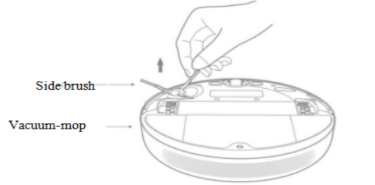
A: 1. Turn the machine over, pull out the side brush and clean it up as shown in the figure below.2. Install the back side brush.
16.Q:How to clean the side brush of Xiaomi Robot Vacuum-Mop 2C?
A: 1. Turn the machine over, pull out the side brush and clean it up as shown in the figure below.2. Install the back side brush.

Tip: It is recommended to clean up once a month and replace the side brush every 3-6 months to ensure the cleaning effect.
17.Q:Does Xiaomi Robot Vacuum-Mop 2C have a motor overload protection function?
A: All motors on the Xiaomi Robot Vacuum-Mop 2C have overload protection, including the vacuum fan, main brush motor, side brush motor, and main wheel motor. The protection will automatically start when foreign matter enters or is seriously blocked and overloaded.
18.Q:Can Xiaomi Robot Vacuum-Mop 2C operate in a low-light environment?
A: It can run. To ensure the best cleaning experience, please keep the ambient light as bright as possible.
19.Q:What could be the cause of the peculiar smell of Xiaomi Robot Vacuum-Mop 2C wipes and dust box?
A: Xiaomi Robot Vacuum-Mop 2C did not clean the rags in time after the mopping is completed. After a long period of time, it may produce peculiar smells. Please clean the rags in time after the mopping is completed.
Xiaomi Robot Vacuum-Mop 2C inhales liquid during cleaning. If the dust box is not cleaned in time, it may produce peculiar smell. Please clean the dust box in time after the work is completed.
20.Q:What is the height of obstacles that Xiaomi Robot Vacuum-Mop 2C can pass through? How about water suction?
A: Xiaomi Robot Vacuum-Mop 2C can pass 20mm high obstacles. After installing the water tank, the obstacle height will be slightly reduced. On a slippery ground, the obstacle height of the host will be reduced. It’s powerful suction is about 2,200 Pa.
Troubleshooting
1.Q:What should I do if Xiaomi Robot Vacuum-Mop 2C cannot connect to the Internet?
A: 1. Confirm whether the WiFi password entered during connection is correct. The WiFi user name cannot contain Chinese characters or special characters such as @¥% in the password setting. If so, please reset it to English or an account with numbers and letters format. And the password and try again;
2. Check whether the router's external network connection is normal. You can try to open the web page and browse through your mobile phone or a computer connected to 3. Confirm whether the distance between the router and the robot is too far (beyond 5 meters or there is a partition wall in between), you can try to move the machine within 1 to 2 meters from the router and try to reconnect;
4. Try to connect to the mobile phone WiFi hotspot;
5. Check whether the router is connected to more smart devices, causing the network to slow down or the router does not respond, you can try after restarting the router;
6. Currently, it does not support the company's EAP 802.1x authentication network, 5G signal network or public WiFi network that requires web page authentication, such as CMCC, ChinaUnicom, etc., you need to switch the network and try to connect;
7. After the network is turned off, if the device is not connected to the Internet for more than one hour, the WiFi module will turn off the network link function, and the WiFi indicator will flash, and the connection can be restored after restarting the device;
8. Check whether the mobile phone restricts the permission of the App, such as networking, positioning, etc., please allow the permission and try again;
9. The connection failure may also be related to the phone model. You can try to connect with other different models of phones.
2. Q: What should I do if the Xiaomi Robot Vacuum-Mop 2C does not rotate while brushing?
A: 1. Check whether there is any matter or hair jam in the position of the side sweeping brush;
- Please check whether the side brush planting hair is jammed by the gap of the battery box cover;
4. After restarting the robot to work for 30 minutes, check whether there is any recurrence.
5.Apply for after-sales testing whether the robot is malfunctioning
3.Q:What should I do if the Xiaomi Robot Vacuum-Mop 2C does not rotate?
A: 1. Check whether there is hair on the roller brush or at both ends of the brush, which is caused by the jamming of sundries;
2. It is recommended to clean regularly and restart inspection;
3. Apply for after-sales testing whether the robot is malfunctioning.
4.Q:What should I do if the Xiaomi Robot Vacuum-Mop 2C rolls abnormal noise?
A: 1. Check whether the parts at both ends of the roller brush are complete and whether there is any defect;
2. Check whether the roller brush cover is not fastened;
3. It may be caused by the rolling brush entangled with debris, try it after cleaning;
4. Apply for after-sales testing whether the robot is malfunctioning
5.Q:What should I do if the roller/universal wheel of Xiaomi Robot Vacuum-Mop 2C does not turn?
A: If the roller does not rotate or fly, it will cause the equipment to spin in place, and the universal wheel will cause abnormal operation of the equipment.
1. Check whether the roller/universal wheel is jammed by foreign matter, causing the side wheel to not rotate normally, if there is foreign matter(
Paper, sundries, etc.) jam into the side wheel, it is recommended that the user check and clean and try to restart;2. Restart the machine after moving the position;
3. Apply for after-sales testing whether the robot is malfunctioning.
6.Q:What should I do if Xiaomi Robot Vacuum-Mop 2C cannot be charged?
A: 1. Check whether the adapter is plugged in, whether it is in good contact with the back of the recharger, and whether the socket has electricity;
2. Check whether the metal shrapnel at the bottom of the charging base and the shrapnel at the bottom of the robot are dirty, causing poor contact with the recharge;
3. Confirm whether the machine is manually placed in the refill seat and it is not aligned;
4. Check whether the height of the charging base shrapnel and the charging contact point of the robot are the same;
5. It may be that the charging stand is located in a remote location and insufficient space causes the automatic recharging to fail;
6. Apply for after-sales testing whether the robot is malfunctioning
7.Q:What should I do if the Xiaomi Robot Vacuum-Mop 2C anti-collision buffer shell fails to rebound?
A: 1. Check if there is any matter stuck;
2. Try to slap manually to check whether it can rebound;
3. It is recommended to clean up objects regularly;
4. Apply for after-sales testing whether the robot is malfunctioning.
8.Q:What should I do if the Xiaomi Robot Vacuum-Mop 2C cannot be started?
A: 1. Check whether the power of the machine is sufficient.
2. Press the start or recharge button on the machine and observe whether the machine has voice prompts and actions.
3. After the machine is connected to the Internet, perform a global cleaning to observe whether the machine can work normally.
4. After the above investigation, the machine still fails to work normally, and after-sales inspection is required for machine failure.
9.Q:What should I do if Xiaomi Robot Vacuum-Mop 2C can't vacuum/small suction power?
A: 1. Try to restart the device;
2. Check whether Hypa is blocked by rubbish or the dust box is full so that it cannot continue to inhale dust;
3. Check whether the robot has sufficient power, and try after charging;
4. After-sales check whether the robot is malfunctioning.
10.Q:What should I do if the map of Xiaomi Robot Vacuum-Mop 2C App is abnormal and skewed?
A: 1. When the equipment frequently encounters obstacles, it will affect the drawing, try to sort out the obstacles;
2. The device is under the bed and sofa, and is blocked by the bed sheet and sofa cover, which will cause the sensor to be blocked and cause the map to be deformed;
3. Moving the position of the machine during the operation of the equipment will cause the positioning of the equipment to be misaligned and cause the map to be deformed;
4. Check whether the network is normal;
5. Put the equipment in the middle position (not in the channel), or use the virtual wall to distinguish the cleaning environment.
11.Q:What should I do if Xiaomi Robot Vacuum-Mop 2C cannot be recharged/recharged slowly?
A: 1. Check whether the device starts from the charging stand when performing cleaning tasks. If it does not start from the charging stand, there is a probability that it will not recharge;
2. Check whether the power supply of the charging base is normal and whether the indicator light of the charging base is on;
3. Check whether the charging stand is placed against the wall, whether there is an open area above 2 meters in front, and an area of 0.5 meters on the left and right;
4. Check whether the charging stand sticker is placed on a flat ground;
5. Check whether it is jammed by foreign objects. For example, if the roller is caught by foreign objects (towels, paper, sundries, etc.), the owner may cause the equipment to be transported.
Poor travel, spinning around, the device alarms and does not work or is trapped, try again after cleaning up;
6. Check the trapped area of the equipment, you can try to separate it with a virtual wall, or it is recommended to try again after manual cleaning;
7. After the equipment is cleaned, there will be a recharging process when returning to the starting area of the equipment, which is normal operation;
8. Apply for after-sales testing whether the robot is malfunctioning
12.Q:What should I do if there is abnormal noise during Xiaomi Robot Vacuum-Mop 2C operation?
A: When working on smooth tiled floors and wooden floors, a slight sound may be produced when the bottom scraper rubs against the ground.
When the host passes through the joint between the tile and the floor, it will touch and clean the seam, and may produce a slight "click" sound.
The above sound does not affect the normal use of the machine. Please check the following for other abnormal noises:
1. Check whether the main machine roller, universal wheel, and roller brush rotate normally, and whether there are abnormal noises during the rotation, if any, check whether there are foreign objects stuck to the corresponding movable mechanism, and try again after removing the foreign objects;
2. Check whether the mop bracket is installed in place, and whether the buckles on the left and right sides are correctly positioned in the slot;
3. If the abnormal sound is irregular, it happens occasionally during the cleaning of the equipment (such as through the cracks in the tiles, the cracks in the wooden floor, etc.), at this time it is
The buffering sound when the equipment passes through uneven ground is normal;
4. After-sales check whether the robot is malfunctioning.
13.Q:What should I do if the firmware update of Xiaomi Robot Vacuum-Mop 2C fails?
A: 1. Check whether the device is normally connected to the Internet, and check whether the network is smooth;
2. Turn off the device and then restart it. Wait for a few minutes. The download of the new software package will take a few minutes, which is a normal phenomenon;
3. Please do not shut down the device and ensure the power of the device during the update process. The software update will have an update process, which is a normal phenomenon.
4. Try to change the time period.
14.Q:What should I do if there is no memory map after Xiaomi Robot Vacuum-Mop 2C has been cleaned?
A: 1. After the equipment is cleaned, the current cleaning map will be remembered only when the equipment is automatically returned to the rechargeable dock. Please do not manually move the equipment or move the equipment during the equipment cleaning;
2. Check the area where the charging stand of the device is placed to ensure that the device can be recharged normally.
15.Q:What should I do if the battery of Xiaomi Robot Vacuum-Mop 2C is insufficient for recharging, and the interrupted scan is not executed after charging?
A: 1. Check whether the equipment cleaning task is completed, connect to the APP to check whether the cleaning area is completed;
2. Check whether the equipment is trapped or there are steps in some areas, causing some areas not to be cleaned, try to separate them with a virtual wall;
3. Check whether the do not disturb mode is turned on in the APP;
4. Manually put the Xiaomi Robot Vacuum-Mop 2C back into the charging cradle to charge and it will not continue to scan.
5. Try to turn off the Do Not Disturb mode of the device and clean again.
16.Q:What should I do if Xiaomi Robot Vacuum-Mop 2C is noisy?
A: There is a silicone scraper at the bottom of the Xiaomi Robot Vacuum-Mop 2C, which can scrape stubborn dust. When the scraper encounters unevenness or tile gaps, it is normal for a slight abnormal noise to appear. In order to ensure the cleaning coverage, the host will clean all corners. In a complex environment, turning and edge movements will be increased, and the cleaning efficiency may be reduced. You can try to change the mode in the App, and you can choose the "quiet" and "standard" suction levels. When the device selects "Quiet" and "Standard" modes for cleaning, the device's quiet mode is about 68 decibels.
17.Q:What should I do if the charging stand is powered off and the Xiaomi Robot Vacuum-Mop 2C runs randomly?
A: 1. It is normal that the device will automatically find the rechargeable cradle when the device is charging. It is normal that the device will automatically find the rechargeable cradle; 2. You can turn on the device's do not disturb mode through the APP, and turn off the device to automatically search for the charging cradle when the device is powered off.
18.Q:What should I do if Xiaomi Robot Vacuum-Mop 2C is trapped by obstacles?
A: 1. Check whether there is any debris around the bottom of the sofa and other obstacles blocking the normal cleaning of the equipment, try after cleaning;
2. Check whether there is any collapse or movable obstacle in the middle of the sofa. The device can enter normally but cannot exit. It is recommended to use a virtual wall;
3. Check if there is any disorder in the cleaning and construction of the equipment, and try cleaning again.
Note: The cleaning efficiency will be reduced in a complex environment. The minimum distance for the host to pass is 38cm, and areas less than this distance may not pass.
19.Q:What should I do if the cleaning path of Xiaomi Robot Vacuum-Mop 2C is chaotic and some areas are repeatedly cleaned?
A: 1. Check whether the real-time cleaning path is chaotic in the APP;
2. Check whether the device scanning and mapping on the APP is skewed, you can try to clean it again;
3. Check whether the equipment is trapped when it runs to the carpet on the steps and the carpet, you can add a virtual wall to try to separate it;
4. Check whether there are curtains or other objects blocking the top sensor, and try to clean again;
5. Check whether the top sensor is directly affected by sunlight or other lights during the cleaning of the equipment. It is recommended to temporarily turn off the direct light and try again, or pull down the window curtains and try to clean again.
20.Q:After using the Xiaomi Robot Vacuum-Mop 2C for a period of time, what should I do if I find that the cleaning ability is reduced or dust is falling?
A: 1. Check the dust box. If the dust box is full, please clean it in time.
2. Check whether the filter screen or clean the filter screen needs to be cleaned, and whether the main brush is entangled by foreign matter.
3. After-sales check whether the robot is malfunctioning.
21.Q:Why can’t the Xiaomi Robot Vacuum-Mop 2C return to the charging dock after cleaning or moving the location?
A: The robot will regenerate the map after partial cleaning or long-distance movement. If the charging base is far away, it may not be able to automatically recharge. Please manually put the sweeper back to the charging base to charge.
22.Q:What should I do if the water tank of Xiaomi Robot Vacuum-Mop 2C leaks?A: There are vent holes on the top cover of the water tank to balance the air pressure inside and outside the water tank. After adding water to the water tank, please take it horizontally. When it is tilted, there will be slight water leakage, which is normal. For other situations, please check as follows:
1. Check the appearance of the water tank for damage such as bumps, cracks, etc.
2. If there is residual water on the floor during mopping, please check as follows:
Check whether the mop has too much water;
Check whether the mop has not been disassembled after the last mopping, and the mop has more residual moisture;
Try to replace with a new mop;
Confirm whether the humidity in the environment is too high;
After-sales check whether the robot is malfunctioning.
23.Q:What should I do if the Xiaomi Robot Vacuum-Mop 2C does not take effect on a regular basis?
A: It may be that the battery is insufficient, and the remaining battery is greater than 15% to start the regular cleaning.
24.Q:What should I do if Xiaomi Robot Vacuum-Mop 2C consumes fast power?
A: 1. Check whether the battery is fully charged when the machine starts to work (connect to the APP to check the battery, if it is not fully charged, the cleaning time will be shortened, please charge it first).
2. Check whether the machine has been "trapped" and "out of trap" during the working process
---a. Trapped: such as being entangled by wires, entering the bottom of the bed and being unable to get out, adding a virtual wall causes the machine to be trapped in the corner, causing the battery to run out
---b. Escape: If the machine enters a multi-stool-leg environment, crosses obstacles (across stool legs, slippers and other sundries), it takes a long time to escape, resulting in fast power consumption.
3. Check whether the power mode is used.
4. After-sales check whether the robot is malfunctioning.
25.Q:What should I do if Xiaomi Robot Vacuum-Mop 2C misses or repeats cleaning?
A: Check whether the film on the host camera is torn off and whether it has accumulated dust. If there is any dust, please clean it up. Please try to keep the indoor environment light as bright as possible during the cleaning process.
26.Q:Is it normal for Xiaomi Robot Vacuum-Mop 2C to go to another room before cleaning the current room?
A: Xiaomi Robot Vacuum-Mop 2C has a specific cleaning path plan. It is normal for one room to go to another room to clean before the cleaning is completed. The previously uncleaned area will be cleaned behind.
27.Q:Is it normal for the Xiaomi Robot Vacuum-Mop 2C cleaning path to go back and forth repeatedly?
A: Xiaomi Robot Vacuum-Mop 2C will clean according to the planned path. When cleaning, it will navigate to the uncleaned area. There will be some repeated back and forth visually. Actually, it is not repeated cleaning but "complementary cleaning".
28.What should I do if the water tank does not come out or the water volume is low when the Xiaomi Robot Vacuum-Mop 2C is mopping the floor?
A: When using a dry mop, the water in the water tank will be absorbed by the mop first. It is recommended to wet the mop before mopping the floor.
1. Please check if there is water in the water tank;
2. Please install the mop correctly according to the instructions;
3. Please clean the mop in time.
4. After-sales check whether the water tank is faulty.
29.Q:Why does Xiaomi Robot Vacuum-Mop 2C repeatedly dock the charging stand when recharging?
A: Please check whether the charging cradle and the charging piece of the main unit are stained with dust. When dust is stained, there will be repeated docking. Please wipe it before use.
30.Q:What should I do if Xiaomi Robot Vacuum-Mop 2C cannot be turned on?
A: The battery is low, please charge it by the charging stand before using it. The ambient temperature is too low (below 0°. or too high (above 50°), please use it in a 0-40° environment.
31.Q:What is the reason why Xiaomi Robot Vacuum-Mop 2C encounters obstacles and does not decelerate and collide when cleaning?
A: Xiaomi Robot Vacuum-Mop 2C has an infrared sensor on the front impact plate, which can detect obstacles and decelerate in advance. However, for some tables and chairs legs with darker colors or smaller volumes, collisions may not be detected, which is normal.
32.Q:What is the reason for the failure of Xiaomi Robot Vacuum-Mop 2C's relocation?
A: Moving the Xiaomi Robot Vacuum-Mop 2C to an area that has not been cleaned before will cause the relocation to fail. Please try to move it to the area that has been cleaned before.
When the host was relocated, someone was standing next to the host. Please try to ensure that you do not stand next to the host and that the camera can fully capture the feature points at the top of the room.
When the host is relocating, the light is dark, please ensure that the relocation is performed under sufficient light.
Note: The host will perform repositioning after being moved. If the repositioning is successful, the cleaning will continue, and if the repositioning fails, the cleaning will restart.
33.Q:What should I do if Xiaomi Robot Vacuum-Mop 2C produces a lot of water when mopping the floor?
A: 1. Check if the mop is not wrung out, try to replace the mop;
2. Check that the water tank cover is fastened enough;
3. Check whether the appearance of the water tank is damaged, and try to replace the water tank;
4. After-sales check whether the machine is malfunctioning.
34.Q:What should I do if the sound is loud when Xiaomi Robot Vacuum-Mop 2C is cleaning?
A: In order to ensure the cleaning effect, the host adopts a fan with a larger suction power, which has a stronger suction effect and a relatively louder sound. When cleaning, you can use a quiet gear with a quieter sound to work.
35.Q:What should I do if the water tank falls off when Xiaomi Robot Vacuum-Mop 2C is mopping the floor?
A: The water tank will fall off if the water tank is not installed and started to work. Please pay attention to the correct way of installing the water tank. You need to hear a "click" sound when installing the buckles on both sides of the water tank.
Does it help?
Yes
No