

Redmi Buds 3 Lite FAQ
Overview
1. Q: What are the features of the Redmi Buds 3 Lite?
A:
1. Brand-new Bluetooth core specification version 5.2 brings significantly improved anti-interference capabilities and more stable connections for seamless in-call audio.
2. Automatic device recognition and simple wireless connections. Take your earbuds out of the charging case and insert into your ears. You'll hear the connection sound, signifying that your device is now connected to your earbuds.
3. The 6mm dynamic driver has been expertly tuned by Xiaomi Sound Lab, ensuring consistent audio quality and bringing every note to life.
4. Type-C charging port — a single charge is enough for up to 5 hours of use*. Outstanding performance with no worries — exercise, listen to music, watch films and enjoy long phone calls.ls.
5. Activate the low latency mode for an immersive gaming experience. Effortless gameplay with accurate production of even the faintest of audio, so you can differentiate between gunshots and footsteps.
6. Double tap, hold, or make use of one of the other touch operations to switch between modes — simple, convenient and efficient.
7. Expertly designed with IP54* dust and water-resistance. Enjoy extraodinary performance in a range of settings, from your daily commute to your time in the gym.
2. Q: What is the name of the headset displayed in the Bluetooth list of the mobile phone?
A: The Bluetooth name is the same as the product name"Redmi Buds 3 Lite".
3. Q: Is Redmi Buds 3 Lite compatible with other Bluetooth headset charging boxes?
A: No.
4. Q: What is the Bluetooth version of Redmi Buds 3 Lite?
A: Redmi Buds 3 Lite adopts Bluetooth 5.2 technology. With the commercialization of the latest technical standards, more and more smart phones begin to adopt the Bluetooth 5.2 standard. When the Bluetooth headset is also Bluetooth 5.2, it will maximize the technical advantages of 5.2 and bring you a better experience. Bluetooth 5.2 technology has a faster transmission rate, more power saving and more stable.
5. Q: How long is the Redmi Buds 3 Lite battery life?
A: The headset can last up to 5 hours with a full charge, and up to 18 hours with the charging box.
Test conditions for listening to songs: earphone power is 100%, the volume is adjusted to 50%, and the Bluetooth encoding method is SBC. Test content: Fully discharge the headset battery during audio playback until one of the headsets stops playing.
Notes: The above is laboratory test data. The actual battery life may vary on factors such as volume, sound source, environmental interference, product functions, and usage habits.
6. Q: Does the Redmi Buds 3 Lite battery support replacement?
A: The battery cannot be removed and does not support replacement.
7. Q: Is Redmi Buds 3 Lite dust and water resistant?
A:
The earphone can reach IP54 dustproof and waterproof, which is not supported by the charging box.
Redmi Buds 3 Lite adopts an IP54 dust-proof and waterproof design, which can effectively prevent dust, foreign objects, and waterproof and moisture-proof characteristics. Liquid splashed from any direction to the shell will not enter the internal components of the headset, preventing harmful dust from accumulating and entering the shell In the internal cavity.
Remark 1: Splash-proof, water-proof and dust-proof functions are not permanently effective, and the protective performance may be reduced due to daily wear and tear. Do not charge the headset in a wet state, do not wear the headset to swim; damage caused by immersion in liquid is not covered by the warranty.
Remark 2: It is not hot water-proof and can not be worn in the bath. It is recommended to avoid strenuous exercise to prevent damage caused by perspiration. The earphones cannot be immersed in water, and the charging case is not waterproof to vapors.
8. Q: How about the noise reduction effect of Redmi Buds 3 Lite?
A: The earphone adopts an in-ear design, does not support active noise reduction, and supports single mic call noise reduction.
FAQ
1. Q: How to wear Redmi Buds 3 Lite?
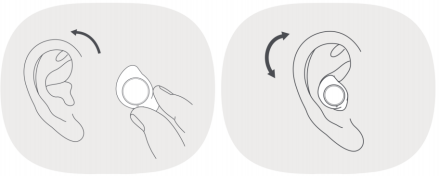
A: Gently insert the earphone into the ear and adjust it to the best wearing condition. When talking, turn the main microphone of the headset towards your mouth to make the conversation clearer.
Tips: The earphones are pre-installed with medium (M) ear caps and large (L) ear caps. If you feel uncomfortable, you can change to a suitable size.
Remarks: After use, put the earphones back into the charging box in time to extend the service life and prevent loss.
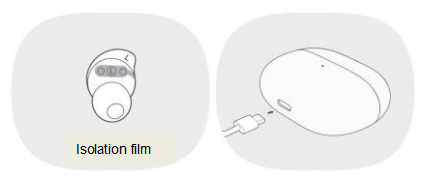
Note: When using the earphones for the first time, please remove the isolation film on the left and right earphones, put the left and right earphones back into the charging box to charge it (trigger the power on), and then take out the earphones for pairing.
2. Q: Does Redmi Buds 3 Lite support dynamic noise reduction?
A: No, it does’t support.
3. Q: How to charge? Does it support wireless charging?
A: This product can only be charged with a Type-C cable and does not support wireless charging.
① Please remove the isolation film at the charging contacts of the left and right earphones before turning it on, and fully charge the charging box and earphones.
② Plug in the charging cable to charge the headset and the charging box at the same time.
③ When the charging box is not fully charged, the white charging indicator light will be on normally; when fully charged, the charging indicator light will go out.
4. Q: Can all Type-C charging cables charge the charging box?
A: All Type-C charging cable can be charged, but please use a regular brand 5V charger for the power adapter.
5. Q: Is the charging box of the headset charged on the computer USB port?
A: Redmi Buds 3 Lite can be charged through the USB port of the computer, and the charging box can be charged by plugging it into the computer with a Type-C charging cable.
6. Q: What should I pay attention to when charging the headset?
A: For Redmi Buds 3 Lite, please refer to the following precautions.
① It is recommended to use a 5V regular brand charger; (the input parameter of the charging box is 5V)
② Do not charge in an environment with high temperature, high heat, high humidity or low temperature;
③ If the earphone battery box is fully charged and not used, the battery will be exhausted and shut down if it is left for a long time. In order to better protect the battery life, it is recommended to charge it once every 1 month (the earphone battery box is fully charged) to avoid battery damage.
7. Q: What do the indicators on the headset and charging box mean?
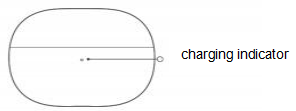
A: For Redmi Buds 3 Lite, the position shown in the figure below is the position of the charging box indicator.
1. Charging box: During charging, the white light of the charging box is always on; when the battery is fully charged, the white light of the indicator light is off.
2. Earphones: When charging in the box, the white light on the top of the earphone is always on; when the battery is fully charged, the white light on the earphone indicator goes out.
3. Bluetooth connection mode: the earphone is in the charging compartment, remove both ears from the box, both ears will flash white slowly (on for 500ms, off for 500ms), the indicator light of the connected device is off; after the earphone is disconnected, it enters the pairing mode : The white light flashes slowly in both ears (on for 500ms, off for 500ms), and the indicator light goes out when the headset is connected to the device again.
4. The first TWS connection of the left and right ears: the headset is turned on and enters the connection state, and the white light of both ears flashes quickly (200ms on, 200ms off); the pairing state with the mobile phone-the white light of both ears flashes slowly (on 500ms, off in 500ms).
8. Q: How do I check the battery level on Redmi Buds 3 Lite?
A: There are 2 ways to do this.
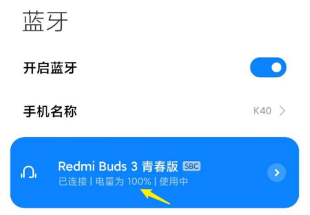
Way 1: You can check the battery level of the headset in the status bar of Apple and Android phones, but only the lowest battery level of the headset will be displayed.
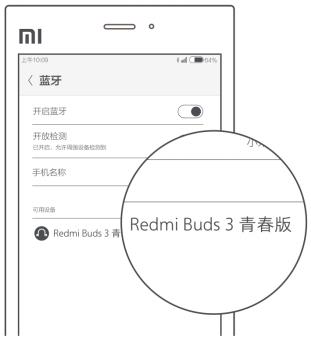
Way 2: Take the headset out of the charging case, connect it to your phone and open the phone's settings screen - Bluetooth screen to check the headset's battery level, as shown in the picture.
9. Q: How do I connect my mobile phone and other devices?
A: The connection steps are as follows,
1. First time connection (be sure to remove the headset from the box)
Note: To use the earphones for the first time, please remove the separation film from the left and right earphones and put the left and right earphones back into the charging case to charge them (trigger the power on), then remove the earphones for pairing.
Connecting steps: Remove the barrier film and put it back into the charging case, then remove the headset from the case and wait for the white light to flash slowly to connect the headset, turn on the Bluetooth search and click on "Redmi Buds 3 Lite" to connect the headset, as shown below.
Tip: If the connection fails, put the headset back into the charging case and repeat the above procedure. Be sure to remove the headset before it enters pairing.
2. Connecting other devices
Disconnect or reset the headset on the connected phone to connect to a new device.
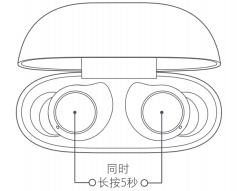
Steps to reset and reconnect: Place the headset in the charging case, with the case open, press and hold the touch area of the left and right headset for 5 seconds, release the touch area, the white light flashes 3 times, the reset is successful (clear the connection between the left and right headset and the headset and the phone), then turn on the Bluetooth of the new device, search and click on "Redmi Buds 3 Lite" to connect the headset.
10. Q: How do I clear the pairing history of the headset with my device and reset the headset?
A: There are 2 ways to do this, organized as follows.
1. Phone delete.
Phone -> Settings -> Bluetooth -> Redmi Buds 3 Lite -> Click -> Unpair (for Xiaomi phones).
2. Reset method.
If the headset cannot be connected normally, please refer to the following way to reset the headset: Make sure the charging case is charged, open the cover, put the left and right headset into the charging case, press and hold the multi-functional touch area of the left and right headset for 5 seconds or more, release, the white light of the left and right headset flashes 3 times at the same time to reset successfully (clear the connection record between the left and right headset and the headset and the phone).
11. Q: Does Redmi Buds 3 Lite support volume adjustment?
A: The volume of the headset is synchronised with the handset, it is not possible to adjust the volume of the headset itself separately, please adjust the volume of the handset.
12. Q:How does Redmi Buds 3 Lite operate?
A: It use sensitive touch operations. The control areas and functions are described in the diagram below.
Tip: The headset may not work when touched after your hands become dry in cold outdoor weather.
For information on how to use the main functions of this headset, please refer to the following video link:
https://s.mi.cn/dAgfph03F9
● Answer/hang up a call
Double tap left/right earbud for Answer incoming call/Next song;Triple tap left/right earbud for Reject/end call
● Play/Pause
Long press the left/right earphone multi-function touch area to pause the audio, and then long press the left/right earphone multi-function touch area to play the audio.
● Switch to the next song
In the audio playback state, double-click the multi-function touch area of the headset to play the next song.
● Answer the second call
When there is a new incoming call during a mobile phone call, double-click the left/right headset multi-function touch area to keep the previous call and answer the second call. After answering the second call, double-click the left/right headset multi-function touch area to switch between the two Call; Double-click the left/right headset multi-function touch area to hang up the current call and answer the held call.
● Wake up the phone voice assistant
In the wearing state (not in a call), triple-click the multi-function touch area of the headset to wake up the voice assistant. (The device needs to support the voice assistant function.)
● Free switching between single ear and both ears
After the left and right earphones are successfully connected, it is in binaural mode; put either earphone back to the lid of the charging box, the other earphone enters the single ear mode, and then take it out again to automatically restore the binaural mode.
● Automatically connect back
If the earphone is in the charging box, open the charging box and take out the earphone. The earphone will automatically connect to the recently connected Bluetooth device; if it is not connected to any device, the earphone will automatically enter the waiting state for connection.
● Connection interrupted
When the device turns off Bluetooth or exceeds the headset connection range, the headset automatically enters the waiting state; if it is not connected to any device within 10 minutes, the headset automatically turns off.
● Low latency mode
The headset is connected to the mobile phone (not in a call state), and at the same time long press the left and right headset multi-function touch area to turn on the low-latency mode; the low-latency mode is turned on, at the same time long press the left and right headset multi-function touch area or put the left and right headset into the box to charge. Turn off low latency mode.
13. Q: Does the headset support bind to Xiaoai App? What functions can be achieved?
A: Does not support bind to the Xiaoai App.
14. Q: Does Redmi Buds 3 Lite support wearing detection?
A: It doesn’t support.
15. Q: Does Redmi Buds 3 Lite support automatic answering calls?
A: It doesn’t support.
16. Q: Does Redmi Buds 3 Lite support display in the notification bar?
A: It doesn’t support.
17. Q: Is it possible to connect two mobile phones at the same time?
A: It doesn’t support.
18. Q: Does Redmi Buds 3 Lite support smart scenes?
A: It doesn’t support.
19. Q: Does Redmi Buds 3 Lite support anti-lost reminders?
A: It doesn’t support.
20. Q: Does it support connection with Mi Band or other Bluetooth bands?
A: It doesn’t support. Because the headset and the Bluetooth band belong to the receiving terminal device, they cannot be connected.
21. Q: Two earphones, the left ear and the right ear are lost/damaged respectively. Can the remaining right ear and left ear be recombined for use?
A: It doesn’t support.
22. Q: Is it supported to connect the left and right earphones to a mobile phone and other devices and use them as two single ear earphones?
A: It doesn’t support.
23. Q: Does Redmi Buds 3 Lite support single ear mode?
A: Support single ear mode: In any scene, the left and right earphones are connected to the device, and any earphone is put into the charging box, it is the single ear mode. In monaural mode, the audio, video, and call functions will not be affected.
24. Q: Can the Redmi Buds 3 Lite be used during charging?
A: The different scenarios are introduced as follows.
① The charging box is charged separately: the earphones can be used.
② When the charging box and the earphone are charged at the same time: No, the earphone needs to be put in the charging box during the charging process, so it cannot be taken out and use.
③ When charging the headset with the charging box: No, the headset needs to be placed in the charging box during the charging process, so it cannot be taken out and worn.
Note: If the charging box only charges one earphone, the other earphone can be used alone.
25. Q: How to turn on or turn off Redmi Buds 3 Lite?
A: The settings are as follows.
1. Power on: Make sure that the charging box is charged and the earphones are in the charging box, open the charging box cover, take out the earphones, and the earphones will automatically power on.
2. Sleep (shutdown): ① Make sure the charging box is charged, put the earphones in the charging box, the white light will be on, the earphones will automatically disconnect and start charging, and the earphones will automatically shut down after being fully charged. ②The headset enters the pairing state and is not in the charging box. If the headset is not connected to the device within 10 minutes, the headset will automatically shut down.
26. Q: Can I use a power bank to charge Redmi Buds 3 Lite?
A: It is not recommended to use a mobile power bank to charge the headset. Some power banks can charge the charging box, but a Type-C charging cable is required.
Note: Some power banks do not support low current output, the current is much lower than the minimum load current of the mobile power after the charging box is fully charged, the mobile power will be automatically disconnected, so it will be undercharged or not charged.
27. Q: Will Redmi Buds 3 Lite fall off easily when worn?
A: The earphone is a bean-shaped in-ear earphone, which is ergonomically designed and fully meets the requirements for wearing. However, individual users have different auricles, and the wearing stability will be affected. It can be adapted according to different ear caps and ear tops.
28. Q: Is the connection of the headset stable during calls, songs or games?
A:The headset uses Bluetooth 5.2 technology, which makes the connection more stable.
1. Due to the connection characteristics of the Bluetooth signal, the earphone signal will be affected in a strong interference environment, causing the earphone to freeze when listening to music. Bluetooth products all have this problem. For example, in subways/trains/airports, there will be varying degrees of interference, and there may be stuttering/intermittent situations.
2. At present, the product is used in offices, coffee shops, homes and other environments where interference is not strong, and there will be no lag problems.
29. Q: Why is there a delay in the headset during voice, video, and gaming?
A: A: This headset uses true wireless Bluetooth technology. The audio is first transmitted from the mobile phone to the master headset, and the master headset transmits the audio to the slave headset. There will be a certain delay in the audio transmission process from the master headset to the slave headset, but it will not affect music and calls. If there is a serious picture delay problem, it is recommended that you restart the phone and reopen the audio software to try whether the delay will be reduced.
Note 1: Compared with traditional “wireless earphones”, the connection of true wireless earphones is not only the signal transmission between the earphone and the signal transmitting device, but also the wireless connection between the main and auxiliary earphones.
Note 2: Affected by the use environment, network, and mobile phone codec speed, it may cause varying degrees of delay when the mobile phone audio data is transmitted to the headset. If multiple routers or Bluetooth devices are used at the same time around the Bluetooth headset, there will be varying degrees of interference, and there may be stuck, intermittent, and disconnected situations.
Remark 3: The unobstructed effective connection distance between the headset and the mobile phone is 10 meters, and disconnection may occur after exceeding it. (The specific distance is affected by environmental interference)
30. Q: Does the headset support voice calls and input using third-party software?
A: Depending on the system, the usage will vary.
1. Both iOS and Android systems support voice calls and voice input.
2. Windows system devices that support Bluetooth can realize voice calls after being connected and correctly set up; as for voice input, third-party software support is required.
Remarks: Some computer applications are not compatible with the headset function and are only suitable for audio and video playback, which is a normal phenomenon.
31. Q: Is Redmi Buds 3 Lite a dual-channel headset?
A: Yes
32. Q: During music playback, if you take off any earphones and put them on again, will the music be played automatically?
A: The Redmi Buds 3 Lite does not support in-ear detection, and the playback will not be paused when the headset is taken off (it will not automatically play when it is worn again).
33. Q: Will there be adverse reactions when wearing Redmi Buds 3 Lite?
A: The power of the earphone is very small, and there is no heat generation. Please rest assured to use it.
1. The headphones are in-ear design, long time wearing will be fatigue, there may be a little pain. In high-temperature environments there may be wet It is recommended to take off the headset after 1 hour of continuous use for a short rest.
2. It is recommended that you choose suitable earmuffs, which can increase ear comfort and reduce pain.
3. The earphone volume should not be too loud. Using too loud for a long time will fatigue your hearing and ear canal nerves, and will easily make your ears feel pain and soreness. It is recommended that you lower the volume and take off the earphones to give your ears a relaxing or kneading massage every 2 hours.
34. Q: Why are there differences in volume when headphones are connected to different devices?
A:The following situations are possible automatic volume adjustment phenomena, which are normal phenomena, please rest assured to use.
① When connected to a MIUI device, the MIUI volume protection mechanism will automatically adjust the volume to a medium volume;
② When connecting to an iOS device, the headset will automatically synchronize with the volume set by the original user of the iOS device.
Remark 1: Some mobile phones or other terminal devices have lower Bluetooth module versions, and the headset volume is not synchronized; then you can turn on the mobile phone-developer options-check whether there is "absolute volume/Bluetooth headset volume synchronization" switch, after turning it on, you can Synchronize the volume with the headset.
Note 2: The volume design of some old mobile phones is different, which may also cause the sound to be too low, which is not a problem with the earphone.
35. Q: Does Redmi Buds 3 Lite support MIUI pop-up windows?
A: It doesn’t support.
36. Q: How many microphones does edmi Buds 3 Lite have?
A: The Redmi Buds 3 Lite has only 1 microphone (single side), and there is no distinction between main microphone and auxiliary microphone.
37. Q: Under what circumstances will there be a delay in Redmi Buds 3 Lite?
A: If multiple routers or Bluetooth devices are used at the same time around the Bluetooth headset, there will be different degrees of interference, and there may be jams and interruptions.
The situation of continuous and disconnected connections.
Affected by the use environment, network, and mobile phone codec speed, it may cause varying degrees of delay when the mobile phone audio data is transmitted to the headset; the headset uses true wireless Bluetooth technology, there will be a certain delay in the audio transmission from the mobile phone to the main/sub headset , But will not affect the quality of music and calls, whether it is the sound details during a call or the rich frequency bands in the music, it can be truly presented.
38. Q: How far is the effective use distance of Redmi Buds 3 Lite?
A: In an unobstructed environment, the effective connection distance between the headset and the mobile phone is about 10 meters. If in the office or at home, the effective use distance will be reduced due to the obstruction of walls or other obstacles. Therefore, there will be cases where the mobile phone is stuck in the living room with earphones to the bedroom or the Bluetooth disconnection.
39. Q: Does Redmi Buds 3 Lite have an anti-wind noise mode?
A: No.
40. Q: Does Redmi Buds 3 Lite support active noise reduction technology?
A: It doesn’t support.
41. Q: Does Redmi Buds 3 Lite support the broadcast of contact names?
A:It doesn’t support.
42. Q: How to answer/hang up a call with a headset?
A: ① Connect a call: When a call comes in, double-click the touch area of the left or right earphone or press the answer key on the mobile phone to answer the call; when you go out, wear the earphone and dial directly on the mobile phone to make a call.
② Hang up the call: During a call, three-click the touch area of the left earphone or right earphone to hang up the call, or press the hangup button on the mobile phone to hang up the call; you can answer the call during music or video. After the call is hung up, it will automatically Enter the music or video state.
43. Q: Does the headset support low latency mode? How to turn on low latency?
A: Redmi Buds 3 Lite supports low latency mode,
①How to turn on: the headset has been connected to the mobile phone (not in a call state), and at the same time long press the left and right headset multi-function touch area to turn it on;
②Close method: Low-latency mode is turned on, and at the same time, long press the left and right earphones multi-functional touch area or put the left and right earphones into the box to charge, then the low-latency mode can be closed.
44. Q: If the distance between the headset and the mobile phone is too far and the connection is disconnected, can it automatically connect after returning to the vicinity?
A:Under the condition of no obstruction or interference, the effective transmission distance of Bluetooth is more than 10 meters.
When the effective transmission distance is exceeded, the connection between the headset and the mobile phone will be automatically disconnected, and automatically enter the waiting state; if it is not connected to any device within 10 minutes, the headset will automatically shut down.
45. Q: Will the headset be automatically disconnected after being placed in the charging case?
A: Yes. Put the earphones in the box, the earphones will automatically disconnect from the mobile phone, and will automatically connect back to the mobile phone after taking them out (but it will not automatically play music because the earphones do not have a wearing detection function). If it is not disconnected, please confirm whether the charging box has power.
46. Q: Will there be crosstalk in the earphones?
A: Redmi Buds 3 Lite will not crosstalk. By default, the headset can only connect to one device at a time, and it will not crosstalk with other devices. Please rest assured that other people will not hear your conversation when making a call.
47. Q: Do you use headphones or the microphone of your mobile phone when recording videos and recordings?
A:When recording video or recording, different mobile phones and software have different settings, depending on the specific scene you use.
1. The headset microphone is used when calling, listening to music, WeChat voice and video, and may use the phone microphone when recording video and recording. 2. You can test by the following methods:
After the headset is connected to the mobile phone, open the recording software, wear the headset and leave the mobile phone for a certain distance (about 3~5 meters) and start recording. After stopping the recording, check whether there is sound in the recorded video or audio. If there is no sound or the sound is low, it means that the recording is using a mobile phone microphone. If the sound is clear, it means that the recording is using a headset microphone.
48. Q: Can I go out without the charging box and only the earphones?
A: If your mobile phone and headphones have been connected, and the power of the headphones can meet your needs when going out, you don't need to bring a charging box. However, in order to prevent the use of the battery from being out of power, nowhere to store or lose it, it is recommended that you carry the charging case as much as possible when you go out.
49. Q: Does the lack of power in the charging box affect the use of the headset?
A: When the headset is fully charged, the charging box will not affect the use of the headset; over-discharging may cause the performance of the battery to decline, it is recommended that you use it with the charge.
50. Q: How to care for the headset?
A:It is recommended to refer to the following information for maintenance.
1. Do not expose the headset to liquid or damp places;
2. Do not use abrasive solvents to clean the earphones;
3. Please try to avoid placing the earphones in low temperature (below 0°C), high temperature (above 45°C), or an environment with a large temperature difference for a long time. In these environments for a long time, the activity of the battery is easily damaged, causing the battery damage;
4. Do not expose the headset to open flames to avoid the danger of explosion;
5. Do not touch the earphones with sharp objects, which may cause scratches or damage;
6. Do not insert any objects into the headset, it will damage the internal components;
7. Do not try to disassemble the headset;
8. If you do not use the headset for a long time, please make sure to keep it in a dry place. If it is left for more than a month, charge it on time to ensure the working performance of the battery and headset.
51. Q: Why does the sound of the earphone become smaller after using the earphone for a period of time?
A: It is recommended to check whether the speaker hole is dirty or blocked. You can use a brush to brush down the speaker hole. At this time, whether the volume of the earphone returns to normal.
52. Q: Why is the song not paused when I put another earphone into the charging box when I play music on one ear for a period of time?
A: Wear only one earphone and put the other ear in the box. The music on the phone will not pause. The current design logic is like this. It is recommended to put both the left and right earphones in the charging box.
53. Q: Why is the charging cable inserted into the charging box interface, and it feels hard to pull it out, and the experience is not so good?
A: At present, the test values of the pullout force and the insertion force are within the normal range, and the structure design is such that it does not affect the normal use of the charging function.
The design logic is as follows: When inserting and unplugging the charging cable, it is normal if the female PIN pin has surface wear at the interface position, but physical damage (abnormal wear, breakage, etc.) is not allowed. Repeat 5 times in a row, shake the wire up, down, left, and right to charge. The charging function is OK. Pull-out force: ①Before test: 8N~20N; ②After test: 5N~20N.
54. Q: Why can I see a small weld line on the touch surface of the headset?
A: The welding line on the touch surface of the earphone is mainly due to the thin-walled light-transmitting indicator on the upper cover of the earphone. The welding line is formed by cold glue when the shell is injection molded. This is a normal condition and does not affect the use of the earphone. The weld line can only be seen from a fixed viewing angle, and it is not obvious to the eye.
55. Q: Why does the charging case creak when opening and closing the cover?
A: The upper cover of the charging box adopts a damping design. When opening and closing, the damping shrapnel will rub against the damping arc surface to produce a slight abnormal noise, which is a normal phenomenon and does not affect normal use.
56. Q: Why is the surface of the charging box easy to get dirty/scratched?
A:If you encounter dirt/scratches on the surface of the consulting charging box, please refer to the following explanation.
① Dirty problem: The surface of the shell material has a decorative texture, which can achieve a more beautiful appearance, but the stain resistance is reduced. After wiping with a soft cloth, a slight mark is left, but this slight mark can be wiped clean with water. A protective film is added before shipment. It is recommended to clean the surface of the product at regular intervals.
② Scratch problem: The shell material is a non-sprayed appearance process part, and the environmentally friendly material shell material is used. Because the hardness of the plastic material is not high, the surface scratch resistance is relatively ordinary. Try to avoid contact and friction between hard objects and the charging box. Movement caused the product to fall to the ground. When not in use, it is recommended to wrap it in a protective bag.
Troubleshooting
1. Q: What should I do if the earphone is not connected/no sound in both ears/the indicator light does not light up/the earphone cannot be found when I use it for the first time?
A: If you encounter this situation for the first time, it may be that the protective film of the earphone has not been removed, or the earphone has not been put back into the charging box to activate after the protective film has been removed.
Solution: When using the headset for the first time, please remove the protective film first, and then put the headset back into the charging box for activation. After activation, the indicator light will light up, and then take both ears out of the charging compartment, and then connect the corresponding Bluetooth name from the mobile phone.
Pay attention to the sequence: ①Tear the film first, ②Return to the charging box to activate, ③Then take out the headset, ④The Bluetooth name can be searched with the mobile phone.
2. Q: What should I do if the headset cannot be charged and the indicator light is off?
A:The earphone may not be able to charge or the charging may be unstable due to long-term storage and unused, poor contact between the earphone and the charging box (dirty contacts), etc. Please follow the methods below to troubleshoot.
1. Check whether the isolation protective film of the charging PIN (pin) on the earphone is torn off. If the protective film of the earphone is not torn off, it cannot be charged. 2. Check whether the earphone charging contacts are dirty, collapsed, or damaged, clean up the dirt in time, and make sure that the charging contacts and the charging box are in good contact.
3. Charge the headset for at least 30 minutes to ensure that the headset is activated.
4. Check whether the charging box has electricity, and check whether the charging pin of the charging box is sunken. When the earphones are placed in the charging box, the white light on the top of the earphones is always on, indicating that the charging box is charged.
5. After confirming that the above is correct, put the headset into the charging box to check whether it is charging normally. If it still fails to charge, please apply for after-sales service.
3. Q: What should I do if the charging box cannot be charged?
A: Please follow the methods below to troubleshoot:
1. Replace the charging cable and charger to try whether it can be charged. If it can be charged after replacement, it may be that the charging cable or charger is faulty;
2. If it is wireless charging, the center position of the charging box needs to be aligned with the center position of the wireless charging, otherwise it will not be able to charge or the charging will be slow; when wireless charging, try to avoid using too thick earphone protective cover, otherwise it will appear Can’t charge.
3. Use the charging cable and charger to charge other devices, verify that the charging cable and charger are normal, if the other devices are normally charged
Please charge the charging box for half an hour before observing. If it still fails to charge, please apply for after-sales testing.
Note: It may also be that the charger is not compatible.
4. Q: What should I do if Redmi Buds 3 Lite cannot be paired or searched?
A: When searching for a Bluetooth headset on the mobile phone, the Bluetooth headset also needs to be in the pairing state.
① First, please make sure that the headset is in a state of waiting for pairing: After opening the cover, take out the headset, wait for the headset to flash slowly to enter the connectable state, and then use the mobile phone to search for the Bluetooth headset "Redmi Buds 3 Lite" for pairing. (When it is put in the charging case, it cannot be paired)
② Make sure that the binding steps are correct. The headset enters the pairing state and is not in the charging box. If it is not connected to the device within 10 minutes, the headset will automatically shut down.
③ It may be that the power of the headset is insufficient. Please charge the headset for half an hour before trying to pair.
④ If none of the above works, please try to restore the headset to factory settings.
Reset steps: Make sure the charging box is charged, put the left and right earphones into the charging box, press and hold the multi-function touch area of the left and right earphones for 5 seconds or more, release, the white light of the left and right earphones will flash 3 times at the same time, the reset is successful ( Clear the left and right earphones and the connection records between the earphones and the phone).
⑤ There may be more interference around, please move to other locations to try. Due to the characteristics of Bluetooth headsets, electromagnetic waves in your area may interfere with the Bluetooth connection, and may even appear silent or disconnected after the connection.
5. Q: The device can search for the headset, but what should I do if it fails to connect?
A: If the device can search for the Redmi Buds 3 Lite, but cannot connect, it may be because the Bluetooth data of the device is abnormal.
①Try to delete the previous connection record of the device, and then try to pair and connect.
②Reset the headset, and then try to pair and connect.
Remarks: Delete the Bluetooth record on the mobile phone: Phone->Settings->Bluetooth->"Redmi Buds 3 Lite"->Unpair.
6. Q: After the headset has been connected to the mobile phone, it does not automatically reconnect after opening the box. What should I do?
A: First of all, make sure that the earphones are taken out of the charging box. The “Redmi Buds 3 Lite” cannot be connected to the mobile phone in the charging box.
If the headset has been taken out of the charging box, but the phone is still not connected, please refer to the following steps.
1. The headset automatically reconnects to the last connected device by default. If the last connected device is not your current phone, you need to reset the headset to reconnect to the phone.
2. The mobile phone is far away from the headset, exceeding the effective transmission distance (10m), or there is an obstacle between the headset and the mobile phone.
3. The Bluetooth of the mobile phone is not turned on. Or turn off the Bluetooth function of the mobile phone and turn it on again to see if it can connect back.
4. Due to the particularity of Bluetooth headsets, electromagnetic waves in your area may interfere with the Bluetooth connection, and the headset may be disconnected and cannot be automatically reconnected in time.
7. Q: The earphone is put in the charging box, and the earphone is continuously connected to the mobile phone, what should I do?
A: In this case, the charging box is out of power, and the white light does not turn on when the earphones are put back into the box (the charging box needs to be charged). Charging the charging box will be normal, and it is not a product malfunction.
8. Q: Will headphones be allergic to wearing? What should I do if there is an adverse reaction (such as inflammation)?
A: The earphones, ear caps, and other parts of this product that come into contact with the skin have passed strict testing for harmful substances and will not affect the human body. When you use the headset, please avoid wearing it for a long time (such as while sleeping), keep your ears clean, and avoid sweat or dirt residues that may cause discomfort, inflammation, and suspected allergies in your ears after wearing them.
Possible causes of suspected allergy symptoms:
① Wear it for a long time (such as when sleeping), airtight, and sweat residue on the earphones;
② The earphones are dirty and have not been cleaned for a long time. The accumulation of residues leads to suspected allergic symptoms.
③ If users experience severe discomfort in their ears or irritation after wearing them, it is recommended to stop wearing them and consult a physician in time; if there are only slight itching symptoms, advised to the following guidelines for wearing:
➢ After wearing the earphones for exercise, please check whether there is sweat on the earphones, if any, please wipe it clean and put it in the box;
➢ For daily use, regularly check whether there is dirt in the earphones, ear caps and charging box, if any, please clean up in time;
➢ After wearing it continuously for a long time, you can take off the earphones and let your ears rest for about half an hour to relieve ear fatigue;
➢ After taking a bath, if there are residual water droplets inside the ears, please clean them up before using the earphones.
9. Q: What should I do if the sound is low or noisy when using headphones?
A: Please check according to the following methods:
① It may be because the battery of the mobile phone or earphones is insufficient, please fully charge it before observing;
② If the distance between the mobile phone and the earphone or between the two earphones is too far, or there is an object blocking the signal (such as a wall), the sound may be intermittent or noisy. Move the mobile phone and the earphone close, and the two earphones close at the same time. Avoid signal blocking;
③ There may be signal interference in the use environment or the mobile phone signal is weak, you can try in other use environments or places where the mobile phone signal is good, and compare whether there is such a phenomenon;
④ If there is a large electromagnetic interference object nearby, it may cause the other party to hear low and noisy sounds. It is recommended to stay away from objects with large electromagnetic interference such as microwave ovens during use.
⑤ Reset the headset, delete the connection record of the headset in the phone, and restart the phone before pairing. If there is still intermittent sound or noise, test with another phone. If the problem persists, please apply for after-sales testing.
10. Q:Why is there no sound or freeze when the earphone is connected?
A: Please follow the ideas below.
1. Reason analysis
① Due to the particularity of Bluetooth headsets, electromagnetic waves in your area may interfere with the Bluetooth connection and cause no sound.
② Please check the volume setting of the mobile phone to see if the volume of the mobile phone is not turned on and it is in a mute state.
③ The mobile phone is far away from the headset, exceeding the effective transmission distance (10m), or there is an obstacle between the headset and the mobile phone.
2. Solution
① Please confirm whether your earphones are in an environment with strong interference, and stay away from objects with large electromagnetic interference such as microwave ovens.
② Unmute the phone and try to increase the volume to see if the sound is normal.
③ Put the phone and earphones together for use, or reconnect.
④ If none of the above works, please reset the headset and connect it again to see if it is normal.
11. Q: Why is the sound still loud after the earphone is connected?
A: The headset and the mobile phone have been connected, but the sounds of music, video, calls, etc. are still played out. It may be that the "Media Audio" option is not checked.
Solution: After the headset is connected to the mobile phone, click "Settings" --> "Bluetooth", find "Redmi Buds 3 Lite" and click on the right> icon to open "Media Audio". Then refer to the following steps.
①On the Bluetooth settings page of the mobile phone, disconnect the Bluetooth and connect to the Bluetooth again to restore.
② Turn off the Bluetooth on the mobile phone and turn on the Bluetooth again. After the headset and the mobile phone are automatically connected back successfully, they can be restored. ③ If none of the above can be solved, please reset the headset and connect it again to see if it is normal.
12. Q: Why is the actual battery life of the headset shorter than the advertised time?
A: Battery life is strongly related to usage habits. The battery life data in the promotion all correspond to specific scenarios.
1. Reasons that affect battery life: ①The headset has low power, ②or the louder volume will consume power faster (due to different phone models, the audio output power of the phone itself is different), ③or the headset may be in an environment with large electromagnetic interference Or there are obstacles such as walls between the headset and the mobile phone.
2. Suggestions to improve battery life: ①It is recommended to use the headset after fully charged, ②It is recommended to lower the volume to see if the usage time is normal, ③Be careful to stay away from objects with large electromagnetic interference such as microwave ovens when using it, and ensure that the headset and mobile phone There is no barrier between them.
3. The test data has been tested in the Xiaomi laboratory. In the actual environment, due to signal interference and electromagnetic interference, certain differences will be normal.
13. Q: What should I do if the sound of the left and right earphones is out of sync?
A: Please refer to the following steps to troubleshoot.
1. Reconnect the earphones (put the earphones back into the charging box, close the charging box and open and take it out), and test whether the sound of the left and right earphones are synchronized.
2. Reset the headset, reconnect after resetting, and then test whether the sound of the left and right headsets are synchronized.
14. Q: What if after connecting the phone, the sound of the phone and the headset is out in sync?
A: Please refer to the following information.
1. Deldelay may result from environmental interference.
2. Reset the headphones and try again.
3. Replace the equipment to verify whether it is a mobile phone problem.If the mobile phone belongs to the MTK platform, it is a platform compatibility problem. At present, it is the optimal state and cannot be optimized. After the problem occurs, it is recommended to restart the mobile phone or put the headphones for a period of time before use.
15. Q: What should I do if there is no sound in one ear after the headset is connected to the mobile phone?
A: A: There is no sound from a single earphone, please refer to the following ideas to deal with it.
1. Reason analysis
① It may be the first time you use the earphones, only take out one earphone from the charging box without connecting both ears;
② It may be caused by prolonged contact with the touch position of the single ear during use, causing the single ear to reset;
③ The unilateral headset may shut down under low power (low power);
④ Whether there is dirt in the earphone earplugs to block the speaker;
⑤ Whether the earphone has been exposed to water and sweat, which causes a short circuit and crashes.
2. Solution
① When activating for the first time, you need to take both earphones out of the charging compartment, and then connect the corresponding Bluetooth name on the mobile phone.There is no such requirement for subsequent use.
② If the single ear is reset, please put the left and right earphones into the charging box at the same time, and try again after resetting the earphones;
③ If the battery is insufficient, after confirming that the headset is in good contact, put it in the box and charge it for 10 minutes, then pair it with Bluetooth again;
④ Check and clean up the dirt of earphone earplugs;
⑤ Put the left and right earphones into the charging box, then take them out, and then listen to the song to see if there is any sound;
⑥ Put the left and right earphones into the charging box at the same time, and try again after resetting the earphones;
⑦ Please check after sale.
16. Q:Why does the earphone always appear not tight after being worn?
A: Hello, it is recommended that you change the earplugs that suit you. People with small ear canal holes will recede if they use big earplugs; people with big ear canal holes will leak sound if they wear small earplugs.
17. Q: Why is there no response when double-clicking the headset? The headset touch does not work?
A:
A: Please refer to the following troubleshooting.
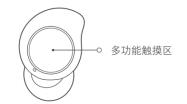
1. If there is no response to the touch, please refer to the instruction manual to use the correct touch position (as shown in the figure below).
2. Make sure that the gestures are correct.
① In the call mode: In the incoming call state, double-click the left and right earphone multi-function touch area to answer the call; during a call, three-click the left and right earphone multi-function touch area to hang up the call; when an incoming call, three-click the left and right earphone multi-function touch area to answer the call; Rejected the call.
② In music mode: Long press the left and right earphone multi-function touch area to pause/play music function.
③ In the voice assistant mode: triple-click the left and right earphone multi-function touch area to wake up the voice assistant (in non-call mode, the voice assistant function of the device must be turned on)
3. It may be that the touch area of the headset is not tapped continuously, or the frequency of tapping twice is too slow. Tap the disc on the back of the headset twice in a row, using the belly of your fingers, not your nails.
4. There may be too much oil or liquid in the fingers, which makes the touchpad insensitive, and the surface of the fingers must be clean.
Does it help?