

Mi Smart Clock FAQ
Specification
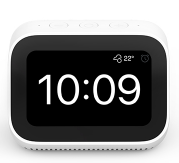
| Product model | Mi Smart Clock |
 |
|
| Basic Specifications | Dimensions:113mm x 68mm x 81.5mm |
| Weight:272g The actual weight may vary depending on the manufacturing process | |
| Display:4" | |
| Resolution:800x480 | |
| Microphone:2-mic array | |
| Speaker:1.5 inch full range speaker | |
| Wireless:WiFi 2.4GHz, Bluetooth 5.0 | |
| Supported Systems:Android 4.4, iOS 9.0 and above | |
| Power Supply:5V/2A | |
| Package contents | 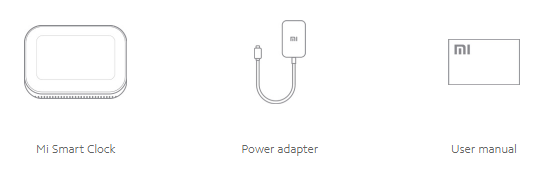 |
Product Introduction
1.Q:How to turn on Mi Smart Clock?
A: There is no built-in battery in the Mi Smart Clock, so it needs to be connected to the power. When the power is switched on, it can be turned on automatically.
Note: Please be sure to use the original power adapter, the non-original adapter may affect the stability of power supply, affect the normal use.
2.Q:How to reset factory settings?
A: 1: Screen -> drag down to the Control Center -> click Settings ->ick Restore Factory Settings. After hearing the voice prompt "factory Settings will be restored soon", wait for the factory Settings to be restored.
2: Screen -> drop-down Control Center - >Settings - Account - > log out, and the factory Settings can be restored after hearing "factory Settings will be restored",
3. Confirm to unbind in APP [My - Unbind], and the factory Settings can be restored.
Note: After restoring factory Settings, Mi Smart Clock will automatically restart, wait for the automatic restart, the duration is about 2~3 minutes, please keep the power on state, wait patiently and until the Mi Smart Clock screen appears QR code.
3.Q:How to turn off Mi Smart Clock?
A: The touch screen can be turned off directly by unplugging the power adapter.If you worry about disturbing, it is recommended to use the disabled microphone instead of shutdown (drop-down screen to control center - disable microphone), the screen will display the corresponding status, the speaker will not be awakened.
Network Introduction
1.Q:Which network does Mi Smart Clock support?
A: Compatible with mainstream personal routers in the market. The router needs to turn on 2.4GHz Wi-Fi.
2.Q:Can Mi Smart Clock connect to multiple Wi-Fi?
A:Mi Smart Clock can only connect to one Wi-Fi at one time, but it will keep a record of the Wi-Fi that has been connected so that you can change the connected Wi-Fi again.
3.Q:How to configure network for Mi Smart Clock?
A:1) Connect to Google Home App and connect to the network according to the instructions in the app.
2) If you need to reconfigure the network, setting path: screen -> drop-down Control Center ->Settings ->WLAN and Bluetooth,and set the network.
If the connection is still unsuccessful after several attempts, check whether the Wi-Fi password was entered incorrectly, or restore the factory Settings and try again.
4.Q:WHow to do if phone cannot find the Mi Smart Clock when initializing and configuring Wi-Fi?
A:1) It is necessary to turn on the Bluetooth of the mobile phone and obtain the GPS information;
2) If it is an Android phone, it is necessary to turn off and turn on the Bluetooth of the system first and try to configure it again;
3) Android version should be higher than 4.4.4, and iOS should be above iOS 9,
4) Try to restart/reset the Mi Smart Clock, and then follow the prompts for configuration.
5.Q:How to do if can't find the Wi-Fi while configuring Mi Smart Clock network?
A:1) Manually input the Wi-Fi name in the APP,
2) Turn off and then turn on Wi-Fi on the phone, exit the APP and re-enter, and select the Wi-Fi you want to connect;
3) Click "Help" directly on the Mi Smart Clock and select the Wi-Fi you want to connect to;
4) If the corresponding network cannot be found in the Wi-Fi list on the Mi Smart Clock, please return and re-enter the list to try.
6.Q:What if the network connection fails in Mi Smart Clock?
A:First of all, you need to make sure that you don't randomly operate the Mi Smart Clock or disconnect the Bluetooth of the phone during the networking process of the speaker.If the distribution network still fails, the following steps can be followed to check:
1) Check whether the router password is entered correctly;
2) Place the router and Mi Smart Clock as close as possible without dividing walls;
3) Find another mobile phone, turn on the hot spot of the mobile phone (ensure that the data flow of the mobile phone is sufficient and the signal is above 3G), let Mi Smart Clock connect to the personal hot spot opened by the mobile phone, and check whether there is a router compatibility and network problem;
4) Some routers may have compatibility problems. At this time, please modify the SSID (wireless network name) and password in the router management background. It is recommended to use a combination of pure letters and numbers, and also check the black-and-white list of routers.After that, reset the MI Smart Clock, restart the Bluetooth of the phone, and carry out network configuration;
5) Modify the DNS service in the router Settings, change the DNS address to 180.76.76.76, and try the configuration again.
7.Q:How to do when the Mi Smart Clock fails to connect to the external network?
A:The connection to the external network fails, which may be caused by the fluctuation of the operator's network or the fault of the optical cat. The following steps can be followed for troubleshooting:
1) Check whether the connection of other devices is normal under the same Wi-Fi.If other devices are normal, please contact your network administrator or log into the router administration background to check whether network related restrictions have been made;
2) If other devices cannot connect to the Internet, check whether the WAN connector of the router is normal. If the WAN connection is normal, please check whether the broadband charge is overdue.
8.Q:How to do if Mi Smart Clock network is disconnected?
A:When the Mi Smart Clock is disconnected from the network, it will reconnect to the Wi-Fi. If the network is restored soon after the disconnect, there may be some fluctuations in the router or carrier network.However, if the network is disconnected for a long time and still does not reconnect, do the following checks:
1) Check the power supply of the router is normal;
2) Check whether the WAN port of the router is normally connected;
3) Check whether other devices are normally connected to Wi-Fi and the Internet;
4) Confirm whether the router password has been changed;
5) Check whether the distance between the router and the Mi Smart Clock is too far or the wall is separated. It is suggested to place the router and the Mi Smart Clock as close as possible.
If all the above checks are OK, you can also try to restart the Mi Smart Clock.
9.Q:How to do if play a video or song too late/the network speed is slow/I Smart Clock is offline frequently?
A:If the play video or song lags, it takes a long time to play, suggest put of the router and Mi Smart Clock as close as possible, ensure Mi Smart Clock where WiFi signal is good, if Mi Smart Clock offline frequently, especially the current router to connect to multiple devices, using the 2.4 GHz wi-fi networks, can be the following:
1) Check whether the network speed of other devices is slow;If the network speed of all devices is slow, log in the router management background to check whether there is a device downloading, which takes up a lot of bandwidth.
2) Log in the management background of the router. If the router only supports 2.4GHz, you can change the WiFi channel of the router to 13 and the bandwidth to 20M to reduce interference in the network environment;
3) Check if the speed limit is set on the router.
Voice
1.Q:What if it is difficult to wake up in a Mi Smart Clock?
A:When it is difficult to wake up in the Mi Smart Clock, check from the following two aspects:
Placement Suggestions: 1) It is not recommended to place the Mi Smart Clock at a location that is too far away from the horizontal plane of the pronunciation position, such as the top of a high shelf or the ground, which will lead to low wake-up probability and recognition efficiency.
2) It is not recommended to place the Mi Smart Clock in the corner of the wall, because the echo and reverberation are relatively large near the wall, which will reduce the efficiency of wake-up and recognition.It is recommended to place the Mi Smart Clock in a slightly empty place.
Awakening Suggestions:
3) It is recommended to wake up within an appropriate distance (1-5 meters);
4) Speak at a normal speed and sound level;
5) Spit clearly and use standard words;
6) Playing music too loudly makes it difficult to wake up.
If you are sure that the wake-up match the above description, but it is still difficult to wake up, check the firmware version of the Mi Smart Clock to ensure that the firmware is the latest version.If the firmware is the latest version, try to restore the factory Settings and restart Mi Smart Clock. If the above steps still cannot be solved, you can guide the user to apply for after-sales service.
2.Q:Is it difficult for old people and children to wake up the Google voice assistant?
A:The pronunciation of old people and children is different from that of adults, which is being optimized at present. If you encounter this problem, first refer to the wake-up advice in the previous article (How to wake up if it is difficult to wake up). It is suggested to use standard words and slow down your speaking speed to wake up.
3.Q:Why do voice assistants sometimes make mistakes?
A: If you speak in standard manner and adjust the position of the Mi Smart Clock according to the usage suggestions, or if it's still mistaken, please submit user feedback, and the engineer will correct the mistake.
Play music and video
1.Q:The music can't play?
A:1)When the music cannot be played, it can be checked as follows: Please make sure that the music has been set to the current music app([App-My-Music Settings]), and logged in the account,
2) Confirm whether there is a problem with a single music resource, and replace other music to confirm whether it can be played. If there is a problem with a single resource, guide users to submit user feedback, record the specific music that cannot be played, and inform users to optimize the resource database in the future;
3) Confirm whether there is a network problem and other music cannot be played if it is changed, and guide the user to try to change the network. The specific method is as follows: Mi Smart Clock connects to the personal hot spot opened by the phone and tries to play again,
4) If other music can be played normally, all music in a single music app cannot be played. In the Settings behind the router, change the DNS address to 180.76.76.76.
Note: If the user's previous single music app is normal and cannot be played at present, it may be due to the maintenance of the music resource server. Please try again at another time.
2.Q:The video can't play?
A:1) Please change other videos first to check the playing situation and confirm whether the current video resource is the problem. If a single video resource cannot be played, record the name of the video and submit user feedback. If all videos cannot be played, continue the following investigation.
2) Ask "the weather today", "tell a joke" and so on to check whether it is normal, exclude the problems of the network,
3) If the network problem is checked, confirm that all videos cannot be played and try another time period (maybe it is the maintenance of video server).
3.Q:The resource playback is abnormal?
A:In case of resource playback lag, audio and video are not synchronized during video playback, etc. :
1) First change other music/video to check the playing situation and confirm whether it is the current resource problem (confirm it is a single resource problem, you can guide the user to submit user feedback and record the name of the resource);
2) Ask "today's weather", "tell a joke" to check whether it is normal, confirm whether it is the problem of network
(Connect the to the phone's personal hot spot and try playing again);If the network is normal, but the resources are abnormal, which may be due to insufficient network bandwidth and WiFi congestion, it is suggested to optimize the WiFi network and conduct user feedback submission log in the App.
Bluetooth problem
1.Q:Does Mi Smart Clock support Bluetooth?Can it be used as a Bluetooth gateway?
A:Mi Smart Clock supports Bluetooth 5.0. After Mi Smart Clock is initialized and bound with Xiaomi account, music can be played through Bluetooth connection.
Mi Smart Clock has Bluetooth Mesh Gateway function, which can realize the linkage between more Bluetooth devices and other devices.
2.Q:Why is Bluetooth turned off by default?
A:In the process of using the Bluetooth speaker, in order to better guarantee the user's experience and prevent the Bluetooth from being wrongly connected by others, the default state of Bluetooth is turned off. If you need to use the Bluetooth function, you need to manually turn on the Bluetooth function in the App.
3.Q:Why does Bluetooth suddenly play music in Mi Smart Clock?
A:If you encounter this problem, you can check the following two contents one by one:
1) When your device has been successfully paired with the Mi Smart Clock, there will be a relevant connection record. Your device may be automatically connected to Bluetooth to play the music content inside the device,
2) When the Bluetooth of the Mi Smart Clock is not turned off, it may be connected by someone else through Bluetooth to play music content
4.Q:Why can't connect the Bluetooth to Mi Smart Clock?
A:1) First check whether the Bluetooth of the mobile phone is turned on in the Settings of Mobile Phone - Settings - Bluetooth - Turn on Bluetooth
2) After that, check whether the Bluetooth is turned on in the screen [Pull down Control Center - Settings -WLAN and Bluetooth]
3) Try using other mobile phones or devices. If you still cannot find it, it may be bound by other people or unknown devices. You can cancel the binding with the device in the screen [Pull down Control Center - Settings -WLAN and Bluetooth], and then use it again
4) There is strong interference between 2.4GHz Wi-Fi and Bluetooth, and electronic devices with Bluetooth function will also have large interference to Bluetooth. Please try to avoid such interference
5) The Bluetooth system of the mobile phone may fail. Please restart the Bluetooth of the mobile phone and retry the connection.
5.Q:Can't connect the Mi Smart Clock to iPhone?
A:1.If connection for the first time, please make sure the Mi Smart Clock has been initialized and binding the Xiaomi account.
2. iPhone has connected to Mi Smart Clock before, if Mi Smart Clock restore the factory Settings, or unbind with iPhone in control center - Settings - WLAN and bluetooth】 ,it will also lead to iPhone can not connect to Mi Smart Clock.
At this point, suggest to go to the iPhone's Settings - Bluetooth - My Device, ignore the Mi Smart Clock, and reconnect.
6.Q:Does bluetooth lag when playing?
A:1) Confirm whether the input (e.g., mobile phone) is playing online music or local music.If it is online music, it will be because of the network speed, cache and other issues resulting in a slow playback,
2) Whether the distance between the input end and Mi Smart Clock is too far.It is generally believed that the effective transmission distance of bluetooth is 10m. If the distance is too far or separated by a wall, bluetooth playback will lag.
Does it help?
Yes
No