

Mi Door and Window Sensor 2 FAQ
Specification
| Product model | Mi Door and Window Sensor 2 |
 |
|
| Product specifications | Product name:Mi Door and Window Sensor 2 |
| Product model:MCCGQ02HL | |
| Product dimensions:34.0x32.7x14.5 mm | |
| Wireless connection:Bluetooth 5.1 BLE | |
| Battery type:CR2032 (installed) | |
| Operating temperature:-10°C to 50°C | |
| Operating humidity:0%–95% RH, non-condensing | |
| Package contents | Mi Door and Window Sensor 2 x1 |
| Adhesive sticker x2 | |
| User manual and Warranty notice x1 |
Product Introduction
1.Q:What is the function of Mi Door and Window Sensor 2?
A: Mi Door and Window Sensor 2 is installed in doors, windows, drawers and other positions, through the proximity and separation of the sensor body and magnet, real-time perception of doors and windows switch state;Detect the changes in ambient light and shade by light sensor.
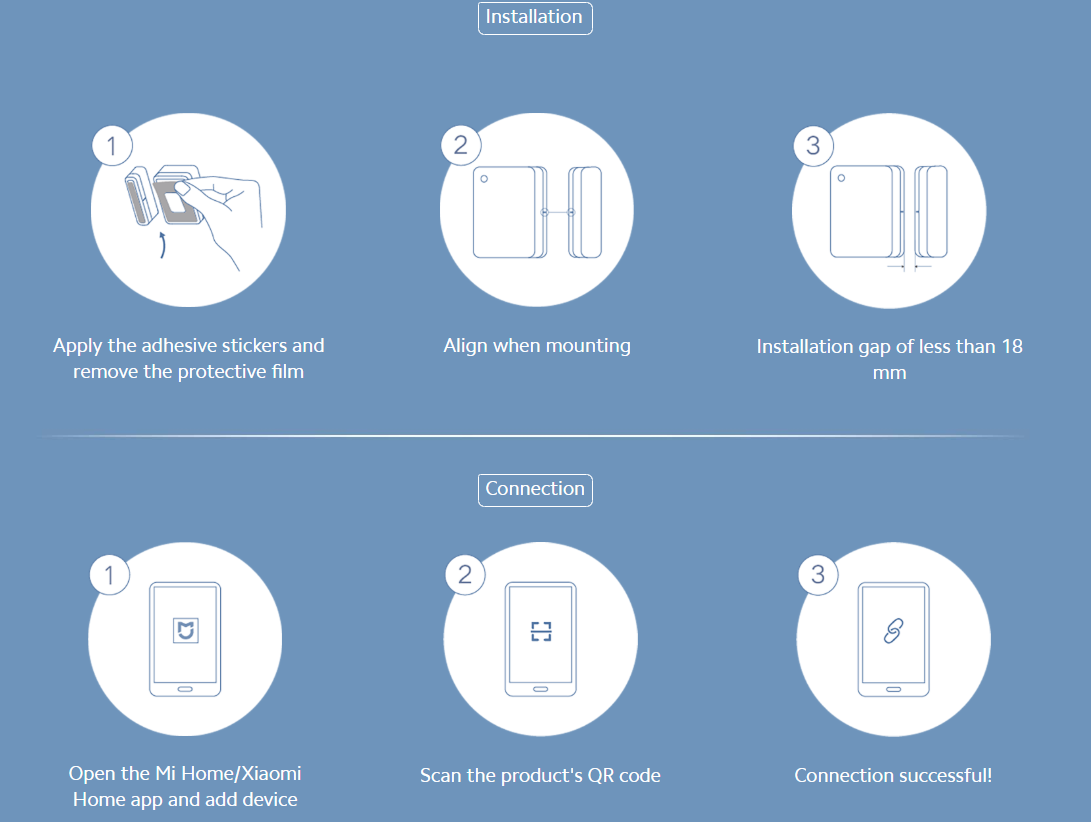
2.Q: How does Mi Door and Window Sensor 2 install and how to connect to Mi Home App?
3.Q :How to replace the battery of Mi Door and Window Sensor 2?
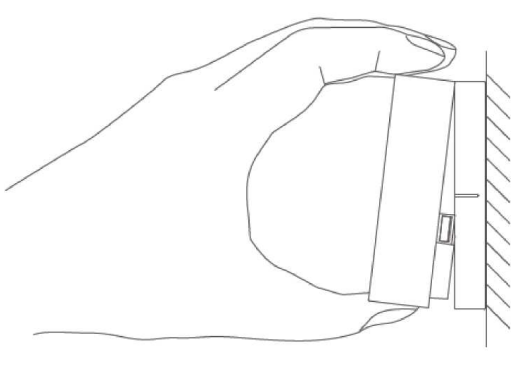
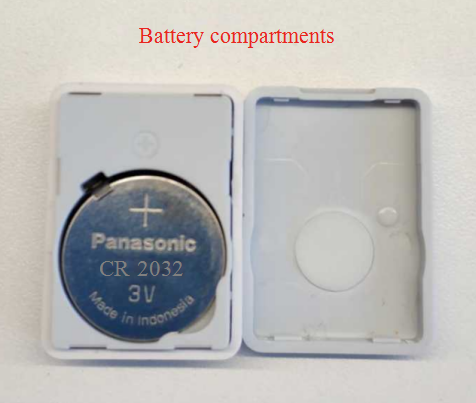
A: 1. Put the thumb in the groove of the main body of the sensor and lift the main body upward to separate it from the back cover;
2. Put the CR2032 battery into the battery slot with the positive pole facing upwards;
3. Align the main body of the sensor with the back cover and press.

4. Q:How to reset Mi Door and Window Sensor 2?
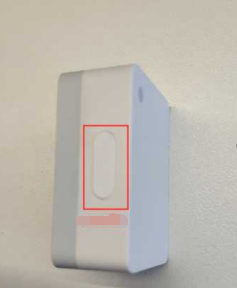
A: If you hold down the reset button for more than 3 seconds, the sensor indicator blinks blue for three consecutive times, indicating that the device is successfully reset. The reset button is on the side of the sensor body.
5. Q:What is the normal communication distance between Mi Door and Window Sensor 2 and the gateway?
A:In a complex indoor environment, it is recommended that the distance between the sensor and the gateway be less than 20 meters. If there is a wall between the sensor and the gateway, the distance between the two needs to be reduced accordingly (in a complex home environment, the best distance is within 5 meters), so as to achieve better communication.
6. Q:Where is the Mi Door and Window Sensor 2 suitable for use?
A: Mi Door and Window Sensor 2 is not waterproof and is only for indoor use.
7.Q: What are the main features of the Mi Door and Window Sensor 2?
1. Detect the status of doors and windows in real time;
2. Sense the light and dark state of the environment in real time and view historical logs;
3. Connect bluetooth gateway for intelligent linkage and view intelligent logs;
4. When the sensor is on or off, the indicator light flashes briefly;
5. Check the battery power;
6. When there is no available Bluetooth gateway in the user's room, then can use the mobile phone for bluetooth connection to check the switch and environment light or shade state;
7. Firmware upgrade: Check the current firmware version and upgrade it.
Note: Logs about door/window switch and environment brightness and darkness cannot be deleted. Logs about linkage in intelligent scenarios can be deleted.
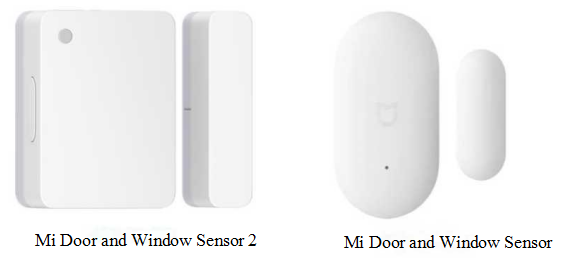
8.Q:What differences does Mi Door and Window Sensor 2与Mi Door and Window Sensor have?
A: 1. Mi Door and Window Sensor 2 needs to be used with Bluetooth gateway or mobile phone bluetooth directly;Mi Door and Window Sensor need to be used with a Zigbee gateway.
2. Mi Door and Window Sensor 2 added light sensor function, support to detect the brightness and darkness of ambient light; The Mi Door and Window Sensor doesn't support detection of ambient light.
Troubleshooting
1.Q : Why does Mi Door and Window Sensor 2 work erratically, sometimes working and sometimes not working?
A:1. The distance between the sensor body and the magnet may be too large, the distance between the two device parts can't be longer than 18mm;
2. The distance between the sensor and the gateway may be too far. Please move the gateway closer to the sensor.
2.Q : How to deal with the Mi Door and Window Sensor 2 can't connect to bluetooth gateway?
A:1. Confirm whether there is bluetooth gateway or Bluetooth Mesh gateway around the device, and place the device as close to the gateway as possible;
2. After you bind the device for the first time, wait 1 to 5 minutes. The device automatically connects to the gateway. If Mi Door and Window Sensor 2 can't find the Bluetooth gateway after 5 minutes, power off the Bluetooth gateway and restart it.
3. If you have another Bluetooth gateway at home, try replacing it.
Note: Ensure that the Bluetooth device and the Bluetooth gateway are under the same Mi account and the distance between the device is not too far, the Bluetooth device can be automatically added to the Bluetooth gateway.
3.Q:How to judge whether Mi Door and Window Sensor 2 is working normally?
A:Close the main body of the sensor to the magnet and separate it for 2-3 times. Then enter the main page of the sensor in MI Home APP and refresh the device log. If there is a corresponding log, it indicates that the device works normally.
4. Q:How to deal with Mi Door and Window Sensor 2 is not powered on all the time?
A:1. Check whether the insulation sheet of the equipment is removed. If the insulation sheet is not removed, the equipment will always be in power-off state;
2. Check whether the battery is exhausted and replace the battery.
5. Q:How to deal with Mi Door and Window Sensor 2 drops after installation?
A:Whether the sensor often changes its position, resulting in the decrease of adhesive sticker, please try to replace the adhesive sticker.
Does it help?
Yes
No