

Mi Computer Monitor Light Bar FAQ
Product introduction
1.Q:What are the features of Mi Computer Monitor Light Bar?
A: 1. it can freely adjust brightness from 10%-100%, freely adjust color temperature from 2700-6500K.
2. it supports 2.4G wireless remote control and fast switching mode, long press and it can quickly enter the computer mode (brightness is 50%, color temperature is 2700K), can prevent dry eyes and fatigue,
3.It supports hang installation, can save desktop space,
4.It is designed for asymmetrical light, screen reflection can be reduced.

2.Q:What kind of monitors is the Mi Computer Monitor Light Bar suitable for?
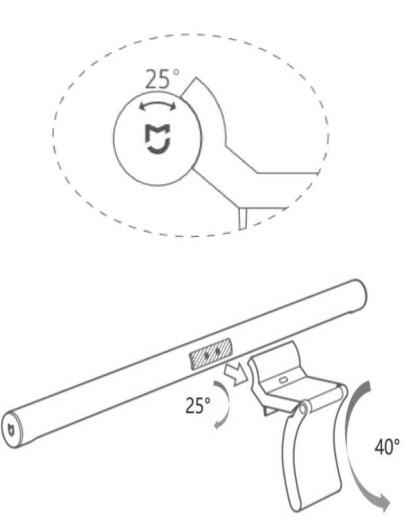
A:The adjustable Angle of the gravity rotating shaft base of the Mi Computer Monitor Light Bar is 40°. It is suitable for the display screen with thickness ≤32mm, and can be adapted to the fish screen, curved screen, iMac, etc.
3.Q:Can the Mi Computer Monitor Light Bar be used on a laptop or anywhere else?
Can not be used for laptop computer, can be used for any hanging vertical plane thickness ≤32mm, such as the bed board, desk baffle.Display screen or baffle of thickness < 10mm can be stably suspended for use, but can not be clamped. It is normal to shake the lamp slightly when adjusting the Angle downward.
Note: it is not suitable for laptop because the light bar needs to be mounted vertically, so it is recommended to use them on desktop monitors and other devices.
4.Q:What is the meaning of the asymmetrical light of Mi Computer Monitor Light Bar?
A:It adopts customized optical lens to project the light forward, so that the light is only projected to the desktop without screen reflection, so you don't have to worry about the sore eyes caused by screen reflection.The mask design has fine etching, which can make the light more soft and suppress glare.
5.Q:How to power the Mi Computer Monitor Light Bar?
A:It uses USB Type-C power supply. Please connect the Type-C with the power interface.Supports the power supply which output voltage is 5V, output current greater is more than 1A.
6.Q:How to install the Mi Computer Monitor Light Bar?
A:1、The light emitting area of the light bar is facing down, first adsorb the power contact of the light bar to the power contact of the base,
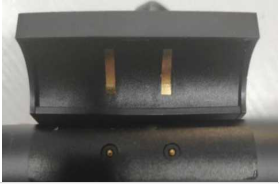
2、Gently break open the base to adjust the size of the opening of the base, place the base to the middle position above the display screen, the rear base counterweight block against the display screen back, the light bar is parallel to the desktop,
Note: Don't break off the light bar to avoid damage to the base.
3、Finally, connect the Type-C to the power interface at the base, and connect the power with the USB end to complete the installation.
7. Q:Can Mi Computer Monitor Light Bar adjust angle?
A:The angle can be adjusted by rotating back and forward, and the angle adjustment range is 25°. The purpose of adjusting the Angle is to avoid glare from human eyes looking forward, and to avoid reflection from the reflective screen.
8. Q:How much is the power of Mi Computer Monitor Light Bar?
A:The power is only 5W.
9.Q:What is the light flux of Mi Computer Monitor Light Bar?
A: 270LM @3900K 100% brightness.
10.Q:Can the color temperature and brightness of Mi Computer Monitor Light Bar be adjusted?
A:Support 10%-100% brightness adjustment, 2700-6500K color temperature adjustment.It has independent 2.4G wireless remote control and short press the remote control knob to switch lights on and off.After turning on the light, rotate the remote control knob to adjust the brightness;Long press and rotate the remote control knob to adjust the color temperature;Long press the remote control knob for 2 seconds to enter the computer mode of the light (2700K color temperature, 50% brightness).Wireless remote control Press the remote control knob to switch lights on and off.After turning on the light, rotate the remote control knob to adjust the brightness.Long press and rotate the remote control knob to adjust the color temperature.Long press the remote control knob for 2 seconds to enter the computer mode of the light (2700K color temperature, 50% brightness).
11.Q:Does Mi Computer Monitor Light Bar have a high color rendering index?
A:The color rendition index is Ra90 high rendition index, which makes the color restoration more real under the light.
12.Q:How long will the battery of the remote control last?
A:The battery of the remote control can last more than 2 years if it is operated 6 times one day and lasts for 3 seconds each time.
13.Q:Can one remote control control multiple Mi Computer Monitor Light Bar at the same time?
A:Yes, but one Mi Computer Monitor Light Bar can only be controlled by one remote control at the same time.
14.Q:How to match the remote control with Mi Computer Monitor Light Bar?
A:When Mi Computer Monitor Light Bar leaves the factory, the remote control and Mi Computer Monitor Light Bar have been paired and can be used directly.If the remote control needs to be matched with other Mi Computer Monitor Light Bar of the same model, please press the knob of the remote control for a long time within 20 seconds after the new Mi Computer Monitor Light Bar is powered on. When Mi Computer Monitor Light Bar's indicator light flashes, the pairing is successful.
15. Q:How do I install the battery of the remote control?
A:Hold the base of the remote control in one hand, press three fingers of the other hand close to the lock and push the back cover counterclockwise to the left to open it. Install 2 sections of No. 7 batteries according to the positive and negative poles of the battery bin, and then install the back cover.
16.Q:What are the accessories of Mi Computer Monitor Light Bar?
A:Mi Computer Monitor Light Bar,Base, Remote control, Charging cable ×1,User Manual.
17.Q:What kind of material is Mi Computer Monitor Light Bar?
A:The body is made of all-metal aluminum alloy.
18.Q:What are the dimensions of Mi Computer Monitor Light Bar and the remote control?
A:The size of the Mi Computer Monitor Light Bar is 23*448mm, and the size of the remote control is 66.5*34mm.
19.Q:How to do if Mi Computer Monitor Light Bar appears flashing or abnormal noise after turning on light?
A:(1) Please timely replace to the power supply equipment whose output voltage is 5V and output current is more than 1A,
(2) Do not use the quick-charge adapter which cannot directly output 5V voltage by default,
(3) Please use the original power cord, do not use USB extension cord or cable splitter,
(4) Do not connect the light body or the base power contact with other metal conductors, otherwise it may cause damage to the product or dangers
(5) The original power cord is a special accessory for Mi Computer Monitor Light Bar, which does not support fast charging or data transmission for other devices.
20.Q:Note matters
A:(1) When cleaning the surface of the product, it is necessary to wipe it with a soft cotton cloth, and can not be cleaned with corrosive solvents,
(2) After the remote control battery replacement, please collect the waste battery to avoid environmental pollution,
(3) This product can only be used indoors,(4) The light source of this light is not replaceable. When the light source reaches the end of its life, the whole light should be replaced.
21.Q:How to deal with the remote control cannot be used to control Mi Computer Monitor Light Bar?
A:We can guide user to replace the battery of the remote control first, it could be the battery failed , if still can't control, you can try to repair, the pairing method is: long press the remote control knob when the lights up 20 seconds before turning on the power supply, when Mi Computer Monitor Light Bar's indicator light flashes, the pairing is successful. If still can't control, guide to after-sale test.
22.Q:Is the Mi Computer Monitor Light Bar an eye protection desk lamp/reading and writing desk lamp?
A:No, at present, there is no clear national standard for "eye protection desk lamp". There is only a performance standard for "reading and writing desk lamp".Mi Computer Monitor Light Bar is mainly used in the display screen, can effectively reduce the screen reflection.
23.Q:Does Mi Computer Monitor Light Bar have memory function after powering off every time?
A:Mi Computer Monitor Light Bar supports memory function after powering off, which can record the brightness and color temperature setting.
24. Q:Why isn't the mask of Mi Computer Monitor Light Bar designed to be completely transparent?
A:As a special lamp for reading and writing on the stage, the nature of the design of asymmetric light is to control the reflected glare of the screen. direct glare should also be considered.After all, the lamp is hung on the display. If it is made into a fully transparent light mask or removed from the light mask, it is very likely that the lamp beads will produce direct glare when looking up at the display from some angles.Under the premise of ensuring the structural design of asymmetric light, the fully transparent light emitting mask helps to clear the light, but has no treatment for the glare of the lamp beads;Textured masks scatter light and blur light, but they make the light softer and help suppress glare.The texture of the Mask is the result of many experiments in the balance between controlling direct glare and screen reflection.
25.Q:Why can we see beads when adjust the light to certain angles?
A:The adjustable range of Mi Computer Monitor Light Bar is extended to 25 degrees, in order to adapt to more types of displays of different thickness. When using, the light can be adjusted to suitable Angle for yourself.
26.Q:Is putting it on the wall the right way to test for asymmetric light?
A:It's not correct, put the multiple lights products directly to look at the shape of the light on the wall, really is more intuitive, but we can look at the real design, some products' distance of two ends is long, Mi Computer Monitor Light Bar's distance of two ends is 1.3 cm and 0.4 cm height difference with other products at the same time, If directly put all the lights on the wall,it will casue scattering, the test is not in the same basic condition for different products.
Does it help?