

Mi Body Fat Scale FAQ
1 .Q:What is the specification of Mi Body Fat Scale?
A:
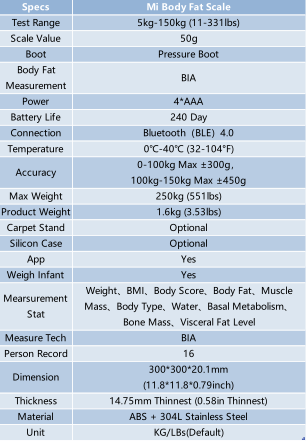
2.Q:What are the standard parts inside the package of Mi Body Fat Scale?
A: Mi Body Fat Scale *1, Manual *1, AAA Battery*4.
3 . Q:How to install batteries into Mi Body Fat Scale?
A:Open the battery case under bottom side as picture below, then follow
the “+”and ”- “ sign to insert batteries.
4 . Q:What is the device requirement for using Mi Fit App to connect Mi Body Fat Scale by mobile devices?
A:Most of the mobile devices have Android 4.4+ or iOS 8.0+ system with Bluetooth 4.0+ support can work with Mi Body Fat Scale.
5 . Q:Are there any precautions should be avoid before using Mi Body Fat Scale?
A: Don’t do the measure during fever or after some situation like heavy drinking, severe sports, overeating, shower or sauna, the measurement result during these situations will be highly inaccurate. Mi Body Fat Scale’s measurement based on BIA bioelectric impedance method which will have slightly AC through the body. Therefore, people with pregnancy, pacemaker user, edema, artificial dialysis, or any other transplant medical equipment are forbidden to measure by Mi Body Fat Scale.
6 . Q:How to pair Mi Body Fat Scale with Mi Fit App?
A:
1. Open Mi Fit App and log in with your Mi account.
2. Put Mi Body Fat Scale on a hard and flat floor.
3. Check the battery level of Mi Body Fat Scale, then stand on Mi Body Fat Scale with both foot then go to “Profile” tab.
4. Select “Add device” under “My devices” then select “Body Fat Scale/Scale”.
5. Select “Yes” after Mi Body Fat Scale is found then you can pair it successfully.
7 . Q:Why Mi Body Fat Scale keeps binding failed?
A:
1. Try re-stand on the scale and re-do the bind steps.
2. Re-open the Bluetooth connection of your phone and retry.
3. Reboot your phone and retry, close the Bluetooth connection from phone connected to Mi Body Fat Scale before.
4. Change the battery of Mi Body Fat Scale due to it cannot be bonded at
low battery level.
8 . Q:Can one Mi account bind with multiple Mi Body Fat Scale?Can Mi Body Fat Scale and Mi Scale bind into one account?
A:M i Body Fat Scale work with Mi Fit App, which can only allow user to bind one Mi Body Fat Scale per Mi account, and also only one Mi Body Fat Scale or a Mi Scale at single time.
9 . Q:How to measure each data correctly through Mi Body Fat Scale? How Mi Body Fat Scale calculate them?
A:
Mi Body Fat Scale uses BIA (Bio-Impedance Analysis) technology to take the measurement. The principle of BIA is separating human body in to conductive body fluids, muscles, and non-conductive adipose tissues. When users stand on the scale, their feet will touch 4 electrodes one the scale and these electrodes will measure the resistance of feet and emit small current into human body to do the measurement inside user. The inside resistance will be high if user has high fat rate, and low if user’s fat rate is low. Then the chip inside scale do the calculation based on the resistance and refer to user’s height, weight, age, and gender to get user’s body fat rate, muscle weight, and moisture ratio, etc. Beside BIA technology, Mi Body Fat Scale uses alternating current instead direct current to measure body fat rate. Compare the low frequency direct current which mainly measures extracellular fluid and bypass the cell, alternating current has higher frequency that can pass through the cell body which can get more accurate result even the speed will be slower.
To do the measurement correctly:
1. Put Mi Body Fat Scale on a hard and flat floor;
2. Stand on the scale with barefoot and make sure feet is get touch with
electrode;
3. The body test will start after weight result steady, then stand stable until
the progress bar under the weight number finish, then user can check the
result in Mi Fit App.
10 . Q:What is the measurement unit support by Mi Body Fat Scale? How to change it?
A:The default unit of Mi Body Fat Scale is “lbs” and can change to KG. User can change the unit by itself in Mi Fit App, under “Profile” -> Mi Body Fat Scale under “My Devices”-> “Scale Unit”
11 . Q:How to add family member for Mi Body Fat Scale?
A:
1、Go to Mi Fit APP and click the weight curve to go to Body Fat Scale page
2、Click “+” symbol to add
3、Follow the steps to input all the information required
12 . Q:How many members can the scale add?
A:Maximum 16 members allowed per scale, and user can check different member’s data by sliding member’s icons in Mi Fit APP.
13 . Q:What’s the test range for the scale?
A:5-150kg(11-331lbs) , 250kg(551lbs) Max.
14 . Q:How to set weight goal for Mi Body Fat Scale?
A:In “Profile” tab of Mi Fit App, select “Weight Goal” under “Set Goal”,
then you can adjust the bar of weight goal by yourself (Press “Rest Goal”
at the end if there is already a goal before you adjust).
15 . Q:How to check the body stats measured by Mi Body Fat Scale? What are the meanings of them?
A:Click the “Body Score” in Mi Fit APP to check
BMI: Body Mass Index, to determine people’s fat level.
Body Score: Overall reference-only score for the test record.
Body Fat: The proportion of fat in total body weight.
Muscle Mass: The mass of skeletal and smooth muscles and other muscle
tissues contained water.
Water: The overall share of water in human body, including the water in your
blood, lymph, and other bodily fluids.
Basal Metabolism: The lowest energy required to maintain basic life activities.
Visceral Fat Level: Fat accumulated in the gap of internal organs
Bone Mass: The amount of calcium, phosphorus, and other matters contained in
the bone.
16 . Q:What is the difference between Mi Scale and Mi Body Fat Scale?
A:Mi Body Fat Scale use BIA technology to test body status and can
determine user’s healthy status like body fat ratio, physical indicator, etc.
Mi Scale can only measure user’s weight and doesn’t have any other
special features.
17 . Q:Why the body fat testing result of Mi Body Fat Scale has highly difference?
A: It’s won’t be too much difference if keep measuring at same time with same
testing situation. If it’s highly difference, put it on the hard-flat floor, re-install
and re-do to measurement.
18 . Q:How to clean Mi Body Fat Scale?
A:Wipe Mi Body Fat Scale by mild cleanser or wet cloth to clean it, do not
touch any organic solvent or other chemicals to Mi Body Fat Scale.
19 . Q:How to set user weight for Mi Body Fat Scale manually?
A:In Mi Fit App, at “Status” tab, click on Mi Body Fat Scale related area to go inside menu, then select “Add Weight” and set the weight manually
20 . Q:How to delete test result for Mi Body Fat Scale?
A:Press Mi Body Fat Scale related area in “Status” tab of Mi Fit App, choose “Delete” option at the bottom of app to delete current showed record.
21 . Q:How to unpair Mi Body Fat Scale?
A:Mi Fit APP-> Profile-> Body Fat Scale -> Unpair-> Unpair -> Unpair Successful
22 . Q:Why Mi Body Fat Scale cannot upload data to Mi Fit App?
A: 1. Stand on the Mi Body Fat Scale then do the sync steps on it.
2. Open Mi Fit App then stand on Mi Body Fat Scale, wait until the weight number on the Scale flashing twice then leave the scale and sync.
3. If still not working, try to re-open the Bluetooth on your phone.
23 . Q:Why the testing results from Mi Body Fat Scale are inaccurate?
A:There are lots of reasons affect testing results to be inaccurate, like before/after eating or exercising, morning/night difference, standing posture, or floor material. Besides the reason by user itself, Mi Body Fat Scale has extremely high sensitive sensor which requires measuring on hard-flat floor to be accurate. And Mi Body Fat Scale may also calculate its own weight if not using it for a long time, user can ignore it and re-do the measurement
after its auto-off.
24 . Q:How to turn on/off Mi Body Fat Scale?
A : After installing batteries into Mi Body Fat Scale, the device will automatically on when user stands on it and automatically off when the user leave.
25 . Q:Why Mi Body Fat Scale keeps updating failed?
A: Try re-open Bluetooth of device. Reboot the phone. Re-install the batteries into Mi Body Fat Scale. For iOS devices, user can cancel the pair with Mi Body Fat Scale and try to update after re-do the pair steps.
26 . Q:What is the battery life of Mi Body Fat Scale?
A:The maximum battery life of Mi Body Fat Scale is about 8 months that measure 3-4 times per day. And Mi Body Fat Scale uses AAA battery, doesn’t need to be charged.
27 . Q:Why the data is so difference when testing on different bottom floors?
A:Because the high-sensitive sensor Mi Body Fat Scale uses, it needs to be testing on the hard-flat floor. Soft floor like carpet or mattress will generate highly inaccurate date.
28 . Q:How to share my body stat with other?
A: Press Mi Body Fat Scale related area in “Score” tab of Mi Fit App, then press the share button on the top right button and choose the share option under the
bottom of next sharing page.
29 . Q:Why there is no data on LED screen?
A:Normally it’s caused by installing batteries incorrectly, try to re-install the batteries with correct “+”and “-” direction.
30 . Q:What is the meaning of the symbol on the LED screen of Mi Body Fat Scale?
A:The process of measurement and updating are showed by progress bar on the LED screen. When user measuring weight, “L” symbol on LED screen means low battery level and “OL” means the measured weight is over 150kg which cannot do the measurement test.
31 . Q:Why the test result of Mi Body Fat Scale keeps failed?
A: If Mi Body Fat Scale cannot get the data other than user weight, it might be:
1. The setting age or height is out of range which the age range is 6-99 and height range is 90-220cm.
2. The electrodes of Mi Body Fat Scale might be dirty on surface or user’s feet is to dry, suggest cleaning the electrodes or feet with wet towel.
3. Feet don’t touch with electrodes, not barefoot nor stand naturally on it.
4. User leave the scale too early, should leave until progress bar finish with flashing twice.
32 . Q:How to use Weigh infant?
A:Mi App->Go to scale page->Click “Weigh Infant” on bottom->Follow the manual steps on APP to do it.
Does it help?
Yes
No