

Mi Body Composition Scale 2 FAQ
1.Q: What if prompted that there is a failure in binding with the body composition scale?
A: In case there is a failure in binding,try the following methods:
1) Restart the Bluetooth on your mobile and bind it again.
2) Reboot your mobile and bind it again.
3) When the battery of the body composition scale runs out,there may be a failure in binding. In this case,replace the battery and try again.
2.Q: How should I measure other body composition data,such as body fat?
A: The Mi Body Composition Scale supports both online and offline measurement methods:
Method 1: Online measurement
1) Open the homepage of the Zepp Life APP.
2) Stand on the sheet metal with bare feet and place your feet naturally on both sides of the scale.
The whole measurement process can be checked via the large circle on the homepage.
3) Get off the scale after the whole measurement process ends,and you will be prompted the
measurement results of this time in the app. You can also tap on the weight curve graphs on the
homepage to check the history of the measurement results.
Method 2: Offline measurement
You do not need to open the Zepp Life APP while performing offline measurement. You can just get on
the scale for measurement with bare feet,and get off from it after the whole measurement process ends,and the data will be automatically synchronized when you open the Zepp Life APP next time.
Note: If the scale is used by multiple persons at the same time,the app will match the results as per weight. If multiple family members have identical weight,it is recommended to use the "Online measurement" method to avoid mistaken data-matching errors.
3.Q: Why couldn’t the body composition scale synchronize data with the Zepp Life APP?
A: In case the data could not be synchronized to the app,try the following methods to enable the
automatic synchronization:
1) Please stand or step on the scale,and open the Zepp Life APP after the screen of the scale turns on.
2) Open the Zepp Life APP and stand on the scale. Step off once the weight value has flickered twice.
If the synchronization still not working,try turning on your mobile's Bluetooth again,and
synchronize it following the above-mentioned methods.
4.Q: What are the reasons for the failure to measure body composition?
A: In case you fail to measure other body data except your weight,the reasons may be:
1) Your age and height set in the app fall out of the measurement scope:
Age scope: 6 - 99.
Height scope: 90 cm - 220 cm.
2) The way in which your feet touch the sheet metal on the surface of the scale is incorrect. please
stand on the sheet metal with bare feet,and place your feet naturally on both sides of the scale.
3) If there is any contamination on the surface of the scale,or if the feet of the user performing the weighing process are dry,it is recommended to clean the surface of the scale or the user’s feet with a wet towel and try the measurement again.
4) During the weighing process,the current user gets off from the scale before the body composition data measurement completes (the measurement process starts after the weight value on the display flickers twice,and the process ends after the progress bar completes a full progress from the left to the right and flickers twice).
Note: Please fill in your real date of birth,height and gender to avoid any unfavorable impact on the accuracy of your body indexes and the analysis reports.
5.Q: What are the reasons for fluctuations of the weighing data?
A: Reason 1: Change of the position
When the scale is moved or lifted,and after which it is used again,the sensor inside the scale will be activated,which causes a deviation to the weighing results. It is recommended to reset the scale (by stepping on the scale to light on the screen and wait until the screen automatically turns off) before you start the weighing process,as the device will automatically perform a calibration to the sensor after the screen turns off,after which the results will be more accurate when you use it again.
Reason 2: Your standing posture
Any subtle changes of your standing posture and position on the scale will affect the sensor and the resistance value,which will cause a deviation of the measurement,so it is recommended that you stand on the center of the scale,keeping the center of your body weight steady.
Reason 3: Diets
Intake of food and water will cause a deviation of the measurement.
Reason 4: Exercises Before and after exercises,your perspiration and breath will bring about a loss of water in your body,which causes fluctuations on the data.
Reason 5: Deviations between morning and evening Due to the daily metabolism of the human body,the weight of a person in the morning may differ from that in the evening,so it is recommended that you would better take the measurement at the same time of each day,and under the same conditions.
Reason 6: The conditions of the ground The bottom of the scale contains very sensitive sensors,so if the ground is uneven or covered by soft materials (like carpets),the weighing accuracy will be affected,and thus it is recommended to directly put the scale on a flat and hard ground.
6.Q: What are the factors that may lead to inaccuracy in the body composition measurements?
A: The following cases may lead to inaccuracy in the measurements:
1) Being in a fever.
2) After drinking a lot of alcohol.
3) After strenuous exercises.
4) After drinking a lot of water.
5) After eating a lot of foods.
6) After taking a shower or sauna.
7.Q: How do I set the weighing units of the body composition scale?
A: The steps are as follows:
1) Open "Mi Fit".2) Tap on "Profile" module.
3) Choose "Mi Body Composition Scale," and tap to enter the body composition scale device page.
4) Tap on "Body Composition Scale Units," and set the units in the prompted page and save it.
8.Q: Should the body composition scale be used only by me? What should be done if
other family members want to use the body composition scale?
A: 1) Enter the body composition details page in the Zepp Life APP,and then tap on the "Edit" button under the title bar to enter the "Family Members" page.
2) Tap the "Add" button lower on the Family Members page to add family members.
3) After the setting completes,your family members can start to measure their body composition,and the app will record the body composition data for all your family members.
Note 1: In case the scale is used by multiple persons at the same time,the app will match the results as per weight. If multiple family members have an identical weight,it is recommended to open the Zepp Life APP to take the measurements each time before the weighing process,to avoid mistaken data-matching errors.
Note 2: If it is temporarily used by friends or relatives,please tap on the "Visitors" button at the
bottom of the Body Composition Details page or the Close Your Eyes & Stand on One Leg page,
and fill in the visitor’s information as guided on the page,and then it is ready to be used. The visitors’ data will only be shown once,and will not be stored.
9.Q: How do I turn on and turn off the Mi Body Composition Scale?
A: After the body composition scale is equipped with the battery,the device will turn on when you
stand on it,and will turn off when you get off from it.
10.Q: What is the meaning of the prompt sign on the body composition scale?
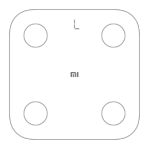
A: During the weighing process,if the "L" symbol flickers,it means low batte
A: In case there is a failure in binding,try the following methods:
1) Restart the Bluetooth on your mobile and bind it again.
2) Reboot your mobile and bind it again.
3) When the battery of the body composition scale runs out,there may be a failure in binding. In this case,replace the battery and try again.
2.Q: How should I measure other body composition data,such as body fat?
A: The Mi Body Composition Scale supports both online and offline measurement methods:
Method 1: Online measurement
1) Open the homepage of the Zepp Life APP.
2) Stand on the sheet metal with bare feet and place your feet naturally on both sides of the scale.
The whole measurement process can be checked via the large circle on the homepage.
3) Get off the scale after the whole measurement process ends,and you will be prompted the
measurement results of this time in the app. You can also tap on the weight curve graphs on the
homepage to check the history of the measurement results.
Method 2: Offline measurement
You do not need to open the Zepp Life APP while performing offline measurement. You can just get on
the scale for measurement with bare feet,and get off from it after the whole measurement process ends,and the data will be automatically synchronized when you open the Zepp Life APP next time.
Note: If the scale is used by multiple persons at the same time,the app will match the results as per weight. If multiple family members have identical weight,it is recommended to use the "Online measurement" method to avoid mistaken data-matching errors.
3.Q: Why couldn’t the body composition scale synchronize data with the Zepp Life APP?
A: In case the data could not be synchronized to the app,try the following methods to enable the
automatic synchronization:
1) Please stand or step on the scale,and open the Zepp Life APP after the screen of the scale turns on.
2) Open the Zepp Life APP and stand on the scale. Step off once the weight value has flickered twice.
If the synchronization still not working,try turning on your mobile's Bluetooth again,and
synchronize it following the above-mentioned methods.
4.Q: What are the reasons for the failure to measure body composition?
A: In case you fail to measure other body data except your weight,the reasons may be:
1) Your age and height set in the app fall out of the measurement scope:
Age scope: 6 - 99.
Height scope: 90 cm - 220 cm.
2) The way in which your feet touch the sheet metal on the surface of the scale is incorrect. please
stand on the sheet metal with bare feet,and place your feet naturally on both sides of the scale.
3) If there is any contamination on the surface of the scale,or if the feet of the user performing the weighing process are dry,it is recommended to clean the surface of the scale or the user’s feet with a wet towel and try the measurement again.
4) During the weighing process,the current user gets off from the scale before the body composition data measurement completes (the measurement process starts after the weight value on the display flickers twice,and the process ends after the progress bar completes a full progress from the left to the right and flickers twice).
Note: Please fill in your real date of birth,height and gender to avoid any unfavorable impact on the accuracy of your body indexes and the analysis reports.
5.Q: What are the reasons for fluctuations of the weighing data?
A: Reason 1: Change of the position
When the scale is moved or lifted,and after which it is used again,the sensor inside the scale will be activated,which causes a deviation to the weighing results. It is recommended to reset the scale (by stepping on the scale to light on the screen and wait until the screen automatically turns off) before you start the weighing process,as the device will automatically perform a calibration to the sensor after the screen turns off,after which the results will be more accurate when you use it again.
Reason 2: Your standing posture
Any subtle changes of your standing posture and position on the scale will affect the sensor and the resistance value,which will cause a deviation of the measurement,so it is recommended that you stand on the center of the scale,keeping the center of your body weight steady.
Reason 3: Diets
Intake of food and water will cause a deviation of the measurement.
Reason 4: Exercises Before and after exercises,your perspiration and breath will bring about a loss of water in your body,which causes fluctuations on the data.
Reason 5: Deviations between morning and evening Due to the daily metabolism of the human body,the weight of a person in the morning may differ from that in the evening,so it is recommended that you would better take the measurement at the same time of each day,and under the same conditions.
Reason 6: The conditions of the ground The bottom of the scale contains very sensitive sensors,so if the ground is uneven or covered by soft materials (like carpets),the weighing accuracy will be affected,and thus it is recommended to directly put the scale on a flat and hard ground.
6.Q: What are the factors that may lead to inaccuracy in the body composition measurements?
A: The following cases may lead to inaccuracy in the measurements:
1) Being in a fever.
2) After drinking a lot of alcohol.
3) After strenuous exercises.
4) After drinking a lot of water.
5) After eating a lot of foods.
6) After taking a shower or sauna.
7.Q: How do I set the weighing units of the body composition scale?
A: The steps are as follows:
1) Open "Mi Fit".2) Tap on "Profile" module.
3) Choose "Mi Body Composition Scale," and tap to enter the body composition scale device page.
4) Tap on "Body Composition Scale Units," and set the units in the prompted page and save it.
8.Q: Should the body composition scale be used only by me? What should be done if
other family members want to use the body composition scale?
A: 1) Enter the body composition details page in the Zepp Life APP,and then tap on the "Edit" button under the title bar to enter the "Family Members" page.
2) Tap the "Add" button lower on the Family Members page to add family members.
3) After the setting completes,your family members can start to measure their body composition,and the app will record the body composition data for all your family members.
Note 1: In case the scale is used by multiple persons at the same time,the app will match the results as per weight. If multiple family members have an identical weight,it is recommended to open the Zepp Life APP to take the measurements each time before the weighing process,to avoid mistaken data-matching errors.
Note 2: If it is temporarily used by friends or relatives,please tap on the "Visitors" button at the
bottom of the Body Composition Details page or the Close Your Eyes & Stand on One Leg page,
and fill in the visitor’s information as guided on the page,and then it is ready to be used. The visitors’ data will only be shown once,and will not be stored.
9.Q: How do I turn on and turn off the Mi Body Composition Scale?
A: After the body composition scale is equipped with the battery,the device will turn on when you
stand on it,and will turn off when you get off from it.
10.Q: What is the meaning of the prompt sign on the body composition scale?
A: During the weighing process,if the "L" symbol flickers,it means low batte
Does it help?
Yes
No