

Mi Bluetooth Neckband Earphones FAQ
Overview
1.Q:Specification
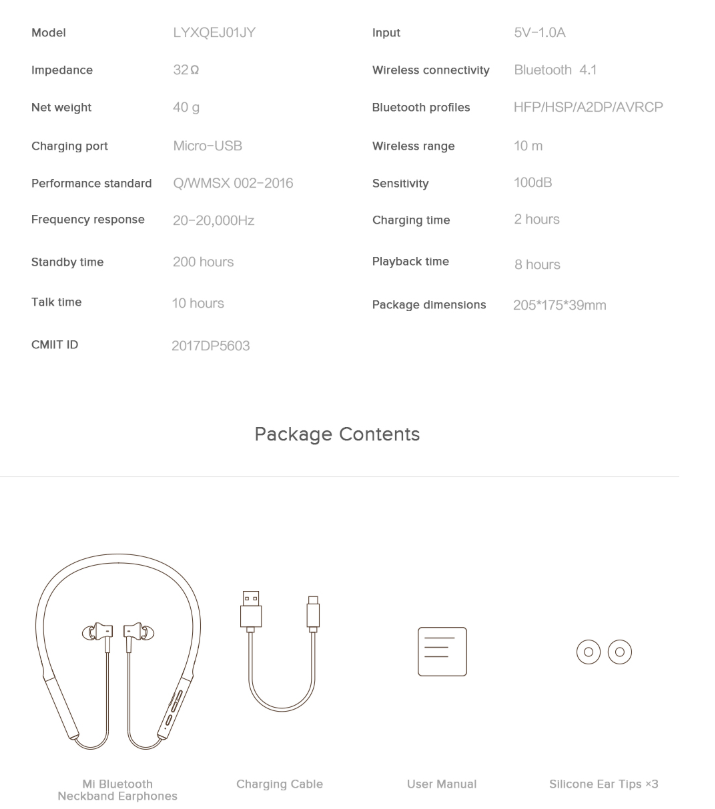
2.Q:How long of Mi Bluetooth Neckband Earphones wire?
A:Mi Bluetooth Neckband Earphones connects through Bluetooth. The bluetooth signal coverage is about 10 meters, and the length from the collar to the headset is about 22cm. After big data investigation, Mi Bluetooth Neckband Earphones can meet the needs of most people and will not feel too long during use, which can reassure users to choose.
Common problem
1.Q:How does Mi Bluetooth Neckband Earphones turn on and turn off?
A:
Turn on:Long press the power key for 3 seconds, and the blue light will be on for 1 second before starting the machine. After starting the machine for the first time, it will automatically enter the state of waiting connection.
Turn off:Long press the power key for 3 seconds, and after the red light goes on for 1 second, the headset will turn off.
2.Q:How does Mi Bluetooth Neckband Earphones charge?
A:Mi Bluetooth Neckband Earphones indicator light is normally on in red when charging and goes off after finishing charging.If the headset is charged on power, the headset will restart and enter the charging state.
When charging, you only need to connect the standard data cable to the adapter and insert the Micro-USB charging port for charging. It is not recommended to use mobile power to charge the headset. Some mobile power supplies have charging restrictions on low current, which may lead to the failure of charging.
3.Q:Does Mi Bluetooth Neckband Earphones support charging while using?
A:Considering the convenience of wearing the collar headset and the charging method of the Bluetooth headset, Mi Bluetooth Neckband Earphones does not support charging while using.
4.Q:How long is the battery life and charging time of Mi Bluetooth Neckband Earphones?
A:The standby time is about 200 hours (listening to music for about 8 hours), and charging time is about 2 hours.
5.Q:How to check the battery of Mi Bluetooth Neckband Earphones?
A:When the Mi Bluetooth Neckband Earphones turn on, it will report the power level by voice. When the power level is low (about 25-30 minutes after the headset will turn off), the headset will also report the power level.It can also be judged according to the state of Mi Bluetooth Neckband Earphones indicator: when the battery is low, the red LED light flashes twice in one second and cycles once in five seconds.In addition, when Mi Bluetooth Neckband Earphones is connected to IOS or Xiaomi mobile phone, the battery will be displayed in the status bar (due to the inconsistent android phone protocol, some Android phones cannot display the battery, which is a normal phenomenon, not a product quality problem).
6.Q:How to pair Mi Bluetooth Neckband Earphones?
A:How to connect:In the state of shutdown, long press the key on for 3 seconds, the blue light flashes, Mi Bluetooth Neckband Earphones enters the state of waiting to be connected, turns on the mobile Phone Bluetooth, searches and connects the Bluetooth device: MI Bluetooth Neckband Earphones, (if need to enter password, the password is 0000) after the pairing succeeds, the headset indicator turns to the state of blue breathing light, it means that connection succeeds.
Automatic connection: Mi Bluetooth Neckband Earphones will automatically connect back to the connected Bluetooth device after turning on. When no record is detected or any Bluetooth device cannot be connected back successfully, Mi Bluetooth Neckband Earphones will automatically enter the state of waiting for connection.
Disconnect: When the phone turns off the Bluetooth connection or exceeds the connection range, Mi Bluetooth Neckband Earphones will automatically enter the state of waiting for connection. If it is not connected to any device within five minutes, Mi Bluetooth Neckband Earphones will automatically shut down.
7.Q:Does Mi Bluetooth Neckband Earphones support to connect to two different devices at the same time?
A:It doesn’t support to connect to two mobile phones at the same time,if you need to connect to another phone,repairing is ok.
8.Q:How to clear Mi Bluetooth Neckband Earphones connection record?
A:When the device turns on, hold down the volume increase button and the volume decrease button for 5 seconds, and all connection records of the Mi Bluetooth Neckband Earphones will be cleared. Then, Mi Bluetooth Neckband Earphones will automatically enter the state of waiting for connection.
9.Q:What bluetooth protocolversion does Mi Bluetooth Neckband Earphones use?
A:It supports bluetooth 4.1,HFP/HSP/A2DP/AVRCP and Apt-X、AAC.
10.Q:Why can't some mobile phones adjust the volume when using Mi Bluetooth Neckband Earphones?
A:Because of the different operating system on the bluetooth headset button function definition is different, there may be a few android phone can't use headphones to adjust the volume, this is not product performance failure or troubleshooting, IOS mobile phones and Xiaomi phones support to adjust the volume through the buttons, in case of user feedback this problem, can guide users to change the other phone to try or directly to adjust the volume on your phone.
11.Q:Is it difficult to press the button when wearing Mi Bluetooth Neckband Earphones?
A:Mi Bluetooth Neckband Earphones has taken into account the problem of wearing the button at the beginning of its design. In particular, the power key and volume increase key are separated, so that the button can be quickly distinguished by fingers during wearing, avoiding the occurrence of incorrect pressing and facilitating blind pressing during wearing.
12.Q:Does Mi Bluetooth Neckband Earphones support waterproof?
A:Mi Bluetooth Neckband Earphones supports waterproof. Please do not use Mi Bluetooth Neckband Earphones in water. Please pay attention to fasten the USB port when using.
13.Q:Can Mi Bluetooth Neckband Earphones connect to the computer?
A:Yes, Mi Bluetooth Neckband Earphones supports connecting to computer with Bluetooth module function.
Q&A
1.Q:How to do if Mi Bluetooth Neckband Earphones cannot be searched or connected?
A:1、Determine whether the headset has entered the pairing mode, and the red and blue lights flash under the pairing mode.
2、 Whether the mobile phone turns on bluetooth and is searching bluetooth.
3、 Whether the mobile phone turns on bluetooth and is searching bluetooth.
4、 Try to clear the connection record of the headset.
5、 Try to replace other mobile phones.
6、Apply for after-sales inspection.
2.Q:Why can't use the microphone of Mi Bluetooth Neckband Earphones when recording with my mobile phone?
A: Usually, if you want to use headset microphone for recording need mobile terminal App support with headset microphone, headphones can open bluetooth microphones at the request of mobile phone system to the corresponding rights, on the most android phones on the market are unable to use this feature, the iPhone system above IOS9.0.1 version can use bluetooth headset microphone for recording.
In addition, if the user has the need to use headset microphone for recording, the user can be advised to install the third software, some third-party software can be set up to use Bluetooth microphone for recording.
3.Q:Why is there silence, low sound or abnormal sound when you make voice calls or send voice messages using mobile chat software?
A:This problem is caused by the adaptation of Android mobile phone and chat software, which is not a product quality problem. In this case, the voice is recorded through the microphone of the phone rather than the microphone of the headset, so there will be silent, low sound and other sound abnormalities.
4.Q:When making a phone call or recording with Mi Bluetooth Neckband Earphones, how to do if sound is silent or low?
A:1、Check whether the MIC of Mi Bluetooth Neckband Earphones is blocked by dirt, and try after cleaning the MIC hole;
2、 Check the wearing way Mi Bluetooth Neckband Earphones and ensure that the collar is not shielded against MIC.
5.Q:Why does the button not work when playing music?
A:This problem is usually caused by the third-party software installed in the mobile phone, not the product quality problem, because the button definition of each player may be different. If the same problem happens, change other music players.
6.Q:Why do earphones play music silently?
A:
1、For Android phones, please check whether the media volume switch in the phone is on or not.
2、 Check whether the playing volume is turned on or not. Due to different audio sources, devices and software, it may be mistaken for silent.
3.Try again to manually adjust the volume of the playback device, player and headset.
4、 Check whether the bluetooth headset and mobile phone are within the range of Bluetooth communication and whether there is interference from Bluetooth;
5、 Try to change the mobile phone or make a phone call;
6、 Apply for after-sales inspection.
7.Q:Why do earphones make calls silently?
A:1、For Android phones, please check whether the audio of the phone is on or not.
- Check whether the call audio select bluetooth headset.
- Try to replace other mobile phones and check whether there is any fault with the mobile phones;
- Apply for after-sales testing.
8.Q:What if Mi Bluetooth Neckband Earphones cannot be turned on?
A:The failure to boot Mi Bluetooth Neckband Earphones is usually caused by battery or improper boot operation.
1、 It is suggested that the user try to recharge the battery for an hour (if the battery is not enough, the red light will only go on after 30 minutes of charging);
2、 Long press the power key for more than 3 seconds when starting the machine (do not let go during the long press process).
9.Q:Does the Mi Bluetooth Neckband Earphones get stuck or disconnected when listening to music?
A:1、Check the music source of the player and try to replace other music sources.
2、 The bluetooth headset is low in power, please try it after recharging.
3、 If the distance between the Bluetooth headset and the mobile phone is too far, put the bluetooth headset near the mobile phone and try.
4、 If the distance between the Bluetooth headset and the mobile phone is too far, put the bluetooth headset near the mobile phone and try.
5、 Adjust the wearing position, do not use the hand on the top of the collar, or try other mobile phone.
Does it help?
Yes
No