

Mi Bluetooth AirDots FAQ(youth version)
Overview
1. Q: What does the Mi Bluetooth AirDots?
A: Mi Bluetooth AirDots starand: Mi Bluetooth AirDots, charging box, charging cable, earmuffs * 3 pairs (The earmuffs are equipped with one pair of earmuffs, and two pairs of earmuffs are attached for users to replace, A total of three pairs of earmuffs, models are: large, medium and small), and instructions.
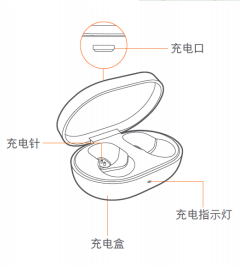
2. Q: Mi Bluetooth AirDots appearance introduction.
A: The appearance of Mi Bluetooth AirDots is elegant and simple with exquisite material. The charging box cover adopts the difficult two-color injection molding process. The appearance is as follows:
4. Q: How much is the protection level of Mi Bluetooth AirDots?
A: Mi Bluetooth AirDots protection level is IPX4.
5. Q: What are wireless headphones (TWS) and what are the features of wireless headphones?
A: Wireless (TWS) headphones are headphones using true wireless stereo technology, which enables wireless connection between the two headphones without any wire connection.Compared with the traditional two-ear motion bluetooth headset, TWS technology completely eliminates the use of wires. Through the wireless series of two headphones, stereo is realized, which greatly reduces the stethoscope effect caused by the wire swing during using.
6. Q: What's the bluetooth version of Mi Bluetooth AirDots?
A: Mi Bluetooth AirDots bluetooth is the latest version 5.0.With the commercialization of the latest technical standard, more and more smart phones begin to adopt bluetooth 5.0 standard. When bluetooth headset is bluetooth 5.0, it will show the technical advantages of 5.0 to the greatest extent and bring excellent use experience to consumers.Previously, only one side of a true wireless bluetooth headset was audible, and bluetooth 5.0 enables stereo calls for a more immersive experience.Compared with bluetooth 4.2, the transmission rate and transmission distance are improved, and it is also more power-saving and safe.
Q&A
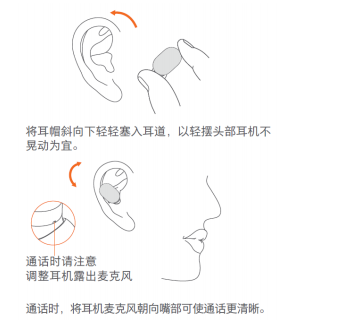
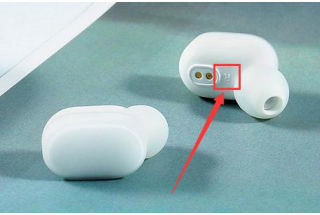
1. Q: How to wear the Mi Bluetooth AirDots?
A: First select and assemble appropriate ear muffs, then wear them as shown in the picture below
2. Q: How to charge the Mi Bluetooth AirDots youth version?
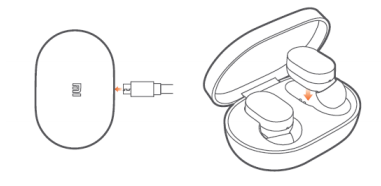
A:Charge for the charging box,The charging starts when the headset is put into the charging box, as shown in the following figure:
3. Q: How to switch on and off the Mi Bluetooth AirDots?
A: Mi Bluetooth AirDots switch method is as follows:
Boot:
1. Under charging state, the earphone will automatically boot when the earphone is taken out.
2. In the shutdown state, long press the touch panel to start the machine for 1 second (the white light is on).
Turn down:
1. The earphone will shut down automatically when it is put into the charging box.
2. When the machine turn on, press the touch panel for 5 seconds to turn off (the red light is on).
Note: In the case of two earphones in series, when one earphone is closed manually through the touch panel, the other earphone is closed simultaneously.
4. Q: How does the Mi bluetooth AirDots connect to mobile phones and other devices?
A: The Mi bluetooth AirDots can be used with two headphones at the same time, or with a single headset and phone. As follows.
Dual headphones mode:
1.First power on the two headset(can be automatically switched on, out of the box can also press 1 seconds long touch panel manual boot), about the headset series factory has been matched, about 2 ~ 3 seconds after boot headset series automatic success, after the success of the series lights extinguished her left ear, right ear light white light slow flash.If the serial record has been cleared or the serial is not successful, repeat the serial pairing.
2. Search "MI AIRDOTS BASIC _R" to complete the connection.When the headset turn on again, it can be automatically connected back to the matching device.
Note: Under the condition of headphones have a serial record (the factory has been in series matching), left boot after 20 seconds before will white lamp lights flash, the left ear is already been series matching to search the right ear, such as the right ear was not boot, hypertelorism, signal interference and no complete series, with the right light white lights flash slowly, 20 seconds after the left earphone into the state of the bluetooth pairing, mobile phone can be connected with the left earphone, separately left at this time will not be with the right headsets in series, if you need series, can only restart the left earphone
Single earphone mode:
1. Turn on one earphone separately (you can take it out of the box and turn it on automatically, or you can press the touch panel hand for 1 second
Power on.
2. When waiting for the white light flashes, search "MI AIRDOTS BASIC _L" or "MI AIRDOTS BASIC_R" to complete the connection.When the headset turn on again, it can automatically connect back to the previous matching device.
Note:
1. The headset has been series matching case (The factory has been in series matching), White lamp light will flash before left earphone boot in 20 seconds, try to connect already series matching right earphone, if you can't finish series-connection within 20 seconds, after 20 seconds, the white light flash slowly,at this time the left earphone into the state of the bluetooth pairing, automatic back to the last paired device.
2. The headset has been matched cases (the factory has been in series matching), even if your mobile phone and left earphone has paired, but the if right earphone boots before the left earphone, or the two earphones boot interval less than 20 seconds, the left earphone will be done with the right headphones series, not connected to the phone.If you do not want to use left and right earphones in series, you can clear the series record of left and right earphones, or the right earphone boots after the left earphone 20 seconds.
5. Q: How to clear the pairing record between the Mi bluetooth AirDots and the device?
A: In the shutdown state, long press the touch panel of any headset for 10 seconds until the indicator light flashes red and white alternately for 3 times and then goes out, and the connection record between the headset end and the device is cleared.
6. Q: How to clear the tandem record of two headphones of Mi bluetooth AirDots?
A:In the shutdown state, press the touch panel of the two earphones for 10 seconds until the light flashes red and white alternately for 3 times and then goes out. Continue to hold down for 10 seconds until the light flashes in red and white alternately for 3 times and then goes out, and the serial record of the two earphones is cleared.
7. Q: How does Mi bluetooth AirDots tandem pairing?
A: The Mi bluetooth AirDots has been paired in series when it leaves the factory. If the user clears the serial record, the serial pairing can be performed again.
Serial pairing method:
1. First confirm whether the indicator light is red and white double flash after the user's two earphones turn on (the indicator light is red and white flash).
2. If the red and white lights didin't flash at the same time, it is suggested to turn off the earphone first. In the shutdown state, long press the touch panel of the two earphones for 10 seconds until the light flashes red and white alternately for 3 times and then goes out.
3.Then two headphones boot at the same time(boot intervals should be less than 20 seconds, the time is too long to enter the bluetooth pairing state), the light is red, white and light double flash at the same time, about 2 ~ 3 seconds after series, series after the success of the left earphone light is put out, the right headphones light white lights flash slowly, at this point you can use mobile search and matching.(sometimes only one earphone will exit the red and white light and double flash at the same time. In this case, you can try to restart both earphones several times.)
8. Q: How to answer/hang up calls, refuse calls, play/pause music, and turn on voice assistant?
A: Answer/hang up the phone: when an incoming call is received, gently touch the touch panel of any headset to answer the call;During the call, touch the touch panel of any earphone to hang up the call. Refuse to accept calls: when incoming calls, long press any headset touch panel for about 1 second to refuse to accept calls; Play/pause music: in standby mode, tap the touch panel of any headset to play/pause music.(music software needs to be running in the background.)Turn on the voice assistant: in standby mode, tap the touch panel of any headset twice to turn on the voice assistant.(the device needs to support the voice assistant function and turn on the quick wake setting.)
9. Q: Does the Mi bluetooth AirDots support simultaneous connection between two phones?
A: it doesn't support connecting two phones at the same time.
10. Q: Will the Mi bluetooth headset AirDots shut down automatically if it is not connected for long time?
A: If you are disconnected for long time, the earphone will automatically shut down after 5 minutes.
11. Q: How to use the Mi bluetooth headset AirDots to answer the second call and switch calls?
A: When the mobile phone calls, touch the touch panel of any headset to make a call. If there is a new call during the call, touch the touch panel to keep the previous call and make the second call, touch the touch panel to switch the two calls.
12. Q: How to switch between the headset and the handset through the Mi Bluetooth AirDots during the call?
A: In the talking state, long press the touch panel of any headset for about 1 second to switch to the handset.
13. Q: How to turn on/off the mute through the Mi bluetooth AirDots?
A: During the conversation, the mute can be turned on by tapping the touch panel of either earphone twice, and the mute can be turned off by tapping the touch panel of the earphone twice
14. Q:Can I use mobile power to charge Mi bluetooth AirDots?
A: At present, most mobile power supplies have current protection. When the mobile power supply detects that the output current is too small, it will be disconnected and charged.Because the battery capacity of Mi bluetooth AirDots is small, the current when charging is also small, which is generally lower than the current protection trigger value of charging treasure, so the current protection function of mobile power will be triggered.If the user visits to consult whether can use mobile power to charge the Mi bluetooth AirDots, it is suggested to confirm if the power bank supply support small current mode? If so, you can use small current mode to charge the headset.
15. Q: When the phone calls, will Mi bluetooth AirDots broadcast the contact name?
A: When a call comes in, the Mi bluetooth AirDots will only ring the bell, not support broadcast the contact name.
Troubleshooting
1. Q: What should i do if Mi bluetooth AirDots can not boot or no reaction?
A: Please check according to the following methods:
1. It may be that the earphone is out of power, please try to turn it on after the earphone is fully charged, and confirm the charging box before charging the earphone
Sufficient electricity;
2. If the battery is charged for more than 30 minutes, the headset indicator still doesn't work. The battery may be damaged.
3. If the headphone indicator light will be on, try to boot it after it is fully charged. If it still cannot be started, please guide the after-sales inspection.
2. Q: How to do if can't search the Mi bluetooth AirDots of bluetooth signal?
A:
1. Determine whether the headset has entered the searched state. When the headset is in the searched state, the white light of the headset indicator flashes slowly.
2. Try to restart the phone, replace the phone, and search after changing the use environment. If the search still fails, please contact with the after-sales.
3. Q: How to do the device can search the Mi bluetooth AirDots youth version but cannot sonnect?
A: If the device can search the Mi bluetooth headset AirDots, but the connection is not available, it may be the device's bluetooth data is abnormal, please try to delete the connection record before the device, restart restart, and then try to pair the connection.
4. Q: How to deal with that PIN code or wrong matching password always appears when the device is connected to Mi bluetooth headset AirDots?
A: You can try to enter "0000". If it is still wrong, the bluetooth data of the device may be abnormal. Please try to delete the connection record of the device before, restart the device, and then try to pair the connection.
5. Q: How to deal with if Mi bluetooth AirDots has intermittent sound or noise?
A: please follow the following methods:
1. It may be that the battery of the mobile phone or earphone is low, please observe after it is fully charged;
2. If the distance between the phone and the earphones or between the two earphones is too far or an object blocks the signal (such as a wall), there may be the problem of intermittent sound or noise.
3. There may be signal interference in the use environment. Try to compare whether there is such phenomenon in other use environments;
4. Clear the pairing record of the earphone terminal, delete the connection record of the phone, and pair the phone for use after restarting the phone. If there is still a problem of intermittent sound or noise, please replace the other phone for testing.
6. Q: How to deal with if use Mi bluetooth AirDots make calls or listen to music silently?
A: please follow the following methods:
1. First determine whether the volume of the mobile phone is adjusted too low. If the volume is normal, please enter the "bluetooth setting" of the mobile phone to check whether the "mobile phone audio" and "media audio" of the youth version of xiaomi bluetooth headset AirDots in the connected device are both enabled.
2. Delete the pairing record of the earphone terminal, delete the connection record of the phone, and connect the phone again after restarting to see if there is any sound. If it is still silent, connect to other phones for testing.
7. Q: How to deal with if Mi bluetooth AirDots charging box cannot charge?
A: please follow the following methods:
1. Confirm whether the input voltage and current of the charger meet the requirements. If not, please replace it;
2. Replace the charging cable and charger to try whether it can be charged. If it can be charged, it may be the problem of the charging cable or charger;
3. Use the charging cable and charger to charge other devices and verify whether the charging cable and charger are normal. If other devices are charged normally, please charge the charging box for half an hour and then observe.
Does it help?
Yes
No