

Mi 20W Wireless Charging Stand FAQ
Specification
| Product model | Mi 20W Wireless Charging Stand |
 |
|
| Basic Parameters | Product Name:Mi 20W Wireless Charging Stand (Universal 20W Fast Charge) |
| Model No.:WPC02ZM | |
| Input Port:USB-C | |
| Transmission Distance:≤4 mm | |
| Input Parameters:5V=2A/9V=1.6A/12V–16V– 1.7A max | |
| Output Parameters:20W max | |
| Operating Temperature:0°C–35°C | |
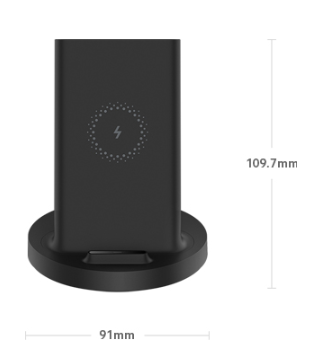
| Product Dimensions:109.7 × 91 × 91 mm | |
| Package Contents | Mi 20W Wireless Charging Stand (Universal 20W Fast Charge) × 1 |
| USB cable × 1 | |
| User manual × 1 |
Overview and product introduction
1.Q:What features does Mi 20W Wireless Charging Stand have?
A:1.A new wireless charging experience:Watch a movie while charging
2.Vertical design:Quick induction instant charging
3.20W max:Powerful 20W super fast wireless charging(1.Up to 20W max wireless super fast charging when used with Mi original 27W or 27W above adapter。2.Apple wireless fast charging: Not compatible with the original 5V/1A adapter that comes with Apple phones. We recommend using 18W Charger for fast wireless charging.3.Universal 20W fast charging: 20W wireless fast charging is for Mi 9, Mi 9 Pro, Mi 10, Mi 10 Pro. Peak power may vary for other phone models due to differences in firmware versions.)
4.Universal fast charge:Compatible with most devices supporting wireless charging
5.Dual coils:Charges a phone placed vertically or horizontally
6.Charges through case:≤4 mm induction distance
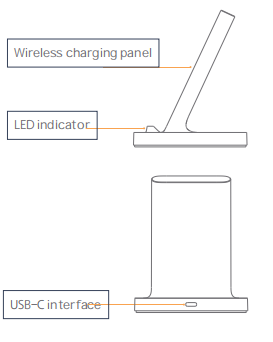
2.Q:Appearance introduction of Mi 20W Wireless Charging Stand
A :

3.Q:Which devices can be charged by Mi 20W Wireless Charging Stand?
A :1.Mi 20W Wireless Charging Stand is a charging bench that can be used to charge a Qi-standard device.When the wireless charger is in normal working state, the LED green light is steady on.
2.Smartly compatible with Apple and Samsung.Charges phones even in their cases.Compatible with a wide range of devices supporting wireless charging. Provides not only 20W super fast charging for Mi 9 and Mi 9 Pro, but also 10W fast charging for Samsung S10. Wireless charging with an induction distance of up to 4 mm lets you keep your phone in its case and still enjoy super fast wireless charging.
4.Q:What requirements does Mi 20W Wireless Charging Stand has on the adapter?
A :
1. 5V/1A adapters are not supported.
2. 5V/2A adapter supports 5W wireless charging.
3. QC2.0/QC3.0 (18W and above) adapters support 10W wireless charging.(Also need your phone to support it)
4.QC3.0 Class B (27W and above) adapters support 20W wireless flash charging.(Also need your phone to support it)
Note: In iOS13.1, Apple adjusted the Wireless Charging frequency of iOS devices, so Mi 20W Wireless Charging Stand only supports 5W when charging for the IOS device.
5.Q :How does Mi 20W Wireless Charging Stand charge for the phone?
A :Place a Qi-standard phone with wireless charging function in the center of the wireless charger and charging will start automatically.When the wireless charger is in normal working state, the LED green light is steady on.When charging, keep the center position of the mobile phone aligned with the center position of the wireless charger for wireless charging. If the charging cannot work normally, please adjust the position of the mobile phone (double coil design, place in horizontal or vertical) until the mobile phone shows normal charging or the LED indicator brights green.
6.Q:What does the indicator status mean?
A :1. After the wireless charger is powered on, the LED indicator light will blink green three times to start normal operation.
2. When the wireless charger is in normal working state, the LED indicator is green on.
3. The wireless charger is in the error and protection stage, and the LED indicator will blink green.
7.Q :Could Mi 20W Wireless Charging Stand be used with a magnetic strip or chip?
A :Mi 20W Wireless Charging Stand should not be placed too close to the magnetic card with a magnetic strip or chip to avoid causing the card to become invalid.
8.Q:Could Mi 20W Wireless Charging Stand be too close to an implanted medical device?
A :Please keep the distance between the implanted medical device and the wireless charger at least 20cm to avoid potential interference to the medical device.
Troubleshooting
1.Q:How to do if the indicator blinks green?
A :When the LED indicator blinks green, the wireless charger is in the error and protection phase.
Perform the following steps to rectify the fault :
1. Check whether the wireless charger is powered through the USB port of the computer. The USB port of the computer has a low power supply current, so it cannot be powered through the USB port of the computer.
2. The LED indicator will blink when you plug in the adapter, guide the user to change another adapter and avoid a metal object on the wireless charger.
3. If the wireless charger will blink after phone being placed on it, first confirm whether the mobile phone supports Qi standard wireless charging, and then confirm whether there is metal foreign matter on the back of the mobile phone. If metal is detected, the LED indicator will blink and report an error.
4, if still cannot solve, please apply for after-sales detecting.
2 Q:How to do if Mi 20W Wireless Charging Stand can’t charge for the phone?
A :1.Check whether the phone supports wireless charging of the Qi standard.
2. Check whether the wireless charger is powered by the USB interface of the computer. The USB interface of the computer has a low power supply current, so it doesn't support the power supply through the USB interface of the computer.
3. Check whether the output current of the adapter is too low. For example, the 5V/1A adapter of the iPhone standard cannot be used.
4. Confirm whether there are metal objects placed on the wireless charger, or whether there are metal foreign bodies on the back of the phone. If metal is detected, the LED indicator will flash to report error.
5, if the mobile phone has a protective case, the thickness shall not exceed 4mm, you can try to remove the protective case to charge.
6. When charging, keep the center position of the mobile phone aligned with the center position of the wireless charger for wireless charging. If the charging cannot work normally, please adjust the position of the mobile phone
7. if still cannot solve, please apply for after-sales detecting.
Does it help?
Yes
No