

Amazfit Bip FAQ
| Product Weight | 1.1 oz / 32 g |
| IP Rating | IP 68 |
| Display Size | 1.28” |
| Display Resolution | 176x176 px |
| Display Type | Trans-reflective color LCD touch screen, Backlight luminance |
| Display Material | 2.5D Corning Gorilla Glass screen, AF Coating |
| Wristband Width | 20mm |
| Band Material | Silicone |
| Wristband Length | 11+8.5 cm |
| Sensor | PPG Heart Rate SensorAcceleration SensorGeomagnetic SensorBarometric Sensor |
| GPS | GPS + GLONASS |
| Connection | Bluetooth 4.0 / BLE |
| Battery | 190mAh Lithium Polymer Battery |
| Charging Time | 2.5 h |
| Standby Time | About 4 Months basic use/ 45 days regular use/ 22 hours GPS + Running mode |
| Vibration Motor | Rotor Motor |
| Case Material | Polycarbonate |
| APP | Mi Fit |
| Language | English |
| System Support | iOS 8.0 and above with BLE 4.0+, Android 4.4 and above with BLE 4.0+ |
Main Features
- Steps & Distance Tracking (track daily steps, mileage, and calories burning data)
- Heart Rate Tracking
- Activity & Sports Tracking
● Sleep Monitoring
● Weather Forecast
- Alarms
- Stopwatch & countdown Timer
- Notifications (receive notifications for incoming calls, messages, SMS, emails, and other apps. Remind you when you reach your goal)
- Idle Alert
- Compass
- Silent Mode
- Screen Unlock ( only for smart lock phones)
Get Started
1. Package Contents
Watch, Charger, User Manual
2. Charging your watch
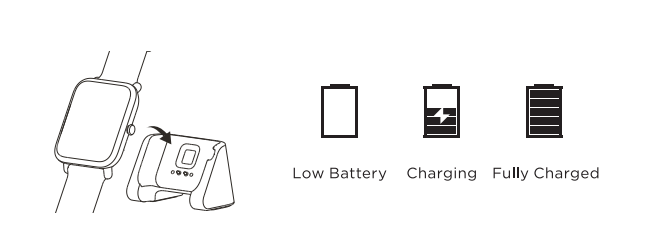
Please fully charge your watch before use. It takes about 2.5 hour to fully charge it.
To charge your Amazfit Bip
Insert the watch into its charging base, attach the USB end of the charger to your PC or a normal charging adaptor. Once clipped in, the watch face will light up and show that the watch as “charging”.
Note: Charger adapter output values is DC 5.0V.
3. Download the APP & Sign in
1) The Amazfit Bip companion app is available for iOS in the Apple App Store and for Android in the Google Play Store. Please search for “Mi Fit” to download and install the app.
2)Scan the QR code in the Amazfit Bip Manual to download and install Mi Fit APP.
You can sign in to Mi Fit app with your Mi account. If you don’t have a Mi account, you can use your email address or phone number to create one.
Does it help?
Yes
No