

10000 mAh Mi Wireless Power Bank FAQ
Overview
1. Q: What is wireless charging?
A : Wireless charging technology, also known as inductive charging and contactless charging, is a new type of charging technology derived from wireless power transmission technology. Wireless charging technology uses near-field induction to transmit energy from the wireless charger to the device being charged, which uses the energy received to charge the battery and provide energy for the device itself to operate. Since the wireless charger and the charging device transmit energy through inductive coupling, no wires are needed and no conductive contacts are exposed.
2 . Q : What is Qi?
A: Qi is the "wireless charging" standard introduced by the Wireless Power Consortium, the world's first standardization organization promoting wireless charging technology. First, products of different brands can be charged with Qi wireless chargers as long as they have a Qi logo. Secondly, it has overcome the technical bottleneck of wireless charging "universality", in the near future, cell phones, cameras, computers and other products can be charged with Qi wireless chargers, providing the possibility of large-scale application of wireless charging.10000 mAh Mi Wireless Power Bank Essential supports this standard.
F&Qs
1.Q :How to charge10000 mAh Mi Wireless Power Bank Essential?
A: Use the charging cable in the package (or other regular manufacturers' charging cables) to connect the charger and the wireless charging power to charge the wireless charging power. When charging, the indicator shows the power information as follows:
|
Power
|
LED1
|
LED2
|
LED3
|
LED4
|
|
0-25%
|
Blink
|
Extinguished
|
Light off
|
Light off
|
|
25-50%
|
Light on
|
Blink
|
Light off
|
Light off
|
|
50-75%
|
Light on
|
Light on
|
Blink
|
Light off
|
|
75-99%
|
Light on
|
Light on
|
Light on
|
Blink
|
|
Charging completed
|
Light on
|
Light on
|
Light on
|
Light on
|
|
Charging abnormal
|
Blink
|
Blink
|
Blink
|
Blink
|
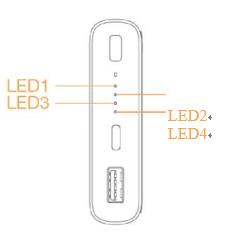
2. Q: How does the power indicator show when10000 mAh Mi Wireless Power Bank Essential is charging other devices?
A : When 10000 mAh Mi Wireless Power Bank Essential is discharged, the power information displayed by the indicator is as follows:
|
Power
|
LED1
|
LED2
|
LED3
|
LED4
|
|
Undervoltage
|
Light off
|
Light off
|
Light off
|
Light off
|
|
0-25%
|
Blink
|
Light off
|
Light off
|
Light off
|
|
25-50%
|
Blink
|
Blink
|
Light off
|
Light off
|
|
50-75%
|
Blink
|
Blink
|
Blink
|
Light off
|
|
75-99%
|
Blink
|
Blink
|
Blink
|
Blink
|
3.Q :How can I use10000 mAh Mi Wireless Power Bank Essential to charge other devices?
A :10000 mAh Mi Wireless Power Bank Essential supports both wired (USB-A) and wireless charging of other devices.
It also supports charging two devices at the same time by wired (USB-A) and wireless means.
Wired charging (USB-A): automatically detects wired charging and discharging without key operation. The power indicator turns off about two minutes after the discharge is completed.
Wireless charging: short press the power check key/short press the power check key twice in a row/access the charger to the adapter to turn on the wireless charging function (the wireless charging indicator lights up to enter the wireless charging standby mode); long press for more than 3 seconds to turn off the wireless charging function (the wireless charging indicator goes off)
Wireless charging indicator corresponds to the working state as follows:
|
Wireless charging indicator status
|
Wireless charging working state
|
|
Standby
|
Breathing light
|
|
Work
|
long bright
|
|
Abnormal
|
Blink
|
|
Close
|
Light off
|
When the wireless charging device is not charged, you can turn on the wireless charging function by short pressing the power check button, if you do not put in the wireless charging device, the wireless charging function will be turned off automatically after 1 minute. If you put in the wireless charging device and then remove it, the wireless charging function will be turned off automatically after 1 minute. After the charging device enters the hibernation mode (hibernation mode: the wireless charging indicator and power indicator are all off), the charging device will automatically detect whether there is a wireless charging device connected to the charging device every 10 minutes. When there is a wireless charging device, the charging device will automatically turn on the wireless charging function and charge the wireless charging device.
The operation of the power check button is as follow:
| Power check key operation method | Wireless charging working state | Wired charging working status |
| Short press | on | Forced on |
| Short press twice in a row | on | Open |
| Long press (greater than 3 seconds) | off | Forced off |
4.Q: 10000 mAh Mi Wireless Power Bank Essential small current discharge mode introduction?
A: 10000 mAh Mi Wireless Power Bank Essential Under the non-charging state, press the power check button twice in a row to enter the low-current discharge mode.
Enter the small current discharge mode, you can charge Bluetooth headset, bracelet and other small current devices continuously, the LED light will light up one by one.
The LED lights will light up one by one to indicate that the user is in low-current discharge mode in the form of running lights. If you need to exit this mode at this time.
Just short press the power check button once. Each time you enter the low current mode, the working time is 2 hours, after 2 hours.
After 2 hours, it will exit this mode automatically.
5 . Q:How to place the phone when using the wireless charging function of 10000 mAh Mi Wireless Power Bank Essential?
A: When charging wirelessly, keep the center of the phone aligned with the center of the wireless charging panel for wireless charging. If it does not work properly, please adjust the position of the phone until it shows normal charging (please refer to the following figure for the position)
Does it help?
Yes
No