

Mobile phone camera appears flash back (black screen or unable to start)
Solution:
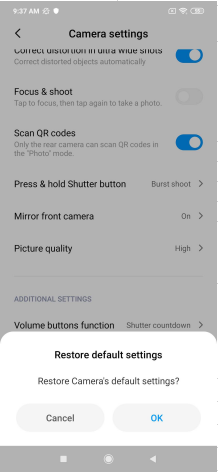
When the camera Settings can be accessed, clear the camera data,restore default Settings (as shown in the figure below) and try again,
1. Enter *#*#6484#*#* in the dialing interface to enter "camera test" or use a third-party camera application to take photos (to exclude whether there is a fault in the camera hardware).
2. Restore factory Settings after data backup, update the latest complete package, and try without restoring any backup,
3. If none of the above methods work, please it is suggested to go to the Xiaomi authorized after-sales center for inspection.
When the camera Settings can be accessed, clear the camera data,restore default Settings (as shown in the figure below) and try again,
1. Enter *#*#6484#*#* in the dialing interface to enter "camera test" or use a third-party camera application to take photos (to exclude whether there is a fault in the camera hardware).
2. Restore factory Settings after data backup, update the latest complete package, and try without restoring any backup,
3. If none of the above methods work, please it is suggested to go to the Xiaomi authorized after-sales center for inspection.
Does it help?
Yes
No