

Mi Watch Lite FAQ
Specification
Overview
1.Q:What are the features of Mi Watch Lite?
A:1. A 1.4-inch high-definition square screen with a resolution of 320×320 is adopted to display a clear and exquisite display. The touch and slide are sensitive and smooth.
2. The watch has simple and lively appearance design, different colors of the watchband and personalized dial, is suitable for all kinds of scenes.
3. support a variety of mainstream sports mode of the whole movement data tracking, it is the best choice for entry-level sports enthusiasts.
4. Comprehensive health tracking, support heart rate monitoring function, help to have a deeper understanding of the body, escort for a healthy life.
6. It support 5ATM waterproof level, can be used in swimming.
2. Q: What material is the MI Watch Lite strap made of?
A: The strap is made of TPU, which is light and comfortable to wear and supports quick removal.
3. Q: How to replace the MI Watch Lite strap?
A: The strap supports quick removal, and the replacement method is as follows:
4. Q: What is the waterproof grade of MI Watch lite?
A: The waterproof grade of MI watch Lite is 5ATM, which can be used for water activities in shallow water such as swimming pool and beach swimming. It is not suitable for sauna, hot spring and other high humidity and high temperature scenes, nor is it suitable for diving, diving, surfing and other wading activities and deep-water activities facing high-speed water flow.
Note: 50m waterproof refers to the waterproof depth of the watch under the standard conditions. This condition means that the watch has a certain water resistance pressure under the static state. The compressive value is not obtained under water, but converted from the value of atmospheric pressure. 50m waterproof means that the watch can withstand the pressure of 50M water depth under the static state.
5. Q: What is the standard configuration of MI Watch lite? What colors are there?
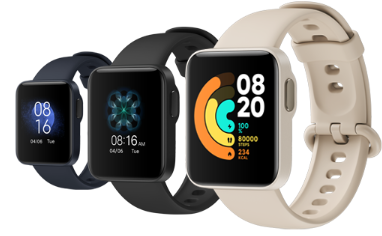
A: Mi watch Lite regular edition is equipped with watch body x 1, contact charging base x 1 and product manual x 1. At present, there are three colors of elegant black, ivory white and ink blue.
APP Usage Related
1.Q: What device bindings does Mi watch Lite support? Is IOS supported?
A: Mi watch Lite needs to be bound through Mi Fitness app in Android and IOS system, which can be searched and downloaded in the app store.
The binding method is as follows:
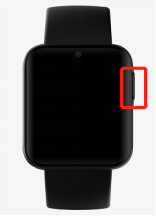
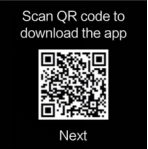
1.Press and hold the power key for about 3 seconds to turn on the watch. Scan the QR code of the watch screen with mobile phone, download and install Mi Fitness.
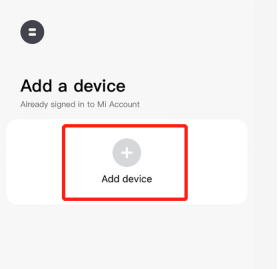
2.Open the app and open the relevant permissions of APP according to the pop-up hint. Click "add device". When the Bluetooth name of the watch appears, click to pair.

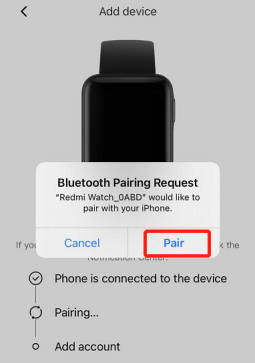
3.When the mobile phone displays the Bluetooth pairing request, click "pair" to complete the pairing connection with the watch.
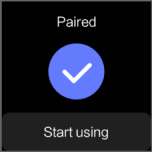
Note:
1. In the pairing process, please make sure that the Bluetooth of the mobile phone is on to ensure the normal connection between the watch and the mobile phone.
2. If can't find the watch in the process of adding the device, or can't connect the watch during the use process, please try to press the watch power button for 3 seconds, select restore factory in the system operation interface, and then add the watch again.
3.Q: How to unbind Mi Watch lite?
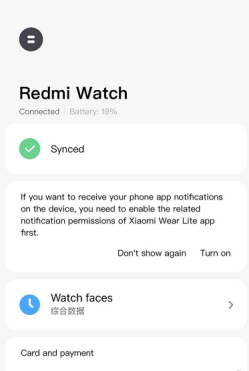
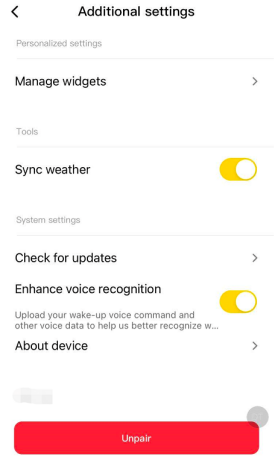
A: 1, Open the app and click other settings in home page> unbind;
2, It will be automatically released from the factory after unbinding, the watch will return to factory settings and all data will be cleared.
4.Q: Does Mi Fitness app support to bind multiple Mi Watch lite?
A:Mi Fitness app can bind multiple watches. Under the same account, 5-10 watches can be bound, but only one watch can be used.
5.Q: How does Mi Fitness app switch to other watches?
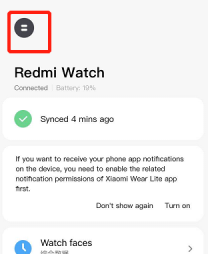
A: Mi Fitness the app, click the icon

in the upper left corner of the home page to enter the device switching interface and select the watch to switch.
6.Q: How does Mi Watch Lite upgrade system firmware?
A: The watch will push the follow-up upgrade package to update the function through app.
1, On the app homepage, click other settings > check for updates;
2, If the new version can be updated, click to download the upgrade package;
3, After the upgrade package is downloaded, it will be automatically pushed to the watch. After receiving the upgrade package, the watch will be automatically upgraded and restarted.
Note:
1. When upgrading the watch, the power needs to exceed 20%;
2. During the upgrade process, the watch should be connected to the mobile phone, and try to keep the watch near the mobile phone.
7.Q: What account does Mi Fitness app support to log in?
A: Currently, Mi Fitness app only supports Mi account login.
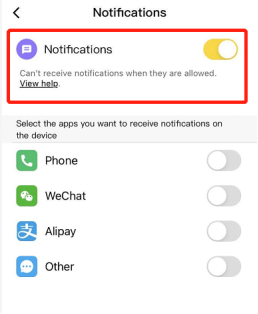
8.Q: How to set Mi Watch Lite notification alert?
A: To receive notification messages from mobile app, MI watch Lite needs to open the app message notification in Mi Fitness app.
Opening method: Mi Fitness app - notifications - open notifications - select app open notification.
Note: open the notification message application in Mi Fitness app, it needs to open the notification authority on the mobile phone at the same time.

9.Q: How to set the MI Watch Lite activity compliance reminder?
A: Mi watch Lite can set the daily calorie or step number target. After wearing the watch, it can monitor the calorie consumption, steps and standing activity of the day. When the movement reaches the standard, the watch will have a vibration warning, which cannot be turned off.
Setting method:
1. Open Mi Fitness app on the mobile phone, log in to Mi account and bind the device.
2. After successful connection with the watch, set it through data > calories / steps > daily target.
Note: in order to ensure the accuracy of exercise calorie consumption, the calories recorded by the watch do not include the consumption of human basic metabolism.
Function and use
1. Q: How does Mi Watch Lite turn on, shut down and restart?
A: Power-on: In the shutdown state, long press the power key for 3 seconds to enter the watch home page.
Shutdown:
1. In the power on state, press and hold the power key for 3 seconds. The watch will enter the page of restart, shutdown and factory recovery, and select shutdown.
2. In the power on state, click Settings > system operation > select shut down.
Restart:
1. In the power on state, press and hold the power key for 3 seconds. The watch will enter the page of restart, shutdown and factory recovery, and select restart.
2. In power on state, keep pressing the power key for 10-12 seconds, the watch will be forced to restart.
3. When the machine is turned on, click Settings - system operation - restart.
2. Q: How does the MI Watch Lite last? How long can it be fully charged?
A: It takes about 1.5-2 hours to fully charge the MI watch Lite. It can last up to 8 days under normal use.
The test scenarios are as follows:
3. Q: What is the capacity of the MI Watch Lite battery? How to charge?
A: The battery capacity of MI watch Lite is 230mAh.
The charging mode is as follows:
1. The watch is placed on the charging base, so that the charging contact on the back of the watch is fully fitted with the metal contact on the charging base.
2. Connect the other end of charging stand to USB-A charger (output voltage is 5V, output current is ≥ 0.5A).
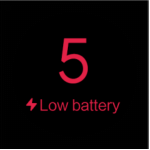
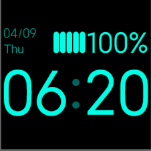
If the power of the watch is less than 10%, it will prompt to connect the charger for charging; during the charging process, there will be a charging prompt.
Note:
1. If the watch can not be turned on after being placed for a long time, the charging icon will be displayed only after recharging for about 1 minute when it is used again.
2. Before charging, please wipe the charging contact of watch to avoid residual sweat or moisture.
4. Q: What are the general operations of MI Watch lite? What is the function of the key?
A: The screen operation and key functions are as follows:
1. Slide from the top edge of the home page of the dial: open the message notification.
2. Slide up the bottom edge of the home page of the dial: open the control panel.
3. Slide left and right on the main page of the dial: switch the direct card.
4. Slide right from the left edge on other pages: return to the previous level.
5. Press and hold for 3 seconds to turn on / off.
6. Click to enter the application list (on the home page of the dial).
7. Click to pause / continue movement (during movement).
8. Long press to lock / unlock the screen.
5. Q: What are the functions of the MI Watch Lite control panel?
A: Mi Watch Lite slides up the bottom edge of the home page of the dial to access the control panel, top to bottom, left to right icons
The meanings are as follows:
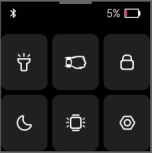

Click on / off flashlight.

Click to turn on / off the wrist lift screen.

Click to enter the screen lock state; long press the key to unlock.

Click on / off DND mode.

After clicking, the screen will stay on for 5 minutes, and then it will turn off automatically.

Click to enter the system setting interface.
6.Q:How does Mi Watch Lite lock and unlock screen?
A:The watch supports the lock screen function. After opening the lock screen, the watch will lock to the current screen and cannot be touched.Key data pages can be locked during the movement for real-time viewing.
Lock screen :
1. Slide to open the control panel on the home page of the dial and click the icon;

2. Long press the power button until the lock screen animation appears on the watch screen. Continue to press and hold the shortcut key until the screen is locked.
Unlock screen:Long press the power button until the watch screen appears with the unlock animation. Continue to press and hold the shortcut key until the screen unlocks.
Note: If choose swimming, the watch screen will lock automatically after starting the exercise.
7.Q:How does Mi Watch Lite measure and check heart rate?
A:Heart rate is the number of heart beats per minute. Mi Watch Lite uses photoelectric volume tracing technology to measure heart rate and show the heart rate value.Mi Watch Lite enable by default for 30 minutes/once time continuous heart rate monitoring, which can monitor personal heart rate.
How to view heart rate:
1. Open the app or slide to enter the heart rate card on the home page of the watch. Click to measure. After the measurement, choose to quit or re-measure.
2. Drag down the heart Rate function page to see the heart rate interval, average resting heart rate, maximum resting heart rate and minimum resting heart rate over the past 30 days.When detecting heart rate, please ensure that the front of the watch is up, the heart rate detection area is attached to the wrist, it is best to gently press the surface of the watch to increase the degree of attachment with the wrist.
8.Q:Does Mi Watch Lite support sleep monitoring?
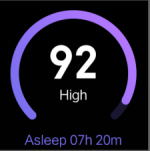
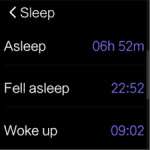
A:The watch supports sleep monitoring. The sleep monitoring function is to wear the watch normally at night and fall asleep. The watch can monitor the heart rate through the built-in sensor and automatically identify and monitor the sleep at night.
Judge the time period: the sleep monitoring time period at night is from 18:00 to 12:00. If the time of falling asleep and getting out of bed is beyond this time period, and the sleep is continuous, it will be considered as sleep at night.Daytime sleep restores energy, but does not affect night sleep scores, which are not recorded.
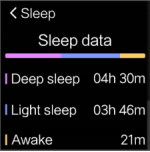
Sleep data type: Sleep data type includes night sleep score, night sleep duration, sleep quality evaluation, and related recommendations.
Sleep data view ways:
1. Slide the watch side to the sleep card on the home page of the watch face to check the sleep score and sleep quality of the last night.
2. Click "

" in the app list to view the sleep data of the day.
3. After the watch is connected to the mobile phone and synchronizes the data, click Sleep in the data section of Mi Fitness APP to view the historical sleep data, including day, week, month and year. It also supports to look at the sleep period of day, the percentage of deep sleep, light sleep, and awake, as well as detailed sleep status at each time point.
Note:
1. There is a delay in the generation of sleep report. The sleep function is turned on immediately after waking up, and there may be no sleep report.
2. The watch only keeps the sleep data of last night.Please timely synchronize the data to Mi Fitness APP to avoid data loss.
9.Q:How does Mi Watch Lite check the weather information?
A:When the watch is connected to the mobile phone, the viewing method is as follows:
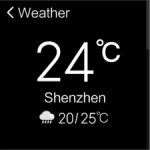
1. Click on the home screen and select the Weather app in the app list for viewing. The local temperature, weather and other information as well as the weather forecast for the next 5 days can be obtained from the sliding gear.
2. Slide the screen from left to right on the home page of the dial to enter the weather card. The owner can only see the temperature, weather and region, but cannot scroll up and down to see more information.
Note: Use the watch to check the real-time weather, it needs to keep the phone connected to the watch. and turn on the weather synchronization function of Mi Fitness APP.
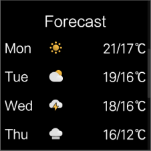
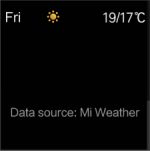
Note:
1. If the watch is not connected to the mobile phone, the weather shows the information synchronized when the phone was last connected.
2. If hide the "weather" card in Mi Fitness APP, the weather cannot be checked through the direct card on the watch.
3. The weather information displayed on the watch is pushed by the Mi Fitness APP after it is obtained from the service provider. If it is different from the weather service provider used in the mobile phone system, the results displayed may be slightly different.
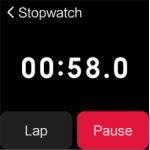
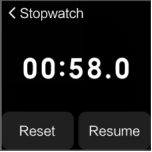
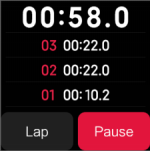
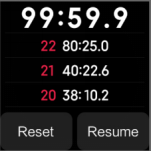
10. Q:How does Mi Watch Lite use stop watch function?
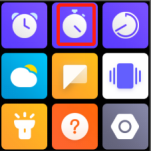
A:1. Click the "

" icon in the application list to open the stopwatch;
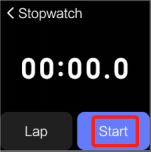
2. Click "Start" to start the time and click the "Interval" icon to click the dot. Click the dot times to view all the dot records, and up to 50 dot records can be displayed;
3. Click "Reset" stopwatch.
2. Click "Start" to start the time and click the "Interval" icon to click the dot. Click the dot times to view all the dot records, and up to 50 dot records can be displayed;
3. Click "Reset" stopwatch.
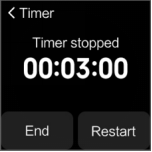
11. Q:How does Mi Watch Lite use Count Down Timer?
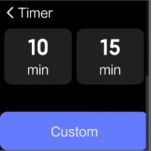
A:By default, the watch provides a countdown of 1 minute, 2 minutes, 3 minutes, 5 minutes, 10 minutes and 15 minutes. It also supports to customize the time to meet the needs of different scenes.
The setting mode is as follows:
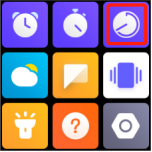
1. Click the "

" icon in the application list to open the timer;
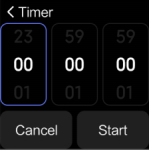
2. Select a number and click to start the countdown directly, click "Customize" to set the time needed.
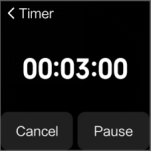
3. After the countdown, the watch will vibrate to remind the owner to click "End" to exit the countdown.
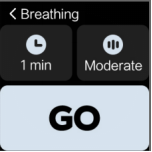
12. Q:How to use the Breathing training function in Mi Watch Lite?
A:Breathing exercises help to regulate heart rate, play a relaxing and soothing role. Regular deep breathing is good for health.
Operation mode:
1. Open the breathing training app "

", and choose 1-5 minutes and appropriate speed for breathing training according to needs.
2, Please keep a steady state of rest, follow the animation of breathing on the watch screen to take a deep breath.
3. After the breathing training, the comparison of heart rate can be seen before and after the breathing training.


13. Q:How to use the flashlight function in Mi Watch Lite?
A:Mi Watch Lite has two ways to turn on the flashlight:
1. Click "

" in the control panel, and then gently touch the screen to turn off the flashlight;
2. Click "

" in the list of apps, tap the screen to turn on the flashlight, and tap the screen again to turn off the flashlight.

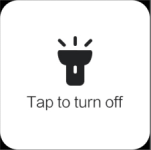
Note: The flashlight is achieved by setting the watch screen to the brightest white light.
14. Q: How to customize the card function in Mi Watch Lite?
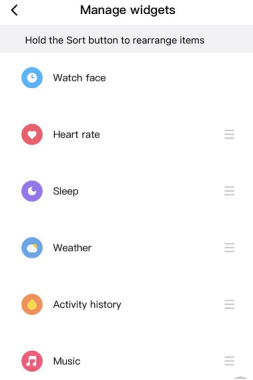
A:Mi Watch Lite supports quick card function. On the home page of the Watch, slide the application card left and right, and slide the right side of the dial page as the default activity statistics (the left-hand page in the picture below). Currently, the supported application card modules are: dial, activity statistics, sleep, weather, heart rate, and music control.
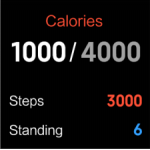
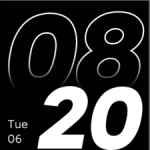
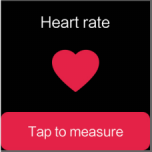
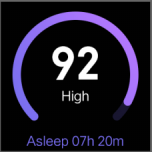
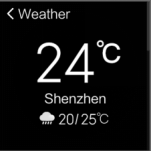
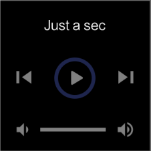
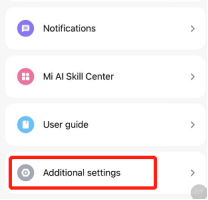
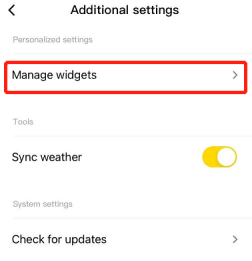
Setting path: Mi Fitness APP->Additional settings -> Manage widgets->Hold the Sort button to rearrange items. Unwanted apps can be dropped to the bottom to hide.
Note: Dial and activity statistics cannot be hidden and the order cannot be adjusted.
15. Q:How to customize keyboard shortcuts in Mi Watch Lite?
A:Mi Watch Lite doesn't have shortcuts.
16. Q:How to change and delete the dial of Mi Watch Lite?
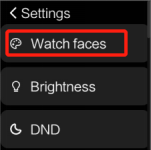
A:Mi Watch Lite supports changing the dial. The replacement mode is as follows: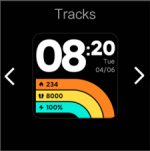

" to delete.
17. Q:How does Mi Watch Lite turn on the sport mode?
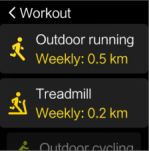
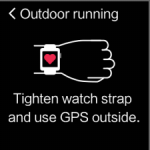
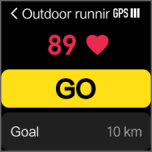
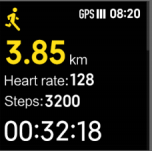
A:1. Click the Sports app on the watch to enter the sports page, then select the sports wanted, and click GO to start sports.
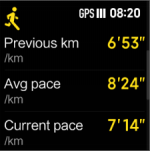
2. Display the exercise data page after the exercise begins.
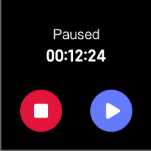
3. During the exercise, click the power button to pause the exercise, and then choose to end or continue the exercise.
Note: If the exercise time is too short, the end of the exercise will prompt "this exercise time is too short, no data will be recorded", it will not save the exercise data.
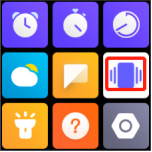
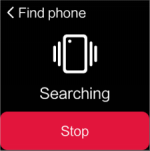
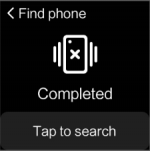
18. Q:Does Mi Watch Lite support find phone/find watch function?
A:Mi Watch Lite support find phone function,doesn't support find watch function inthe phone terminal.In the state of Bluetooth connection between the mobile phone and the watch, if cannot find the mobile phone, please use the function of the watch to find the mobile phone.
Operate ways:
Click " " in the app list or the phone icon in the control panel, and the phone will ring or vibrate.Click the search phone page again to end the search status.
Note: If the Bluetooth is not connected, find phone function is not available.
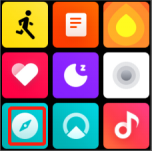
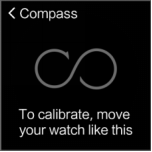
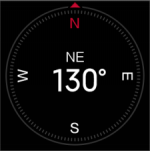
19. Q:Does Mi Watch Lite support the compass function?
A:Yes, open the compass and turn the watch according to the prompts on the watch screen. After calibration, the compass can be used for positioning.
20. Q:What sports mode does Mi Watch Lite support?
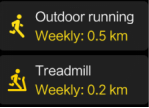
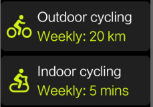
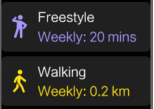
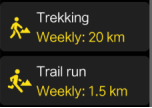
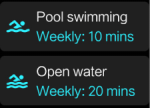
A:The sports mode of Mi Watch Lite currently includes outdoor running, indoor running, indoor cycling, outdoor cycling, free activities, hiking, mountaineering, cross-country, swimming pool, open water swimming and cricket.

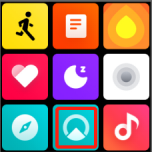
21.Q:Does Mi Watch Lite support view altitude pressure?
A:Support.
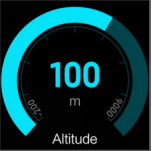
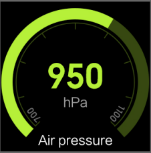
22. Q:How does Mi Watch Lite set aralm?
A:Mi Watch Lite supports alarm function, alarm reminder by vibration reminder, support to set multiple alarm and repeat alarm.
Set the alarm as follows:
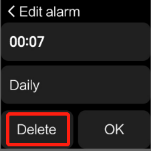
Method 1: Click the power key on the home page of the dial to enter the list of applications, and click " " to open the alarm;Click the "Add Alarm" icon to set the time. If the repeated date is not selected, it will be a single time alarm.If a repeat date is selected, it is a repeat alarm clock.Click OK to complete the Settings.
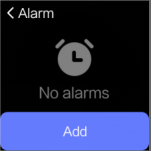
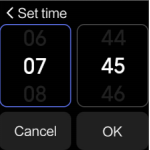

Stop alarm: The alarm should be alerted by vibrating, and clicking the screen will delay the alarm for 10 minutes.Click the power button to end the alarm clock.
Delete alarm: Click the power key on the home page of the dial to enter the list of applications, and click " " to open the alarm application;Click the alarm to delete, and click "Delete Alarm" to delete the alarm.
23. Q:How to set up "Do Not Disturb" mode?
A: After do not disturb mode is enabled, such as no vibration reminder of incoming call and application notification;However, the system prompts, such as low battery, alarm clock, etc. will still vibrate to remind.
Setting method:
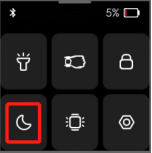
1. Slide into the control panel on the home page of the watch and click the "Do Not Disturb" icon to open/close;
2. Watch settings->Do not Disturb mode->Click on/off.
24. Q:Does Mi Watch Lite support heart rate overshoot alerts?
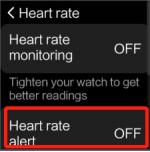
A:Yes, after setting the alarm for heart rate overshoot, if the alarm value is detected and there is no obvious activity such as 10 minutes, the watch will issue an alarm for heart rate overshoot;
Setting method: Enter "Settings" in the application list or control panel, click "Heart Rate Setting", and turn on "Heart Rate Overshoot Reminder".
25. Q:Does Mi Watch Lite support APP notifications?
A:Yes, the watch and the mobile phone are connected. After opening the APP notification on Mi Fitness APP, the message notification can be checked on the watch. The message notification is displayed in the form of list, without supporting folding or reply.
View message notifications:
1、Slide down the home page of the watch dial and open the message panel to view the message notification;Or click the " " icon in the application list to view it.
2、After clicking the message to see details, the message list will no longer display the message.
Delete message notification: Slide down the home page of the watch dial, open the Message panel, and click the Clear button at the bottom of the message list to clear all messages.
26. Q: Does Mi Watch Lite support calling alerts?
A:Yes, when the watch is connected to the mobile phone, when there is an incoming call on the mobile phone, the watch will vibrate to remind and display the number or name of the caller.Opening mode: Mi Fitness APP->Message notification ->;Open message notification->Select the call app. Click the red call icon on the watch screen to reject the call and do not support answering the call (the watch terminal only supports hanging up operation).

Note: 1. The name of caller ID should be the same as that on the mobile phone, and if it is unfamiliar phone number,it will be displayed of caller ID;If it is stored in the address book,it will be displayed of name.
2. If do not disturb mode is on and during the do not disturb period, receive a call reminder won't be sent.
27. Q:What sport datas can be viewed in Mi Watch Lite?
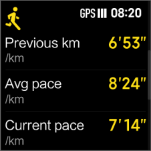
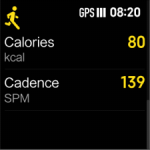
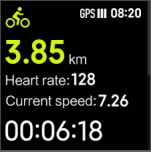
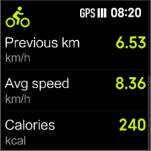
A:Mi Watch Lite each sports mode presents the most critical exercise data, taking outdoor running and outdoor riding behaviors as examples:
1. Outdoor running can display time, heart rate, mileage, pace, heat, stride frequency and total steps;
2. Outdoor cycling can display time, heart rate, distance, speed and heat
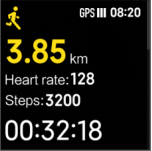
Note: The data types displayed in the exercise are different for different exercise modes.
28. Q:Does Mi Fitness App support third-party app to access?
A:Android phone support third-party access.The iOS version of the APP supports access to Apple Health.
29. Q:How does Mi Watch Lite turn off the alarm vibrations?
A:The watch alarm clock doesn't support turning off vibration, but it supports pressing the power button or shortcut button to turn off the alarm. Clicking the screen when the alarm clock vibrates will delay the alarm for 10 minutes.
30. Q:Can Mi Watch Lite add time in multiple countries?
A:The dual time zone setting is not supported.
31. Q:Does Mi Watch Lite support to make call function?
A:Mi Watch Lite doesn't support phone functions, so it cannot make phone calls on the Watch side. When the Watch is connected to the mobile phone and the phone calls, it only supports hanging up the phone on the Watch.
32. Q:What types of notifications do Mi Watch Lite notifications include?
A:Activity reminder, low battery reminder, activity reaching the standard reminder, heart rate exceeding the limit reminder, message reminder, upgrade reminder, etc.
33. Q: Does Mi Watch Lite support wrist lock?
A:Yes, when this function is enabled, the password lock screen will be activated when the watch detects that it is not worn to ensure information security. The password is a combination of 4-digit numbers from1 to 9.
Opening mode: Watch ->Settings ->Wrist stripping code ->Set password.
34. Q:What if I forget the wrist lock password?
A:If enter the wrong password 15 times in a row, the system will prompt to restore the factory setting. After directly restoring the factory, please re-bind the device and continue to use it.
35. Q:How to do if current heart rate is too high measured by Mi Watch Lite?
A:When the heart rate is too high, it needs to take a proper rest instead of excessive exercise.If the heart rate continues to be too high, it is recommended to consult medical personnel in time according to situation.
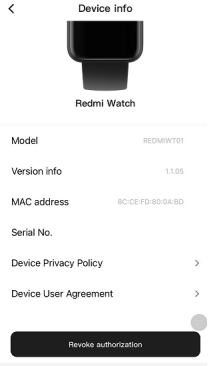
36. Q:How to check Mi Watch Lite MAC address and SN?
A:1、Open path:Watch settings->About->watch info;
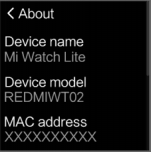
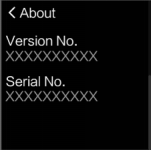
2、In the status of watch is connected to phone,Mi Fitness App->Additional settings->About device->Device info.
37. Q:What positioning system does Mi Watch Lite use?
A:GPS+ glonass positioning system is adopted.
Troubleshooting
1.Q: How to do if Mi Watch Lite step count inaccurate?
A: Principle of step recording: The accelerometer is built into the watch. The data detected by the accelerometer is then combined with the algorithm and the basic information of the human body, and the information is finally converted into steps, consumption and other information.
Factors influencing the of watch steps record:
1. The principle of measuring walking distance by watch is to estimate the step length of the owner based on the height, gender and weight set by the owner, and then multiply it by the number of steps taken by an individual to get an estimated value.
2. Since the step length varies from person to person, people of the same height, gender and weight may also have different step lengths, so the final calculated value will have a large error.
3. The accuracy of the steps has many uncertain factors,such as each person's behavior ,the size of arm waving the habit of walking activity and human activities(such as walking, driving, driving, taking a bath, etc.), the arm movements more complex (such as keystrokes, move the mouse, lift pulling, etc.).
4. Just because of the above reasons, the distance calculated by the watch is also an estimated value. The watch cannot be used as a professional measuring tool to measure the distance.In the future, the software algorithm will be continuously optimized to calculate more accurate data.
2.Q: Why is there no exercise data after exercise generate?
A: 1. Please confirm whether the watch is normally worn and whether the heart rate is normal;
2. After starting the exercise, whether the exercise time or distance reaches the minimum standard of exercise record;
3. It may be caused by improper wearing and abnormal monitoring of heart rate.
3.Q: Why does the watch still display speed information when the movement stops in the motion mode?
A: The distance and speed of exercise are calculated and determined by time. The speed will stop after 10 seconds of exercise.
4.Q: What if Mi Watch Lite cannot be charged?
A: Please follow the following methods to conduct screening or inspection:
1. It is recommended to use normal standard charging head for charging;
2. Check whether the metal contact of the watch body and the metal contact of the charging line are stained, please try to use paper towels to wipe, (if rust occurs, use cotton or cotton cloth dipped in alcohol to wipe) to ensure that the watch body and the charging line do not have bad contact.
3. Take the watch off the charging seat and put it back, plug it in again, and try to replace the socket.
4. If the above inspection is invalid, please apply for after-sales inspection.
5.Q: Why does Mi Watch Lite show heart rate when worn on other objects?
A: Watches collect signals from optical sensors to analyze an individual's heart rate.Because of the limitation of working principle of the sensor itself if the watches wear on other objects, or the heart rate sensor when there are obstructions ahead, if the heart rate sensor detects light signal change, can measure the heart rate value, therefore when algorithm is compatible with the signal, will signal miscalculation of the latter, lead to calculate the heart rate value.
6.Q: Why can only a small number of dials be stored at the watch end?
A: Due to the large footprint of the dial, in order to ensure the running speed of the watch system, the number of dial will be limited.
7.Q: What if the data synchronization between the phone and the watch fails?
A: 1. Refresh the page of Mi Fitness APP and reconnect;
2. Turn off the bluetooth of the mobile phone and restart the connection with Mi Fitness APP;
3. Restart the watch, restart the phone, and try to reinstall Mi Fitness APP.
8.Q: What if Mi Watch Lite doesn't vibrate?
A: 1, First check whether the watch is on the "do not disturb" mode;
2. If it is not turned on, please restart the watch and set several alarm clocks after the restart. If the watch screen can normally display the alarm interface but the watch does not vibrate, please apply for after-sale treatment.
9.Q: What if Mi Watch Lite crashes, the screen goes black, or it can't be turned on?
A: 1. Connect the device to the charging base and charging line, and keep charging for more than 10 minutes.
2. If it still cannot be started after charging, please try forced restart: long press the power button for more than 12 seconds to force restart.
3. If the equipment still cannot be started, it shall apply for after-sales inspection.
10.Q: What if Mi Watch Lite system upgrade fails?
A: 1. If the App or the device prompts failure to upgrade, please try to restart the device and upgrade again.
2. Place the watch on the charger, ensure smooth mobile phone network, and upgrade the watch when the battery power is more than 30%.
3. Reset the watch and try to upgrade after matching.
4. Try to replace other phones to re-bind and try to upgrade.
3. If the upgrade fails, the machine cannot be started. Please contact the after-sales service to deal with it.
11.Q: What if Mi Watch Lite smell abnormal when it is unpacked?
A: Mi Watch Lite broke open the packing there may be a slight odor, plastic products and packaging materials due to factors such as its material, usually there are some plastic, and products in the packaging sealed space to store for a period of time, smell gathered themselves together, and to be relatively obvious when unpacking, usually placed a period of time, the taste will disappear naturally, will not appear an impact on the human body and function.
12.Q: What if Mi Fitness APP fails to sync with watch?
A: 1. Please check whether the APP version of the mobile phone and the firmware version of the watch are the latest, if not the latest,upgrade attempt first;
2. Please check the network connection of the mobile phone.If phone's Wi-Fi connection is disconnected, try reconnect.If Wi-Fi connection is working but still can't synchronize, try to use the data network.
3. Check the connection status between the watch and the mobile phone, ensure the normal bluetooth connection, and try to refresh it in the APP for several times.
4, Please restart the phone Bluetooth, restart the phone and watch to try.
13.Q: What if Mi Watch Lite fails to measure heart rate?
A: Turn off the continuous heart rate detection, click the watch heart rate, and measure the heart rate for a single time. When the watch is being measured, check whether the heart rate light at the bottom of the watch will turn on. If it is not on, unbind, rebind or restart the watch.If it is invalid,apply for after-sales.
14.Q: How to deal with the time error of Mi Watch Lite?
A: If the time of the watch is inconsistent with the time of the mobile phone, please connect to the Mi Fitness APP for the refresh operation.
15.Q: What if Mi Watch Lite can't bind?
A: 1. Exit the APP and turn off the Bluetooth switch to reopen the binding attempt.
2. If the watch cannot be found in Mi Fitness App, please put watch close to the phone, or search and add it again where there are few Bluetooth devices.
3. If the search still fails, check whether there is watch information in the bluetooth setting of the phone, clear the bluetooth pairing information of the watch, and then enter the home page of Mi Fitness APP to add the device again. Take Xiaomi phone as an example: Settings>Choose watch>Unpair, and then re-add the binding.
4. Restart the watch or mobile phone, reset the watch and try to change the environment.
16.Q: What if the weather doesn't update on Mi Watch Lite?
A: The weather is usually updated every 15 to 30 minutes. If it is found that the weather condition is not updated for a long time.
Please click below to check:
1. Please open the Mi Fitness APP and check whether the watch is disconnected from the phone via Bluetooth on the home page.
2. Please click "Additional Settings" on the home page of Mi Fitness APP and check whether weather synchronization is enabled in "Tool Settings".
17.Q: What if Mi Watch Lite screen doesn't light up?
A: If the watch's screen is turned off and the screen cannot be lit by lifting the wrist or pressing the power button/shortcut, please try the following operations:
1. It may be because the watch is low in power, please connect the charging seat to check whether the power is sufficient.
2. Long press the power button for 12 seconds to restart the watch.After restarting, please check the watch version and upgrade the watch to the latest version.
18.Q: How to do about the inaccurate heart rate measurement in Mi Watch Lite?
A: 1. Non-standard wearing mode will affect the measurement of heart rate signal, such as light leakage caused by incomplete fitting, arm swing and slight movement of the watch on the skin, etc. Wearing the watch too tightly, arm elevation and clenching will affect blood circulation, which may also affect the heart rate inaccuracy.
2. Verify the situation of wearing, wear detection need to be slightly tight, the above left and right movement of the watch can not be subject to sliding.Secondly, to verify the wearing position, can not wear in the wrist joint, wrist movement is more likely to cause the bottom of the watch and the skin fit loosely.
19.Q: What if the bright screen of Mi Watch Lite is not sensitive?
Q: What if Mi Watch Lite smell abnormal when it is unpacked?
A: Mi Watch Lite broke open the packing there may be a slight odor, plastic products and packaging materials due to factors such as its material, usually there are some plastic, and products in the packaging sealed space to store for a period of time, smell gathered themselves together, and to be relatively obvious when unpacking, usually placed a period of time, the taste will disappear naturally, will not appear an impact on the human body and function.
20.Q: What if Mi Fitness APP fails to sync with watch?
A: 1. Please check whether the APP version of the mobile phone and the firmware version of the watch are the latest, if not the latest,upgrade attempt first
2. Please check the network connection of the mobile phone.If phone's Wi-Fi connection is disconnected, try reconnect.If Wi-Fi connection is working but still can't synchronize, try to use the data network.
3. Check the connection status between the watch and the mobile phone, ensure the normal bluetooth connection, and try to refresh it in the APP for several times.
4. Please restart the phone Bluetooth, restart the phone and watch to try.
21.Q: What if Mi Watch Lite fails to measure heart rate?
A: Turn off the continuous heart rate detection, click the watch heart rate, and measure the heart rate for a single time. When the watch is being measured, check whether the heart rate light at the bottom of the watch will turn on. If it is not on, unbind, rebind or restart the watch.If it is invalid,apply for after-sales.
22.Q: How to deal with the time error of Mi Watch Lite?
A: If the time of the watch is inconsistent with the time of the mobile phone, connect to the Mi Fitness APP for the refresh operation.
23.Q: What if Mi Watch Lite can't bind?
A: 1. Exit the APP and turn off the Bluetooth switch to reopen the binding attempt.
2. If the watch cannot be found in Mi Fitness App, please put watch close to the phone, or search and add it again where there are few Bluetooth devices;
3. If the search still fails, check whether there is watch information in the bluetooth setting of the phone, clear the bluetooth pairing information of the watch, and then enter the home page of Mi Fitness APP to add the device again. Take Xiaomi phone as an example: Settings>Choose watch>Unpair, and then re-add the binding;
4. Restart the watch or mobile phone, reset the watch and try to change the environment.
24.Q: What if the weather doesn't update on Mi Watch Lite?
A: The weather is usually updated every 15 to 30 minutes. If it is found that the weather condition is not updated for a long time;
Please click below to check:
1. Please open the Mi Fitness APP and check whether the watch is disconnected from the phone via Bluetooth on the home page;
2. Please click "Additional Settings" on the home page of Mi Fitness APP and check whether weather synchronization is enabled in "Tool Settings".
25.Q: What if Mi Watch Lite screen doesn't light up?
A: If the watch's screen is turned off and the screen cannot be lit by lifting the wrist or pressing the power button/shortcut, please try the following operations:
1. It may be because the watch is low in power, please connect the charging seat to check whether the power is sufficient.
2. Long press the power button for 12 seconds to restart the watch.After restarting, please check the watch version and upgrade the watch to the latest version.
26.Q: How to do about the inaccurate heart rate measurement in Mi Watch Lite?
A: 1. Non-standard wearing mode will affect the measurement of heart rate signal, such as light leakage caused by incomplete fitting, arm swing and slight movement of the watch on the skin, etc. Wearing the watch too tightly, arm elevation and clenching will affect blood circulation, which may also affect the heart rate inaccuracy.
2, Verify the situation of wearing, wear detection need to be slightly tight, the above left and right movement of the watch can not be subject to sliding.Secondly, to verify the wearing position, can not wear in the wrist joint, wrist movement is more likely to cause the bottom of the watch and the skin fit loosely.
27.Q: What if the bright screen of Mi Watch Lite is not sensitive?
A: This function works by relying on the acceleration sensor inside the watch. Please wake up the screen by tilting wrist, turning it over, lifting it up and so on.But if the Angle is too small, too slow may cause the screen to fail to shine.
28.Q: Is the charging base of the watch and the black strap easy to stain?
A: The charging base and strap of the watch are made of silica gel. The use of silica gel charging seat can play an anti-slip effect and better fix the charging seat to prevent sliding deviation during charging. The surface of silica gel watchband has been treated with anti-allergy and is comfortable and skin-friendly.But in the use of wear will inevitably come into contact with the dust, the black watchband and charging seat after the contrast is more obvious, it is recommended to wear found dust in time to clean.
29.Q: What if Mi Watch Lite app notification does not remind?
A: 1. Check whether the connection between the watch and the mobile phone is normal, and confirm that the mobile phone is paired and connected with Bluetooth.
2. Check whether the "do not disturb" mode is on and off at the watch end.
3. Check that Mi Fitness APP has correctly enabled the access to notifications.
4. Check that the current application information can be correctly displayed in the notification bar. If it is not displayed, please open the notification management authority on this app.
5. Check the message notification when this APP is enabled in Mi Fitness APP. Setting mode: Mi Fitness APP -- Message notification -- Open Message notification -- Select APP to open.
6. Restart, reset the watch, and re-bind.
Note: When the phone is in the chat interface, the chat message will not be pushed to the watch.
30.Q: Why does the watch only vibrate but not light up when there is a new message?
A: This is a normal phenomenon. After the watch system was upgraded to the latest version, the strategy of message reminder was optimized.Considering that there are many message notifications in common use, the bright screen will be triggered frequently. On the one hand, it will have some influence on power consumption, and on the other hand, it is also a kind of excessive disturbance.Therefore, the strategy of message notification reminder is updated. When a message comes, it only vibrates and does not actively light up the screen. The control of viewing is in itself.
31.Q: Why is the number of steps of the watch inconsistent with Mi Fitnessable APP?
A: It may be caused by the disconnect between the watch and the APP, and the step number information is not synchronized in time. The synchronization can be done after the watch is refreshed in the Mi Fitness APP.
32.Q: What if Mi Watch Lite has been successfully bound but cannot be connected?
A: 1. First to ensure that the watch is full of power;
2. The flight mode of the watch must be turned off. On the watch dial page, slide the screen to check whether the flight mode icon is turned off;
3. Check the connection status of Mi Fitness APP. If it is disconnected, click to reconnect;
4. End the process of Mi Fitness APP, restart the phone's Bluetooth, restart the phone or watch, and try to refresh the connection in the APP;
5. Please try to restore the watch to factory, and then click "Connect" on the homepage of APP. When the same pairing code appears on the interface of the watch and APP, click "Pair".
6. If it still cannot be solved, please clear the bluetooth pairing with the watch in the bluetooth setting of the phone, restore the factory setting of the watch, and then start the binding process again.
33.Q: Mi Watch Lite has been paired successfully. What if the binding account fails?
A: It may be that the network connection of the mobile phone is abnormal. Please check the network connection of the mobile phone.If phone's Wi-Fi connection is disconnected, try reconnecting.If the Wi-Fi connection works but still fails to bind, try to use the data network.
34.Q: What if the screen of Mi Watch Lite can't slide?
A: 1, check whether the watch battery is too low;
2. Click the power key or shortcut key to light up the screen and check whether it is in the lock screen state. If it is in the lock screen state, long press the shortcut key to unlock the screen.
3. Press the crown button to try to return to the home page, but still can't slide the screen to let the watch be forced to restart.
4. Try to restore factory Settings.
35.Q: Why is the weather on watch different from the weather on the phone?
A: The weather information displayed on the watch is pushed by the Mi Fitness APP after it is obtained from the service provider. If it is different from the weather service provider used in the mobile phone system, the results displayed may be slightly different.
36.Q: Why doesn't watch count steps when have already started walking?
A: The watch is updated several times in one minute, but not in real time every second.
37.Q: Does watch drain fast?
A: About the power consumption of the watch, it has something to do with personal daily use. For example, some special scenes will lead to an increase in the number of times to lift the wrist and light the screen, frequent information reminders, heart rate detection and other functions open throughout the day, which will also lead to an increase in power consumption.At the same time, the electrical flow required for heart rate detection of watches will vary due to individual physical differences, leading to differences in power consumption. Turn off some functions that don't need, it can improve the watch's battery life.
The battery life of the watch can be improved through some simple Settings. For example, when there is no need to use the following functions, it is suggested to turn off the functions such as heart rate measurement, notification management, wrist lifting and bright screen switch in the device details page of Mi Fitness APP.
| Product model | Mi Watch Lite |
 | |
| Basic Specs | Display:1.4" LCD display |
| Resolution:320*320 | |
| Screen type:TFT | |
| Backlight:Min 350Nits(Typ) | |
| NTSC:60%(Typ),PPI 323 | |
| 6-axis sensor:3-axis accelerometer and 3-axis gyroscope | |
| Heart rate-sensor: | |
| L-Sensor | |
| Compass | |
| Barometer(altimeter) | |
| Battery:230 mAh | |
| Sports:11 sports modes | |
| Supported exercises:Outdoor running, Treadmill Outdoor cycling, Indoor ,cycling, Freestyle, Walking, Trekking, Trail run, Pool swimming, Open water swimming, Cricket | |
| Health & Daily Life:Heart Rate Monitoring, Sleep Monitoring, Breathing, Notifications, Weather, Clock, Alarm, Flashlight, Music Control | |
| Satellite Positioning:GPS / A-GPS / GLONASSBluetooth:BLE 5.0 | |
| Dimensions and specifications | Weight:35g (with strap) 21g (without strap) |
| Dimensions:41mm * 35mm * 10.9 mm(11.9mm at HRSensor) | |
| Strap material:TPU | |
| Water Resistance:5 ATM | |
| Packing list | Watch body ×1 | Watch strap ×1 | Dedicated charging dock ×1 | User manual ×1 |
1.Q:What are the features of Mi Watch Lite?
A:1. A 1.4-inch high-definition square screen with a resolution of 320×320 is adopted to display a clear and exquisite display. The touch and slide are sensitive and smooth.
2. The watch has simple and lively appearance design, different colors of the watchband and personalized dial, is suitable for all kinds of scenes.
3. support a variety of mainstream sports mode of the whole movement data tracking, it is the best choice for entry-level sports enthusiasts.
4. Comprehensive health tracking, support heart rate monitoring function, help to have a deeper understanding of the body, escort for a healthy life.
6. It support 5ATM waterproof level, can be used in swimming.
2. Q: What material is the MI Watch Lite strap made of?
A: The strap is made of TPU, which is light and comfortable to wear and supports quick removal.
3. Q: How to replace the MI Watch Lite strap?
A: The strap supports quick removal, and the replacement method is as follows:
4. Q: What is the waterproof grade of MI Watch lite?
A: The waterproof grade of MI watch Lite is 5ATM, which can be used for water activities in shallow water such as swimming pool and beach swimming. It is not suitable for sauna, hot spring and other high humidity and high temperature scenes, nor is it suitable for diving, diving, surfing and other wading activities and deep-water activities facing high-speed water flow.
Note: 50m waterproof refers to the waterproof depth of the watch under the standard conditions. This condition means that the watch has a certain water resistance pressure under the static state. The compressive value is not obtained under water, but converted from the value of atmospheric pressure. 50m waterproof means that the watch can withstand the pressure of 50M water depth under the static state.
5. Q: What is the standard configuration of MI Watch lite? What colors are there?
A: Mi watch Lite regular edition is equipped with watch body x 1, contact charging base x 1 and product manual x 1. At present, there are three colors of elegant black, ivory white and ink blue.
APP Usage Related
1.Q: What device bindings does Mi watch Lite support? Is IOS supported?
A: Mi watch Lite needs to be bound through Mi Fitness app in Android and IOS system, which can be searched and downloaded in the app store.
Q: How to bind Mi Watch Lite with Android phone?
A: Mi watch Lite needs to be bound with Mi Fitness app. After binding, the app should be locked in the background to avoid being shut down by the system, resulting in disconnection from the mobile phone and affecting the normal use of the watch.The binding method is as follows:
1.Press and hold the power key for about 3 seconds to turn on the watch. Scan the QR code of the watch screen with mobile phone, download and install Mi Fitness.
2.Open the app and open the relevant permissions of APP according to the pop-up hint. Click "add device". When the Bluetooth name of the watch appears, click to pair.
3.When the mobile phone displays the Bluetooth pairing request, click "pair" to complete the pairing connection with the watch.
Note:
1. In the pairing process, please make sure that the Bluetooth of the mobile phone is on to ensure the normal connection between the watch and the mobile phone.
2. If can't find the watch in the process of adding the device, or can't connect the watch during the use process, please try to press the watch power button for 3 seconds, select restore factory in the system operation interface, and then add the watch again.
3.Q: How to unbind Mi Watch lite?
A: 1, Open the app and click other settings in home page> unbind;
2, It will be automatically released from the factory after unbinding, the watch will return to factory settings and all data will be cleared.
4.Q: Does Mi Fitness app support to bind multiple Mi Watch lite?
A:Mi Fitness app can bind multiple watches. Under the same account, 5-10 watches can be bound, but only one watch can be used.
5.Q: How does Mi Fitness app switch to other watches?
A: Mi Fitness the app, click the icon
in the upper left corner of the home page to enter the device switching interface and select the watch to switch.
6.Q: How does Mi Watch Lite upgrade system firmware?
A: The watch will push the follow-up upgrade package to update the function through app.
1, On the app homepage, click other settings > check for updates;
2, If the new version can be updated, click to download the upgrade package;
3, After the upgrade package is downloaded, it will be automatically pushed to the watch. After receiving the upgrade package, the watch will be automatically upgraded and restarted.
Note:
1. When upgrading the watch, the power needs to exceed 20%;
2. During the upgrade process, the watch should be connected to the mobile phone, and try to keep the watch near the mobile phone.
7.Q: What account does Mi Fitness app support to log in?
A: Currently, Mi Fitness app only supports Mi account login.
8.Q: How to set Mi Watch Lite notification alert?
A: To receive notification messages from mobile app, MI watch Lite needs to open the app message notification in Mi Fitness app.
Opening method: Mi Fitness app - notifications - open notifications - select app open notification.
Note: open the notification message application in Mi Fitness app, it needs to open the notification authority on the mobile phone at the same time.
9.Q: How to set the MI Watch Lite activity compliance reminder?
A: Mi watch Lite can set the daily calorie or step number target. After wearing the watch, it can monitor the calorie consumption, steps and standing activity of the day. When the movement reaches the standard, the watch will have a vibration warning, which cannot be turned off.
Setting method:
1. Open Mi Fitness app on the mobile phone, log in to Mi account and bind the device.
2. After successful connection with the watch, set it through data > calories / steps > daily target.
Note: in order to ensure the accuracy of exercise calorie consumption, the calories recorded by the watch do not include the consumption of human basic metabolism.
Function and use
1. Q: How does Mi Watch Lite turn on, shut down and restart?
A: Power-on: In the shutdown state, long press the power key for 3 seconds to enter the watch home page.
Shutdown:
1. In the power on state, press and hold the power key for 3 seconds. The watch will enter the page of restart, shutdown and factory recovery, and select shutdown.
2. In the power on state, click Settings > system operation > select shut down.
Restart:
1. In the power on state, press and hold the power key for 3 seconds. The watch will enter the page of restart, shutdown and factory recovery, and select restart.
2. In power on state, keep pressing the power key for 10-12 seconds, the watch will be forced to restart.
3. When the machine is turned on, click Settings - system operation - restart.
2. Q: How does the MI Watch Lite last? How long can it be fully charged?
A: It takes about 1.5-2 hours to fully charge the MI watch Lite. It can last up to 8 days under normal use.
The test scenarios are as follows:
| Scene | Endurance | |
| Routine use | Receive notification, 100 articles [100 for Bluetooth connected mobile phone]Report watch data: once a dayAlarm clock, 2 timesExercise continuously every week, 35 minutes (average 5 minutes per day, whole cycle)Check time 50 timesThe heart rate was measured every half an hourUse voice, 15 times, 20 seconds / time, 5 minutes in total | 8 days |
3. Q: What is the capacity of the MI Watch Lite battery? How to charge?
A: The battery capacity of MI watch Lite is 230mAh.
The charging mode is as follows:
1. The watch is placed on the charging base, so that the charging contact on the back of the watch is fully fitted with the metal contact on the charging base.
2. Connect the other end of charging stand to USB-A charger (output voltage is 5V, output current is ≥ 0.5A).
If the power of the watch is less than 10%, it will prompt to connect the charger for charging; during the charging process, there will be a charging prompt.
Note:
1. If the watch can not be turned on after being placed for a long time, the charging icon will be displayed only after recharging for about 1 minute when it is used again.
2. Before charging, please wipe the charging contact of watch to avoid residual sweat or moisture.
4. Q: What are the general operations of MI Watch lite? What is the function of the key?
A: The screen operation and key functions are as follows:
1. Slide from the top edge of the home page of the dial: open the message notification.
2. Slide up the bottom edge of the home page of the dial: open the control panel.
3. Slide left and right on the main page of the dial: switch the direct card.
4. Slide right from the left edge on other pages: return to the previous level.
5. Press and hold for 3 seconds to turn on / off.
6. Click to enter the application list (on the home page of the dial).
7. Click to pause / continue movement (during movement).
8. Long press to lock / unlock the screen.
5. Q: What are the functions of the MI Watch Lite control panel?
A: Mi Watch Lite slides up the bottom edge of the home page of the dial to access the control panel, top to bottom, left to right icons
The meanings are as follows:
Click on / off flashlight.
Click to turn on / off the wrist lift screen.
Click to enter the screen lock state; long press the key to unlock.
Click on / off DND mode.
After clicking, the screen will stay on for 5 minutes, and then it will turn off automatically.
Click to enter the system setting interface.
- Bluetooth connection status: when the watch and mobile phone are not connected, Bluetooth is gray; after connection, the Bluetooth icon is white.
- Current power of watch: display charging icon under charging state.
6.Q:How does Mi Watch Lite lock and unlock screen?
A:The watch supports the lock screen function. After opening the lock screen, the watch will lock to the current screen and cannot be touched.Key data pages can be locked during the movement for real-time viewing.
Lock screen :
1. Slide to open the control panel on the home page of the dial and click the icon;
2. Long press the power button until the lock screen animation appears on the watch screen. Continue to press and hold the shortcut key until the screen is locked.
Unlock screen:Long press the power button until the watch screen appears with the unlock animation. Continue to press and hold the shortcut key until the screen unlocks.
Note: If choose swimming, the watch screen will lock automatically after starting the exercise.
7.Q:How does Mi Watch Lite measure and check heart rate?
A:Heart rate is the number of heart beats per minute. Mi Watch Lite uses photoelectric volume tracing technology to measure heart rate and show the heart rate value.Mi Watch Lite enable by default for 30 minutes/once time continuous heart rate monitoring, which can monitor personal heart rate.
How to view heart rate:
1. Open the app or slide to enter the heart rate card on the home page of the watch. Click to measure. After the measurement, choose to quit or re-measure.
2. Drag down the heart Rate function page to see the heart rate interval, average resting heart rate, maximum resting heart rate and minimum resting heart rate over the past 30 days.When detecting heart rate, please ensure that the front of the watch is up, the heart rate detection area is attached to the wrist, it is best to gently press the surface of the watch to increase the degree of attachment with the wrist.
8.Q:Does Mi Watch Lite support sleep monitoring?
A:The watch supports sleep monitoring. The sleep monitoring function is to wear the watch normally at night and fall asleep. The watch can monitor the heart rate through the built-in sensor and automatically identify and monitor the sleep at night.
Judge the time period: the sleep monitoring time period at night is from 18:00 to 12:00. If the time of falling asleep and getting out of bed is beyond this time period, and the sleep is continuous, it will be considered as sleep at night.Daytime sleep restores energy, but does not affect night sleep scores, which are not recorded.
Sleep data type: Sleep data type includes night sleep score, night sleep duration, sleep quality evaluation, and related recommendations.
Sleep data view ways:
1. Slide the watch side to the sleep card on the home page of the watch face to check the sleep score and sleep quality of the last night.
2. Click "
" in the app list to view the sleep data of the day.
3. After the watch is connected to the mobile phone and synchronizes the data, click Sleep in the data section of Mi Fitness APP to view the historical sleep data, including day, week, month and year. It also supports to look at the sleep period of day, the percentage of deep sleep, light sleep, and awake, as well as detailed sleep status at each time point.
Note:
1. There is a delay in the generation of sleep report. The sleep function is turned on immediately after waking up, and there may be no sleep report.
2. The watch only keeps the sleep data of last night.Please timely synchronize the data to Mi Fitness APP to avoid data loss.
9.Q:How does Mi Watch Lite check the weather information?
A:When the watch is connected to the mobile phone, the viewing method is as follows:
1. Click on the home screen and select the Weather app in the app list for viewing. The local temperature, weather and other information as well as the weather forecast for the next 5 days can be obtained from the sliding gear.
2. Slide the screen from left to right on the home page of the dial to enter the weather card. The owner can only see the temperature, weather and region, but cannot scroll up and down to see more information.
Note: Use the watch to check the real-time weather, it needs to keep the phone connected to the watch. and turn on the weather synchronization function of Mi Fitness APP.
Note:
1. If the watch is not connected to the mobile phone, the weather shows the information synchronized when the phone was last connected.
2. If hide the "weather" card in Mi Fitness APP, the weather cannot be checked through the direct card on the watch.
3. The weather information displayed on the watch is pushed by the Mi Fitness APP after it is obtained from the service provider. If it is different from the weather service provider used in the mobile phone system, the results displayed may be slightly different.
10. Q:How does Mi Watch Lite use stop watch function?
A:1. Click the "
" icon in the application list to open the stopwatch;
2. Click "Start" to start the time and click the "Interval" icon to click the dot. Click the dot times to view all the dot records, and up to 50 dot records can be displayed;
3. Click "Reset" stopwatch.
2. Click "Start" to start the time and click the "Interval" icon to click the dot. Click the dot times to view all the dot records, and up to 50 dot records can be displayed;
3. Click "Reset" stopwatch.
11. Q:How does Mi Watch Lite use Count Down Timer?
A:By default, the watch provides a countdown of 1 minute, 2 minutes, 3 minutes, 5 minutes, 10 minutes and 15 minutes. It also supports to customize the time to meet the needs of different scenes.
The setting mode is as follows:
1. Click the "
" icon in the application list to open the timer;
2. Select a number and click to start the countdown directly, click "Customize" to set the time needed.
3. After the countdown, the watch will vibrate to remind the owner to click "End" to exit the countdown.
12. Q:How to use the Breathing training function in Mi Watch Lite?
A:Breathing exercises help to regulate heart rate, play a relaxing and soothing role. Regular deep breathing is good for health.
Operation mode:
1. Open the breathing training app "
", and choose 1-5 minutes and appropriate speed for breathing training according to needs.
2, Please keep a steady state of rest, follow the animation of breathing on the watch screen to take a deep breath.
3. After the breathing training, the comparison of heart rate can be seen before and after the breathing training.
13. Q:How to use the flashlight function in Mi Watch Lite?
A:Mi Watch Lite has two ways to turn on the flashlight:
1. Click "
" in the control panel, and then gently touch the screen to turn off the flashlight;
2. Click "
" in the list of apps, tap the screen to turn on the flashlight, and tap the screen again to turn off the flashlight.
Note: The flashlight is achieved by setting the watch screen to the brightest white light.
14. Q: How to customize the card function in Mi Watch Lite?
A:Mi Watch Lite supports quick card function. On the home page of the Watch, slide the application card left and right, and slide the right side of the dial page as the default activity statistics (the left-hand page in the picture below). Currently, the supported application card modules are: dial, activity statistics, sleep, weather, heart rate, and music control.
Setting path: Mi Fitness APP->Additional settings -> Manage widgets->Hold the Sort button to rearrange items. Unwanted apps can be dropped to the bottom to hide.
Note: Dial and activity statistics cannot be hidden and the order cannot be adjusted.
15. Q:How to customize keyboard shortcuts in Mi Watch Lite?
A:Mi Watch Lite doesn't have shortcuts.
16. Q:How to change and delete the dial of Mi Watch Lite?
A:Mi Watch Lite supports changing the dial. The replacement mode is as follows:
- Replace the watch end and slide into the control panel on the watch home page->Settings ->Watch faces, or long press the home dial of the screen to enter the dial selection page, slide left and right to select the dial.The dial that comes with the system and the dial that has been downloaded and changed before will be displayed on the dial selection page.
- Change in the Mi Fitness APP. When the watch is connected to the phone, open the Mi Fitness APP and select dial management->Click the dial that need to replace ->Click to download and install, and wait for the installation to complete.
- Open Mi Fitness APP and enter "Dial Management";
- Select "Added", select the dial to be deleted, and click "
" to delete.
17. Q:How does Mi Watch Lite turn on the sport mode?
A:1. Click the Sports app on the watch to enter the sports page, then select the sports wanted, and click GO to start sports.
2. Display the exercise data page after the exercise begins.
3. During the exercise, click the power button to pause the exercise, and then choose to end or continue the exercise.
Note: If the exercise time is too short, the end of the exercise will prompt "this exercise time is too short, no data will be recorded", it will not save the exercise data.
18. Q:Does Mi Watch Lite support find phone/find watch function?
A:Mi Watch Lite support find phone function,doesn't support find watch function inthe phone terminal.In the state of Bluetooth connection between the mobile phone and the watch, if cannot find the mobile phone, please use the function of the watch to find the mobile phone.
Operate ways:
Click "
" in the app list or the phone icon in the control panel, and the phone will ring or vibrate.Click the search phone page again to end the search status. Note: If the Bluetooth is not connected, find phone function is not available.
19. Q:Does Mi Watch Lite support the compass function?
A:Yes, open the compass and turn the watch according to the prompts on the watch screen. After calibration, the compass can be used for positioning.
20. Q:What sports mode does Mi Watch Lite support?
A:The sports mode of Mi Watch Lite currently includes outdoor running, indoor running, indoor cycling, outdoor cycling, free activities, hiking, mountaineering, cross-country, swimming pool, open water swimming and cricket.
21.Q:Does Mi Watch Lite support view altitude pressure?
A:Support.
22. Q:How does Mi Watch Lite set aralm?
A:Mi Watch Lite supports alarm function, alarm reminder by vibration reminder, support to set multiple alarm and repeat alarm.
Set the alarm as follows:
Method 1: Click the power key on the home page of the dial to enter the list of applications, and click "
" to open the alarm;Click the "Add Alarm" icon to set the time. If the repeated date is not selected, it will be a single time alarm.If a repeat date is selected, it is a repeat alarm clock.Click OK to complete the Settings. Stop alarm: The alarm should be alerted by vibrating, and clicking the screen will delay the alarm for 10 minutes.Click the power button to end the alarm clock.
Delete alarm: Click the power key on the home page of the dial to enter the list of applications, and click "
" to open the alarm application;Click the alarm to delete, and click "Delete Alarm" to delete the alarm. 23. Q:How to set up "Do Not Disturb" mode?
A: After do not disturb mode is enabled, such as no vibration reminder of incoming call and application notification;However, the system prompts, such as low battery, alarm clock, etc. will still vibrate to remind.
Setting method:
1. Slide into the control panel on the home page of the watch and click the "Do Not Disturb" icon to open/close;
2. Watch settings->Do not Disturb mode->Click on/off.
24. Q:Does Mi Watch Lite support heart rate overshoot alerts?
A:Yes, after setting the alarm for heart rate overshoot, if the alarm value is detected and there is no obvious activity such as 10 minutes, the watch will issue an alarm for heart rate overshoot;
Setting method: Enter "Settings" in the application list or control panel, click "Heart Rate Setting", and turn on "Heart Rate Overshoot Reminder".
25. Q:Does Mi Watch Lite support APP notifications?
A:Yes, the watch and the mobile phone are connected. After opening the APP notification on Mi Fitness APP, the message notification can be checked on the watch. The message notification is displayed in the form of list, without supporting folding or reply.
View message notifications:
1、Slide down the home page of the watch dial and open the message panel to view the message notification;Or click the "
" icon in the application list to view it. 2、After clicking the message to see details, the message list will no longer display the message.
Delete message notification: Slide down the home page of the watch dial, open the Message panel, and click the Clear button at the bottom of the message list to clear all messages.
26. Q: Does Mi Watch Lite support calling alerts?
A:Yes, when the watch is connected to the mobile phone, when there is an incoming call on the mobile phone, the watch will vibrate to remind and display the number or name of the caller.Opening mode: Mi Fitness APP->Message notification ->;Open message notification->Select the call app. Click the red call icon on the watch screen to reject the call and do not support answering the call (the watch terminal only supports hanging up operation).
Note: 1. The name of caller ID should be the same as that on the mobile phone, and if it is unfamiliar phone number,it will be displayed of caller ID;If it is stored in the address book,it will be displayed of name.
2. If do not disturb mode is on and during the do not disturb period, receive a call reminder won't be sent.
27. Q:What sport datas can be viewed in Mi Watch Lite?
A:Mi Watch Lite each sports mode presents the most critical exercise data, taking outdoor running and outdoor riding behaviors as examples:
1. Outdoor running can display time, heart rate, mileage, pace, heat, stride frequency and total steps;
2. Outdoor cycling can display time, heart rate, distance, speed and heat
Note: The data types displayed in the exercise are different for different exercise modes.
28. Q:Does Mi Fitness App support third-party app to access?
A:Android phone support third-party access.The iOS version of the APP supports access to Apple Health.
29. Q:How does Mi Watch Lite turn off the alarm vibrations?
A:The watch alarm clock doesn't support turning off vibration, but it supports pressing the power button or shortcut button to turn off the alarm. Clicking the screen when the alarm clock vibrates will delay the alarm for 10 minutes.
30. Q:Can Mi Watch Lite add time in multiple countries?
A:The dual time zone setting is not supported.
31. Q:Does Mi Watch Lite support to make call function?
A:Mi Watch Lite doesn't support phone functions, so it cannot make phone calls on the Watch side. When the Watch is connected to the mobile phone and the phone calls, it only supports hanging up the phone on the Watch.
32. Q:What types of notifications do Mi Watch Lite notifications include?
A:Activity reminder, low battery reminder, activity reaching the standard reminder, heart rate exceeding the limit reminder, message reminder, upgrade reminder, etc.
33. Q: Does Mi Watch Lite support wrist lock?
A:Yes, when this function is enabled, the password lock screen will be activated when the watch detects that it is not worn to ensure information security. The password is a combination of 4-digit numbers from1 to 9.
Opening mode: Watch ->Settings ->Wrist stripping code ->Set password.
34. Q:What if I forget the wrist lock password?
A:If enter the wrong password 15 times in a row, the system will prompt to restore the factory setting. After directly restoring the factory, please re-bind the device and continue to use it.
35. Q:How to do if current heart rate is too high measured by Mi Watch Lite?
A:When the heart rate is too high, it needs to take a proper rest instead of excessive exercise.If the heart rate continues to be too high, it is recommended to consult medical personnel in time according to situation.
36. Q:How to check Mi Watch Lite MAC address and SN?
A:1、Open path:Watch settings->About->watch info;
2、In the status of watch is connected to phone,Mi Fitness App->Additional settings->About device->Device info.
37. Q:What positioning system does Mi Watch Lite use?
A:GPS+ glonass positioning system is adopted.
Troubleshooting
1.Q: How to do if Mi Watch Lite step count inaccurate?
A: Principle of step recording: The accelerometer is built into the watch. The data detected by the accelerometer is then combined with the algorithm and the basic information of the human body, and the information is finally converted into steps, consumption and other information.
Factors influencing the of watch steps record:
1. The principle of measuring walking distance by watch is to estimate the step length of the owner based on the height, gender and weight set by the owner, and then multiply it by the number of steps taken by an individual to get an estimated value.
2. Since the step length varies from person to person, people of the same height, gender and weight may also have different step lengths, so the final calculated value will have a large error.
3. The accuracy of the steps has many uncertain factors,such as each person's behavior ,the size of arm waving the habit of walking activity and human activities(such as walking, driving, driving, taking a bath, etc.), the arm movements more complex (such as keystrokes, move the mouse, lift pulling, etc.).
4. Just because of the above reasons, the distance calculated by the watch is also an estimated value. The watch cannot be used as a professional measuring tool to measure the distance.In the future, the software algorithm will be continuously optimized to calculate more accurate data.
2.Q: Why is there no exercise data after exercise generate?
A: 1. Please confirm whether the watch is normally worn and whether the heart rate is normal;
2. After starting the exercise, whether the exercise time or distance reaches the minimum standard of exercise record;
3. It may be caused by improper wearing and abnormal monitoring of heart rate.
3.Q: Why does the watch still display speed information when the movement stops in the motion mode?
A: The distance and speed of exercise are calculated and determined by time. The speed will stop after 10 seconds of exercise.
4.Q: What if Mi Watch Lite cannot be charged?
A: Please follow the following methods to conduct screening or inspection:
1. It is recommended to use normal standard charging head for charging;
2. Check whether the metal contact of the watch body and the metal contact of the charging line are stained, please try to use paper towels to wipe, (if rust occurs, use cotton or cotton cloth dipped in alcohol to wipe) to ensure that the watch body and the charging line do not have bad contact.
3. Take the watch off the charging seat and put it back, plug it in again, and try to replace the socket.
4. If the above inspection is invalid, please apply for after-sales inspection.
5.Q: Why does Mi Watch Lite show heart rate when worn on other objects?
A: Watches collect signals from optical sensors to analyze an individual's heart rate.Because of the limitation of working principle of the sensor itself if the watches wear on other objects, or the heart rate sensor when there are obstructions ahead, if the heart rate sensor detects light signal change, can measure the heart rate value, therefore when algorithm is compatible with the signal, will signal miscalculation of the latter, lead to calculate the heart rate value.
6.Q: Why can only a small number of dials be stored at the watch end?
A: Due to the large footprint of the dial, in order to ensure the running speed of the watch system, the number of dial will be limited.
7.Q: What if the data synchronization between the phone and the watch fails?
A: 1. Refresh the page of Mi Fitness APP and reconnect;
2. Turn off the bluetooth of the mobile phone and restart the connection with Mi Fitness APP;
3. Restart the watch, restart the phone, and try to reinstall Mi Fitness APP.
8.Q: What if Mi Watch Lite doesn't vibrate?
A: 1, First check whether the watch is on the "do not disturb" mode;
2. If it is not turned on, please restart the watch and set several alarm clocks after the restart. If the watch screen can normally display the alarm interface but the watch does not vibrate, please apply for after-sale treatment.
9.Q: What if Mi Watch Lite crashes, the screen goes black, or it can't be turned on?
A: 1. Connect the device to the charging base and charging line, and keep charging for more than 10 minutes.
2. If it still cannot be started after charging, please try forced restart: long press the power button for more than 12 seconds to force restart.
3. If the equipment still cannot be started, it shall apply for after-sales inspection.
10.Q: What if Mi Watch Lite system upgrade fails?
A: 1. If the App or the device prompts failure to upgrade, please try to restart the device and upgrade again.
2. Place the watch on the charger, ensure smooth mobile phone network, and upgrade the watch when the battery power is more than 30%.
3. Reset the watch and try to upgrade after matching.
4. Try to replace other phones to re-bind and try to upgrade.
3. If the upgrade fails, the machine cannot be started. Please contact the after-sales service to deal with it.
11.Q: What if Mi Watch Lite smell abnormal when it is unpacked?
A: Mi Watch Lite broke open the packing there may be a slight odor, plastic products and packaging materials due to factors such as its material, usually there are some plastic, and products in the packaging sealed space to store for a period of time, smell gathered themselves together, and to be relatively obvious when unpacking, usually placed a period of time, the taste will disappear naturally, will not appear an impact on the human body and function.
12.Q: What if Mi Fitness APP fails to sync with watch?
A: 1. Please check whether the APP version of the mobile phone and the firmware version of the watch are the latest, if not the latest,upgrade attempt first;
2. Please check the network connection of the mobile phone.If phone's Wi-Fi connection is disconnected, try reconnect.If Wi-Fi connection is working but still can't synchronize, try to use the data network.
3. Check the connection status between the watch and the mobile phone, ensure the normal bluetooth connection, and try to refresh it in the APP for several times.
4, Please restart the phone Bluetooth, restart the phone and watch to try.
13.Q: What if Mi Watch Lite fails to measure heart rate?
A: Turn off the continuous heart rate detection, click the watch heart rate, and measure the heart rate for a single time. When the watch is being measured, check whether the heart rate light at the bottom of the watch will turn on. If it is not on, unbind, rebind or restart the watch.If it is invalid,apply for after-sales.
14.Q: How to deal with the time error of Mi Watch Lite?
A: If the time of the watch is inconsistent with the time of the mobile phone, please connect to the Mi Fitness APP for the refresh operation.
15.Q: What if Mi Watch Lite can't bind?
A: 1. Exit the APP and turn off the Bluetooth switch to reopen the binding attempt.
2. If the watch cannot be found in Mi Fitness App, please put watch close to the phone, or search and add it again where there are few Bluetooth devices.
3. If the search still fails, check whether there is watch information in the bluetooth setting of the phone, clear the bluetooth pairing information of the watch, and then enter the home page of Mi Fitness APP to add the device again. Take Xiaomi phone as an example: Settings>Choose watch>Unpair, and then re-add the binding.
4. Restart the watch or mobile phone, reset the watch and try to change the environment.
16.Q: What if the weather doesn't update on Mi Watch Lite?
A: The weather is usually updated every 15 to 30 minutes. If it is found that the weather condition is not updated for a long time.
Please click below to check:
1. Please open the Mi Fitness APP and check whether the watch is disconnected from the phone via Bluetooth on the home page.
2. Please click "Additional Settings" on the home page of Mi Fitness APP and check whether weather synchronization is enabled in "Tool Settings".
17.Q: What if Mi Watch Lite screen doesn't light up?
A: If the watch's screen is turned off and the screen cannot be lit by lifting the wrist or pressing the power button/shortcut, please try the following operations:
1. It may be because the watch is low in power, please connect the charging seat to check whether the power is sufficient.
2. Long press the power button for 12 seconds to restart the watch.After restarting, please check the watch version and upgrade the watch to the latest version.
18.Q: How to do about the inaccurate heart rate measurement in Mi Watch Lite?
A: 1. Non-standard wearing mode will affect the measurement of heart rate signal, such as light leakage caused by incomplete fitting, arm swing and slight movement of the watch on the skin, etc. Wearing the watch too tightly, arm elevation and clenching will affect blood circulation, which may also affect the heart rate inaccuracy.
2. Verify the situation of wearing, wear detection need to be slightly tight, the above left and right movement of the watch can not be subject to sliding.Secondly, to verify the wearing position, can not wear in the wrist joint, wrist movement is more likely to cause the bottom of the watch and the skin fit loosely.
19.Q: What if the bright screen of Mi Watch Lite is not sensitive?
Q: What if Mi Watch Lite smell abnormal when it is unpacked?
A: Mi Watch Lite broke open the packing there may be a slight odor, plastic products and packaging materials due to factors such as its material, usually there are some plastic, and products in the packaging sealed space to store for a period of time, smell gathered themselves together, and to be relatively obvious when unpacking, usually placed a period of time, the taste will disappear naturally, will not appear an impact on the human body and function.
20.Q: What if Mi Fitness APP fails to sync with watch?
A: 1. Please check whether the APP version of the mobile phone and the firmware version of the watch are the latest, if not the latest,upgrade attempt first
2. Please check the network connection of the mobile phone.If phone's Wi-Fi connection is disconnected, try reconnect.If Wi-Fi connection is working but still can't synchronize, try to use the data network.
3. Check the connection status between the watch and the mobile phone, ensure the normal bluetooth connection, and try to refresh it in the APP for several times.
4. Please restart the phone Bluetooth, restart the phone and watch to try.
21.Q: What if Mi Watch Lite fails to measure heart rate?
A: Turn off the continuous heart rate detection, click the watch heart rate, and measure the heart rate for a single time. When the watch is being measured, check whether the heart rate light at the bottom of the watch will turn on. If it is not on, unbind, rebind or restart the watch.If it is invalid,apply for after-sales.
22.Q: How to deal with the time error of Mi Watch Lite?
A: If the time of the watch is inconsistent with the time of the mobile phone, connect to the Mi Fitness APP for the refresh operation.
23.Q: What if Mi Watch Lite can't bind?
A: 1. Exit the APP and turn off the Bluetooth switch to reopen the binding attempt.
2. If the watch cannot be found in Mi Fitness App, please put watch close to the phone, or search and add it again where there are few Bluetooth devices;
3. If the search still fails, check whether there is watch information in the bluetooth setting of the phone, clear the bluetooth pairing information of the watch, and then enter the home page of Mi Fitness APP to add the device again. Take Xiaomi phone as an example: Settings>Choose watch>Unpair, and then re-add the binding;
4. Restart the watch or mobile phone, reset the watch and try to change the environment.
24.Q: What if the weather doesn't update on Mi Watch Lite?
A: The weather is usually updated every 15 to 30 minutes. If it is found that the weather condition is not updated for a long time;
Please click below to check:
1. Please open the Mi Fitness APP and check whether the watch is disconnected from the phone via Bluetooth on the home page;
2. Please click "Additional Settings" on the home page of Mi Fitness APP and check whether weather synchronization is enabled in "Tool Settings".
25.Q: What if Mi Watch Lite screen doesn't light up?
A: If the watch's screen is turned off and the screen cannot be lit by lifting the wrist or pressing the power button/shortcut, please try the following operations:
1. It may be because the watch is low in power, please connect the charging seat to check whether the power is sufficient.
2. Long press the power button for 12 seconds to restart the watch.After restarting, please check the watch version and upgrade the watch to the latest version.
26.Q: How to do about the inaccurate heart rate measurement in Mi Watch Lite?
A: 1. Non-standard wearing mode will affect the measurement of heart rate signal, such as light leakage caused by incomplete fitting, arm swing and slight movement of the watch on the skin, etc. Wearing the watch too tightly, arm elevation and clenching will affect blood circulation, which may also affect the heart rate inaccuracy.
2, Verify the situation of wearing, wear detection need to be slightly tight, the above left and right movement of the watch can not be subject to sliding.Secondly, to verify the wearing position, can not wear in the wrist joint, wrist movement is more likely to cause the bottom of the watch and the skin fit loosely.
27.Q: What if the bright screen of Mi Watch Lite is not sensitive?
A: This function works by relying on the acceleration sensor inside the watch. Please wake up the screen by tilting wrist, turning it over, lifting it up and so on.But if the Angle is too small, too slow may cause the screen to fail to shine.
28.Q: Is the charging base of the watch and the black strap easy to stain?
A: The charging base and strap of the watch are made of silica gel. The use of silica gel charging seat can play an anti-slip effect and better fix the charging seat to prevent sliding deviation during charging. The surface of silica gel watchband has been treated with anti-allergy and is comfortable and skin-friendly.But in the use of wear will inevitably come into contact with the dust, the black watchband and charging seat after the contrast is more obvious, it is recommended to wear found dust in time to clean.
29.Q: What if Mi Watch Lite app notification does not remind?
A: 1. Check whether the connection between the watch and the mobile phone is normal, and confirm that the mobile phone is paired and connected with Bluetooth.
2. Check whether the "do not disturb" mode is on and off at the watch end.
3. Check that Mi Fitness APP has correctly enabled the access to notifications.
4. Check that the current application information can be correctly displayed in the notification bar. If it is not displayed, please open the notification management authority on this app.
5. Check the message notification when this APP is enabled in Mi Fitness APP. Setting mode: Mi Fitness APP -- Message notification -- Open Message notification -- Select APP to open.
6. Restart, reset the watch, and re-bind.
Note: When the phone is in the chat interface, the chat message will not be pushed to the watch.
30.Q: Why does the watch only vibrate but not light up when there is a new message?
A: This is a normal phenomenon. After the watch system was upgraded to the latest version, the strategy of message reminder was optimized.Considering that there are many message notifications in common use, the bright screen will be triggered frequently. On the one hand, it will have some influence on power consumption, and on the other hand, it is also a kind of excessive disturbance.Therefore, the strategy of message notification reminder is updated. When a message comes, it only vibrates and does not actively light up the screen. The control of viewing is in itself.
31.Q: Why is the number of steps of the watch inconsistent with Mi Fitnessable APP?
A: It may be caused by the disconnect between the watch and the APP, and the step number information is not synchronized in time. The synchronization can be done after the watch is refreshed in the Mi Fitness APP.
32.Q: What if Mi Watch Lite has been successfully bound but cannot be connected?
A: 1. First to ensure that the watch is full of power;
2. The flight mode of the watch must be turned off. On the watch dial page, slide the screen to check whether the flight mode icon is turned off;
3. Check the connection status of Mi Fitness APP. If it is disconnected, click to reconnect;
4. End the process of Mi Fitness APP, restart the phone's Bluetooth, restart the phone or watch, and try to refresh the connection in the APP;
5. Please try to restore the watch to factory, and then click "Connect" on the homepage of APP. When the same pairing code appears on the interface of the watch and APP, click "Pair".
6. If it still cannot be solved, please clear the bluetooth pairing with the watch in the bluetooth setting of the phone, restore the factory setting of the watch, and then start the binding process again.
33.Q: Mi Watch Lite has been paired successfully. What if the binding account fails?
A: It may be that the network connection of the mobile phone is abnormal. Please check the network connection of the mobile phone.If phone's Wi-Fi connection is disconnected, try reconnecting.If the Wi-Fi connection works but still fails to bind, try to use the data network.
34.Q: What if the screen of Mi Watch Lite can't slide?
A: 1, check whether the watch battery is too low;
2. Click the power key or shortcut key to light up the screen and check whether it is in the lock screen state. If it is in the lock screen state, long press the shortcut key to unlock the screen.
3. Press the crown button to try to return to the home page, but still can't slide the screen to let the watch be forced to restart.
4. Try to restore factory Settings.
35.Q: Why is the weather on watch different from the weather on the phone?
A: The weather information displayed on the watch is pushed by the Mi Fitness APP after it is obtained from the service provider. If it is different from the weather service provider used in the mobile phone system, the results displayed may be slightly different.
36.Q: Why doesn't watch count steps when have already started walking?
A: The watch is updated several times in one minute, but not in real time every second.
37.Q: Does watch drain fast?
A: About the power consumption of the watch, it has something to do with personal daily use. For example, some special scenes will lead to an increase in the number of times to lift the wrist and light the screen, frequent information reminders, heart rate detection and other functions open throughout the day, which will also lead to an increase in power consumption.At the same time, the electrical flow required for heart rate detection of watches will vary due to individual physical differences, leading to differences in power consumption. Turn off some functions that don't need, it can improve the watch's battery life.
The battery life of the watch can be improved through some simple Settings. For example, when there is no need to use the following functions, it is suggested to turn off the functions such as heart rate measurement, notification management, wrist lifting and bright screen switch in the device details page of Mi Fitness APP.
Does it help?
Yes
No