

Mi Smart Band 6 FAQ
Specification
| Product model | Mi Smart Band 6 |
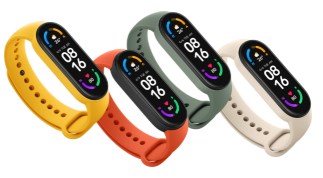 | |
| Display | 1.56" AMOLED display Display resolution: 152*486 Display color depth: 326 PPI Display brightness: up to 450 nits, adjustable |
| Sensors | High precision 6-axis sensor and PPG heart rate sensor 6-axis sensor: Low power-consumption 3-axis accelerometer and 3-axis gyroscope PPG heart rate sensor |
| Battery life | 14-day extra-long battery life with magnetic charger Charging method: Magnetic charging Charging time: ≤ 2 hours Battery life: ≥ 14 days* |
| Sports | 30 fitness modes Supported exercises: Treadmill, Freestyle, Outdoor running, Cycling, Walking, Pool swimming, Rowing machine, Elliptical, Indoor cycling, Yoga, Jump rope, Dance, Indoor fitness, Gymnastics, HIIT, Core training, Stretching, Bowling, Badminton, Boxing, Stepper, Pilates, Basketball, Volleyball, Table tennis, Cricket, Ice skating, Kickboxing, Street dance, Zumba |
| Health | Heart rate and sleep monitoring with women's health tracking Heart rate monitoring: Whole-day heart rate manual heart rate, resting heart rate and heart rate curve Sleep monitoring: Deep sleep, light sleep, rapid eye movement (REM), naps Women's health tracking: Provides recording and reminders for the menstrual cycle and ovulation phases Stress monitoring, breathing exercises, PAI vitality index assessment, idle alerts, step counter, goal setting |
| Other features | Message/call notification, App alerts, Calendar, Alarm, Clock, Stopwatch, Timer, Music control, Find phone, Unlock phone(MIUI), Camera remote shutter*, Weather, Set activity goals. *The availability will vary between markets. |
| Dimensions and specifications | Body net weight 12.8 g Body dimensions 47.4 × 18.6 × 12.7 mm Waterproof rating 5 ATM Wireless connection Bluetooth 5.0 Adjustable length 155–219 mm Battery capacity 125 mAh Battery type Lithium-ion polymer battery Strap material TPU Strap buckle material Aluminum alloy Display cover material Tempered glass with anti-fingerprint coating Case material PC plastic Operating temperature 0℃~45℃ System language Supports English, German, Italian, French, Spanish, Russian, Taditional Chinese, Simplified Chinese. The aforementioned languages will be launched successively. Supported systems Android 5.0 or iOS 10.0 and above |
| Packing list | Band body ×1 Band strap ×1 Dedicated charging cable ×1 User manual ×1 |
Use related
1.Q:How to charge Mi Smart Band 6?Does the band work with other band adapters?
A:The battery capacity of Mi Smart Band 6 is 125mAh, which takes about 2 hours to be fully charged. The band is equipped with a special magnetic suction charging base, which is not common with chargers of other Mi Band 1/2/3/4 series products, but common with chargers of Mi Band 5 series.
It is not necessary to remove the wristband for charging. It needs to connect the two ends with metal contacts to a special charging base (as shown in the figure below).Then connect the charging cable to a standard USB charging head with a 5V output current of 250mAh or more.
Note:
1. Please ensure that the charging contact is clean and dry when charging, and check whether the charging buckle and the charger are in good contact.
2. If the band haven't been used for a long time, please to wait for a while before the charging interface is displayed on the screen.
3. During charging, please check the current time, receive call reminder and APP notification.
4. It is recommended to use standard brand charging head for charging.
2.Q:How to check the charging state of Mi Smart Band 6?
A:After the band is inserted into the charging stand, it will display the icon of being charged, which can show the charging progress and the specific percentage. After about 10 seconds, the screen will rest. If you want to check the charging progress at this time, the screen will be lit up and the charging interface will be displayed.When fully charged, the band will vibrate to remind, and the battery will display 100%.
Note: If the charging diagram is not on this page, please check the firmware version whether upgrade to the latest version.
3.Q:How does Mi Smart Band 6 turn on/off,reboot and reset factory setting?
A:Turn on/off: The band will automatically shut down when the power is too low, and don't support manual turnoff. In the state of low power turnoff, the band will be recharged and automatically turn on (about 3 minutes) when the power reaches the starting power.
Restart/Restore factory: Select Restart or Restore factory from the "Settings" of the band, bind the connection state, and unbind in the APP to restore factory Settings.
4.Q:What’s the Mi Smart Band 6 PAI?
A:PAI is Personal Activity Intelligence,PAI is a fitness score, to assess the current period of personal movement situation, PAI through relevant algorithm, nearly seven days of the personal data and heart rate values into PAI, PAI's meaning is to help people improve cardiorespiratory fitness health, If PAI value remains at 100 and above, can better maintain the body health.
5.Q:Does Mi Smart Band 6 power saving mode?
A:Mi Smart Band 6 doesn't have a special power saving mode switch, but by turning off the automatic heart rate detection, or modifying the frequency of heart rate detection, and reducing the brightness of the band display, the effect of energy saving and battery life can be achieved.
Setting Path:
Zepp Life APP:Mi Smart Band 6:Heart monitoring--Activity HR monitoring,Sleep monitoring assistant and All-day stress monitoring.
The other models,except Mi Smart Band 6:Heart rate monitoring--Automatic heart rate monitoring & sleep assistant
6.Q:How does Mi Smart Band 6 check the weather?
A:Light up the screen, click the weather application, the current weather can be viewed , the display content is: weather icon, current temperature, all-day temperature, air quality, location, up to view the next 7 days of weather.
It allows to set up regional cities in the Zepp Life APP and turn on weather alerts.When the weather warning notification is received after opening, the band will receive this push.
Zepp Life App: Profile -> Mi Band -> weather setting page, select city (automatic location or manually select city), temperature unit (Celsius/Fahrenheit), and push weather warning.
Note:
1. Use the band to check the real-time weather. Keep the connection between the phone and the band.
2. If the band is not connected to the phone, the weather display is the information synchronized when the phone was last connected.
7.Q:What's the camera feature of Mi Smart Band 6?
A:The camera function of the band can control the phone to take photos through the band, this function needs to be used in the state of connection between the band and the phone.
Before using this function, please make pairing in the Zepp Life APP.
Pairing method:
IOS phone: After binding the device, the system will pop up a pairing popup. Click "Allow pairing".
Android phone: Zepp Life APP-> Mi Band -> Lab -> Photo Setting -> Bluetooth Pair (Unpair)
After the pairing is completed, open the camera app on the phone and press the camera button on the band to control the phone to take photos.The photo status is as follows:
8.Q:Does Mi Smart Band 6 support unlock phone?
A:Mi Smart Band 6 supports unlocking the phone.In the state of Bluetooth connection between the mobile phone and band, the band unlocking is a one-to-one binding between the band and the phone. Within a safe distance, the band can replace the input of the unlock password or pattern, which not only ensures security, but also greatly improves the convenience of operation.Unlocking the phone is done in the Zepp Life APP.Setting method:
Zepp Life App:
1. Open the Zepp Life APP-> Profile -> Mi Band -> Screen Unlock -> Set the password of the phone lock screen.
2. After setting the band unlock function, the display on the band screen allows the phone to bind?Click "√" to show that binding is successful.
After successful binding, the unlocking distance can be set. There are three kinds of distance: close, moderate and far.
9.Q:Does Mi Smart Band 6 support unlock laptop?
A:Yes, Mi Smart Band 6 supports unlock laptop. This function needs to be supported after APP updates. If enabled, the battery life of the band will be affected, and it allows to choose whether to enable it according to personal needs.
10.Q:How long does it take to complete a single measurement of SpO₂?
A:About 25-50 seconds.
11.Q:What are the reasons for the failure of SpO₂?
A:1) The body and arms didn't remain static during the measurement or the band was shaking
2) The arm hair, tattoo and dirt at the measurement site affect the signal acquisition of the optical sensor
3) The wearing position is not correct, and the blood oxygen value is not easy to be measured due to the small blood vessel distribution in the wrist
APP connection related
1.Q:What Apps can Mi Smart Band 6 bind ,how to bind?
A:Mi Smart Band 6 can bind to Mi Wear app and Zepp Life app,
1.Scan the QR code to download and install the app. Add the Mi Smart Band 6 to the app first before starting to use it.
2.Log into Mi account in the app, and follow the instructions to connect and pair the band with phone. Once the band vibrates and a pairing request is displayed on its screen, tap to complete the pairing with phone.
Note: Make sure the Bluetooth on phone is enabled. Hold the phone and the band close to each other during pairing.
2.Q:Can Zepp Life APP bind sevral Mi Smart Band 6?
A:Zepp Life APP can bind to sevral bang,but only one can be used when enabled.
3.Q:How to switch different device in Zepp Life APP?
A:If the Zepp Life APP is tied to multiple devices, it supports to switch between them in the APP.
Switch mode: Zepp Life App: Profile -> My Device -> Click Device -> Click Enable Device.When a new device is enabled, it deactivates before connecting device.
4.Q:How does Mi Band keep connection with Zepp Life APP?
A: Set the Zepp Life APP as the application whitelist, and ensure that the APP is running in the background, the Bluetooth of the phone will not be turned off, and keep the band within the Bluetooth connection distance of the phone.
5.Q:What functions will be affected when Mi Smart Band 6 is disconnected from the mobile phone?
A:1. The firmware cannot be updated at the APP end.
2. Weather information cannot be updated on the band.
3. The sports and health data generated cannot be synchronized to the mobile phone in the first time. This information will be lost after the band is restored to the factory.
4. Unable to receive mobile phone notifications and reminders, unable to search mobile phones with the band.
6.Q:How to do if Mi Smart Band 6 is often disconnected with Zepp Life APP?
A:1. Check whether the band and APP have been upgraded to the latest version.
2. Lock the Zepp Life APP in the multi-tasking window of the phone to avoid being cleaned in the background APP.
Note: Please refer to the background operation permission guide of the Zepp Life App page for different detailed operation steps of each mobile phone and system.
7.Q:If Mi Smart Band 6 is not around, can others search the band?
A:After the band is bound, the Bluetooth of the band will be invisible to others, and others cannot search the Bluetooth address.
8.Q:Mi Smart Band 6 can't bind or fails to bind?
A:1. Make sure that the band is powered, put it as close to the phone as possible and try again.
2. Check the update of the Zepp Life APP to the latest version.
3. Clear the Bluetooth information of the device in the Bluetooth list of the mobile phone system;
4. Please try switching on and off the bluetooth or restarting the mobile phone.
5. If Mi Band has been bound before, it is necessary to unbind it in the previous device account or restore the band to the factory setting at the end of the band, and then bind a new phone.
6. if still unable to connect, can replace the phone to try.
7. If can't search the band by changing multiple mobile phones, please apply for after-sales treatment.
9.Q: How to do if Mi Smart Band 6 is disconnected from the Zepp Life APP and cannot be reconnected manually?
A:To ensure that the mobile network connection is normal, check according to the following steps:
1. Make sure that the band is near the mobile phone, within 3 meters, and there is no obvious obstruction.
2. Make sure whether the bluetooth of the mobile phone is in the enabled state. If it is already in the enabled state, please restart the bluetooth of the mobile phone.
3. Go to the mobile phone system Settings page and unpair the paired devices in the Bluetooth list.
4. Please restore the band to the factory, unbind the band on the mobile phone end, and then re-bind
5. Restart the phone, replace the phone to try.
10.Q:Why is there no monitoring record or score in the APP after starting the sleep breathing quality monitoring?
A:1. First, confirm whether the sleep breathing quality test is enabled in the Zepp Life APP.
Setting Path: Zepp Life APP - Profile -Mi Band - Health Monitoring - Sleep Breathing Quality Test
2. If the sleep duration is too short, and the effective monitoring duration is too short, the sleep breathing quality score or measurement data will not be displayed(generally sleep more than 3 hours at night).
A) Improper wearing mode may lead to failure to monitor the quality of sleep breathing. It is recommended not to wear too loose, the device is a finger distance from the carpal bone.
B) Low power of the band may lead to inability to monitor, so it is necessary to maintain sufficient power of the band (it is recommended to maintain more than 20% power).
C) If none of the above reasons, verify whether the APP and firmware version are up to latest. It is recommended to restart the band or try to unbind the band again.
Does it help?