

Mi Band 4C FAQ
Overview
1. Q:What are the features of Mi Band 4C?
A:1. 1.08 "TFT large color screen with clear display and vivid color.
2. Small size and long endurance, integrated direct-plug charging mode, 5ATM waterproof.
3. 2 hours charged fully, 14 days super long endurance, meet the daily exercise needs.
4. Simple and fashionable appearance design, with different color watchband, sports, leisure, business style conversion.
5. It has the functions of heart rate monitoring and exercise heart rate reminder, sleep monitoring every night, scientific sleep analysis, and all data are clear at a glance; Always intimate, comprehensive protection of health.
6. Mature exercise and health algorithm, support a variety of exercise modes, including outdoor running, hiking, cycling, indoor running and exercise.The mobile phone can also record the movement track, display the distance, real-time speed, exercise heart rate and other information;
7. Rich and varied intimate small functions to improve the experience of details in life, such as controlling music playing, weather, alarm clock, countdown, searching mobile phone, do not disturb mode, etc.
2. Q:Introduction of Mi Band 4C screen
A: The Mi band 4C has a 1.08-inch TFT screen with a resolution of 128x220 and a maximum brightness of 200nit. The enhanced glass panel is wearable and scratch-resistant, making the touch more sensitive.
Note: TFT is a core component of LCD screen. Most LCD screens in the market are based on TFT technology, and it is also the mainstream display device on laptop and desktop.Simply put, its main function is to independently control whether each pixel is bright or not.Each pixel of TFT is controlled by TFT integrated on itself and is an active pixel.Therefore, not only the speed can be greatly improved, but also the contrast and brightness can be greatly improved, and the resolution can also reach a very high level.
3.Q: What‘s star and of the Mi Band 4C?
A: Mi Band 4C is equipped with a band body, a wristband, and operating instructions (including three packets of certificates).
4.Q:What's the difference between the Mi Band 4C and the Mi Band 4?
A: Mi Band 4C is a big colorful display bands, compared with Mi Band 4, also supports many functions, such as sleep monitoring, various movement modes, weather, music control, alarm, etc., but Mi Band 4C used the 1.08 inch TFT screen, the design of the USB one upright type charging, charging is more convenient.
For more detailed comparison of the two bands, please refer to the following table:
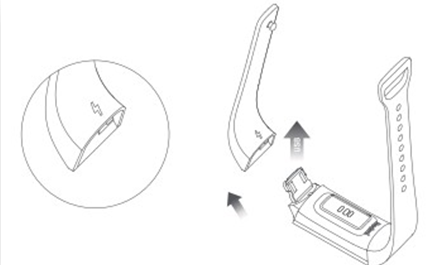
5. Q:How to install and remove the Mi Band 4C?
A: Installation method:
1. Align the concave part of the end of the short wrist band with one end of the USB plug of the brand body and fix the assembly;
2. Install the long wristband on the other end of the main body of the band in the same way.
Disassembly method: hold the main body of the band and the wrist band with both hands, pull out the side of the Band with an oblique downward Angle of 45 degrees, and pull out the other end of the wrist band in the same way. When removing the wrist band for the first time, it may be difficult because the wrist band is too tight.
6.Q:What kind of material does Mi Band 4C use?Is it common with Mi Band?
A: Mi Band 4C wristband is not common with Mi Band.The Mi Band 4C is made of thermoplastic elastomer and the wrist buckle is made of PA plastic. It fits the arm when worn and is easy and natural.The adjustable length of the wristband is 150.6-198.74mm, which can be used by most people.
7.Q:What is the Mi Band 4C waterproof rating? Can I swim?
A: The Mi Band 4C is 5ATM waterproof and can be worn in the shower, swimming pool and shallow water.It is not suitable for sauna, hot spring and other high humidity and high temperature scene, also not suitable for diving, surfing and other wading activities and deep water activities.
Note:
1.The band has a certain water resistance pressure, which is not obtained under water but converted through the value of great pressure resistance. The waterproof value of 50 meters indicates that the Band can withstand the pressure of 50 meters of water depth under the static state.
2. If coming into contact with seawater, body wash, soapy water, perfume, solvent, detergent, acid or acidic substances, insecticides, lotions, sunscreen, moisturizers or hair colorants, rinse with water and dry.
Function and Use
1. Q:Which device does Mi Band 4C support to bind?
A: Android device can download Mi Fitness APP, and iOS device can download Mi Fitness Lite.After adding a bound device on the APP side, Redmi Band supports the same functions on Android and iOS device.
Note:1. Support Android4.4 or iOS10 or above;
2. Binding Mi Fitness app is not supported.
2. Q:What apps does Mi Band 4C have?
A: Mi Band 4C has state, heart rate, exercise (outdoor running, indoor running, cycling, walking, free activity), weather, notification, more (do not disturb, alarm clock, theme, music, stopwatch, countdown, find mobile phone, Alipay, setting) and other applications.Slide the screen up and down to find the desired application, and click to enter.
3. Q: How about the endurance performance of Mi Band 4C?
A: It lasts for 14 days under typical usage scenarios, and up to 17 days after turning off the automatic heart rate detection.
14 days endurance performance specific scene: After full charge, turn on the 30-minute automatic heart rate detection (other default Settings are factory default) test content: receive and display 100 notifications every day;2 alarm clocks per day, vibrating for 5 seconds;Click the button to display time 20 times a day;Start the APP to synchronize data once a day;
17 days endurance performance specific scene: After full charge, turn off the automatic heart rate detection (other Settings are factory default) test content: receive and display 100 notifications per day;2 alarm clocks per day, vibrating for 5 seconds;Click the button to display time 20 times a day;Start the APP to sync data once a day.
The above is the test environment. In actual use, the battery life is related to various factors such as setting, operation and use environment, and may be different from the laboratory data.
4.Q:What is the capacity of Mi Band 4C battery?How long does it take to charge a Mi Band 4C?
A: The battery capacity of Mi Band 4C is 130mAh. The battery of Mi Band 4C is affected by temperature. It can be fully charged in about 2 hours after normal charging (the temperature is 15-45℃).Fill at low temperature (0-15℃) for about 8 hours;At high temperature (45-60℃), the electric quantity is charged to about 60% at most, which cannot be fully filled.The temperature below 0℃ cannot be charged.
Note:
1. Make sure the charging contact is clean and dry when charging, and check whether the charging buckle and charger are in good contact.
2. When charging, please pay attention to the front and back of the USB charging port of the band. The contact of the charging port of the band should be in contact with the contact of the USB charger in order to charge normally.If the band does not vibrate when plugged in (Note: The band will not vibrate when charged under 25% of the battery), please change to the other side and the access direction to try charging again.
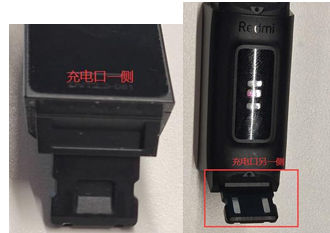
3. If the band haven't been used for a long time, please need to wait 3 minutes before,the charging interface will display on the screen.
5.Q:How do Mi Band 4C start up, shut down, restart or restory factory settings?
A: Power on: The first time I get my band, the default state of band power off. Long press the button to start the machine.
Power off: The band will shut down automatically when the power level is too low. Manual power off is not supported. In the state of low power power off, the band will start up automatically when the power level reaches the starting level (about 3 minutes).
Restart/restory factory: select restart or restory factory from More -> Settings on the band.In the state of unbounding, long press the home button to restore factory Settings.
6.Q:How to wear Mi Band 4C?
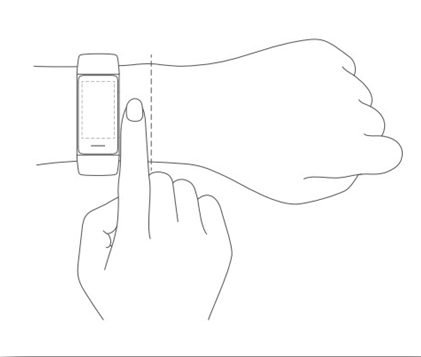
A:Wear the band to a point about one finger away from the carpal bone, and adjust the elastic of the Band to a comfortable position to ensure that the cardiac sensor can collect data normally.Do not wear too tight or too loose, otherwise it will affect the accuracy of heart rate sampling.
7.Q: Does Mi Band 4C support automatic heart rate detection?
A: Mi Band 4C supports automatic heart rate detection. Setting method: enter Mi Fitness app-> Other Settings -- > Heart rate setting --> turn on or off "Automatic heart rate detection".After turning on the automatic heart rate detection, the heart rate will be detected throughout the day, and the battery life of the band will be significantly reduced. The detection frequency can be set by owner: 1 minute, 5 minutes, 10 minutes and 30 minutes.
8. Q:How to download the new dial to Mi Band 4C?
A: Open Mi Fitness app-> Dial management page -- > Dial market -- > select dial -> and click to download and use. Only one dial can be downloaded at a time. At present, the band can save up to 3 dials (Except two preset dials, one can be downloaded)
Note:
1.In addition to the preset two dials, it also supports to download a new dial, when downloading other new dials, will automatically replace the previously downloaded dial.
2. Preset dial does not support replacement.
9.Q: How to change the Mi Band 4C dial style?
A: The main body of Mi Band 4C has built-in system dial. More dial can be downloaded and used in Mi Fitness APP. The dial style can be changed in the band and Mi Fitness APP.
1. Modification method of the band: lighten the band interface -> More -> Dial ->slide the dial up and down, select the dial and click to switch.
2. Mi Fitness APP modification method: open Mi Fitness APP-> Dial management page -> My dial or dial market -> select the installed dial and click to use.
10.Q: Does Mi Band 4C support call alerts?
A: Yes. When the band connect to the mobile phone, when there is an incoming call on the mobile phone, the band will vibrate to remind and display the number or name of the caller.
Open mode: Mi Fitness app-> message notification -> open message notification -> select phone APP. Please click the red phone icon on the screen of the ring to reject the call and click the mute icon to mute the call.
11.Q:Does Mi Band 4C support power saving mode?
A: The Mi Band 4C does not have a special power-saving mode switch, but by turning off automatic heart rate monitoring, it can save energy and increase battery life.
Setting method: Mi Fitness app-> other setting -> heart rate setting -> detection mode -> turn off automatic heart rate detection.
12. Q:Does Mi Band 4C support motion mode?
A: Mi Band 4C supports outdoor running, indoor running, cycling, brisk walking and free activities.The swimming mode is not supported. The sports data page will be displayed after starting the exercise. When the band connected to the mobile phone, the mobile phone can be used to locate and record the movement track.The motion data can be viewed in the process of motion. Each motion mode presents the most critical motion data, so the data that can be viewed in different modes is different.
13.Q:How to set up and use Mi Band 4C do not Disturb mode?
A: When Mi Band 4C opens the "Do Not Disturb" mode, it will block all notifications except alarm clock and heart rate warning. The band can accept other messages, but no vibration or bright screen alerts.
Open method: Click "More", select "Do Not Disturb" and display the current "Do Not Disturb" state. Click the arrow to change the "Do Not Disturb" mode.Support three modes: on do not Disturb, intelligent on (automatically on after sleep) and off do not disturb.Timing on is not supported.
14.Q:Can Mi Band 4C control music playing on phone?
A: The Mi Band 4C can control the music playing on the phone.When the band connect to the mobile phone, open the music player on the mobile phone and start playing music. Click More on the band and select music to enter the music control interface. The volume can be increased or decreased at the top of the player, the music can be played/paused in the middle, and the last/next music can be switched at the bottom.Currently supported music players include: currently supported most music players in the market, but due to the openness of music players and differences in APP versions, the experience of band music control may be affected to some extent.
Note:
In order to better use the band to control the music playing on the mobile phone, this function can only be used after the mobile phone starts playing music and keeps the background running.In order to avoid cleaning the memory with one key in android system and some housekeeping software may clean the process or intercept the process, please set it according to Mi Fitness app-> "Device" ->"start background operation permission.
15.Q: How to set the screen brightness of Mi Band 4C?
A: Setting method: click More -> Setting -> Brightness, click "+" to increase the screen brightness, click "-" to reduce the screen brightness.There are five levels of brightness adjustable.
16.Q:How do Mi Band 4C view firmware and Bluetooth addresses?
A: 1. Click "More -> Setting->About, to view the firmware and bluetooth address.
2、After the band bind to the mobile phone, Mi Fitness APP can be viewed. The viewing path is: Mi Fitness app-> other Settings ->. About the device, the firmware version, SN and MAC addresses of the device can be viewed.
17.Q:How to use Mi Band 4C Find phone function?
A: Mi Band 4C supports find phone function, use this function to maintain connection with mobile phone band, operation method: light band - > More - > find phones, the band will display the phone is ringing, the phone will ring, click the bell icon will closed ring in the band, on the phone ringing the bell sound does not support to change.
18. Q:How to set the wrist lifting bright screen of Mi Band 4C?
A: Setting method: Mi Fitness app-> other Settings -> wrist lifting bright screen -> on/off at a fixed time. Choose to open, open or close at a fixed time all day according to needs.
19.Q:How to check Mi Band 4C Bluetooth connection status?
A: In the upper left corner of the home page of the dial, it allows to check the Bluetooth icon. The icon shows the state and "

" indicates that it is not connected, while the icon shows the hidden state to indicate that it is connected.
20.Q: Does Mi Band 4C support unlock phone or laptop?
A: No, it doesn't
APP connection related
1. Q:How Mi Band 4C bind to the App?
A:Mi Band 4C requires Mi Fitness APP binding on the android phone and Mi Fitness Lite binding on the iOS phone.After binding, the APP should be locked in the background to avoid being shut down by the system, resulting in disconnection from the phone and affecting the normal use of the band.
The binding method is as follows (Take Mi Fitness APP as an example) :
1."Add device", click "Automatic scanning Device" or "Mi Band 4C", and when the bluetooth name of the band "Mi Band 4C" appears, click to pair.
2. During pairing, the band screen will prompt whether to pair. Click "' √ '" to complete the pairing connection with the band.
Note: If the band cannot be found in the process of adding the device, or the band cannot be connected during use, please try to press the home button of the band for a long time, select restore factory from the operating interface of the system, and then add it again.
2. Q:How does the Mi Band 4C unbind from the phone?
A: 1. Open Mi Fitness APP/ Mi Fitness Lite APP and click other Settings on the home page to unbind,
2. After the band restores the factory Settings, it will be automatically unbound from the phone.Once unbound, all data will be cleared.
3.Q:How to set up Mi Band 4C Application Notification reminder?
A: If Mi Band 4C wants to accept notifications from mobile phone, such as SMS and call reminder, it needs to open the APP's message notification in Mi Fitness APP.
Opening method: Mi Fitness app-> message notification -> enable message notification -> select APP to open notification (call, SMS, etc.), and select only notifications when the phone is locked.Notification reminder includes: sedentary reminder, low battery reminder, activity reaching the standard reminder, heart rate exceeding the limit reminder, message reminder, upgrade reminder, etc.
Note: If enable the notification message in the Mi Fitness APP, the notification permission on the mobile phone should be opened at the same time.
4.Q: Can Mi Fitness APP bind multiple bands?
A: Mi Fitness APP can bind multiple bands. 5-10 bands can be bound on the same account, but only one can be enabled when used.
5.Q:Does it support to directly sync the band information when log in the same account on another phone?
A: It doesn't support to sync the band directly when logging on to a new phone. In order to protect the privacy and security of s, as the following actions to log in:
1. Mi Fitness app->Other device,unbind the device.
2. Long press the home button for 3 seconds, and restore factory Settings.
3.Clear the bluetooth information of the device in the Bluetooth list of the mobile phone system.
4.Turn off the bluetooth of the phone,and return the bluetooth.
5. Open Mi Fitness APP and add the device again.
6.Q: What functions will be affected when Mi Band 4C disconnect from the phone?
A: Disconnected connection will affect the following functions:
1. The band's firmware cannot be updated at the APP terminal;
2. The band cannot update weather information,
3. The sports and health data generated cannot be synchronized to the mobile phone in the first time, and the information will be lost forever after the band restore to factory mode,
4. Unable to receive messages from the phone, unable to find the phone through the band.
7.Q:How to do if Mi Band 4C usually disconnect with Mi Fitness APP?
A: 1. Check whether the band and APP have been upgraded to the latest version;
2. Lock the Mi Fitness APP in the multitasking window of the phone to avoid the APP being shut down in the background.
Note: please refer to Mi Fitness app-> Device-> Enable background run permissions.
8.Q:Does it need to unbind first before bind to other phone?
A:Please unbind the band in the Mi Fitness APP of the old phone, and then rebind in the Mi Fitness APP of the new phone
1. Mi Fitness APP->Other device,unbind the device.
2. Long press the home button for 3 seconds, and restore factory Settings.
3.Clear the bluetooth information of the device in the Bluetooth list of the mobile phone system.
4.Turn off the bluetooth of the phone,and return the bluetooth.
5. Open Mi Fitness APP and add the device again.
Q&A
1. Q: How do Mi Band 4C update firmware?
A: The band will push the upgrade package through Mi Fitness APP to update its functions.
1. Mi Fitness APP->Other Settings -> check the upgrade.
2. If there is a new version that can be updated, click to download the upgrade package.
3. After downloading the upgrade package, the band will automatically upgrade and restart.
Note:
1. The battery power of the band should be maintained at 20% or above when it is upgraded.
2. During the upgrade process, the band should be connected to the mobile phone, and try to keep the band near the mobile phone.
2.Q:What language does Mi Band 4C support?
A: Mi Band 4C supports Chinese (simplified), Chinese (traditional) and English. When the band connect to the phone, the band will automatically sync the phone's language.
3.Q:Can Mi Band 4C customize dial?
A: Custom dial and album dial are not supported at present.
4.Q: Can the Mi Band 4C delete the dial?
A: 1. The preset dial of the band does not support deletion. The downloaded dial can be reset and cleared.
2. The new dial that download does not support to delete directly, the new dial will replace the previous downloaded dial.
5. Q: Will the detection effect of Mi Band 4C be the same when wear on the different hand?
A: The monitoring effect of Mi Band 4C wearing data on the left and right hand is consistent, which does not affect the normal sampling of sports and health data. It allows to choose to wear it according to usage habits without setting.
6.Q:Does the Mi Band 4C support to connect heart rate band?
A: No.
7.Q: Does Mi Band 4C support NFC?
A: No.
Troubleshooting
1. Q:How to do if Mi Band 4C doesn't vibrate?
A: 1. First, check whether enable the "do not disturb" mode;
2. If doesn't enable, it supports to restart the band. After restarting successfully, please use the find device function on Mi Fitness APP to check whether the band vibrate or not.
2. Q:What if Mi Band 4C fails to upgrade?
A: When upgrading the Mi Band 4C, please ensure the battery power is above 20%. If it still fails, check it as follows:
1.If the APP or the band prompts upgrade failed, please try to restart the band and upgrade again,
2. Upgrade the band after charging 20% or more,upgrade again,
3. Reset the band and try to upgrade after rematching;
4. Restart the phone and try to reconnect and upgrade;
5. Replace other phones to re-bind and try to upgrade.
3. Q:What if Mi Band 4C fails to charge?
A:1. Please ensure that the charge port of the band is clean and dry;
2. Try to change the direction of the band body connecting to the charger to ensure that the charge end of the band is consistent with the USB charging base correctly and there is no reverse connection;
3. Some mobile power supply does not support small current charging. It is recommended to use standard charger for charging;
4. Try to replace other adapters.
Note: Please confirm whether the ambient temperature of the band during charging is too low (< 0℃) or too high (> 60℃).If the temperature of the Band is too high or too low, it is forbidden to charge. The charging function will automatically resume after the temperature is normal.We suggest to charge when the temperature is 15℃-45℃.
4.Q:How to deal with the time error?
A: If the time of the band is inconsistent with the time of the phone, connect to the Mi Wea APP and try to refresh.
5. Q:Why does the band screen appear bisect stripes at certain angles?
A: Stripes are screen etchings, a necessary process to realize touch function. They may be seen at certain special angles and under certain light conditions. They are normal phenomena and do not affect normal use.
1. Q:What are the features of Mi Band 4C?
A:1. 1.08 "TFT large color screen with clear display and vivid color.
2. Small size and long endurance, integrated direct-plug charging mode, 5ATM waterproof.
3. 2 hours charged fully, 14 days super long endurance, meet the daily exercise needs.
4. Simple and fashionable appearance design, with different color watchband, sports, leisure, business style conversion.
5. It has the functions of heart rate monitoring and exercise heart rate reminder, sleep monitoring every night, scientific sleep analysis, and all data are clear at a glance; Always intimate, comprehensive protection of health.
6. Mature exercise and health algorithm, support a variety of exercise modes, including outdoor running, hiking, cycling, indoor running and exercise.The mobile phone can also record the movement track, display the distance, real-time speed, exercise heart rate and other information;
7. Rich and varied intimate small functions to improve the experience of details in life, such as controlling music playing, weather, alarm clock, countdown, searching mobile phone, do not disturb mode, etc.
2. Q:Introduction of Mi Band 4C screen
A: The Mi band 4C has a 1.08-inch TFT screen with a resolution of 128x220 and a maximum brightness of 200nit. The enhanced glass panel is wearable and scratch-resistant, making the touch more sensitive.
Note: TFT is a core component of LCD screen. Most LCD screens in the market are based on TFT technology, and it is also the mainstream display device on laptop and desktop.Simply put, its main function is to independently control whether each pixel is bright or not.Each pixel of TFT is controlled by TFT integrated on itself and is an active pixel.Therefore, not only the speed can be greatly improved, but also the contrast and brightness can be greatly improved, and the resolution can also reach a very high level.
3.Q: What‘s star and of the Mi Band 4C?
A: Mi Band 4C is equipped with a band body, a wristband, and operating instructions (including three packets of certificates).
4.Q:What's the difference between the Mi Band 4C and the Mi Band 4?
A: Mi Band 4C is a big colorful display bands, compared with Mi Band 4, also supports many functions, such as sleep monitoring, various movement modes, weather, music control, alarm, etc., but Mi Band 4C used the 1.08 inch TFT screen, the design of the USB one upright type charging, charging is more convenient.
For more detailed comparison of the two bands, please refer to the following table:
| Product | Mi Band 4C | Mi Band 4 |
| Screen type | TFT | AMOLED |
| Screen size | 1.08" | 0.95" |
| Waterproof level | 5ATM | 5ATM |
| APP | Mi Fitness | Zepp Life |
| Charging way | USB integrated direct-plug charge mode | Pogo Pin charge cable |
| Bluetooth version | Bluetooth 5.0 BLE | Bluetooth 5.0 BLE |
| Life performance | 14 days | 20 days |
| Find device | Support | Support |
| Find the band | Support | Support |
| Sleep monitoring | Support | Support |
| Heart rate throughout the day | Support | Support |
| Sedentary remind | Support | Support |
| Phone calls reminding | Support | Support |
| Do not disturb mode | Support | Support |
| APP message notification | Support | Support |
| NFC function | Not Support | Not Support |
| Swimming mode | Not Support | Support |
A: Installation method:
1. Align the concave part of the end of the short wrist band with one end of the USB plug of the brand body and fix the assembly;
2. Install the long wristband on the other end of the main body of the band in the same way.
Disassembly method: hold the main body of the band and the wrist band with both hands, pull out the side of the Band with an oblique downward Angle of 45 degrees, and pull out the other end of the wrist band in the same way. When removing the wrist band for the first time, it may be difficult because the wrist band is too tight.
6.Q:What kind of material does Mi Band 4C use?Is it common with Mi Band?
A: Mi Band 4C wristband is not common with Mi Band.The Mi Band 4C is made of thermoplastic elastomer and the wrist buckle is made of PA plastic. It fits the arm when worn and is easy and natural.The adjustable length of the wristband is 150.6-198.74mm, which can be used by most people.
7.Q:What is the Mi Band 4C waterproof rating? Can I swim?
A: The Mi Band 4C is 5ATM waterproof and can be worn in the shower, swimming pool and shallow water.It is not suitable for sauna, hot spring and other high humidity and high temperature scene, also not suitable for diving, surfing and other wading activities and deep water activities.
Note:
1.The band has a certain water resistance pressure, which is not obtained under water but converted through the value of great pressure resistance. The waterproof value of 50 meters indicates that the Band can withstand the pressure of 50 meters of water depth under the static state.
2. If coming into contact with seawater, body wash, soapy water, perfume, solvent, detergent, acid or acidic substances, insecticides, lotions, sunscreen, moisturizers or hair colorants, rinse with water and dry.
Function and Use
1. Q:Which device does Mi Band 4C support to bind?
A: Android device can download Mi Fitness APP, and iOS device can download Mi Fitness Lite.After adding a bound device on the APP side, Redmi Band supports the same functions on Android and iOS device.
Note:1. Support Android4.4 or iOS10 or above;
2. Binding Mi Fitness app is not supported.
2. Q:What apps does Mi Band 4C have?
A: Mi Band 4C has state, heart rate, exercise (outdoor running, indoor running, cycling, walking, free activity), weather, notification, more (do not disturb, alarm clock, theme, music, stopwatch, countdown, find mobile phone, Alipay, setting) and other applications.Slide the screen up and down to find the desired application, and click to enter.
3. Q: How about the endurance performance of Mi Band 4C?
A: It lasts for 14 days under typical usage scenarios, and up to 17 days after turning off the automatic heart rate detection.
14 days endurance performance specific scene: After full charge, turn on the 30-minute automatic heart rate detection (other default Settings are factory default) test content: receive and display 100 notifications every day;2 alarm clocks per day, vibrating for 5 seconds;Click the button to display time 20 times a day;Start the APP to synchronize data once a day;
17 days endurance performance specific scene: After full charge, turn off the automatic heart rate detection (other Settings are factory default) test content: receive and display 100 notifications per day;2 alarm clocks per day, vibrating for 5 seconds;Click the button to display time 20 times a day;Start the APP to sync data once a day.
The above is the test environment. In actual use, the battery life is related to various factors such as setting, operation and use environment, and may be different from the laboratory data.
4.Q:What is the capacity of Mi Band 4C battery?How long does it take to charge a Mi Band 4C?
A: The battery capacity of Mi Band 4C is 130mAh. The battery of Mi Band 4C is affected by temperature. It can be fully charged in about 2 hours after normal charging (the temperature is 15-45℃).Fill at low temperature (0-15℃) for about 8 hours;At high temperature (45-60℃), the electric quantity is charged to about 60% at most, which cannot be fully filled.The temperature below 0℃ cannot be charged.
Note:
1. Make sure the charging contact is clean and dry when charging, and check whether the charging buckle and charger are in good contact.
2. When charging, please pay attention to the front and back of the USB charging port of the band. The contact of the charging port of the band should be in contact with the contact of the USB charger in order to charge normally.If the band does not vibrate when plugged in (Note: The band will not vibrate when charged under 25% of the battery), please change to the other side and the access direction to try charging again.
3. If the band haven't been used for a long time, please need to wait 3 minutes before,the charging interface will display on the screen.
5.Q:How do Mi Band 4C start up, shut down, restart or restory factory settings?
A: Power on: The first time I get my band, the default state of band power off. Long press the button to start the machine.
Power off: The band will shut down automatically when the power level is too low. Manual power off is not supported. In the state of low power power off, the band will start up automatically when the power level reaches the starting level (about 3 minutes).
Restart/restory factory: select restart or restory factory from More -> Settings on the band.In the state of unbounding, long press the home button to restore factory Settings.
6.Q:How to wear Mi Band 4C?
A:Wear the band to a point about one finger away from the carpal bone, and adjust the elastic of the Band to a comfortable position to ensure that the cardiac sensor can collect data normally.Do not wear too tight or too loose, otherwise it will affect the accuracy of heart rate sampling.
7.Q: Does Mi Band 4C support automatic heart rate detection?
A: Mi Band 4C supports automatic heart rate detection. Setting method: enter Mi Fitness app-> Other Settings -- > Heart rate setting --> turn on or off "Automatic heart rate detection".After turning on the automatic heart rate detection, the heart rate will be detected throughout the day, and the battery life of the band will be significantly reduced. The detection frequency can be set by owner: 1 minute, 5 minutes, 10 minutes and 30 minutes.
8. Q:How to download the new dial to Mi Band 4C?
A: Open Mi Fitness app-> Dial management page -- > Dial market -- > select dial -> and click to download and use. Only one dial can be downloaded at a time. At present, the band can save up to 3 dials (Except two preset dials, one can be downloaded)
Note:
1.In addition to the preset two dials, it also supports to download a new dial, when downloading other new dials, will automatically replace the previously downloaded dial.
2. Preset dial does not support replacement.
9.Q: How to change the Mi Band 4C dial style?
A: The main body of Mi Band 4C has built-in system dial. More dial can be downloaded and used in Mi Fitness APP. The dial style can be changed in the band and Mi Fitness APP.
1. Modification method of the band: lighten the band interface -> More -> Dial ->slide the dial up and down, select the dial and click to switch.
2. Mi Fitness APP modification method: open Mi Fitness APP-> Dial management page -> My dial or dial market -> select the installed dial and click to use.
10.Q: Does Mi Band 4C support call alerts?
A: Yes. When the band connect to the mobile phone, when there is an incoming call on the mobile phone, the band will vibrate to remind and display the number or name of the caller.
Open mode: Mi Fitness app-> message notification -> open message notification -> select phone APP. Please click the red phone icon on the screen of the ring to reject the call and click the mute icon to mute the call.
11.Q:Does Mi Band 4C support power saving mode?
A: The Mi Band 4C does not have a special power-saving mode switch, but by turning off automatic heart rate monitoring, it can save energy and increase battery life.
Setting method: Mi Fitness app-> other setting -> heart rate setting -> detection mode -> turn off automatic heart rate detection.
12. Q:Does Mi Band 4C support motion mode?
A: Mi Band 4C supports outdoor running, indoor running, cycling, brisk walking and free activities.The swimming mode is not supported. The sports data page will be displayed after starting the exercise. When the band connected to the mobile phone, the mobile phone can be used to locate and record the movement track.The motion data can be viewed in the process of motion. Each motion mode presents the most critical motion data, so the data that can be viewed in different modes is different.
13.Q:How to set up and use Mi Band 4C do not Disturb mode?
A: When Mi Band 4C opens the "Do Not Disturb" mode, it will block all notifications except alarm clock and heart rate warning. The band can accept other messages, but no vibration or bright screen alerts.
Open method: Click "More", select "Do Not Disturb" and display the current "Do Not Disturb" state. Click the arrow to change the "Do Not Disturb" mode.Support three modes: on do not Disturb, intelligent on (automatically on after sleep) and off do not disturb.Timing on is not supported.
14.Q:Can Mi Band 4C control music playing on phone?
A: The Mi Band 4C can control the music playing on the phone.When the band connect to the mobile phone, open the music player on the mobile phone and start playing music. Click More on the band and select music to enter the music control interface. The volume can be increased or decreased at the top of the player, the music can be played/paused in the middle, and the last/next music can be switched at the bottom.Currently supported music players include: currently supported most music players in the market, but due to the openness of music players and differences in APP versions, the experience of band music control may be affected to some extent.
Note:
In order to better use the band to control the music playing on the mobile phone, this function can only be used after the mobile phone starts playing music and keeps the background running.In order to avoid cleaning the memory with one key in android system and some housekeeping software may clean the process or intercept the process, please set it according to Mi Fitness app-> "Device" ->"start background operation permission.
15.Q: How to set the screen brightness of Mi Band 4C?
A: Setting method: click More -> Setting -> Brightness, click "+" to increase the screen brightness, click "-" to reduce the screen brightness.There are five levels of brightness adjustable.
16.Q:How do Mi Band 4C view firmware and Bluetooth addresses?
A: 1. Click "More -> Setting->About, to view the firmware and bluetooth address.
2、After the band bind to the mobile phone, Mi Fitness APP can be viewed. The viewing path is: Mi Fitness app-> other Settings ->. About the device, the firmware version, SN and MAC addresses of the device can be viewed.
17.Q:How to use Mi Band 4C Find phone function?
A: Mi Band 4C supports find phone function, use this function to maintain connection with mobile phone band, operation method: light band - > More - > find phones, the band will display the phone is ringing, the phone will ring, click the bell icon will closed ring in the band, on the phone ringing the bell sound does not support to change.
18. Q:How to set the wrist lifting bright screen of Mi Band 4C?
A: Setting method: Mi Fitness app-> other Settings -> wrist lifting bright screen -> on/off at a fixed time. Choose to open, open or close at a fixed time all day according to needs.
19.Q:How to check Mi Band 4C Bluetooth connection status?
A: In the upper left corner of the home page of the dial, it allows to check the Bluetooth icon. The icon shows the state and "
" indicates that it is not connected, while the icon shows the hidden state to indicate that it is connected.
20.Q: Does Mi Band 4C support unlock phone or laptop?
A: No, it doesn't
APP connection related
1. Q:How Mi Band 4C bind to the App?
A:Mi Band 4C requires Mi Fitness APP binding on the android phone and Mi Fitness Lite binding on the iOS phone.After binding, the APP should be locked in the background to avoid being shut down by the system, resulting in disconnection from the phone and affecting the normal use of the band.
The binding method is as follows (Take Mi Fitness APP as an example) :
1."Add device", click "Automatic scanning Device" or "Mi Band 4C", and when the bluetooth name of the band "Mi Band 4C" appears, click to pair.
2. During pairing, the band screen will prompt whether to pair. Click "' √ '" to complete the pairing connection with the band.
Note: If the band cannot be found in the process of adding the device, or the band cannot be connected during use, please try to press the home button of the band for a long time, select restore factory from the operating interface of the system, and then add it again.
2. Q:How does the Mi Band 4C unbind from the phone?
A: 1. Open Mi Fitness APP/ Mi Fitness Lite APP and click other Settings on the home page to unbind,
2. After the band restores the factory Settings, it will be automatically unbound from the phone.Once unbound, all data will be cleared.
3.Q:How to set up Mi Band 4C Application Notification reminder?
A: If Mi Band 4C wants to accept notifications from mobile phone, such as SMS and call reminder, it needs to open the APP's message notification in Mi Fitness APP.
Opening method: Mi Fitness app-> message notification -> enable message notification -> select APP to open notification (call, SMS, etc.), and select only notifications when the phone is locked.Notification reminder includes: sedentary reminder, low battery reminder, activity reaching the standard reminder, heart rate exceeding the limit reminder, message reminder, upgrade reminder, etc.
Note: If enable the notification message in the Mi Fitness APP, the notification permission on the mobile phone should be opened at the same time.
4.Q: Can Mi Fitness APP bind multiple bands?
A: Mi Fitness APP can bind multiple bands. 5-10 bands can be bound on the same account, but only one can be enabled when used.
5.Q:Does it support to directly sync the band information when log in the same account on another phone?
A: It doesn't support to sync the band directly when logging on to a new phone. In order to protect the privacy and security of s, as the following actions to log in:
1. Mi Fitness app->Other device,unbind the device.
2. Long press the home button for 3 seconds, and restore factory Settings.
3.Clear the bluetooth information of the device in the Bluetooth list of the mobile phone system.
4.Turn off the bluetooth of the phone,and return the bluetooth.
5. Open Mi Fitness APP and add the device again.
6.Q: What functions will be affected when Mi Band 4C disconnect from the phone?
A: Disconnected connection will affect the following functions:
1. The band's firmware cannot be updated at the APP terminal;
2. The band cannot update weather information,
3. The sports and health data generated cannot be synchronized to the mobile phone in the first time, and the information will be lost forever after the band restore to factory mode,
4. Unable to receive messages from the phone, unable to find the phone through the band.
7.Q:How to do if Mi Band 4C usually disconnect with Mi Fitness APP?
A: 1. Check whether the band and APP have been upgraded to the latest version;
2. Lock the Mi Fitness APP in the multitasking window of the phone to avoid the APP being shut down in the background.
Note: please refer to Mi Fitness app-> Device-> Enable background run permissions.
8.Q:Does it need to unbind first before bind to other phone?
A:Please unbind the band in the Mi Fitness APP of the old phone, and then rebind in the Mi Fitness APP of the new phone
1. Mi Fitness APP->Other device,unbind the device.
2. Long press the home button for 3 seconds, and restore factory Settings.
3.Clear the bluetooth information of the device in the Bluetooth list of the mobile phone system.
4.Turn off the bluetooth of the phone,and return the bluetooth.
5. Open Mi Fitness APP and add the device again.
Q&A
1. Q: How do Mi Band 4C update firmware?
A: The band will push the upgrade package through Mi Fitness APP to update its functions.
1. Mi Fitness APP->Other Settings -> check the upgrade.
2. If there is a new version that can be updated, click to download the upgrade package.
3. After downloading the upgrade package, the band will automatically upgrade and restart.
Note:
1. The battery power of the band should be maintained at 20% or above when it is upgraded.
2. During the upgrade process, the band should be connected to the mobile phone, and try to keep the band near the mobile phone.
2.Q:What language does Mi Band 4C support?
A: Mi Band 4C supports Chinese (simplified), Chinese (traditional) and English. When the band connect to the phone, the band will automatically sync the phone's language.
3.Q:Can Mi Band 4C customize dial?
A: Custom dial and album dial are not supported at present.
4.Q: Can the Mi Band 4C delete the dial?
A: 1. The preset dial of the band does not support deletion. The downloaded dial can be reset and cleared.
2. The new dial that download does not support to delete directly, the new dial will replace the previous downloaded dial.
5. Q: Will the detection effect of Mi Band 4C be the same when wear on the different hand?
A: The monitoring effect of Mi Band 4C wearing data on the left and right hand is consistent, which does not affect the normal sampling of sports and health data. It allows to choose to wear it according to usage habits without setting.
6.Q:Does the Mi Band 4C support to connect heart rate band?
A: No.
7.Q: Does Mi Band 4C support NFC?
A: No.
Troubleshooting
1. Q:How to do if Mi Band 4C doesn't vibrate?
A: 1. First, check whether enable the "do not disturb" mode;
2. If doesn't enable, it supports to restart the band. After restarting successfully, please use the find device function on Mi Fitness APP to check whether the band vibrate or not.
2. Q:What if Mi Band 4C fails to upgrade?
A: When upgrading the Mi Band 4C, please ensure the battery power is above 20%. If it still fails, check it as follows:
1.If the APP or the band prompts upgrade failed, please try to restart the band and upgrade again,
2. Upgrade the band after charging 20% or more,upgrade again,
3. Reset the band and try to upgrade after rematching;
4. Restart the phone and try to reconnect and upgrade;
5. Replace other phones to re-bind and try to upgrade.
3. Q:What if Mi Band 4C fails to charge?
A:1. Please ensure that the charge port of the band is clean and dry;
2. Try to change the direction of the band body connecting to the charger to ensure that the charge end of the band is consistent with the USB charging base correctly and there is no reverse connection;
3. Some mobile power supply does not support small current charging. It is recommended to use standard charger for charging;
4. Try to replace other adapters.
Note: Please confirm whether the ambient temperature of the band during charging is too low (< 0℃) or too high (> 60℃).If the temperature of the Band is too high or too low, it is forbidden to charge. The charging function will automatically resume after the temperature is normal.We suggest to charge when the temperature is 15℃-45℃.
4.Q:How to deal with the time error?
A: If the time of the band is inconsistent with the time of the phone, connect to the Mi Wea APP and try to refresh.
5. Q:Why does the band screen appear bisect stripes at certain angles?
A: Stripes are screen etchings, a necessary process to realize touch function. They may be seen at certain special angles and under certain light conditions. They are normal phenomena and do not affect normal use.
Does it help?
Yes
No